
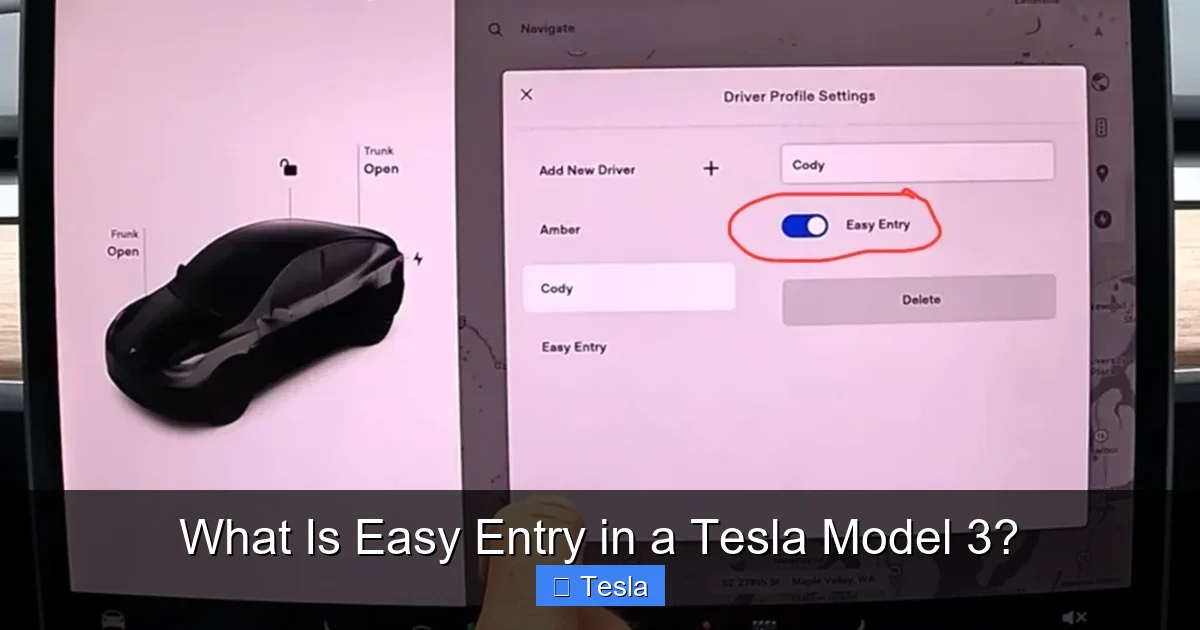
What Is Easy Entry in a Tesla Model 3?

Contents
- 1 Key Takeaways
- 2 📑 Table of Contents
- 3 Introduction: The Magic of Seamless Entry
- 4 What Exactly is Easy Entry in a Tesla Model 3?
- 5 How to Enable, Disable, and Access Easy Entry
- 6 Customizing Your Perfect Easy Entry Position
- 7 The Tangible Benefits: Why You’ll Love This Feature
- 8 Troubleshooting: When Easy Entry Doesn’t Behave
- 9 Beyond the Basics: Pro Tips and Considerations
- 10 Conclusion: A Small Feature, A Big Difference
- 11 Frequently Asked Questions

Anti-Slip Dashboard Mat

Car Sunshade for Windshield

Steering Wheel Cover

Battery Terminal Cleaner
Easy Entry in a Tesla Model 3 is a brilliant convenience feature that automatically moves the steering wheel and driver’s seat to create more space for you to get in and out of the car. You control it through the touchscreen or Tesla app, can fine-tune positions for different drivers, and it seamlessly integrates with your selected driver profile. This system is a game-changer for taller or shorter drivers, those with limited mobility, and anyone who values a personalized, hassle-free experience every single time they approach their vehicle.
Key Takeaways
- What It Is: Easy Entry automatically moves the steering wheel upward and the driver’s seat backward when you open a door or press the key fob, creating maximum entry/exit space.
- How to Control It: You can enable, disable, and customize Easy Entry directly in the Tesla Model 3’s touchscreen under Controls > Vehicle > Easy Entry, or via the Tesla mobile app.
- Deep Customization: The feature uses your selected driver profile’s saved seat and steering wheel settings, allowing each driver to have their own unique “easy” position.
- Primary Benefits: It dramatically improves accessibility, prevents seat/steering wheel contact with your body during entry/exit, and adds a premium, personalized touch to every drive.
- Troubleshooting Basics: If it stops working, first check if it’s enabled, verify your driver profile is active, and try a simple vehicle reboot before seeking service.
- Safety First: The system only activates when a door is opened or the car is unlocked, and movements are slow and deliberate, ensuring it never operates dangerously while driving.
📑 Table of Contents
- Introduction: The Magic of Seamless Entry
- What Exactly is Easy Entry in a Tesla Model 3?
- How to Enable, Disable, and Access Easy Entry
- Customizing Your Perfect Easy Entry Position
- The Tangible Benefits: Why You’ll Love This Feature
- Troubleshooting: When Easy Entry Doesn’t Behave
- Beyond the Basics: Pro Tips and Considerations
- Conclusion: A Small Feature, A Big Difference
Introduction: The Magic of Seamless Entry
Picture this: You’re carrying a bag of groceries, it’s raining, and you need to get into your car. You fumble with the key, open the door, and then… you have to awkwardly shimmy past a steering wheel that’s too close and a seat that’s too far forward. Annoying, right? Now, imagine that same scenario, but as soon as you open the door, the steering wheel smoothly tilts up and away, and the driver’s seat glides back, giving you a clear, unobstructed path to slide right in. That, in a nutshell, is the sheer convenience of Easy Entry in a Tesla Model 3.
It’s one of those “small” features that makes a monumental difference in daily ownership. It transforms a routine physical task into a moment of quiet, automated luxury. But what exactly is Easy Entry? How does it work? How do you make it your own? And what should you do if it acts up? This guide will walk you through everything you need to know about this fantastic feature, turning you from a casual user into a true Easy Entry expert.
What Exactly is Easy Entry in a Tesla Model 3?
At its core, Easy Entry is an automated convenience system. Its sole job is to reposition two critical components—the steering wheel and the driver’s seat—to their most retracted positions when you are about to enter or exit the vehicle. Think of it as your car politely scooting back and tilting its wheel to say, “After you.”

Visual guide about What Is Easy Entry in a Tesla Model 3?
Image source: gearpatro.com
The Science of the Scoot: How It Works
The system is triggered by one of two simple actions: either opening the driver’s door or pressing the unlock button on your key fob or phone key (if configured). Once triggered, the car doesn’t just randomly move things. It uses the precise seat and steering wheel positions saved in your currently selected driver profile. This is the key to its intelligence. Your “Driving Position” (the position you use while actually driving) is different from your “Easy Entry Position.”
For example, your driving position might have the seat relatively forward for pedal reach and the wheel at a comfortable height for viewing the screen. Your Easy Entry position, by default, has the seat all the way back and the wheel all the way up. When you open the door, the car smoothly transitions from your driving position to this stored Easy Entry position. When you close the door and either shift into Drive or press the brake pedal (depending on your settings), it smoothly returns to your driving position. It’s a silent, elegant ballet of mechanics and software.
How to Enable, Disable, and Access Easy Entry
Getting started with Easy Entry is refreshingly simple, and you have two primary ways to control it: from inside the car or from the Tesla mobile app.
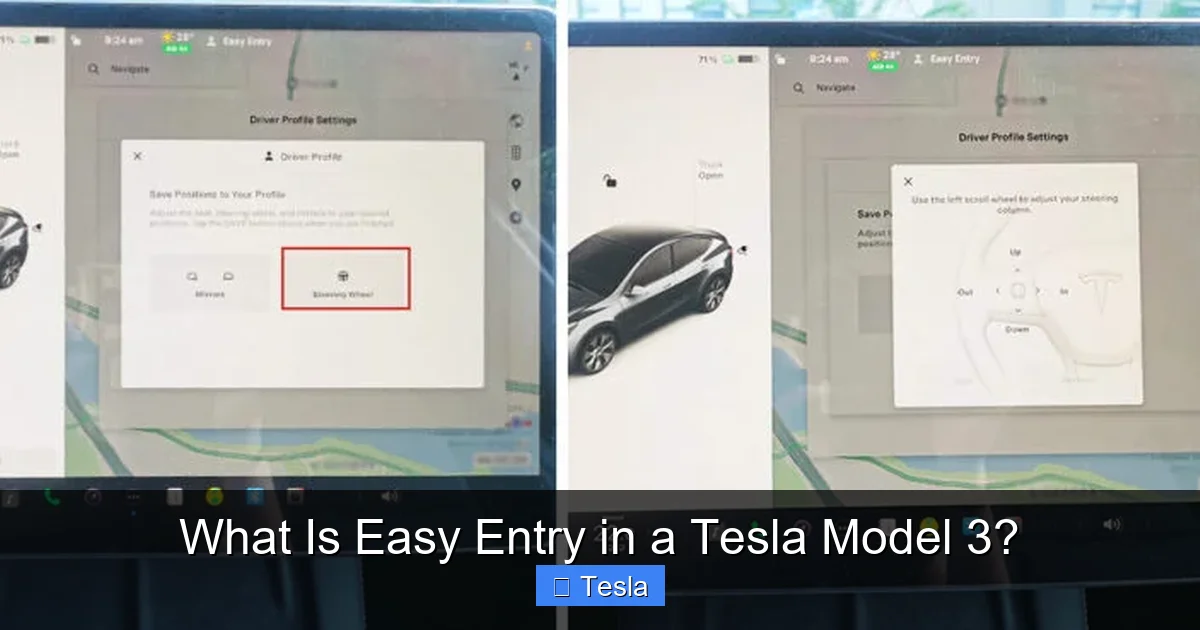
Visual guide about What Is Easy Entry in a Tesla Model 3?
Image source: teslashooters.com
Enabling/Disabling via the Touchscreen
1. Tap Controls (the car icon) on the bottom center screen.
2. Navigate to Vehicle.
3. Find the Easy Entry toggle switch and turn it ON or OFF.
That’s it! The toggle is global; it turns the feature on or off for all driver profiles. However, the actual movements are still governed by each profile’s saved settings.
Controlling via the Tesla Mobile App
The Tesla app offers similar control. Go to Controls > Safety & Security (the exact path can vary slightly with updates), and you’ll find the Easy Entry toggle. This is handy if you’re walking up to the car and want to pre-position it before you even touch the door handle.
A Critical Prerequisite: Your Driver Profile
Here’s the most important nuance: Easy Entry will not work unless you have a driver profile actively selected and that profile has saved seat and steering wheel settings. If you get in the car and it’s on “Guest” or a profile with no saved positions, the feature will do nothing. So, your first step in setup is to adjust your seat and wheel perfectly for driving, then tap the profile icon on the screen and select Save. Do this for every regular driver of the car.
Customizing Your Perfect Easy Entry Position
The default positions (seat all the way back, wheel all the way up) are designed for maximum clearance, but they might not be ideal for everyone. Maybe you’re tall and just need the wheel to tilt up, but the seat doesn’t need to go fully back. Or perhaps you have a specific ergonomic need. Tesla lets you customize the exact “Easy Entry” positions for each driver profile.
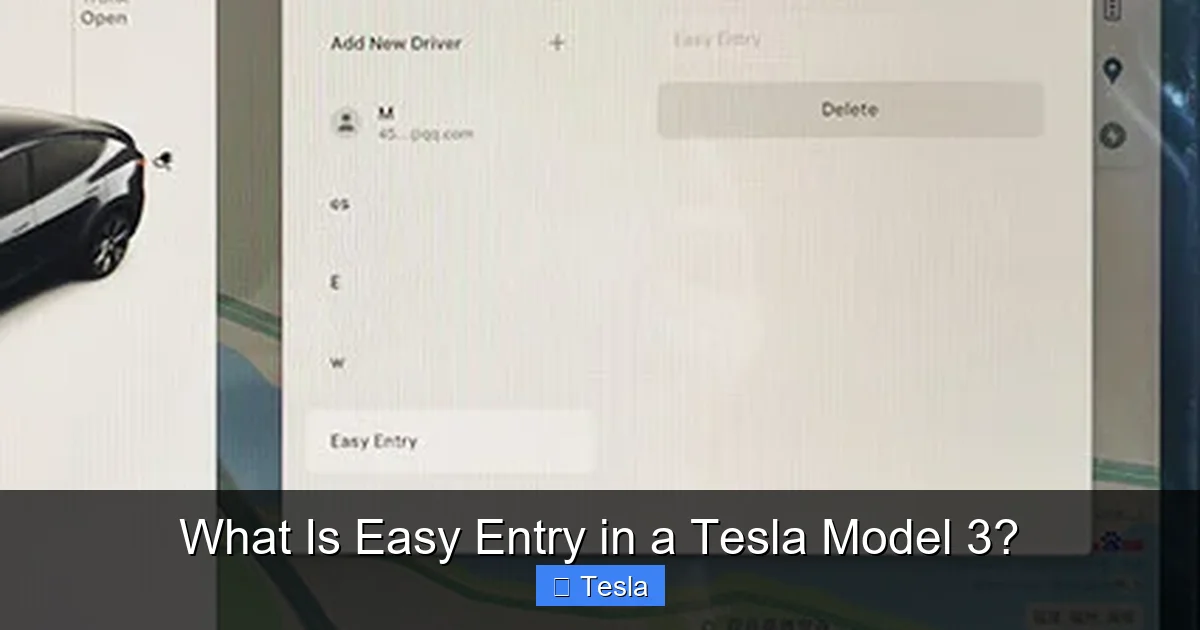
Visual guide about What Is Easy Entry in a Tesla Model 3?
Image source: teslashooters.com
Step-by-Step Customization
1. Select Your Profile: Make sure your desired driver profile is active (the name will be at the top of the screen).
2. Enter Easy Entry Mode: With the car on and parked, open the driver’s door. The seat and wheel should automatically move to the Easy Entry position.
3. Manually Adjust: While in this position, use the manual seat controls (the switches on the side of the seat) and the steering wheel adjustment buttons/joystick to find the perfect position for you to comfortably slide in and out. Adjust until you have just the right amount of space.
4. Save to Profile: Once satisfied, tap the profile icon at the top of the screen and select Save. The car will now remember these exact positions as your custom Easy Entry setting for that profile.
Syncing with Other Features
Your customized Easy Entry position is just one piece of your driver profile’s puzzle. It works in harmony with other personalized settings like mirror positions, climate control preferences, radio presets, and even Automatic Mirror Fold settings. When you approach the car with your phone key or key fob, it can recognize you, select your profile, and trigger Easy Entry all in one fluid motion. This level of integration is what makes the Tesla ownership experience feel so uniquely tailored. Many owners also enjoy personalizing their car’s exterior; if you’re considering a wrap to match your customized interior experience, you can check out our detailed guide on how much a Tesla Model 3 wrap costs.
The Tangible Benefits: Why You’ll Love This Feature
Beyond the initial “cool factor,” Easy Entry delivers practical, daily benefits that owners quickly come to rely on.
Accessibility and Comfort for All Body Types
This is the biggest win. For very tall drivers, the default position prevents their head from brushing the roof as they duck in. For shorter drivers, it prevents the seat from being too far forward, making it easier to swing legs in. It’s also a tremendous help for those with limited mobility, back problems, or recovering from surgery, reducing the need for strenuous twisting and contorting.
Protecting Your Interior and Yourself
How many times have you accidentally bumped your knee on the steering wheel or scuffed the side of the seat bolsters with your leg or bag during a rushed entry? Easy Entry eliminates this wear and tear on your car’s interior and saves you from bruises and bent door panels. It’s a proactive protection system for both you and your Tesla’s pristine cabin.
The “Premium” Feeling and Routine Integration
There’s an undeniable sense of sophistication when your car greets you by making space. It subtly reinforces the feeling that you’re driving a machine from the future. Furthermore, it becomes a seamless part of your routine. You don’t even think about it; you just open the door and get in. This kind of frictionless interaction is the hallmark of great user experience design.
Safety Through Clarity
By moving the wheel up, it provides an unobstructed view of the dashboard and touchscreen as you first sit down. This allows for a quick glance to confirm your settings or check for any alerts before you begin driving, contributing to a more informed and controlled start to your journey.
Troubleshooting: When Easy Entry Doesn’t Behave
Like any computer-controlled system, Easy Entry can occasionally hiccup. Don’t panic; most issues are simple to resolve.
Issue: The Feature Doesn’t Activate at All
First, check the basics: Is the Easy Entry toggle turned ON in Controls > Vehicle? Is a driver profile with saved settings currently active? Is the car in Park? The system will not work if the car is in any other gear.
Next, check your profile: Go to your driver profile and verify that both Seat and Steering Wheel positions show as “Saved.” If they say “Not Saved,” adjust them manually and save again.
Finally, reboot: A simple soft reboot often clears temporary software glitches. Park the car, press and hold both scroll wheels on the steering wheel until the screen goes black and the Tesla logo reappears.
Issue: It Works Intermittently or Erratically
This can be frustrating. Common culprits include:
– Key Fob/Phone Key Detection: If the car isn’t reliably detecting your key, the profile won’t switch, and thus the saved Easy Entry position won’t load. Ensure your key fob battery is good or your phone key has Bluetooth on and is authorized.
– Software Bug: Occasionally, a Tesla software update can introduce a minor bug. Check online forums for your specific software version. Often, a future update patches it.
– Obstruction: Ensure nothing is physically blocking the seat’s rearward travel or the steering wheel’s upward tilt.
When to Contact Tesla Service
If you’ve verified all settings, rebooted the vehicle, and the seat or steering wheel doesn’t move at all or makes unusual noises (grinding, straining), there may be a mechanical fault with the motor or track. This requires professional diagnosis. Similarly, if the system works but the movements are jerky or incomplete, it’s a service issue. You can schedule service directly through the Tesla app. For context on other potential Tesla service concerns, like understanding a 503 server maintenance error, it’s good to know most issues are software-related and often resolved with updates.
Beyond the Basics: Pro Tips and Considerations
Once you have Easy Entry mastered, you can optimize it further.
Using It as a Quick “Reset”
If you’ve been driving for hours and your back is stiff, opening the driver’s door (even if you’re not getting out) will trigger Easy Entry, letting you stretch and adjust your seating position before you resume your trip. It’s a built-in mobility break.
Teaching New Drivers or Valets
When someone new is driving your car, you can manually trigger Easy Entry to show them the maximum space available. You can then guide them to adjust the seat and wheel to their preferred driving position and save it to a new profile (like “Guest”), ensuring they have a comfortable and safe setup.
Battery Impact? Negligible.
A common concern is whether this feature drains the 12V battery when the car is “asleep.” The movements are very brief and only occur when the car is unlocked or a door is opened—events that already wake up the car’s systems. The energy consumed is infinitesimally small, comparable to the power used by the dome light. You will not notice any impact on your driving range or 12V battery health.
It’s Part of a Larger Ecosystem
Easy Entry doesn’t exist in a vacuum. It’s part of Tesla’s philosophy of a “keyless,” profile-based experience. It works alongside Auto Lock/Unlock, Walk-Away Lock, and Driver Profile Switching based on key detection. Understanding how these features interlock gives you the full picture of the car’s intelligence. If you’re also looking to enhance your car’s aesthetics alongside its functional tech, exploring window tinting options is popular; our guide on how much it costs to tint a Tesla Model 3 provides a great overview.
Conclusion: A Small Feature, A Big Difference
Easy Entry in a Tesla Model 3 is more than just a party trick. It’s a thoughtfully engineered solution to a universal problem—the awkward ingress and egress of modern cars with large center consoles and fixed steering columns. It embodies Tesla’s approach to user experience: identify a pain point, solve it elegantly with software and motors, and make it personal through profiles.
By taking a few minutes to set up and customize this feature for every driver in your household, you invest in a daily ritual that is smoother, more comfortable, and more dignified. It reduces friction, protects your car’s interior, and adds a touch of automotive magic to something as mundane as getting into your vehicle. If you haven’t already, dive into your Tesla’s settings today, save those seat and wheel positions, and experience the difference. Once you have it, you’ll wonder how you ever lived without it. And if you ever want to give your Model 3’s exterior a fresh new look to match its smart interior, finding out how much it costs to wrap a Tesla Model 3 is your next easy step.
Frequently Asked Questions
How do I turn on Easy Entry in my Tesla Model 3?
Go to Controls > Vehicle on your touchscreen and toggle the “Easy Entry” switch to ON. You must also have a driver profile with saved seat and steering wheel settings selected for it to function.
Why did my Easy Entry stop working suddenly?
First, ensure the feature is still enabled and the correct driver profile (with saved settings) is active. A soft reboot (holding both steering wheel scroll buttons) often resolves temporary software glitches. If problems persist, check for pending software updates.
Does Easy Entry work with multiple driver profiles?
Yes! This is its best feature. Each driver profile saves its own unique “Driving Position” and “Easy Entry Position.” When you select your profile (via phone key, key fob, or manually), the car will use your personalized settings for both driving and entry.
Is Easy Entry safe? Could it hit me while I’m getting in?
The system is designed with safety in mind. Movements are slow and deliberate. It only activates when the car is in Park and a door is opened or the car is unlocked. The system will stop if it detects an obstruction, though it’s best to ensure you have clear space before the movement begins.
Can I manually override the Easy Entry position?
Absolutely. The moment you touch any manual seat or steering wheel adjustment control, the automatic movement stops, and you take manual control. You can then save this new position to your profile if you wish.
Will using Easy Entry drain my Tesla’s battery?
No. The energy used for the brief seat and steering wheel movements is negligible and only occurs when the car is already waking up due to door opening or unlocking. It has no measurable impact on your driving range or 12V battery longevity.







