
How to Turn on Fcw on a Jeep Grand Cherokee

Activating Forward Collision Warning (FCW) on your Jeep Grand Cherokee is a simple process done through the vehicle’s Uconnect infotainment system settings menu. This crucial safety feature alerts you of potential frontal collisions, helping to prevent accidents. The system is typically enabled by default but can be customized or accidentally turned off, so knowing how to access and verify its status is essential for every Grand Cherokee owner.
Key Takeaways
- FCW is a standard safety feature: Forward Collision Warning is part of the safety suite on most modern Grand Cherokee models, often bundled with systems like Blind Spot Monitoring and Adaptive Cruise Control.
- Activation is menu-based: You turn FCW on or off via the “Safety & Driver Assistance” or similar menu on your Uconnect touchscreen, not with a physical button.
- It can be customized: Beyond on/off, you can often adjust the FCW sensitivity (early, medium, late) and choose between audible alerts, visual cues, or both.
- It requires a clear forward view: The FCW system uses a forward-facing camera, typically located behind the rearview mirror. A dirty or obstructed windshield in that area can cause warnings or disable the system.
- It’s not Autobrake: FCW only provides warnings. For automatic emergency braking, your Grand Cherokee must have the optional or higher-trim “Active Braking” or “Full-Speed Collision Warning with Active Braking” feature enabled separately.
📑 Table of Contents
- Understanding FCW: Your Grand Cherokee’s Front-Line Defender
- Where to Find the FCW Control: Navigating the Uconnect System
- Step-by-Step: How to Turn On FCW on Your Grand Cherokee
- Troubleshooting: Why FCW Might Not Be Available or Working
- Beyond the Switch: Maximizing Your FCW Experience
- The Big Picture: FCW in Your Jeep’s Safety Ecosystem
- Conclusion: Your Simple Path to a Safer Drive
Understanding FCW: Your Grand Cherokee’s Front-Line Defender
So, you’ve got a powerful, capable Jeep Grand Cherokee. It’s built for adventure, for tackling rugged trails and cruising down the highway with confidence. But some of its most important capabilities aren’t about torque or towing capacity—they’re about keeping you and your passengers safe. One of the most critical of these is the Forward Collision Warning (FCW) system. Think of it as your vehicle’s extra set of watchful eyes, constantly scanning the road ahead for potential trouble you might have missed.
FCW is a sophisticated driver-assistance technology designed to alert you when it detects an imminent collision with a vehicle or object in your path. Using a forward-facing camera, usually nestled behind the rearview mirror, it analyzes the distance and relative speed between your Grand Cherokee and what’s ahead. If the system calculates that you’re approaching something too quickly without a significant response from the driver, it issues a warning. This could be a visual icon on your instrument cluster or windshield, a chime, or a combination of both, giving you precious extra seconds to react—to brake, steer, or both.
Before we dive into the “how-to,” it’s vital to understand what FCW is and, just as importantly, what it isn’t. It is a warning system. It does not automatically apply the brakes for you in most base configurations. That function—Automatic Emergency Braking (AEB) or Active Braking—is a more advanced feature that may be included on your specific model year and trim level. FCW is the alert that comes before that potential intervention. Keeping this system active and properly configured is one of the simplest, most effective things you can do to enhance your daily driving safety, whether you’re navigating city traffic or on a long interstate stretch.
You won’t find a dedicated “FCW” button on your dashboard or steering wheel. Like most modern vehicle settings, its control resides within the digital brain of your Jeep—the Uconnect infotainment system. The exact menu path can vary slightly depending on your Grand Cherokee’s model year and the generation of Uconnect (e.g., Uconnect 4, Uconnect 5), but the logic is consistent. You’re looking for a section dedicated to vehicle settings, safety, or driver assistance features.
Visual guide about How to Turn on Fcw on a Jeep Grand Cherokee
Image source: jeepmaven.com
Typically, you’ll start by pressing the “Apps” or “Vehicle” button on your Uconnect home screen. From there, look for icons or headings labeled “Settings,” “Safety & Driver Assistance,” “Driver Assistance,” or sometimes “Safety”. Once inside that menu, you should see an option for “Forward Collision Warning” or “FCW.” It might be a simple toggle switch (On/Off) or, on newer models, a setting that allows you to select the alert timing (“Early,” “Medium,” “Late”) and the type of alert (“Visual & Audible,” “Visual Only”).
A Note on Model Year Variations
If you own a 2022 or newer Grand Cherokee with the latest Uconnect 5 system, the interface is more graphical and tile-based. The settings are often found under a “Vehicle” tile on the home screen, then “Safety & Security.” For 2014-2021 models with Uconnect 4 or 3, the path is usually “Apps” > “Settings” > “Safety & Driver Assistance.” If you have an older model (pre-2014), the system might be accessed through buttons on the steering wheel or a smaller, non-touch screen menu using the radio knobs. Consulting your owner’s manual is always the best final authority, as it provides the exact steps for your specific vehicle identification number (VIN) and configuration.
Step-by-Step: How to Turn On FCW on Your Grand Cherokee
Now, let’s get to the practical steps. We’ll focus on the most common process for Uconnect 4 and 5 systems, which cover the vast majority of recent Grand Cherokees on the road today. Remember, the system is usually “On” from the factory. You’re likely reading this because you may have accidentally turned it off, are troubleshooting a warning light, or are setting up a used vehicle and want to verify all safety features are active.
Visual guide about How to Turn on Fcw on a Jeep Grand Cherokee
Image source: vehiclesphere.com
Step 1: Start Your Vehicle. Ensure your Grand Cherokee is in “Park” and the engine is running. The Uconnect system must be powered on and fully booted to access the settings menus.
Step 2: Access the Main Menu. On your touchscreen, tap the “Apps” button (often represented by a grid of squares) or the “Vehicle” button. This opens the main application menu.
Step 3: Navigate to Settings. Find and tap the “Settings” icon or tab. This is your gateway to all vehicle configuration options.
Step 4: Select Safety & Driver Assistance. Within the Settings menu, scroll or look for a category called “Safety & Driver Assistance,” “Driver Assistance,” or simply “Safety.” Tap on it.
Step 5: Locate Forward Collision Warning. You should now see a list of available safety systems. Find “Forward Collision Warning” or “FCW.” Tap on this option.
Step 6: Enable and Customize. You will be presented with the FCW controls. The primary setting is the toggle switch. Ensure it is set to “On”. Below or beside this, you may see options for:
- Sensitivity: Choose when you want the warning to trigger. “Early” gives you more time but may trigger more frequently in heavy traffic. “Late” is less sensitive. “Medium” is the standard, balanced setting.
- Alert Type: Select between “Visual & Audible” (recommended for maximum alertness) or “Visual Only” if you find the chime annoying in stop-and-go traffic.
Step 7: Confirm and Exit. Once your preferences are set, simply exit the menu by tapping the back arrow or home button. Your settings are saved automatically. You may see a brief icon appear on your instrument cluster or windshield (depending on your model) indicating FCW is active.
If you don’t see the FCW option at all in your menus, it’s possible your specific Grand Cherokee trim does not include the feature, or there is a system fault. In that case, a diagnostic check at a Jeep dealership is warranted.
Troubleshooting: Why FCW Might Not Be Available or Working
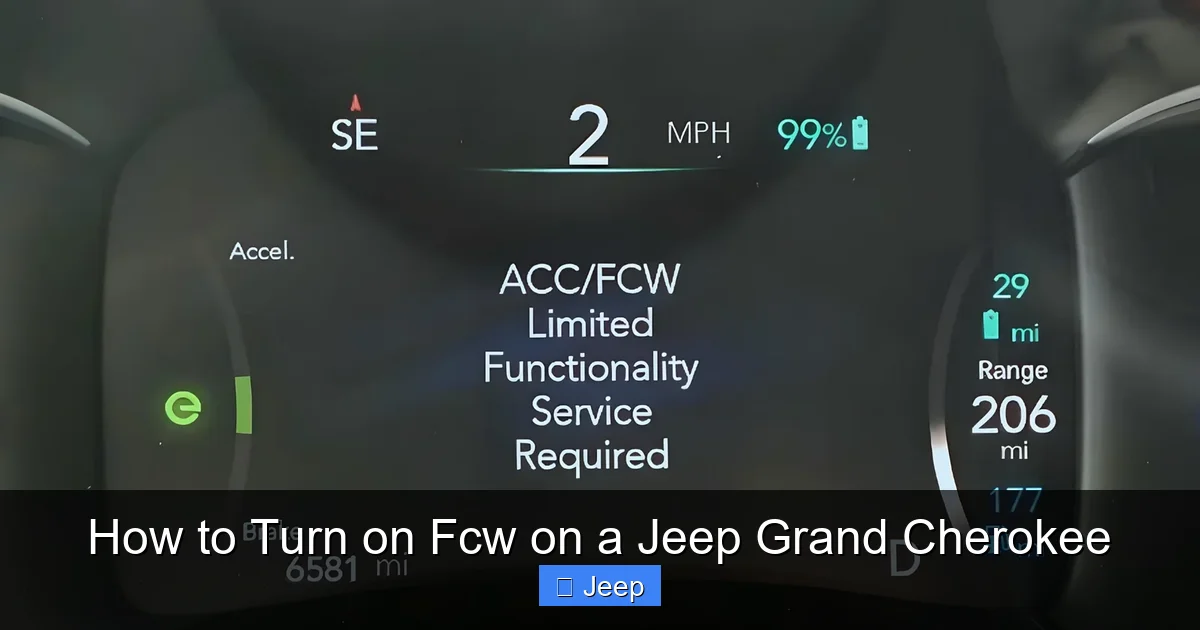
You’ve followed the steps, but the FCW setting is grayed out, missing, or you’re getting a persistent warning message like “FCW Unavailable” or “Service Forward Collision Warning.” Don’t panic. There are several common, often fixable, reasons for this.
Visual guide about How to Turn on Fcw on a Jeep Grand Cherokee
Image source: jeepinside.com
The Obvious Culprit: A Dirty or Obstructed Windshield
The FCW camera is typically located near the top of the windshield, behind the rearview mirror. Its view must be completely clear. This is the #1 cause of FCW issues. Check for:
- Bug splatter, mud, or snow/ice accumulation directly in front of the camera area.
- An aftermarket windshield sticker or parking pass blocking the lens.
- A cracked or damaged windshield in that specific upper-central area.
- Heavy rain, fog, or snow that is physically obscuring the camera’s view.
Solution: Carefully clean the inside and outside of the windshield in the area directly behind the rearview mirror. Use a soft cloth and appropriate glass cleaner. If the windshield is cracked in that spot, it may need replacement.
System Malfunction or Sensor Calibration
Sometimes, the system itself has a fault. This could be due to:
- A software glitch that a simple system restart can fix (turn the car off, open and close the driver’s door, wait 5 minutes, restart).
- The camera has lost its calibration. This can happen after a windshield replacement, a minor front-end collision, or even a hard jolt. The camera’s alignment is extremely precise.
- An electrical issue or blown fuse related to the safety systems.
Solution: A simple restart is worth a try first. If the problem persists, the FCW system will need to be professionally recalibrated using specialized diagnostic tools at a Jeep dealership or a reputable auto shop with ADAS (Advanced Driver Assistance Systems) calibration equipment. They will ensure the camera is perfectly aimed and communicating with the vehicle’s computer.
Weather and Environmental Factors
FCW is a camera-based system. Its performance can be temporarily hindered by:
- Direct, low-angle sunlight (sunrise/sunset) causing glare or “blinding” the camera.
- Heavy rain, snowstorms, or thick fog that obscures the road ahead.
- Tunnels or sudden changes from bright to dark environments.
Solution: Understand that in these conditions, the system may disengage itself and display an “Unavailable” message. This is normal. Once you exit the tunnel or the weather improves, the system should reactivate automatically. If it doesn’t, a restart may be needed.
Beyond the Switch: Maximizing Your FCW Experience
Turning the system “On” is just the first step. To truly make FCW work for you, you need to understand its behavior and integrate it into your driving mindset.
Choosing the Right Sensitivity Setting
That “Early, Medium, Late” setting is more important than you might think. “Early” is ideal for highway driving where you’re maintaining steady speeds and following distances are larger. It will alert you sooner to a car braking ahead, which is great for preventing highway pile-ups. However, in dense city traffic with constant stop-and-go, an “Early” setting can become overly sensitive, chiming at you for normal, predictable braking events. In this environment, “Medium” or even “Late” provides a more tolerable experience while still offering a safety net. Experiment and find what suits your typical driving patterns.
Audible vs. Visual Alerts: A Personal Choice
The sound of a warning chime can be jarring. Some drivers instinctively prefer a quiet “Visual Only” alert to avoid startlement. However, studies show that a multi-sensory alert (sound + sight) is more effective at capturing a distracted driver’s attention. If you find the sound too intrusive, try adjusting the volume of the chime in your Uconnect sound settings first. If you still prefer silence, “Visual Only” is better than nothing, but be extra disciplined about keeping your eyes on the road.
Understanding the System’s Limitations
FCW is an aid, not a replacement for attentive driving. It has limits. It may not detect:
- Pedestrians, cyclists, or animals (unless your specific system includes that capability).
- Vehicles that are partially obstructed or cutting in sharply from adjacent lanes.
- Objects on the road like tire treads, debris, or stalled cars until you’re very close.
- In very sharp curves where the camera’s view of the road ahead is limited.
Always maintain a safe following distance and stay engaged. Treat FCW as your helpful co-pilot, not your autopilot.
The Big Picture: FCW in Your Jeep’s Safety Ecosystem
FCW rarely works in isolation. In your Grand Cherokee, it’s part of a interconnected web of safety technologies. Understanding how it relates to other systems gives you a fuller picture of your vehicle’s protective capabilities.
Most commonly, FCW is the foundation for Adaptive Cruise Control (ACC). When ACC is engaged, it uses the same forward camera to monitor traffic and automatically adjust your speed to maintain a set following distance. FCW is the “alert” layer that works even when ACC is off. On higher trims like the Grand Cherokee L or models with the available “ProTech Safety Group,” FCW is paired with Active Braking. In this configuration, if the FCW alert is ignored and a collision is imminent, the system can automatically apply the brakes to mitigate or avoid the impact. This is the ultimate evolution of the FCW concept.
Furthermore, the data from the forward camera often feeds into other systems like Lane Departure Warning (LDW) and Auto High Beam control. A clean, well-functioning windshield and camera area is critical for all these features to work correctly. This is why a simple act of keeping that part of your windshield clean has a cascading positive effect on your overall vehicle safety.
Finally, consider the ownership context. Modern safety features like FCW significantly impact a vehicle’s resale value and desirability. If you’re ever looking into the financial side of Grand Cherokee ownership, you’ll find that vehicles with intact and functional safety suites hold their value better. For instance, when researching how much a 2014 Jeep Grand Cherokee is worth, the presence and condition of its safety features are key appraisal points. Similarly, if you’re exploring how much a Jeep Grand Cherokee lease costs, the inclusion of advanced safety packages can influence the residual value and monthly payment calculations. Keeping FCW active is not just safe; it’s smart economics.
Conclusion: Your Simple Path to a Safer Drive
Turning on Forward Collision Warning in your Jeep Grand Cherokee is a straightforward task of navigating the Uconnect menus. It’s a setting that should be checked and confirmed during your regular vehicle familiarization, especially if you’ve purchased a used Grand Cherokee. Remember, the goal is not just to have the feature turned on, but to have it configured in a way that complements your driving style—choosing the right sensitivity and alert type for your typical routes.
More than a checkbox on a features list, FCW represents a leap in automotive safety, providing a crucial buffer against the unexpected. By understanding how to activate it, how to troubleshoot common issues like a dirty windshield, and how it fits into your Grand Cherokee’s broader safety architecture, you become a more informed and proactive owner. You’re not just operating a machine; you’re commanding a sophisticated safety system designed to protect what matters most. Take five minutes today, locate that setting, and ensure your Grand Cherokee’s watchful eye is open and ready for the road ahead.
Frequently Asked Questions
Is FCW the same as Automatic Emergency Braking on a Grand Cherokee?
No. FCW (Forward Collision Warning) only provides alerts (visual and/or audible). Automatic Emergency Braking (AEB) or Active Braking is a separate, more advanced feature that can automatically apply the brakes. You must have the specific safety package that includes AEB for automatic intervention to occur.
Why does my Grand Cherokee say ‘FCW Unavailable’?
The most common reason is a dirty or obstructed windshield in the area behind the rearview mirror where the camera is located. Clean that area thoroughly. Other causes include extreme weather (heavy rain, fog), a system fault requiring a restart, or a need for professional camera calibration after a windshield replacement.
Can I turn off FCW permanently?
Yes, you can toggle it off through the Uconnect settings menu. However, it is not recommended for safety reasons. You can also customize it to visual-only alerts or a less sensitive setting if the standard warnings feel too frequent for your driving environment.
Does FCW work at night or in bad weather?
FCW is designed to work day and night. However, its effectiveness can be reduced in heavy rain, snow, fog, or direct glare from low-angle sunlight, as these conditions can obscure the camera’s view. The system may temporarily disable itself and display an “Unavailable” message under these extreme conditions.
Will FCW warn me about pedestrians or cyclists?
It depends on your Grand Cherokee’s specific model year and safety package. Base FCW systems typically only detect vehicles. More advanced systems, often part of a “ProTech” or similar package, may include pedestrian and cyclist detection as part of a broader collision mitigation system. Check your owner’s manual for your specific capabilities.
Do I need to do anything to maintain the FCW system?
The main maintenance task is keeping the windshield clean, especially the area behind the rearview mirror. Avoid placing any stickers, parking passes, or dash mats that could obstruct the camera’s view. If you ever have your windshield replaced, ensure the shop knows it has an ADAS camera and that they perform the necessary recalibration.
