
Does Tesla Lock When You Walk Away?

Yes, Tesla vehicles are designed to lock automatically when you walk away with the key (phone or fob) out of range. This “Walk-Away Lock” feature is enabled by default for convenience and security. However, its behavior can be influenced by settings like Sentry Mode, your proximity, and whether you have a Phone Key or key fob. Understanding these nuances ensures the feature works reliably for you.
You just finished a drive in your Tesla. You open the door, step out, grab your groceries, and start walking toward the house. Did you remember to lock the car? If you’re driving a Tesla, the answer is almost certainly, “Don’t worry, it did it for you.” This seamless, almost magical feature is one of the many conveniences of owning an electric vehicle from the brand that redefined the modern car. But how exactly does Tesla lock when you walk away? Is it foolproof? And what can you do if it doesn’t work as expected? Let’s pop the hood on this clever piece of technology.
For anyone coming from a traditional car where you habitually hit the lock button on the key fob or, worse, forget entirely, Tesla’s approach is a paradigm shift. The goal is simple: security without effort. The car knows you’re leaving and secures itself. But beneath that simplicity lies a fascinating interplay of Bluetooth Low Energy (BLE), software logic, and user-customizable settings. It’s not just a single switch; it’s a small ecosystem of decisions happening in the background every time you exit your vehicle.
In this complete guide, we’ll walk through everything you need to know about Tesla’s walk-away auto-lock. We’ll cover how it works with both Phone Key and the optional key fob, where to find the settings to turn it on or off, how features like Sentry Mode play into the equation, and what to do when the system gets confused. By the end, you’ll have a master-level understanding of one of Tesla’s most useful daily features.
Key Takeaways
- Automatic Locking is Default: All modern Teslas automatically lock the doors and trunk when you walk away with the authenticated key device beyond a set distance.
- It’s Controlled by Settings: You can disable “Walk-Away Lock” entirely in the vehicle’s touchscreen settings under Locks.
- Phone Key is Primary: For most owners using the Tesla app as a Phone Key, the car locks based on Bluetooth signal strength and your phone’s location relative to the vehicle.
- Sentry Mode Interacts: When Sentry Mode is active, the car remains “awake” and may delay locking or behave differently to monitor surroundings.
- Manual Override Exists: You can manually lock/unlock via the app, key fob, touchscreen, or by pressing the door handle. A double-click of the handle may lock if configured.
- Factors Can Disrupt It: A dead phone battery, Bluetooth interference, or leaving a key inside the car can prevent the auto-lock sequence from completing.
- Not All Doors May Lock: Depending on settings and model (e.g., Model X Falcon doors), the primary lock action secures the driver door and frunk/trunk, with other doors following.
📑 Table of Contents
- How the “Walk-Away Lock” Feature Actually Works
- Finding and Customizing Your Lock Settings
- The Sentry Mode Complication: Does It Keep the Car Awake?
- Manual Overrides and What to Do If It Doesn’t Lock
- Real-World Scenarios: Examples & Practical Tips
- Security Implications and Peace of Mind
- Conclusion: A Feature That Just Works (Mostly)
How the “Walk-Away Lock” Feature Actually Works
At its heart, Tesla’s auto-lock is a proximity-based system. The car continuously communicates with your authenticated key device—usually your smartphone via the Tesla app (Phone Key), or a separate key fob—using Bluetooth Low Energy (BLE). BLE is perfect for this because it uses very little power and can measure signal strength (RSSI) to estimate distance.
The Proximity Dance: Signal Strength and Geofencing
Think of it like an invisible, constantly shifting bubble around your car. Your phone (or fob) is inside that bubble when you’re driving or sitting nearby. The moment you open a door and physically exit the vehicle, you begin to move outside that bubble. The car’s computer is monitoring the BLE signal. As the signal weakens past a predetermined threshold—typically corresponding to about 5-10 feet away—the system interprets this as “the key is leaving.”
Once that threshold is crossed and the car detects the driver’s door has been opened and closed (via door ajar switches), it initiates the lock sequence. It’s a two-part check: 1) Is the authenticated key moving away? 2) Has the driver egressed? Only when both conditions are met does it send the signal to the door actuators to engage the locks. This prevents the car from locking you inside if you simply reach out to close the door while your phone is still on the seat.
The Role of the Phone Key vs. Key Fob
The experience is slightly different depending on your key method. For the vast majority of Tesla owners using Phone Key, the process is entirely seamless and invisible. There’s no fob to take out. The app runs in the background of your phone, and the BLE handshake happens automatically. As long as Bluetooth is on and the app is properly installed and paired, your phone is the key.
If you have the optional key fob, the principle is identical, but the fob has a physical button. The walk-away lock still functions automatically based on proximity, but you also have the option to manually press the lock button on the fob as you walk away. Some users prefer this tactile confirmation. The fob’s BLE signal is also what the car uses to determine proximity.
Finding and Customizing Your Lock Settings
This automatic behavior isn’t set in stone. Tesla gives you control right in the car. To find these settings, tap the ‘Controls’ icon (the car silhouette) on the bottom center screen, then go to ‘Locks’. Here you’ll find the primary toggle for ‘Walk-Away Lock’. If you turn this off, the car will not lock automatically when you exit. You’ll have to use the app, the touchscreen lock icon, or the door handle double-click to secure the vehicle.
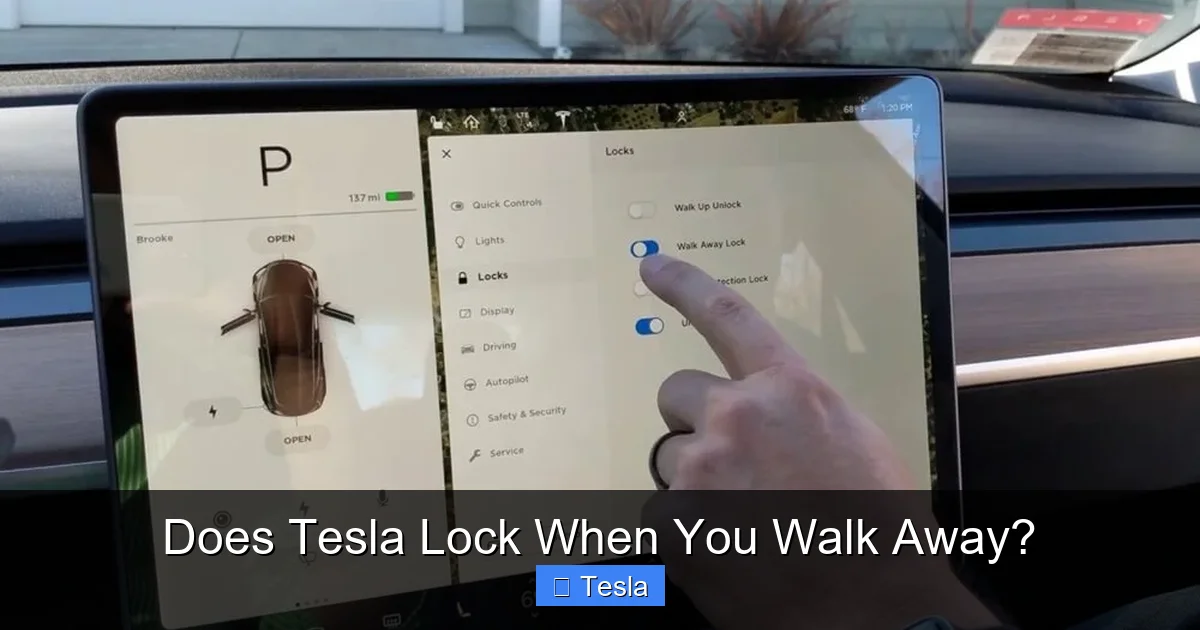
Visual guide about Does Tesla Lock When You Walk Away?
Image source: carstale.com
Beyond the Main Toggle: Other Influencing Settings
Two other settings in that same menu significantly impact the auto-lock experience:
- “Lock while driving”: This is a separate safety feature that locks all doors once the car is moving over a certain speed (usually 5 mph). It’s almost always left on. It’s unrelated to walk-away but part of the overall locking strategy.
- “Double-click” on door handle: For Model 3 and Y, you can configure a double-press of the door handle to lock the car. This is a manual override method. Some users set this to “Lock” so they can consciously lock the car as they walk away if they’ve disabled auto-lock or want extra assurance.
Pro Tip: If you frequently have passengers who might not have a phone key paired, or if you’re in a situation where you’ll be returning to the car in seconds (like a quick curb-side drop-off), you might consider temporarily disabling Walk-Away Lock. It’s easy to toggle on or off as needed.
The Sentry Mode Complication: Does It Keep the Car Awake?
Here’s where things get interesting. Sentry Mode, Tesla’s always-watching security feature, uses the car’s external cameras and sensors to monitor its surroundings for threats when parked. When activated (via the “Security” settings or a quick icon tap on the touchscreen), the car enters a heightened state of awareness.
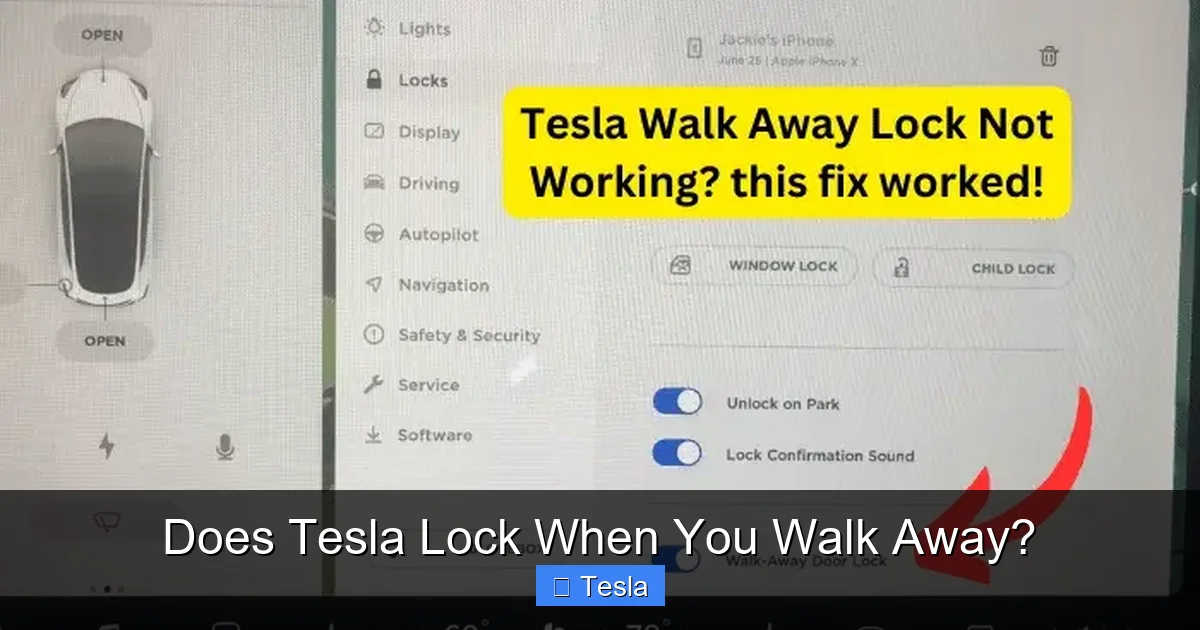
Visual guide about Does Tesla Lock When You Walk Away?
Image source: teslord.com
How Sentry Mode Affects Auto-Lock Timing
Because Sentry Mode needs to stay powered and alert, it can slightly alter the behavior of the walk-away lock. When Sentry Mode is on, the car is less likely to immediately enter a deep sleep state after you leave. This means the BLE communication might remain active for a longer period, potentially delaying the auto-lock signal by a few seconds.
In practice, you might walk 15 feet away, look back, and see the car’s lights haven’t flashed yet (the mirror blinkers flash when locks engage). Don’t panic. Just keep walking. The car is likely still in Sentry Mode’s “standby” and will lock once it confirms the key is sufficiently distant and no activity is detected. The feature is designed to work with Sentry Mode, not against it, but the timing can feel different.
Sentry Mode and the “Key Inside” Warning
Another interaction: if you leave your Phone Key (or fob) inside the parked car while Sentry Mode is active, the car will detect the key’s presence and will not lock automatically. You’ll likely see a warning on the touchscreen or in the Tesla app notification that “A key is inside the vehicle.” This is a crucial safety net to prevent you from locking your only key inside. It works the same way without Sentry Mode, but Sentry Mode’s constant activity makes the detection more immediate and obvious.
Manual Overrides and What to Do If It Doesn’t Lock
So, you’ve walked away, the car didn’t lock, and you’re now inside your house wondering if you have to go back. First, don’t assume it failed. Wait about 30 seconds, then check the Tesla app on your phone. The app will show the vehicle’s lock status in real-time. If it’s unlocked, you can lock it instantly from the app—no return trip needed.
Visual guide about Does Tesla Lock When You Walk Away?
Image source: tesla-lock-sounds.com
Manual Locking Methods (Your Backup Plan)
You have several ways to lock the car manually, which also serve as diagnostics:
- Tesla App: The most reliable method from anywhere with a signal. Open the app, tap the lock icon.
- Touchscreen: While inside the car, tap the lock icon on the bottom status bar.
- Door Handle (Model 3/Y): A quick double-press of the door handle (if configured in settings) will lock the car from the outside.
- Key Fob: Press the lock button on the fob.
Troubleshooting a Misbehaving Auto-Lock
If the walk-away lock consistently fails, here’s your checklist, in order of likelihood:
- Check the Setting: Confirm “Walk-Away Lock” is enabled in Controls > Locks.
- Phone Battery & Bluetooth: A critically low phone battery can disable BLE. Ensure Bluetooth is on and the Tesla app is running (not force-quit on iOS).
- Key Inside: Double-check no phone, fob, or even a credit-card-style key is left in the center console, cup holder, or door pocket.
- Restart the Vehicle: A simple soft reboot (hold both scroll wheels on the steering wheel until the screen goes black) can clear temporary glitches.
- Re-pair Your Phone Key: In the app or car settings, remove your phone as a key and re-add it, following the pairing process precisely.
- Check for Interference: Are you in a dense urban area with lots of BLE traffic? A strong Wi-Fi router or other electronics near the car can sometimes interfere. Try moving the car to a different location to test.
If problems persist, a service appointment may be needed to check the BLE module or door lock actuators. But in 95% of cases, it’s a settings or user-behavior issue.
Real-World Scenarios: Examples & Practical Tips
Let’s make this concrete with some everyday situations.
The Grocery Run
You park, hop out, grab a reusable bag, and head into the store. Your phone is in your pocket. The car should lock automatically within 5-10 seconds of you walking away. Tip: Give it a second after closing the door before you stride off. A brisk, confident walk away gives the system a clear signal that you’re departing.
The Curb-Side Drop-Off
You’re letting a passenger out on a busy street. You open their door, they get out, you close it, and you’re still at the curb. If you have Walk-Away Lock on, the car might lock as you’re still standing there if your phone moves out of range. This could trap you outside if you need to get back in quickly. Solution: For this scenario, either disable Walk-Away Lock temporarily, or ensure you keep your phone (the key) in your hand/pocket right next to the car until you’re ready to drive off. The system is smart enough to know the key hasn’t truly “walked away” if it’s still within a few feet.
Multi-Driver Households
If your spouse also uses the car with their phone paired, the walk-away lock is based on which authenticated key was last used to operate the vehicle. If you drive, your phone is the active key. If you exit, the car looks for your phone moving away. If your spouse’s phone is still inside the car, it won’t prevent the lock because the system is tracking the key of the last driver. However, if their phone is the one that unlocked and started the car, then their phone’s proximity is what matters. This can get confusing. The best practice is to ensure all paired keys are with their respective owners when exiting.
Related: If you’re curious about how other brands handle similar features, our articles on Does The Toyota Rav4 Lock Automatically When You Walk Away and Does Toyota Have Walk Away Auto Lock provide useful comparisons.
Security Implications and Peace of Mind
Beyond convenience, this feature is a core part of your Tesla’s security. An unlocked car is an invitation. By automatically locking, the car eliminates the most common human error: forgetting. Combined with Sentry Mode, which can record and alarm if someone tampers with the vehicle while it’s locked, you have a powerful two-layer defense.
Is It Secure?
The BLE communication is encrypted, making it very difficult to “sniff” and clone the key signal in a relay attack (though no system is 100% immune to sophisticated, targeted attacks). The proximity requirement is the main guard. For everyday use in a parking lot or street, it’s highly secure. You can further enhance security by setting a PIN to drive, which prevents anyone who somehow gained entry from simply driving off.
The “Fob Jammer” Concern
A theoretical threat is a criminal using a BLE signal jammer to prevent your phone’s signal from reaching the car as you walk away, thereby preventing the auto-lock. While possible, it’s rare and impractical for a thief, as they would need to be very close to you and the car at the exact moment you exit. The more likely scenario is a simple user error or system glitch, which is why the app verification is your best friend.
Conclusion: A Feature That Just Works (Mostly)
So, does Tesla lock when you walk away? The resounding answer is yes, it’s designed to. It’s a brilliant fusion of software and hardware that, for the vast majority of owners, works flawlessly in the background. You get in, you drive, you get out, and you never have to give locking a second thought. That’s the promise, and for the most part, Tesla delivers.
The key to a perfect experience is understanding its dependencies: a charged phone with Bluetooth on, the correct setting enabled, and no key left inside. When those conditions are met, it’s automotive magic. When they aren’t, you have the powerful Tesla app as your remote control and a suite of manual options. Take a few minutes to explore the Locks settings in your car, decide if you want the double-click handle lock as a manual backup, and enjoy the profound simplicity of a car that truly looks after itself. It’s just one of the many small details that make Tesla ownership feel like the future, today.
P.S. While we’re on the topic of Tesla ownership costs and maintenance, you might be wondering about expenses like how much it costs to wrap a Tesla Model 3 to protect the paint, or the cost to tint Tesla windows for privacy and heat rejection. These are popular customizations for new owners!
Frequently Asked Questions
What exactly triggers the Tesla to lock when I walk away?
The car uses Bluetooth to track your authenticated key (phone or fob). It locks automatically when two things happen: 1) the driver’s door is opened and closed, and 2) the key’s signal strength drops below a set threshold, indicating you’ve walked a short distance away.
Can I turn off the walk-away auto-lock feature?
Yes, absolutely. You can disable it anytime in your car’s settings by going to Controls > Locks and toggling off “Walk-Away Lock.” You would then need to lock the car manually using the app, touchscreen, or door handle.
Does Sentry Mode prevent my Tesla from auto-locking?
No, but it can delay the lock by a few seconds. Sentry Mode keeps the car’s systems more active to monitor its surroundings, so the transition to the locked state might be slightly slower. The car will still lock once it confirms the key has moved away.
What if my phone battery is dead? Will the car still lock?
If your phone’s battery is completely dead, it cannot communicate via Bluetooth, so the car will not detect it walking away. It will remain unlocked. You must manually lock it with another method (like a paired key fob or the Tesla app on another device if you have it). Always ensure your phone has some charge.
I walked away and my Tesla didn’t lock. What should I check first?
First, open the Tesla app on your phone to check the real-time lock status and lock it remotely if needed. Then, verify that “Walk-Away Lock” is enabled in the car’s settings, your phone’s Bluetooth is on, and no key (phone, fob, or card key) is left inside the vehicle.
Is this feature the same on all Tesla models (Model S, 3, X, Y)?
The core functionality is the same across all current Tesla models. However, the user interface for manual locking (like the door handle) and the specifics of door types (Falcon doors on Model X) can vary slightly. The underlying BLE proximity-based logic is consistent.
