

Does Tesla Auto-lock?

Contents
- 1 Key Takeaways
- 2 📑 Table of Contents
- 3 Understanding Tesla’s Auto-Lock System
- 4 Customizing Your Auto-Lock Experience
- 5 Auto-Lock Across Different Tesla Models
- 6 Security Implications and Complementary Features
- 7 Troubleshooting: When Auto-Lock Doesn’t Work
- 8 The Future of Tesla Locking: Updates and Integration
- 9 Practical Tips for Optimal Use
- 10 Frequently Asked Questions

Jack Stands

Tire Repair Kit

Car Seat Organizer

Car Interior LED Light
Yes, all modern Tesla vehicles feature a standard auto-lock system, commonly known as “walk-away auto-lock.” This feature automatically locks the doors when you walk away from the car with your authenticated key (phone or key card). You can customize the lock behavior and sensitivity through the vehicle’s touchscreen settings. It’s a core part of Tesla’s integrated security, working alongside Pin-to-Drive and Sentry Mode. While the core function is consistent, subtle differences exist between models like the Model 3, Y, S, and X.
Key Takeaways
- Standard Feature: Walk-away auto-lock is a factory-installed, standard feature on all Tesla models from the last decade.
- Key-Based Activation: The system uses Bluetooth Low Energy (BLE) to detect your authenticated phone key or key card as you move away.
- Fully Customizable: You can adjust lock settings, including disabling walk-away lock, setting lock delays, and controlling door handle presentation.
- Phone Key is Primary: The feature is designed around the smartphone key; using a physical key fob (for older models) has slightly different behaviors.
- Part of a Security Suite: Auto-lock works with Pin-to-Drive, GPS tracking, and the optional Sentry Mode for comprehensive vehicle protection.
- Model Nuances: While conceptually identical, implementation details like lock chimes and handle behavior can vary slightly between Model S/X and 3/Y.
- Manual Override Always Available: You can always lock/unlock manually via the app, touchscreen, or physical key card.
[FEATURED_IMAGE_PLACEHOLDER]
📑 Table of Contents
Understanding Tesla’s Auto-Lock System
One of the many conveniences of owning a Tesla is the seamless, keyless entry and start system. A cornerstone of this convenience is the auto-lock feature. When you ask, “Does Tesla auto-lock?” the straightforward answer is a resounding yes. All Tesla vehicles manufactured in the modern era come equipped with an intelligent, automatic door locking system that engages when you walk away from the car with your key. This isn’t just a simple timer; it’s a smart system that uses continuous Bluetooth communication to know exactly when you’ve departed.
This feature, often marketed as “walk-away auto-lock,” is designed to give you peace of mind. You never have to second-guess if you locked your car after parking at the grocery store or a friend’s house. The car locks itself. But how does it work? What can you customize? And are there any quirks to be aware of? Let’s dive deep into the mechanics, settings, and practical implications of Tesla’s auto-locking system.
How the “Walk-Away” Magic Happens
The technology behind Tesla’s auto-lock is elegantly simple yet robust. Your smartphone, set up as a phone key, or your key card, constantly communicates with the car via Bluetooth Low Energy (BLE). The car’s antennas are always listening for the authenticated signal from your device. When you open the door and start using the car, a “session” begins. The system monitors the signal strength (RSSI) of your key. As you walk away, the signal weakens. Once it drops below a predetermined threshold and you’ve closed all doors, the car assumes you have left and automatically locks the doors. There’s no need to press a button on the key fob; the act of walking away is the trigger.
This process typically takes 1-2 seconds after the last door is closed and you’re a few feet away. You’ll often hear a distinct chirp or see the side mirror blink as confirmation. The system is smart enough to know if you’re still near the vehicle (like loading groceries in the trunk) and will delay locking until you’ve truly moved off. This prevents the frustrating scenario of the car locking while you’re still trying to access it.
Customizing Your Auto-Lock Experience
While the default behavior is perfect for most people, Tesla understands that everyone’s preference is different. The auto-lock settings are fully customizable through the vehicle’s large central touchscreen. This level of control is a hallmark of Tesla’s software-defined approach. You can tailor the locking experience to match your exact needs and address specific scenarios.
Visual guide about Does Tesla Auto-lock?
Image source: wikihow.com
Navigating the Lock Settings Menu
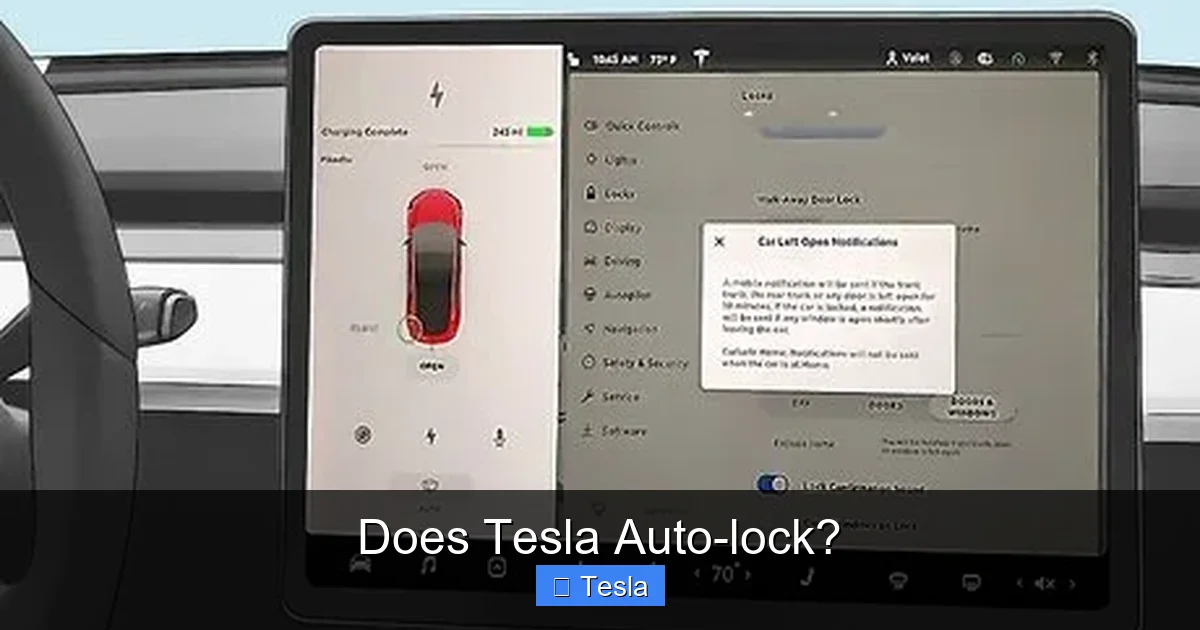
To find these settings, tap the ‘Controls’ icon (car symbol) on the bottom dock, then select ‘Lock.’ Here, you’ll find several toggles and options. The primary switch is for “Walk-Away Lock.” Turning this off completely disables the automatic locking upon exit. This might be useful for a valet scenario or if you’re parked in a private, secure garage and prefer to lock manually. However, for most users, keeping this on is the safest bet.
Below that, you’ll find “Lock when doors close.” This is a related but distinct feature. When enabled, the car will lock automatically *as soon as all doors are closed*, regardless of whether you have your key with you or are still nearby. This is a more aggressive setting. Some owners love it for added security in tight parking lots; others find it annoying if they need to quickly reopen a door. It’s worth experimenting with to see what fits your routine.
Controlling Door Handle Presentation
Another related setting is “Present Handles.” When your phone key is near, the door handles automatically extend (on Model S and X) or illuminate (on Model 3 and Y) for easy entry. You can disable this if you prefer a sleeker look or want to manually control handle presentation. Disabling it doesn’t affect auto-lock but changes the physical interaction with the car. This setting is also found in the ‘Lock’ menu. If you’re considering aesthetic modifications, understanding how these handles work is important. For instance, owners who choose to wrap their Tesla Model 3 often appreciate the clean look of non-presenting handles, though they must then use the app or key card to unlock.
Auto-Lock Across Different Tesla Models
The fundamental principle of walk-away auto-lock is universal across Tesla’s lineup. However, the user experience has some subtle variations between the Model S/X (with falcon wing doors and presenting handles) and the Model 3/Y (with flush door handles). These differences are mostly auditory and visual feedback rather than functional.
Visual guide about Does Tesla Auto-lock?
Image source: wikihow.com
Model S & Model X: The Audible Confirmation
In the larger Models S and X, the auto-lock confirmation is often a more pronounced, three-tone chime from the vehicle’s external speaker (the same one that produces the famous “fart” sounds). You’ll also see the door handles retract. The system is exceptionally reliable on these models, likely due to their more complex door mechanisms that benefit from automatic locking to ensure they are fully sealed. The sensitivity of the walk-away detection is finely tuned to account for the larger vehicle footprint.
Model 3 & Model Y: The Silent Blink
The more compact Model 3 and Y tend to use a quieter confirmation. The primary signal is the blinking of the turn signal indicators on the side mirrors. You might hear a softer chirp from the speaker, but the mirror blink is the most reliable visual cue. The handle illumination on these models pulses briefly when locked. The system is equally effective but feels slightly more “stealthy.” Some early production Model 3s had software bugs where the car wouldn’t lock if a door was slightly ajar, but these have been largely resolved via over-the-air updates.
It’s also worth noting that the window tint on a Tesla Model 3 or Model Y does not interfere with the Bluetooth or key card signals used for auto-lock. The sensors are located in the door pillars and roof, not the glass.
Security Implications and Complementary Features
Auto-lock is more than a convenience; it’s a critical security layer. In today’s world, an unlocked car is an invitation for theft of items inside or, in rare cases, joyriding. By automatically ensuring your Tesla is locked, you eliminate the human error of forgetting. But Tesla doesn’t stop there. The auto-lock system is deeply integrated with other security features to create a formidable defense.

Visual guide about Does Tesla Auto-lock?
Image source: wikihow.com
Pin-to-Drive: The Immobilizer
Even if a thief somehow gains entry (e.g., by breaking a window), they cannot drive the car away without the 4-digit PIN you set in the vehicle settings. This feature, activated via the touchscreen, is a mandatory step before the car can be driven. It renders the vehicle useless to an unauthorized driver. The auto-lock makes it much harder to even get *inside* the car to attempt this.
Sentry Mode: The Watchful Eye
Sentry Mode is the ultimate deterrent. When activated (usually when parked in a public area), the car’s external cameras remain active. If someone approaches, touches, or leans on the car, Sentry Mode enters a “alert” state, displaying a message on the screen that cameras are recording. If a more serious threat is detected (like a window break), the car sounds the alarm, flashes the lights, and sends an alert to your phone. The auto-lock ensures that when Sentry Mode is active, the car is already secured, making unauthorized entry significantly more difficult. For maximum security, pairing auto-lock with Sentry Mode and Pin-to-Drive is highly recommended.
GPS Tracking and Mobile App Control
Should the worst happen and your Tesla be stolen, the built-in GPS tracking, accessible via the Tesla mobile app, allows you to track its location in real-time and share coordinates with law enforcement. The same app lets you lock or unlock the car from anywhere, honk the horn, or flash the lights to help locate it. The auto-lock is your first line of defense, but this connectivity provides the crucial last line.
Troubleshooting: When Auto-Lock Doesn’t Work
For such a reliable system, it can be disconcerting when your Tesla fails to auto-lock. Before assuming a fault, there are several common, solvable reasons.
The Phone Key is the Heart of the System
The most frequent cause is an issue with your phone key. Is Bluetooth turned on? This seems obvious, but it’s the first thing to check. Is the Tesla app running in the background? On both iOS and Android, the app must be installed and have permission to run in the background for the phone key to function reliably. Force-close and reopen the app. Is your phone’s battery critically low? A dying phone may not maintain a strong BLE connection. Are you using a different phone or a borrowed key card? The car will only auto-lock when the specific, authenticated key you used to start the car is the one walking away.
Physical Obstructions and Settings
Check if any door, hood, or frunk is not fully closed. The system requires all closures to be secure. Look at your touchscreen; is there an icon indicating a door is open? Also, double-check your lock settings. You may have inadvertently disabled “Walk-Away Lock” or enabled “Lock when doors close” and are confused by the different behavior. A simple settings reset can solve this.
Environmental and Interference Issues
Extreme cold can sometimes affect Bluetooth performance. Major sources of radio frequency interference (like large power transformers or certain wireless equipment) in your parking area could theoretically disrupt the signal. If problems persist, a soft reboot of the vehicle (holding both scroll wheels on the steering wheel until the screen turns off) can often refresh the system’s connectivity. If all else fails, a service appointment may be needed to check antenna health, though this is rare.
The Future of Tesla Locking: Updates and Integration
Tesla’s beauty is its ability to improve over time via over-the-air (OTA) software updates. The auto-lock system has already seen refinements—improved sensitivity, new chime options, and better integration with other features. Future updates could introduce even more granular controls. Imagine being able to set a geofence: auto-lock only activates when you leave your home neighborhood. Or integration with your smart home, so the car locks automatically as part of your “leaving” routine.
Furthermore, as Tesla moves toward a fully autonomous future, the locking system will be integral to the robotaxi vision. A self-driving Tesla will need to lock itself after each passenger exits. The current robust auto-lock system is the foundational technology for that future. It’s also worth noting that while the system is sophisticated, it doesn’t require any special 220V outlet installation for your Tesla to function; it’s a low-power, always-on system powered by the 12V battery.
Practical Tips for Optimal Use
To get the most out of your Tesla’s auto-lock, follow these simple practices. First, always set up your phone key properly. Use the official Tesla app, ensure location services are enabled, and add the app to your phone’s battery optimization whitelist. Second, get in the habit of giving the door a firm, definitive push to ensure it’s fully latched before walking away. A partially closed door will prevent locking. Third, listen for the chirp and glance at the mirrors after closing the door. This quick habit confirms the system worked as intended. Finally, if you frequently give rides to others, consider setting up a PIN for your phone key (available in settings) so they can’t use your key to unlock and drive the car, but you still retain the auto-lock benefit when you leave with your phone.
Frequently Asked Questions
Does Tesla auto-lock work with the phone key or only the key card?
The walk-away auto-lock feature is designed primarily for the smartphone key, as that is the key most users carry daily. It works flawlessly with the phone key. It also works with the key card, but since you typically have to physically remove the card from your wallet to use it, you are more likely to be holding it as you walk away, which can sometimes prevent the lock from triggering until the card is put away. The system is optimized for the passive, always-with-you phone key.
Can I completely turn off Tesla’s auto-lock?
Yes, you can. Within the ‘Controls > Lock’ menu on your touchscreen, you can toggle off “Walk-Away Lock.” This will stop the car from automatically locking when you walk away with your key. You will then need to manually lock the car using the Tesla app, the touchscreen (while parked), or by pressing the lock button on your key card. This is not recommended for general security but can be useful for specific situations like valet parking or in a secure private garage.
What triggers the Tesla to auto-lock?
The trigger is a combination of three conditions: 1) All doors, hood, and frunk must be fully closed. 2) Your authenticated key (phone or key card) must be moving away from the vehicle, detected by a weakening Bluetooth signal. 3) The “Walk-Away Lock” setting must be enabled. Once these conditions are met, typically within 1-2 seconds of the last door closing, the car locks itself and provides audible/visual confirmation.
Will my Tesla auto-lock if I leave my phone inside the car?
No, it will not. The system requires your authenticated key to be *outside* the vehicle and moving away. If your phone (the key) is left inside, the car will detect that the key is still within the cabin and will not engage the lock. This is a crucial safety feature to prevent you from accidentally locking your phone inside the car. You would need to use your key card or the mobile app on another device to lock it.
Does auto-lock work the same in all Tesla models?
Yes, the core function is identical across all models (Model S, 3, X, Y). The car will lock when you walk away with your key. The differences are minor and relate to feedback: Model S/X use a louder external chime and handle retraction, while Model 3/Y rely more on mirror blink and handle illumination. The sensitivity and logic are fundamentally the same, ensuring a consistent user experience.
Can I adjust the distance at which my Tesla auto-locks?
No, the lock distance threshold is not a user-adjustable setting. It is a fixed parameter calibrated by Tesla engineers to balance reliability (not locking too early while you’re still near) and responsiveness (not waiting too long after you’ve left). Users can only toggle the feature on/off or use the separate “Lock when doors close” function, which triggers based on door closure, not distance.







