
How to Reset the Nissan Altima Oil Light

Resetting the Nissan Altima oil light is a simple process that ensures your vehicle’s maintenance reminders stay accurate. Whether you’ve just changed your oil or need to clear a persistent warning, this guide walks you through the correct steps for every Altima model year—no mechanic required.
Key Takeaways
- Know your model year: Reset procedures vary between older (pre-2013) and newer (2013+) Nissan Altima models due to differences in dashboard and infotainment systems.
- Use the trip odometer button: Most Altimas require pressing and holding the trip reset button on the instrument cluster to initiate the oil light reset sequence.
- Turn the ignition on (not start): You don’t need to start the engine—just turn the key to the “ON” position or press the start button without your foot on the brake.
- Complete the reset within 10 seconds: Timing matters. Follow the steps quickly to avoid having to restart the process.
- Verify the reset worked: After completing the steps, check that the oil change light is off when you start the car.
- Don’t ignore regular oil changes: Resetting the light doesn’t replace actual maintenance—stick to your recommended oil change intervals.
- Consult your owner’s manual: If unsure, your vehicle’s manual provides model-specific instructions and troubleshooting tips.
📑 Table of Contents
- Why the Nissan Altima Oil Light Matters
- When Should You Reset the Oil Light?
- How to Reset the Oil Light on Older Nissan Altimas (2007–2012)
- How to Reset the Oil Light on Newer Nissan Altimas (2013–Present)
- Troubleshooting Common Reset Issues
- Best Practices for Oil Maintenance in Your Nissan Altima
- Conclusion
Why the Nissan Altima Oil Light Matters
The oil change indicator light in your Nissan Altima isn’t just a nagging reminder—it’s a vital part of your vehicle’s maintenance system. This light, often labeled “Oil,” “Change Oil,” or “Maintenance,” alerts you when it’s time for an oil change based on mileage, driving conditions, and engine performance data collected by the car’s onboard computer. Ignoring it can lead to reduced engine efficiency, increased wear, and even costly repairs down the road.
Modern Nissan Altimas use intelligent maintenance systems that track more than just mileage. They consider factors like engine temperature, idle time, and driving patterns to determine when your oil is no longer effectively lubricating the engine. That means the light might come on sooner if you frequently drive in stop-and-go traffic, tow heavy loads, or operate in extreme temperatures. Resetting the oil light after a service ensures the system starts tracking fresh data, so you get accurate reminders for future maintenance.
But here’s the catch: simply changing your oil isn’t enough. If you don’t reset the oil light, it will continue to flash or stay illuminated, which can be distracting and may cause you to second-guess whether the service was actually completed. Worse, if the light remains on, you might delay your next oil change, thinking the system hasn’t registered the current one. That’s why knowing how to reset the Nissan Altima oil light is an essential skill for every Altima owner.
When Should You Reset the Oil Light?
Visual guide about How to Reset the Nissan Altima Oil Light
Image source: enginepartsdiagram.com
You should reset the oil light immediately after every oil change—whether you did it yourself or had it done at a service center. This ensures the vehicle’s maintenance timer starts fresh and gives you accurate alerts for the next service interval. Most Nissan Altimas are designed for oil changes every 5,000 to 7,500 miles under normal driving conditions, but this can vary based on your model year, engine type, and driving habits.
It’s also important to reset the light if you’ve recently topped off your oil or performed a partial oil change. While topping off doesn’t fully replace degraded oil, some drivers do it temporarily between full changes. In such cases, resetting the light can help avoid confusion—but remember, a full oil and filter change is still necessary at the recommended interval.
Another scenario where a reset is needed is after a battery replacement or disconnect. Sometimes, electrical interruptions can cause the maintenance system to malfunction or retain old data. If you notice the oil light comes on unexpectedly after such an event, a reset may resolve the issue.
Lastly, if you’ve purchased a used Nissan Altima and the oil light is on, it’s a good idea to reset it after verifying the oil level and condition. This gives you a clean slate and helps you establish a reliable maintenance schedule moving forward.
How to Reset the Oil Light on Older Nissan Altimas (2007–2012)

Visual guide about How to Reset the Nissan Altima Oil Light
Image source: enginepartsdiagram.com
If you drive a Nissan Altima from 2007 to 2012, the oil light reset process is straightforward and relies on the trip odometer button located on the instrument cluster. These models don’t have the advanced touchscreen systems found in newer versions, so the method is purely mechanical and doesn’t require any digital menus.
Step-by-Step Guide for 2007–2012 Models
Start by ensuring your vehicle is parked on a level surface and the engine is off. Turn the ignition to the “ON” position—this means turning the key until the dashboard lights up, but without starting the engine. If your Altima has a push-button start, press the start button once without pressing the brake pedal.
Next, locate the trip odometer reset button. It’s usually a small button near the speedometer or tachometer, often labeled “TRIP” or “ODO/TRIP.” Press and hold this button. While holding it, watch the oil change indicator light on the dashboard. After about 5 to 10 seconds, the light should begin to flash or blink.
Continue holding the button until the light turns off completely. This usually takes another 5 to 10 seconds. Once the light is off, release the button. Now, turn the ignition off and then start the engine. The oil light should no longer be illuminated.
Tips for Success
Timing is crucial. If you release the button too early, the reset won’t complete. If you wait too long, you might accidentally reset the trip odometer instead. Practice the sequence a few times if needed. Also, make sure the ignition is in the “ON” position—not “ACC” or “OFF”—as the system won’t respond otherwise.
If the light doesn’t reset on the first try, don’t panic. Simply turn the ignition off, wait 10 seconds, and try again. Sometimes electrical systems need a brief pause to reset properly.
How to Reset the Oil Light on Newer Nissan Altimas (2013–Present)

Visual guide about How to Reset the Nissan Altima Oil Light
Image source: erwinsalarda.com
Starting in 2013, Nissan introduced updated dashboard designs and infotainment systems in the Altima, which changed how the oil light reset is performed. These models often use a combination of the trip button and the steering wheel controls or center display menu. The process is still simple, but it requires a slightly different approach.
Using the Trip Button (2013–2018 Models)
For Altimas from 2013 to 2018, the reset method is similar to older models but may involve additional steps. Begin by turning the ignition to the “ON” position without starting the engine. Locate the trip odometer button on the instrument cluster.
Press and hold the trip button. Within a few seconds, the oil change light should begin to flash. Continue holding the button until the light turns off—this usually takes about 10 seconds. Release the button, turn the ignition off, and then start the car. The light should be gone.
Some 2013–2018 models may display a “Maintenance” or “Service” message instead of a dedicated oil light. In these cases, the reset process is the same, but you’ll see the message disappear from the dashboard.
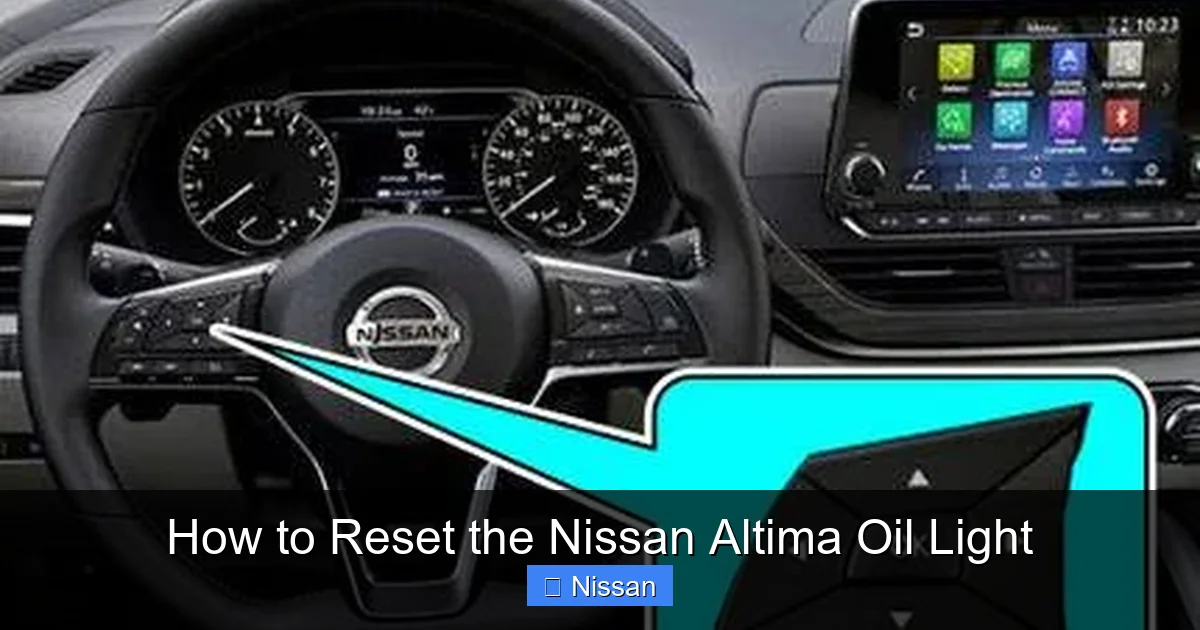
Using the Steering Wheel Controls (2019–Present Models)
From 2019 onward, many Nissan Altimas come equipped with advanced driver information systems accessible via steering wheel buttons. To reset the oil light on these models, start by turning the ignition to “ON.”
Use the arrow buttons on the left side of the steering wheel to navigate to the “Settings” or “Maintenance” menu on the instrument cluster display. Scroll through the options until you find “Oil Change” or “Maintenance Reset.” Select it, and follow the on-screen prompts to confirm the reset.
Once confirmed, the system will reset the oil change interval, and the light should disappear. Turn the ignition off and restart the vehicle to verify the reset was successful.
Alternative Method via Center Display (If Equipped)
Some newer Altimas with NissanConnect infotainment systems allow you to reset the oil light through the touchscreen. Go to the “Settings” menu, then select “Vehicle Information” or “Maintenance.” Look for an option to reset the oil change reminder and follow the instructions.
This method is user-friendly but may not be available on all trims. If you don’t see the option, fall back on the steering wheel or trip button method.
Troubleshooting Common Reset Issues
Even with the correct steps, sometimes the oil light won’t reset. Don’t worry—this is more common than you think, and there are usually simple fixes.
The Light Won’t Turn Off
If the oil light remains on after following the reset procedure, double-check that you completed all steps correctly. Ensure the ignition was in the “ON” position and that you held the button long enough. Try the process again, paying close attention to timing.
If it still doesn’t work, the issue might be electrical. A weak battery or faulty sensor can interfere with the reset. Try disconnecting the battery for 10–15 minutes to reset the vehicle’s computer, then reconnect it and attempt the reset again.
The Light Comes Back On Immediately
If the oil light resets successfully but comes back on right after starting the car, it could indicate a real problem. Check your oil level and condition. Low or dirty oil can trigger the light even after a reset. Top off or change the oil if necessary.
Also, inspect the oil pressure sensor or oil filter. A malfunctioning sensor can send false signals to the dashboard. If you’re unsure, have a mechanic diagnose the issue.
No Response from the Dashboard
If pressing the trip button does nothing—no flashing lights, no response—the button itself might be faulty. Try cleaning around the button or gently pressing it multiple times. If it’s physically damaged, it may need replacement.
Alternatively, the instrument cluster could have a software glitch. In rare cases, a firmware update from a Nissan dealer may be required.
Reset Works, But Trip Odometer Also Resets
This happens when the reset sequence isn’t timed correctly. To avoid this, make sure you’re only holding the button long enough to reset the oil light—usually 10–15 seconds. If the trip odometer resets, simply reprogram it using the same button.
Best Practices for Oil Maintenance in Your Nissan Altima
Resetting the oil light is just one part of responsible vehicle ownership. To keep your Altima running smoothly, follow these best practices for oil maintenance.
Follow the Recommended Oil Change Interval
Nissan recommends changing the oil in your Altima every 5,000 to 7,500 miles, depending on driving conditions. If you frequently drive in severe conditions—such as extreme heat, cold, or stop-and-go traffic—consider changing the oil every 3,000 to 5,000 miles.
Use high-quality synthetic or conventional oil that meets Nissan’s specifications (typically 0W-20 or 5W-30). Always replace the oil filter with a genuine Nissan or equivalent aftermarket part.
Check Your Oil Regularly
Even with a maintenance light, it’s wise to check your oil level monthly. Park on level ground, wait 5–10 minutes after turning off the engine, and use the dipstick to verify the oil level and condition. The oil should be clean and between the “MIN” and “MAX” marks.
If the oil appears dark, gritty, or smells burnt, it’s time for a change—even if the light hasn’t come on yet.
Keep Records of Oil Changes
Maintain a log of every oil change, including the date, mileage, type of oil used, and whether the filter was replaced. This helps you stay on schedule and can increase your car’s resale value.
Many drivers use apps or physical notebooks, but even a note in your phone’s calendar works.
Use Genuine or High-Quality Parts
While aftermarket oils and filters can save money, cheap alternatives may not meet Nissan’s standards. Using subpar products can lead to engine wear and void your warranty. Stick to reputable brands like Mobil 1, Castrol, or Nissan Genuine Oil.
Don’t Delay Oil Changes
Even if the light hasn’t come on, don’t stretch oil changes beyond the recommended interval. Old oil loses its lubricating properties and can cause sludge buildup, reduced fuel efficiency, and engine damage.
Conclusion
Resetting the Nissan Altima oil light is a quick and easy task that every owner should know how to do. Whether you drive an older model with a simple trip button or a newer Altima with advanced digital controls, the process is designed to be user-friendly and accessible. By following the correct steps for your specific model year, you can ensure your maintenance reminders stay accurate and your engine stays protected.
Remember, resetting the light is not a substitute for regular oil changes. It’s a tool to help you stay on top of your vehicle’s needs. Combine timely resets with consistent oil checks and quality maintenance, and your Altima will reward you with reliable performance for years to come.
If you ever run into issues, don’t hesitate to consult your owner’s manual or visit a Nissan service center. And if you’ve just changed your oil, take two minutes to reset that light—it’s a small step that makes a big difference.
Frequently Asked Questions
How often should I reset the oil light on my Nissan Altima?
You should reset the oil light every time you change your oil, whether it’s done at a shop or by yourself. This ensures the maintenance system starts tracking fresh data for your next service interval.
Can I reset the oil light without starting the engine?
Yes, you only need to turn the ignition to the “ON” position. You don’t have to start the engine—just make sure the dashboard lights are on and the car is in accessory mode.
What if the oil light still won’t reset after following the steps?
Try repeating the process, ensuring you hold the button long enough. If it still doesn’t work, check your battery or consult a mechanic—there may be an electrical or sensor issue.
Does resetting the oil light affect my warranty?
No, resetting the oil light has no impact on your warranty. It’s a standard maintenance procedure recommended by Nissan to keep your vehicle’s systems accurate.
Can I reset the oil light if I only topped off the oil?
You can reset it to clear the warning, but remember that topping off isn’t a full oil change. You should still change the oil and filter at the recommended interval.
Do all Nissan Altima models use the same reset method?
No, the method varies by model year. Older models (2007–2012) use the trip button, while newer ones (2013+) may use steering wheel controls or touchscreen menus. Always check your owner’s manual for the correct procedure.