
How to Reset Oil Life on a 2015 Jeep Cherokee

Resetting the oil life on your 2015 Jeep Cherokee is a crucial step after every oil change to ensure the vehicle’s maintenance system accurately tracks your next service interval. The process can be done manually using the steering wheel controls or with a diagnostic scan tool. Failing to reset this light means your Cherokee’s computer will continue to think the oil is old, leading to persistent warning lights and potentially confusing service schedules. This guide provides clear, detailed instructions for both methods, ensuring you can complete the task correctly and keep your Jeep running smoothly.
Key Takeaways
- The oil life monitor is an algorithm, not a mileage counter: It calculates oil degradation based on engine revolutions, temperature, and driving habits, making the reset essential after an oil change.
- Two primary reset methods exist: A simple manual sequence using the steering wheel buttons, or a more technical method using an OBD2 scan tool.
- Never reset the oil life without changing the oil: Doing so defeats the purpose of the system and can lead to engine damage from neglected maintenance.
- The manual method is free and quick: It requires no special tools and takes less than 30 seconds once you know the button sequence.
- A scan tool is a fallback option: If the manual method fails or the system is glitched, a compatible scan tool can communicate directly with the vehicle’s PCM.
- Consult your owner’s manual first: It contains the official procedure and specifications for your specific trim level (Sport, Latitude, Limited, etc.).
- If problems persist, seek a professional: A persistent oil life light after a correct reset may indicate a deeper issue with the sensor or PCM.
📑 Table of Contents
- Introduction: Why That Oil Life Light Matters
- Understanding Your 2015 Cherokee’s Oil Life System
- Preparing for the Reset: Tools and Safety
- Method 1: The Standard Manual Reset (Button Sequence)
- Method 2: Using a Diagnostic Scan Tool
- Troubleshooting: What If the Light Won’t Reset?
- The Importance of Doing It Right: Beyond the Annoying Light
- Conclusion: A Simple Skill for Every Cherokee Owner
Introduction: Why That Oil Life Light Matters
That little wrench icon or “Oil Life” message glowing on your 2015 Jeep Cherokee’s dashboard isn’t just an annoying reminder—it’s your vehicle’s way of talking to you. Unlike older cars that simply told you to change the oil every 3,000 or 5,000 miles, your Cherokee uses a sophisticated Oil Life Monitoring System (OLMS). This system doesn’t just count miles; it actually analyzes how you drive. Short trips, extreme temperatures, and heavy loads all degrade engine oil faster than long highway cruises. The system calculates a percentage of useful oil life remaining and alerts you when it’s time for a change.
Here’s the critical part: after you or your mechanic changes the oil and filter, that system’s internal counter is still running. It thinks the old, depleted oil is still in the engine. If you don’t perform a reset, you’ll get a constant, nagging service light, and more importantly, the system won’t start accurately counting down from 100% for your new oil. This guide will walk you through exactly how to reset oil life on a 2015 Jeep Cherokee, ensuring your maintenance schedule gets back on track. We’ll cover the standard manual button-press method and the alternative scan tool method, so you have the knowledge to handle it yourself.
Understanding Your 2015 Cherokee’s Oil Life System
How the Algorithm Works
The 2015 Jeep Cherokee’s OLMS is a smart piece of engineering. It uses input from the engine control module (ECM) or powertrain control module (PCM). It monitors parameters like engine runtime, coolant temperature, vehicle speed, and engine load. A series of cold starts and short trips will deplete the oil life percentage much faster than a steady-state highway drive. This personalized approach is more accurate than a one-size-fits-all mileage interval, helping to prevent both premature oil changes (wasting money and resources) and dangerously late ones.
Visual guide about How to Reset Oil Life on a 2015 Jeep Cherokee
Image source: adventurejeep.com
What the “100%” and “0%” Mean
When you see “100%” on your cluster, it means the system has just been reset after an oil change, with a full new oil life. As you drive, this number decreases. The vehicle’s manual typically recommends changing the oil when the display reaches around 15% or when the wrench icon illuminates. At 0%, the system will display “Oil Change Required” or a similar urgent message. It’s vital to change the oil and then immediately reset the system to 100% to begin a new, accurate cycle.
Preparing for the Reset: Tools and Safety
Before you start, a little preparation goes a long way. The good news is that the standard manual reset requires absolutely no tools—just your fingers and the steering wheel controls. However, being in the right mindset and vehicle state is key.

Visual guide about How to Reset Oil Life on a 2015 Jeep Cherokee
Image source: oilreset.com
The Perfect Vehicle State
For the manual reset procedure to be recognized by the Cherokee’s computer, the vehicle must be in a specific state:
- All doors must be closed.
- The ignition must be in the “ON/RUN” position (the position right before you start the engine, where the dashboard lights are on). Do not start the engine.
- The transmission must be in “Park” (P).
- The parking brake can be set or not, but ensure the vehicle is secure and on level ground.
If any of these conditions aren’t met, the reset sequence will not initiate, and you’ll just be pressing buttons with no result. This is the most common reason for failure.
Optional: Scan Tool Preparation
If you need to use the scan tool method (more on this later), you’ll need a compatible OBD2 scanner that has the capability to access the Powertrain Control Module (PCM) and perform service resets. Not all basic code readers can do this. You’ll need a tool like a high-end Autel, Launch, or Snap-on scanner, or even some advanced Bluetooth adapters with the right app. Ensure your scanner is charged and has the latest software updates for Fiat Chrysler Automobiles (FCA) vehicles.
Method 1: The Standard Manual Reset (Button Sequence)
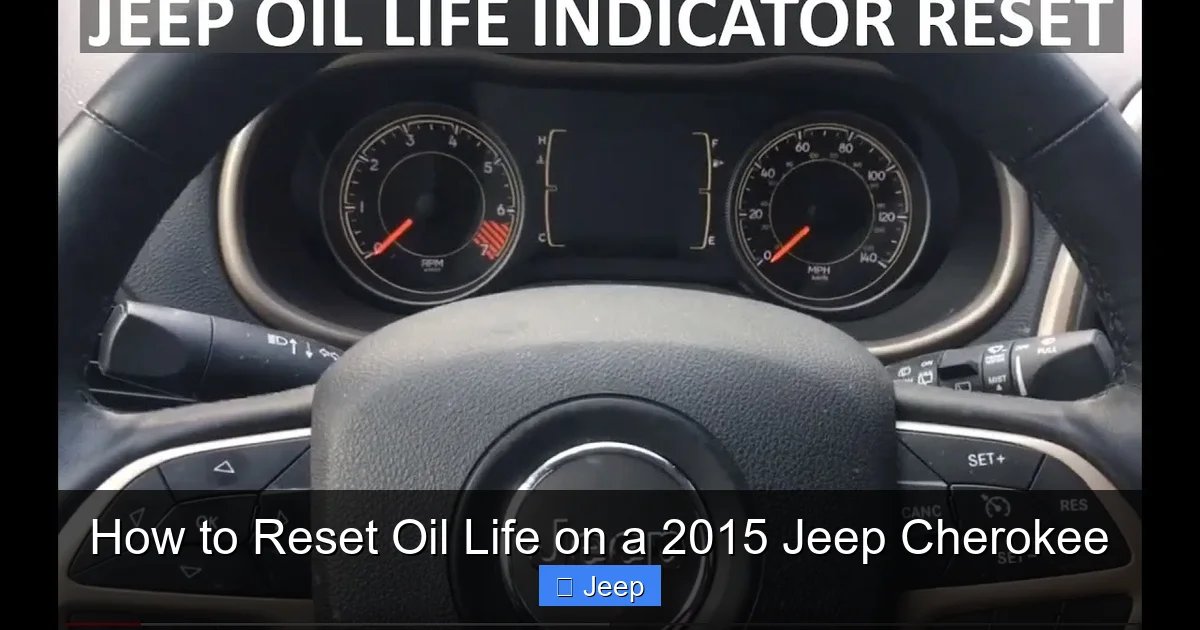
This is the method Jeep intended for owners and is by far the most common. It uses the “Up” and “Down” arrow buttons on the left side of your steering wheel, part of the steering wheel-mounted audio and trip computer controls. The sequence must be performed precisely and within a specific time window.

Visual guide about How to Reset Oil Life on a 2015 Jeep Cherokee
Image source: oilreset.com
Step-by-Step Button Sequence
Follow these steps exactly. It can feel a bit tricky the first time, but it becomes second nature.
- Turn the ignition to “ON/RUN”. Do not start the engine. All dash lights should illuminate, and you should see the odometer/trip meter display on the cluster.
- Locate the control buttons. Find the “Up” (▲) and “Down” (▼) arrow buttons on the left spoke of your steering wheel. You will also use the “Enter” button (the button in the center of the arrows, often with a checkmark or “OK” symbol).
- Press the “Up” arrow button (▲) repeatedly until the display on your instrument cluster changes from the odometer to show “Oil Life X%”. You may need to press it several times. The display will cycle through different screens like “Trip A,” “Trip B,” “Distance to Empty,” etc.
- Once you see the “Oil Life X%” message, fully press and hold the “Enter” button (the OK/check button). Hold it down firmly.
- While still holding the “Enter” button, press and release the “Down” arrow button (▼) one time. You do not need to hold the down button; just a quick press and release while the Enter button is held.
- Release the “Enter” button. After a moment, the display should change. You should see the oil life percentage start to reset, often blinking or showing “Reset” before returning to “100%”.
- Turn the ignition off and then back on to verify the reset was successful. The oil life should now read 100%.
Pro Tip: If it doesn’t work the first time, turn the ignition completely off, wait 10 seconds, and start again from Step 1. Ensure you are in the correct display screen (“Oil Life X%”) before starting the hold-and-press sequence. The timing is sensitive.
Method 2: Using a Diagnostic Scan Tool
What if the manual button sequence doesn’t work? Maybe the steering wheel buttons are faulty, or there’s a glitch in the instrument cluster. This is where a professional-grade scan tool becomes your best friend. This method is also what technicians at the dealership or a reputable shop will use.
When to Use This Method
- The manual reset sequence fails repeatedly, even when performed correctly.
- The steering wheel control buttons for the trip computer are not functioning.
- The instrument cluster display is dim, malfunctioning, or stuck on another screen.
- You are already using a scan tool to diagnose another issue and have it connected.
Step-by-Step Scan Tool Procedure
The exact menu names can vary slightly by scanner brand, but the general path is the same.
- Connect the scan tool. Plug the OBD2 connector into the port under your dashboard, near the steering column. Turn the ignition to “ON/RUN”.
- Establish communication. Power on your scanner and follow its prompts to select your vehicle (2015, Jeep, Cherokee). The tool will communicate with the vehicle’s modules.
- Navigate to the Service Reset or Maintenance menu. This is often found under headings like “Body & Comfort,” “Instrument Cluster,” or a dedicated “Service Reset” section. Look for options like “Oil Life Reset,” “Service Light Reset,” or “Maintenance Reset.”
- Select the correct module. You may need to choose which control module to communicate with. For an oil life reset, you typically select the PCM (Powertrain Control Module) or sometimes the “Instrument Cluster” module. The scanner will guide you.
- Follow the on-screen prompts. The tool will likely ask you to confirm the reset (“Are you sure you want to reset Oil Life to 100%?”). Confirm the action.
- Verify and disconnect. The scanner should display a “Reset Successful” or similar message. Turn the ignition off and back on to check your Cherokee’s dash. The oil life should now read 100%. Disconnect the scan tool.
Important Note: If your basic OBD2 reader only shows and clears engine codes (P-codes), it likely cannot perform this service reset. You need a tool with deeper system access.
Troubleshooting: What If the Light Won’t Reset?
You followed the manual steps perfectly, but the wrench is still there. Don’t panic. There are a few common culprits and solutions.
Scenario 1: “I Did the Sequence, But Nothing Happened.”
This is almost always a state issue. Double-check: Are all doors shut? Is the parking brake set? Is the transmission in Park? Is the ignition in “ON/RUN” and not “ACC” or “START”? Try the sequence again, being extra careful to find the correct “Oil Life” display screen before holding the Enter button. Sometimes, the cluster defaults to showing the odometer; you must first use the Up arrow to cycle to the oil life percentage screen.
Scenario 2: “The Reset Starts But Ends at 99% or Doesn’t Stay at 100%.”
This can indicate a weak battery or an electrical glitch. Ensure your battery terminals are clean and tight. A low voltage supply can interrupt the reset process. Try the sequence again after a short drive to recharge the battery, or with the vehicle connected to a battery tender. If it persists, it may point to a failing instrument cluster or PCM memory issue.
Scenario 3: “The Light Came Back On Immediately After Reset.”
This is a major red flag. It means the PCM is detecting a fault that it associates with the oil life system. Possible causes include a faulty oil pressure sensor, a broken wire in the sensor circuit, or an internal PCM failure. Do not keep resetting it. You need a professional diagnosis with a scan tool to check for related diagnostic trouble codes (DTCs) in the PCM. For context, resetting procedures for other FCA vehicles like the 2012 Dodge Journey or Jeep Grand Cherokee can be similar, but persistent issues always require a deeper look.
The Importance of Doing It Right: Beyond the Annoying Light
Resetting the oil life isn’t just about turning off a nuisance. It’s about maintaining the integrity of your Cherokee’s entire maintenance reminder ecosystem. The system tracks other services too, like tire rotations, often based on mileage or time intervals from the last reset. If your oil life is stuck at 0%, the system may not properly prompt you for other necessary services, or it may get its internal counters confused.
Furthermore, a correctly reset system provides accurate data. When you or a future buyer checks the vehicle’s service history via the dash display, it will show a truthful record of when the oil was last changed and reset. This is invaluable for proving proper maintenance. Think of it as updating the “last serviced” date in your car’s digital brain. Skipping this step after an oil change is like writing a check but not recording it in your checkbook—your balance will be wrong, leading to problems later.
Conclusion: A Simple Skill for Every Cherokee Owner
Knowing how to reset oil life on a 2015 Jeep Cherokee empowers you as a vehicle owner. It saves you a trip to the dealership or shop for a simple 30-second task, which they might charge you for as a “courtesy” or a “diagnostic.” The manual method using the steering wheel controls is designed to be user-friendly and is your first line of defense. Keep this guide bookmarked, and don’t be afraid to try it after your next oil change. Remember the key: ignition ON, find the oil life screen, hold Enter, press Down, release. If that fails, understand the scan tool alternative or know when to call a pro. By completing this reset, you ensure your Cherokee’s sophisticated maintenance system works exactly as intended, giving you accurate reminders and peace of mind that your engine is being protected with fresh oil on a schedule tailored to your actual driving habits.
Frequently Asked Questions
What is the difference between an oil change and an oil life reset?
The oil change is the physical act of draining old oil and replacing it with new oil and a new filter. The oil life reset is the electronic step that tells your Cherokee’s computer that this service has been completed, so it can start counting down from 100% again for the new oil. One is a mechanical procedure; the other is a digital one.
What if the oil life light comes back on immediately after I reset it?
If the light returns right after a successful reset, it indicates a deeper problem. The PCM is likely detecting a fault, such as a bad oil pressure sensor or a circuit issue. You should not keep resetting it. Have a mechanic scan for trouble codes to diagnose the underlying cause.
Can I reset the oil life without actually changing the oil?
Technically, yes, you can perform the reset sequence without changing the oil. However, this is strongly advised against. It defeats the entire purpose of the monitoring system, which is to ensure your engine receives timely oil changes. Doing this risks severe engine damage from running on degraded oil.
How often should I need to reset the oil life?
You should reset the oil life every single time you change the oil and filter, regardless of how many miles you drove since the last change. It’s a one-time reset per oil change service. The system then calculates the new life percentage based on your subsequent driving.
Do I need any special tools for the manual reset?
No. The standard manual reset method only requires the use of the steering wheel’s arrow buttons and the center “Enter” button. No tools, no apps, no scan tool are necessary for this procedure.
My 2015 Cherokee has a different dash display; does the procedure change?
The basic principle remains the same for all 2015 Cherokee models (Sport, Latitude, Limited, Trailhawk). You must cycle the display to show the “Oil Life XX%” message using the steering wheel controls, then hold the Enter button and press the Down arrow. The exact wording on the screen might vary slightly, but the button sequence is identical across all trims. If your vehicle has a completely different steering wheel without these controls, you must use the scan tool method.
