
Corrosion on Car Battery Terminal

Corrosion on car battery terminals is a common but often misunderstood issue that can prevent your car from starting. It appears as a powdery white, green, or blue substance around the battery posts and cables, and if left untreated, it can lead to poor electrical connections, reduced battery life, and even complete battery failure.
Key Takeaways
- Corrosion is a chemical reaction: It forms when battery acid vapors mix with moisture and air, creating a crusty buildup on terminals.
- It disrupts electrical flow: Even a thin layer of corrosion can interfere with the connection between the battery and the vehicle’s electrical system.
- Cleaning is simple and safe: With basic tools like baking soda, water, and a wire brush, you can remove corrosion in minutes.
- Prevention is key: Applying dielectric grease or battery terminal protectant after cleaning helps stop future corrosion.
- Regular inspection matters: Checking your battery every few months can catch corrosion early and save you from unexpected breakdowns.
- Not all corrosion is the same: White, green, or blue deposits may indicate different issues—like overcharging or leaks—so pay attention to color and location.
- Professional help may be needed: If corrosion returns quickly or the battery is old, it might be time for a replacement or electrical system check.
📑 Table of Contents
What Is Corrosion on Car Battery Terminals?
You pop the hood of your car and notice a strange, flaky substance around the battery terminals—maybe it’s white, green, or even blue. That’s corrosion, and it’s more common than you might think. But what exactly is it, and why does it happen?
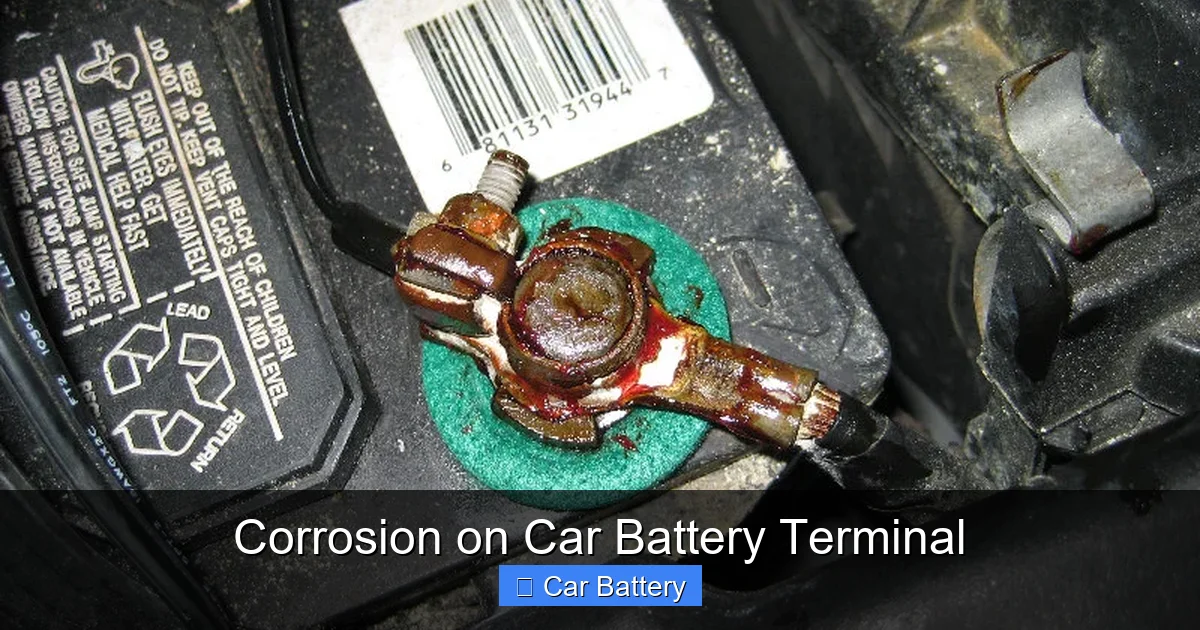
Corrosion on car battery terminals is the result of a chemical reaction between the sulfuric acid inside the battery and the metal components of the terminals and cables. When the battery charges, it releases hydrogen gas. This gas, combined with moisture in the air and traces of acid, reacts with the lead and copper in the terminals to form compounds like lead sulfate and copper sulfate. These compounds appear as a crusty, powdery buildup that can range in color from white to blue-green.
This buildup isn’t just unsightly—it’s a sign that your battery or charging system might be under stress. While a small amount of corrosion is normal over time, excessive or recurring corrosion can signal deeper issues like overcharging, a leaking battery, or poor ventilation under the hood.
Why Does It Matter?
You might be thinking, “It’s just a little gunk—how bad can it be?” The truth is, even a thin layer of corrosion can seriously impact your car’s performance. Electricity needs a clean, direct path to flow from the battery to the starter, alternator, and other components. When corrosion builds up, it acts like an insulator, blocking that flow.
This can lead to slow cranking when you try to start your car, flickering lights, or even a complete failure to start. In extreme cases, the corrosion can eat away at the metal terminals, causing permanent damage that requires terminal replacement or a new battery altogether.
Think of it like a clogged pipe in your house. Water can still flow, but not as efficiently. Similarly, your car’s electrical system struggles to deliver the power it needs when corrosion is present. The good news? It’s usually easy to fix—if you catch it early.
What Causes Battery Terminal Corrosion?
Understanding the root causes of corrosion can help you prevent it from happening again. While some corrosion is inevitable due to the nature of lead-acid batteries, several factors can accelerate the process.
Visual guide about Corrosion on Car Battery Terminal
Image source: paulstravelpictures.com
Battery Overcharging
One of the most common causes of excessive corrosion is an overcharging alternator. When the alternator sends too much voltage to the battery—typically above 14.4 volts—it causes the electrolyte inside the battery to break down more rapidly. This increases the release of hydrogen gas, which escapes through the vent caps and reacts with the terminals.
Overcharging can be caused by a faulty voltage regulator, a bad alternator, or even a malfunctioning onboard computer. If you notice corrosion appearing quickly—within weeks of cleaning—it’s worth having your charging system checked by a mechanic.
Leaking Battery Acid
Older or damaged batteries may develop cracks or loose seals, allowing small amounts of sulfuric acid to seep out. This acid doesn’t just stay liquid—it evaporates and reacts with the metal terminals, forming corrosive compounds. You might notice a strong, acrid smell near the battery or see a sticky, wet residue around the terminals.
Leaks are a red flag. Not only do they contribute to corrosion, but they also pose a safety hazard. Sulfuric acid can burn skin and damage paint or metal parts under the hood. If you suspect a leak, handle the battery with extreme care and consider replacing it soon.
Poor Ventilation and Moisture
Batteries need to breathe. Modern car batteries are designed with vent caps that allow gases to escape safely. But if these vents are blocked—or if the battery is installed in a tight, enclosed space—gases can build up and condense around the terminals.
Moisture from rain, car washes, or high humidity can also accelerate corrosion. Water droplets settling on the terminals create the perfect environment for chemical reactions. That’s why cars stored in garages with poor airflow or driven in humid climates often see more corrosion.
Age and Wear
Like any component, batteries wear out over time. A battery that’s more than three to five years old is more prone to internal degradation, which can lead to increased gas production and corrosion. Terminal connections may also loosen over time, creating gaps where moisture and acid can accumulate.
Regular maintenance becomes even more important as your battery ages. Don’t wait for corrosion to appear—inspect your battery every few months, especially before long trips or seasonal changes.
How to Identify Corrosion on Your Battery
Spotting corrosion early is the first step to preventing bigger problems. But what exactly should you look for? Corrosion isn’t always obvious, especially if it’s just starting to form.
Visual guide about Corrosion on Car Battery Terminal
Image source: blog.amsoil.com
Visual Signs
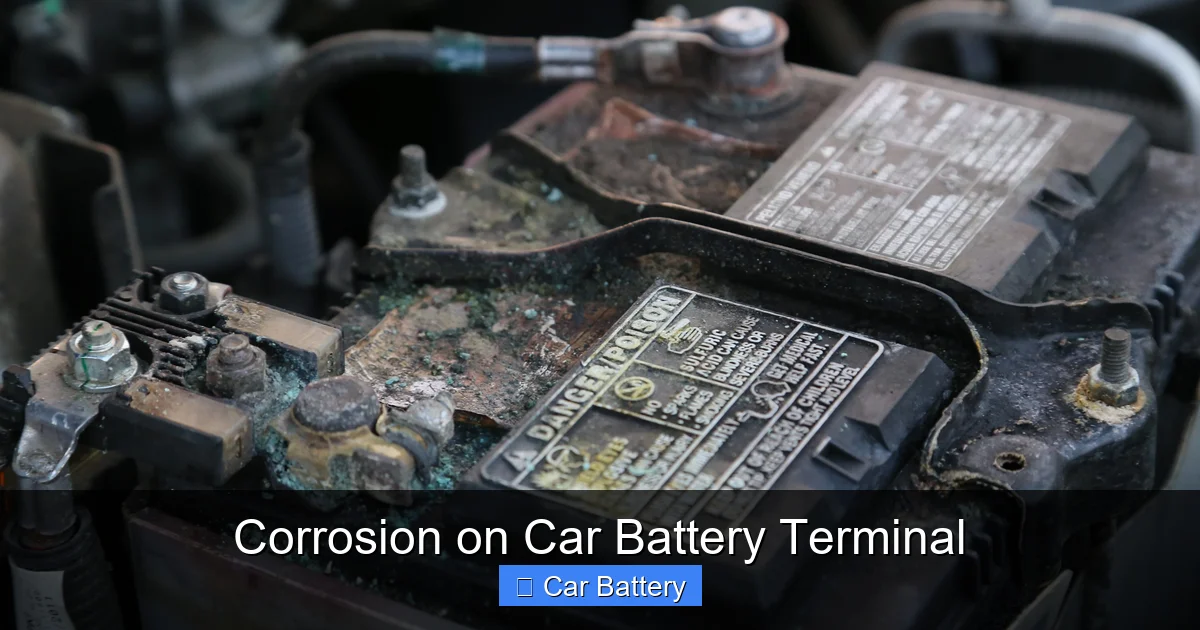
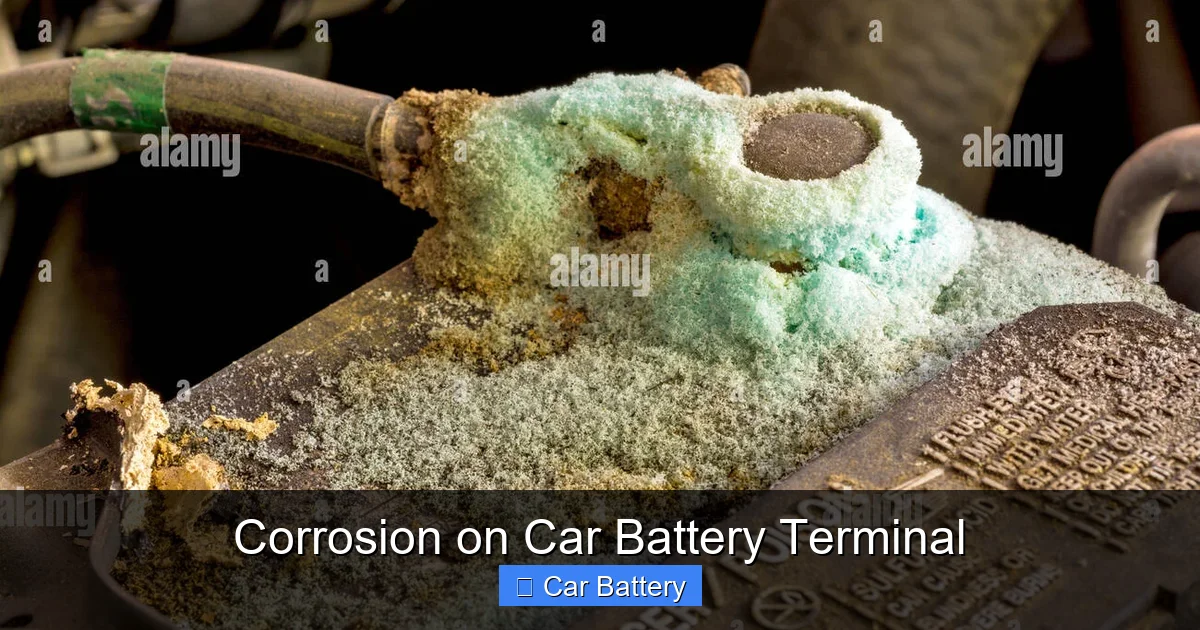
The most obvious sign is a powdery or crusty buildup around the battery terminals and cable connectors. The color can vary:
- White or gray: Usually indicates lead sulfate formation, common with normal battery operation.
- Blue or green: Suggests copper sulfate, which forms when acid reacts with copper cables or clamps. This often points to a leak or overcharging.
- Fluffy or fuzzy texture: A sign of active corrosion that’s still growing.
You might also notice a faint, egg-like smell—that’s hydrogen sulfide gas, a byproduct of battery reactions. While not always present, it’s a clue that chemical activity is happening.
Performance Clues
Sometimes, the car itself will tell you something’s wrong. If your engine cranks slowly, especially in cold weather, or if your headlights dim when you turn on the radio, it could be due to poor electrical connections caused by corrosion.
Other warning signs include:
- The car won’t start, but the lights and radio work (indicating power is reaching some systems but not the starter).
- Frequent need for jump-starts.
- Battery warning light on the dashboard.
If you experience any of these symptoms, pop the hood and inspect the battery. Even if you don’t see visible corrosion, it’s worth checking the terminals for tightness and cleanliness.
When to Worry
Not all corrosion is created equal. A small amount of white powder around the positive terminal is fairly normal and easy to clean. But if you see:
- Corrosion spreading down the cables.
- A wet, sticky residue (indicating acid leakage).
- Cracks or bulges in the battery case.
- Corrosion returning within days or weeks of cleaning.
…then it’s time to take action. These signs suggest a deeper issue that may require professional diagnosis or battery replacement.
How to Safely Clean Corrosion from Battery Terminals
Cleaning corrosion is one of the easiest DIY car maintenance tasks—and it can save you hundreds in repair bills. With a few household items and some basic safety precautions, you can restore your battery’s performance in under 30 minutes.
Visual guide about Corrosion on Car Battery Terminal
Image source: c8.alamy.com
What You’ll Need
Before you start, gather these supplies:
- Baking soda
- Water
- A small bowl or container
- An old toothbrush or wire brush
- Safety goggles and rubber gloves
- A wrench (usually 10mm or 13mm)
- Clean rags or paper towels
- Dielectric grease or battery terminal protector (optional but recommended)
Always wear gloves and eye protection. Battery acid is corrosive and can cause burns or eye damage. Work in a well-ventilated area, and keep open flames or sparks away—hydrogen gas is highly flammable.
Step-by-Step Cleaning Process
Step 1: Disconnect the Battery
Start by turning off the engine and removing the keys. Always disconnect the negative terminal first (marked with a “-” or black cover), then the positive terminal (marked with a “+” or red cover). This prevents accidental short circuits if your wrench touches metal while loosening the positive cable.
Step 2: Make the Cleaning Solution
Mix 1 tablespoon of baking soda with 1 cup of water in a small bowl. Baking soda neutralizes the acidic corrosion, making it safe to remove. Stir until the baking soda dissolves.
Step 3: Apply the Solution
Dip the toothbrush or wire brush into the solution and scrub the terminals and cable ends thoroughly. You’ll see the mixture fizz as it reacts with the corrosion—that’s normal. Focus on areas with heavy buildup, but be gentle to avoid damaging the metal.
Step 4: Rinse and Dry
Use a damp rag to wipe away the residue. Then dry everything completely with a clean towel. Any leftover moisture can lead to new corrosion.
Step 5: Reconnect the Battery
Reattach the positive terminal first, then the negative. Tighten the clamps securely—loose connections can cause arcing and more corrosion over time.
Step 6: Apply Protection (Optional but Recommended)
Once the terminals are clean and dry, apply a thin layer of dielectric grease or a commercial battery terminal protector. This creates a barrier that repels moisture and slows future corrosion. Don’t overdo it—just a light coating is enough.
Tips for Success
- If corrosion is stubborn, let the baking soda solution sit for 5–10 minutes before scrubbing.
- For hard-to-reach areas, use a small wire brush or an old toothbrush.
- Never use sandpaper—it can scratch the terminals and create grooves where corrosion can hide.
- If the cables are heavily corroded or damaged, consider replacing them.
How to Prevent Future Corrosion
Cleaning corrosion is great, but preventing it is even better. A few simple habits can keep your battery terminals clean and your car starting reliably for years.
Use Terminal Protectors
After cleaning, apply a protective coating like dielectric grease, petroleum jelly, or a spray-on battery terminal protector. These products create a moisture-resistant barrier that slows chemical reactions. Reapply every 6–12 months or after washing your car.
Check Battery Connections Regularly
Make it a habit to inspect your battery every few months. Look for signs of corrosion, loose clamps, or frayed cables. Tighten connections if needed, and clean any early buildup before it becomes a problem.
Ensure Proper Ventilation
Make sure your battery’s vent caps are secure and not blocked. If your battery is in a sealed compartment, check that airflow isn’t restricted. Good ventilation helps dissipate gases and reduces moisture buildup.
Address Charging System Issues
If corrosion keeps coming back, have your alternator and voltage regulator tested. An overcharging system is a common culprit and can damage your battery over time.
Replace Old Batteries
Batteries typically last 3–5 years. If yours is older and showing signs of corrosion, it may be nearing the end of its life. Replacing it proactively can prevent unexpected failures and reduce future maintenance.
When to Call a Professional
While most corrosion issues can be handled at home, some situations require expert help. If you notice:
- Frequent corrosion despite regular cleaning.
- Signs of acid leakage or battery swelling.
- Electrical problems that persist after cleaning.
- The battery is more than five years old.
…it’s time to visit a mechanic. They can test your battery, alternator, and overall electrical system to identify hidden issues. In some cases, a simple repair—like replacing a voltage regulator—can solve the problem for good.
Final Thoughts
Corrosion on car battery terminals might seem like a minor nuisance, but it’s a warning sign that shouldn’t be ignored. Left unchecked, it can lead to starting problems, electrical failures, and even safety hazards. The good news? With regular inspection, simple cleaning, and preventive care, you can keep your battery in top shape and your car running smoothly.
Think of battery maintenance like changing the oil—it’s a small task that pays big dividends. Take a few minutes every few months to check under the hood. Your future self (and your car) will thank you.
Frequently Asked Questions
Is it safe to drive with corroded battery terminals?
Driving with corroded terminals is not recommended. The corrosion can block electrical flow, leading to starting problems or complete failure. It’s best to clean the terminals as soon as you notice buildup.
Can I clean battery corrosion without disconnecting the battery?
It’s strongly advised to disconnect the battery before cleaning. Working on a live battery increases the risk of short circuits, sparks, or electrical shock. Always disconnect the negative terminal first for safety.
What if the corrosion keeps coming back?
Recurring corrosion often indicates an underlying issue like overcharging, a leaking battery, or poor ventilation. Have your charging system and battery inspected by a professional to identify and fix the root cause.
Can I use vinegar to clean battery corrosion?
Vinegar is acidic and can worsen corrosion or damage metal parts. Stick to a baking soda and water solution, which safely neutralizes battery acid without harming the terminals.
How often should I check my battery for corrosion?
Inspect your battery every 3–6 months, especially before winter or long trips. Regular checks help catch corrosion early and prevent unexpected breakdowns.
Does corrosion mean my battery is dead?
Not necessarily. Corrosion affects the connection, not the battery’s internal health. Cleaning the terminals often restores performance. However, if the battery is old or damaged, replacement may be needed.
