
How to Reset Wrench Light on Honda Civic

The wrench light on your Honda Civic is a maintenance reminder, not an emergency signal. It illuminates when your vehicle is due for scheduled service, typically an oil change. Resetting it is a simple process you can do yourself after performing the required maintenance, usually via the steering wheel buttons or trip odometer. Always address the underlying service need first before resetting the light to avoid engine damage.
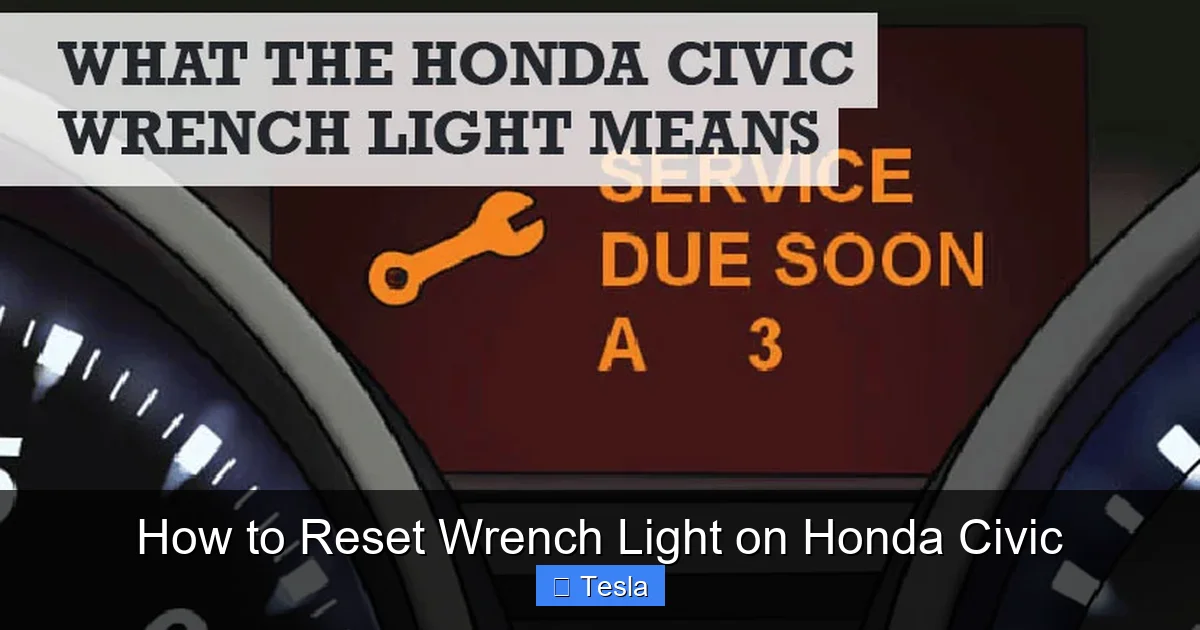
That little amber wrench icon glowing on your Honda Civic’s dashboard can be a source of mild panic or deep annoyance. Is something seriously broken? Do you need to drop everything and call a tow truck? Take a deep breath. In the vast majority of cases, that wrench light is simply your car’s polite (and sometimes persistent) way of saying, “Hey, it’s time for my scheduled check-up.” It’s a maintenance reminder system, not a dire warning of imminent failure. This guide will walk you through everything you need to know about that light, from what it truly means to the exact steps to turn it off, ensuring your Honda Civic stays happy and healthy for miles to come.
Understanding this system is key. Honda calls it the “Maintenance Minder” system. It’s a sophisticated algorithm that calculates service intervals based not just on mileage, but on actual engine operating conditions, temperature, and driving style. Severe driving (lots of short trips, extreme temps, dusty conditions) will trigger the reminder sooner than gentle, highway driving. The wrench light is your car’s way of practicing preventative medicine. Ignoring it is like ignoring your own annual physical—eventually, something will go wrong that could have been prevented. But once you’ve done the work—usually an oil change and a multi-point inspection—resetting the light is a straightforward DIY task that saves you a dealership service fee.
Key Takeaways
- The wrench light is a maintenance minder, not a故障灯: It indicates scheduled service is due, most commonly an oil and filter change, based on your driving conditions.
- Always perform the required service first: Resetting the light without changing the oil or performing the needed maintenance is deceptive and can lead to engine wear.
- The reset procedure varies by model year: Newer Civics (2016+) use steering wheel controls, while older models often use the trip odometer button. Know your specific model.
- It’s a manual reset, not automatic: The system won’t turn itself off after service. You must follow the specific sequence to clear the light.
- If the light returns quickly, there’s a problem: A rapidly re-illuminating wrench light suggests the service wasn’t completed correctly or there’s a sensor issue.
- Consult your owner’s manual first: Your manual has the definitive procedure and service codes for your specific vehicle.
- Other lights require different attention: Don’t confuse the wrench with the check engine light, tire pressure light, or brake system light, which indicate actual faults needing diagnosis.
📑 Table of Contents
Understanding the Wrench Light: It’s Not a Check Engine Light
First, let’s eliminate the most common confusion. The wrench light (sometimes a yellow “wrench” symbol or the word “SERVICE”) is fundamentally different from the ominous check engine light (a yellow engine outline). The check engine light illuminates when the car’s computer (PCM) detects a fault in the emissions, engine, or transmission control systems. It means “diagnose me.” The wrench light means “service me.” One is a problem report; the other is a calendar reminder. This distinction is critical because it dictates your response. You can safely drive with a wrench light on (after confirming it’s just the reminder) to get service, but driving with a flashing check engine light can cause catastrophic damage.
What Exactly Triggers the Wrench Light?
The Maintenance Minder system tracks several service items. When you see the wrench, it’s signaling that one or more of the following is due, based on the coded display you might see alongside the light (like “A1,” “B2,” etc.):
- Oil and Filter Change (Service Code ‘A’): This is the most common trigger. The system monitors oil life as a percentage, factoring in engine revolutions, temperature, and time. When it hits a threshold, the wrench appears.
- Tire Rotation (Service Code ‘1’): Typically due every 7,500-10,000 miles to ensure even tire wear.
- Air Filter Replacement (Service Code ‘C’): The engine air filter keeps debris out of your engine. A clogged filter reduces efficiency and power.
- Transmission Fluid Change (Service Code ‘B’ or ‘3’): Critical for smooth shifting and long transmission life, especially in severe conditions.
- Other Inspections & Adjustments: The system also reminds for brake inspection, fluid level checks, parking brake adjustment, and more, bundled into codes like ‘B’ (major service) or ‘2’ (inspection).
To know exactly what your Civic needs, you can often scroll through the multi-information display using the steering wheel buttons to see the specific service code. If you see “A1,” it means oil change and tire rotation. “B2” means oil change and a more comprehensive inspection. Your owner’s manual will decode these service codes for your specific model year.
Essential Preparation Before You Reset
Do not, we repeat, do not just reset the wrench light without performing the underlying service. This is the cardinal sin of car maintenance. You are essentially lying to your car’s computer. The light will come back on prematurely, and more importantly, you are risking engine or component damage by skipping necessary maintenance. The reset is the final, ceremonial step—the “all clear” after the work is done.
Visual guide about How to Reset Wrench Light on Honda Civic
Image source: simplecarguides.com
Here is your pre-reset checklist:
- Perform the Required Service: Change the oil and filter if code ‘A’ is present. Rotate tires if code ‘1’ is present. If you’re not comfortable doing this yourself, take it to a trusted mechanic. Ensure they complete all items listed in your service code.
- Verify All Service Items Are Complete: Double-check that the cabin air filter, engine air filter, and other items in your service code were addressed if needed.
- Start with a “Clean Slate”: The reset procedure requires the car to be in a specific state. Make sure:
- The ignition is in the ON (II) position, but the engine is OFF. All doors closed.
- The parking brake is set.
- The transmission is in Park (P) for automatics or Neutral for manuals.
- For most procedures, the wrench light should currently be illuminated on the dash.
- Have Your Owner’s Manual Handy: While this guide covers the most common methods, your manual is the ultimate authority for your specific model year and trim. Procedures can change slightly between generations.
Step-by-Step Reset Procedures for Different Honda Civic Generations
The reset method depends heavily on your Civic’s model year. Below are the most common and reliable methods. We’ll start with the newest and work backward.

Visual guide about How to Reset Wrench Light on Honda Civic
Image source: carglassadvisor.com
For 2016-2025 Honda Civic (10th & 11th Gen) – Using Steering Wheel Controls
This is the most common modern method. The buttons are on the left side of the steering wheel.
- Turn the ignition ON. Press the START/STOP button twice without pressing the brake pedal (for keyless models) or turn the key to the ON (II) position. Do not start the engine. All dash lights should come on, including the wrench.
- Locate the “Menu/Enter” button (often a single dot or a down arrow) and the “Up/Down” arrow buttons on the steering wheel.
- Use the Up/Down arrows to scroll through the menu options on the driver’s information display (behind the steering wheel). Look for an option like “Settings” or a wrench/vehicle icon.
- Select “Settings” by pressing the center “Menu/Enter” button.
- Scroll to “Maintenance/Vehicle Settings” or “Maintenance Reset.”
- Select “Maintenance Reset” or “Oil Life Reset.” You may see a confirmation screen showing the current oil life percentage (e.g., 15%).
- Select “Reset” or “Yes.” The display will typically show “100%” or “Oil Life 100%” and the wrench light on the dash should extinguish.
- Turn the ignition OFF and then back ON to confirm the light is gone.
Pro Tip: On some models, you can also access this via the touchscreen: Home > Settings > Vehicle > Maintenance Reset. The steering wheel method is more universal.
For 2006-2015 Honda Civic (8th & 9th Gen) – Using the Trip Odometer Button
This classic method uses the small reset button near your speedometer/trip meter.
- Turn the ignition ON. Do not start the engine. The wrench light should be on.
- Press and release the “trip/reset” button (usually located on the instrument panel, near the odometer). You should see the display switch from showing the odometer/trip meter to showing the service code (e.g., “A1,” “B2”) or “Oil Life xx%”.
- Now, press and HOLD the same button. Hold it for about 5-10 seconds. You will see the display begin to blink or change. It may show “Reset?” or a series of dashes.
- Continue holding the button until the display changes to show “100%” (for oil life) or until the wrench icon on the dash begins to blink and then goes out. This can take 10-15 seconds of continuous holding.
- Release the button. The light should be off. Start the engine briefly, then turn it off to ensure it stays off.
Important: On some 9th Gen Civics (2012-2015), you must first turn the key to the ON position, then turn it OFF, and then back to ON while holding the reset button to enter the reset mode. The display will show a series of dashes. Release and press again to reset. If the simple hold doesn’t work, consult your manual for this specific sequence.
What If the Light Comes Back Immediately or Won’t Reset?
This is a critical troubleshooting step. If you’ve completed the service and the wrench light either won’t reset or reappears within a few drive cycles, you have a problem. Here’s what to check:
- Incomplete Service: Did the oil actually get changed? Was the correct oil filter installed? Double-check your work or ask your mechanic for proof of service.
- Faulty Sensor or Wiring: The oil life sensor or its wiring harness could be damaged. This requires diagnostic scanning with a professional tool.
- Incorrect Reset Procedure: You may have missed a step. Re-read the instructions for your exact model year. Try the procedure again, ensuring you hold the button long enough.
- Underlying Mechanical Issue: Rarely, an engine problem (like low oil pressure) could cause the system to think service is needed immediately. If the light is on AND you have other symptoms (ticking noise, low oil level on dipstick), stop driving and check oil levels immediately.
If you’ve verified the service was done correctly and the light still misbehaves, it’s time to visit a mechanic. They can use a scan tool to not only reset the light but also check for any stored trouble codes in the Maintenance Minder module itself.
Beyond the Wrench: Other Common Honda Civic Lights & Resets
Your Civic’s dash is a command center of information. While we’re focused on the wrench, it’s helpful to know that other lights have their own reset procedures, which are almost always separate and require specific conditions. Resetting the maintenance light (which is often the same as the wrench) is one thing, but dealing with a tire pressure monitoring system (TPMS) light is a different animal entirely. The TPMS light requires you to adjust tire pressures to the correct PSI (found on the driver’s door jamb sticker) and then initiate a relearn process, often via a button or through the infotainment menu. Similarly, a brake system warning light is serious and often won’t reset until the brake fluid level is corrected or a fault is repaired. Never guess with these other lights. Refer to your manual or a specific guide for that particular system.

Visual guide about How to Reset Wrench Light on Honda Civic
Image source: carproblemsolved.com
The Importance of a Holistic Maintenance Approach
Resetting the wrench is the last step in a cycle of care. Think of it this way: the light came on because your car’s computer calculated that the oil had degraded to a point where its lubricating and cleaning properties are compromised. By changing the oil and filter, you’ve restored the engine’s vital fluid. By resetting the light, you’ve told the computer, “The oil is fresh. Start counting down from 100% again.” This cycle is what keeps your engine running smoothly for 200,000+ miles. It’s not just about oil, either. When your code says “B” service, it includes inspections of brakes, suspension, fluid levels, and belts. Catching a worn brake pad or a leaking hose during this scheduled service prevents a costly breakdown and ensures your safety. Simple DIY tasks like changing the engine air filter between major services can also help your engine breathe easier and potentially extend oil life.
Conclusion: Your Simple Path to a Dark Dashboard
Seeing that wrench on your Honda Civic’s dash doesn’t have to be a stressful event. It’s a tool, a helpful reminder from your vehicle that it’s time for some routine love. The process is empowering: you perform the necessary maintenance—the real work that protects your investment—and then you take two minutes to perform the simple reset sequence, silencing the alert and restoring your peace of mind. Remember the golden rule: service first, reset second. Know your model year’s procedure, whether it’s the steering wheel menu dive for a 2020 Civic or the classic trip button hold for a 2010 model. By respecting this system, you’re not just turning off a light; you’re actively participating in your car’s longevity, reliability, and efficiency. A well-maintained Honda Civic is a joy to drive and a testament to smart ownership. Now that you’re armed with this knowledge, you can confidently tackle that wrench light and get back to enjoying the road.
Frequently Asked Questions
Will the wrench light turn off by itself after I get an oil change?
No, the Maintenance Minder system will not automatically reset. The light will stay on until you manually clear it using the specific reset procedure for your model year, even if a shop changed the oil but forgot to reset it.
Can I reset the wrench light without changing the oil?
Technically yes, but you absolutely should not. Resetting without performing the service deceives the computer, causes the light to return prematurely, and most importantly, leaves your engine without fresh oil, leading to accelerated wear and potential damage.
My wrench light is flashing. Is that normal?
A steadily illuminated wrench light is normal for a service reminder. A flashing wrench light is less common but on some models indicates the service is overdue. It’s a more urgent reminder to get service as soon as possible. It should still reset normally after service is performed.
I reset the light, but it came back on after one drive. What’s wrong?
This usually means the underlying service item was not properly completed. Double-check that the oil was actually changed with the correct viscosity and filter. If it was, there may be a faulty oil life sensor or a wiring issue that needs professional diagnosis.
Is the wrench light the same as the “Service Engine Soon” light?
No. The wrench light is the Maintenance Minder indicator. The “Service Engine Soon” or check engine light (engine-shaped icon) indicates a problem with the engine or emissions system that needs diagnostic scanning. They are separate systems with different meanings.
Where can I find the exact reset instructions for my specific Civic?
Your definitive source is the owner’s manual. It has the precise steps and diagrams for your exact model year and trim. You can also find model-year-specific guides on reputable automotive information websites.
