
How to Turn Off Awd Lock on a Nissan Rogue

Turning off AWD lock on your Nissan Rogue is simple but important for fuel efficiency and normal driving. This guide walks you through the process, explains when to use it, and shares safety tips to keep your vehicle running smoothly.
If you own a Nissan Rogue, chances are you’ve seen that little AWD Lock button on your center console—maybe even pressed it during a snowy morning or while driving through a muddy trail. But do you really know what it does? And more importantly, do you know how to turn it off when you no longer need it?
The AWD Lock feature is a handy tool designed to improve traction in low-grip situations like snow, ice, gravel, or light off-roading. When activated, it sends power to all four wheels simultaneously, giving your Rogue better stability and control. But here’s the catch: it’s not meant to be used all the time. In fact, leaving AWD Lock engaged on dry pavement or during normal city driving can actually hurt your vehicle’s performance, reduce fuel efficiency, and even cause mechanical stress over time.
So, how do you turn it off? The good news is that it’s incredibly simple—usually just a press of a button. But understanding *when* and *why* to turn it off is just as important as knowing *how*. This guide will walk you through everything you need to know about turning off AWD Lock on your Nissan Rogue, from step-by-step instructions to practical tips and common mistakes to avoid. Whether you’re a new Rogue owner or just need a refresher, you’ll walk away with the knowledge to use your AWD system wisely and keep your SUV running at its best.
Key Takeaways
- Understand what AWD Lock does: It forces all-wheel drive to stay engaged for better traction in slippery conditions, but it’s not meant for everyday use.
- Know when to turn it off: Deactivate AWD Lock when roads are dry or you’re driving at highway speeds to prevent drivetrain strain and improve fuel economy.
- Use the correct button or switch: Most Nissan Rogues have a dedicated AWD Lock button on the center console—press it once to activate, press again to deactivate.
- Listen for dashboard indicators: The AWD Lock light on your instrument panel will turn off when the system is disengaged.
- Avoid prolonged use on dry pavement: Keeping AWD Lock on unnecessarily can cause tire wear, reduced fuel efficiency, and potential damage to the drivetrain.
- Consult your owner’s manual: Model years and trims may vary slightly—always refer to your specific vehicle’s manual for accurate instructions.
- Reset after off-roading or snow: Make it a habit to turn off AWD Lock once you return to normal road conditions to maintain optimal vehicle performance.
📑 Table of Contents
What Is AWD Lock and How Does It Work?
Before we dive into how to turn off AWD Lock, let’s first understand what it actually does. AWD stands for All-Wheel Drive, and on the Nissan Rogue, it’s an intelligent system that normally operates in front-wheel drive mode for better fuel efficiency. When the system detects wheel slip—like when you’re accelerating on a slick road—it automatically sends power to the rear wheels to help maintain traction.
The AWD Lock mode takes this a step further. When you activate AWD Lock, the system forces a more permanent split of power between the front and rear axles—typically around 50:50—even when there’s no slip detected. This gives you maximum grip in challenging conditions, such as deep snow, mud, or loose gravel. Think of it like putting your car in “off-road mode” for light terrain.
But here’s the key point: AWD Lock is not the same as full-time all-wheel drive. It’s a temporary assist mode designed for short-term use in specific conditions. Once you’re back on dry, stable pavement, you should turn it off. Why? Because the Rogue’s AWD system isn’t built to handle constant 50:50 power distribution on high-traction surfaces. Doing so can cause binding in the drivetrain, increased tire wear, and reduced fuel economy.
How the AWD System Reacts in Different Conditions
Let’s break it down with a few real-world examples. Imagine you’re driving through a snowstorm. Your front wheels start to slip as you accelerate from a stoplight. Without AWD Lock, the system might take a second or two to detect the slip and send power to the rear wheels. But with AWD Lock engaged, power is already being sent to all four wheels, so you get immediate traction and smoother acceleration.
Now, picture yourself driving on a dry highway at 70 mph. With AWD Lock on, your Rogue is constantly forcing power to the rear wheels, even though they don’t need it. This creates unnecessary resistance in the drivetrain, which can lead to overheating components, increased fuel consumption, and even premature wear on the transfer case or differential.
In short, AWD Lock is a tool—not a setting you leave on all the time. Use it when you need extra grip, and turn it off when you don’t.
Signs That AWD Lock Is Active
So how do you know if AWD Lock is currently engaged? Your Nissan Rogue gives you clear visual cues. Look at your instrument cluster—there’s usually a small icon that looks like a car with all four wheels highlighted or labeled “AWD LOCK.” When this light is on, the system is active.
You might also notice a slight change in how the vehicle feels. With AWD Lock on, the Rogue may feel a bit more “connected” to the road, especially in slippery conditions. But on dry pavement, you could notice a faint dragging sensation or a slight decrease in acceleration responsiveness.
If you’re ever unsure, just glance at the dashboard. The AWD Lock indicator is your best friend when it comes to knowing whether the system is on or off.
Step-by-Step Guide to Turning Off AWD Lock

Visual guide about How to Turn Off Awd Lock on a Nissan Rogue
Image source: nissannationpodcast.com
Now that you understand what AWD Lock does and when to use it, let’s get to the main event: how to turn it off. The process is straightforward and takes just a few seconds.
Locate the AWD Lock Button
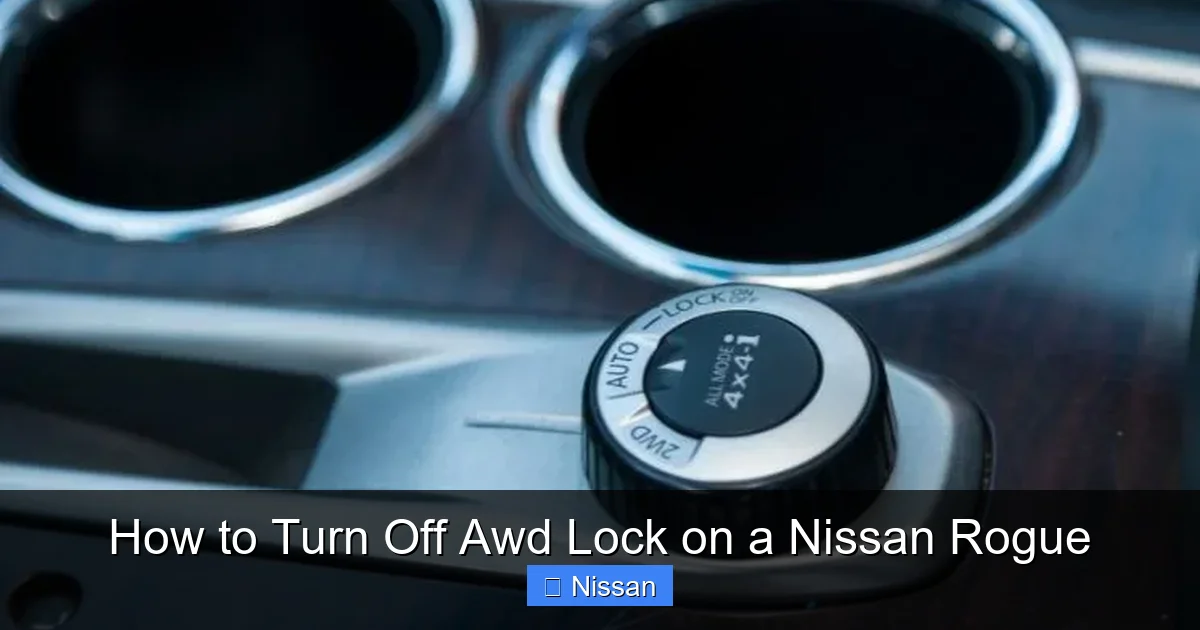
The AWD Lock button is typically found on the center console, near the gear shifter. It’s usually labeled “AWD LOCK” and may have a small icon of a car with all four wheels. On some models, it’s a physical button with a light that illuminates when active. On others, it might be a touch-sensitive switch.
If you can’t find it, don’t worry—check your owner’s manual. The exact location can vary slightly depending on your Rogue’s model year and trim level. For example, the 2020–2023 Nissan Rogue often has the button in the lower center stack, just above the climate controls.
Press the Button to Deactivate
Once you’ve found the button, turning off AWD Lock is as simple as pressing it. If the system is currently active, the button’s light will be on. Press it once, and the light should turn off. That’s it—AWD Lock is now disengaged.
You’ll also see the AWD Lock indicator on your dashboard disappear. This confirms that the system has returned to its normal, automatic AWD mode, where power is sent to the rear wheels only when needed.
Verify the System Is Off
After pressing the button, take a moment to check your instrument panel. Make sure the AWD Lock light is no longer illuminated. If it’s still on, try pressing the button again. In rare cases, the system may not respond immediately—especially if the vehicle is in motion or the battery is low.
If the light remains on despite repeated presses, consult your owner’s manual or contact a Nissan service center. There could be a system error or a need for a software update.
When to Turn It Off Automatically
Some newer Nissan Rogue models are equipped with an automatic AWD Lock disengagement feature. This means that if you drive above a certain speed—usually around 25–30 mph—the system will automatically turn off AWD Lock, even if you don’t press the button.
This is a great safety feature because it prevents drivers from accidentally leaving AWD Lock on during highway driving. However, it’s still a good habit to manually turn it off when you no longer need it, especially if you’ve been driving in snow or mud and are returning to normal roads.
When Should You Use AWD Lock—and When Should You Turn It Off?
Visual guide about How to Turn Off Awd Lock on a Nissan Rogue
Image source: nissannationpodcast.com
Knowing how to turn off AWD Lock is only half the battle. The other half is knowing *when* to use it in the first place. Using AWD Lock at the wrong time can do more harm than good.
Best Situations to Use AWD Lock
AWD Lock is ideal for short-term use in low-traction environments. Here are some common scenarios where it shines:
– **Driving in deep snow or slush:** When roads are covered in snow and your front wheels are slipping, AWD Lock helps maintain forward momentum.
– **Muddy or gravel roads:** Loose surfaces can cause wheels to spin. AWD Lock distributes power more evenly, reducing the chance of getting stuck.
– **Light off-roading:** If you’re driving on a dirt trail or forest road, AWD Lock can improve stability and control.
– **Steep inclines or declines:** When climbing a snowy hill or descending a muddy slope, AWD Lock gives you better grip and confidence.
In these situations, activating AWD Lock can make a real difference in your vehicle’s performance and your safety.
When to Turn It Off Immediately
On the flip side, there are several situations where you should turn off AWD Lock right away:
– **Dry pavement:** Once you’re back on clear, dry roads, deactivate AWD Lock. There’s no benefit to keeping it on, and it can cause unnecessary wear.
– **Highway driving:** At speeds above 30 mph, AWD Lock can strain the drivetrain. Turn it off before merging onto the freeway.
– **City driving:** Stop-and-go traffic on normal roads doesn’t require AWD Lock. Save it for when you really need it.
– **Parking or tight maneuvers:** While not always harmful, AWD Lock can make tight turns feel stiff. Turn it off when navigating parking lots or narrow streets.
A good rule of thumb: if you’re not actively dealing with slippery or unstable conditions, AWD Lock should be off.
Common Mistakes to Avoid
Many drivers make the mistake of treating AWD Lock like a permanent setting. They turn it on during a snowstorm and forget to turn it off for weeks. This is a big no-no.
Another mistake is using AWD Lock on icy roads at high speeds. While it helps with traction, it doesn’t improve braking or cornering. Always drive cautiously in winter conditions, regardless of your AWD settings.
Finally, don’t assume AWD Lock makes your Rogue invincible. It’s a helpful tool, but it won’t prevent accidents on black ice or steep, untreated roads. Safe driving habits are still your best defense.
Impact of Leaving AWD Lock On
Visual guide about How to Turn Off Awd Lock on a Nissan Rogue
Image source: thecarhow.com
You might be thinking, “So what if I leave it on for a few extra days? It’s just a button.” But the truth is, prolonged use of AWD Lock can have real consequences for your vehicle.
Reduced Fuel Efficiency
One of the most noticeable effects is decreased fuel economy. When AWD Lock is active, your engine has to work harder to turn all four wheels, even when it’s not necessary. This increases fuel consumption by up to 10–15% in some cases.
For example, if your Rogue normally gets 28 mpg on the highway, you might drop to around 24 mpg with AWD Lock engaged. Over time, that adds up—both in cost and environmental impact.
Increased Wear on Drivetrain Components
The Nissan Rogue’s AWD system is designed to be smart and efficient. Forcing it into a locked state on dry pavement creates stress on components like the transfer case, differential, and driveshafts. These parts aren’t built to handle constant torque distribution on high-traction surfaces.
Over time, this can lead to premature wear, overheating, and even mechanical failure. Repairing or replacing these components can cost hundreds—or even thousands—of dollars.
Tire Wear and Handling Issues
Another side effect is uneven tire wear. When AWD Lock is on, all four wheels are forced to rotate at the same speed, even during turns. On dry pavement, this can cause the tires to scrub or skid slightly, leading to faster wear on the tread.
You might also notice that your Rogue feels less responsive or “twitchy” during cornering. This is because the locked AWD system resists the natural speed differences between inner and outer wheels in a turn.
Potential for Dashboard Warnings
In some cases, leaving AWD Lock on for too long can trigger warning lights on your dashboard. The vehicle’s computer may detect abnormal drivetrain behavior and alert you with a message like “AWD System Malfunction” or “Check AWD System.”
While this doesn’t always mean immediate damage, it’s a sign that something isn’t right. Ignoring these warnings can lead to more serious issues down the road.
Tips for Maintaining Your Nissan Rogue’s AWD System
Now that you know how to turn off AWD Lock and why it matters, let’s talk about keeping your AWD system in top shape.
Regular Maintenance Checks
Just like any other part of your vehicle, the AWD system needs regular attention. Make sure to include it in your routine maintenance schedule. This includes:
– Checking and replacing AWD fluid as recommended (usually every 30,000–60,000 miles)
– Inspecting driveshafts and CV joints for wear or leaks
– Ensuring tires are properly inflated and evenly worn
Your owner’s manual will have specific guidelines for your model year.
Rotate Your Tires
Because AWD systems are sensitive to tire size and wear differences, it’s crucial to rotate your tires regularly—typically every 5,000–7,000 miles. Uneven tire wear can confuse the AWD system and cause it to work harder than necessary.
Use the Right Tires
Always use the same type and size of tires on all four wheels. Mixing tire brands, tread patterns, or sizes can disrupt the AWD system and lead to performance issues. If you install winter tires, make sure they’re on all four wheels—not just the front or rear.
Drive Smart
Finally, remember that AWD doesn’t make you invincible. It improves traction, but it doesn’t improve braking or handling on ice or snow. Always adjust your driving to the conditions, and don’t rely solely on technology to keep you safe.
Conclusion
Turning off AWD Lock on your Nissan Rogue is a simple but essential part of owning and maintaining your vehicle. It’s not just about pressing a button—it’s about understanding when to use the feature and when to let your SUV’s intelligent AWD system do its job automatically.
By using AWD Lock only when needed—such as in snow, mud, or off-road conditions—and turning it off when you return to normal roads, you’ll protect your drivetrain, improve fuel efficiency, and extend the life of your tires and components.
Remember: the AWD Lock button is there to help you in tough situations, not to be a permanent fixture. Make it a habit to check your dashboard after driving in adverse conditions, and always refer to your owner’s manual for model-specific guidance.
With this knowledge, you’re now equipped to get the most out of your Nissan Rogue’s AWD system—safely, efficiently, and confidently.
Frequently Asked Questions
How do I know if AWD Lock is turned on?
Look at your instrument panel. If the AWD Lock indicator light is illuminated, the system is active. You may also notice a slight change in how the vehicle handles, especially on slippery surfaces.
Can I drive with AWD Lock on all the time?
No, you should not. AWD Lock is designed for temporary use in low-traction conditions. Leaving it on during normal driving can reduce fuel efficiency, increase wear on drivetrain components, and cause handling issues.
Will turning off AWD Lock improve my gas mileage?
Yes, especially if you’ve been driving on dry pavement with it engaged. Disengaging AWD Lock allows the system to operate in its default front-wheel-drive mode, which is more fuel-efficient.
Does AWD Lock work in reverse?
Yes, AWD Lock functions in both forward and reverse gears. It helps maintain traction when backing up on slippery or uneven surfaces.
What happens if I forget to turn off AWD Lock?
If you drive at higher speeds or on dry pavement with AWD Lock on, you may experience reduced fuel economy, increased tire wear, and potential strain on the drivetrain. Some models will automatically disengage it above 30 mph.
Is AWD Lock the same as 4WD?
No. AWD Lock on the Nissan Rogue is not a true 4WD system. It’s a temporary all-wheel-drive mode for light off-roading or slippery conditions, not for heavy-duty off-road use like a traditional 4WD system.
