
How to Turn Off Awd Lock on a Hyundai Tucson

Turning off the AWD Lock on a Hyundai Tucson is simple: just press the AWD Lock button again while driving. This feature is meant for temporary use in low-traction situations like deep snow or mud, not for everyday dry pavement driving. Constantly using AWD Lock can harm your drivetrain and hurt fuel economy. Always return to normal AWD Auto mode for regular driving to ensure your vehicle operates optimally and safely.
Key Takeaways
- AWD Lock is a temporary feature: It manually locks the center clutch to send a fixed 50/50 torque split front/rear, intended only for getting unstuck from severe low-traction conditions.
- To disable, press the button once: While the vehicle is moving, simply press the AWD Lock button (often with a “Lock” icon) a second time to return to the standard intelligent AWD Auto mode.
- Do not use on dry pavement: Driving for extended periods with AWD Lock engaged on high-traction surfaces can cause binding, premature wear, and damage to the drivetrain components.
- The system disengages automatically: If you exceed a certain speed (typically around 25-30 mph / 40-48 km/h), the Tucson will automatically disengage AWD Lock and revert to AWD Auto for safety.
- AWD Auto is your default and best mode: This intelligent system constantly monitors wheel slip and road conditions, seamlessly distributing power where it’s needed most for optimal traction and efficiency.
📑 Table of Contents
- Understanding Your Hyundai Tucson’s AWD System
- The Critical Rule: When NOT to Use AWD Lock
- How to Turn Off AWD Lock: The Simple Steps
- What Happens If You Forget? Automatic Disengagement
- Troubleshooting: What If AWD Lock Won’t Turn Off?
- Maintaining Your AWD System for Longevity
- Conclusion: A Simple Skill for a Smarter Driver
Understanding Your Hyundai Tucson’s AWD System
So, you’re sitting in the driver’s seat of your Hyundai Tucson, looking at the array of buttons on the console or dash. There it is: a button marked with an icon that looks like a car with “AWD” and the word “LOCK.” You pressed it once, maybe because you were stuck in a snowbank or a muddy trail, and a little light on your instrument cluster came on telling you that “AWD LOCK” is active. Now you’re on the road again, the emergency is over, and you’re wondering, “How do I turn this thing off?” You’ve come to the right place. We’re going to walk through exactly what this button does, why you shouldn’t leave it on, and the incredibly simple, safe way to disengage it.
First, let’s clarify what you’re actually dealing with. Your Hyundai Tucson doesn’t have a traditional, full-time four-wheel-drive system with a locking differential like a heavy-duty truck. Instead, it uses a sophisticated, on-demand All-Wheel Drive (AWD) system. In its normal state—often labeled “AWD Auto”—the Tucson’s computer brain (the ECU) is constantly working. It uses sensors from the wheels, the throttle, and the steering to predict and detect any loss of traction. If the front wheels start to slip, it can instantly send power to the rear wheels, all without you lifting a finger. This is perfect for 99% of your driving, from rainy highways to slippery side streets.
The Purpose of the AWD Lock Button
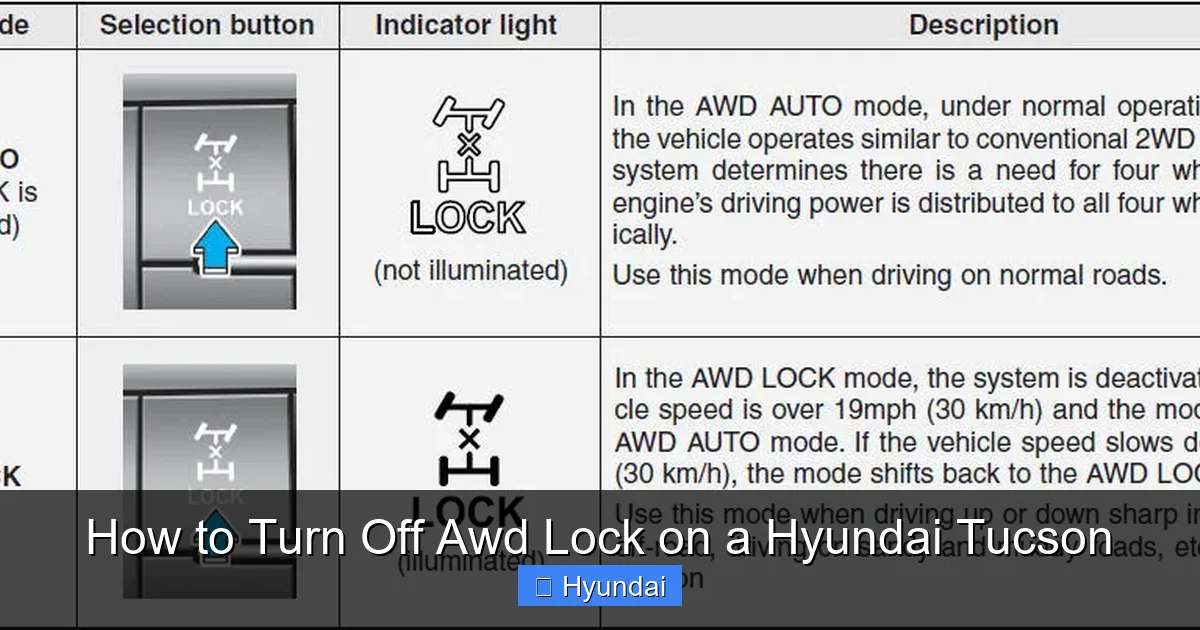
The “AWD Lock” button is a manual override. It tells the system: “Forget the computer’s predictions. I need maximum, equal torque to both the front and rear axles right now, no matter what.” This creates a fixed 50/50 power split. Why would you want this? Imagine you’re stuck in deep, fresh snow, or you’re trying to navigate a particularly muddy, rutted path. In these extreme, low-traction scenarios, the automatic system might hesitate or cycle power too quickly, making it hard to build momentum. Locking it gives both axles a steady supply of power, helping you “rock” the vehicle free or maintain steady forward thrust. It’s a recovery tool, not a driving mode.
The Critical Rule: When NOT to Use AWD Lock
This is the most important part of our guide. The AWD Lock function is a specialized tool for a specific job. Using it outside of that job is like using a sledgehammer to put in a finishing nail—it gets the job done, but it causes damage. You should never drive your Tucson with AWD Lock engaged on high-traction surfaces like dry asphalt, wet pavement, or even packed snow. Here’s why.
Visual guide about How to Turn Off Awd Lock on a Hyundai Tucson
Image source: hyundaitucsonmanual.com
The Danger of Drivetrain Binding
When your AWD system is in its normal Auto mode, it’s designed to allow a slight difference in rotational speed between the front and rear axles. This is called “slip” and it’s necessary for turning on dry pavement. Think about it: when you go around a corner, your outside wheels travel a slightly longer distance than your inside wheels. A full-time locked system would fight against this, causing the drivetrain (especially the center clutch and driveshafts) to twist and bind under stress. This binding creates immense heat and pressure, leading to premature wear, whining noises, and eventually, catastrophic failure of components like the clutch pack or driveshaft U-joints. It’s not a matter of if it will cause damage, but when.
Fuel Economy Takes a Major Hit
Even if you avoid damage, driving with AWD Lock forces the system to work against itself constantly. The transfer case and rear drive unit are always engaged and trying to send power, creating significant parasitic drag. Your engine has to work much harder to overcome this drag, which means you’ll see a noticeable drop in your miles per gallon (MPG). You’re literally burning extra fuel for no benefit, as the locked system provides no extra safety or performance on dry roads. It’s an expensive and inefficient way to drive.
How to Turn Off AWD Lock: The Simple Steps
Okay, you’ve used AWD Lock to get out of that jam, and you’re now back on a normal, grippy surface. You need to disengage it. The process is intentionally straightforward, designed so you can do it without taking your eyes off the road for long.
Visual guide about How to Turn Off Awd Lock on a Hyundai Tucson
Image source: autoactuality.com
Step 1: Ensure the Vehicle is Moving. The AWD Lock system is designed to be disengaged only while the vehicle is in motion. You typically cannot turn it off if the car is completely stopped with the engine running. This is a safety feature to prevent accidental disengagement during a critical recovery moment.
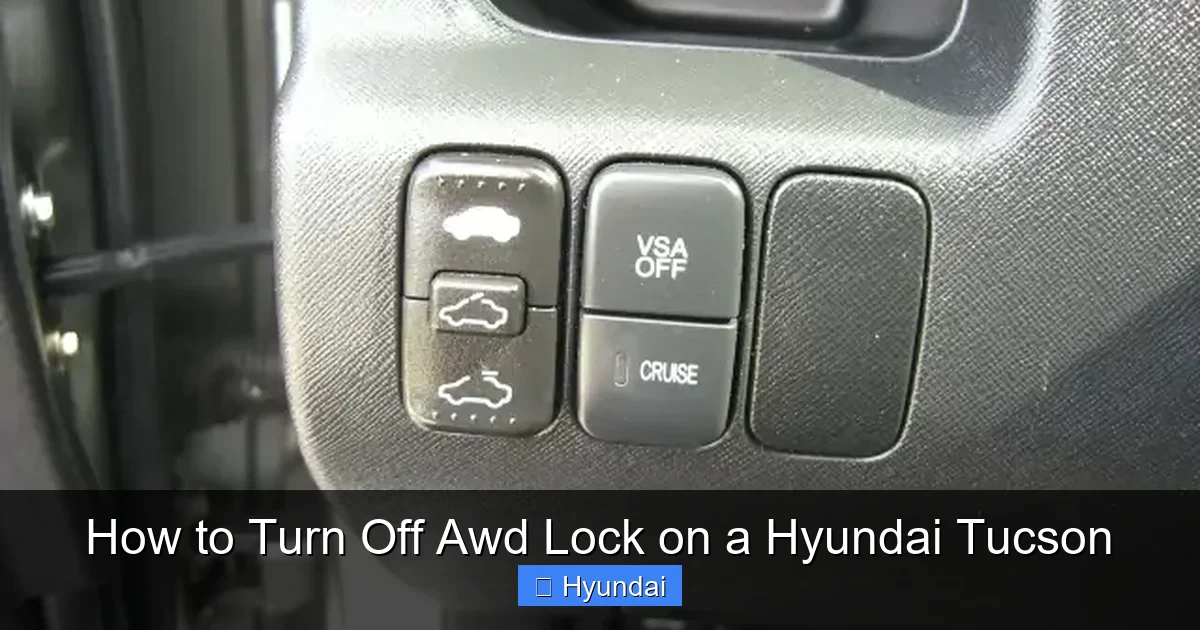
Step 2: Locate the AWD Lock Button. This is usually found on the center console, near the climate controls or infotainment system. It’s often a black button with a white or orange icon depicting a car with “AWD” and the word “LOCK.” In some model years, it might be a soft-touch button on the lower dash or steering wheel area. Consult your owner’s manual if you can’t find it, but it’s almost always prominently labeled.
Step 3: Press the Button Once. While driving at any reasonable speed (above a crawl), simply press the AWD Lock button one time. You should feel a distinct click.
Step 4: Watch for the Indicator Light to Go Out. Immediately after pressing the button, check your instrument cluster. The “AWD LOCK” warning light (usually orange or yellow) should extinguish within a second or two. Simultaneously, you may see a different indicator, like “AWD AUTO” or simply an “AWD” icon without “LOCK,” illuminate to confirm the system has reverted to its standard automatic mode. You might also hear or feel a slight, normal mechanical clunk as the center clutch disengages and the system reconfigures itself.
That’s it! You have successfully turned off AWD Lock. Your Tucson’s computer is now back in charge, intelligently managing power distribution for your current driving conditions. For more details on how various vehicle systems operate, you might find our article on how to turn off AWD on a Dodge Challenger interesting, as it covers a very different performance-oriented system.
What Happens If You Forget? Automatic Disengagement
Hyundai engineers, knowing that drivers might forget they’ve locked the system, built in a crucial automatic failsafe. If you accidentally leave AWD Lock engaged and begin driving at higher speeds, your Tucson will take matters into its own hands. Once you exceed a predetermined speed threshold—typically around 25 to 30 miles per hour (40 to 48 km/h)—the vehicle’s computer will automatically disengage the AWD Lock mode and revert to AWD Auto. The “AWD LOCK” light on your dash will turn off. This is a critical protective measure designed to prevent the drivetrain binding and damage we discussed earlier. It’s the car’s way of saying, “Hey, you’re going too fast for this setting. I’m switching back to normal for your own good.” So, even if you forget, your Tucson has a safety net. However, you should not rely on this as a regular practice. It’s a last-resort protection, not a feature to be used intentionally. Always be mindful and manually turn it off when you no longer need it.
Visual guide about How to Turn Off Awd Lock on a Hyundai Tucson
Image source: i.ytimg.com
Troubleshooting: What If AWD Lock Won’t Turn Off?
In the vast majority of cases, the process described above works flawlessly. But what if you press the button, the light stays on, and the system remains locked? Don’t panic. There are a few common reasons this can happen, and some are easy to check yourself.
Check Your Speed and Conditions
First, confirm you are actually moving at a speed above a very slow crawl (more than 5-10 mph). The system may not respond if you’re barely moving. Also, are you in an extremely low-traction situation where the system is actively fighting to maintain the lock? If you’re still stuck and wheels are spinning, the system may hold the lock to assist you. Try gaining a little momentum on a clearer surface first.
The Button Itself: Stuck or Faulty
Over time, dust, debris, or a spilled drink can cause the AWD Lock button to become physically stuck or unresponsive. Inspect the button. Can you press it down fully? Does it feel spongy or return slowly? Gently clean around the button with a soft brush and a mild cleaner. If it feels mechanically broken or doesn’t click, it may need replacement by a technician.
Electronic Glitches and System Faults
Like any modern car, your Tucson’s computer can sometimes have a hiccup. A simple restart can fix temporary glitches. Try this: safely park, turn the engine completely off, open and close the driver’s door (this resets many systems), wait 30 seconds, and restart the car. Then try the disengagement procedure again while driving. If the light persists, it’s possible a fault has been detected in the AWD system itself—perhaps a bad sensor on the rear axle or an issue with the transfer case motor. In this case, the “AWD LOCK” light may be accompanied by a more general “AWD” or “Check Engine” warning light. This requires professional diagnosis. Continuing to drive with a potential fault, especially with the system locked, is risky. Schedule a service appointment with your Hyundai dealer or a trusted mechanic. They can read the diagnostic trouble codes (DTCs) from the vehicle’s computer to pinpoint the exact issue, which could range from a simple wiring problem to a failing transfer case actuator.
Maintaining Your AWD System for Longevity
Your Hyundai Tucson’s AWD system is robust and designed for years of reliable service, but it does benefit from proper care. Treating the AWD Lock button with respect is the first step. Here are a few more tips to keep your all-wheel drive healthy.
- Use the Correct Tires: This is non-negotiable. AWD systems are only as good as the tires beneath them. Always maintain proper tire pressure and ensure all four tires are the same size, model, and have roughly equal tread depth. Mixing worn and new tires, or different types of tires, can confuse the system and cause excessive wear on the drivetrain. If you need to replace only two tires, put the new ones on the rear axle for stability, but plan to replace all four as soon as possible.
- Follow Recommended Service Intervals: Your owner’s manual will specify when the transfer case fluid (if equipped) and differential fluids need to be changed. Unlike engine oil, these fluids are often “lifetime” in many modern vehicles, but for severe duty (frequent towing, extreme off-road use), earlier changes can be beneficial. Stick to the schedule.
- Listen and Feel: Get to know the normal sounds and feel of your Tucson. A healthy AWD system should operate silently in Auto mode. Unusual noises—like grinding, clunking, or a high-pitched whine that changes with speed—especially when turning, are early warning signs. Get them checked immediately.
- Use AWD Lock Sparingly and Appropriately: Reserve it for when you’re truly stuck. A few seconds or a minute of use to rock the vehicle free is fine. It’s not meant for driving up a long, snowy driveway at a constant speed; in that case, AWD Auto will likely perform just as well or better. Remember, its purpose is to break initial static friction, not for sustained use.
By following these practices, you ensure your AWD system is there when you need it most, for the life of your vehicle. For other Hyundai-specific maintenance queries, resources on resetting service lights or addressing warnings are widely available.
Conclusion: A Simple Skill for a Smarter Driver
Mastering the AWD Lock function on your Hyundai Tucson is about understanding a simple principle: it’s a tool, not a default setting. The knowledge of how to turn it off—just one press of a button while moving—is empowering. It means you can confidently use this powerful feature to get out of a tight spot, then seamlessly return to the intelligent, efficient, and safe AWD Auto mode that your vehicle was primarily designed for. This small act of switching modes protects your investment by preventing costly drivetrain wear, saves you money at the gas pump, and ensures your Tucson is operating at its peak performance for your everyday journeys. So the next time you see that “AWD LOCK” light illuminate, you’ll know exactly what it means, why it’s on, and precisely how to turn it off when the job is done. Drive smart, drive informed.
Frequently Asked Questions
Can I turn off AWD Lock while the car is stopped?
No, the system is designed to only disengage AWD Lock while the vehicle is in motion. You must be moving (typically above a very slow crawl) for the button press to register and for the system to safely unlock the center clutch.
Will my Tucson automatically turn off AWD Lock if I drive fast?
Yes. As a safety feature, if you exceed approximately 25-30 mph (40-48 km/h) with AWD Lock engaged, the computer will automatically disengage it and revert to AWD Auto mode to prevent drivetrain damage on high-traction surfaces.
Is it bad to occasionally use AWD Lock on wet pavement?
While brief, occasional use on wet pavement is less harmful than on dry asphalt, it’s still not recommended. The system is engineered for severe low-traction conditions like deep snow or mud. For wet roads, the standard AWD Auto mode provides more than adequate and smarter traction control.
What does the AWD Lock light look like on the dash?
The indicator is typically an orange or yellow icon that resembles a car with the letters “AWD” and the word “LOCK” displayed. It’s usually located in the gauge cluster behind the steering wheel. When it’s off and AWD Auto is active, you might see a simple “AWD” icon without the “LOCK” text.
My AWD Lock light is stuck on and won’t turn off. Is this serious?
It can be. If the light remains on despite pressing the button while moving, it indicates either a stuck button, a system fault, or that the vehicle is still in a condition it deems requires lock (like being stuck). A persistent light with a normal driving feel might point to an electronic glitch. If it’s accompanied by other warning lights or unusual noises, have the system scanned for trouble codes by a professional immediately.
Does using AWD Lock use more gas?
Yes, significantly more. Engaging AWD Lock creates constant mechanical drag in the drivetrain because the center clutch is fully engaged and the rear axle is permanently powered. The engine must work harder to overcome this drag, leading to a substantial decrease in fuel economy compared to the efficient, on-demand nature of AWD Auto mode.