
How Do I Start My Hyundai with a Key?

Starting your Hyundai with a key is straightforward but varies by model year and key type. Whether you have a traditional metal key, a key fob with a hidden manual key, or a push-button start system, the process is simple once you know the steps. This guide breaks down each method, explains common problems like a dead battery or steering wheel lock, and provides clear, step-by-step instructions for every Hyundai on the road today.
So, you’re standing by your Hyundai, key in hand (or maybe fob in hand), and you just want to get going. It should be simple, right? Usually, it is! But Hyundai has used several different key and starting systems over the years. Figuring out how to start your Hyundai with a key depends on whether you’re driving a 2005 Elantra or a 2024 Santa Fe. Don’t worry. We’re going to walk through every single scenario, from the old-school metal key to the modern push-button start. By the end, you’ll be a Hyundai starting pro, ready to handle anything from a routine startup to a dead key fob battery.
First, take a breath. This isn’t a complex puzzle. It’s a series of simple, logical steps. The key—pun intended—is recognizing what kind of “key” you actually have. Is it a solid piece of metal? Does it have buttons on it? Is there a little cap on the fob that hides a physical key? The answer tells you exactly what to do. Let’s break it down from the simplest to the most advanced system.
Key Takeaways
- Identify Your Key Type: Hyundai uses traditional keys, key fobs with manual keys, and push-button start key fobs. The starting procedure depends entirely on which one you have.
- Traditional Key Start: Insert the key into the door lock to unlock, then into the ignition cylinder to start. Turn clockwise to “Start” and release.
- Push-Button Start with Key Fob: The fob must be inside the vehicle. Press the brake pedal (or clutch for manual), then the engine start/stop button. No key insertion is needed.
- Emergency Manual Key: If your key fob battery dies, locate the hidden physical key inside the fob. Use it to unlock the door, then locate the hidden key slot near the start button to start the car.
- Common Issues: A completely dead key fob battery is the #1 cause of “key not detected” errors. Also check for a locked steering wheel or a weak car battery.
- Security Feature: The steering wheel lock engages if you try to turn the wheel without the key in the “On” position. Gently wiggle the wheel while turning the key to disengage it.
- When in Doubt, Consult Manual: Your owner’s manual has the definitive instructions for your specific model year and trim level.
📑 Table of Contents
- 1. Identifying Your Hyundai Key & Starting System
- 2. How to Start Your Hyundai: Step-by-Step for Each System
- 3. What to Do When the Key Fob Battery is Dead (The #1 Problem)
- 4. Troubleshooting: Why Won’t My Hyundai Start?
- 5. Security Features & Important Safety Tips
- 6. Special Cases: Cold Weather, Aftermarket Keys, and More
- Conclusion: You’ve Got This
1. Identifying Your Hyundai Key & Starting System
Before we do anything, we need to play detective. Look at your key. Really look at it. Hyundai’s evolution from a simple metal key to a sophisticated keyless entry and start system happened over three main phases. Knowing which phase your car belongs to is the first step to getting it running.
The Traditional Metal Key (Pre-2010s Models & Some Base Trims)
This is the classic. It’s a solid piece of metal, often with a plastic head for the remote buttons. You use it to unlock the door, and then you physically insert it into a ignition cylinder. You’ll find this on older models like the Hyundai Accent, Elantra, and Sonata from the early-to-mid 2000s, and sometimes still on the very base trims of newer models if they skip the keyless option. If your key has a distinct, separate metal blade that you can pull out or that’s permanently attached, and you see a round hole in the steering column, you have this system.
The Key Fob with Hidden Manual Key (Common Mid-2000s to Mid-2010s)
This is a very common Hyundai setup. The “key” is a plastic fob with lock/unlock/trunk buttons. But inside that fob is a hidden, foldable metal key. To use it, you press a small button or slide a cover to release the metal key. You use this key to unlock the driver’s door in an emergency (like a dead fob battery). Then, you insert that metal key directly into a small, often covered, slot on the steering column to start the car. Models like the Hyundai Tucson and Santa Fe from this era frequently use this design. It’s a bridge between old and new technology.
The Push-Button Start with Key Fob (Modern Hyundai Standard)
This is what you’ll find on almost all new Hyundai vehicles today, from the sleek Sonata to the rugged Palisade. There is no ignition cylinder. The key is a fob that stays in your pocket or purse. The car has a start/stop button, usually marked with a circle and a power symbol, on the dashboard or center console. The system is called “Push-Button Start” or “Smart Key.” The car’s antennas constantly look for the unique signal from your paired key fob. If it’s inside the car, you can start the engine. There is no manual key insertion for normal operation, but the fob itself contains a hidden emergency key for unlocking the door if the fob’s battery dies.
2. How to Start Your Hyundai: Step-by-Step for Each System
Now that you’ve identified your system, let’s get that engine running. We’ll start with the simplest and move to the most common modern system.
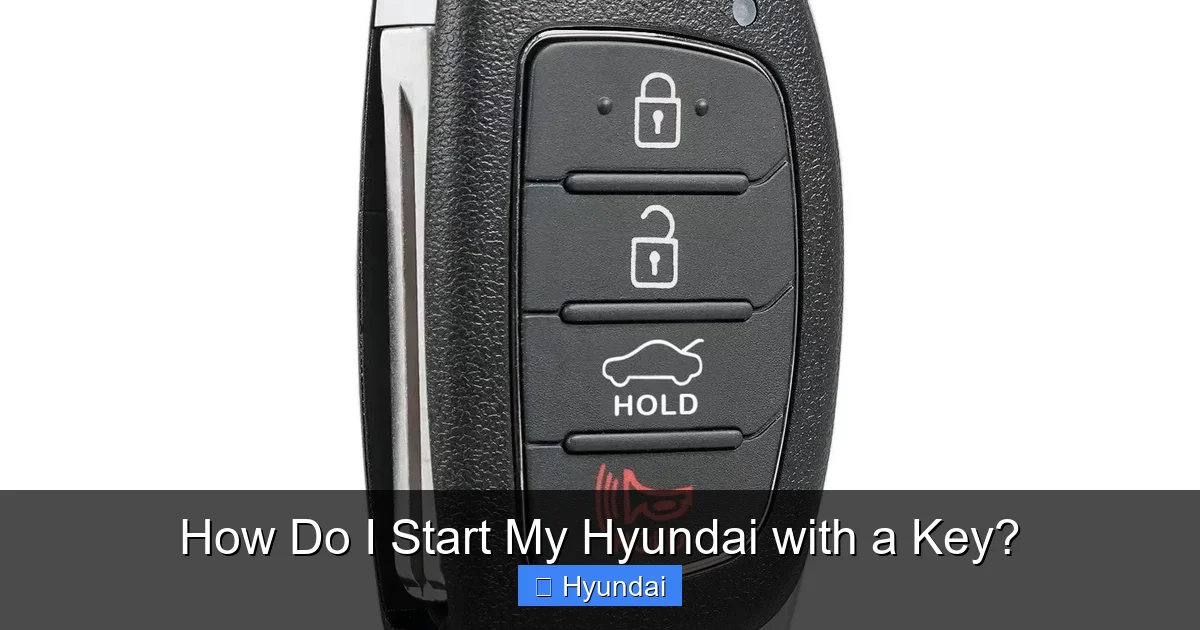
Visual guide about How Do I Start My Hyundai with a Key?
Image source: m.media-amazon.com
Starting a Hyundai with a Traditional Metal Key
This is automotive basics, but let’s be thorough.
- Unlock: Use the key to unlock the driver’s side door. You can also use the remote buttons if the fob battery is good.
- Enter & Sit: Get in, close the door, and adjust your seat and mirrors.
- Insert Key: Locate the ignition cylinder on the right side of the steering column (for left-hand drive models). Insert the key fully.
- Start Sequence: The key will have positions: “Lock” (0), “On” (I or II), and “Start” (III). Turn the key clockwise to the “Start” position. You’ll hear the starter motor crank the engine.
- Release: As soon as the engine fires and is running smoothly, release the key. It will spring back to the “On” position on its own. Do not hold it in the start position.
- Driving: To shift into drive (or reverse), you will typically need to press the brake pedal first, as a safety interlock.
Tip: If the steering wheel is locked (common when parked on a hill), you might not be able to turn the key. Gently wiggle the steering wheel left and right while attempting to turn the key. The lock will disengage with a slight click.
Starting a Hyundai with a Key Fob & Hidden Manual Key
This is the two-step process for when the fob’s electronics are dead or you’re using the manual key for entry.
Part A: Unlocking the Door with the Manual Key
- Locate the small release button or slider on your key fob. Press/slide it to eject the hidden metal key.
- Use this key to unlock the driver’s door. There is often a separate keyhole on the door handle itself, sometimes hidden under a plastic cap. Pry off the cap with the key tip if needed.
Part B: Starting the Engine with the Manual Key
- Once inside, look at the steering column. You’ll see a small, round cover or a slot that looks like it would fit a key. This is the emergency ignition slot.
- Remove the cover (it may just pull off or require a gentle twist).
- Insert the metal key into this slot.
- Turn the key clockwise to start the engine, just like with a traditional key. Release when the engine starts.
- The car will now run normally. You can drive it, but your key fob’s remote functions (lock/unlock, trunk) won’t work until you replace the fob’s battery.
Important: This system is designed as a backup. The main, everyday way to start the car is still with the key fob in the vehicle and the push-button (if your model has it). The manual key is for entry and emergency starting only.
Starting a Hyundai with Push-Button Start (The Most Common Modern Method)
This feels like magic the first time you do it. No key, no turning. Just a button.
- Ensure Key Fob is Inside: The entire key fob must be inside the vehicle. It can be in your pocket, purse, or on the seat. The system has a range of about 3-5 feet.
- Press the Brake (or Clutch): For safety, you must firmly press the brake pedal. If you have a manual transmission, press the clutch pedal instead.
- Press the Start/Stop Button: Locate the button, usually on the dashboard to the right of the steering wheel or on the center console. Press it once firmly.
- Engine Starts: The engine will crank and start. The button’s light may change color (often from white to red or green). You’re ready to drive.
- To Turn Off: When you park and want to turn the engine off, ensure the car is in “Park” (P), press the brake pedal, and press the start/stop button again.
Common Variations: Some Hyundai models have a two-step process: Press the button once (without the brake) to turn the ignition to “On” (powering accessories), then press again (with brake) to start. The engine start/stop button also often has a key symbol on it. If your key fob battery is extremely low, you may need to hold the button for a few seconds instead of a quick press.
3. What to Do When the Key Fob Battery is Dead (The #1 Problem)
This is the most frequent “I can’t start my Hyundai” situation. Your key fob battery (usually a CR2032) dies, and the car doesn’t detect the key. The doors won’t unlock with the button, and the push-button start does nothing or says “Key not detected.” Here’s your rescue plan.

Visual guide about How Do I Start My Hyundai with a Key?
Image source: thecarhow.com
Step 1: Unlock the Door Manually
As described above, use the hidden manual key inside your fob to unlock the driver’s door. This gets you inside the car.
Step 2: The Emergency Start Procedure
This is the critical step that many owners don’t know about. Hyundai designed a backup for this exact scenario.
- With the dead fob inside the car (place it in the cup holder or on the passenger seat), locate the emergency key slot. This is not the same as the door key slot. It’s a small, rectangular or circular slot on the side of the start/stop button itself or immediately next to it on the dashboard/console. There’s often a little icon of a key next to it.
- Press the key fob’s plastic against the start/stop button, aligning the hidden manual key (if your fob has one) with this emergency slot. Some models require you to press the fob directly into the button while pressing the brake.
- Alternatively, on some models, you simply press the start/stop button with the key fob held very close (within an inch). The car’s system will use the fob’s antenna to get a tiny bit of power and recognize the key’s code even with a dead battery.
- Consult your owner’s manual for the exact method for your model year. The procedure can vary slightly.
Once the car recognizes the key, the start procedure is normal: press the brake and the start button. The engine will start. Get the key fob battery replaced immediately after this. You can usually do it yourself with a small flat-head screwdriver to open the fob case. If you’re unsure how to get a new key or fob, a Hyundai dealer or locksmith can help.
4. Troubleshooting: Why Won’t My Hyundai Start?
Okay, you have the right key, the fob battery is good, but the engine just clicks or does nothing. Let’s diagnose.

Visual guide about How Do I Start My Hyundai with a Key?
Image source: i.ytimg.com
The “Click-Click” Sound (Starter Motor Engages but Engine Doesn’t Turn)
This usually means the starter motor is getting power but can’t turn the engine over. Causes:
- Dead or Weak 12-Volt Battery: This is the most common cause of a click. The starter needs a huge surge of current. If your battery is old, corroded, or just drained (left lights on), it can’t provide it. Try jump-starting the car. If it starts, have the battery and charging system tested.
- Bad Starter Motor/Solenoid: If jump-starting doesn’t work and the battery is strong, the starter itself may be faulty. This requires professional replacement.
- Engine Seizure (Rare): No oil, severe internal damage. This is serious and requires a mechanic.
No Sound, No Lights, Nothing (Total Electrical Failure)
This points to a main power issue.
- Completely Dead Battery: No power at all. Check battery terminals for severe corrosion. Clean them and try a jump-start.
- Loose or Corroded Battery Terminals: The main cables might not be making contact. Open the hood and check. Tighten and clean the clamps if they are white/green and crusty.
- Blown Main Fuse: A major electrical short can blow a large fuse, killing all power. Check the engine bay fuse box.
- Faulty Key Fob (for Push-Start): If the car’s dash lights don’t even come on when you press the start button (without brake), the car isn’t detecting the key at all and is in a security lockout. Re-programming or replacing the fob may be needed.
Key Fob Not Detected (But Dash Lights Come On)
The dash lights up when you press the start button, but it says “Key not detected” or just beeps. This means the car’s computer is on, but it can’t find your key’s signal.
- Dead Key Fob Battery: Replace the CR2032 battery in the fob.
- Key Fob is Out of Range: Make sure the fob is inside the car. Don’t leave it in your pocket outside the door.
- Interference: Strong radio signals, a cell phone on the fob, or being near a large metal object can block the signal. Hold the fob right next to the start button.
- Unpaired Key: The key may have lost its programming with the car. This can happen after a battery disconnect. You’ll need to re-program the key using a special procedure (often requires a dealer scan tool) or a professional locksmith.
5. Security Features & Important Safety Tips
Modern starting systems aren’t just about convenience; they’re critical security features. Understanding them helps you avoid lockouts and theft.
The Steering Wheel Lock
This is a mechanical lock that engages when you remove the key and turn the wheel. Its purpose is to prevent theft. If you try to start the car while the wheel is turned and locked, the key won’t turn. The solution is the wiggle technique mentioned earlier. Gently turn the wheel left and right while applying light pressure to the key. The lock will disengage, and the key will turn. Never force the key.
Keyless Entry & Theft Prevention
Push-button start systems use encrypted rolling codes, making them very hard to clone. However, there is a threat called a “relay attack” where thieves amplify your key fob’s signal from inside your house to your car in the driveway. To prevent this:
- Store your key fob in a signal-blocking pouch (Faraday bag) or a metal container at night.
- Never leave the key fob on a hook or table near windows or doors.
- Some Hyundais have a software update to disable the key fob’s signal when not in use—check with your dealer.
Never Turn the Key to “Start” While Already Running
This seems obvious, but it’s a common mistake that can damage the starter motor. Once the engine is running, the key will spring back from the “Start” position. Do not hold it there. For push-button cars, pressing the button again while running will turn the engine off.
6. Special Cases: Cold Weather, Aftermarket Keys, and More
Real-world conditions can affect starting.
Starting in Very Cold Weather
Cold thickens engine oil and weakens batteries.
- Ensure your battery is healthy and fully charged. A weak battery that works in summer will fail in winter.
- Turn the key to “On” (the position before “Start”) and wait 3-5 seconds. This lets the fuel pump prime and the engine computer get ready. Then turn to “Start.” This helps in cold weather.
- For push-start, the system does this automatically. Just ensure the key fob battery is strong, as cold also weakens its signal.
Using an Aftermarket or Unprogrammed Key
If you get a new key cut from a locksmith or online, it will open the door but will NOT start the car unless it’s specifically programmed to your Hyundai’s immobilizer system. This is an anti-theft feature. You must have the new key fob/programmed by a Hyundai dealer or a licensed automotive locksmith with the proper equipment. Just having the correct cut is not enough. If you try to use an unprogrammed key, the dash will light up, but the engine will not crank, and a security light (often a car with a key icon) will blink. This is normal behavior for an unpaired key.
Conclusion: You’ve Got This
Starting your Hyundai with a key is one of the most fundamental interactions you have with your vehicle. It’s designed to be intuitive. Remember the golden rule: know your key type. Is it a blade to insert, a fob to press, or a fob to hold near a button? From there, the steps are logical.
For the vast majority of Hyundai owners with cars from the last decade, the process is: ensure the key fob is inside, press the brake, press the start button. If that fails because the fob battery is dead, find the hidden emergency slot and use the manual key to start. For older models, it’s the classic insert-and-turn.
When problems arise beyond a dead fob battery—like clicking, silence, or a persistent security light—the root cause is usually the 12-volt car battery, a faulty starter, or an unprogrammed key. Diagnose in that order. And when in doubt, your owner’s manual is your best friend. It has the exact diagrams and procedures for your specific VIN.
Your Hyundai’s starting system is a marvel of modern engineering blending convenience and security. Treat your key fob with care (keep it away from water and strong magnets), replace its battery every 2-3 years as a preventative measure, and you’ll enjoy countless, effortless starts for years to come. Now, go enjoy the drive!
Frequently Asked Questions
What if my Hyundai push-button start just beeps and says “Key not detected”?
First, ensure the key fob is inside the car. If the fob battery is dead, replace it. If that doesn’t work, hold the fob directly against the start/stop button while pressing the brake pedal. This uses a backup antenna to read the key’s code. If it still fails, the key may need to be re-programmed by a dealer.
My steering wheel is locked and I can’t turn the key. What do I do?
This is normal when the wheel is turned while the key is removed. Gently and slowly wiggle the steering wheel left and right while attempting to turn the key in the ignition. You should feel and hear a slight click as the lock disengages. Do not force the key violently.
Can I start my Hyundai if the key fob battery is completely dead?
Yes. Every Hyundai with a keyless system has an emergency procedure. Use the hidden manual key inside the fob to unlock the door. Then, locate the emergency key slot on or next to the start/stop button. Insert the manual key or press the fob against the button as specified in your owner’s manual to start the engine.
My Hyundai won’t start in the cold, but the battery is new. Why?
Even a new battery can be temporarily weakened by extreme cold. Try the “pre-start” routine: turn the key to the “On” position (or press the start button once without the brake) and wait 5-10 seconds. This allows the fuel pump to prime and the engine computer to fully activate. Then, start normally. Also, ensure you’re using the correct oil viscosity for cold weather (e.g., 5W-20).
I bought a used Hyundai with only one key. Can I get a spare made?
Absolutely. You will need a new key that is both cut for your door/ignition and programmed to your car’s immobilizer system. This must be done by a Hyundai dealership or a certified automotive locksmith. They will need your vehicle’s VIN and proof of ownership. Do not assume a standard key cut from a hardware store will work to start the engine.
My car has a push-button start, but I found a traditional keyhole under a cap on the steering column. What is that for?
That is the emergency manual key slot. You only use it if your key fob battery is completely dead and you cannot use the standard push-button start procedure. You unlock the door with the hidden manual key from the fob, then insert that same key into this steering column slot to start the engine. It is not for daily use.