
How to Stop Car Alarm When Changing Battery

Changing a car battery can accidentally trigger your vehicle’s alarm system, causing noise and stress. This guide walks you through safe, proven methods to stop the car alarm during a battery swap—without damaging your car or setting off false alerts.
Changing a car battery might seem like a simple DIY task—after all, it’s just swapping out an old component for a new one, right? Well, yes and no. While the physical act of removing and replacing a battery is straightforward, modern vehicles are packed with sensitive electronics, including sophisticated alarm and immobilizer systems. And here’s the catch: disconnecting the battery can sometimes confuse these systems, triggering a loud, persistent car alarm that leaves you flustered and your neighbors annoyed.
Imagine this: You’ve just popped the hood, loosened the terminals, and carefully removed the old battery. You install the new one, reconnect the cables, and—bam!—the car starts blaring like it’s under attack. No, it’s not haunted. It’s just your vehicle’s security system reacting to what it perceives as a breach. This happens because many alarm systems are designed to activate when they detect a sudden loss of power or unexpected disconnection. The good news? You don’t have to live with the noise or risk damaging your car. With the right preparation and a few smart techniques, you can stop the car alarm when changing the battery—smoothly and safely.
In this guide, we’ll walk you through everything you need to know to avoid alarm mishaps during a battery change. Whether you’re a seasoned DIYer or a first-time car owner, these tips will help you handle the process like a pro. We’ll cover why alarms go off, how to prevent it from happening, and what to do if the siren starts screaming mid-swap. Let’s get started.
Key Takeaways
- Disconnect the negative terminal first: Always remove the negative cable before the positive to reduce the risk of short circuits and alarm activation.
- Use a memory saver device: Plug in a memory saver to maintain power to your car’s electronics, preventing alarm systems from resetting or triggering.
- Keep the key fob nearby: Holding the key fob close to the ignition or door sensor can help maintain communication with the immobilizer and alarm system.
- Turn off the alarm manually if possible: Some vehicles allow you to disable the alarm via the dashboard menu or by pressing a button on the key fob before starting the battery change.
- Wait 10–15 minutes after reconnection: After installing the new battery, wait briefly before turning on accessories to let the system stabilize and avoid false alarms.
- Consult your owner’s manual: Every car model handles alarms differently—your manual holds model-specific instructions for safe battery replacement.
- Seek professional help if unsure: If the alarm won’t stop or you’re uncomfortable with electrical work, visit a mechanic to avoid costly mistakes.
📑 Table of Contents
- Why Does the Car Alarm Go Off When Changing the Battery?
- Preparation: Steps to Take Before Removing the Battery
- Step-by-Step Guide to Safely Change the Battery Without Triggering the Alarm
- What to Do If the Alarm Goes Off During or After the Battery Change
- Tips to Prevent Future Alarm Issues
- When to Call a Professional
- Conclusion
Why Does the Car Alarm Go Off When Changing the Battery?
To understand how to stop the car alarm when changing the battery, it helps to know why it happens in the first place. Modern vehicles rely on complex electronic control units (ECUs) that manage everything from engine performance to security features. The alarm system is one of the most sensitive components. It’s designed to detect unauthorized access—like someone breaking a window or tampering with the ignition. When the battery is disconnected, the system may interpret the sudden power loss as a break-in attempt.
Here’s what’s happening under the hood: The alarm system constantly monitors voltage levels and circuit continuity. When you disconnect the battery, especially if done abruptly, the system loses its reference point. Upon reconnection, it may not recognize the restored power as legitimate. Instead, it assumes the vehicle has been compromised and activates the siren, lights, or even the horn as a warning.
Another factor is the immobilizer system, which works hand-in-hand with the alarm. This system prevents the engine from starting unless the correct key (with a programmed transponder chip) is present. When the battery is removed, the immobilizer may lose its memory or fail to sync properly with the key fob. As a result, the car thinks it’s being stolen and triggers the alarm as a defense mechanism.
Additionally, some vehicles have a “panic mode” or “tamper alert” feature that activates if the battery is disconnected while the alarm is armed. Even if you disarm the system before starting, residual signals or timing issues can still cause a false trigger. This is especially common in cars with aftermarket alarms or older models with less refined electronics.
Understanding these triggers is the first step to prevention. Once you know why the alarm goes off, you can take targeted steps to avoid it—keeping your driveway quiet and your peace of mind intact.
Preparation: Steps to Take Before Removing the Battery
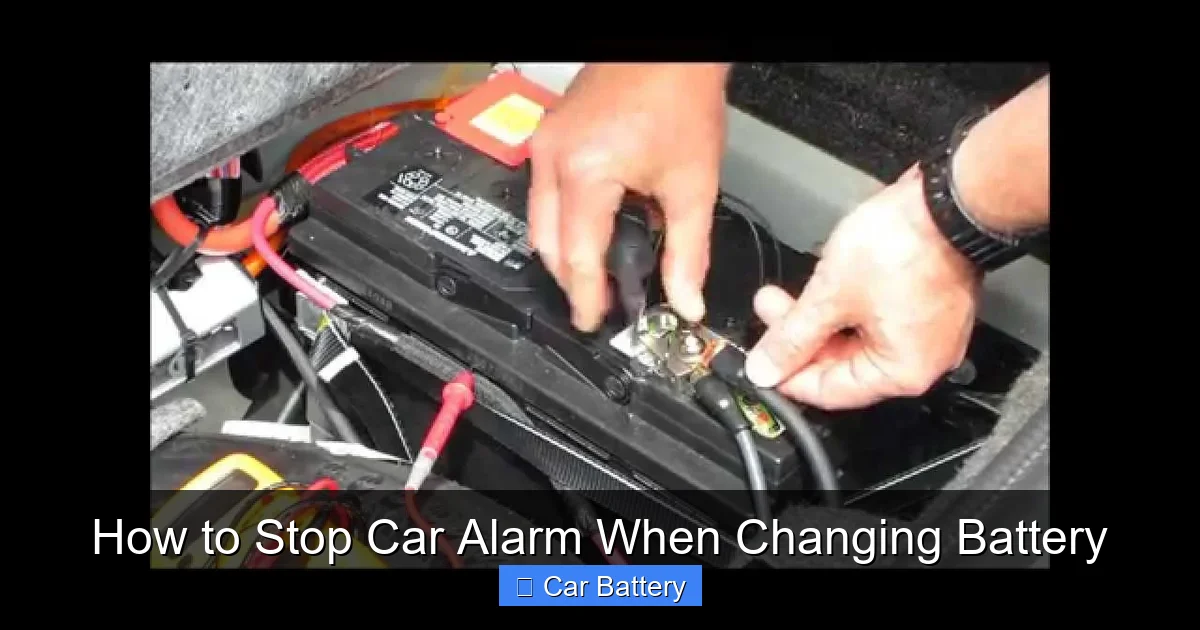
Visual guide about How to Stop Car Alarm When Changing Battery
Image source: i.ytimg.com
Proper preparation is the key to a smooth battery change with minimal risk of triggering the alarm. Rushing into the job without planning is the fastest way to end up with a blaring car and a headache. So before you even touch a wrench, take a few minutes to set yourself up for success.
Gather the Right Tools and Equipment
Start by collecting everything you’ll need: a socket wrench or combination wrench (usually 10mm or 13mm), safety gloves, safety glasses, a battery terminal cleaner or wire brush, and a memory saver device if you have one. A memory saver plugs into your car’s OBD-II port or cigarette lighter and maintains power to the ECU and alarm system while the battery is disconnected. This simple tool can prevent most alarm issues and save your radio presets, clock settings, and navigation data.
If you don’t have a memory saver, don’t panic—there are still ways to minimize risk. But investing in one (they cost around $15–$25) is a smart move for anyone who works on their car regularly.
Locate Your Owner’s Manual
Every car is different. Your owner’s manual contains specific instructions for battery replacement, including whether your vehicle has a backup power source or special procedures for disabling the alarm. For example, some Honda models require you to press the brake pedal after reconnecting the battery to reset the system. Others, like certain Ford vehicles, may need a specific key sequence to re-sync the immobilizer.
Take a few minutes to read the section on battery maintenance. It might save you from a loud surprise.
Ensure the Vehicle Is Off and Secure
Make sure the engine is off, the keys are out of the ignition, and the vehicle is in park (or in gear for manual transmissions) with the parking brake engaged. Open the hood and secure it with the prop rod. If your car has a security light on the dashboard, note its status—flashing or solid—before you begin. This can help you determine if the alarm is armed.
Keep the Key Fob Close
Hold your key fob in your hand or place it on the dashboard near the steering column. Many modern cars use proximity sensors that detect the fob’s signal. Keeping it nearby helps maintain communication with the immobilizer system, reducing the chance of a false alarm when power is restored.
Consider Disarming the Alarm Manually
If your car has a remote key fob with an “unlock” or “disarm” button, press it once before starting. This tells the system you’re authorized and may prevent it from reacting to the battery disconnection. Some vehicles also allow you to disable the alarm through the infotainment system—check your settings menu for a “Security” or “Alarm” option.
By taking these preparatory steps, you’re not just being cautious—you’re actively reducing the risk of triggering the alarm. Think of it like warming up before a workout: a little effort upfront prevents injury (or in this case, noise pollution).
Step-by-Step Guide to Safely Change the Battery Without Triggering the Alarm
Visual guide about How to Stop Car Alarm When Changing Battery
Image source: contentgrid.homedepot-static.com
Now that you’re prepared, it’s time to get your hands dirty—safely. Follow these steps carefully to change your car battery without setting off the alarm.
Step 1: Disconnect the Negative Terminal First
Always remove the negative (black) cable before the positive (red) one. This reduces the risk of short circuits. If you disconnect the positive first and your wrench touches the car’s metal frame, you could create a spark—potentially damaging electronics or even causing a fire. By removing the negative first, you eliminate the ground connection, making the system safer to work on.
Use your wrench to loosen the nut on the negative terminal clamp. Once it’s loose, wiggle the clamp gently and lift it off the battery post. Tuck it aside so it doesn’t accidentally touch the terminal while you work.
Step 2: Disconnect the Positive Terminal
Now remove the positive cable using the same method. Loosen the nut, lift the clamp, and secure it away from the battery. Some vehicles have a protective cover over the positive terminal—remove it first if present.
Step 3: Remove the Old Battery
Most batteries are held in place by a clamp or bracket. Use your wrench to remove the bolts securing it. Once free, carefully lift the battery out. Car batteries are heavy (30–50 pounds), so use proper lifting technique—bend your knees, keep your back straight—and consider asking for help if needed.
Place the old battery on a stable surface, preferably in a recycling bin or take it to an auto parts store for proper disposal.
Step 4: Install the New Battery
Before placing the new battery, clean the tray and terminals with a wire brush if there’s corrosion. Position the new battery so the terminals match the cable layout (positive on the right or left, depending on your car). Secure it with the hold-down clamp and tighten the bolts.
Step 5: Reconnect the Positive Terminal First
Here’s the reverse of the disconnection process: connect the positive cable first, then the negative. This minimizes the chance of a spark near the battery, where flammable gases may be present. Tighten the clamp securely but don’t over-tighten—this can strip the threads.
Step 6: Reconnect the Negative Terminal
Attach the negative cable and tighten the nut. Double-check both connections to ensure they’re snug and corrosion-free.
Step 7: Wait Before Turning On Accessories
After reconnecting, wait 10–15 minutes before turning on the radio, lights, or ignition. This allows the ECU and alarm system to stabilize. Some systems need a moment to recognize the restored power and re-sync with the key fob.
If you used a memory saver, unplug it now. If not, proceed to the next step.
Step 8: Test the System
Insert the key and turn the ignition to “on” (but don’t start the engine yet). Watch the dashboard lights. If the security or immobilizer light flashes or stays on, the system may still be alarmed. Try pressing the unlock button on your key fob. If the light goes off, you’re good to go.
Start the engine. If the alarm doesn’t sound, you’ve successfully avoided the trigger. If it does go off, don’t panic—there are ways to stop it quickly.
What to Do If the Alarm Goes Off During or After the Battery Change

Visual guide about How to Stop Car Alarm When Changing Battery
Image source: i.ytimg.com
Even with the best preparation, sometimes the alarm still goes off. Don’t worry—this doesn’t mean you’ve broken anything. It just means the system needs a little help resetting. Here’s how to stop the car alarm when changing the battery if it starts blaring.
Method 1: Use the Key Fob
The fastest way to stop most alarms is to press the “unlock” button on your key fob. This sends a signal to the system that you’re authorized. In many cases, the alarm will shut off immediately. If it doesn’t, try pressing the “panic” button once to cancel it, then press “unlock.”
Method 2: Insert the Key and Turn the Ignition
If the fob doesn’t work, insert the physical key into the ignition and turn it to the “on” position. This tells the immobilizer that the correct key is present. Wait a few seconds, then turn it back to “off” and remove the key. Repeat once or twice. On some vehicles, this cycling process resets the security system.
Method 3: Disconnect the Battery Again (Temporarily)
If the alarm persists, you may need to disconnect the battery again—but only for a short time. Remove the negative cable and wait 30–60 seconds. This forces a hard reset of the ECU and alarm system. Reconnect the cable and try starting the car. This method works well for older vehicles or those with basic alarm systems.
Method 4: Check for Faulty Sensors or Wiring
If the alarm keeps going off even after a proper reset, there may be an underlying issue. A faulty door sensor, hood switch, or damaged wiring can cause false triggers. Inspect the doors, trunk, and hood to make sure they’re fully closed. Look for warning lights on the dashboard that might indicate a sensor problem.
Method 5: Consult a Professional
If none of the above methods work, it’s time to visit a mechanic or dealership. They can use diagnostic tools to read error codes and reset the system properly. Continuing to drive with a malfunctioning alarm can drain the new battery or damage the electrical system.
Tips to Prevent Future Alarm Issues
Once you’ve successfully changed your battery and stopped the alarm, take steps to avoid the problem in the future.
Use a Memory Saver Regularly
If you plan to do more DIY work—like replacing the alternator or cleaning terminals—invest in a memory saver. It’s a small price to pay for peace of mind.
Keep Your Key Fob Charged
A weak key fob battery can cause communication issues with the immobilizer. Replace the fob battery every 1–2 years or when the range decreases.
Maintain Clean Battery Terminals
Corrosion on terminals can cause poor connections and voltage drops, which may confuse the alarm system. Clean terminals every 6–12 months with a baking soda and water solution.
Upgrade to a Smart Battery Maintainer
If your car sits unused for long periods, use a smart battery maintainer (trickle charger). It keeps the battery charged without overcharging, reducing the need for frequent replacements and alarm risks.
When to Call a Professional
While changing a battery is generally safe for DIYers, there are times when it’s best to leave it to the experts. If your car has a high-end security system (like BMW’s Comfort Access or Mercedes’ KEYLESS-GO), a hybrid or electric vehicle, or if you’ve tried everything and the alarm still won’t stop, seek professional help. Mechanics have the tools and knowledge to reset complex systems without causing damage.
Conclusion
Changing a car battery doesn’t have to be a nerve-wracking experience filled with unexpected sirens. By understanding why the alarm goes off and following the right steps, you can stop the car alarm when changing the battery—quickly and safely. Preparation is everything: use a memory saver, disconnect terminals in the correct order, keep your key fob close, and consult your owner’s manual. If the alarm still triggers, don’t panic—use your fob, cycle the ignition, or perform a temporary disconnect to reset the system. With these tips, you’ll be able to handle battery changes with confidence, keeping your car secure and your neighbors happy.
Frequently Asked Questions
Why does my car alarm go off when I change the battery?
The alarm may activate because the system interprets the sudden loss of power as a security breach. Modern vehicles use sensitive electronics that monitor voltage and circuit continuity, and disconnecting the battery can confuse these systems.
Can I stop the alarm by pressing the key fob?
Yes, in most cases pressing the “unlock” button on your key fob will immediately stop the alarm. This signals the system that you’re authorized and helps re-sync the immobilizer.
Is it safe to disconnect the car battery without a memory saver?
It’s safe, but using a memory saver is highly recommended. It prevents alarm triggers and preserves settings like radio presets and navigation data. Without one, you risk false alarms and system resets.
What order should I disconnect the battery terminals?
Always disconnect the negative (black) terminal first, then the positive (red). When reconnecting, attach the positive first, then the negative. This reduces the risk of short circuits and sparks.
How long should I wait after reconnecting the battery before starting the car?
Wait 10–15 minutes to allow the ECU and alarm system to stabilize. This helps prevent false triggers and gives the system time to recognize the restored power.
What if the alarm won’t stop after changing the battery?
Try using the key fob, cycling the ignition, or temporarily disconnecting the battery again. If the problem persists, there may be a sensor or wiring issue—consult a professional mechanic.