
How to Change the Battery in a Nissan Sentra Key Fob

Contents
- 1 Key Takeaways
- 2 📑 Table of Contents
- 3 Why Your Nissan Sentra Key Fob Might Need a New Battery
- 4 What You’ll Need to Replace the Battery
- 5 Step-by-Step Guide to Changing the Battery
- 6 Tips for Maintaining Your Key Fob
- 7 Troubleshooting Common Issues After Battery Replacement
- 8 When to Seek Professional Help
- 9 Conclusion
- 10 Frequently Asked Questions


Changing the battery in your Nissan Sentra key fob is a quick and easy DIY task that takes just a few minutes. With the right tools and a little patience, you can restore full functionality to your key fob without visiting a dealership.
Key Takeaways
- You don’t need a mechanic: Replacing the battery in your Nissan Sentra key fob is a simple DIY job anyone can do at home.
- Use the correct battery type: Most Sentra key fobs use a CR2032 3-volt lithium coin cell battery—check your owner’s manual to confirm.
- Handle the fob carefully: The plastic casing and internal components are delicate, so avoid using excessive force when opening.
- Reset the fob after replacement: After inserting the new battery, press all buttons to ensure proper reconnection and functionality.
- Keep spare batteries on hand: Key fob batteries typically last 3–5 years, so having extras ready can save you from being locked out unexpectedly.
- Test all functions: After replacing the battery, verify that lock, unlock, trunk release, and panic buttons all work correctly.
- Avoid moisture and static: Always work in a dry environment and avoid touching circuit boards with bare fingers to prevent damage.
📑 Table of Contents
Why Your Nissan Sentra Key Fob Might Need a New Battery
If you’ve noticed your Nissan Sentra key fob acting up lately—maybe the buttons feel sluggish, the range has shortened, or it just won’t respond at all—it’s likely time for a battery change. Modern key fobs are essential for daily convenience, allowing you to lock, unlock, and even start your car remotely. When the battery starts to fade, these features become unreliable, which can be frustrating, especially in bad weather or when you’re in a hurry.
The good news? You don’t need to visit a dealership or pay a technician to fix this. Most Nissan Sentra key fobs use a standard CR2032 battery, which is inexpensive and widely available at drugstores, supermarkets, and online retailers. Replacing it yourself takes less than 10 minutes and requires only a few basic tools. Plus, doing it yourself gives you confidence in handling small car maintenance tasks and saves you both time and money.
Common Signs of a Dying Key Fob Battery
Before jumping into the replacement process, it’s helpful to confirm that a weak battery is actually the issue. Here are some telltale signs your Nissan Sentra key fob needs a new battery:
- Reduced range: You have to stand closer to the car for the fob to work.
- Delayed response: There’s a noticeable lag between pressing a button and the car responding.
- Intermittent operation: The fob works sometimes but not others, especially in cold weather.
- Warning light on dashboard: Some Sentra models display a key fob battery warning on the instrument cluster.
- Buttons feel unresponsive: The physical buttons may not click or register when pressed.
If you’re experiencing one or more of these issues, it’s very likely the battery is nearing the end of its life. Most key fob batteries last between 3 to 5 years, depending on usage. If your fob is older than that, or if you’ve never replaced the battery, now is a great time to do so.
Why DIY Battery Replacement Makes Sense
Many car owners assume that key fob repairs require professional help, but that’s not the case with battery replacement. Nissan designs its key fobs with user accessibility in mind, making it easy for owners to perform this simple maintenance task. By doing it yourself, you avoid dealership fees—which can range from $20 to $50 just for a battery swap—and you gain valuable hands-on experience with your vehicle.
Additionally, replacing the battery yourself ensures you’re using a high-quality, fresh battery. Some service centers may use older stock or lower-grade batteries, which can lead to shorter lifespans. When you buy your own CR2032 battery, you can choose a trusted brand like Duracell, Energizer, or Panasonic for reliable performance.
What You’ll Need to Replace the Battery

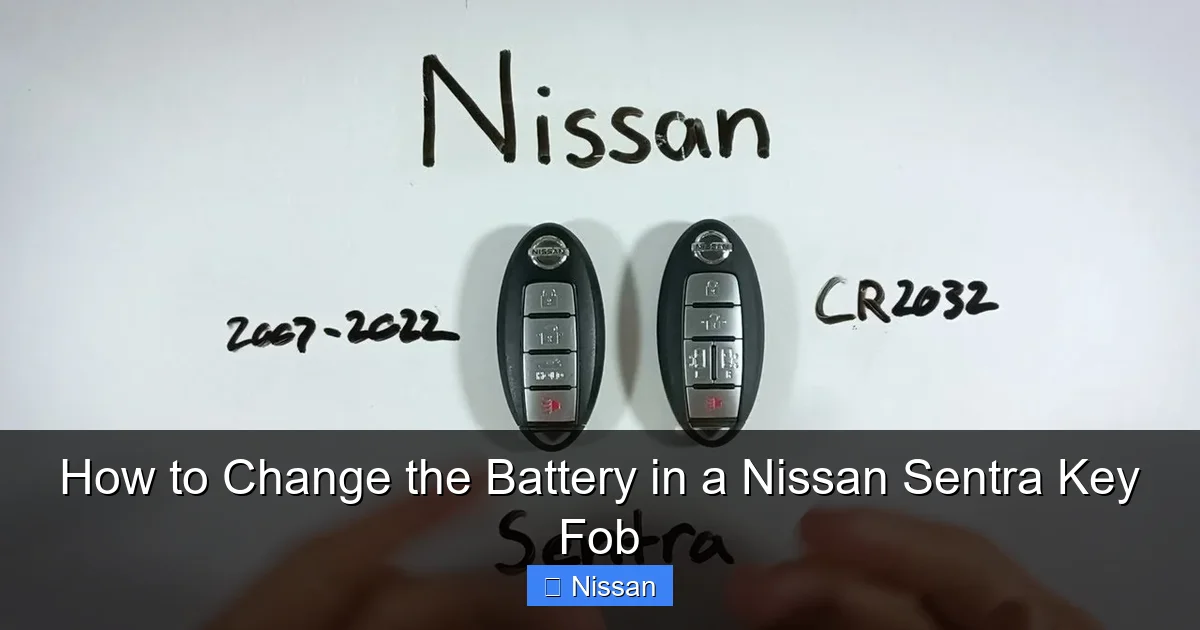
Visual guide about How to Change the Battery in a Nissan Sentra Key Fob
Image source: fobbattery.com
Before you begin, gather the necessary tools and materials. Having everything ready will make the process smoother and reduce the chance of losing small parts.
Essential Tools and Supplies
Here’s a quick checklist of what you’ll need:
- CR2032 3-volt lithium battery: This is the most common battery used in Nissan Sentra key fobs. Double-check your owner’s manual or the existing battery to confirm the type.
- Small flathead screwdriver or plastic pry tool: Used to gently open the key fob casing. A plastic tool is preferred to avoid scratching or damaging the plastic.
- Tweezers (optional): Helpful for handling the small battery and aligning components.
- Clean, well-lit workspace: A flat surface with good lighting helps prevent losing tiny parts.
- Soft cloth or paper towel: To protect the fob and keep the area clean.
You can find CR2032 batteries at most convenience stores, electronics shops, or online. A pack of four usually costs under $10 and can last you for years. It’s a smart investment for any car owner.
Choosing the Right Battery
Not all CR2032 batteries are created equal. While they may look identical, differences in quality can affect performance and lifespan. Look for reputable brands and check the expiration date on the packaging. A fresh battery ensures maximum power output and longer life.
Avoid cheap, no-name batteries, as they may leak or fail prematurely. Leaking batteries can damage the internal circuitry of your key fob, leading to costly repairs. Stick with trusted manufacturers to ensure reliability.
Also, make sure the battery is the correct size and voltage. The CR2032 is 20mm in diameter and 3.2mm thick, with a nominal voltage of 3 volts. Using a different battery type—like a CR2025 or CR2016—may not fit properly or provide enough power.
Step-by-Step Guide to Changing the Battery
Visual guide about How to Change the Battery in a Nissan Sentra Key Fob
Image source: paulstravelpictures.com
Now that you’re prepared, let’s walk through the process of replacing the battery in your Nissan Sentra key fob. This guide applies to most Sentra models from 2007 to 2024, including those with push-button start and remote trunk release.
Step 1: Locate the Key Release Button
Most Nissan Sentra key fobs have a small mechanical key hidden inside for emergency use. Look for a small button or switch on the side or top of the fob. Press it to release the physical key.
Once the key is out, you’ll see a small indentation or seam along the edge of the fob. This is where you’ll insert your tool to open the casing.
Step 2: Open the Key Fob Casing
Using a small flathead screwdriver or plastic pry tool, gently insert the tip into the seam near the key release area. Slowly work your way around the edge, applying light pressure to pop the two halves apart.
Be patient—don’t force it. The casing is held together by plastic clips that can break if you apply too much pressure. If you’re using a metal screwdriver, wrap the tip in tape to avoid scratching the fob.
Once the casing starts to separate, continue prying gently until the two halves come apart completely. Set the top half aside carefully.
Step 3: Remove the Old Battery
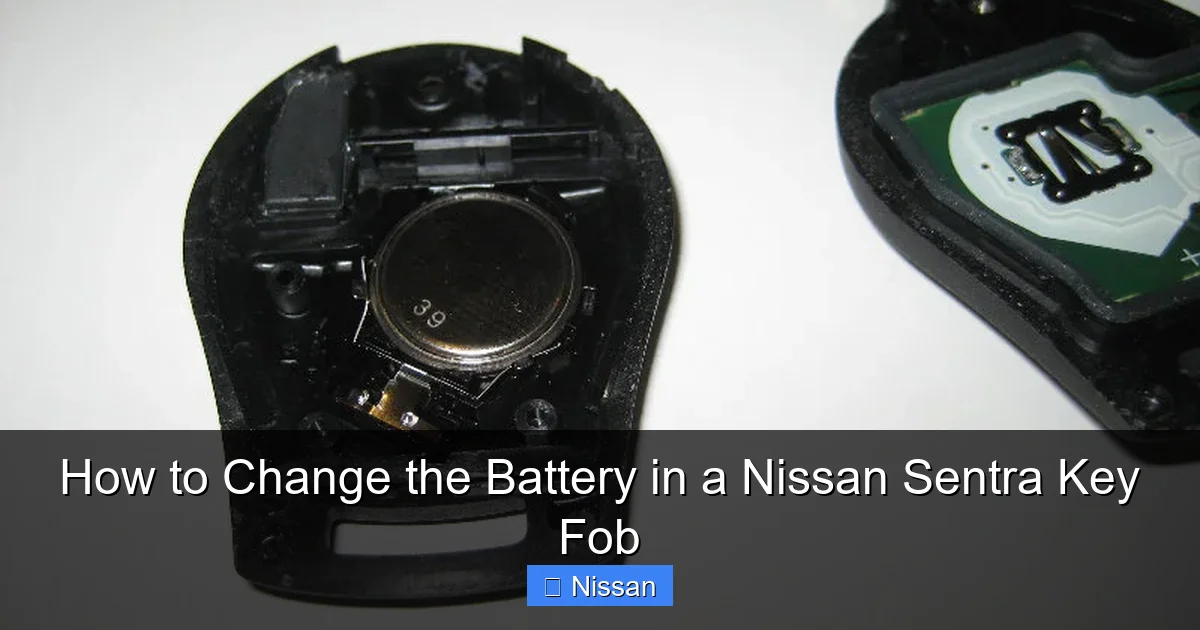
Inside the fob, you’ll see the battery seated in a small circular compartment. It’s usually held in place by a metal clip or spring.
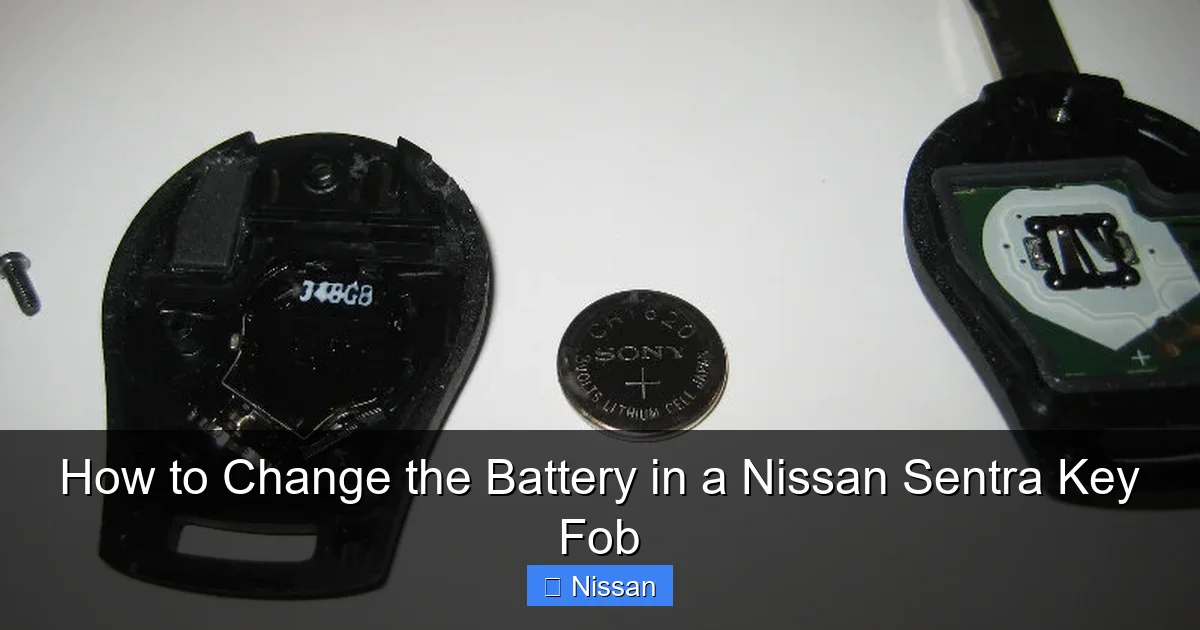
Use your fingernail, tweezers, or the tip of the screwdriver to gently lift the battery out. Note the orientation—most batteries have the positive (+) side facing up. Take a quick photo with your phone if you’re unsure, so you can remember how to insert the new one.
Dispose of the old battery responsibly. Lithium batteries should not be thrown in the regular trash. Many hardware stores and recycling centers accept used batteries for safe disposal.
Step 4: Insert the New Battery
Take your new CR2032 battery and place it into the compartment with the positive (+) side facing up, matching the orientation of the old battery. Press it gently into place until it sits securely.
Make sure the battery is fully seated and doesn’t wobble. A loose battery can cause intermittent connections and poor performance.
Step 5: Reassemble the Key Fob
Carefully align the two halves of the fob and press them together until you hear a series of clicks. Start from one end and work your way around to ensure all clips snap into place.
Avoid using excessive force. If the halves don’t close easily, double-check that the battery and internal components are properly aligned. Forcing the casing can damage the plastic or misalign the buttons.
Step 6: Test the Key Fob
Once reassembled, test all the buttons to make sure they work:
- Press the lock button—your car should respond immediately.
- Try the unlock button.
- Test the trunk release (if equipped).
- Activate the panic alarm to ensure the signal is strong.
If any button doesn’t work, open the fob again and check the battery orientation and seating. Sometimes a slight misalignment can prevent proper contact.
Tips for Maintaining Your Key Fob
Visual guide about How to Change the Battery in a Nissan Sentra Key Fob
Image source: paulstravelpictures.com
Replacing the battery is just one part of keeping your Nissan Sentra key fob in top condition. With a little care, you can extend its lifespan and avoid future issues.
Keep It Clean and Dry
Dirt, dust, and moisture can damage the internal electronics of your key fob. Avoid exposing it to water, especially when washing your hands or walking in the rain. If your fob gets wet, dry it thoroughly with a soft cloth and let it air dry completely before using it.
You can also clean the exterior with a slightly damp cloth and mild soap. Avoid harsh chemicals or abrasive cleaners that can scratch the plastic or fade the buttons.
Avoid Dropping or Impact
Key fobs are durable, but they’re not indestructible. Dropping your fob on a hard surface can crack the casing, damage the circuit board, or dislodge internal components. Try to keep it in a safe place, like a keychain pouch or your pocket, rather than tossing it into a bag or onto a table.
If your fob does get damaged, it may still work, but the risk of future failure increases. In severe cases, you may need to replace the entire fob.
Store Spare Batteries Properly
Keep a few extra CR2032 batteries in a dry, cool place. Avoid storing them in hot areas like a car glove box, as heat can reduce their lifespan. A small plastic container or original packaging works well.
Label the container with the purchase date so you know when to replace them. Even unused batteries have a shelf life of about 5–10 years.
Use the Fob Regularly
If you don’t drive your car often, the key fob may sit unused for long periods. This can cause the battery to drain faster due to internal circuitry staying active. Try to use the fob at least once a week, even if it’s just to lock and unlock the doors.
This helps maintain the battery’s charge and keeps the internal components functioning properly.
Troubleshooting Common Issues After Battery Replacement
Even after replacing the battery, you might encounter a few hiccups. Here’s how to address the most common problems.
Key Fob Still Not Working
If your fob doesn’t respond after a battery change, double-check the following:
- Battery orientation: Ensure the positive (+) side is facing up.
- Battery seating: Make sure the battery is fully pressed into the compartment.
- Clean contacts: Use a cotton swab and rubbing alcohol to clean the metal contacts inside the fob.
- Damaged fob: If the fob was dropped or exposed to water, internal damage may require professional repair.
If none of these steps work, try reprogramming the fob. Some Nissan models require a reset after battery replacement.
Reprogramming the Key Fob
In rare cases, the fob may lose its connection to the car after a battery change. To reprogram it:
- Sit in the driver’s seat with all doors closed.
- Insert the key into the ignition (or press the start button with the fob nearby).
- Turn the key to the “ON” position (do not start the engine).
- Press and hold the “LOCK” button on the fob for 5–10 seconds.
- Turn the key back to “OFF” and remove it.
- Test the fob to see if it works.
This process varies slightly by model year, so consult your owner’s manual for exact instructions.
Buttons Feel Stiff or Unresponsive
If the buttons don’t click or feel mushy, the issue may be dirt or debris under the rubber pads. Open the fob again and gently clean the button contacts with a cotton swab and isopropyl alcohol. Let it dry completely before reassembling.
Avoid using water or excessive liquid, as it can damage the electronics.
When to Seek Professional Help
While most battery replacements are straightforward, there are times when professional assistance is needed.
Physical Damage to the Fob
If the casing is cracked, the buttons are broken, or the internal circuit board is visible, the fob may need repair or replacement. Dealerships and locksmiths can often provide refurbished or new fobs, though they can be expensive.
Persistent Connectivity Issues
If the fob works intermittently even with a new battery, there may be a problem with the car’s receiver or the fob’s transmitter. This requires diagnostic tools and expertise beyond a simple battery swap.
Keyless Entry System Malfunction
If other keyless features—like proximity unlocking or push-button start—aren’t working, the issue may be with the car’s system, not just the fob. A technician can run a diagnostic scan to identify the root cause.
Conclusion
Changing the battery in your Nissan Sentra key fob is a simple, cost-effective way to restore full functionality and avoid the hassle of a dead fob. With just a few tools and a few minutes of your time, you can keep your key fob working reliably for years to come.
By following this guide, you’ve learned how to identify a weak battery, gather the right supplies, safely open the fob, replace the battery, and troubleshoot common issues. Plus, you’ve picked up tips for maintaining your fob and extending its lifespan.
Remember, regular maintenance goes a long way. Keep spare batteries on hand, handle your fob with care, and test it periodically to catch problems early. And if you ever run into trouble, don’t hesitate to consult your owner’s manual or reach out to a professional.
Taking care of your key fob isn’t just about convenience—it’s about peace of mind. Whether you’re heading to work, running errands, or taking a road trip, a working key fob ensures you’re never locked out of your Nissan Sentra.
Frequently Asked Questions
How often should I replace the battery in my Nissan Sentra key fob?
The battery typically lasts 3 to 5 years, depending on usage. If you notice reduced range or delayed responses, it’s time for a replacement.
Can I use a different battery type in my key fob?
No, always use a CR2032 3-volt lithium battery. Other sizes may not fit or provide the correct voltage, which can damage the fob.
Will replacing the battery reset my key fob settings?
Usually not, but in some cases, the fob may need to be reprogrammed. Test all functions after replacement and consult your manual if issues persist.
What if my key fob still doesn’t work after changing the battery?
Check the battery orientation, clean the contacts, and ensure the fob is fully reassembled. If problems continue, the fob may be damaged and require professional repair.
Can I replace the battery myself, or do I need a mechanic?
Yes, you can easily replace the battery at home with basic tools. It’s a simple DIY task that doesn’t require special skills or equipment.
Where can I buy a replacement CR2032 battery?
You can find CR2032 batteries at pharmacies, electronics stores, supermarkets, and online retailers like Amazon or Walmart. Look for reputable brands for best results.



