
How to Program the 2022 Hyundai Garage Door Opener

Programming your 2022 Hyundai’s garage door opener is a simple, 5-minute process using the built-in Homelink system. It works with most standard and rolling code garage door openers, eliminating the need for separate remotes. Just clear old codes, press a few buttons, and sync with your garage’s receiver. Follow our detailed guide for a hassle-free setup.
Key Takeaways
- Homelink is the System: Your 2022 Hyundai uses the Homelink wireless control system, typically located on the rearview mirror or overhead console, to operate garage doors and gates.
- Compatibility is Key: It works with most garage door openers, but you must identify if yours uses a standard fixed code or a rolling code for proper programming.
- Simple Button Sequence: Programming involves clearing the Homelink button, pressing it to sync, and then pressing the “Learn” button on your garage door opener unit.
- Rolling Codes Need a Second Step: For rolling code systems, you must press the garage’s learn button twice within 30 seconds to complete the pairing.
- Troubleshooting is Straightforward: Common issues like failed syncing are often fixed by repeating the sequence, ensuring fresh batteries in your original remote, and minimizing signal interference.
- It’s a One-Time Setup: Once programmed, the Homelink button will work every time you press it, storing the code permanently until you deliberately clear it.
- Universal Process: The steps are nearly identical across many vehicle brands, so learning this skill is useful for any car with a built-in opener.
📑 Table of Contents
- Introduction: Unlock the Convenience of Your Hyundai’s Built-In Opener
- Understanding Your Hyundai’s Homelink System
- Step-by-Step Programming Guide for Your 2022 Hyundai
- Troubleshooting: Why Isn’t My Garage Door Opening?
- Pro Tips for a Smooth Programming Experience
- Conclusion: Enjoy Your Newfound Convenience
Introduction: Unlock the Convenience of Your Hyundai’s Built-In Opener
Have you ever fumbled for a clunky garage door remote in your cupholder or purse? Or maybe you’ve got a separate remote for every home you visit, creating a bulky keychain nightmare. If you own a 2022 Hyundai, you have a brilliant solution right on your rearview mirror. Programming your 2022 Hyundai garage door opener is one of the easiest and most rewarding vehicle features to set up. It transforms your car into a seamless entry point for your home, adding a serious layer of convenience and modern tech to your daily routine.
We’re going to walk through this together, step by step. No tech degree needed. Whether you drive a sporty Elantra, a family-friendly Santa Fe, or an adventurous Tucson, the process is virtually the same. We’ll cover everything from finding the right buttons to tackling those tricky rolling code systems. By the end, you’ll wonder why you didn’t do it sooner. Let’s get started and make that garage door respond to your Hyundai with a simple press of a button.
Understanding Your Hyundai’s Homelink System
Before we start pressing buttons, let’s quickly understand what we’re working with. The system in your 2022 Hyundai is called Homelink. It’s a universal wireless control system developed to operate garage doors, gates, lights, and even home security systems. It’s been around for decades and is trusted by millions.
Visual guide about How to Program the 2022 Hyundai Garage Door Opener
Image source: vehq.com
What is Homelink and Where is It?
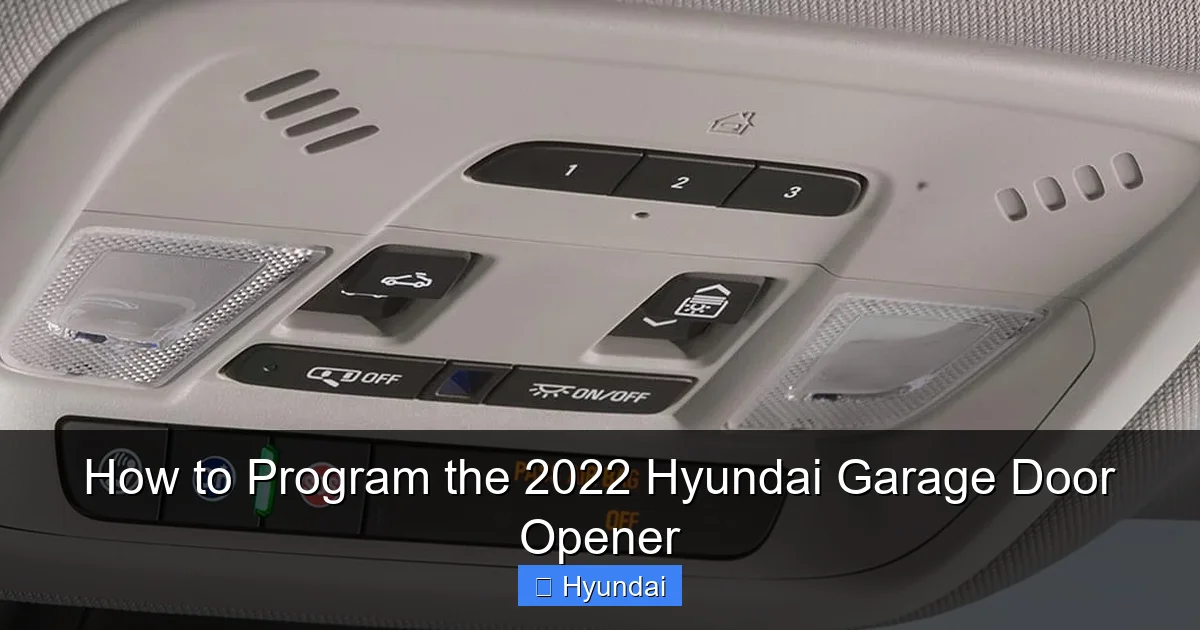
In your 2022 Hyundai, you’ll typically find the Homelink buttons on the rearview mirror housing. Look for three small, usually black, buttons with a little house icon on them. In some models, like certain trims of the Palisade or Santa Fe, they might be on the overhead console near the map lights. The button arrangement is standard: the center button is often the primary one you’ll program, with the left and right serving as secondary channels for a second or third door/gate.
Homelink works by learning and storing the radio frequency signal from your existing garage door remote. Once programmed, it mimics that remote’s signal, so your garage door opener thinks your car *is* the remote. It’s a fantastic way to declutter your visor and consolidate controls.
Compatibility: Will It Work With My Garage Door?
The great news is that Homelink is compatible with over 99% of garage door openers made since 1982. That includes major brands like LiftMaster, Chamberlain, Genie, Craftsman, and many others. The only real exception is some very old or extremely obscure systems. There are two main types of opener systems you’ll encounter:
- Standard Fixed Code: These older systems use a set of DIP switches (little toggles) on both the remote and the garage door opener motor unit to set a code. The code never changes.
- Rolling Code (Security+): This is the modern standard for security. The code changes every time you use the remote, making it nearly impossible to copy. Brands like LiftMaster’s Security+ and Genie’s Intellicode use this.
Don’t worry if you don’t know which you have. The programming process will tell you. If the first method doesn’t work, we’ll move to the rolling code method. It’s also worth noting that the process is so standardized that if you ever need to program a Kia garage door opener, the steps will be virtually identical.
Step-by-Step Programming Guide for Your 2022 Hyundai
Alright, hands on the wheel. Let’s do this. First, park your Hyundai in the driveway, close to the garage door but not blocking it. Have your existing garage door remote control handy. You’ll also need a ladder to access the learn button on your garage door opener motor, which is usually installed on the ceiling of the garage.
Visual guide about How to Program the 2022 Hyundai Garage Door Opener
Image source: vehq.com
Step 1: Clear the Homelink Button (Start Fresh)
It’s always best to start with a clean slate. Even if this button is new to you, clearing it ensures no old, conflicting codes are stored.
- Locate the Homelink button you want to program (e.g., the center button).
- Press and hold down that button. You’ll see the indicator light (usually a small LED) on the button begin to glow steadily. Keep holding it.
- After about 10-15 seconds, the indicator light will start to blink slowly. This means the old code has been cleared, and the button is ready to learn a new one.
- Release the button. The light will go out. You’re ready for the next step.
Step 2: Put Homelink in “Learn Mode”
Now we tell the Homelink button to start listening for a signal.
- Quickly press and release the same Homelink button you just cleared. Do not hold it this time.
- The indicator light will now begin to blink rapidly. This blinking means the Homelink receiver is active and searching for a signal to learn. You have about 30 seconds to complete the next step before it times out.
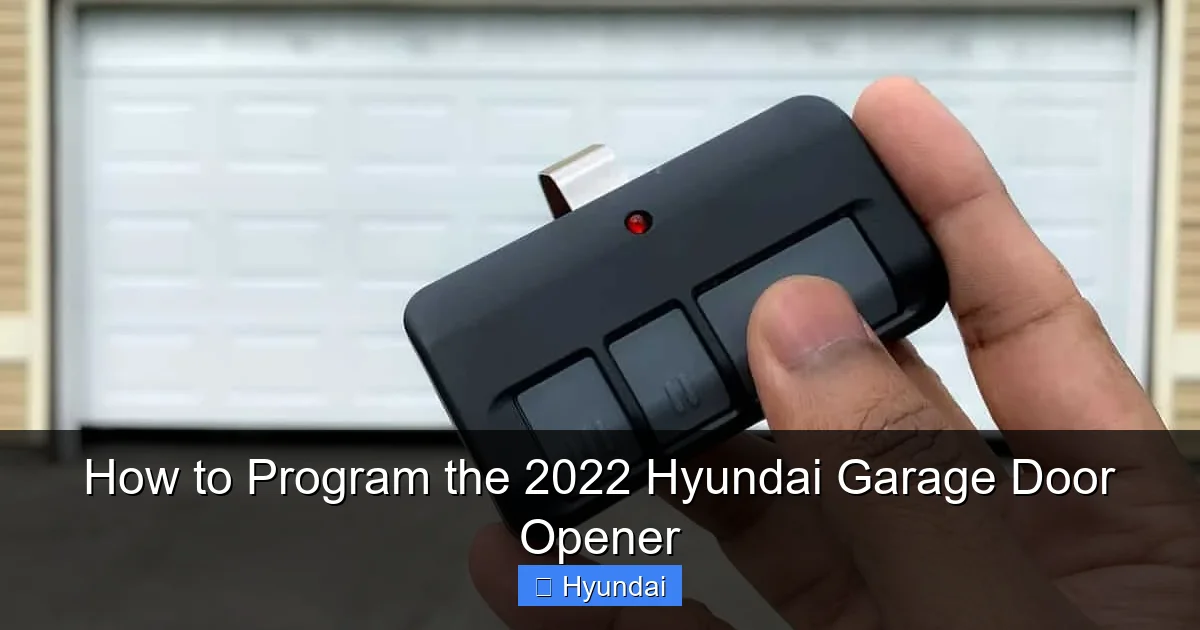
Step 3: Teach It From Your Original Remote
This is the core step for standard fixed code systems.
- Take your original garage door remote control.
- Stand within a few feet of your Hyundai’s front windshield (the Homelink antenna is in the mirror).
- Press and hold the button on your remote that opens the garage door. Hold it down firmly.
- While holding the remote button, watch the Homelink indicator light in your Hyundai. It should stop blinking rapidly and either turn solid or begin to blink very slowly. This means it has successfully captured the signal.
- Once the light changes, you can release the button on your remote.
- Press the Homelink button in your Hyundai to test. The garage door should operate. If it does, you’re done! If not, proceed to the rolling code method below.
Pro Tip: If the Homelink light never changes, make sure your remote’s battery is fresh. Hold the remote very close to the rearview mirror, ideally touching it. You may need to repeat the sequence a couple of times.
Step 4: The Rolling Code Method (For Modern Openers)
If Step 3 didn’t work, your garage door opener almost certainly uses a rolling code. This requires a second piece of hardware: the “Learn” button on your garage door opener’s motor unit.
- Access the Learn Button: Get your ladder and climb into the garage. On your garage door opener motor (the box attached to the ceiling), locate a colored button—usually red, yellow, purple, or green. It’s labeled “Learn,” “Learn Code,” or has a radio wave icon. It might be under a light cover or on the back panel.
- Initiate Learning on the Opener: Press and release that Learn button. A small LED next to it will begin to blink. You now have about 30 seconds to complete the programming in your car before the garage door opener’s learn mode times out.
- Return to Your Hyundai: Go back to your car. Make sure the Homelink button is still in rapid blink mode from Step 2. If the light has stopped blinking, press and release the Homelink button once to restart the rapid blink.
- Press the Homelink Button: While the garage door opener’s LED is blinking, press and release the Homelink button in your Hyundai. The Homelink indicator light should go solid or blink slowly, indicating it has received the signal.
- Press the Learn Button Again (Crucial Step): Now, go back to the ladder. You must press and release the same Learn button on the garage door opener a second time. The LED will blink again. This second press confirms the pairing and allows the rolling code to sync.
- Final Test: Go back to your car and press the programmed Homelink button. The garage door should operate. You may need to press it twice: once to send the initial signal and a second time to activate the door, depending on your opener model.
Important: Some newer Hyundai models require you to press the Homelink button twice for rolling code systems—once to send the initial code and a second time to activate. If the door doesn’t move on the first press, try pressing it again quickly.
Troubleshooting: Why Isn’t My Garage Door Opening?
Stuck? Don’t sweat it. This is the most common hurdle, and there’s almost always a simple fix. Let’s diagnose.
Visual guide about How to Program the 2022 Hyundai Garage Door Opener
Image source: garagedoorpedia.com
Common Issue #1: The Light Blinks but the Door Doesn’t Move
This usually means the signal was learned, but it’s not the correct one for your opener.
- Solution: Clear the Homelink button again (hold until slow blink) and repeat the entire process. For rolling code, ensure you pressed the garage’s Learn button twice—once before pressing Homelink, and once after. The timing is sensitive.
Common Issue #2: Nothing Happens – No Light Change
The Homelink button never left rapid blink mode. It didn’t learn the signal.
- Solution: Replace the battery in your original remote. A weak remote signal won’t be captured. Hold the remote right up against the rearview mirror. Make sure you’re using the correct remote for that specific door (if you have multiple). Try repeating the sequence 3-4 times.
Common Issue #3: The Door Opens but Then Reverses Immediately
This is a safety feature of the garage door opener—it thinks something is in the way.
- Solution: This is often a signal strength issue. The Homelink signal might be too weak or intermittent. Ensure your car’s battery is healthy. Try programming again, holding the remote closer to the mirror. If it persists, your garage door opener’s safety sensors may be misaligned—check those first.
When All Else Fails: Reset and Consult Manuals
If you’ve tried everything, perform a full reset. Clear all Homelink buttons (hold each for 15 seconds). Then, consult your 2022 Hyundai owner’s manual—it has model-specific diagrams. Also, check your garage door opener’s manual for compatibility notes. Some very new or proprietary systems might need a signal repeater, but this is rare. For persistent issues with a specific brand, you might find answers in guides for other vehicles; for instance, programming a Toyota garage door opener covers similar universal challenges.
Pro Tips for a Smooth Programming Experience
Let’s get you from frustrated to finished with these insider tips.
- Do It in Daylight: Programming is easier when you can see the tiny LED lights clearly on both the Homelink button and the garage door opener’s learn button.
- Have a Helper: One person in the car, one on the ladder. You can yell “NOW!” to coordinate the presses, saving countless trips up and down the ladder.
- Know Your Opener Model: If you can find the model number on your garage door opener (e.g., 8500, 8355), a quick web search for “[Model] rolling code programming” can give you brand-specific tips.
- Program All Buttons at Once: Once you’ve successfully programmed one Homelink button, you can program the other two for additional doors or gates using the same steps. Just clear each button first.
- Keep the Original Remote: Don’t throw away your old remote! Keep it as a backup. You’ll also need it if you ever sell the car and want to clear the Homelink memory.
- Signal Interference: Keep large metal objects, other key fobs, and electronic devices away from the rearview mirror area during programming. They can block the signal.
- For Multiple Doors: If you have two garage doors, program one to the center button and the other to the left or right. Use the same process for each, clearing each button individually first.
Conclusion: Enjoy Your Newfound Convenience
There you have it. You’ve just unlocked one of the most satisfying convenience features in your 2022 Hyundai. That little button on your mirror now holds the power to open your home with a gentle press. No more digging for remotes, no more juggling keys and groceries. It’s a small upgrade that makes a big impact on your daily life.
Remember, the key is patience and following the steps for your specific garage door type. If it doesn’t work the first time, clear and try again—especially ensuring you press the learn button twice for rolling code systems. This skill is valuable; the process is so similar that you could easily program a 2023 Nissan Rogue garage door opener or many other vehicles using this same foundational knowledge.
So go ahead, park in the driveway, and give it a shot. We’re confident you’ll get it. Welcome to the world of seamless, integrated smart living, Hyundai style. Your garage door is now officially part of your car’s family.
Frequently Asked Questions
Can I program my 2022 Hyundai garage door opener if I don’t have the original remote?
No, you absolutely need the original working remote control for the initial programming. The Homelink system learns the signal directly from that remote. If you’ve lost it, you’ll need to purchase a new remote for your garage door opener and program that first, or use the learn button method with a new remote.
How many garage doors or gates can I program to my Hyundai?
Your 2022 Hyundai’s Homelink system has three buttons, so you can program up to three different devices. This could be two garage doors and one gate, or three separate doors. Each button stores its own unique code and must be programmed individually.
What if my garage door opener doesn’t have a “Learn” button?
If your opener is very old (pre-1982) or a rare model without a learn button, it likely uses a fixed code with DIP switches. In this case, you simply use the remote in Step 3 above. If that fails, your opener may not be compatible with Homelink, and you’d need an external signal repeater adapter, which is uncommon today.
Will programming the Homelink erase the code from my original remote?
No. Programming your Hyundai’s Homelink is a one-way learning process. Your original remote’s code remains intact and unchanged. You can continue to use the original remote as a backup, and programming the car does not affect any other remotes you might have.
Do I need to reprogram the Homelink if my car battery dies?
No. The Homelink settings are stored in non-volatile memory within the Homelink module. They are not powered by the car’s main battery. Disconnecting or replacing your Hyundai’s battery will not erase your programmed garage door codes.
How do I clear or reset all programmed Homelink buttons?
To clear a single button, press and hold that specific Homelink button until the indicator light blinks slowly (about 10-15 seconds), then release. To clear all three buttons at once, press and hold all three buttons simultaneously until the lights blink rapidly, then release. This is useful if you sell the car or want to start fresh.