
How to Program the 2022 Hyundai Garage Door Opener

Programming the garage door opener in a 2022 Hyundai is a quick job, usually about five minutes, using the built-in HomeLink system. HomeLink works with most standard and rolling-code garage door openers, so you do not need a separate remote in the car. You clear the old codes, train the HomeLink button from your existing remote and, for rolling-code openers, finish by pressing the Learn button on the opener. This guide walks through each step and the fixes for common problems.
Button layout and exact light behavior can vary slightly by Hyundai model and trim, so keep your owner’s manual handy and use the steps below as the standard HomeLink process.
Key Takeaways
- HomeLink is the system: your 2022 Hyundai uses the HomeLink wireless control system, typically on the rearview mirror or overhead console, to operate garage doors and gates.
- Compatibility is high but not universal: it works with most openers, but you need to know whether yours uses a fixed code or a rolling code.
- The sequence is simple: clear the buttons, train the HomeLink button from your original remote, then confirm with the opener if it is rolling code.
- Rolling codes need a second step: you press the Learn button on the opener, then press the HomeLink button within 30 seconds, sometimes more than once.
- Troubleshooting is straightforward: repeat the sequence, use a fresh battery in your original remote and reduce interference.
- It is a one-time setup: the programmed code stays stored until you clear it deliberately.
- The process is similar across brands: the steps are close to the same on many vehicles with a built-in opener.
Table of Contents
- Introduction: Unlock the Convenience of Your Hyundai’s Built-In Opener
- Understanding Your Hyundai’s HomeLink System
- Step-by-Step Programming Guide for Your 2022 Hyundai
- Troubleshooting: Why Is My Garage Door Not Opening?
- Pro Tips for a Smooth Programming Experience
- Conclusion: Enjoy Your Newfound Convenience
Introduction: Unlock the Convenience of Your Hyundai’s Built-In Opener
Ever fumbled for a clunky garage door remote in a cupholder or bag? Or carried a separate remote for each home you visit? If you drive a 2022 Hyundai, there is a neat solution right on your mirror or overhead console. Programming it is among the easiest and most rewarding features to set up, and it turns your car into the key to your garage.
Whether you drive an Elantra, a Santa Fe or a Tucson, the process is close to identical. This guide covers finding the right buttons, working out whether your opener uses a fixed or rolling code, and fixing the common problems.

Understanding Your Hyundai’s HomeLink System
HomeLink is a universal wireless control system that operates garage doors, gates, lights and some home security systems. It has been around for decades and is trusted by millions of drivers.
What Is HomeLink and Where Is It?
In a 2022 Hyundai, you will typically find HomeLink as three small buttons, often with a house icon, on the rearview mirror housing. In some models and trims, such as certain Palisade or Santa Fe configurations, the buttons sit on the overhead console near the map lights. The left, center and right buttons are independent channels, so you can program up to three devices.
HomeLink works by learning and storing the radio signal from your existing remote. Once programmed, it copies that signal, and your opener treats the car as just another remote.
Compatibility: Will It Work With My Garage Door?
HomeLink is compatible with the large majority of garage door openers, including common brands such as LiftMaster, Chamberlain, Genie and Craftsman. Very old or unusual systems can be exceptions. There are two main types:
- Standard fixed code: older systems that use a set of DIP switches on the remote and the opener to set a code that never changes.
- Rolling code (such as Security+ or Intellicode): the modern standard, where the code changes with every use, which makes copying much harder.
If you do not know which you have, the training process will tell you: if the door does not respond after Step 2, use the rolling-code step. The steps are so standard that they are also close to what you would do to program a Kia garage door opener.
Step-by-Step Programming Guide for Your 2022 Hyundai
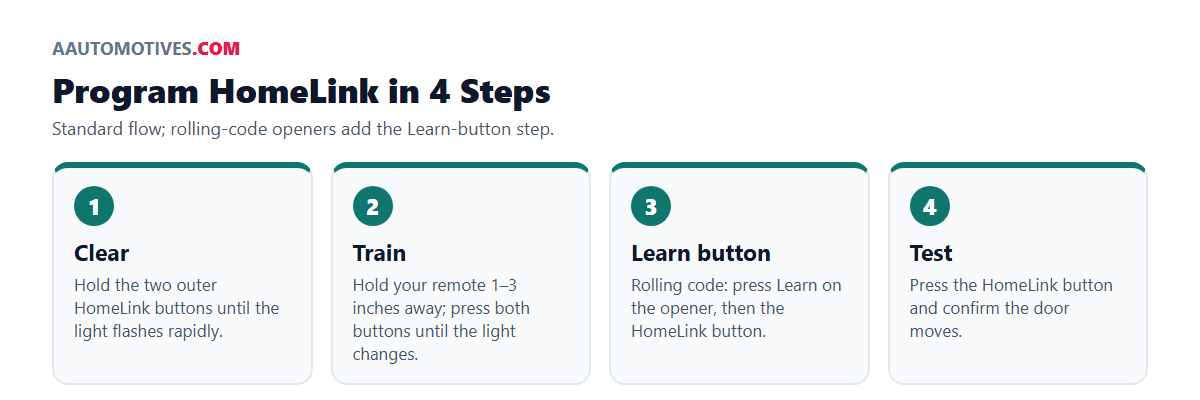
Park in the driveway close to the garage door, but not blocking it. Have your existing remote ready, and a ladder if you need to reach the Learn button on the opener. The chart below summarizes the four steps.
Step 1: Clear the HomeLink Buttons (Start Fresh)
Start with a clean slate so old codes do not conflict.
- With the vehicle on or in accessory mode, press and hold the two outside HomeLink buttons.
- Keep holding for about 20 seconds, until the indicator light changes from a steady glow to a rapid flash.
- Release both buttons. All three channels are now cleared. (Clearing is for the whole system; to change a single channel later, just train it again.)
Step 2: Train HomeLink From Your Original Remote
This is the core step for fixed-code openers, and the first stage for rolling-code ones.
- Pick the HomeLink button you want to program, for example the center one.
- Hold your original remote about 1–3 inches from that HomeLink button, near the mirror or console.
- Press and hold both the HomeLink button and the remote button at the same time.
- Watch the HomeLink light. It starts with a slow flash and changes to a rapid flash when HomeLink has learned the signal. Release both buttons.
- Press and hold the HomeLink button to test. If the door moves, you are done. If the door does not move, continue to Step 3.
Tip: if the light never changes, use a fresh battery in the remote and try holding it at slightly different distances or angles. Repeat a couple of times if needed.
Step 3: The Rolling-Code Method (for Modern Openers)
If the door did not respond after Step 2, the opener almost certainly uses a rolling code, so you also need to pair the car with the opener’s Learn button.
- Find the Learn button. On the opener motor unit on the garage ceiling, look for a colored button, usually red, yellow, purple or green, labeled “Learn” or with a radio-wave icon. It may be under a light cover or on the back panel.
- Press and release Learn. An indicator next to it will glow or blink, and you usually have about 30 seconds to finish in the car.
- Return to the car and press the HomeLink button. Press and hold it for about two seconds, release, and repeat. Some systems need up to three presses.
- Check the result. The opener light will blink or you will hear a click when the pairing is accepted.
- Test. Press the HomeLink button. The door should move.
Timing is sensitive here, which is why a helper makes it much easier: one person in the car, one at the opener.
Troubleshooting: Why Is My Garage Door Not Opening?
Stuck? This is the most common hurdle, and the fix is almost always simple.
Common Issue 1: The Light Flashes but the Door Does Not Move
The signal was learned, but the opener has not accepted it. Fix: repeat the Learn-button step, and make sure you press the HomeLink button within the 30-second window. If the door still does not respond, clear the system and start again.
Common Issue 2: Nothing Happens and the Light Does Not Change
HomeLink never learned the signal. Fix: replace the battery in the original remote, hold the remote right against the mirror or console, confirm you are using the correct remote for that door, and repeat the sequence several times.
Common Issue 3: The Door Opens, Then Reverses Immediately
This is usually a safety feature of the opener, which thinks something is blocking the door. Fix: check that the safety sensors near the floor are clean and aligned, then check the HomeLink signal. A weak car battery can cause a weak signal, so make sure the battery is healthy.
When All Else Fails: Reset and Check the Manuals
Do a full reset by clearing the buttons (Step 1) and start over, then check the owner’s manual for your model and the opener’s manual for compatibility notes. Some very new or proprietary openers need a compatibility bridge or repeater kit from the opener’s maker. For persistent problems with a specific brand, guides for other vehicles often help; for example, see how to program a Toyota garage door opener.
Pro Tips for a Smooth Programming Experience
- Do it in daylight: the indicator lights are easier to read.
- Have a helper: one person in the car and one at the opener saves trips up and down the ladder.
- Know your opener model: the model number (for example 8500 or 8355) lets you search for brand-specific rolling-code tips.
- Program all the buttons you need: each of the three buttons can be trained for another door or gate with the same steps.
- Keep the original remote: it is your backup and you will need it for training.
- Reduce interference: keep large metal objects, other key fobs and electronic devices away from the mirror area while training.
- Multiple doors: program one door per button, and train each button separately.
Conclusion: Enjoy Your Newfound Convenience
You have just unlocked one of the most satisfying convenience features in your 2022 Hyundai. One button now opens your garage, with no more digging for remotes or juggling keys and groceries. If it does not work the first time, clear the buttons and try again, and remember the extra Learn-button step for rolling-code openers. The same knowledge carries over to other cars; you could just as easily program a 2023 Nissan Rogue garage door opener.
Frequently Asked Questions
Can I program my 2022 Hyundai garage door opener without the original remote?
Not for the basic method. HomeLink learns the signal from a working remote. If you have lost it, buy a replacement remote for your opener and train HomeLink from that, or use the opener’s Learn-button method with a new remote.
How many garage doors or gates can I program?
HomeLink has three buttons, so you can program up to three devices, such as two garage doors and a gate. Each button stores its own code and is trained separately.
What if my opener does not have a Learn button?
Very old openers may use a fixed code with DIP switches, in which case Step 2 should work. If it fails, the opener may need an external compatibility adapter, which is uncommon today.
Will programming HomeLink erase my original remote?
No. HomeLink only copies the signal. Your original remote and any other remotes keep working.
Do I need to reprogram HomeLink if my car battery dies?
No. HomeLink stores its settings in non-volatile memory, so disconnecting or replacing the battery should not erase them.
How do I clear all programmed HomeLink buttons?
Press and hold the two outside buttons for about 20 seconds until the light flashes rapidly, then release. This clears all channels, which is useful before selling the car.