
How to Program Toyota Garage Door Opener

Programming your Toyota garage door opener is simpler than you think. Whether you’re using Homelink or a built-in system, this guide walks you through every step—from locating the buttons to syncing with your garage door motor. No tools, no stress—just seamless access every time.
Key Takeaways
- Most Toyota vehicles use the Homelink system: This universal technology allows you to program garage doors, gates, and lighting systems with ease.
- Programming takes less than 5 minutes: With the right steps, you can sync your opener quickly without professional help.
- You’ll need your garage door remote: The original remote is essential for the initial programming process.
- Clear previous codes if needed: Resetting the Homelink system ensures a clean start for new programming.
- Test the connection after setup: Always verify that the door opens and closes reliably before relying on it daily.
- Compatible with most garage door openers: Works with major brands like Chamberlain, LiftMaster, Genie, and more.
- Keep your vehicle manual handy: Specific instructions may vary slightly by Toyota model and year.
📑 Table of Contents
How to Program Toyota Garage Door Opener: A Complete Guide
So, you’ve just pulled into your driveway, reached for the garage door opener in your Toyota—and nothing happens. Frustrating, right? Or maybe you’ve recently moved into a new home and need to sync your car’s built-in system with your garage door motor. Don’t worry—you’re not alone. Thousands of Toyota owners face this same situation, and the good news is that programming your Toyota garage door opener is easier than you might think.
Most modern Toyota vehicles come equipped with a built-in universal garage door opener system, commonly known as Homelink. This sleek, integrated feature is usually located on the overhead console or rearview mirror, depending on your model. Instead of fumbling with a separate remote, you can open and close your garage door—and even control gates or exterior lights—right from your driver’s seat. The process is straightforward, but it does require a few precise steps to get it right.
In this guide, we’ll walk you through everything you need to know about how to program Toyota garage door opener systems. Whether you’re driving a Camry, RAV4, Highlander, or even a Tundra, the principles remain largely the same. We’ll cover where to find the buttons, how to sync with your garage door motor, troubleshooting tips, and even what to do if your system isn’t responding. By the end, you’ll be able to program your opener confidently—no technician required.
Understanding the Toyota Garage Door Opener System
Visual guide about How to Program Toyota Garage Door Opener
Image source: garagedoorpedia.com
Before diving into the programming steps, it’s helpful to understand how the system works. Toyota’s garage door opener is part of the Homelink system, a wireless technology developed by Gentex Corporation. Homelink has been widely adopted by automakers because it’s reliable, secure, and compatible with most garage door openers on the market.
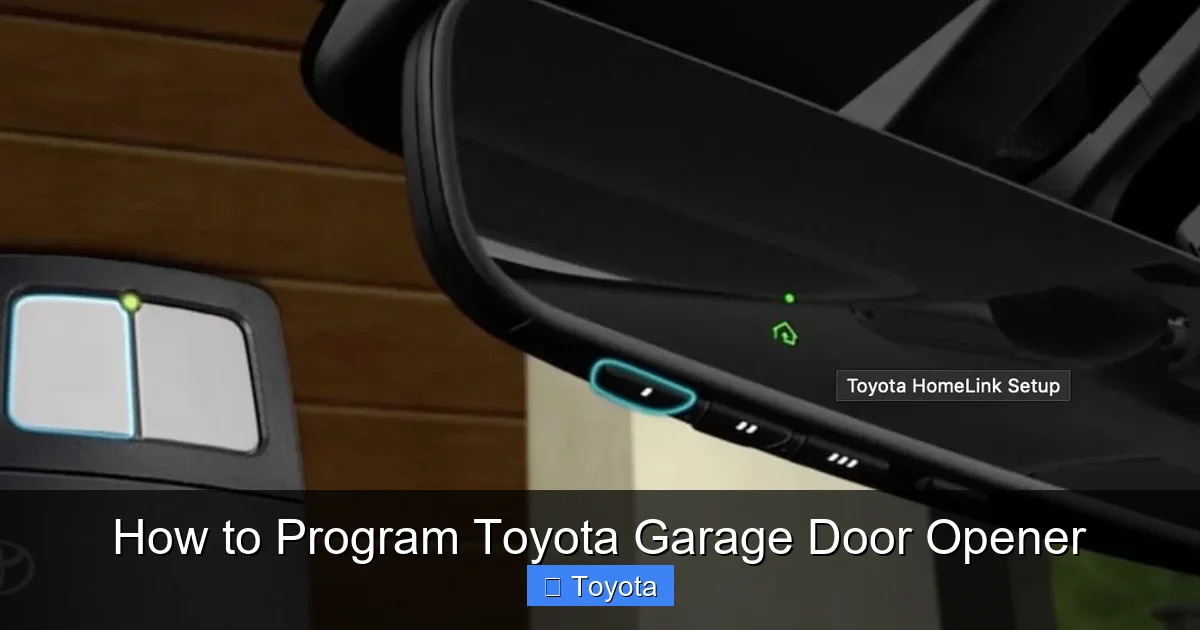
The Homelink system in your Toyota consists of one to three programmable buttons, typically located near the rearview mirror or on the overhead console. These buttons can be synced to control your garage door, a gate, or even outdoor lighting. Once programmed, pressing the button sends a coded signal to your garage door motor, telling it to open or close.
One of the key advantages of Homelink is its rolling code technology. Unlike older systems that used a fixed code, rolling code systems change the signal each time you use the opener. This prevents hackers from “capturing” your signal and using it to break into your garage. It’s a smart security feature that gives you peace of mind.
Another benefit is convenience. Imagine pulling up to your house after a long day, pressing a button on your visor, and watching the garage door open smoothly—all without getting out of the car. That’s the kind of seamless experience Toyota aims to deliver.
Where to Find the Homelink Buttons
The location of the Homelink buttons varies slightly depending on your Toyota model and year. Here’s a quick breakdown:
– **Overhead Console:** In many models like the Camry, Corolla, and RAV4, the buttons are located on the overhead console, just above the rearview mirror. They’re usually labeled with a house or garage icon.
– **Rearview Mirror:** Some newer models, such as the Highlander and Sienna, integrate the buttons directly into the rearview mirror. Look for small, unmarked buttons on the mirror’s housing.
– **Sun Visor:** In a few older models, the buttons may be embedded in the sun visor. Flip down the visor and check for small, rectangular buttons.
If you’re unsure, consult your owner’s manual. It will show you exactly where the Homelink system is located in your specific vehicle.
What You’ll Need Before Starting
Before you begin programming, gather the following items:
– Your Toyota vehicle (with the ignition on or in accessory mode)
– The original garage door remote control
– Access to your garage door motor unit (usually mounted on the ceiling)
– A ladder (if needed to reach the motor)
Having these items ready will make the process smoother and faster. You don’t want to be halfway through programming only to realize you can’t reach the motor unit.
Step-by-Step Guide to Programming Your Toyota Garage Door Opener
Visual guide about How to Program Toyota Garage Door Opener
Image source: vehq.com
Now that you know what the system is and where to find it, let’s get into the actual programming steps. The process is similar across most Toyota models, but we’ll highlight any variations where they exist.
Step 1: Prepare Your Vehicle and Remote
Start by turning your Toyota’s ignition to the “on” position or placing it in accessory mode. You don’t need to start the engine, but the electrical system must be active for the Homelink buttons to work.
Next, locate your original garage door remote. This is the small handheld device you’ve been using to open the door. You’ll need it to send the initial signal to your vehicle.
If you’ve lost your remote, don’t panic. Some garage door motors have a “learn” or “program” button on the unit itself, which can be used as an alternative. We’ll cover that method later.
Step 2: Clear Existing Codes (If Necessary)
If you’ve previously programmed the Homelink system and are setting it up for a new garage door, it’s a good idea to clear the old codes first. This ensures there’s no interference or confusion during the new setup.
To clear the codes:
1. Press and hold the first and third Homelink buttons simultaneously.
2. Keep holding them for about 20 seconds.
3. The indicator light will flash rapidly, then turn solid or turn off—this means the system has been reset.
Now your Homelink system is ready for fresh programming.
Step 3: Program the Homelink Button
Here’s where the magic happens. Follow these steps to sync your Toyota with your garage door:
1. Hold your garage door remote close to the Homelink button you want to program (within 1–3 inches).
2. Press and hold both the Homelink button and the remote button at the same time.
3. Continue holding both buttons until the Homelink indicator light changes—usually from blinking to solid, or from solid to off. This can take 10 to 30 seconds.
4. Release both buttons.
At this point, your Toyota should be synced with the remote. But we’re not done yet.
Step 4: Sync with the Garage Door Motor
Now you need to link your vehicle directly to the garage door motor. This step ensures that your car can communicate with the door opener, even if you don’t have the remote.
1. Locate the “learn” or “program” button on your garage door motor. It’s usually on the back or side of the unit and may be colored yellow, red, orange, or purple.
2. Press and release this button. The motor’s indicator light will turn on or blink, indicating it’s ready to receive a signal.
3. Within 30 seconds, return to your Toyota and press the newly programmed Homelink button three times.
Each press sends a signal to the motor. After the third press, the motor should recognize the signal and program your vehicle.
Step 5: Test the System
Once programming is complete, test the system:
– Press the Homelink button and watch the garage door.
– It should open or close smoothly.
– If it doesn’t respond, repeat the process or check for interference.
Pro tip: Stand inside your garage when testing. This way, you can see if the door stops or reverses unexpectedly—important for safety.
Troubleshooting Common Issues
Visual guide about How to Program Toyota Garage Door Opener
Image source: i.ytimg.com
Even with clear instructions, things don’t always go as planned. Here are some common problems and how to fix them.
The Homelink Light Doesn’t Flash or Stay On
If the indicator light doesn’t respond when you press the buttons, check the following:
– Is the ignition on? The system won’t work if the car is completely off.
– Are the buttons clean? Dirt or grime can interfere with contact.
– Is the remote battery dead? Replace it and try again.
The Garage Door Doesn’t Respond
If your car is programmed but the door won’t open:
– Make sure you’re within range (usually 10–20 feet of the door).
– Check for interference from LED bulbs or other wireless devices.
– Verify that the motor’s “learn” button was pressed correctly.
Rolling Code Compatibility Issues
Some newer garage door openers use advanced rolling code systems that require an extra step:
1. After programming the Homelink button, press it once while standing near the motor.
2. The motor will send a confirmation signal back to your car.
3. Press the Homelink button again to complete the handshake.
This two-way communication ensures secure, reliable operation.
Multiple Vehicles? Program Each One Separately
If you have more than one Toyota, each vehicle must be programmed individually. You can’t sync one remote to multiple cars unless each goes through the setup process.
Advanced Tips and Best Practices
Now that you’ve mastered the basics, here are some pro tips to get the most out of your Toyota garage door opener.
Use the Right Button for the Right Function
If your Homelink system has three buttons, assign each one a specific purpose:
– Button 1: Main garage door
– Button 2: Side gate or second garage door
– Button 3: Outdoor lights or security system
This organization makes it easier to remember which button does what.
Keep Your Remote as a Backup
Even though your car can open the door, keep the original remote in your home or garage. If your car battery dies or the Homelink system fails, you’ll still have access.
Update Your System After Moving
If you move to a new house, reprogram your Homelink system immediately. Don’t leave old codes active—they could be a security risk.
Check Compatibility with Your Garage Door Brand
Most major brands—Chamberlain, LiftMaster, Genie, Craftsman, and Linear—are compatible with Homelink. However, very old or custom systems may not work. Check your garage door manual or contact the manufacturer if you’re unsure.
Replace Batteries Regularly
While your Toyota doesn’t use batteries for Homelink, your garage door remote does. Weak batteries can cause programming failures. Replace them every 1–2 years.
Frequently Asked Questions (FAQs)
Can I program my Toyota garage door opener without the remote?
Yes, if your garage door motor has a “learn” button. Press it, then press the Homelink button three times within 30 seconds. This method works for most modern openers.
How many garage doors can I program with my Toyota?
Most Toyota Homelink systems support up to three devices. You can program one button for your main garage door, another for a gate, and a third for outdoor lighting.
Why does my Homelink button only work sometimes?
This could be due to low remote battery, interference, or a weak signal. Try replacing the remote battery and programming the system again. Also, ensure you’re within range.
Can I use Homelink with a smart garage door opener?
Yes, but you may need to disable Wi-Fi or app-based controls during programming. Some smart openers require a specific sequence—check your opener’s manual for details.
What if my Toyota doesn’t have Homelink?
Older models or base trims may not include the system. In that case, you can purchase a universal remote that mounts to your visor or use a smartphone app if your opener supports it.
Is it safe to program my garage door opener in a public place?
Avoid programming in busy areas. Someone could potentially capture your signal. Always program at home or in a secure, private location.
Conclusion
Programming your Toyota garage door opener doesn’t have to be a headache. With the right steps, it’s a quick and satisfying process that adds convenience and security to your daily routine. Whether you’re syncing your Camry with a new LiftMaster motor or setting up your RAV4 for a side gate, the Homelink system makes it easy.
Remember to keep your owner’s manual handy, test the system thoroughly, and don’t skip the step of clearing old codes if you’re setting up a new door. And if you run into trouble, don’t hesitate to consult a professional—though in most cases, you’ll find that the solution is simpler than you thought.
Now that you know how to program Toyota garage door opener systems with confidence, you can enjoy seamless access every time you pull into the driveway. No more fumbling with remotes, no more waiting in the rain—just smooth, reliable operation at the touch of a button.
So go ahead, give it a try. Your future self will thank you every time you drive home.
Frequently Asked Questions
Can I program my Toyota garage door opener without the remote?
Yes, if your garage door motor has a “learn” button. Press it, then press the Homelink button three times within 30 seconds. This method works for most modern openers.
How many garage doors can I program with my Toyota?
Most Toyota Homelink systems support up to three devices. You can program one button for your main garage door, another for a gate, and a third for outdoor lighting.
Why does my Homelink button only work sometimes?
This could be due to low remote battery, interference, or a weak signal. Try replacing the remote battery and programming the system again. Also, ensure you’re within range.
Can I use Homelink with a smart garage door opener?
Yes, but you may need to disable Wi-Fi or app-based controls during programming. Some smart openers require a specific sequence—check your opener’s manual for details.
What if my Toyota doesn’t have Homelink?
Older models or base trims may not include the system. In that case, you can purchase a universal remote that mounts to your visor or use a smartphone app if your opener supports it.
Is it safe to program my garage door opener in a public place?
Avoid programming in busy areas. Someone could potentially capture your signal. Always program at home or in a secure, private location.