
How to Open a Tesla Model 3 Trunk from Outside

Opening your Tesla Model 3 trunk from the outside is straightforward with the Tesla app or key fob. If those fail, an emergency manual release inside the trunk cavity provides a reliable backup. Understanding these methods ensures you’re never locked out of your cargo space.
So, you’re standing next to your sleek Tesla Model 3, groceries in hand, ready to toss them into the spacious trunk. You press the button on the key fob… nothing. You open the Tesla app on your phone… the command times out. Panic starts to set in. How do you get into the trunk from the outside when the technology fails? This is a surprisingly common concern for new and potential Tesla owners, especially given the Model 3’s minimalist, keyhole-free design. Unlike a traditional car with a physical key slot, your Tesla relies on a combination of wireless commands and a cleverly hidden mechanical backup. This complete guide will walk you through every single method, step-by-step, from the everyday to the emergency. We’ll cover exactly how to open a Tesla Model 3 trunk from outside, troubleshoot common problems, and give you peace of mind for any situation.
Key Takeaways
- Primary Methods: Use the Tesla smartphone app or the physical key fob for effortless, one-touch trunk opening from outside.
- Emergency Manual Release: A hidden interior latch inside the trunk allows opening from the inside when all electronics fail.
- Power Dependency: The powered trunk release requires a charged 12V battery; a dead battery disables app and fob functions.
- Safety First: The manual release is for emergencies only; ensure no one is trapped inside before using it.
- Preventive Care: Regularly check your key fob battery and maintain your 12V auxiliary battery to avoid lockout situations.
- No External Keyhole: The Model 3 has no traditional exterior keyhole for the trunk, relying solely on electronic and manual methods.
- Practice: Familiarize yourself with the manual release location while you have easy access, so you’re prepared in an emergency.
📑 Table of Contents
- Understanding Your Model 3’s Trunk System
- Method 1: Opening the Trunk with the Tesla Mobile App
- Method 2: Using the Tesla Key Fob or Key Card
- Method 3: The Emergency Manual Trunk Release
- Troubleshooting: When the Standard Methods Fail
- Comparing to Traditional Cars and Other EVs
- Best Practices and Proactive Measures
Understanding Your Model 3’s Trunk System
Before diving into the “how,” it’s helpful to understand the “why.” The Tesla Model 3’s trunk (or rear cargo area) is designed as a power-operated liftgate, similar to many modern SUVs. It doesn’t have a traditional key cylinder on the outside. Instead, it operates through three primary channels:
- The Tesla Mobile App: Sends a wireless command via Bluetooth or cellular to your car’s computer, which activates the trunk release motor.
- The Key Fob (Key Card or Fob): Pressing the trunk icon on the fob sends a dedicated low-frequency RF signal directly to the vehicle’s Body Control Module (BCM), triggering the release.
- The Manual Emergency Release: A purely mechanical latch located inside the trunk cavity. This is your ultimate failsafe when all power and electronics are unavailable.
It’s crucial to know that both the app and key fob methods require the car’s 12V auxiliary battery to be functional. This smaller battery powers the car’s computer systems, including the locks and trunk release mechanism, even when the main high-voltage battery is disconnected or depleted. If the 12V battery is dead, your electronic options vanish, and you must use the manual release. This is a critical distinction from many gasoline cars where a dead battery often still allows physical key operation.
The Role of the 12V Auxiliary Battery
The Model 3, like all Teslas, has a standard 12V lead-acid or lithium battery (depending on model year) that operates all the low-voltage systems: lights, locks, wipers, and the touchscreen. The main battery pack powers the drivetrain. When the main battery is low or the car is “asleep,” the 12V battery keeps the security and access systems alive. If this 12V battery dies—from leaving lights on, an old battery, or a parasitic drain—the car becomes a very expensive paperweight. You won’t be able to unlock the doors or open the trunk via electronic means. Jump-starting or replacing the 12V battery becomes the first step before any electronic trunk opening is possible. This is why regular 12V battery health checks are part of Tesla maintenance.
Method 1: Opening the Trunk with the Tesla Mobile App
This is the most modern and convenient method, assuming you have your phone with you and it’s connected to the internet or within Bluetooth range.
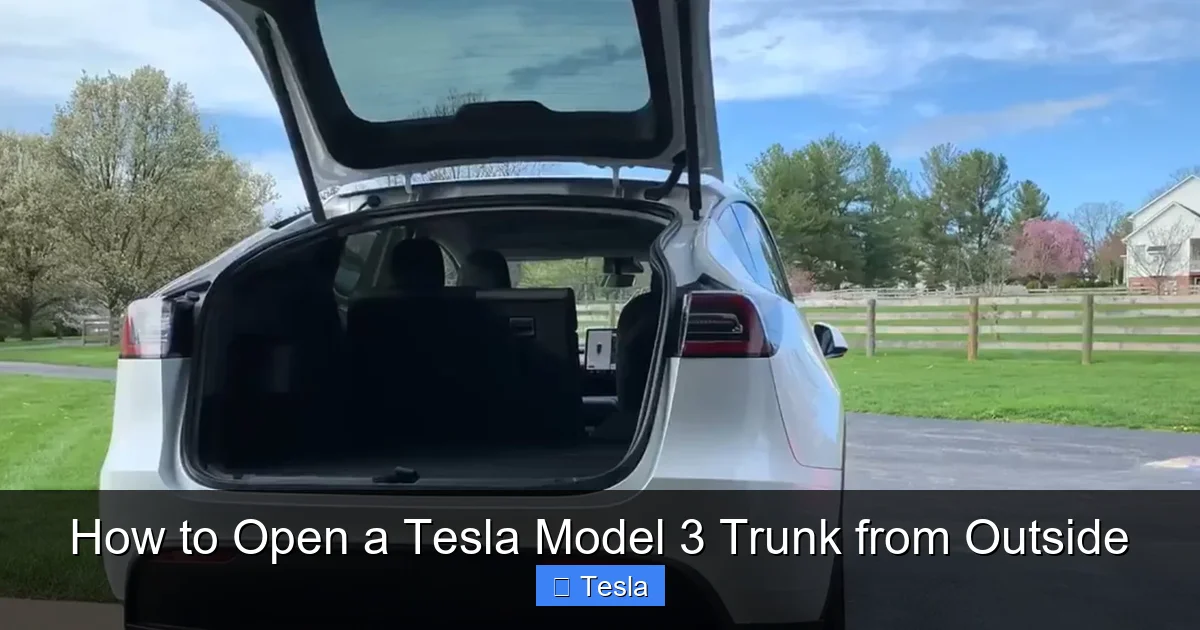
Visual guide about How to Open a Tesla Model 3 Trunk from Outside
Image source: cdn.teslanorth.com
Step-by-Step Guide
- Ensure Connectivity: Your phone must be logged into the Tesla app and paired with your vehicle. The car should be within Bluetooth range (typically 30-50 feet) or have a cellular connection if you’re using the app remotely.
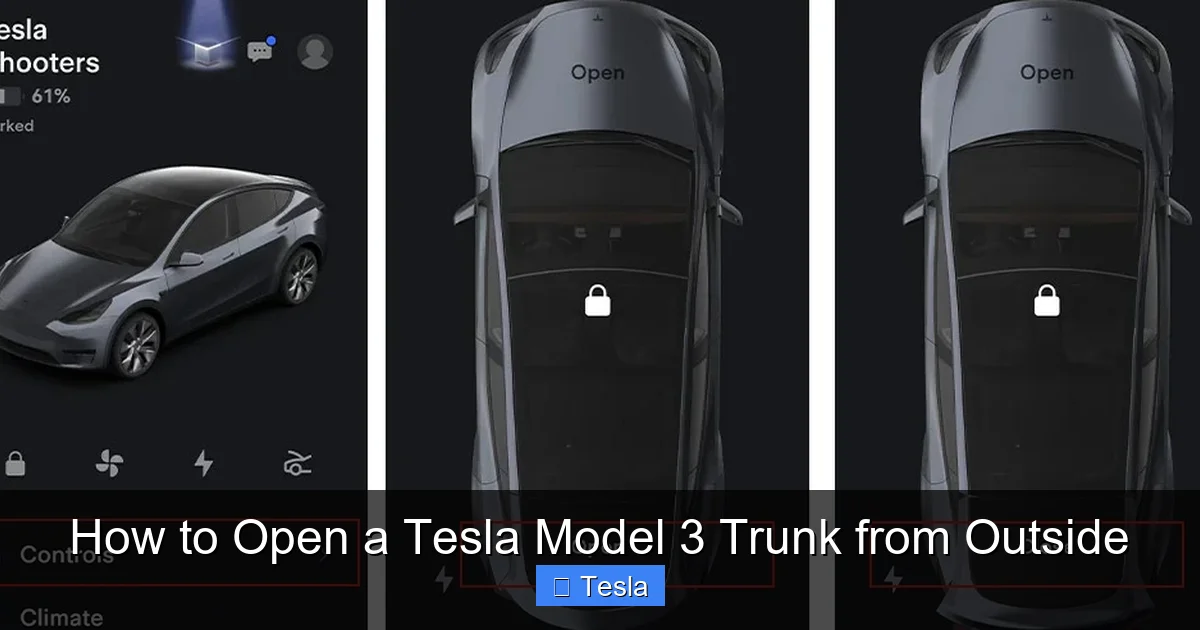
- Open the App: Launch the Tesla app on your smartphone. It should automatically connect and display your car’s current status (locked/unlocked, location, charge level).
- Navigate to Controls: Tap on the “Controls” menu, which usually appears as a steering wheel icon or a grid icon at the bottom of the screen.
- Find the Trunk Command: Within the Controls menu, look for the “Trunk” or “Rear Trunk” option. It’s often represented by an icon of a car with an open hatch.
- Press and Hold: Tap the trunk icon. You will typically need to press and hold it for 1-2 seconds. A progress ring or animation will appear on the icon.
- Listen for Confirmation: You should hear the trunk solenoid click and see the trunk begin to lift slightly. The app may also show a “Trunk Opening” notification.
Pro Tip: If the app command doesn’t work instantly, ensure your phone’s Bluetooth is on and that the car is awake. You can sometimes wake the car by pressing a door handle or using the app’s “Wake Up” function. Also, check for any pending software updates for the car or the app, as bugs can sometimes disrupt controls.
Method 2: Using the Tesla Key Fob or Key Card
The physical key fob (sold separately for Model 3) or the included key card is your reliable, always-available backup. It uses a dedicated radio frequency that doesn’t depend on your phone’s battery or signal.
Visual guide about How to Open a Tesla Model 3 Trunk from Outside
Image source: teslashooters.com
For the Key Fob
- Locate the Trunk Button: The Tesla key fob has a single, raised button on its front face. This button has an icon of a car with an open rear hatch.
- Aim and Press: Stand near the rear of the vehicle (within 3-5 feet is ideal). Press and hold the trunk button firmly for about 1 second. You should hear the trunk release mechanism engage.
- No Need to Aim Precisely: Unlike some infrared remotes, the fob’s RF signal doesn’t need a direct line of sight to the trunk. It can work through your hand or clothing.
For the Key Card
The key card operates differently. It requires physical contact with a designated sensor.
- Find the Sensor: On the driver’s side B-pillar (the vertical post between the front and rear doors), there is a rectangular, slightly recessed area. This is the card reader for unlocking and starting the car. There is no card sensor for the trunk on the outside. The key card cannot open the trunk directly from the outside. You must first unlock the car (by tapping the card to the B-pillar), then use the trunk button on the inside of the driver’s door or the interior trunk button. This is a key difference from the fob.
Important Note: If your key fob battery is dead (the fob still works via NFC when tapped to the door handle, but the wireless buttons fail), you will need to replace the coin cell battery inside the fob. A weak battery can cause intermittent failures. For the key card, ensure it’s not damaged and the NFC chip is intact.
Method 3: The Emergency Manual Trunk Release
This is your absolute last-resort method when the car has no 12V power and both the app and key fob are non-functional. It’s a purely mechanical process that requires you to be inside the trunk or have access to the interior trunk cavity. This is not a method for opening the trunk from the absolute outside without any access, but rather for when you can get into the car or have someone let you into the vehicle’s interior to access the trunk from inside the car.
Visual guide about How to Open a Tesla Model 3 Trunk from Outside
Image source: teslashooters.com
Location and Operation
- Access the Trunk Interior: First, you must be able to get into the Model 3’s cabin. If the doors are locked due to a dead 12V battery, you’ll need to use the physical key hidden inside the key fob (if you have the fob) to manually unlock the driver’s door. Alternatively, if you have a key card and a charged phone, you might use the Tesla app to unlock the doors remotely if the car has cellular connectivity and some residual 12V power.
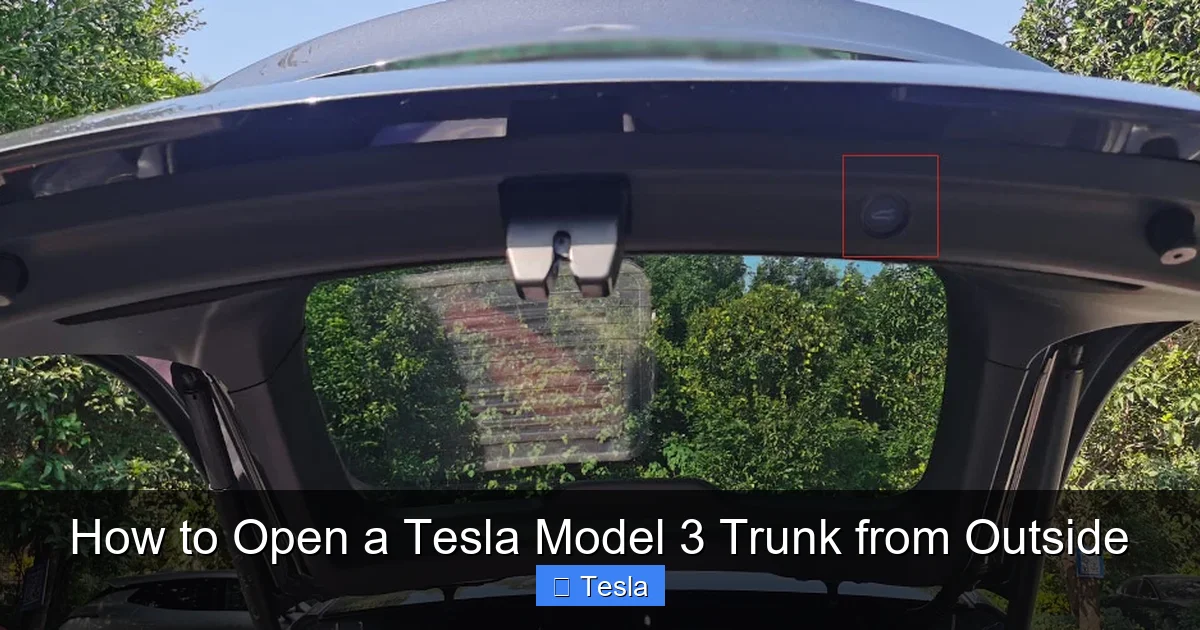
- Open the Trunk Cover: Once inside the car (or if the trunk is already slightly ajar), locate the rigid trunk lid trim panel. You need to remove a small section of this trim to access the manual release.
- Find the Release Tab: On the right-hand side (passenger side in left-hand drive markets) of the trunk’s interior, near the top and close to the latch mechanism, there is a small, rectangular plastic flap. This is often a different color or has a subtle texture. Carefully pry this flap open with a flat tool like a plastic trim removal tool or a fingernail.
- Pull the Cord: Behind the flap, you will see a bright red or brightly colored nylon pull cord. Firmly pull this cord in the direction indicated (usually towards you and slightly down). You will feel and hear a mechanical clunk as it disengages the primary latch.
- Lift the Trunk: The trunk lid should now be able to be lifted manually. It will be heavy, as the power struts are not assisting. Use your legs and back carefully to raise it.
Visual Guide and Practice
Tesla includes instructions for this in the owner’s manual. It’s highly recommended to locate and practice this procedure when you first get your car and have full power. Find the flap, pull the cord with the trunk closed (it will just click and not open, but you’ll feel the resistance), and understand its location. In a true emergency with a dead battery and no other access, this knowledge is invaluable. For a detailed visual, searching for “Tesla Model 3 manual trunk release” online will yield many video tutorials from owners.
Safety Warning: This release is designed for emergency egress from the trunk or for opening when locked out. It is not a routine opening method. Always ensure no person or pet is in the trunk path before pulling the cord, as the heavy lid can cause injury if it falls.
Troubleshooting: When the Standard Methods Fail
You’ve tried the app and the fob, but the trunk remains stubbornly shut. Here’s a systematic approach to diagnose the problem.
Check the 12V Battery First
This is the most common culprit. If the 12V battery is completely dead, the car’s entire low-voltage system is offline.
- Symptom: Door handles don’t retract/extend, touchscreen is black, headlights won’t turn on manually, car won’t “wake up” via app.
- Solution: You need to jump-start or replace the 12V battery. Accessing the 12V battery requires opening the frunk (front trunk). To open the frunk with a dead 12V battery, you must use the manual frunk release. This is a separate, equally hidden procedure involving pulling a cable through the front tow hook cover. This is a complex process best understood by consulting your owner’s manual or a service guide. Once the 12V is revived, the trunk release should work again.
Key Fob Issues
- Dead Fob Battery: Replace the CR2032 coin cell inside the fob. The fob can still be used via NFC (tapping to door handle) to unlock and drive, but the wireless trunk button will fail.
- Signal Interference: You might be in a “dead zone” for the fob’s signal, or another RF source could be jamming it. Move closer to the rear of the car and try again.
- Fob Not Paired: Rare, but possible after a software update. Re-pair the fob via the car’s touchscreen (if you can get in) or at a Tesla Service Center.
App Connectivity Problems
- Phone Bluetooth Off: Ensure Bluetooth is enabled. The app uses Bluetooth for local commands when the phone is nearby.
- Car Asleep & No Cellular: If the car is in a deep sleep and has no cellular signal (e.g., in a concrete parking garage), the app cannot wake it. You must physically approach the car and touch a door handle to wake it, then use the fob or interior button.
- App Glitch: Force close and restart the app. Log out and back in. Ensure the app is updated.
Physical Obstruction or Mechanical Failure
If you hear a click but the trunk doesn’t move, something might be physically jamming it—ice, snow, a cargo item pressed against the lid from inside. Also, the latch or power strut could be mechanically broken. In this case, you may need to carefully lift the lid manually while someone presses the release button to disengage the latch, or call roadside assistance. For comparison, many other vehicles like the Nissan Rogue also have power liftgates with similar failure modes and manual overrides.
Comparing to Traditional Cars and Other EVs
The Tesla Model 3’s approach is emblematic of the electric vehicle and premium brand shift away from physical keys. How does it stack up against other popular models?
No Exterior Keyhole
Most traditional sedans and SUVs (like a Toyota Corolla) still have a physical key slot on the trunk lid for a mechanical key. This is a direct, fail-safe method that requires no battery power. The Model 3 has no such slot, forcing reliance on electronics or the internal manual release. This is a point of contention for some buyers who value absolute simplicity.
Integration with Vehicle Systems
The Tesla’s app-based control is more integrated than a simple remote fob. You can open the trunk from anywhere you have cell service, schedule pre-conditioning (which includes defrosting the trunk seal), and see the trunk’s status on the app. A traditional car fob only works within a short range. However, this integration means a total loss of function if the 12V battery is dead and you have no cellular signal to wake the car remotely—a scenario less likely with a basic fob that can still work with a weak 12V battery.
The Manual Release Paradigm
Many modern cars with power liftgates, from a Subaru Forester to a Honda Pilot, have an interior manual release cord similar to Tesla’s. The principle is the same: a mechanical backup inside the cargo area. The key difference is that in many of those vehicles, you can often access that interior release by folding down the rear seats and reaching in from the passenger compartment. In the Model 3, the release is behind a trim panel on the trunk lid itself, requiring you to be in the trunk cavity to pull it. This makes it less useful if you’re locked out of the entire car and trunk, as you first need to get into the cabin to access the trunk interior.
Best Practices and Proactive Measures
Don’t wait for a lockout to figure this out. Here’s how to be prepared.
Know Your Tools
- Keep Your Phone Charged: A dead phone battery is as bad as a dead car battery. Carry a portable power bank for emergencies.
- Maintain Key Fob Battery: Replace the fob’s CR2032 battery every 1-2 years, or at the first sign of reduced range (having to be very close to the car).
- Monitor 12V Battery Health: The Tesla touchscreen will often warn you of a low 12V battery. Heed these warnings and replace the 12V battery proactively every 3-5 years, as it’s a wear item.
Practice the Manual Release (Carefully)
With the trunk open and the car powered, locate the manual release flap. Pull the cord to feel its action. This muscle memory will be crucial in a stressful situation. Just remember: never pull it when someone is near the trunk lid from the outside.
Plan for Access
Consider your typical loading scenarios. If you frequently carry large items, practice opening the trunk with the fob from different angles. If you often have your hands full, ensure the Tesla app is easy to access on your phone’s lock screen. You can also set up a Tesla Model 3 wrap that doesn’t interfere with key fob signal strength (avoiding thick metallic films).
Frequently Asked Questions
Can I open the Tesla Model 3 trunk from outside if the main battery is dead?
Yes, but only if the 12V auxiliary battery has power. The trunk release is powered by the 12V battery, not the main high-voltage pack. If the 12V battery is also dead, you must first jump-start or replace it, or use the emergency manual release from inside the trunk cavity after gaining entry to the cabin.
Where exactly is the manual trunk release on a Tesla Model 3?
It’s located inside the trunk. Look on the right-hand side (passenger side) of the trunk’s interior, near the top latch area. There is a small, rectangular plastic flap. Pry this open to reveal a brightly colored (usually red) pull cord. Pulling this cord disengages the primary trunk latch, allowing you to lift the heavy lid manually.
Why won’t my Tesla app open the trunk?
Common reasons include: your phone’s Bluetooth is off, the car is in a deep sleep with no cellular signal to wake it, the app needs an update, or the car’s 12V battery is dead. Ensure Bluetooth is on, try waking the car by touching a door handle, and check for any 12V battery warnings on the touchscreen.
Can I open the trunk with the key card from the outside?
No. The Tesla key card only works via NFC (near-field communication) when tapped directly to a door handle or the B-pillar reader to unlock and drive. It has no RF transmitter for remote functions like opening the trunk. You must use the key fob or the app for outside trunk operation.
Is it safe to regularly use the manual trunk release?
No. The manual release is an emergency backup designed for situations with complete power loss. It disengages the primary latch but does not assist with the weight of the trunk lid, which is very heavy and can cause injury if it falls. Use it only when necessary and ensure the area is clear.
What’s the difference between opening a Tesla Model 3 trunk and a traditional car’s trunk?
The biggest difference is the lack of an exterior physical keyhole. A traditional car like a Honda Civic often has a key slot on the trunk lid itself for a mechanical key. The Model 3 relies solely on electronic signals (app/fob) or the internal manual pull cord, making it dependent on the 12V battery’s charge for standard operation.
