
What Battery for My Car Key

Choosing the right battery for your car key fob is essential for reliable performance and avoiding unexpected lockouts. This guide walks you through battery types, replacement steps, and how to identify the correct model for your vehicle—so you stay in control, even when your key starts acting up.
Key Takeaways
- Most car key fobs use CR2032 batteries: This is the most common type, offering long life and reliable power for remote functions.
- Check your owner’s manual or fob label: Always verify the correct battery model before purchasing to avoid compatibility issues.
- Replace batteries every 3–5 years: Even if the key still works, weak batteries can cause intermittent failures.
- Use quality brands like Energizer or Duracell: Cheap batteries may leak or fail prematurely, damaging your key fob.
- Handle the battery carefully: Avoid touching the contacts with bare fingers to prevent corrosion and ensure proper function.
- Test after replacement: Always test all key functions (lock, unlock, trunk, panic) to confirm the new battery works correctly.
- Keep a spare battery handy: Store one in your glove box or emergency kit for peace of mind on the go.
📑 Table of Contents
- What Battery for My Car Key? A Complete Guide to Key Fob Power
- Why Your Car Key Battery Matters
- Common Battery Types for Car Keys
- How to Replace the Battery in Your Car Key
- Where to Buy a Replacement Battery
- Tips for Maintaining Your Key Fob Battery
- What to Do If the New Battery Doesn’t Work
- Final Thoughts: Stay Prepared, Stay in Control
What Battery for My Car Key? A Complete Guide to Key Fob Power
Ever been rushing to your car, only to find your key fob isn’t responding? That sinking feeling when your key won’t unlock the doors—especially in bad weather or late at night—is something every driver dreads. More often than not, the culprit is a dead or dying battery. But don’t worry: replacing the battery in your car key is usually quick, easy, and doesn’t require a trip to the dealership.
Understanding what battery for your car key you need is the first step to staying prepared. Most modern key fobs run on small, coin-shaped lithium batteries, and while they’re designed to last several years, they don’t last forever. Knowing how to identify the right battery, where to buy it, and how to install it can save you time, money, and stress. In this guide, we’ll walk you through everything you need to know—from common battery types to step-by-step replacement instructions—so you can keep your key fob working like new.
Why Your Car Key Battery Matters
Your car key fob is more than just a remote—it’s a sophisticated piece of technology that communicates with your vehicle using radio frequencies. It handles locking and unlocking doors, starting the engine (in some models), opening the trunk, and even activating the alarm. All of these functions rely on a steady power supply from a small but mighty battery.
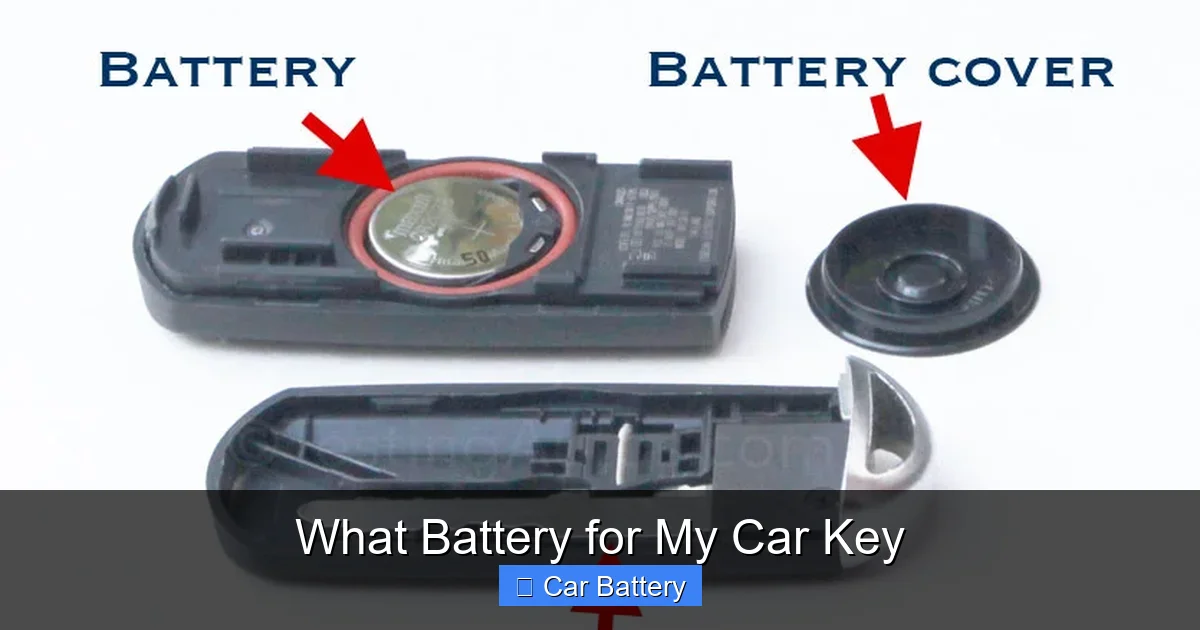
Visual guide about What Battery for My Car Key
Image source: testingautos.com
When the battery starts to weaken, you might notice subtle signs: the range shortens, buttons respond slowly, or the fob only works when held close to the door. Ignoring these signs can lead to a complete failure, leaving you stranded outside your car. That’s why knowing what battery for your car key is essential—not just for convenience, but for safety and reliability.
How Long Do Key Fob Batteries Last?
Most key fob batteries are designed to last between 3 to 5 years, depending on usage. If you use your key frequently—like unlocking your car multiple times a day—the battery may drain faster. Environmental factors also play a role: extreme heat or cold can reduce battery life. For example, leaving your keys in a hot car during summer can accelerate wear.
Even if your key still works, it’s smart to replace the battery proactively. Think of it like changing the batteries in your smoke detector—better safe than sorry. Waiting until the fob completely dies could leave you locked out at the worst possible moment.
Signs Your Key Fob Battery Is Dying
Don’t wait for total failure. Watch for these common warning signs:
- Reduced range: The fob only works when it’s right next to the car.
- Delayed response: Buttons take a few seconds to register.
- Intermittent function: Some buttons work, others don’t—or they work only sometimes.
- Dashboard warning: Some cars display a “Key Fob Battery Low” message.
- Physical damage: A swollen or leaking battery is a clear sign it needs replacing immediately.
If you notice any of these, it’s time to check your battery. And don’t assume it’s always the battery—sometimes the issue is with the fob itself or the car’s receiver. But in most cases, a simple battery swap does the trick.
Common Battery Types for Car Keys
Not all car key batteries are the same. While many look identical—small, round, and silver—there are several types, each with different voltages, capacities, and compatibility. Using the wrong one can damage your fob or cause it to malfunction.
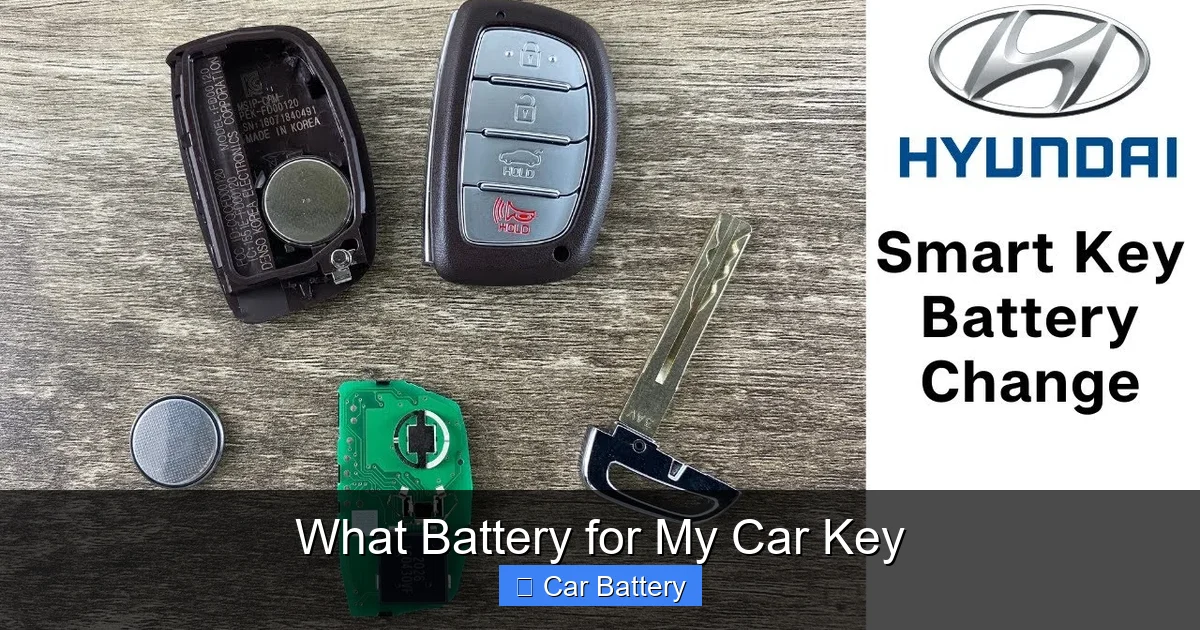
Visual guide about What Battery for My Car Key
Image source: i.ytimg.com
The most common battery used in car key fobs is the CR2032. This 3-volt lithium coin cell is widely available, affordable, and powers the majority of modern key remotes. But depending on your vehicle’s make and model, you might need a different type. Let’s break down the most popular options.
CR2032: The Most Popular Choice
The CR2032 is the go-to battery for car keys. It’s 20mm in diameter, 3.2mm thick, and delivers a steady 3 volts. You’ll find it in keys for brands like Toyota, Honda, Ford, Nissan, and many others. It’s also used in other devices like calculators, watches, and medical equipment, so it’s easy to find at pharmacies, electronics stores, or online.
One reason for its popularity is reliability. CR2032 batteries have a long shelf life (up to 10 years) and perform well in extreme temperatures. They’re also less likely to leak than cheaper alternatives, which protects your fob’s internal components.
Other Common Key Fob Batteries
While CR2032 is the most common, some vehicles use different batteries. Here are a few others you might encounter:
- CR2025: Slightly thinner than the CR2032 (2.5mm vs. 3.2mm), but same voltage and diameter. Used in some BMW, Mercedes, and Audi models.
- CR2016: Thinner still (1.6mm), but still 3 volts. Found in older or compact key fobs.
- CR1632: Smaller diameter (16mm), used in slim or mini fobs.
- CR1616 and CR1220: Even smaller, used in keyless entry cards or smart keys.
Always double-check your specific model. Using a CR2025 in a fob designed for a CR2032 might work temporarily, but the thinner battery can rattle inside, causing poor contact and eventual failure.
How to Identify Your Key’s Battery
Confused about what battery for your car key you need? Here’s how to find out:
- Check the owner’s manual: The manual usually lists the battery type under “key fob” or “remote control.”
- Look inside the fob: Open the key (we’ll show you how below) and check the battery itself—it’s often printed right on the cell.
- Search online: Use your car’s make, model, and year plus “key fob battery” in a search engine. Forums and manufacturer sites often have the answer.
- Ask the dealer or a locksmith: If you’re still unsure, a quick call can clarify.
Pro tip: Take a photo of the battery before removing it. That way, you can show it to a store clerk or search for it online with confidence.
How to Replace the Battery in Your Car Key
Replacing a key fob battery is easier than you might think—no special tools or technical skills required. Most fobs are designed for user replacement, and the process takes just a few minutes. Let’s walk through it step by step.
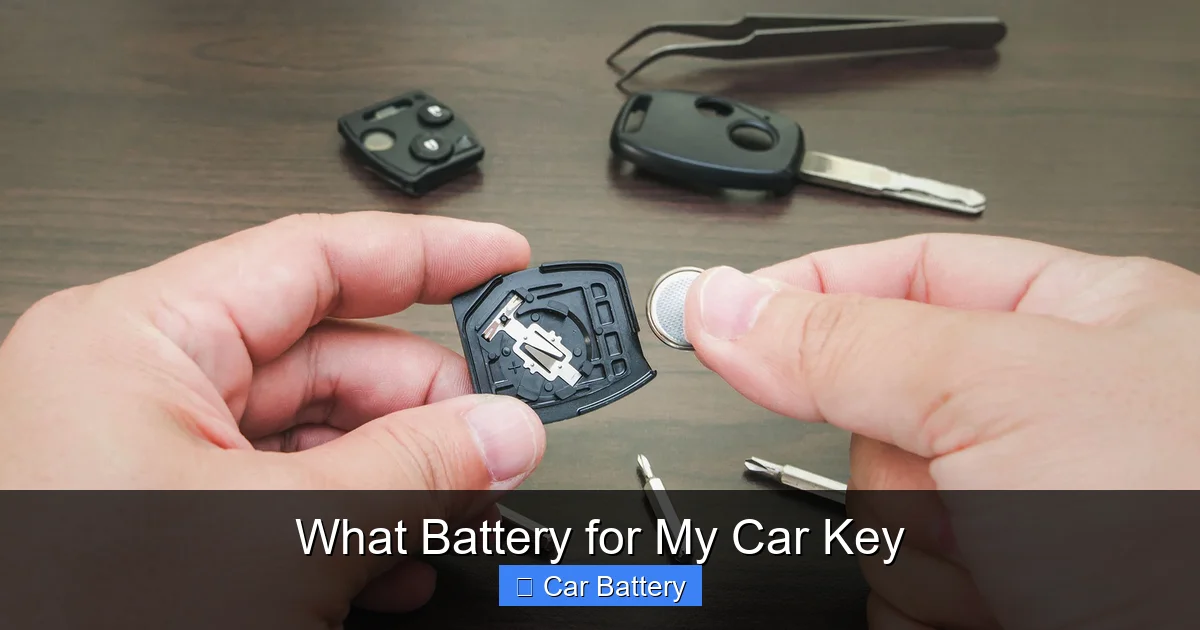
Visual guide about What Battery for My Car Key
Image source: ebaymotorsblog.com
Step 1: Gather Your Supplies
You’ll need:
- The correct replacement battery (e.g., CR2032)
- A small flathead screwdriver or a plastic prying tool
- A clean, well-lit workspace
- Optional: Tweezers (for handling small batteries)
Avoid using metal tools that can scratch or damage the fob. Plastic spudgers or guitar picks work great for prying.
Step 2: Open the Key Fob
Most key fobs have two halves held together by clips or a small screw. Here’s how to open them:
- For clip-style fobs: Look for a small seam along the edge. Insert the flathead tool and gently twist to pop the halves apart. Work slowly to avoid breaking the clips.
- For screw-style fobs: Use a tiny screwdriver (often Phillips #0 or #1) to remove the screw, usually located near the key ring hole.
- For sliding keys: Some fobs have a physical key that slides out. Pull it out first, then look for a release button or seam.
Be gentle. The plastic is durable but can crack if forced. If it doesn’t open easily, double-check for hidden screws or clips.
Step 3: Remove the Old Battery
Once the fob is open, you’ll see the battery seated in a small compartment. Note its orientation—most have the positive (+) side facing up. Use your fingers or tweezers to lift it out.
Important: Avoid touching the battery’s metal contacts with your bare fingers. The oils from your skin can cause corrosion and reduce performance. If you do touch it, wipe it gently with a clean, dry cloth.
Step 4: Install the New Battery
Place the new battery into the compartment with the correct orientation (usually + side up). Make sure it sits flat and secure. Some fobs have a small spring or clip to hold it in place—ensure it’s properly seated.
Don’t force it. If it doesn’t fit easily, double-check the battery type. Using the wrong size can damage the fob or prevent it from working.
Step 5: Reassemble the Fob
Snap the two halves back together or reinsert the screw. Make sure everything aligns properly. Test the key before closing it completely—press each button to ensure they respond.
If the fob doesn’t work, reopen it and check:
- Is the battery installed correctly?
- Are the contacts clean and free of debris?
- Is the fob fully closed and sealed?
Once everything works, you’re good to go!
Special Cases: Smart Keys and Keyless Entry
Some high-end vehicles use smart keys or keyless entry fobs that don’t have removable batteries. In these cases, the battery is often sealed inside, and replacement may require a trip to the dealership or a professional locksmith.
However, many smart keys still have a small backup battery or a physical key blade that can be used to start the car manually. Check your manual for emergency procedures. And if your smart key stops working, try replacing the battery in the physical key fob first—it might be the culprit.
Where to Buy a Replacement Battery
You don’t need to visit a dealership to get a new key fob battery. In fact, you can find them almost anywhere. Here are the best places to shop:
Local Retail Stores
Pharmacies like CVS, Walgreens, and Rite Aid carry common coin cell batteries. Big-box stores like Walmart, Target, and Costco also stock them in the electronics or battery aisle. Prices are usually low—around $2 to $5 per battery—and you can walk out with it the same day.
Tip: Buy a pack of two or more. It’s always smart to have a spare on hand.
Auto Parts Stores
Stores like AutoZone, O’Reilly Auto Parts, and Advance Auto Parts often have key fob batteries and may even help you replace it for free. Some locations offer battery testing and installation services, which can be helpful if you’re unsure.
Online Retailers
Amazon, eBay, and Walmart.com offer a wide selection of batteries, often in bulk packs. You can compare brands, read reviews, and have them delivered to your door. Just make sure you’re buying from a reputable seller to avoid counterfeit batteries.
When shopping online, look for:
- Brands you trust (Energizer, Duracell, Panasonic)
- High customer ratings (4+ stars)
- Clear product descriptions with battery type and voltage
Dealerships and Locksmiths
If you’re unsure or uncomfortable doing it yourself, a dealership or professional locksmith can replace the battery for you. This is more expensive—often $10 to $20 including labor—but guarantees it’s done correctly.
Some dealerships even offer free battery checks during service visits. It’s worth asking!
Tips for Maintaining Your Key Fob Battery
Replacing the battery is just one part of keeping your key fob in top shape. With a little care, you can extend its life and avoid future issues.
Store Your Keys Properly
Avoid leaving your keys in hot or cold environments. Extreme temperatures can drain the battery faster. Don’t leave them on a sunny dashboard or in a freezing car overnight.
Also, keep them away from metal objects. Keys stored near coins, tools, or other electronics can cause interference or accidental button presses, which drain the battery.
Clean the Fob Regularly
Dirt, dust, and grime can build up around the buttons and battery contacts. Use a soft, dry cloth to wipe the exterior. For stubborn dirt, lightly dampen the cloth with water—never spray liquid directly on the fob.
Inside, use a cotton swab to gently clean the battery contacts. Avoid using alcohol or harsh chemicals, which can damage the circuitry.
Use a Key Fob Cover
A silicone or rubber cover can protect your fob from drops, scratches, and moisture. It also helps prevent accidental button presses in your pocket or bag.
Look for covers designed for your specific key model. They’re inexpensive and widely available online.
Test the Battery Periodically
Even if your key works, test the battery every 6 to 12 months. You can use a multimeter to check voltage (should be around 3V) or simply replace it proactively every 3–5 years.
Some cars have a built-in battery test feature—check your manual to see if yours does.
What to Do If the New Battery Doesn’t Work
Sometimes, even after replacing the battery, your key fob still won’t work. Don’t panic—there are a few common fixes.
Check the Battery Orientation
Double-check that the battery is installed with the correct side up. The positive (+) side usually faces outward, but some fobs are different. Refer to the old battery or a photo you took earlier.
Clean the Contacts
Dirt or corrosion on the battery contacts can prevent power from flowing. Use a cotton swab and a drop of rubbing alcohol to clean them gently. Let it dry completely before reassembling.
Reset the Fob
Some fobs need to be resynchronized with the car after a battery change. This usually involves pressing a sequence of buttons or inserting the key into the ignition. Check your owner’s manual for instructions.
Test the Car’s Receiver
If the fob still doesn’t work, the issue might be with the car’s receiver or antenna. Try using the physical key to unlock the door and start the car. If that works, the fob may need reprogramming or repair.
Consider Professional Help
If all else fails, visit a dealership or locksmith. They can diagnose the issue, replace the battery, or reprogram the fob if needed.
Final Thoughts: Stay Prepared, Stay in Control
Knowing what battery for your car key you need is a small but important part of car ownership. A dead key fob battery can turn a simple errand into a major hassle—but with the right knowledge, you can handle it quickly and confidently.
Remember: most car keys use a CR2032 battery, but always verify your model. Replace the battery every 3–5 years, use quality brands, and keep a spare on hand. With these tips, you’ll never be left stranded again.
Take a few minutes today to check your key fob. Open it up, see what battery it uses, and buy a replacement if needed. It’s a small investment of time that pays off in peace of mind every time you press that unlock button.
Frequently Asked Questions
What battery does my car key fob use?
Most car key fobs use a CR2032 battery, but some models require CR2025, CR2016, or others. Check your owner’s manual, the battery label, or search online using your car’s make and model to confirm.
How often should I replace my key fob battery?
Replace your key fob battery every 3 to 5 years, or sooner if you notice reduced range or delayed response. Proactive replacement prevents unexpected failures.
Can I use a different battery if I can’t find the exact one?
It’s not recommended. Using a battery with the wrong size or voltage can damage the fob or cause it to malfunction. Always use the correct type specified for your key.
Where can I buy a replacement key fob battery?
You can buy key fob batteries at pharmacies, auto parts stores, big-box retailers, and online. Look for trusted brands like Energizer or Duracell for best results.
Do I need tools to replace the battery?
Most key fobs can be opened with a small flathead screwdriver or plastic prying tool. No special equipment is needed—just be gentle to avoid damaging the casing.
What if my key fob still doesn’t work after replacing the battery?
Check the battery orientation, clean the contacts, and ensure the fob is fully closed. If it still fails, the issue may be with the fob or car’s receiver—consult a professional if needed.