
What Does a Red Light on a Tesla Charger Mean?

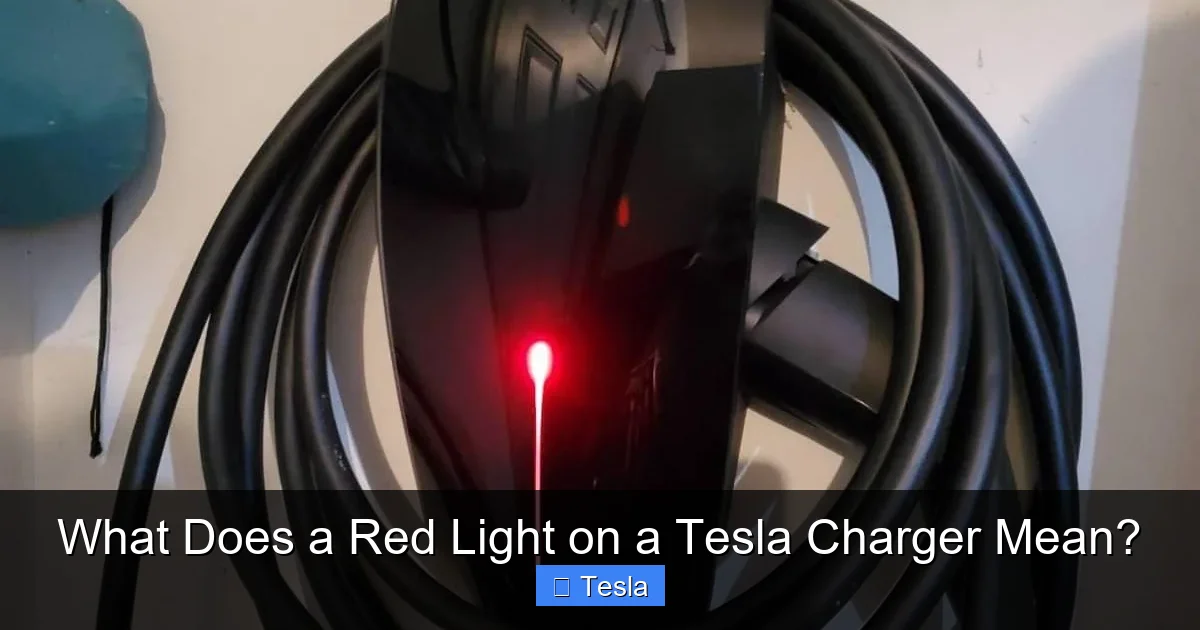
A red light on your Tesla charger is a universal warning signal indicating a fault has been detected. It typically points to issues like a poor electrical connection, overheating, a faulty charger, or a problem with your vehicle’s charging system. While it often means charging has stopped, the exact cause can range from a simple loose cable to a more serious hardware issue. The first steps are always to safely disconnect, inspect for obvious problems, and try a different outlet or charger before seeking professional service.
You plug in your Tesla, the connector clicks into place, and you expect to see that familiar, reassuring green light indicating energy is flowing into your battery. Instead, you see it: a stark, unwavering red light on your Mobile Connector or Wall Connector. Your heart sinks a little. What does a red light on a Tesla charger mean? Is it serious? Is your car okay? How do you fix it?
First, take a breath. A red light is your charger’s way of saying, “Hey, something’s not right, and I’ve stopped charging to keep everyone safe.” It’s a protective measure, not necessarily a catastrophe. While it’s frustrating to have your charging session interrupted, understanding this signal is the first step to getting back on the road. This guide will walk you through everything you need to know about that red light, from the simple fixes you can try yourself to when it’s time to call in the pros.
Key Takeaways
- A Red Light Means a Fault: Unlike a solid green (charging) or blue (ready) light, a red light signifies an error that has halted the charging process for safety.
- Common Culprits are Simple: The most frequent causes are a loose or damaged charge cable, an overheated charger, or a problem with the wall outlet or circuit.
- Vehicle Issues Can Trigger It: Sometimes the problem originates in the car, such as a faulty charging port, a battery management system alert, or a communication error between the car and charger.
- Start with Basic Troubleshooting: Always begin by safely unplugging everything, checking for physical damage, trying a different outlet or charger, and rebooting your vehicle’s touchscreen.
- Not All Red Lights Are Equal: Pay attention to patterns—a blinking red light can mean something different than a solid red light, and some chargers have specific blink codes.
- Safety First: If you smell burning, see melted plastic, or notice repeated faults after basic checks, stop immediately and contact Tesla Support or an electrician. Electrical issues can be hazardous.
- Warranty May Cover Repairs: If the charger is under warranty and the fault isn’t due to misuse or damage, Tesla may replace it. Document the issue with photos/videos.
📑 Table of Contents
- Understanding Your Tesla Charger’s Language: The Light Guide
- The Most Common Reasons for a Red Light
- Decoding the Blinks: Is Your Red Light Solid or Flashing?
- Your Step-by-Step Troubleshooting Guide
- When the Problem is the Charger Itself
- Prevention: Keeping the Red Light at Bay
- Conclusion: Knowledge is Power (and Charging)
Understanding Your Tesla Charger’s Language: The Light Guide
Before we dive into the red light specifically, it helps to know what the other colors mean. Your Tesla charger uses a simple but effective traffic light system to communicate its status. Think of it as the charger’s mood ring.
The Normal Spectrum: Green, Blue, and White
A solid green light means everything is perfect—your car is actively charging. A blinking green light indicates the charger is preparing to start or is in a brief communication handshake with the vehicle. A solid blue light (on Wall Connectors) means the charger is powered and ready, but no car is connected. Some chargers also show a white light when they are in a scheduled or delayed charging mode, waiting for its programmed start time.
The Warning Spectrum: Amber and Red
An amber or yellow light is a cautionary signal. It might mean the charger is in a “standby” or “idle” state, or it could indicate a minor, often recoverable, issue like a temporary temperature rise. A red light, however, is the stop sign. It means a fault has been detected, and charging has been immediately terminated for safety. The charger will not resume until the fault is cleared and power is cycled.
The Most Common Reasons for a Red Light
So, what triggers this stop-charging alarm? The vast majority of red light incidents stem from one of a few common sources. We’ll start with the simplest and most frequent.

Visual guide about What Does a Red Light on a Tesla Charger Mean?
Image source: portablepowerguides.com
1. The Usual Suspect: Connection Problems
This is the #1 cause, especially for Mobile Connector users. The fault can be at either end of the charging cable.
- Loose Connection at the Wall Outlet/Adapter: If you’re using a NEMA adapter (like a 14-50 or 10-30), the plug might not be fully seated in the wall outlet. The prongs can vibrate loose over time. Ensure it’s plugged in firmly and that any locking ring on the adapter is snug.
- Loose Connection at the Vehicle: The Tesla connector might not be fully inserted into the car’s charge port. Listen for the definitive “click.” Sometimes debris or snow/ice in the charge port can prevent a full connection. Check the port for obstructions.
- Damaged or Dirty Connectors: Inspect both the male pins on the charger handle and the female receptacle in your car. Look for bent pins, corrosion, dirt, or moisture. A poor electrical connection here can cause a voltage drop or short, triggering a red light. Clean gently with a dry cloth.
2. Thermal Protection: The Charger is Too Hot
Both the Mobile Connector and Wall Connector have built-in thermal sensors. If the internal temperature rises too high, they will shut down and display a red light to prevent damage.
Why does it overheat? Often, it’s due to insufficient ventilation. If the charger is tucked into a tight space, covered by a blanket, or placed on a hot surface (like asphalt on a sunny day), it can’t dissipate heat. High ambient temperatures combined with the heat generated during charging (especially at higher amperage) can push it over the limit. The solution is to move it to a cooler, well-ventilated area.
3. Power Supply Issues: The Wall Circuit
The problem might not be the charger at all, but the electricity feeding it.
- Overloaded Circuit: Is there a large appliance (air conditioner, dryer, workshop tools) on the same circuit as your EV charger? The combined draw can exceed the circuit’s capacity, causing a voltage sag or trip that the charger detects as a fault.
- Faulty or Loose Wiring/Outlet: An old, damaged, or improperly installed outlet or wiring in your wall can create an unstable power connection. This is a serious potential fire hazard. If you suspect this, stop using the outlet and call a licensed electrician.
- Voltage Fluctuations: In some areas with unstable grid power, brownouts or surges can cause the charger to fault. A whole-home surge protector can help mitigate this.
It’s worth noting that issues with the vehicle’s own onboard charger can also manifest as a fault on the external connector. If your car’s internal charger has a problem, it may communicate an error to the Tesla connector, causing it to display red. This is harder to diagnose at home.
Decoding the Blinks: Is Your Red Light Solid or Flashing?
Not all red lights are created equal. The pattern of the red light can offer more specific clues, especially on the newer generation Tesla Wall Connector (which has a more sophisticated LED ring).
Visual guide about What Does a Red Light on a Tesla Charger Mean?
Image source: ecarcraze.com
Solid Red Light
A steady, solid red light is the most generic “fault” indication. It means a general error has occurred. Start with the basic troubleshooting steps: unplug, inspect, try a different outlet/cable. If it persists, there may be an internal hardware failure in the charger itself.
Blinking/Flashing Red Light
Blinking patterns are often diagnostic codes. For example, on many Tesla chargers:
- One Blink: Often indicates a ground fault or earth leakage error.
- Two Blinks: Can signal a high-temperature fault.
- Three Blinks: Might indicate a communication error between the charger and the vehicle.
- Four Blinks: Could point to a voltage or frequency problem with the incoming AC power.
Important: The exact blink codes can vary slightly between charger generations and models (Mobile Connector Gen 1 vs. Gen 2 vs. Gen 3, or Wall Connector). Your best resource is the official Tesla documentation for your specific charger model, which can be found in your Tesla app under “Charging” or on Tesla’s support site. Observing and noting the blink pattern is crucial information if you need to contact Tesla Support.
Your Step-by-Step Troubleshooting Guide
Don’t just stare at the red light. Let’s fix this methodically. Follow these steps in order. Always prioritize safety: if you smell burning or see melted plastic, stop immediately and unplug the charger from the wall.

Visual guide about What Does a Red Light on a Tesla Charger Mean?
Image source: ecarcraze.com
Step 1: The Power Cycle (The “Turn It Off and On Again”)
This is the digital age’s universal cure.
- Unplug the charger from your Tesla vehicle first.
- Unplug the charger from the wall outlet or adapter.
- Wait a full 60 seconds. This clears any residual charge and resets the charger’s internal computer.
- Plug it firmly back into the wall outlet/adapter.
- Plug it into your Tesla.
- Observe the light sequence. If it goes from red to blue (ready) and then to green (charging), you’ve solved it!
Step 2: Physical Inspection and Simple Swaps
If the red light returns immediately:
- Check both ends: Carefully inspect the connector on the charger and the charge port on your car for dirt, moisture, or damage. Clean if necessary with a dry, soft cloth.
- Try a different outlet: If possible, plug your charger into a different, known-good 240V outlet on a different circuit (e.g., a dryer outlet with the correct adapter). If it works there, the problem is with your original EV circuit/wiring.
- Try a different charger: If you have access to another Tesla charger (a friend’s, a public station, a different adapter), try it on your car. If the other charger works fine on your car, your original Tesla charger is likely faulty.
- Try your charger on a different Tesla: If possible, plug your charger into another Tesla. If it also shows a red light on a different car, your charger is the problem. If it works on the other car, your vehicle’s charge port or onboard charger may be the issue.
Step 3: Vehicle Reboot and Settings Check
Sometimes the car’s software needs a refresh.
- With the charger plugged in (but showing red), get in your car and perform a soft reboot: Hold down both scroll wheels on the steering wheel until the screen goes black and the Tesla logo reappears. After the reboot, check the charger light.
- On the car’s touchscreen, go to Controls > Charging. Ensure “Scheduled Charging” isn’t accidentally set for a future time, which might show a different light. Also, check for any other warning messages on the screen related to charging or the battery.
Step 4: Consult the Source and Seek Help
If none of the above works:
- Open your Tesla mobile app. It often provides more specific error messages about charging faults (e.g., “Charge port error,” “Check power supply”).
- Visit the Tesla Support page for your charger model. They have detailed troubleshooting guides and diagrams for blink codes.
- Contact Tesla Support directly through the app. They can run remote diagnostics on your vehicle and charger (if connected to Wi-Fi) and advise the next steps. Have your charger’s serial number and a description of the light pattern ready.
- If you suspect a house wiring issue (as indicated by Step 2 working on a different circuit), you must call a licensed electrician. Do not ignore this.
When the Problem is the Charger Itself
If you’ve determined through swapping that the fault lies with your Tesla charger (Mobile or Wall Connector), what are your options?
Warranty Coverage
Your Tesla charger is covered by a limited warranty (typically 1-3 years, depending on model and region). If the failure is due to a defect in materials or workmanship, Tesla will repair or replace it at no cost. You must initiate a service request through the Tesla app. Be prepared to describe the issue and, if asked, provide photos/videos of the red light and the serial number label.
Out-of-Warranty Replacement
If the warranty has expired, or if the charger was damaged due to misuse (e.g., running over the cable, using it with a non-Tesla adapter that caused a short), you’ll need to purchase a replacement. You can buy new directly from Tesla or from reputable third-party sellers. Prices vary by model.
The “Is It Worth Repairing?” Question
Generally, Tesla does not offer repair services for their chargers. They are considered sealed units. A failed internal component (like a power electronics board) usually means full replacement. Given the cost of a new Wall Connector versus the price of a used one, replacement is typically the only path.
Prevention: Keeping the Red Light at Bay
An ounce of prevention is worth a pound of troubleshooting. Here’s how to treat your charger right:
- Handle with Care: Don’t yank the cable. Coil it loosely when not in use. Avoid driving over it or pinching it in doors/trunks.
- Keep it Clean and Dry: Store the charger in a dry place. Wipe down the connector periodically. Never use a wet charger.
- Mind the Environment: Don’t leave it in direct, scorching sun or in freezing, damp conditions if possible. Ensure it has airflow around it—don’t bury it in a pile of garage clutter.
- Use Correct Adapters: Only use genuine Tesla adapters or high-quality, UL-listed third-party adapters rated for the amperage and voltage. Cheap adapters are a fire risk and a common cause of faults.
- Don’t Overload Circuits: Be mindful of what else is on the same circuit as your EV charger. A dedicated circuit is always best.
- Regularly Check Connections: Periodically ensure the wall plug/adapter and the car connector are seated properly.
Conclusion: Knowledge is Power (and Charging)
That red light on your Tesla charger is not a reason for dread; it’s a piece of information. It’s your charger and your car working together to prevent damage and ensure safety. By understanding its meaning—a fault has occurred—and following a logical, safe troubleshooting process, you can diagnose and resolve most issues yourself. Start simple: unplug, inspect, try a different outlet. If those steps don’t work, leverage your Tesla app and Support resources. Remember, the problem is often a loose plug or a hot charger, not a broken car. Treat your charging equipment with care, ensure your home electrical system is up to the task, and you’ll enjoy many years of silent, efficient, red-light-free charging.
Frequently Asked Questions
What does a solid red light on my Tesla Mobile Connector mean?
A solid red light typically indicates a general fault that has stopped charging. Common causes include a loose connection at the car or wall, overheating of the charger, or a power supply issue. Start by unplugging it from both ends, waiting 60 seconds, and reconnecting firmly.
My Tesla charger is blinking red. How do I know what’s wrong?
Blinking patterns are often diagnostic codes. For example, one blink may mean a ground fault, two blinks a high-temperature fault, and three blinks a communication error. Check your specific charger’s manual in the Tesla app or on Tesla’s website for the exact blink code meanings for your model.
Can a red light indicate a problem with my Tesla car, not the charger?
Yes, absolutely. A fault in the vehicle’s onboard charger, battery management system, or charge port can send an error signal to the external connector, causing it to display red. Troubleshooting by trying your charger on another Tesla (if possible) helps isolate the issue.
Is it safe to keep trying to charge if the red light comes back?
No. If the red light returns after a basic reset, do not repeatedly attempt to charge. The fault is persistent and could indicate a serious safety issue like a short circuit or overheating component. Continued attempts could damage your charger, car, or home wiring. Stop and troubleshoot or contact Tesla Support.
Could a red light be caused by my home’s electrical system?
Yes, frequently. Faulty wiring, a loose connection in your outlet or breaker panel, an overloaded circuit, or unstable voltage from the grid can all cause the charger to detect a fault and display red. If the charger works on a different circuit, you need an electrician to inspect your EV charging circuit.
Will Tesla replace my charger if it shows a red light under warranty?
If your charger is still within its warranty period and the failure is due to a manufacturing defect (not physical damage or misuse), Tesla will typically replace it. You must contact Tesla Support via the app to open a service case and have the device diagnosed. They will guide you through the warranty replacement process.
