
How to Reset Oil Life on a 2014 Jeep Cherokee

Resetting the oil life monitor on your 2014 Jeep Cherokee is a simple procedure you can do yourself after an oil change. It involves using the vehicle’s odometer button or steering wheel controls to navigate the instrument cluster menu. This guide provides detailed, trim-specific instructions to ensure you reset the system correctly, preventing false service reminders and keeping your engine properly maintained.
So, you just finished that well-deserved oil change on your trusty 2014 Jeep Cherokee. You’ve topped off the fluids, double-checked the drain plug, and properly disposed of the old oil. You start the engine, and everything sounds great. But then, a familiar yellow light illuminates on your dashboard, or a message stubbornly reads “Oil Change Required” on the digital display. Frustrating, right? Don’t worry—this isn’t a sign of a faulty engine or a messed-up service. It’s simply your Cherokee’s computer, the Powertrain Control Module (PCM), still holding onto the old oil life percentage from before your service. Resetting it is a crucial final step that many DIYers and even some quick-lube technicians overlook. This comprehensive guide will walk you through exactly how to reset the oil life on a 2014 Jeep Cherokee, breaking down the process for every trim level and potential system configuration. Think of it as giving your Cherokee’s maintenance minder a fresh, clean slate.
Understanding why this reset is necessary is the first step. Your 2014 Cherokee doesn’t have a traditional, simple mileage-based reminder. Instead, it uses a sophisticated oil life monitoring system (OLMS). This system doesn’t just count miles; it’s an algorithm that factors in engine revolutions, operating temperature, and driving conditions (like frequent short trips in cold weather versus long highway drives) to estimate the actual degradation of your engine oil’s lubricating properties. When you change the oil and filter, you’ve physically reset the oil’s condition, but the computer’s memory still thinks it’s the old, worn-out oil. You must manually tell the PCM, “Hey, the oil is new! Start counting from 100% again.” If you don’t, the service light will continue to come on based on the old data, leading to unnecessary worry or, worse, neglecting a future actual oil change. It’s a simple task that takes less than a minute but has a significant impact on your vehicle’s maintenance accuracy and your peace of mind.
The good news is that Fiat Chrysler Automobiles (FCA), Jeep’s parent company at the time, designed this reset to be a straightforward, no-tools-required procedure you can do from the driver’s seat. However, the exact steps differ slightly based on whether your Cherokee has the basic instrument cluster with an odometer button or the more advanced steering wheel-mounted controls. We’ll cover both. Before we dive into the button-pressing, let’s lay the essential groundwork to ensure a smooth, successful reset every single time.
Key Takeaways
- The oil life monitor is an algorithm, not a sensor: It calculates oil degradation based on engine run time, temperature, and driving habits, so resetting it is mandatory after every oil change.
- Two primary reset methods exist: Most 2014 Cherokee models use the “Vehicle Info” menu via the steering wheel controls, while base trims may use the odometer button on the instrument cluster.
- You must perform the reset immediately after an oil change: The system counts down from 100% with each engine start. Failing to reset it will cause the “Change Oil” message to illuminate prematurely.
- Ensure the ignition is in the “ON/RUN” position but the engine is OFF: The engine must not be running for the reset procedure to be accessible in the menu system.
- Confirmation is key: The system will ask you to confirm the reset. You must select “YES” or “DONE” (depending on trim) to finalize the process and return the oil life to 100%.
- Consult your owner’s manual for your specific trim: While this guide covers all common procedures, the exact menu path can vary slightly between Sport, Latitude, Limited, and Trailhawk trims.
- If the reset fails, check your work: Ensure you didn’t accidentally start the engine during the process, and verify you held buttons for the correct duration. A weak battery can sometimes cause menu glitches.
📑 Table of Contents
- Understanding Your Cherokee’s Oil Life Monitoring System
- Preparation: Before You Press Any Buttons
- Method 1: The Steering Wheel Control Reset (Most Common)
- Method 2: The Odometer Button Reset (Base Models)
- After the Reset: Verification and Best Practices
- Common Issues, Troubleshooting, and FAQs
- Conclusion: A Simple Step for Long-Term Engine Health
Understanding Your Cherokee’s Oil Life Monitoring System
To effectively reset a system, you must first understand what you’re resetting. The oil life monitor in your 2014 Jeep Cherokee is a software-driven feature that replaced the old-school “change oil every 3,000 miles” rule with a personalized, condition-sensitive schedule. For the average driver under normal conditions, the system will typically call for an oil change between 5,000 and 7,500 miles, but it can range from as low as 3,000 miles (for severe, constant short-trip driving) to over 10,000 miles (for ideal, consistent highway driving). This adaptability is great for engine longevity and saving money on unnecessary oil changes, but it relies entirely on accurate input and timely resets.
How the Algorithm Works
The PCM constantly gathers data from various engine sensors. It knows how long the engine has run, at what RPMs, and at what temperatures. Cold starts and short trips where the oil never reaches its full operating temperature are particularly hard on oil, causing it to degrade faster from fuel dilution and condensation. The system weights these “severe” conditions more heavily. Conversely, a long, steady-state highway drive where the engine and oil are thoroughly warmed up is considered “mild” and counts down the oil life percentage more slowly. When the calculated oil life reaches 15% or lower, the “Oil Change Required” message will illuminate on your dashboard display. Some models may also show a percentage countdown in the trip computer screen.
The Importance of a Full Reset
Imagine you change your oil at 5,000 miles when the display reads 15%. The mechanic resets the system to 100%. Your new oil is now at 100% life. You drive another 5,000 miles under similar conditions. The system, having learned your habits, may now calculate that the oil is down to, say, 30% life. It’s doing its job perfectly. But if the initial reset was forgotten, the PCM would still think the oil had only 15% life left at the 5,000-mile mark, possibly triggering a warning at 6,000 miles instead of the correct 10,000. This confusion can lead to either changing oil too early (wasting money) or, more dangerously, ignoring a legitimate warning because you think it’s a glitch. A proper reset synchronizes the computer’s clock with your physical service.
Preparation: Before You Press Any Buttons
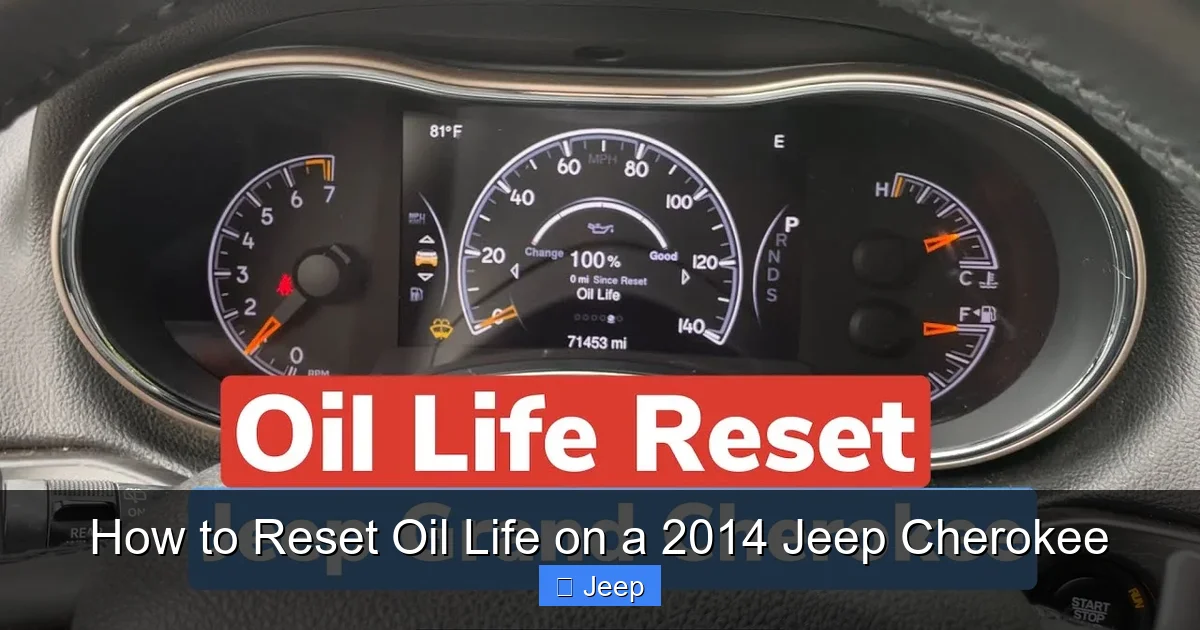
Rushing into the reset procedure without proper setup is a common cause of failure. Taking two minutes to prepare will save you from frustration. First and foremost, this procedure must be performed with the ignition in the “ON/RUN” position and the engine completely OFF. If the engine is running, the menu options you need will be locked out or will not function correctly. Turn the key to the position just before starting, or if you have a keyless ignition, press the start button once without touching the brake pedal to activate the accessory mode.
Visual guide about How to Reset Oil Life on a 2014 Jeep Cherokee
Image source: i.ytimg.com
Next, ensure all doors are closed. Some vehicle systems will disable certain menu functions if a door is ajar as a safety feature. Also, take a moment to locate your reset controls. For most 2014 Cherokee models, you will use the steering wheel-mounted controls. These are the buttons on the backside or left side of the steering wheel spokes, typically used for cycling through the trip odometer and audio volume. You’re looking for a button with a single up/down arrow or a “MENU” or “INFO” button. On base Sport trims without these steering wheel controls, you will use the odometer reset button on the instrument cluster itself, which is the small button typically used to toggle between trip odometers and the odometer. Finally, have your owner’s manual handy. While this guide is comprehensive, your manual contains the definitive procedure for your specific vehicle’s configuration and any model-year-specific nuances.
Method 1: The Steering Wheel Control Reset (Most Common)
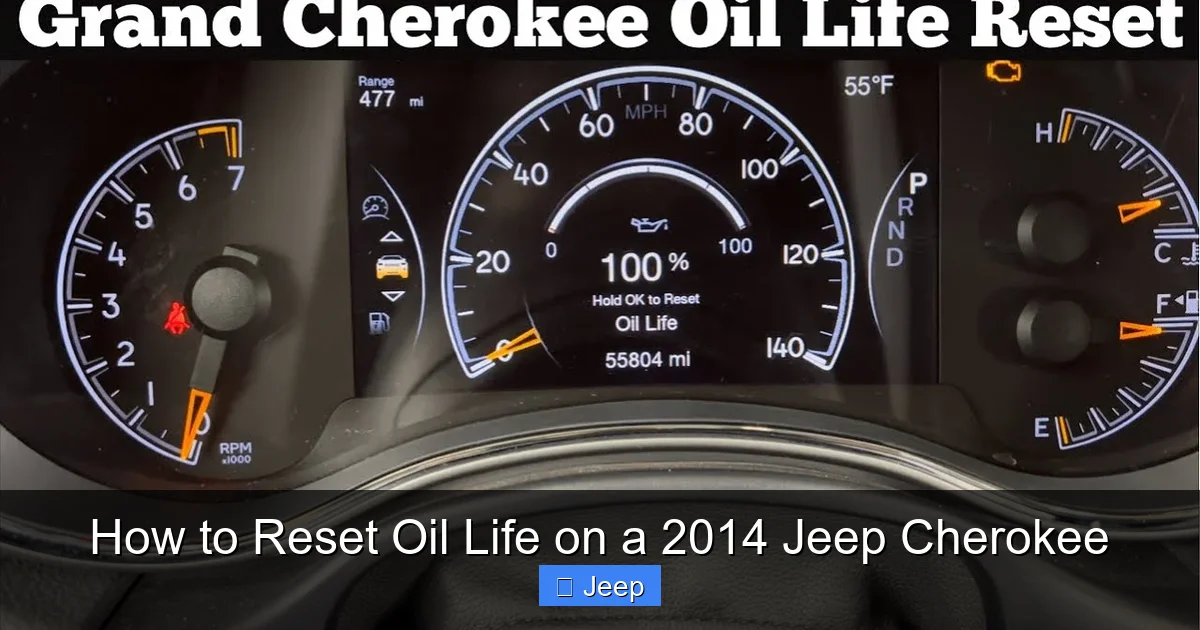
This is the standard method for the vast majority of 2014 Jeep Cherokee models, including Latitude, Limited, and Trailhawk trims. It uses the intuitive menu system accessed through the buttons on the steering wheel. The sequence is logical once you know the path: Menu > Vehicle Info > Oil Life > Reset. Here is the detailed, step-by-step breakdown.
Visual guide about How to Reset Oil Life on a 2014 Jeep Cherokee
Image source: i.ytimg.com
Step-by-Step Button Sequence
1. With the ignition ON and engine OFF, locate the “MENU” or “INFO” button on your steering wheel. It’s often distinguished by a symbol of a sheet of paper or a list. Press this button repeatedly until you see “Vehicle Info” appear on the instrument cluster’s digital display screen between the speedometer and tachometer.
2. Once “Vehicle Info” is displayed, press the “DOWN” arrow button (usually the larger of the two arrow buttons) to scroll through the sub-menu options. You should cycle through items like “Tire Pressure,” “Distance To Empty,” and “Oil Life.” Keep pressing the down arrow until “Oil Life” is highlighted or displayed.
3. With “Oil Life” selected on the screen, press and hold the “DOWN” arrow button for approximately 3-5 seconds. The display will change. You should see the current oil life percentage (e.g., “15%”) and a prompt asking if you want to reset it. The prompt will typically read “RESET Oil Life?” or “YES / NO.”
4. While the reset prompt is displayed, quickly press the “DOWN” arrow button one more time. This selects “YES.” The screen should then change to read “100% Oil Life” or “DONE,” and the message will disappear after a few seconds. The “Change Oil” warning light on your dash should also extinguish immediately.
5. Turn the ignition OFF and then back ON to verify the reset was successful. The oil life message should no longer be present, and if you access the Vehicle Info menu, Oil Life should read 100%.
Trim-Specific Variations
Some Limited or Trailhawk trims with the premium instrument cluster may have a slightly different menu structure. Instead of a “Vehicle Info” main menu, you might first see a “Customize” or “Setup” menu. If pressing the MENU button doesn’t bring up “Vehicle Info,” try pressing it again to cycle through other main menus like “Vehicle Status” or “Maintenance.” The core principle remains: find the Oil Life readout, then press and hold the down arrow to initiate a reset. On rare occurrences, the confirmation might require pressing the “UP” arrow instead of “DOWN” to select “YES.” The on-screen prompt is your ultimate guide—it will tell you which button to press.
Method 2: The Odometer Button Reset (Base Models)
If your 2014 Jeep Cherokee is a base Sport trim and lacks the steering wheel-mounted info controls, you will use the small black odometer reset button located on the instrument panel, just to the right of the speedometer. This method is a bit more “old-school” and relies on manipulating the odometer display to access the service menu. It’s a reliable method but requires a precise timing sequence.
Visual guide about How to Reset Oil Life on a 2014 Jeep Cherokee
Image source: koala.sh
Step-by-Step Button Sequence
1. With the ignition ON and engine OFF, press and hold the odometer reset button (the one you normally use to toggle between trip A, trip B, and the total odometer).
2. While continuing to hold the button, turn the ignition key to the “OFF” position. Do not release the button.
3. Now, while still holding the button, turn the ignition key back to the “ON/RUN” position. Keep holding the button. The odometer display will change. Instead of showing mileage, it will display a series of diagnostic or service menus. You are looking for one that says “Oil Life” or shows a percentage.
4. When the “Oil Life” display appears (it may cycle through other codes like “dOn” or “SET”), release the reset button. The display will now show the current oil life percentage, such as “15%”.
5. With the percentage displayed, press and release the reset button one time. The percentage should begin to blink or change.
6. Press and hold the reset button again until the display changes to read “100%” or shows a series of dashes. This confirms the reset is complete.
7. Turn the ignition OFF. The next time you start the vehicle, the oil life message should be gone, and the odometer should return to its normal trip/odometer display function.
Troubleshooting This Method
This method can be tricky because it requires the exact timing of turning the key while holding the button. If you end up in a diagnostic menu with strange codes (like “bUl” or “SEr”), simply turn the ignition OFF and start over. Ensure you are holding the button during the entire OFF-to-ON key cycle. If the display never changes from the odometer reading, you may be on the wrong initial menu; try pressing the button once before starting the sequence to ensure you’re starting from the standard odometer view.
After the Reset: Verification and Best Practices
You’ve pressed the buttons, seen the 100% confirmation, and felt a surge of accomplishment. Before you consider it a job well done, you must verify the reset was successful. An incomplete reset is just as bad as no reset at all. Start by turning your Cherokee’s ignition completely OFF. Wait about 10 seconds. Then, turn it back to the ON/RUN position. Watch the dashboard intently during the startup bulb check sequence. The “Oil Change Required” message or light should not illuminate after the gauges sweep. If it does, the reset failed, and you need to repeat the procedure.
Next, navigate back into the menu system using your steering wheel controls or odometer button. Find the “Oil Life” readout again. It should now proudly display “100%.” If it shows any other number, the process did not take. Double-check that you held the button long enough to see the reset prompt and that you confirmed it correctly. Once verified, you can start the engine and drive normally. The system will now begin its countdown from 100% based on your driving habits.
Integrating the Reset into Your Maintenance Routine
The single most important practice is to always, without exception, reset the oil life immediately after completing an oil and filter change, whether you do it yourself or take it to a shop. Do not rely on the service provider to do it correctly—verify it before you leave the bay or your driveway. Make it a non-negotiable final step on your service checklist. Additionally, keep a small log (in your glove box or a maintenance app) noting the date, mileage, and oil type used at each change. This complements the electronic monitor and provides a hard record. For a deeper dive into maintenance schedules for similar Fiat Chrysler vehicles, you might find our guide on resetting the oil change on a Jeep Grand Cherokee helpful, as the principles are identical across many models.
Common Issues, Troubleshooting, and FAQs
Even with the best instructions, a few things can go wrong. Let’s address the most common hiccups. First, if the “Oil Life” option is missing from your menu entirely, it could indicate a deeper electrical issue or a PCM that needs reflashing, but more commonly, it’s because you’re in the wrong menu. Double-check you are in “Vehicle Info” or the equivalent, not “Audio Settings” or “Compass.” Second, if the reset prompt appears but pressing the button does nothing, your button may be faulty, or the system may be in a “locked” state due to a low battery voltage. Try a key cycle (turn OFF, wait, turn back ON) and try again. A weak battery can cause the instrument cluster to behave erratically.
Third, and most importantly, can you reset the oil life without changing the oil? Technically, yes, the procedure will work. But you should never do this. The oil life monitor is a critical engine health tool. Resetting it without performing the actual service defeats its entire purpose and puts your engine at severe risk of premature wear or failure. Only reset it when the physical oil and filter have been replaced with the correct specifications. Finally, if the oil life light comes back on almost immediately after a reset, it usually means the reset was not properly confirmed, or there is a fault code stored related to the oil pressure or sensor circuit that needs diagnosis. In this case, a professional scan with a proper diagnostic tool is recommended.
Conclusion: A Simple Step for Long-Term Engine Health
Resetting the oil life on your 2014 Jeep Cherokee is not a complex mechanical task; it’s a simple interaction with your vehicle’s computer. It’s the digital equivalent of removing the old oil change sticker from your windshield and putting on a new one. By mastering this procedure—whether through the steering wheel controls or the odometer button—you take full control of your Cherokee’s maintenance schedule. You ensure the accurate, condition-based reminders this intelligent system was designed to provide. This accuracy saves you from both the anxiety of a phantom warning light and the danger of ignoring a real one. It’s a small act of ownership that directly contributes to your Jeep’s reliability and longevity. So, after your next oil change, take those extra 30 seconds, follow the steps outlined here, and enjoy the satisfaction of a job truly done right. Your 2014 Cherokee, and its engine, will thank you for miles to come.
Frequently Asked Questions
What if the oil life menu doesn’t appear on my 2014 Jeep Cherokee?
First, ensure you are in the correct main menu (usually “Vehicle Info” via steering wheel controls). If it’s still missing, your instrument cluster may have a software glitch. Try cycling the ignition OFF and back ON. If the problem persists, a weak battery can sometimes inhibit menu access. A professional diagnostic scan may be needed to check for module communication errors.
Can I reset the oil light if I just topped off the oil but didn’t change it?
Technically, you can follow the reset steps, but you absolutely should not. The oil life monitor calculates degradation over time and usage. Topping off only adds volume; it does not restore the chemical properties of the existing, worn oil. Resetting without a full change will give you a false sense of security and lead to running degraded oil, which can cause engine damage.
My oil life was at 15%, I changed the oil, but the light came back on after 100 miles. Why?
This usually means the reset was not completed correctly. The confirmation step (pressing and holding to select “YES”) was likely missed. Go through the procedure again very carefully, ensuring you see the 100% confirmation on the display before considering it done. If it happens again, there may be an underlying electrical fault.
How often should I actually be resetting the oil life?
You should reset the oil life once and only once, immediately following every single oil and filter change. The system then counts down from 100% on its own. Do not reset it at any other time, as this would erase the accurate mileage and condition data the system has accumulated.
Is the procedure the same for a 2015 or 2016 Jeep Cherokee?
For the most part, yes. The 2014-2016 Cherokee models share the same basic FCA Uconnect and instrument cluster architecture. However, always consult your specific owner’s manual, as minor software updates can sometimes slightly alter menu names or button requirements. The core principle of navigating to Oil Life and holding a button remains constant.
My Cherokee has a “Service” light, not an “Oil Change” light. Is resetting the same?
Yes, the process is identical. The “Service” light on the 2014 Cherokee is specifically for the oil life monitor. It’s the same warning, just different wording on some trim levels. The reset procedure for the oil life system is what will extinguish this “Service” reminder. If you have other service lights (like for tires or brakes), those have separate reset procedures.