How to Remote Start Ford F150

Contents
- 1 Key Takeaways
- 2 📑 Table of Contents
- 3 Unlocking Convenience: An Introduction to Your F150’s Remote Start
- 4 How Does Remote Start Work? The Science Behind the Magic
- 5 Does My F150 Have Remote Start? A Compatibility Check
- 6 The Factory Method: Using Your Key Fob
- 7 Going Cellular: Remote Start with the FordPass App
- 8 Safety First: Non-Negotiable Precautions
- 9 Troubleshooting: Why Won’t My F150 Remote Start?
- 10 Maintenance and Best Practices for Longevity
- 11 Conclusion: Your Command Center on a Cold Morning
- 12 Frequently Asked Questions

Car Fog Light Bulb
Wiper Blade Refills

Side Mirror Rain Guard

Car GPS Navigator
Mastering the remote start on your Ford F150 is a simple game-changer for comfort and convenience. This guide covers everything from checking your truck’s compatibility to using the factory key fob or the FordPass app. We’ll walk you through the exact button sequences, crucial safety precautions, and how to troubleshoot common issues. You’ll also learn essential maintenance tips to keep your remote start system reliable for years to come.
Key Takeaways
- Compatibility is Key: Not all F150s have remote start. You must have the factory-installed system, typically indicated by a remote start symbol on your key fob.
- The Standard Sequence: The factory method involves a specific lock-unlock-hold pattern on your key fob, confirmed by horn honks and parking lights.
- Safety is Non-Negotiable: Never remote start your truck in an enclosed area. Always ensure it’s in ‘Park,’ the parking brake is set, and the area is clear of obstacles and people.
- FordPass App Offers More: If equipped, the FordPass app on your smartphone allows for remote starting from virtually anywhere with a cellular signal, often with more range than the fob.
- Weak Fob Battery is the #1 Culprit: Most remote start failures are due to a dying key fob battery. Replacing it is the first and easiest troubleshooting step.
- System Conflicts Can Occur: Aftermarket accessories or a tripped anti-theft system can disable remote start. Knowing how to perform a system reset can often resolve this.
- Regular Maintenance Matters: A healthy truck battery and a well-cared-for key fob are essential for consistent remote start performance, especially in extreme temperatures.
[FEATURED_IMAGE_PLACEHOLDER]
📑 Table of Contents
- Unlocking Convenience: An Introduction to Your F150’s Remote Start
- How Does Remote Start Work? The Science Behind the Magic
- Does My F150 Have Remote Start? A Compatibility Check
- The Factory Method: Using Your Key Fob
- Going Cellular: Remote Start with the FordPass App
- Safety First: Non-Negotiable Precautions
- Troubleshooting: Why Won’t My F150 Remote Start?
- Maintenance and Best Practices for Longevity
- Conclusion: Your Command Center on a Cold Morning
Unlocking Convenience: An Introduction to Your F150’s Remote Start
Imagine stepping out of your front door on a frigid winter morning or a scorching summer afternoon to find your Ford F150 already warming up or cooling down. The cabin is comfortable, the windshield is defrosted, and your truck is ready to go. That’s the magic of a properly functioning remote start system. For F150 owners, this isn’t just a luxury feature; it’s a practical tool that adds a significant layer of convenience to your daily routine and work life.
However, like any technology, it requires a bit of know-how to use it effectively and troubleshoot it when things go wrong. Many owners have the feature but aren’t sure of the exact steps, while others may not even know if their specific model year and trim level include it. This comprehensive guide will demystify the entire process. We’ll start with the absolute basics of identifying your system, move through the precise methods for activation, dive deep into safety protocols you must follow, and equip you with the knowledge to solve most common problems on your own. By the end, you’ll be a remote start expert, able to command your F150 with confidence.
How Does Remote Start Work? The Science Behind the Magic
The Radio Handshake
At its core, your F150’s remote start is a sophisticated radio communication system. Your key fob (or smartphone) acts as a transmitter, sending a unique, encrypted signal to a receiver module installed in your truck. This module, often called the Remote Start Control Module (RSCM), is a dedicated computer. When it receives the correct “start” command, it authenticates the signal and, if all safety parameters are met, initiates the engine start sequence just as if you had turned the key or pressed the ignition button.
Visual guide about How to Remote Start Ford F150
Image source: slashgear.com
Safety Interlocks: Your Truck’s Guardrails
Your F150 is not going to start blindly. The system has multiple electronic “guardrails” or interlocks that must all be satisfied before the engine will fire. These are critical safety features designed to prevent accidental starting in dangerous situations. The primary interlocks check for:
- Transmission in Park (P): The system verifies the gear selector is in the ‘P’ position. This is the most fundamental safety check.
- Parking Brake Engagement: On many models, especially those with a manual transmission or specific packages, the parking brake must be set.
- Closed Hood: A hood ajar switch prevents starting if the hood is not securely latched. This is why it’s a good habit to visually confirm your hood is closed before attempting a remote start.
- No Key in Ignition: The system ensures no physical key is in the ignition cylinder (on models that have one).
- Sufficient Fuel and Battery: The truck’s main computer must report adequate fuel levels and a sufficiently charged battery.
- Closed Doors (Sometimes): Some systems or customer settings may require all doors to be closed and locked.
If any of these conditions are false, you will not get a confirmation signal, and the engine will not start. Understanding these interlocks is the first step in effective troubleshooting.
Does My F150 Have Remote Start? A Compatibility Check
Before you can start your truck remotely, you need to confirm the feature is actually installed. Ford offered remote start as standard equipment on many higher trims (like Limited, Platinum, and Raptor) and as an optional add-on for others. Here’s how to find out for sure.

Visual guide about How to Remote Start Ford F150
Image source: cdn.shopify.com
1. The Key Fob Test
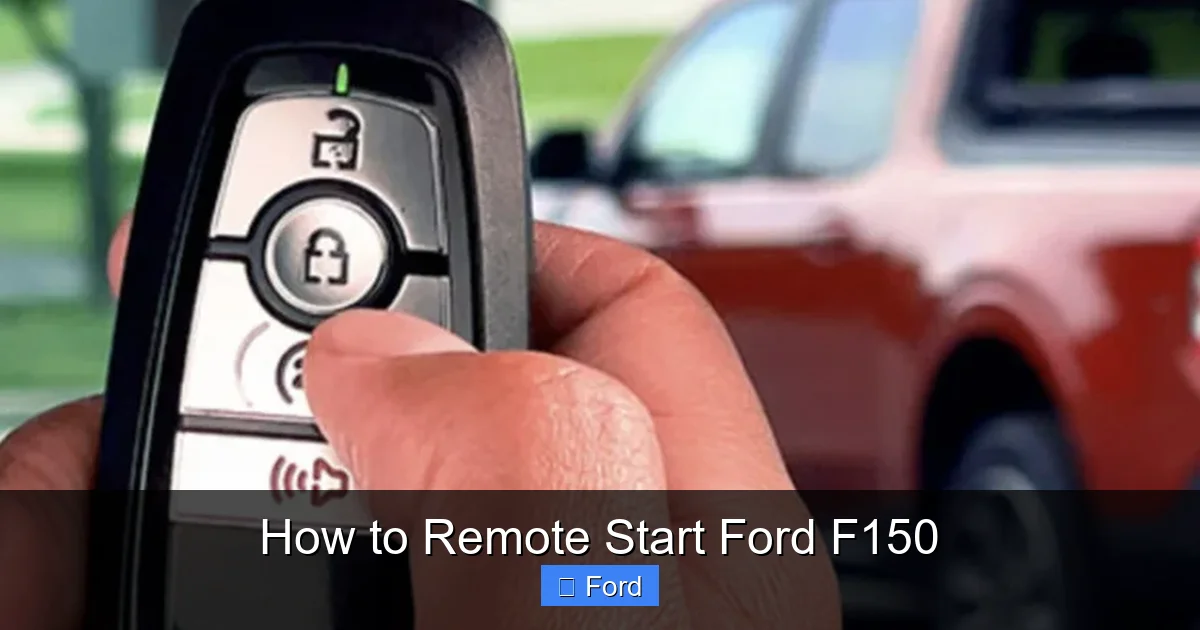
Look at your key fob. The easiest indicator is the presence of a dedicated remote start button. On most F150 key fobs from the 2015 model year onward, this is a button with a circular arrow icon (🔄) or the word “REMOTE START.” It’s usually located on the back or side of the fob. If you see this button, your truck almost certainly has the factory system.
2. The Owner’s Manual
Your factory owner’s manual will have a section titled “Remote Start System” or “Remote Vehicle Start.” If it’s there, you have it. It will also contain the exact procedure for your specific model year, which can have slight variations.
3. The VIN Decoder
Your Vehicle Identification Number (VIN) holds the code to your truck’s factory options. You can use a free VIN decoder service online ( Ford’s own website has one). Look for option codes like “REMOTE START” or “SECURICODE.” This is the most definitive method if you don’t have the fob or manual.
4. The Physical Test (With Caution)
If you’ve confirmed the button exists but want to test it, do so safely. Stand near the truck, press the lock button first, then immediately press and hold the remote start button. You should hear a short horn honk (or a beep if the horn is disabled), and the parking lights will flash once or twice. The engine will then start, and the parking lights will remain on to indicate it’s running. If this happens, you’re all set! If not, you may have a system issue or your truck simply doesn’t have the feature.
Note: If you discover your truck does not have factory remote start, aftermarket systems are available. However, installation can be complex, may void warranties, and requires professional integration with your F150’s security system. We always recommend checking if your vehicle can be equipped with the factory-like system first.
The Factory Method: Using Your Key Fob
This is the original, intended method and works without any cellular signal. The range is typically 200-300 feet in open space, but walls and obstacles will reduce it significantly.

Visual guide about How to Remote Start Ford F150
Image source: carglassadvisor.com
Step-by-Step Activation Sequence
The sequence is consistent across most modern F150 models. Follow these steps precisely:
- Ensure All Conditions are Met: The truck must be in ‘Park,’ the parking brake set, all doors closed and locked, the hood closed, and the key fob inside the vehicle (or with you). The engine must be off.
- Press the Lock Button First: Point your fob at the truck and press the lock button (the one with the closed padlock icon). You should hear the doors lock and see the parking lights flash.
- Immediately Press and Hold Remote Start: Within a second or two of locking the doors, press and hold the remote start button (🔄). Do not press the unlock button first.
- Wait for Confirmation: Hold the button for about 3 seconds. You will typically hear one short horn honk (or a beep) and see the parking lights flash. This is your confirmation that the signal was sent and accepted.
- Engine Starts: After the confirmation, the engine will crank and start. The parking lights will stay on to indicate the engine is running remotely.
To turn the engine off remotely, simply press the remote start button once. The parking lights will turn off, and the engine will stop. You must then use the key fob to unlock and enter the vehicle. Pressing the brake pedal or turning the key/button to ‘On’ will also stop the remote start cycle and prepare for normal driving.
Going Cellular: Remote Start with the FordPass App
For many newer F150s (typically 2020+ with a connected modem), the FordPass app on your smartphone provides an even more powerful remote start experience. Its range is virtually anywhere you have a cellular signal, meaning you can start your truck from your office, a restaurant, or even a different city.
Setup and Prerequisites
Before you can use the app, you must:
- Have a compatible F150 with an active SYNC Connect or embedded modem subscription (often included for a trial period).
- Download the FordPass app on your iOS or Android device.
- Create a FordPass account and add your vehicle by following the in-app pairing instructions, which usually involve scanning a QR code in your truck’s infotainment system or entering your VIN.
- Ensure your truck’s settings allow for remote start via the app. This is often found in the vehicle settings menu on the infotainment screen under “Remote Start” or “FordPass.”
Starting Your Truck via App
The process is straightforward:
- Open the FordPass app and select your F150.
- On the main vehicle control screen, you will see a large “Start” button, often with a circular arrow icon. You may also have options to set climate control (start with A/C on or heat on).
- Tap “Start.” The app will show a “Starting…” message and then confirm when the engine is running. You can also set a timer for a delayed start.
- To stop the engine, simply tap the “Stop” button that appears once the truck is running.
The app also provides valuable feedback. If the start command fails, it will often give a reason, such as “Doors Ajar” or “Park Brake Not Set,” which is incredibly helpful for troubleshooting.
Safety First: Non-Negotiable Precautions
Using remote start is a privilege that comes with serious responsibility. Ignoring these safety rules can lead to property damage, injury, or even death.
The Golden Rules
- NEVER Remote Start in an Enclosed Space: This includes garages, carports, and even well-ventilated but enclosed parking structures. A running vehicle in an enclosed area will quickly fill it with deadly carbon monoxide (CO) exhaust fumes. CO is odorless, colorless, and lethal.
- Always Check Your Surroundings: Before activating remote start, do a quick visual scan. Is there a child, pet, or obstacle behind your truck? Remember, the vehicle will move forward if left in ‘Drive’ (though interlocks usually prevent this, never assume).
- Know Your Local Laws: Many cities and states have laws against idling a vehicle unattended. The penalties can be fines or even having your vehicle towed. Check your local regulations. A good practice is to only use remote start when you are within sight of the vehicle or in a private, secure location.
- Secure Your Vehicle: The truck will be running with the doors locked. This is a security feature, but it also means if you lose your key fob while it’s running, you could be locked out. Have your fob ready before you walk to the vehicle.
- Climate Considerations: While convenient, don’t rely on remote start as the sole method to defrost a heavily iced windshield in extreme cold. The engine and A/C/heater need time to work. Allow 10-15 minutes of runtime for significant temperature change. For heavy ice, manual clearing is still required.
Pro Tip: Make it a habit to do a quick walk-around of your F150 before you leave it for the night. Check tire pressure, fluid levels, and ensure the area around it is clear. This ties in perfectly with knowing how to safely open your hood for any necessary checks.
Troubleshooting: Why Won’t My F150 Remote Start?
When your remote start fails, don’t panic. The system is designed to be diagnostic. Here is a logical, step-by-step approach to find the problem.
Step 1: The Basics
- Fob Battery: This is the culprit 70% of the time. A weak fob battery has reduced range and may not send a strong enough signal. Replace the battery in your key fob. It’s a simple CR2032 or similar coin cell battery.
- Truck Battery: A weak or discharged main battery in your F150 can prevent the remote start module from having enough power to engage the starter. If your truck battery is over 4 years old or the engine cranks slowly normally, have it tested. A healthy battery is crucial.
- Range: Move closer to the vehicle. Stand next to it and try again. If it works up close but not from a distance, your fob battery or the truck’s receiver antenna may be the issue.
Step 2: Check the Interlocks
Go through the safety checklist mentally:
- Is the truck in Park (P)?
- Is the parking brake engaged? (Try setting it firmly).
- Are all doors closed and locked? Check the driver’s door specifically.
- Is the hood securely latched? Push down on the front of the hood to be sure.
- Is there a key in the ignition (if applicable)?
- Is the fuel level above ‘E’?
Step 3: System Errors and Resets
If all interlocks are satisfied and the fob battery is new, a system error may be the cause. The most common is a tripped anti-theft system. Sometimes, a faulty aftermarket accessory (like a new stereo or alarm) can interfere with the remote start signal.
- Anti-Theft Reset: A simple key cycle often resets the system. Insert the key, turn it to the ‘On’ position (but don’t start), wait 5 seconds, then turn it off. Wait 10 seconds and try the remote start sequence again. If this fails, a more involved anti-theft system reset procedure may be necessary, which involves a specific key turn pattern and waiting period.
- Check for Service Messages: Look at your instrument cluster for any warning lights (like the check engine light) or messages on the screen. A major system fault can disable remote start. If the check engine light is on, diagnosing that underlying issue is the priority.
- Disable Aftermarket Gear: If you recently installed an aftermarket radio, dash cam, or alarm, temporarily disconnect its power supply and test the remote start. If it works, the accessory is causing interference and needs to be professionally installed with a proper bypass module.
Maintenance and Best Practices for Longevity
Your remote start system is reliable, but it needs a little care to stay that way, especially in a tough truck like the F150.
Key Fob Care
Your fob is a small, delicate computer. Avoid exposing it to extreme heat (like leaving it on the dashboard in summer) or crushing it in your pocket. Keep it away from strong magnets. A protective case can prevent scratches and damage. Remember to replace the battery proactively—every 2-3 years is a good rule of thumb, or when you notice reduced range.
Truck Battery Health
The remote start module draws a small amount of current from your truck’s battery even when the vehicle is off (this is called “parasitic drain”). A weak or old battery (typically 4+ years) may not hold enough charge to support this drain plus the high current needed to start the engine. Have your battery tested regularly, especially before winter. A healthy battery is the foundation of all your truck’s electrical functions, including the air conditioning system that the remote start engages.
Professional Service
If you’ve exhausted all troubleshooting steps and your remote start still doesn’t work, it’s time to call a professional. A dealer or a reputable automotive electronics specialist has the diagnostic tools to communicate with the Remote Start Control Module, check for stored fault codes, and test the wiring and antenna. They can also verify if the module itself has failed, which is rare but possible.
For other critical maintenance on your truck, such as brake system service, always consult a qualified mechanic to ensure your safety on the road.
Conclusion: Your Command Center on a Cold Morning
Mastering the remote start on your Ford F150 transforms your ownership experience. It’s more than a party trick; it’s a tool for comfort, safety, and vehicle care. You can warm the cabin and defrost windows before your commute, cool it down on a hot afternoon, and even run the engine periodically if the truck sits for long periods to maintain battery charge and fluid circulation. By understanding how the system works—the radio handshake, the critical safety interlocks—you can use it correctly and confidently. Remember the simple fob sequence: Lock, then Hold Start. Explore the extended capabilities of the FordPass app if your truck supports it. And above all, commit to the non-negotiable safety rules: never start it in a garage, always check your surroundings, and know your local idling laws. With this knowledge, you’re not just starting an engine; you’re taking command of your driving environment, ensuring every journey in your F150 begins on the right foot, or rather, at the right temperature.
Frequently Asked Questions
What is the typical range of the factory key fob remote start?
In open, unobstructed space, you can expect a range of about 200-300 feet. However, walls, metal objects, and even other vehicles can drastically reduce this. Always test your range in your typical parking scenario.
Do I need to have the key fob inside the truck for remote start to work?
No, the key fob must be outside the vehicle for the remote start signal to be accepted. The system checks for the presence of a valid key inside to prevent accidental starting. The fob should be on your person when you walk to the truck.
How long does the engine run once I remotely start my F150?
By default, a factory remote start will run the engine for 10-15 minutes (the exact time varies by model year). After that time, the engine will shut off automatically. You can extend this cycle by pressing the remote start button again before the timer expires.
My remote start worked yesterday but not today. What should I check first?
First, replace the battery in your key fob. A weak battery is the most common cause of intermittent failure. Second, ensure the truck’s parking brake is fully engaged and all doors are firmly closed. A slightly ajar door or an incompletely set parking brake will prevent start.
Can I install an aftermarket remote start on a non-equipped F150?
Yes, but it’s complex. The F150’s factory security system (Pass-Key III+) requires a specialized “bypass module” to trick the truck’s computer into thinking a valid key is present. This installation is best left to professionals to avoid damaging the vehicle’s electrical system or creating security vulnerabilities.
Will remote start work if my F150 has the Auto Start-Stop system enabled?
Yes, remote start will work regardless of the Auto Start-Stop setting. However, once you begin driving and come to a stop, the Auto Start-Stop system will function normally and may turn the engine off. If you want to disable this feature for maximum power or to keep the engine running at stops, you’ll need to manually turn it off each drive cycle. You can learn how to permanently disable Auto Start-Stop for a different driving experience.