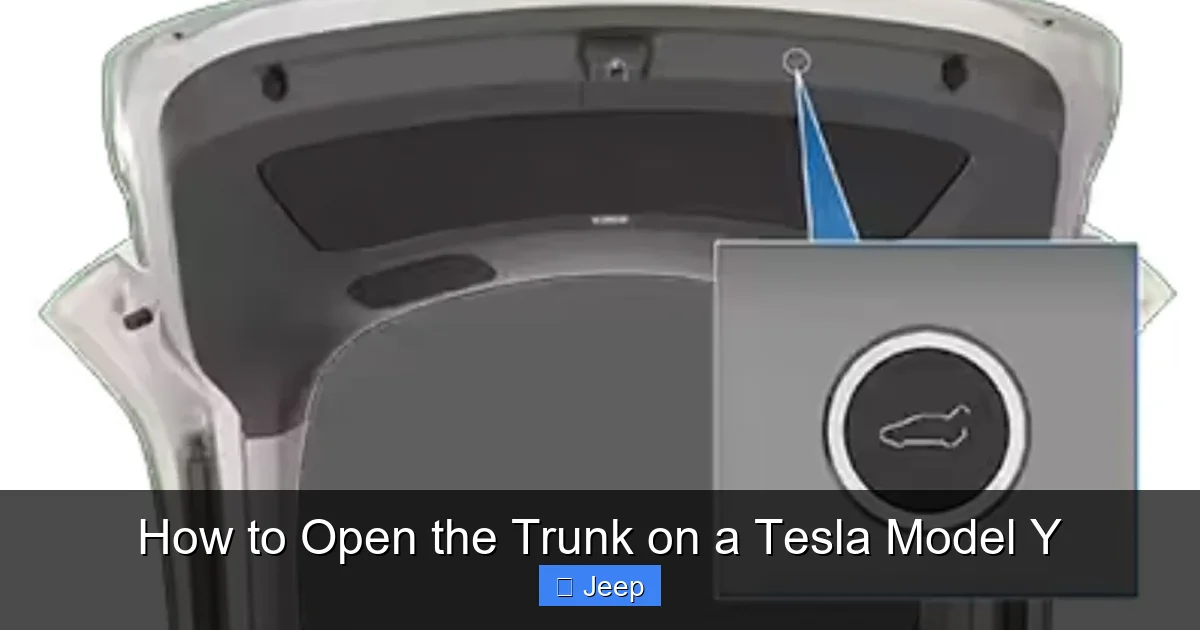
How to Open the Trunk on a Tesla Model Y

Contents
- 1 Key Takeaways
- 2 📑 Table of Contents
- 3 The Primary Methods: App and Key Fob
- 4 Interior-Based Trunk Release Options
- 5 The Critical Emergency Manual Release
- 6 Troubleshooting: When the Trunk Won’t Open
- 7 Safety Features and Best Practices
- 8 Maximizing Your Trunk’s Utility
- 9 Conclusion
- 10 Frequently Asked Questions

Car Tool Kit Set

Car Seat Cover (Universal Fit)

Foam Cannon

Car Dent Repair Kit
Opening the trunk on your Tesla Model Y is designed to be effortless and convenient, primarily through the smartphone app or key fob. You also have an interior button and a hidden manual emergency release inside the trunk. This guide details every method, troubleshooting steps for common issues, and essential safety tips for using your Model Y’s cargo area.
Welcome to your comprehensive guide for operating one of the most convenient features in your Tesla Model Y: the powered rear trunk. If you’re new to Tesla or electric vehicles in general, the absence of a traditional keyhole or a simple lever might seem puzzling at first. Fear not. The Model Y’s trunk system is a masterclass in intuitive, tech-forward design, but it’s crucial to know all your options, especially for those rare moments when technology doesn’t cooperate. Whether you’re loading groceries, sports equipment, or preparing for a road trip, understanding how to open the trunk on a Tesla Model Y reliably is a must. This guide will walk you through every single method, from the everyday to the emergency, ensuring you’re never stuck with a full cart and a closed cargo hold.
Key Takeaways
- Primary Methods: The Tesla app and key fob are the two main, effortless ways to open the Model Y trunk remotely or as you approach the vehicle.
- Interior Control: A dedicated trunk release button is located on the driver’s side door pillar and on the center console screen for convenient inside operation.
- Emergency Manual Release: A concealed mechanical latch, located under the trunk’s cargo cover, allows you to open the trunk from inside if power is completely lost.
- Troubleshooting: If electronic methods fail, check your phone’s Bluetooth/connection, key fob battery, and the vehicle’s 12V auxiliary battery as first steps.
- Safety First: Always use the trunk’s child safety lock when transporting children or pets, and be mindful of the powered liftgate’s operation to avoid pinching hazards.
- Capacity & Use: The Model Y’s rear trunk offers 66 cubic feet of space with seats folded, and its powered operation makes loading and unloading significantly easier than manual trunks.
[FEATURED_IMAGE_PLACEHOLDER]
📑 Table of Contents
The Primary Methods: App and Key Fob
For the vast majority of your daily use, you’ll open the Model Y’s trunk using either the official Tesla smartphone app or the included key fob. These are the fastest, most convenient methods and leverage the vehicle’s advanced connectivity.
Opening with the Tesla Smartphone App
This is arguably the smoothest method. Once you have the Tesla app installed, logged in, and your vehicle paired via Bluetooth (a critical step), opening the trunk is a one-tap operation.
- Ensure Connectivity: Your phone must have Bluetooth on and be within range (typically 30-50 feet). The app must also show your Model Y as “Connected” or “Awake.” If it shows “Asleep,” you may need to wake the car first by tapping the screen or using the app’s climate controls.
- The Process: Open the Tesla app, select your Model Y from the vehicle list, and on the main control screen, you’ll see a large trunk icon. Simply press and hold this icon for about one second. You’ll hear the trunk latch disengage and see the trunk begin to rise on the app’s animation.
- Pro Tip: You can customize the app’s quick controls to put the trunk icon on the first screen for even faster access. Also, if you have an Apple Watch, the Tesla app for WatchOS often includes trunk controls, making it accessible without pulling out your phone.
Using the Tesla Key Fob
The key fob provided with your Model Y (if you purchased one; some models rely solely on phone key) is a powerful tool with multiple functions built into a sleek, minimalist design.
- Locate the Trunk Button: On the key fob, there is a dedicated button with a trunk icon. It’s usually the top button on the front face.
- The Process: Stand within about 20-30 feet of your Model Y. Ensure there are no obstructions directly behind the vehicle. Press and hold the trunk button on the fob for approximately one second. You will hear a distinct click from the trunk latch, and the liftgate will automatically begin to open. Pressing it again will pause the operation; pressing and holding it a third time will reverse and close the trunk.
- Range Considerations: The fob’s effective range can be reduced by large metal objects, other electronic devices, or if the fob’s battery is low. A low battery might require you to be much closer to the vehicle for the signal to register.
It’s worth noting that for owners who use their phone as the primary key (Phone Key), the process is identical to the app method but often feels even more seamless, as you don’t even need to open an app—just have your phone in your pocket or bag and use the fob’s trunk button, or use the app as described. The system is designed for incredible convenience, much like how you might open the gas tank on a 2022 Honda Civic with a simple press inside the car, but Tesla’s system is fully automated and remote.
Interior-Based Trunk Release Options
What happens if your hands are full and your phone and fob are out of reach? Tesla has you covered with interior-mounted controls that allow you to open the trunk from inside the vehicle.

Visual guide about How to Open the Trunk on a Tesla Model Y
Image source: pevme.com
The Driver’s Side Door Pillar Button
This is a physical button, similar in feel to a traditional interior trunk release, located on the lower portion of the driver’s side door pillar (the B-pillar). It’s often a black button with a trunk icon.
- Operation: Simply press this button once. You will hear the trunk latch release, and the powered liftgate will begin to open automatically. This is perfect for when you’re seated in the driver’s seat and want to open the trunk before getting out.
- Safety Feature: This button will not function if the vehicle is moving above a very slow speed (typically a few mph), preventing accidental opening while driving.
The Touchscreen Control
The large central touchscreen in your Model Y is the command center for nearly every vehicle function, including the trunk.
- Navigation: Tap the “Controls” icon (car symbol) on the bottom dock. Then, navigate to the “Locks” section. You will see a button for “Open Trunk.”
- Process: Tapping “Open Trunk” will initiate the same powered opening sequence. This method is useful if you’re already interacting with the screen for climate, media, or navigation settings and decide you need the trunk open.
- Requirement: The vehicle must be powered on (you’re sitting in it with a seatbelt clicked or the car is awake) for the screen controls to be active. This is different from the app/fob, which can work when the car is “asleep.”
The Critical Emergency Manual Release
In the unlikely event of a total power failure—a dead 12V auxiliary battery that powers the locks and trunk motor, or a completely disconnected main battery—your electronic methods will fail. Tesla includes a well-hidden but accessible manual mechanical release for this exact scenario. Knowing its location is a vital piece of knowledge for every Model Y owner.

Visual guide about How to Open the Trunk on a Tesla Model Y
Image source: i0.wp.com
Location and Identification
The emergency release is cleverly concealed to maintain the clean, uncluttered look of the trunk’s cargo floor.
- Remove the Cargo Cover: Lift the trunk’s soft, padded cargo cover. It’s held in place by magnets and Velcro at the rear. Pull it up and forward to remove it completely, setting it aside.
- Find the Release Tab: On the metal sheet metal of the trunk floor, near the center and slightly towards the rear, you will see a small, rectangular, bright-colored (usually yellow or orange) plastic tab with a grip. It’s about the size of a matchbook.
How to Operate It
Pulling this tab is a direct mechanical action that releases the primary trunk latch, just like pulling a release cable in a traditional car.
- Action: Firmly grasp the tab and pull it directly towards you (towards the rear seats). You will feel significant resistance and hear a loud, definitive “CLUNK” as the main latch disengages.
- Opening the Trunk: Once the latch is released, you can manually lift the trunk lid. Be prepared; the trunk is heavy and has gas struts to assist, but without power, they may offer less assistance. Use both hands and lift from the edge near the hinges for the best leverage.
- Important: After using the manual release and restoring power (jump-starting the 12V battery), the trunk will function normally again. The manual release does not need to be reset. However, if you had to use it, it’s a strong indicator that your 12V battery needs immediate attention, as it powers all the vehicle’s low-voltage systems.
This manual release is a non-negotiable safety feature, mandated in all vehicles with powered rear hatches. It’s similar in concept to the emergency trunk releases found in many sedans and SUVs, like those you might find in a Nissan Pathfinder, though Tesla’s is more cleverly hidden.
Troubleshooting: When the Trunk Won’t Open
Even with multiple methods, you might encounter a situation where the trunk refuses to open. Don’t panic. Follow this systematic troubleshooting checklist from simplest to most complex.
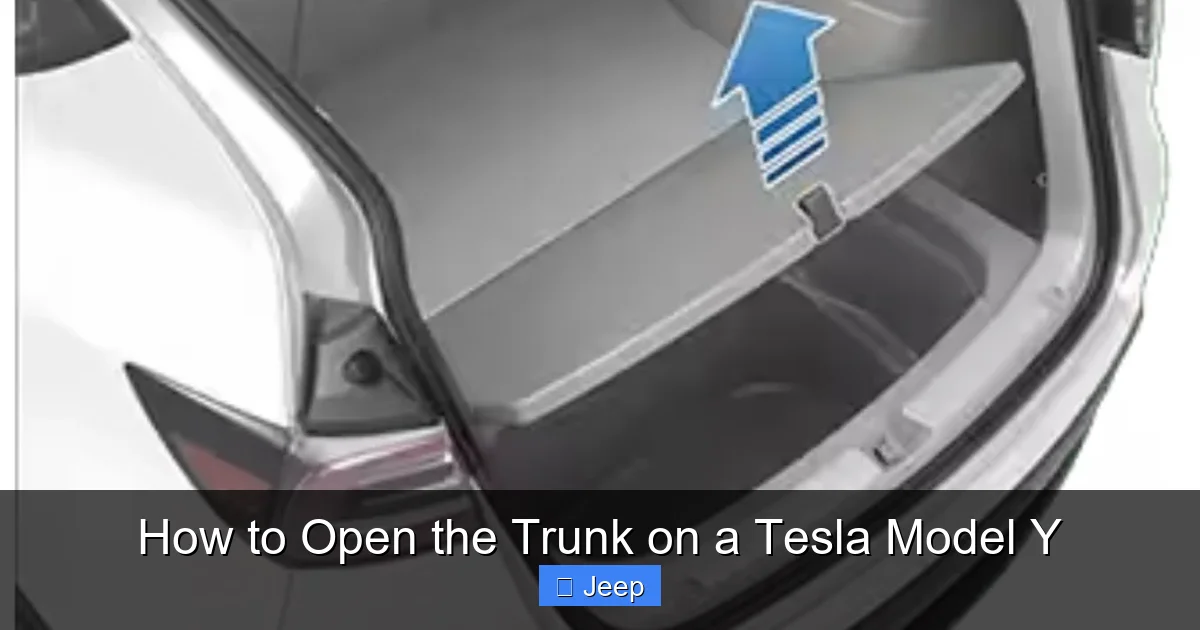
Visual guide about How to Open the Trunk on a Tesla Model Y
Image source: i0.wp.com
Step 1: Check the Obvious
- Phone/App Issues: Is your phone’s Bluetooth on? Is the Tesla app updated? Is your phone’s OS updated? Force-close and restart the app. Try logging out and back in.
- Key Fob Issues: Is the fob’s battery low? (The fob will still work for a while, but range diminishes). Try the physical buttons on the fob for other functions (lock/unlock) to confirm it’s working. Replace the CR2032 coin cell battery if in doubt—it’s a cheap and easy fix.
- Obstructions: Is there an object physically blocking the trunk lid’s path? Ice, snow, or a large item pressed against the seal can prevent opening and trigger a safety stop. Check the rear bumper and seal area.
Step 2: Vehicle State and Connectivity
- Is the Car “Asleep”? If using the app, the car might be in a deep sleep to conserve range. Tap the app’s “Climate” button or use the key fob’s lock/unlock to wake it, then try the trunk again.
- 12V Battery Health: This is the most common culprit for total electronic failure. The main battery pack powers the car, but a small 12V battery (like in a conventional car) powers all the computers, locks, and the trunk motor. If it’s dead, nothing electronic works. You’ll see warnings on the touchscreen about “12V Battery Voltage Low” or “Vehicle Needs Service.” The solution is a jump start or replacement of the 12V battery. This is a critical maintenance item for all Tesla owners.
- Software Glitch: A temporary software bug can sometimes disable certain controls. Try a soft reboot of the vehicle: with the car in Park, press and hold both scroll wheels on the steering wheel until the screen goes black and the Tesla logo reappears (about 30-60 seconds). After reboot, try again.
Step 3: The Last Resort – Manual Release
If all electronic methods fail and you suspect a dead 12V battery, your only option is the emergency manual release described in the previous section. Once you gain access to the trunk, you can jump-start the 12V battery from the front tow hook/frunk area (another topic for another guide!) or call for roadside assistance.
Safety Features and Best Practices
The Model Y’s powered trunk is incredibly convenient, but it’s a powerful moving object. Understanding its safety features and using it correctly is essential for protecting people, pets, and your cargo.
Child Safety Lock
To prevent children or pets from accidentally opening the trunk from inside, the Model Y has an electronic child lock.
- Activation: Go to Controls > Locks on the touchscreen. You will see a toggle for “Child Lock.” When enabled, the interior trunk release button on the driver’s door pillar is disabled. The touchscreen trunk button will also require a confirmation pop-up.
- Best Practice: Always engage the child lock when transporting young children or animals in the rear cargo area, even if they are in a crate. It’s a simple step that prevents a potentially dangerous situation.
Powered Liftgate Operation & Pinch Protection
- Auto-Open/Close: The trunk opens and closes fully on its own. You can stop it at any point by pressing the key fob button, the interior button, or the app button again.
- Pinch Sensing: The trunk is equipped with sensors. If it encounters resistance while closing (like a hand, a pet’s tail, or a bag strap), it will automatically stop and reverse direction to open slightly. Never test this with your body! Always keep hands, feet, and clothing clear of the trunk lid’s path during operation.
- Height Adjustment: You can set the maximum opening height to prevent the trunk from hitting a low garage ceiling. In Controls > Service > Trunk, you can calibrate the open height to your preference.
Weight Limits and Cargo Management
The Model Y has a maximum payload capacity (the weight of people and cargo). Overloading can strain the trunk hinges and liftgate struts. Always distribute weight evenly and secure loose items with the cargo net or straps provided. The powered struts that hold the trunk open have a limit; extremely heavy items placed right at the edge of the trunk could potentially strain them over time.
Maximizing Your Trunk’s Utility
Knowing how to open it is just the start. Here’s how to make the most of the space.
Understanding Capacity
The Model Y offers a generous 66 cubic feet of cargo space with the rear seats folded down. With the seats up, it still provides a useful 30 cubic feet. The powered liftgate means you can open it with a full load in your arms, a feature that becomes indispensable after a big Costco run. This level of convenience rivals, and in many ways exceeds, the ease of use found in traditional SUVs where you might need to open the trunk on a Nissan Rogue with a manual lever or key fob button that doesn’t offer the same seamless, app-based control.
Protecting Your Trunk Interior
The cargo area is susceptible to dirt, mud, spills, and scratches. Consider investing in a high-quality, custom-fit all-weather trunk liner. These are easy to remove, clean, and provide excellent protection. For a more permanent aesthetic upgrade, many owners choose to wrap the interior trim panels or apply a protective film to the tailgate’s paint to prevent scratches from loading items. Speaking of which, if you’re interested in protecting your Tesla’s exterior paint, you might want to research how much it costs to wrap a Tesla Model Y for a custom finish or added protection.
Privacy and Security
The Model Y’s rear window is large, and items in the trunk are visible from outside. For privacy, use the included cargo cover. It rolls up and stores in a dedicated pocket when not in use. For enhanced security and UV protection, some owners opt for aftermarket rear window tint. Always check local regulations on tint darkness. If you’re considering this, looking up how much it costs to tint a Tesla Model Y can give you a good estimate of both material and labor costs for a professional installation.
Conclusion
Mastering how to open the trunk on your Tesla Model Y is about more than just a single trick; it’s about understanding a multi-layered system designed for ultimate convenience and backed by robust safety and emergency protocols. From the effortless phone app and key fob to the interior buttons and the crucial manual release, you now have a complete toolkit. Remember to regularly check your key fob battery and be mindful of your 12V auxiliary battery’s health, as it’s the unsung hero that powers all these electronic conveniences. By incorporating these practices, you’ll ensure that your Model Y’s trunk is always ready to make your loading and unloading experience as smooth and stress-free as the rest of the driving experience. Embrace the technology, know the manual backup, and enjoy the unparalleled convenience of your electric SUV.
Frequently Asked Questions
What is the main way to open the Tesla Model Y trunk?
The primary method is using the Tesla smartphone app. With your phone connected via Bluetooth, press and hold the trunk icon in the app for one second to activate the powered liftgate.
Where is the emergency manual trunk release located?
It’s hidden under the soft cargo cover. Remove the cover, and you’ll find a bright yellow or orange pull tab on the metal trunk floor near the center. Pull it firmly towards you to mechanically release the latch.
Can I open the trunk if my phone is dead or not with me?
Yes. Use the physical key fob (if you have one) by pressing and holding its trunk button. You can also use the trunk release button on the driver’s side door pillar or the touchscreen control inside the car, provided the vehicle is powered on.
Why might my trunk not open electronically?
>Common causes include a dead 12V auxiliary battery (which powers all electronics), a disconnected or low-power phone/key fob, Bluetooth connectivity issues, or a software glitch that may be fixed by rebooting the car’s system.
Does opening the trunk drain the main battery significantly?
No. The trunk motor draws power from the 12V auxiliary battery, not directly from the main high-voltage battery pack. The energy used is negligible and will not impact your driving range.
How do I stop the trunk from opening automatically when I approach the car?
The trunk does not open automatically on approach by default. You must actively use the app, fob, or a button. However, if you have “Walk-Away Lock” enabled and are carrying your phone key, the car will lock as you walk away. There is no setting to make the trunk open passively for security reasons.