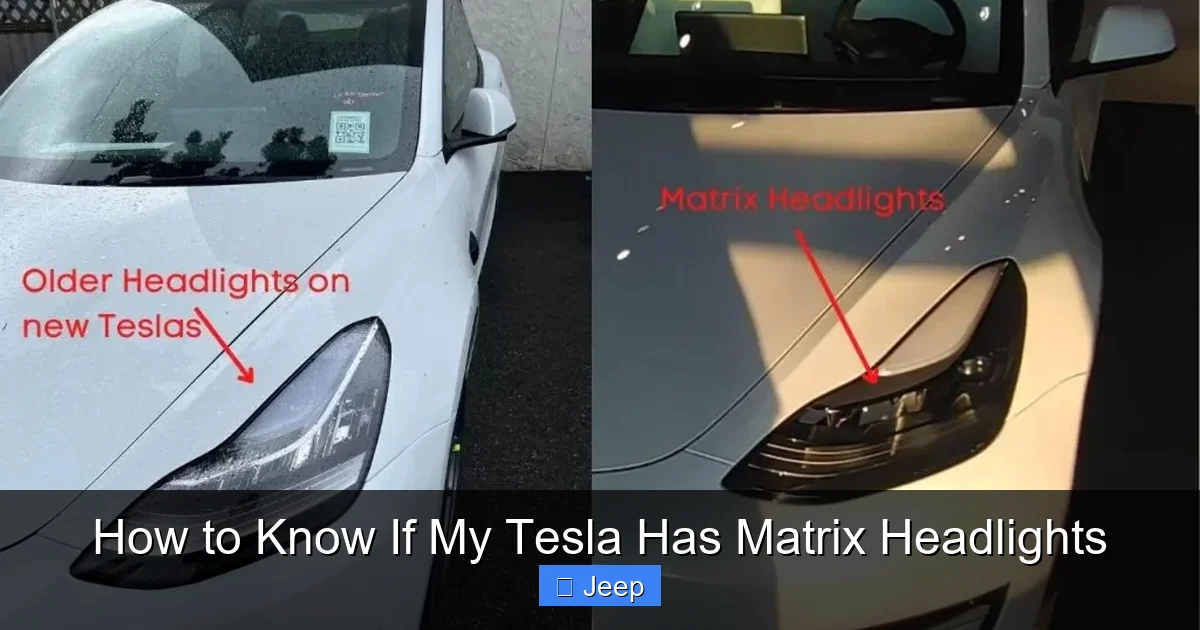
How to Know If My Tesla Has Matrix Headlights

Contents
- 1 Key Takeaways
- 2 📑 Table of Contents
- 3 What Are Tesla Matrix Headlights, Anyway?
- 4 Method 1: The Digital Detective – Checking Your Tesla’s Software Menu
- 5 Method 2: The Nighttime Visual Test – Seeing the Magic in Action
- 6 Method 3: Decoding Your VIN – The Paper Trail
- 7 A Model Year & Trim Guide to Matrix Headlight Availability
- 8 The Tangible Benefits: Why Should You Care?
- 9 Can I Add Matrix Headlights to an Older Tesla? The Hard Truth
- 10 Common Misconceptions and Confusions
- 11 Frequently Asked Questions




Wondering if your Tesla is equipped with the advanced Matrix headlights? You can find out by checking your vehicle’s settings, looking for specific visual patterns at night, or decoding your VIN. These adaptive LED headlights automatically adjust their beam pattern to avoid dazzling other drivers, a feature available on most newer Model 3 and Model Y vehicles. This guide will walk you through every method to identify them with certainty.
Key Takeaways
- Matrix headlights are an adaptive LED system: They use multiple individual LED segments to selectively dim parts of the beam, preventing glare for oncoming traffic while maintaining maximum illumination elsewhere.
- Your Tesla’s software settings are the first place to check: The “Controls” menu under “Lights” will explicitly list “Matrix” if your vehicle is equipped with them.
- A visual nighttime test is a reliable real-world confirmation: Look for the distinctive “shutter” or “pixel” effect as the headlights actively block sections of light for oncoming cars.
- Model year and trim are strong indicators: Matrix headlights became standard or widely available on Model 3 and Model Y starting in late 2021/2022, especially on Long Range and Performance trims.
- Your VIN can decode the headlight type: The 10th character of your VIN often indicates the model year, and specific VIN ranges correlate with Matrix headlight availability.
- They are not the same as standard LED or projector headlights: Standard LEDs are bright but static; Matrix headlights are dynamic and intelligent, representing a significant safety upgrade.
- Retrofitting is generally not possible: Matrix headlights are an integrated system; you cannot simply swap the hardware. Identification is key before assuming you have them.
📑 Table of Contents
- What Are Tesla Matrix Headlights, Anyway?
- Method 1: The Digital Detective – Checking Your Tesla’s Software Menu
- Method 2: The Nighttime Visual Test – Seeing the Magic in Action
- Method 3: Decoding Your VIN – The Paper Trail
- A Model Year & Trim Guide to Matrix Headlight Availability
- The Tangible Benefits: Why Should You Care?
- Can I Add Matrix Headlights to an Older Tesla? The Hard Truth
- Common Misconceptions and Confusions
What Are Tesla Matrix Headlights, Anyway?
Imagine driving at night on a dark country road. An oncoming car appears. In a traditional car, you’d likely flash your high beams briefly to avoid dazzling the other driver, then dip to low beams, sacrificing your own visibility. Now, imagine your car’s headlights could see that oncoming vehicle and, with incredible precision, create a “hole” in the high beam pattern just for that car, while keeping the rest of the road brilliantly illuminated. That’s the magic of Matrix headlights.
Officially, Tesla calls this feature “Adaptive Highbeam Headlights” on vehicles equipped with the hardware. The term “Matrix” comes from the array of individually controlled LED segments—think of it like a low-resolution screen made of light. Each segment can be turned on, off, or dimmed independently hundreds of times per second. This is made possible by a forward-facing camera (the same one used for Autopilot and Traffic-Aware Cruise Control) that constantly scans the road ahead, identifying vehicles, pedestrians, and reflective objects.
The Technology Behind the Beam
Unlike a simple high/low beam reflector or even a standard LED projector, a Matrix system is a software-controlled ballet of light. The camera feeds data to a computer, which calculates the exact position and movement of obstacles. It then commands the headlight’s control module to selectively darken specific LEDs. The result is a high beam that is always “on” but is constantly and seamlessly reshaped to avoid causing glare. It’s a monumental leap in active safety technology for nighttime driving.
This system is part of Tesla’s broader philosophy of using software to enhance hardware. The physical hardware might look similar to a standard LED headlight assembly from the outside, but inside lies a sophisticated matrix of emitters and a dedicated processor. For a Tesla owner, this means a safer, less stressful drive at night without ever having to manually flip the high beam stalk.
Method 1: The Digital Detective – Checking Your Tesla’s Software Menu
This is the fastest, most definitive way to know. Your Tesla’s touchscreen knows exactly what hardware is installed on your specific vehicle. The information is right there in the settings.
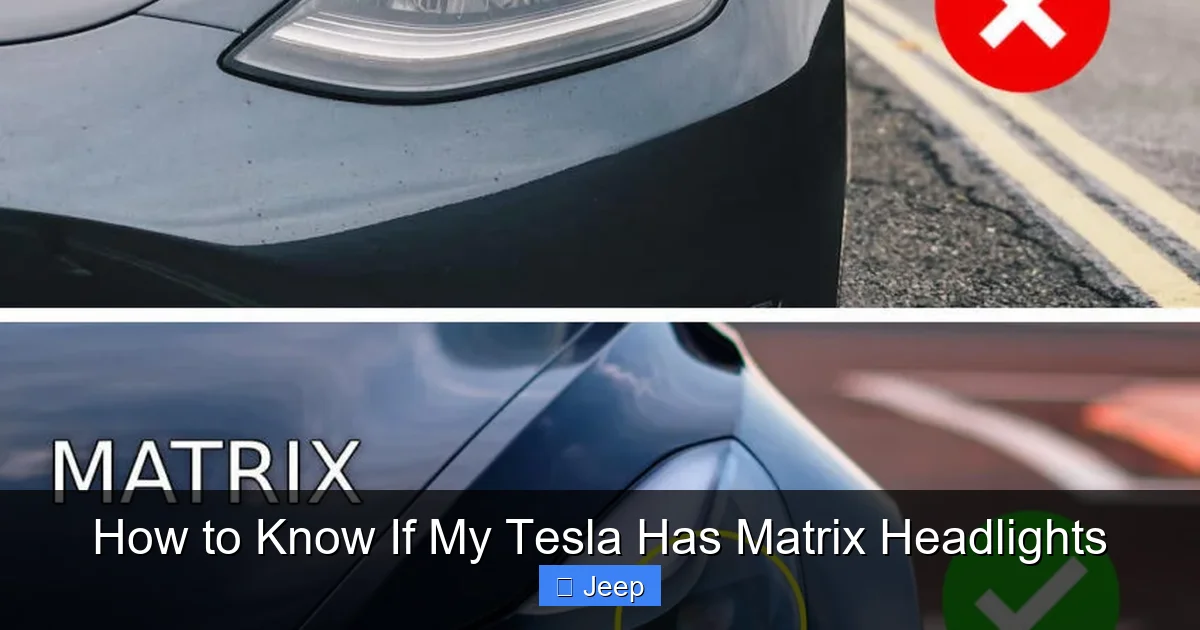
Visual guide about How to Know If My Tesla Has Matrix Headlights
Image source: tesladept.com
Step-by-Step Guide to Finding the Setting
1. Sit in your Tesla with the car powered on (either in Park or a low-speed “sleep” state).
2. Tap the “Controls” icon (the car symbol) on the bottom center of the screen.
3. Navigate to “Lights”.
4. Look through the list of toggleable light settings.
If your vehicle has Matrix headlights, you will see a setting explicitly labeled something like “Adaptive Highbeam” or “Matrix Beams”. It might be a simple on/off toggle. The presence of this dedicated software-controlled option is a 100% confirmation that your car has the Matrix hardware. If you only see standard options like “Headlight Brightness” or “Headlight Adjustment” without any adaptive beam control, your vehicle is equipped with the standard LED or halogen headlights, not the Matrix system.
Why This Method Is Best
It’s instant, requires no special conditions (like darkness), and is foolproof. The car’s software only exposes features for hardware that is physically present. There’s no guesswork. This should be your very first step in the identification process.
Method 2: The Nighttime Visual Test – Seeing the Magic in Action
If you prefer a hands-on, real-world demonstration, or if you want to double-check the software reading, you can perform a visual test. This requires darkness and a specific scenario.
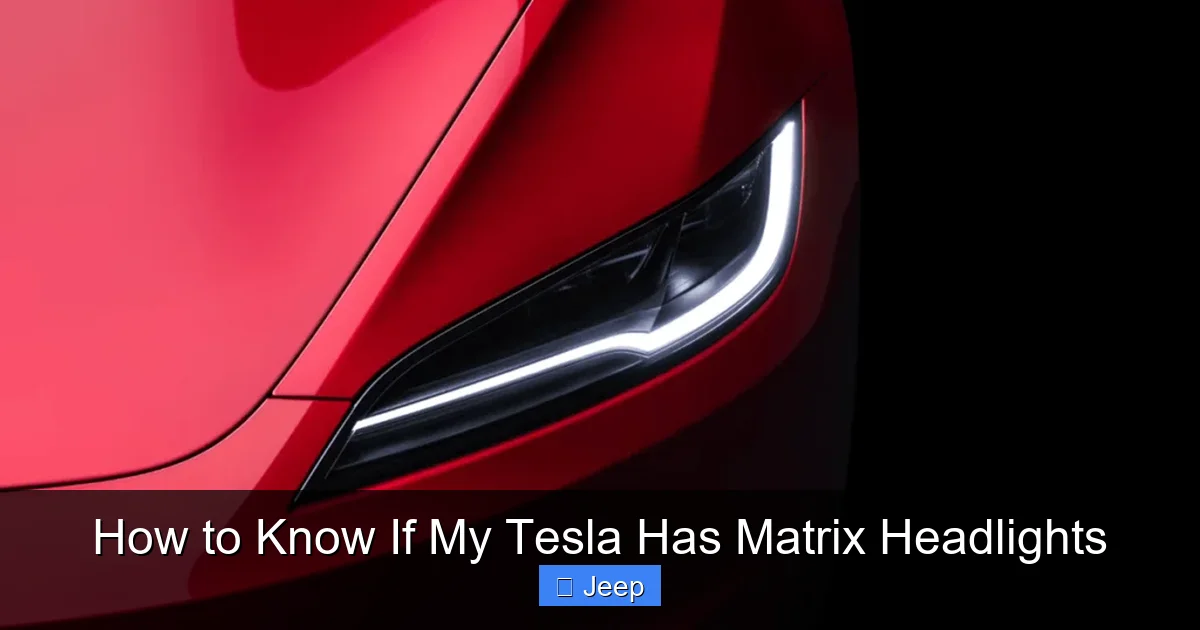
Visual guide about How to Know If My Tesla Has Matrix Headlights
Image source: carstale.com
Setting Up the Test
Find a safe, dark road with minimal ambient lighting. You need an oncoming vehicle. Ideally, this is another car traveling toward you on a two-lane road. Have a passenger help if possible, but you can do it alone. Ensure your Tesla’s headlights are set to “Auto” high beams (the default setting). The system needs to be enabled to function.
What to Look For
As the oncoming vehicle approaches, keep your eyes on its headlights and your peripheral vision on the road ahead. When your Tesla’s system determines it’s safe to use high beams, you’ll see them activate. Now, watch closely as the other car gets nearer.
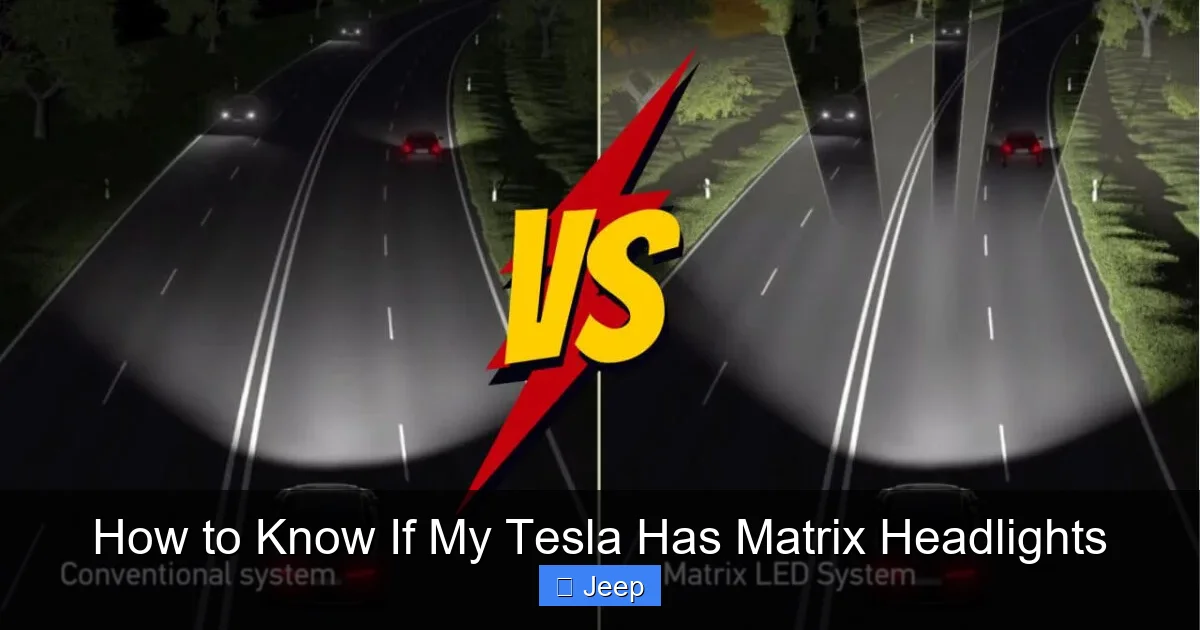
- The “Shadow” or “Hole”: You will see a distinct, dark, rectangular or rounded “shadow” or cutout appear directly over the oncoming car’s headlights. It’s not a blur; it’s a sharply defined area of darkness within your otherwise bright high beam pattern.
- The “Pixel” Effect: If you look at a flat, light-colored wall or a large sign as you pass it with your high beams on, you might see the individual LED segments activating and deactivating. It can look like a subtle, moving grid or shimmering effect across the illuminated area.
Important: Do not stare directly into your own headlight reflector or lens from the front of the car; the light is extremely intense. Observe the effect on the road and on other objects. If you see this dynamic, selective dimming, you have Matrix headlights. If your high beams simply turn off completely when a car approaches, you have a standard system.
Method 3: Decoding Your VIN – The Paper Trail
Your Vehicle Identification Number (VIN) is a 17-character code that contains a wealth of information about your car’s specifications. While not all VIN decoders publicly expose headlight details, you can use it to narrow down the possibilities based on production date and model configuration.
Visual guide about How to Know If My Tesla Has Matrix Headlights
Image source: carstale.com
Finding and Understanding Your VIN
You can find your Tesla’s VIN:
• On the dashboard, visible through the windshield on the driver’s side.
• In the Tesla mobile app under “Controls” > “Software” > “Vehicle Details.”
• In the car’s “Controls” > “Service” menu.
The most important character for our purpose is often the 10th character, which typically indicates the model year. For example, ‘L’ might be 2020, ‘M’ 2021, ‘N’ 2022, etc. (Note: Tesla’s coding isn’t always perfectly sequential, so use an online VIN decoder for precise year mapping).
Cross-Referencing Production Timelines
Once you know your approximate model year, you can research when Matrix headlights became available for your specific model (Model 3, Model Y, etc.). Tesla introduced Matrix headlights as an option on certain trims in late 2021 for the Model 3 and Model Y, gradually making them more common and eventually standard on many configurations for the 2022 and 2023 model years.
If your VIN indicates a production date in, say, March 2022 for a Model 3 Long Range, the odds are extremely high that it has Matrix headlights. If your VIN is from mid-2020, it almost certainly does not. The VIN method is best used for confirmation when combined with the software check, or for used car shopping before you can run a software check.
A Model Year & Trim Guide to Matrix Headlight Availability
Knowing the general rollout timeline for your specific Tesla model can give you a very good guess. Here’s a breakdown based on community knowledge and production trends. (Note: Tesla frequently changes options and standards. This is a general guide, not a substitute for checking your own vehicle.)
Model 3
- Pre-2021: Almost exclusively standard LED projector headlights. No Matrix option.
- 2021 (Late Refresh): Matrix headlights were introduced as an option on Long Range and Performance trims. Standard Range likely retained standard LEDs.
- 2022-Present: Matrix headlights became standard on all new Model 3 trims (Standard Range, Long Range, Performance) in most markets.
Model Y
- 2020-2021: Early Model Ys had standard LED headlights. Matrix was a rare or unavailable option initially.
- 2022: Matrix headlights became widely available and eventually standard on Long Range and Performance. Some early 2022 Standard Range may have standard LEDs.
- 2023-Present: Matrix headlights are standard on nearly all new Model Ys globally.
Model S & Model X
The flagship Model S and Model X have used a different, more advanced headlight system (often called “Full LED” or with projectors) for many years. The term “Matrix” is primarily associated with the Model 3 and Model Y platform. Older S and X may have adaptive features but not the exact Matrix pixel system. Newer refreshed S and X (2021+) have their own sophisticated LED systems with adaptive high beams that function similarly but may have different branding.
The Tangible Benefits: Why Should You Care?
If you’re trying to identify this feature, you’re likely wondering what it actually does for you. The benefits are significant and directly impact safety and comfort.
1. Unmatched Nighttime Visibility
With standard high beams, you’re often forced to choose between seeing far down the road and blinding oncoming drivers. Matrix headlights eliminate this compromise. You can keep your high beams on almost constantly, illuminating the entire roadway, shoulders, and signs, while the system silently carves out safe zones for other road users. This dramatically increases your sight distance on dark roads.
2. Reduced Driver Fatigue and Stress
Constantly flipping between high and low beams is a nuisance and a distraction. With Matrix, you set it and forget it. The system works autonomously, allowing you to focus entirely on driving. Night drives become less stressful, especially on long, lonely highways.
3. Enhanced Safety for Everyone
By preventing glare, you are directly reducing the risk of temporarily blinding an oncoming driver, which is a major cause of nighttime accidents. You also maintain your own optimal visibility, making it easier to spot pedestrians, animals, or debris on the road ahead. It’s a win-win for overall road safety.
4. Future-Proofing with Software Updates
Because the feature is software-controlled, Tesla can refine the algorithm over time. An update might improve the camera’s object recognition or make the beam transitions smoother. Your Matrix headlights can get better with age, unlike fixed hardware systems. This is a key advantage of Tesla’s software-centric approach, which also applies to other vehicle systems—you can even learn how to charge a Tesla rental car through their intuitive app and software integration.
Can I Add Matrix Headlights to an Older Tesla? The Hard Truth
This is a common question, and the answer is crucial for owners of pre-2021 Teslas hoping for an upgrade. The short, direct answer is: No, you cannot retrofit Matrix headlights onto a Tesla that wasn’t built with them.
Why It’s Not a Simple Bulb Swap
Matrix headlights are not an aftermarket bulb or module. They are a complete, integrated assembly with a unique internal LED array and a dedicated control unit that communicates directly with the vehicle’s main computer and Autopilot camera. The wiring harness, software calibration, and mounting points are all specific to this system. Swapping it would require not just the headlight assembly (which is extremely expensive), but also the corresponding computer module and, most importantly, the software integration that only Tesla can provide.
The Only “Upgrade” Path
The only way to get Matrix headlights is to purchase a Tesla that was factory-equipped with them. For used car shoppers, identifying Matrix headlights using the methods in this guide is a critical step in the buying process. If you own an older Tesla and are fascinated by the technology, your best investment is in a used Model 3 or Model Y from the 2022+ model years that already has the feature. Remember, any major headlight work, whether on a Matrix or standard system, can be costly, so always factor in potential repair costs when considering a vehicle’s overall value.
Common Misconceptions and Confusions
Let’s clear up some points of confusion that often arise in Tesla owner forums.
“My headlights are LED, so they must be Matrix.”
False. All Teslas from the last several years have LED headlights. “Matrix” is a specific *type* of LED headlight with adaptive, segment-controlled beams. Most Teslas have standard LED projectors. The presence of LED bulbs does not indicate Matrix capability.
“I see a pattern in my high beams, so I have Matrix.”
Be careful. Some standard LED projectors can have a slight striping or pattern in the beam cutoff on a wall. This is a static, physical cutoff from the projector lens. The Matrix effect is dynamic—it moves and changes shape in real-time as traffic conditions change. The static test pattern is not the same as the adaptive Matrix function.
“Matrix headlights are the same as the ‘Autosteer’ camera.”
They use the *same* forward-facing camera hardware for vision, but the software process is different. The Autopilot/FSD stack identifies lanes, cars, and paths for steering. The headlight control software is a separate module that takes that camera data and translates it into beam patterns. They are complementary systems sharing a sensor.
Frequently Asked Questions
Can I turn off my Tesla’s Matrix headlights?
Yes. You can manually override the system by pushing the headlight stalk forward to activate high beams, which will then stay on continuously without adaptation. You can also disable the “Adaptive Highbeam” feature in the Controls > Lights menu, which will revert the high beams to a static pattern that turns off completely for oncoming traffic.
Do Matrix headlights work in the rain or fog?
They work, but their effectiveness is reduced. The camera may struggle to identify vehicles through heavy precipitation, and the light can scatter off fog or rain droplets, reducing overall visibility. In such conditions, it’s often better to manually use low beams, which is what the system may default to anyway if its confidence is low.
Are Matrix headlights legal everywhere?
Yes. They are designed to comply with international lighting regulations (like UNECE standards) by ensuring the high beam does not produce glare that exceeds legal limits for other drivers. The adaptive dimming is specifically engineered to meet these safety standards.
Do Matrix headlights use more battery power than standard LEDs?
Negligibly. While they have more individual LEDs, the system’s intelligence often keeps parts of the array turned off when not needed. The energy consumption difference compared to a standard LED high beam is minimal and not a noticeable factor in overall range.
Will a Tesla service center confirm if I have Matrix headlights?
Absolutely. A service technician can look up your vehicle’s build sheet or VIN in their internal system to see the exact option package. They can also perform a diagnostic scan to see which systems are active. This is a surefire way to get a definitive answer.
If I have Matrix headlights, do I still need to use my high beams manually?
Almost never. The system is designed to be fully automatic. It will activate high beams when appropriate on dark roads and automatically adapt them. Manual intervention is only needed in very unusual scenarios, like if the camera is obstructed or the system is turned off.