
How to Clear the Tire Maintenance Light on a Nissan

Clearing the tire maintenance light on a Nissan is simpler than you think—no dealership visit required. Whether you’ve rotated your tires, replaced a sensor, or just reset your TPMS, this guide walks you through the process for popular models like the Altima, Rogue, and Sentra using built-in menus or the TPMS reset button.
Key Takeaways
- Understand what triggers the light: The tire maintenance light typically appears after tire rotation, pressure changes, or sensor issues—not always a flat tire.
- Know your Nissan model: Reset procedures vary slightly between models like the Altima, Rogue, Maxima, and Sentra, so check your owner’s manual.
- Use the TPMS reset button: Many Nissan vehicles have a physical button under the steering wheel or near the fuse panel to reset the system.
- Drive to reset automatically: Some models require driving at 50+ mph for 10+ minutes to allow the system to recalibrate.
- Check tire pressure first: Always ensure all tires are inflated to the recommended PSI before attempting a reset.
- Use a TPMS tool if needed: For advanced resets or sensor relearns, a professional TPMS scan tool may be necessary.
- Visit a dealer as a last resort: If DIY methods fail, a Nissan service center can diagnose and clear persistent warnings.
📑 Table of Contents
- Why Is My Nissan’s Tire Maintenance Light On?
- What Is TPMS and How Does It Work in Nissan Vehicles?
- Step-by-Step Guide: How to Clear the Tire Maintenance Light on a Nissan
- Model-Specific Reset Instructions
- When the Light Won’t Go Off: Troubleshooting Tips
- Preventing Future TPMS Issues
- When to Visit a Nissan Dealer or Mechanic
- Conclusion
Why Is My Nissan’s Tire Maintenance Light On?
So, you’re driving along, enjoying your Nissan—maybe it’s a smooth Altima cruise or a weekend adventure in your Rogue—and suddenly, a little yellow light pops up on your dashboard. It looks like a tire with an exclamation point inside. Your first thought? “Uh-oh, do I have a flat?” Not necessarily.
The tire maintenance light, often called the TPMS (Tire Pressure Monitoring System) warning light, doesn’t always mean you’ve got a puncture. In fact, it’s usually triggered by changes in tire pressure, recent tire rotations, or even temperature fluctuations. Cold mornings can cause air to contract, dropping pressure just enough to trip the sensor. Or maybe you recently had your tires rotated or replaced, and the system hasn’t recognized the new positions yet.
This light is your Nissan’s way of saying, “Hey, something’s different with your tires—check it out.” It’s a safety feature designed to keep you informed, but it can be annoying when it stays on after you’ve already addressed the issue. The good news? You don’t need to rush to the dealership every time it comes on. Most of the time, you can clear it yourself in just a few minutes.
Understanding why the light appears is the first step to fixing it. It’s not just about low air—it’s about communication. Your Nissan’s TPMS relies on sensors inside each tire (or in the valve stems) that send pressure data to the car’s computer. When that data changes unexpectedly, the system flags it. So whether you’ve rotated tires, driven through a cold snap, or replaced a sensor battery, the light may stay on until the system is reset.
What Is TPMS and How Does It Work in Nissan Vehicles?

Visual guide about How to Clear the Tire Maintenance Light on a Nissan
Image source: bryansgarage.com
Before we dive into resetting the light, let’s break down what TPMS actually is. TPMS stands for Tire Pressure Monitoring System, and it’s a standard feature on all Nissan vehicles manufactured after 2008 (thanks to federal regulations). Its job is simple: monitor the air pressure in your tires and alert you if it drops below a safe level.
Nissan uses one of two types of TPMS: direct or indirect.
Direct TPMS is the most common in modern Nissans. It uses small sensors mounted inside each tire (usually attached to the valve stem) that measure pressure and temperature in real time. These sensors send wireless signals to a central receiver in the car, which then displays the info on your dashboard. If one tire’s pressure drops significantly, the system knows exactly which one it is and can even show you the exact PSI on some models.
Indirect TPMS, on the other hand, doesn’t use physical sensors. Instead, it relies on the car’s anti-lock braking system (ABS) to detect differences in wheel speed. If one tire is underinflated, it spins slightly faster than the others, and the ABS sensors pick up on that. While cheaper to maintain, indirect systems are less accurate and can’t tell you which tire is low—just that something’s off.
Most Nissan models—like the Altima, Rogue, Sentra, Maxima, and Pathfinder—use direct TPMS. That means each tire has its own sensor, and the system can pinpoint issues with precision. These sensors are powered by small batteries that last about 5 to 10 years. When a battery dies, the sensor stops transmitting, and the TPMS light may come on—even if your tire pressure is perfect.
The system also needs to “learn” the position of each sensor after tire rotations or replacements. That’s why the light might stay on after a rotation—the car doesn’t know which sensor is now in the front left, for example. Resetting the system tells it to relearn those positions.
Step-by-Step Guide: How to Clear the Tire Maintenance Light on a Nissan

Visual guide about How to Clear the Tire Maintenance Light on a Nissan
Image source: bryansgarage.com
Now that you know what’s going on under the hood (or rather, under the tires), let’s get to the main event: clearing that pesky light. The process is straightforward for most Nissan models, but it does require a few specific steps. Don’t worry—you don’t need special tools or a mechanic. Just your hands, maybe a tire pressure gauge, and about 10 minutes of your time.
Step 1: Check and Adjust Tire Pressure
Before you do anything else, make sure all four tires are inflated to the correct pressure. This is the most common reason the light stays on—even if it came on after a rotation or sensor replacement.
Find the recommended PSI for your Nissan. It’s usually listed on a sticker inside the driver’s side door jamb or in your owner’s manual. Don’t use the number on the tire sidewall—that’s the maximum pressure, not the recommended one.
Use a reliable tire pressure gauge to check each tire. If any are low, inflate them to the correct level. If one is significantly low, inspect it for leaks or damage. Once all tires are properly inflated, move to the next step.
Step 2: Locate the TPMS Reset Button
Most Nissan vehicles have a physical TPMS reset button. It’s usually found under the steering wheel, near the fuse panel, or sometimes behind the glove compartment. Look for a small button labeled “TPMS,” “SET,” or “RESET.” On some models, it’s a small pinhole you press with a paperclip.
For example:
– Nissan Altima (2013–2018): The button is under the steering column, near the hood release.
– Nissan Rogue (2014–2020): It’s located under the dashboard, to the left of the steering wheel.
– Nissan Sentra (2013–2019): Often found near the fuse box, under the dash.
If you can’t find it, consult your owner’s manual—it’ll have a diagram.
Step 3: Turn the Ignition to “On” (But Don’t Start the Engine)
Insert your key and turn it to the “ON” position. You’ll see the dashboard lights come on, but the engine shouldn’t be running. This powers up the car’s computer without engaging the motor.
On push-button start models, press the “Start” button twice without pressing the brake pedal. This puts the car in accessory mode.
Step 4: Press and Hold the TPMS Reset Button
Once the ignition is on, press and hold the TPMS reset button. You’ll usually need to hold it for about 3 to 5 seconds. Watch the TPMS light on the dashboard—it should start blinking slowly (about once every second).
Keep holding the button until the light blinks three times, then release. On some models, you may hear a chime or see a confirmation message on the display.
If the light doesn’t blink, try pressing the button again. Make sure you’re holding it long enough. If it still doesn’t respond, double-check that the ignition is on and the tires are properly inflated.
Step 5: Drive the Vehicle to Complete the Reset
After releasing the button, start the engine and drive the car at a speed of at least 50 mph for 10 to 15 minutes. This allows the TPMS system to recalibrate and recognize the sensor positions.
During this drive, the system is “learning” the new tire positions. You may notice the light stays on during the drive—that’s normal. Once the system completes its cycle, the light should turn off automatically.
If the light doesn’t go off after driving, repeat the process. Sometimes it takes a second attempt, especially if the sensors were recently replaced or the car has been sitting for a long time.
Alternative Method: Using the Dashboard Menu (For Newer Models)
Some newer Nissan models—like the 2021+ Rogue or Altima—allow you to reset the TPMS through the infotainment system.
Here’s how:
1. Turn the ignition to “ON.”
2. Navigate to the “Settings” menu on the touchscreen.
3. Select “Vehicle” or “Driving Assistance.”
4. Look for “Tire Pressure” or “TPMS Reset.”
5. Follow the on-screen prompts to initiate the reset.
6. Drive the vehicle as instructed (usually 50+ mph for 10+ minutes).
This method is more user-friendly and doesn’t require finding a hidden button. Check your owner’s manual to see if your model supports this feature.
Model-Specific Reset Instructions
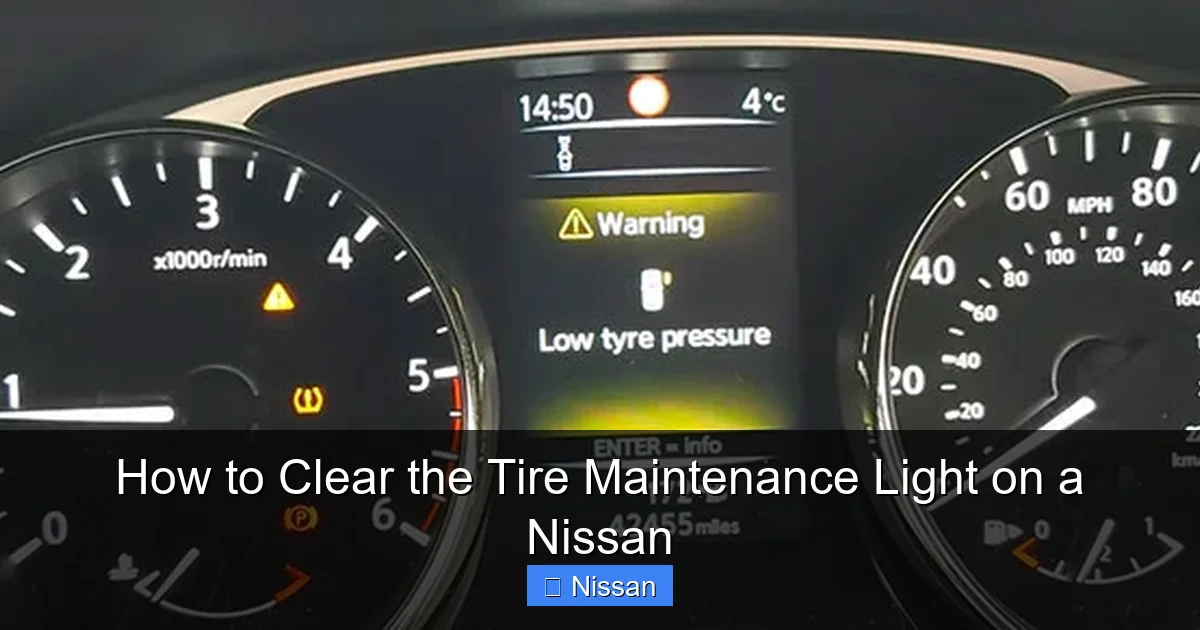
Visual guide about How to Clear the Tire Maintenance Light on a Nissan
Image source: bryansgarage.com
While the general process is similar across Nissan models, there are slight variations. Let’s break it down by some of the most popular vehicles.
Nissan Altima (2013–2023)
The Altima uses a direct TPMS system with a reset button under the steering column. After inflating tires to the correct PSI, turn the ignition on, press and hold the TPMS button until the light blinks three times, then drive at 50+ mph for 10 minutes. The light should turn off once the system relearns the sensor positions.
Nissan Rogue (2014–2024)
The Rogue has a TPMS reset button located under the dashboard, near the driver’s left knee. The process is the same: check pressure, turn ignition on, press and hold the button until the light blinks, then drive. Newer Rogues (2021+) may also offer a menu-based reset via the touchscreen.
Nissan Sentra (2013–2022)
The Sentra’s reset button is often tucked near the fuse panel. Follow the standard steps: inflate tires, turn ignition on, press the button, and drive. If the light persists, it could indicate a faulty sensor—especially in older models where sensor batteries may be dying.
Nissan Maxima (2016–2023)
The Maxima uses a similar system. The reset button is under the steering wheel. After resetting, drive steadily at highway speeds. The Maxima’s system is sensitive, so even small pressure changes can trigger the light.
Nissan Pathfinder (2013–2024)
The Pathfinder has a TPMS reset button near the fuse box. The process is identical: check pressure, turn ignition on, press the button, drive. Some trims may require a TPMS tool for full sensor relearn, especially after tire rotation.
When the Light Won’t Go Off: Troubleshooting Tips
So you’ve followed all the steps—checked the pressure, pressed the button, driven for 15 minutes—but that light is still glowing like a stubborn ember. Don’t panic. There are a few common reasons why the TPMS light might refuse to cooperate.
Faulty or Dead TPMS Sensor
TPMS sensors have internal batteries that last about 5 to 10 years. Once the battery dies, the sensor can’t transmit data, and the system can’t read the tire pressure. This is especially common in older Nissans or vehicles with high mileage.
If one sensor is dead, the light may stay on even if the other three are working. You’ll need a TPMS scan tool to diagnose which sensor is failing. These tools can read the sensor IDs and signal strength. If a sensor is unresponsive, it likely needs replacement.
Replacing a TPMS sensor isn’t cheap—expect to pay $100–$200 per sensor, including installation. Some shops can reprogram existing sensors, but if the battery is dead, replacement is the only option.
Sensor Not Properly Seated or Damaged
During tire rotations or replacements, sensors can get knocked loose or damaged. If a sensor isn’t securely attached to the valve stem, it may not transmit correctly. Inspect each sensor to make sure it’s tight and undamaged.
Also, check the valve stem itself. A cracked or corroded stem can cause air leaks and interfere with the sensor. If you see damage, have the valve and sensor replaced together.
Incorrect Sensor Programming
After a tire rotation, the system needs to relearn which sensor is in which position. If the reset process wasn’t completed correctly, the car may still think the old sensor layout is active.
Try the reset process again, making sure to drive at a consistent speed for the full 10–15 minutes. Avoid sudden stops or sharp turns during this time—smooth driving helps the system calibrate.
Software Glitch or System Error
Sometimes, the issue isn’t mechanical—it’s digital. A glitch in the car’s computer can cause the TPMS light to stay on. This is rare but possible.
Try disconnecting the car’s battery for 10–15 minutes to reset the electrical system. Turn off the ignition, disconnect the negative terminal, wait, then reconnect. This can clear temporary errors.
If the light returns, it’s likely a hardware issue.
Extreme Temperature Changes
Cold weather can cause tire pressure to drop significantly. If you reset the system in warm weather and then drive in freezing temperatures, the pressure may fall below the threshold again.
Check your tire pressure regularly in winter. Consider using nitrogen inflation, which is less affected by temperature swings, though it’s not essential.
Preventing Future TPMS Issues
The best way to deal with the tire maintenance light is to avoid it altogether. A little prevention goes a long way in keeping your Nissan’s TPMS happy.
Check Tire Pressure Monthly
Make it a habit to check your tire pressure at least once a month. Use a quality gauge and compare the readings to the recommended PSI. Don’t wait for the light to come on—proactive checks prevent surprises.
Rotate Tires Regularly
Follow your Nissan’s recommended tire rotation schedule (usually every 5,000 to 7,500 miles). This ensures even wear and helps the TPMS sensors last longer. After rotation, always reset the system.
Inspect Sensors During Service
When you take your car in for oil changes or tire service, ask the technician to inspect the TPMS sensors. They can check for damage, corrosion, or low battery signals.
Use a TPMS Maintenance Kit
Some kits include replacement valve cores, seals, and caps designed for TPMS sensors. These can prevent leaks and extend sensor life. They’re inexpensive and easy to install.
Keep Records
Track when you rotate tires, replace sensors, or reset the system. This helps you identify patterns and catch issues early.
When to Visit a Nissan Dealer or Mechanic
Most TPMS issues can be resolved at home, but there are times when professional help is needed.
If you’ve tried the reset process multiple times and the light won’t go off, it’s time to visit a Nissan service center or a trusted mechanic. They have advanced diagnostic tools that can read sensor data, check battery life, and reprogram the system.
Also, if you suspect a sensor is dead or damaged, a professional can confirm it and replace it correctly. Attempting to replace sensors yourself can lead to leaks or further damage if not done properly.
Finally, if your Nissan is still under warranty, let the dealer handle TPMS issues. They’ll diagnose and fix the problem at no cost.
Conclusion
Clearing the tire maintenance light on your Nissan doesn’t have to be a headache. With the right knowledge and a few simple steps, you can reset the TPMS system and get back to driving with confidence. Whether you’re behind the wheel of an Altima, Rogue, or Sentra, the process is straightforward: check your tire pressure, locate the reset button, follow the steps, and take a short drive.
Remember, the light is there to help you—not haunt you. It’s a sign that your Nissan is looking out for your safety. By staying proactive with tire maintenance and understanding how the TPMS works, you can keep that light off for good.
And if all else fails? Don’t hesitate to visit a professional. Sometimes, a little expert help is exactly what you need.
Frequently Asked Questions
How long does it take for the TPMS light to turn off after resetting?
After resetting, the light usually turns off within 10 to 15 minutes of driving at 50+ mph. The system needs time to recalibrate and confirm proper tire pressure.
Can I drive with the tire maintenance light on?
Yes, but it’s not recommended. The light indicates a potential issue with tire pressure or sensors, which can affect handling, fuel efficiency, and safety.
Do I need a special tool to reset the TPMS on a Nissan?
Most Nissan models only require the built-in reset button or dashboard menu. However, some advanced resets or sensor replacements may need a TPMS scan tool.
Why does the TPMS light come on in cold weather?
Cold temperatures cause air to contract, lowering tire pressure. Even a small drop can trigger the TPMS light. Check and adjust pressure when tires are cold.
Can I reset the TPMS light without driving?
No. Driving is required for the system to recalibrate. The car must reach a certain speed and distance for the sensors to relearn their positions.
How often should I replace TPMS sensors?
TPMS sensors typically last 5 to 10 years. Replace them if the battery dies, the sensor is damaged, or the light won’t reset after proper maintenance.