
How to Change Tire Pressure Units on a Subaru Outback

Changing the tire pressure units on your Subaru Outback is simple and can be done directly through the vehicle’s infotainment system or dashboard menu. Whether you prefer PSI, kPa, or BAR, this guide walks you through the process for various model years, ensuring your tire pressure monitoring system (TPMS) displays in your preferred unit.
Key Takeaways
- Access the settings menu: Use the steering wheel controls or touchscreen to navigate to the vehicle settings.
- Locate the TPMS or unit settings: Find the tire pressure or measurement units option in the menu system.
- Select your preferred unit: Choose between PSI (pounds per square inch), kPa (kilopascals), or BAR based on your region or preference.
- Confirm the change: Save the setting to ensure the new unit appears on the dashboard and TPMS display.
- Check compatibility by model year: Older Outbacks may require different steps than newer models with updated infotainment systems.
- Understand regional standards: PSI is common in the U.S., while kPa and BAR are used in Europe and other countries.
- Reset TPMS if needed: After changing units, verify that tire pressure readings are accurate and reset the system if necessary.
📑 Table of Contents
- Why Tire Pressure Units Matter in Your Subaru Outback
- Understanding Tire Pressure Units: PSI, kPa, and BAR
- How to Change Tire Pressure Units on a Subaru Outback (2015–2024 Models)
- Step-by-Step Guide with Practical Examples
- Tips for Accurate Tire Pressure Monitoring
- Troubleshooting Common Issues
- Conclusion
Why Tire Pressure Units Matter in Your Subaru Outback
Driving a Subaru Outback means you value safety, reliability, and precision—especially when it comes to vehicle maintenance. One often-overlooked but essential aspect of car care is monitoring tire pressure. Properly inflated tires improve fuel efficiency, extend tire life, and enhance handling, especially on rugged terrain or during long road trips. But did you know that the unit of measurement your Outback uses to display tire pressure can vary?
Most drivers in the United States are familiar with PSI (pounds per square inch), the standard unit for tire pressure. However, if you’ve traveled internationally or purchased a vehicle with European specifications, you might encounter kPa (kilopascals) or BAR. These units are commonly used in countries that follow the metric system. While the actual pressure remains the same, the way it’s displayed can be confusing if you’re not used to it.
The good news? Your Subaru Outback allows you to change the tire pressure units directly from the dashboard or infotainment system. This flexibility ensures that you can view your tire pressure in the format you’re most comfortable with, whether you’re a long-time PSI user or someone who prefers metric units. In this guide, we’ll walk you through the exact steps to change tire pressure units on various Subaru Outback models, from older generations to the latest 2024 versions.
Understanding how to switch between units isn’t just about convenience—it’s about clarity and safety. Misreading tire pressure due to unfamiliar units could lead to underinflated or overinflated tires, which increases the risk of blowouts, poor traction, and reduced fuel economy. By customizing your display, you ensure that you’re always getting accurate, understandable information at a glance.
Understanding Tire Pressure Units: PSI, kPa, and BAR
Visual guide about How to Change Tire Pressure Units on a Subaru Outback
Image source: images.simplepart.com
Before diving into the how-to, let’s clarify what these units actually mean and why they matter.
PSI (Pounds per Square Inch): This is the most common unit in the United States. It measures the force exerted by air inside the tire per square inch of area. Most passenger vehicles, including the Subaru Outback, recommend tire pressures between 30 and 35 PSI when cold.
kPa (Kilopascals): Part of the metric system, kPa is widely used in Canada, Europe, and many other countries. One PSI is approximately equal to 6.895 kPa. So, a typical tire pressure of 32 PSI translates to about 220 kPa. If you’re used to metric units, kPa may feel more intuitive.
BAR: Another metric unit, BAR is often used in automotive and industrial applications. One BAR is roughly equal to 14.5 PSI. So, 32 PSI is about 2.2 BAR. While less common in passenger vehicles, some European models and diagnostic tools use BAR.
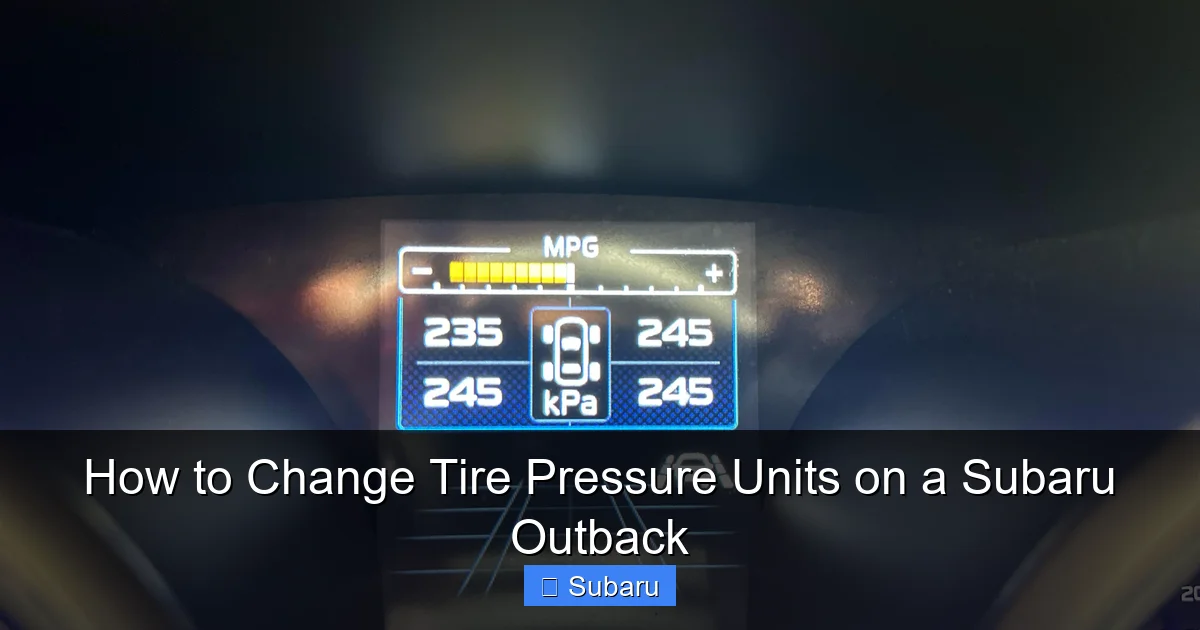
Why does this matter for your Outback? The vehicle’s Tire Pressure Monitoring System (TPMS) can display readings in any of these units, depending on your settings. If you’ve recently imported your car or moved from another country, you might find the default unit unfamiliar. Changing it ensures you can monitor your tires confidently and accurately.
It’s also worth noting that tire pressure recommendations on the vehicle’s door jamb sticker or owner’s manual are typically listed in PSI for U.S. models. However, if you’ve switched to kPa or BAR, you’ll need to mentally convert or use a reference chart to match the recommended values. For example, if your Outback recommends 32 PSI, that’s approximately 220 kPa or 2.2 BAR.
How to Change Tire Pressure Units on a Subaru Outback (2015–2024 Models)
Visual guide about How to Change Tire Pressure Units on a Subaru Outback
Image source: i.redd.it
The process for changing tire pressure units varies slightly depending on your Outback’s model year and infotainment system. Below, we’ll break it down by generation to ensure you find the right method for your vehicle.
For 2015–2019 Subaru Outback Models (With STARLINK Infotainment)
If you own a 2015 to 2019 Subaru Outback, your vehicle likely uses the STARLINK multimedia system with a 7-inch touchscreen. Here’s how to change the tire pressure units:
1. Start the vehicle and ensure the ignition is on. You don’t need to drive—just turn the key to the “ON” position or press the start button without pressing the brake.
2. Access the main menu by tapping the “Home” button on the touchscreen or using the physical menu button near the screen.
3. Navigate to “Settings” — this is usually represented by a gear icon. Tap it to open the settings menu.
4. Select “Vehicle” from the list of options. This section contains vehicle-specific settings, including lighting, wipers, and tire pressure.
5. Tap “Tire Pressure” or “TPMS Settings.” On some models, this may be labeled as “Measurement Units” or “Units.”
6. Choose your preferred unit — you’ll see options for PSI, kPa, or BAR. Tap the one you want.
7. Confirm the selection by tapping “OK” or “Save.” The change should take effect immediately.
After making the change, check your dashboard or the TPMS display to confirm the new unit is showing. If you don’t see the update, try restarting the vehicle or cycling the ignition.
For 2020–2024 Subaru Outback Models (With Updated STARLINK and Digital Cluster)
The 2020 and newer Outbacks feature an upgraded STARLINK system with a larger touchscreen and a digital instrument cluster. The process is similar but may involve the steering wheel controls:
1. Turn on the ignition — no need to start the engine.
2. Use the steering wheel controls to navigate the digital instrument cluster. Press the “Menu” or “Info” button on the left side of the steering wheel.
3. Scroll to “Settings” using the arrow buttons. Press “OK” to enter.
4. Select “Vehicle Settings” — this may also be called “Car Settings” or “System Settings.”
5. Find “Units” or “Measurement Units” — this option controls temperature, distance, and tire pressure units.
6. Choose “Tire Pressure” and select your preferred unit: PSI, kPa, or BAR.
7. Press “OK” to save — the change will appear on both the digital cluster and the center display.
Alternatively, you can use the touchscreen:
– Tap the “Settings” icon on the home screen.
– Go to “Vehicle” > “Units” > “Tire Pressure.”
– Select your desired unit and confirm.
For 2010–2014 Subaru Outback Models (Older STARLINK or Basic Display)
Older Outbacks may not have a full touchscreen but still allow unit changes via the dashboard menu:
1. Turn the ignition to “ON.”
2. Press and hold the “Trip” button on the instrument cluster until the display changes.
3. Use the “Trip” or “Reset” button to cycle through display options until you reach “Units” or “Measurement.”
4. Press and hold again to enter the unit selection mode.
5. Cycle through PSI, kPa, and BAR using the button, then release to select.
6. Wait for the setting to save — the display will return to normal after a few seconds.
Note: On some 2010–2014 models, the tire pressure unit may be tied to the overall measurement system (e.g., if you switch from miles to kilometers, the pressure unit may also change). Check your owner’s manual for model-specific details.
Step-by-Step Guide with Practical Examples

Visual guide about How to Change Tire Pressure Units on a Subaru Outback
Image source: i.ytimg.com
Let’s walk through a real-world example to make this even clearer.
Imagine you’re preparing for a road trip from Denver to Moab, Utah. You’ve just checked your tires at a gas station that uses kPa, and the reading shows 220 kPa. You’re used to PSI, so you’re not sure if that’s correct. Your Outback is a 2022 model with the digital cluster.
Here’s what you do:
1. Pull over safely and turn on the ignition.
2. Use the steering wheel “Menu” button to access the digital display.
3. Navigate to “Settings” > “Vehicle Settings” > “Units.”
4. Select “Tire Pressure” and change it from kPa to PSI.
5. The display now shows 32 PSI — right in the recommended range for your Outback.
6. You feel confident and continue your journey.
This simple change eliminates confusion and ensures you’re maintaining your tires correctly.
Another scenario: You’ve just moved from Germany to the U.S. and brought your Outback with you. The car is set to BAR, and you’re not familiar with it. You want to switch to PSI to match local standards.
Using the touchscreen method:
– Tap “Settings” > “Vehicle” > “Units” > “Tire Pressure.”
– Change from BAR to PSI.
– Now, when you check your tires, you see 33 PSI instead of 2.3 BAR — much easier to understand.
These examples show how changing the unit can make a big difference in daily driving and long-term maintenance.
Tips for Accurate Tire Pressure Monitoring
Changing the unit is just the first step. To get the most out of your TPMS, follow these best practices:
Check Tire Pressure When Cold: Tire pressure increases as tires heat up from driving. For accurate readings, check pressure before driving or after the car has sat for at least three hours.
Use a Quality Tire Gauge: While your Outback’s TPMS is helpful, it’s not always precise. Keep a digital tire gauge in your glove box for manual checks.
Adjust for Load and Conditions: If you’re carrying heavy cargo or towing, you may need to increase tire pressure slightly. Refer to your owner’s manual for recommendations.
Reset TPMS After Changes: If you’ve changed units or replaced a sensor, reset the TPMS to ensure accurate alerts. On most models, this is done through the “TPMS Reset” option in the settings menu.
Monitor Regularly: Make it a habit to check tire pressure monthly. Small leaks or temperature changes can affect pressure over time.
Understand the Warning Light: If the TPMS warning light comes on, it means one or more tires are significantly underinflated. Pull over safely and check your tires immediately.
Troubleshooting Common Issues
Sometimes, changing the tire pressure unit doesn’t go as planned. Here are a few common issues and how to fix them:
Unit Reverts After Restart: If your setting doesn’t save, the vehicle may have a software glitch. Try disconnecting the battery for 10 minutes, then reconnect and repeat the process.
No Unit Option in Menu: Some older models don’t allow unit changes. In this case, you may need to use a third-party OBD2 scanner or visit a Subaru dealer for assistance.
Incorrect Readings After Change: If the pressure seems off after switching units, double-check with a manual gauge. The TPMS may need recalibration.
Touchscreen Unresponsive: If the screen freezes, try a soft reset by holding the power button for 10 seconds. If that doesn’t work, consult your dealer.
Conclusion
Changing the tire pressure units on your Subaru Outback is a quick and easy way to personalize your driving experience and ensure you’re monitoring your tires accurately. Whether you prefer PSI, kPa, or BAR, your Outback gives you the flexibility to choose. By following the steps outlined in this guide, you can switch units in just a few minutes—no tools or technical expertise required.
Remember, proper tire pressure is about more than just numbers. It’s about safety, efficiency, and peace of mind. Whether you’re navigating city streets or exploring off-road trails, your Outback performs best when its tires are properly inflated. Take a few moments to customize your display, and you’ll be ready for whatever the road brings.
Don’t forget to check your tire pressure regularly, especially before long trips or seasonal changes. And if you ever run into issues, your Subaru dealer or owner’s manual is always a great resource. With the right settings and habits, you’ll keep your Outback running smoothly for years to come.
Frequently Asked Questions
Can I change the tire pressure units on a 2012 Subaru Outback?
Yes, but the process may be more limited. Use the “Trip” button on the instrument cluster to cycle through display options and look for a “Units” or “Measurement” setting. If unavailable, consult your owner’s manual or a Subaru dealer.
Will changing the unit affect my TPMS warnings?
No, changing the unit only affects how the pressure is displayed. The TPMS will still alert you if a tire is underinflated, regardless of the unit used.
Why does my Outback show kPa instead of PSI?
Your vehicle may have been imported or previously used in a country that uses metric units. You can easily switch back to PSI using the settings menu.
How often should I check my tire pressure?
Check your tire pressure at least once a month and before long trips. Cold tires provide the most accurate reading.
Can I change units while driving?
It’s not recommended. Always make changes when the vehicle is parked and the ignition is on, but the engine is off.
What if the unit option is missing from my menu?
Some older models don’t support unit changes. In this case, use a manual tire gauge or visit a Subaru service center for assistance.
