
How to Change the Thermostat in a 2017 Gmc Acadia

Replacing the thermostat in your 2017 GMC Acadia is a challenging but rewarding DIY project that can save you hundreds in repair costs. This comprehensive guide walks you through every step, from recognizing symptoms like overheating or no heat, to the intricate process of accessing the thermostat housing behind the engine cover, and the critical system bleeding procedure. While it requires mechanical patience and specific tools, completing this job yourself ensures the job is done right and helps you understand your vehicle’s cooling system intimately.
Key Takeaways
- Symptom Recognition: Key signs of a failing thermostat include the engine overheating, taking forever to warm up, or having no heat inside the cabin, even when the engine is hot.
- Complex Access: The thermostat on a 2017 GMC Acadia is buried deep, requiring removal of the entire engine cover and upper intake plenum to reach it, making this a time-consuming, intermediate-level task.
- Coolant System Bleeding is Non-Negotiable: Air pockets trapped in the system after replacement will cause overheating. You must properly bleed the cooling system using the bleed screws and a specific procedure.
- Use the Correct Coolant: The Acadia requires Dex-Cool (orange) or a specified equivalent. Using the wrong type can cause gelling and severe engine damage. Always mix with distilled water.
- Replace Related Parts: While the thermostat is out, inspect and consider replacing the upper and lower radiator hose clamps and the thermostat housing gasket for a long-lasting, leak-free repair.
- Know When to Call a Pro: If you are uncomfortable with complex engine disassembly or the bleeding process fails, seek a professional. Improper reassembly can lead to catastrophic engine failure.
- Dispose of Coolant Responsibly: Old coolant is toxic. Collect it in a sealed container and take it to a auto parts store, repair shop, or hazardous waste facility for proper recycling.
📑 Table of Contents
Introduction: Why Your Acadia’s Thermostat Matters
Your 2017 GMC Acadia’s thermostat is a tiny but mighty component. Think of it as the gatekeeper for your engine’s coolant. Its simple job is to stay closed when the engine is cold, letting it warm up quickly, and then open at a precise temperature (usually around 195°F) to allow hot coolant to flow through the radiator and cool down. When this little valve gets stuck—either closed, causing dangerous overheating, or stuck open, preventing the engine from reaching its optimal operating temperature—you have a problem. A stuck-closed thermostat is an emergency; a stuck-open one kills fuel economy and leaves you shivering in winter. For the Acadia, this part is not easily accessible. It’s hidden behind the engine cover and the upper intake manifold, which is why a dealership or shop will charge $600-$900 for this repair. But for the mechanically-inclined with patience, changing the thermostat in a 2017 GMC Acadia is a perfect project to master your SUV’s inner workings and save a significant amount of money. Let’s roll up our sleeves.
Before we dive into the wrench-turning, it’s crucial to understand what you’re getting into. This is not a 30-minute job like on some older vehicles. You will be disassembling the top end of the engine. You’ll need a good set of sockets, a torque wrench, and a methodical approach. Rushing or skipping steps, especially the coolant bleeding, will lead to frustration and potentially an overheating engine on your test drive. This guide will break it down into manageable phases, with clear warnings and pro tips to help you succeed. We’ll also touch on how this fits into broader vehicle maintenance; for instance, while you’re in there, it’s a great time to check the oil to ensure everything is in good shape, a skill covered in our beginner-friendly guide on how to check the oil in a car.
Understanding Your 2017 GMC Acadia’s Thermostat
What the Thermostat Actually Does
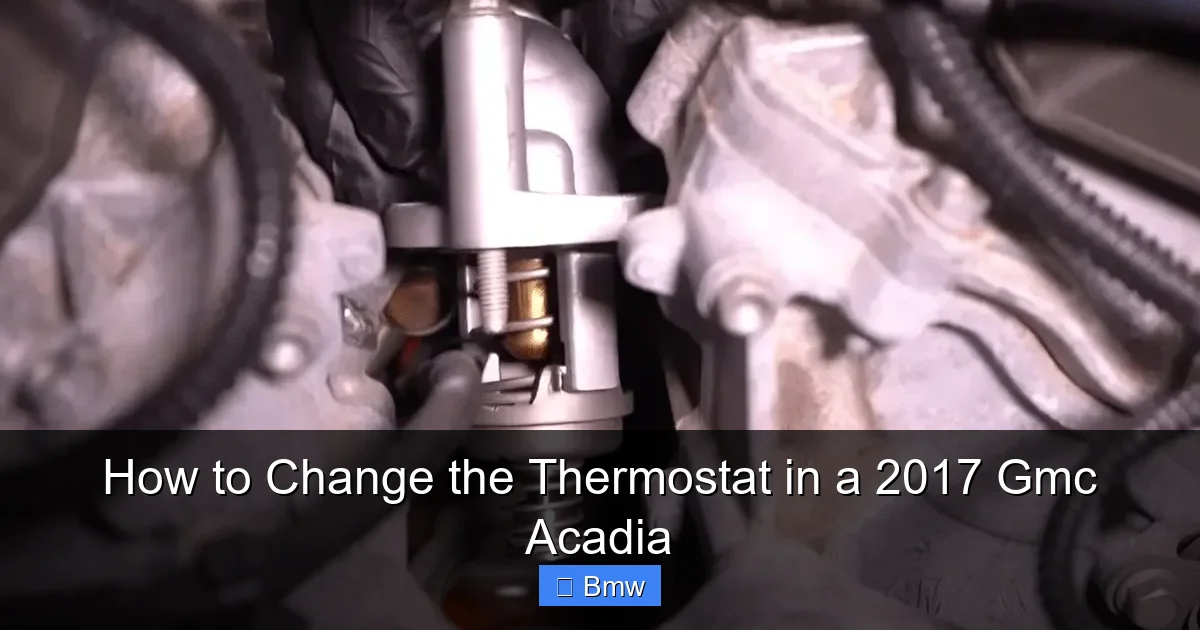
The thermostat is a temperature-sensitive valve located in a housing where the upper radiator hose connects to the engine. Inside is a wax pellet that expands with heat. When cold, the pellet is solid, keeping the valve shut. As the engine warms, the pellet melts and expands, pushing a pin that opens the valve. This regulated flow is what maintains your engine’s precise operating temperature. The 2017 Acadia’s 3.6L V6 (LAFT or LFX engine) is very sensitive to temperature. Running too hot for even a few minutes can warp cylinder heads. Running too cold for extended periods causes excessive wear, poor fuel economy, and a cabin that never gets warm.

Visual guide about How to Change the Thermostat in a 2017 Gmc Acadia
Image source: autoyolo.com
Location and Access Challenges
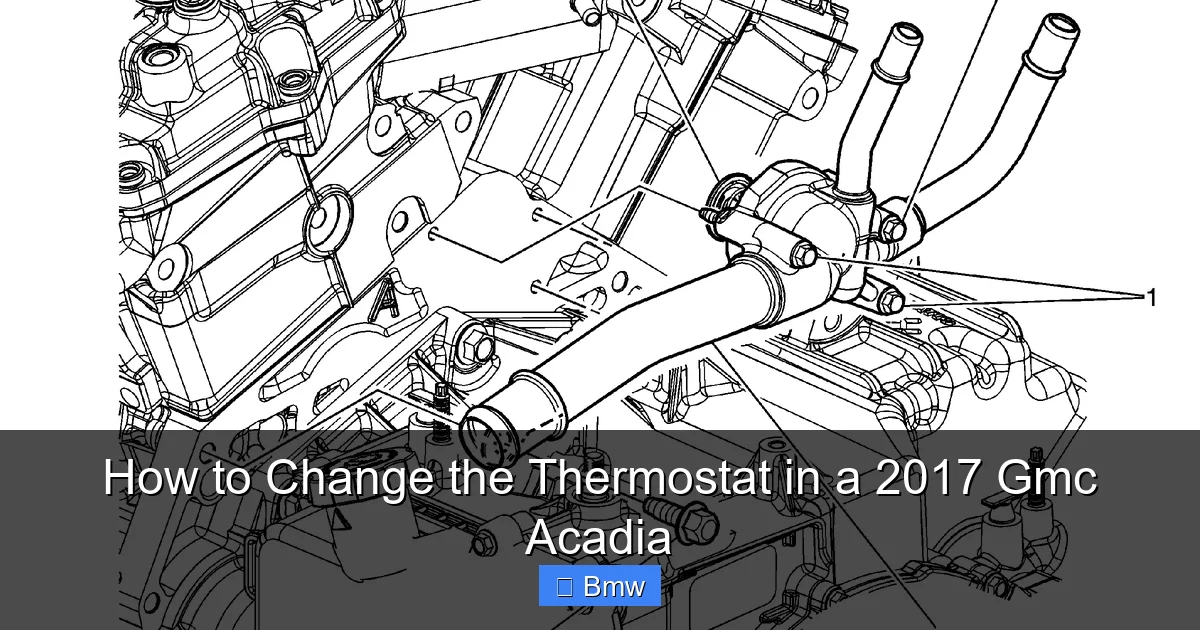
Here’s the main reason this job is rated difficult: location. On the Acadia, the thermostat housing is located on the driver’s side (left side) of the engine block, near the cylinder head. To see it, you must first remove the large, plastic engine cover (it says “3.6L VVT” on it). Under that, you’ll find the upper intake plenum—the big black “snorkel” that feeds air to all six cylinders. This plenum must be removed to access the thermostat housing bolts. It’s held on by multiple bolts and has several vacuum lines, electrical connectors, and hoses attached. This is where most DIYers get nervous. Take your time here, label connectors with tape, and be gentle with the plastic parts.
Signs Your Thermostat is Failing
Don’t guess. Watch for these clear symptoms. First, and most critically, is overheating. If your temperature gauge spikes into the red or the “Engine Hot” warning light comes on, especially in normal driving or when stopped, stop the vehicle immediately. Second, if your heater blows only lukewarm or cold air when the engine is fully warmed up, that’s a classic sign of a stuck-closed thermostat not allowing hot coolant to circulate to the heater core. Third, if your engine takes an exceptionally long time to warm up (the temperature needle stays near the “C” for 10+ minutes of driving), the thermostat is likely stuck open. You might also notice a drop in fuel economy and a general lack of power. If you see these, it’s time to diagnose or replace.
Tools, Parts, and Preparation
Essential Tools for the Job
Gather everything before you start. You’ll need:
Visual guide about How to Change the Thermostat in a 2017 Gmc Acadia
Image source: autoyolo.com
- Socket Set: 8mm, 10mm, 13mm, 15mm, and 18mm deep and shallow sockets. A 18mm is crucial for the thermostat housing bolts.
- Ratchet and Extensions: A flex-head ratchet and at least two 3-inch extensions are vital for reaching bolts under the plenum.
- Torque Wrench: Critical for properly tightening the intake plenum bolts to spec (usually 18-22 ft-lbs). Do not guess.
- Pliers: Needle-nose and standard for hose clamp pins and electrical connector locks.
- Screwdrivers: Flathead for prying plastic clips and releasing hose clamps.
- Drain Pan: At least 2-gallon capacity for coolant.
- Funnel: For bleeding and filling.
- New Thermostat: Ensure it’s for a 2017 Acadia 3.6L. A Stant or OEM is recommended.
- New Thermostat Housing Gasket: The housing uses a rubber O-ring gasket. Get the specific part (ACDelco 15-11038 or equivalent).
- Engine Coolant: Dex-Cool (orange) or the specified equivalent. You’ll need about 4-5 quarts total for a drain and refill.
- Distilled Water: For mixing with concentrate or flushing (if needed).
- Shop Towels/Rags: Lots of them.
- Gloves and Safety Glasses.
Recommended Parts and Consumables
While you have the system open, it’s smart to replace parts that are easy to access now. Inspect the upper and lower radiator hoses. If they are original, feel them for soft spots or cracks. Replacing them now saves a future emergency. Also, get a new radiator drain plug washer (if your model has one) and a bottle of coolant system sealant (like Bar’s Leaks) as a just-in-case, though a proper gasket should make it unnecessary. Having a new coolant temperature sensor on hand isn’t a bad idea, as they can fail around the same time and are located nearby. This ties into general car upkeep—just as you’d change the cabin air filter in your Honda Civic to maintain air quality, replacing aging coolant and hoses maintains your engine’s health.
Safety First and Coolant Draining
NEVER OPEN A HOT RADIATOR CAP. The system is pressurized and scalding coolant will erupt, causing severe burns. The engine must be completely cold. Start by locating the radiator drain cock. It’s a plastic petcock on the driver’s side bottom of the radiator. Place your drain pan under it. Position a rag under the drain to catch spray. Loosen the clamp on the lower radiator hose (the one going to the thermostat housing) and slide it back. Carefully pry the hose off its neck—have a rag ready to catch the surge. Then, open the radiator drain cock. Let it drain completely. Once mostly drained, you can disconnect the lower hose from the thermostat housing for full access, which we’ll do later. Also, disconnect the negative battery terminal before starting work. This is a critical safety step to prevent any electrical shorts.
Step-by-Step Thermostat Replacement
Phase 1: Removing the Engine Cover and Intake Plenum
This is the most intimidating part. Start with the engine cover. It’s plastic, held by several 10mm bolts and plastic push clips. Remove all bolts and gently pry up the cover. Set it aside. Now, the upper intake plenum. You’ll see it’s a large black plastic piece with the throttle body on the front and the air filter box attached. First, disconnect the air filter box snorkel from the throttle body. Loosen the clamp and pull it off. Then, carefully unplug the Mass Air Flow (MAF) sensor electrical connector (it’s on the air filter box side). Press the tab and pull. Next, locate and unplug the throttle body electrical connector. There’s also a small vacuum line for the PCV system running to the plenum—note its routing. Now, systematically remove all the bolts holding the plenum to the cylinder heads. They are 10mm and 13mm, some with captive nuts underneath. Use your extensions and flex ratchet. As you remove the last bolt, support the plenum with one hand. It’s heavy and has wiring harnesses attached. Gently lift it straight up and set it on a clean surface. You’ll see the thermostat housing now, on the driver’s side of the engine block, with the upper radiator hose attached.
Visual guide about How to Change the Thermostat in a 2017 Gmc Acadia
Image source: 2carpros.com
Phase 2: Removing the Old Thermostat
With the plenum out of the way, you have clear access. Start by loosening the clamp on the upper radiator hose where it connects to the thermostat housing. Slide the clamp back. Twist and pull the hose off the housing neck. Have a rag ready for a small amount of coolant drip. Now, locate the two bolts holding the thermostat housing to the engine block. They are typically 18mm. Spray them with penetrating oil (like PB Blaster) and let it soak for 10 minutes if they are rusty. Using your 18mm socket and a long extension, break them loose and remove them. The housing may be stuck with old gasket material. Gently pry it off with a plastic pry tool or a flathead screwdriver wrapped in a rag to avoid scratching the sealing surface. Once loose, lift the housing off. Inside, you’ll see the old thermostat. Note its orientation—which side faces up? There’s usually an arrow or stamping on the thermostat body that should point in the direction of coolant flow (towards the radiator). Pull the old thermostat out. Clean the housing and engine block sealing surfaces meticulously with a plastic scraper and brake cleaner. Any old gasket residue will cause a leak.
Phase 3: Installing the New Thermostat
This is simple but critical. Place the new thermostat into the block, ensuring it’s seated correctly with the orientation mark matching the old one. It should sit flat. Now, take your new thermostat housing gasket. It’s a rubber O-ring. Lightly lubricate it with a tiny bit of new coolant or a compatible grease. This helps it seat and prevents pinching. Place the gasket into the groove on the housing or on the block, depending on design. Carefully position the housing back over the thermostat and onto the block. Hand-start both bolts to avoid cross-threading. Then, using your torque wrench, tighten the housing bolts to the factory specification—typically 18-22 ft-lbs. Do not overtighten; the housing is aluminum and can crack. Reconnect the upper radiator hose to the housing and tighten its clamp securely.
Reassembly and Coolant System Bleeding
Reinstalling the Intake Plenum
This is the reverse of removal, but with a key detail. Before placing the plenum, ensure all the bolt holes are clear. Carefully lower the plenum onto the engine, guiding it over the bolts. Start all the bolts by hand. The plenum must sit flush and even. If it’s crooked, you’ll have a vacuum leak. Tighten the bolts in the factory sequence (usually a criss-cross pattern from the center out) to the specified torque (often 18-22 ft-lbs). Double-check every bolt. Reconnect all electrical connectors (MAF, throttle body) and the vacuum line. Reattach the air filter box snorkel with its clamp. Finally, reinstall the plastic engine cover.
The Critical Bleeding Procedure
This step is where DIY jobs fail. Air trapped in the cooling system will create an air pocket around the thermostat or temperature sensor, causing erroneous readings and overheating. The Acadia has specific bleed screws. Locate the bleeder screw on the thermostat housing itself (a small hex-head plug) and another on the passenger-side cylinder head near the firewall. With the radiator drain closed and the engine off, fill the coolant recovery tank to the “MAX” line with your 50/50 Dex-Cool mix. Now, with the engine off, open the bleeder screws slightly. You’ll hear air hiss. Let it bleed until a steady stream of coolant flows out, then snug them closed. Now, start the engine with the heater set to MAXIMUM heat and fan on HIGH. This opens the heater core valve and helps bleed air from that circuit. Let the engine idle. It will likely surge and drop in temperature as air works its way out. Watch the temperature gauge. It may climb towards normal, then drop back as air bled through. Periodically, open the bleeder screws again to release any new air pockets. Keep the coolant tank topped up. You may need to do this for 10-15 minutes. Gently rev the engine to 2000 RPM a few times to help circulate coolant and purge air. The goal is a steady, bubble-free stream from the bleeders and a solid, stable temperature gauge at normal operating range (~195°F). Do not skip this. If you’re struggling, this process is similar to bleeding other systems; understanding fluid dynamics is key, much like when you change the transmission fluid in a Honda Civic, where air removal is also vital.
Final Checks and Top-Off
Once bled, shut off the engine. Let it cool completely. Check the coolant level in the reservoir when cold and top off to “MAX.” Inspect every connection you made—housing bolts, hose clamps, intake plenum bolts—for any signs of leakage. Wipe everything clean. Reconnect the negative battery terminal. Start the engine again and watch for leaks. Let it reach full operating temperature, verify the heater is blowing hot air, and confirm the temperature gauge is stable. Take it for a short drive, monitoring the gauge closely. After the drive, let it cool and re-check the coolant level. Top off if necessary.
Testing, Troubleshooting, and Final Tips
Post-Replacement Verification
A successful repair is defined by three things: 1) The engine maintains a steady, normal temperature under load (city driving, slight incline). 2) The cabin heater produces strong, hot air. 3) There are zero coolant leaks. Use an OBD2 scanner to check for any new trouble codes, particularly related to coolant temperature sensor (P0117, P0118). A scan tool that shows live data is best. Verify the coolant temperature reading is around 195°F when hot and matches an infrared thermometer reading on the thermostat housing. If the gauge is erratic, you still have air in the system.
Common Pitfalls and How to Fix Them
Problem: Overheating after replacement. Solution: Almost always an air pocket. Re-do the bleeding procedure meticulously. Ensure the heater was on during the process. Sometimes, air can be trapped in the heater core itself. Try cracking a heater hose slightly while bleeding (have a catch container).
Problem: Heater still blows cold. Solution: If the engine is at proper temperature but the heater is cold, you may have an air pocket in the heater core line. Bleeding again with the heater on max is key. Also, verify the heater control valve (if equipped) is operating.
Problem: Coolant leak from housing. Solution: Tighten housing bolts to spec in a criss-cross pattern. If it persists, the gasket is pinched or the sealing surface is damaged. Reinstall with a new gasket, ensuring surfaces are perfectly clean.
Problem: Check Engine Light with temp sensor code. Solution: The sensor’s electrical connector may have been disturbed or not fully reconnected. Check the connection on the driver’s side of the engine block near the thermostat. Also, air pockets can cause false sensor readings.
When to Consider Professional Help
This job is for confident DIYers. If at any point you feel overwhelmed by the intake plenum removal, if bolts are stripped or broken, or if the bleeding process just won’t clear the air, stop and call a professional. A mistake can lead to a $5,000 engine rebuild. Also, if your Acadia has other issues (like a suspected head gasket leak—white smoke, milky oil) that may have caused the thermostat to fail, those need to be addressed first. Remember, performing your own maintenance like this or routine tasks such as how often to change antifreeze in a Toyota (the principles are the same for your GMC) builds profound knowledge of your vehicle and saves money long-term.
Conclusion: Empowerment Through DIY
Changing the thermostat in your 2017 GMC Acadia is a serious undertaking that tests your mechanical skill and patience. It’s not for the faint of heart, but for those who complete it, the rewards are substantial. You’ve saved a hefty repair bill, gained intimate knowledge of your engine’s cooling system, and ensured the job was done with care and the correct parts. The key to success is methodical disassembly, meticulous cleaning, correct torque, and an obsessive, patient coolant bleeding process. Treat your Acadia’s cooling system with respect—it’s the heart of your engine’s health. By mastering this repair, you’ve joined the ranks of informed owners who don’t shy away from the complex. Keep that knowledge growing. Next time, you might tackle something else, like learning how to change the air filter in a Honda Civic to master another simple yet vital maintenance task. Your Acadia will thank you with reliable, cool operation for years to come. Now, go enjoy your drive with confidence.
Frequently Asked Questions
How long does it take to change a thermostat on a 2017 GMC Acadia?
For a first-time DIYer with average mechanical skill, expect to spend 4-6 hours. For an experienced mechanic, it’s a 2-3 hour job. The vast majority of time is spent removing and reinstalling the upper intake plenum to access the thermostat.
What specific coolant do I need for a 2017 GMC Acadia?
Your Acadia requires Dex-Cool (orange) or a coolant that meets General Motors’ specification 9985548. This is an extended-life, organic acid technology (OAT) coolant. Never mix it with traditional green or yellow coolants. Use a 50/50 mix with distilled water unless using a pre-mixed product.
Can I drive with a bad thermostat?
You should not. A thermostat stuck closed will cause rapid overheating, which can warp cylinder heads and destroy the engine in minutes. A thermostat stuck open will cause poor performance, high emissions, and no heat, and prolonged operation can cause excessive engine wear due to low operating temperature. Replace it promptly.
Do I need to replace the thermostat housing?
Usually not. The plastic housing on the Acadia is durable. Focus on getting a new, high-quality thermostat and, most importantly, a new rubber O-ring gasket. Only replace the housing if it’s cracked, warped, or has severe corrosion.
Why is my engine still overheating after replacing the thermostat?
The #1 cause is an air pocket in the cooling system. Re-bleed the system thoroughly with the heater on max. Other causes include a defective new thermostat (rare), a clogged radiator, a failing water pump, or a blown head gasket (which may have caused the original failure).
What other parts should I inspect while doing this job?
With the system drained and the upper hose off, inspect the upper and lower radiator hoses for age, softness, or cracks. Check the condition of the hose clamps. Also, inspect the coolant temperature sensor mounted near the thermostat housing for any signs of leakage or damage, as they often fail around the same time.
