
How Do I Know If My Tesla Has Matrix Headlights?

Contents
- 1 Key Takeaways
- 2 📑 Table of Contents
- 3 What Exactly Are Matrix Headlights (And Why Should You Care)?
- 4 Method 1: The Touchscreen Check (Your First Stop)
- 5 Method 2: The Physical Spot-Check (Look at the Headlights)
- 6 Method 3: The VIN Decoder & Paper Trail
- 7 The Benefits of Having Matrix Headlights (It’s Not Just a Gimmick)
- 8 Common Myths and Troubleshooting
- 9 Conclusion: Light Up Your Path Correctly
- 10 Frequently Asked Questions


Matrix headlights are Tesla’s advanced adaptive lighting system that uses a grid of LEDs to selectively dim portions of the beam, preventing glare for other drivers. You can identify them by checking your vehicle’s touchscreen settings under Light Controls, looking for the specific multi-LED array pattern in the headlight housing, or confirming your Tesla’s model year and trim—they were introduced in late 2021 for Model 3 and Y, and are standard on newer Model S and X. If your car has the feature, you’ll see an “Adaptive Highbeam” or similar option in the menus, and the physical headlights will show a distinct cluster of small, individually controllable LED segments rather than a single large bar.
Picture this: you’re driving home on a dark, winding country road at night. A car appears in the distance, heading toward you. You flick your high beams on for better visibility, but as you get closer, you have to switch back to low beams to avoid dazzling the other driver. It’s a constant, annoying toggle. Now, imagine a system that keeps your high beams on all the time, but magically creates a “hole” in the light pattern right where that oncoming car is, so you see the road brilliantly while they see nothing but darkness. That, in a nutshell, is the magic of Tesla’s Matrix headlights. But how do you know if your Tesla is one of the lucky ones equipped with this clever piece of tech? Let’s break it down, step by step, in plain English.
First, a quick note on naming. Tesla calls its system “Matrix Headlights.” Other car brands have their own names—Audi calls it “Matrix LED,” Mercedes has “Adaptive Highbeam Assist Plus.” They all do the same fundamental thing: use a camera to see other cars and then selectively black out parts of your high beam to prevent glare. It’s one of the most significant safety advancements in automotive lighting in the last decade. For Tesla owners, it’s a feature that feels like the future, today. But it hasn’t been around on all models forever. So, your detective journey starts with one big question: does my Tesla even have the hardware for it?
Key Takeaways
- Matrix headlights are Tesla’s brand name for adaptive driving beam technology. They use dozens of small LEDs that can be turned on/off or dimmed independently to shape the light beam around other vehicles, maximizing your visibility without blinding oncoming traffic.
- They became widely available starting in late 2021/2022 model years. For Model 3 and Model Y, they were introduced as a standard or optional feature depending on the trim. All new Model S and Model X vehicles come equipped with them.
- The fastest way to check is via your car’s touchscreen menu. Navigate to Controls > Lights > Headlight Settings. If you see an option like “Adaptive Highbeam,” “Matrix Beam,” or “Automatic High Beam” with adaptive capabilities, your car has the system.
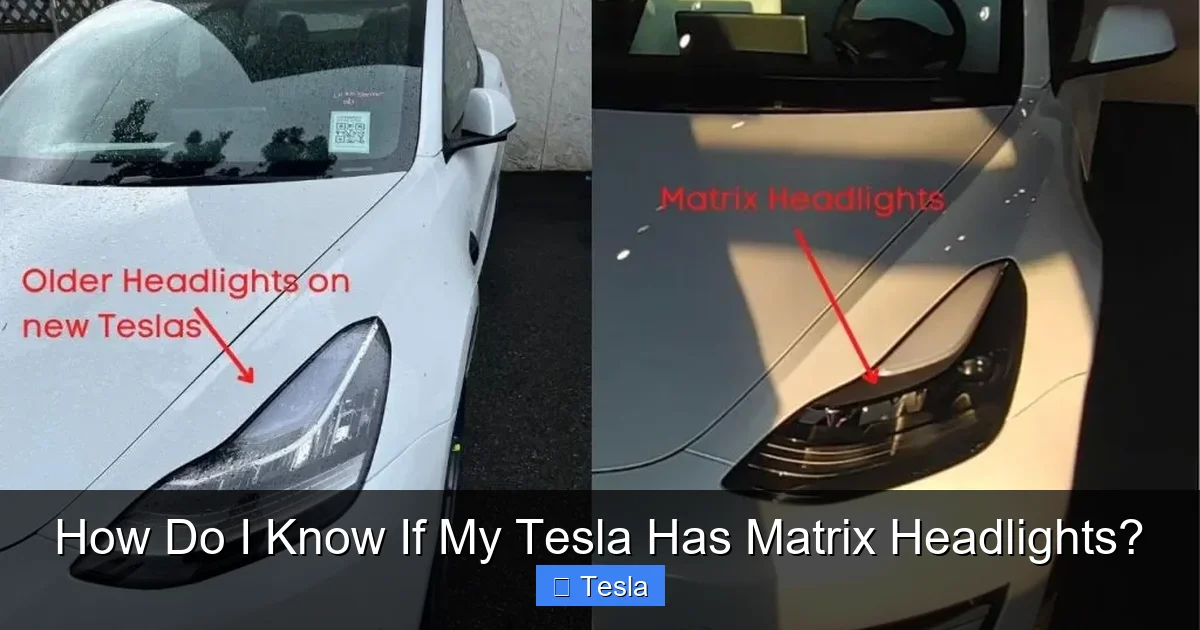
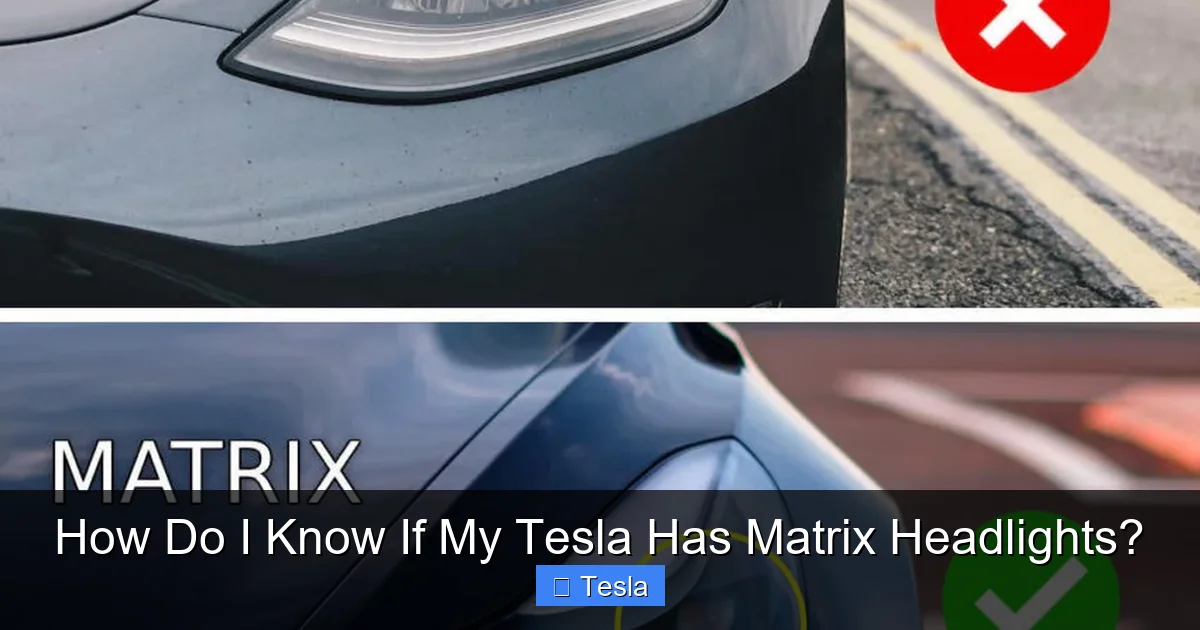
- Physical inspection reveals a distinct LED pattern. Look at the headlight from the front. Matrix headlights have a complex array of many small, square or rectangular LED emitters. Standard LED headlights typically use one or two larger, continuous light bars.
- They are a software-controlled safety feature, not a separate bulb. The system uses the same physical hardware but activates different LED segments based on camera data. You cannot “retrofit” them onto a car without the specific Matrix-capable headlight assembly.
- Having the hardware doesn’t mean it’s always active. The feature requires the correct software version and may be limited or disabled in certain regions due to local regulations. Ensure your Tesla’s software is up-to-date.
- VIN decoding can provide a definitive answer. While not always user-friendly, a Tesla service center or certain online VIN decoders can confirm the exact headlight specification installed at the factory.
📑 Table of Contents
- What Exactly Are Matrix Headlights (And Why Should You Care)?
- Method 1: The Touchscreen Check (Your First Stop)
- Method 2: The Physical Spot-Check (Look at the Headlights)
- Method 3: The VIN Decoder & Paper Trail
- The Benefits of Having Matrix Headlights (It’s Not Just a Gimmick)
- Common Myths and Troubleshooting
- Conclusion: Light Up Your Path Correctly
What Exactly Are Matrix Headlights (And Why Should You Care)?
Before we hunt for them, let’s understand what we’re looking for. Traditional halogen or even basic LED headlights are pretty dumb. They’re either on low beam (a fixed pattern) or high beam (a different fixed pattern, usually brighter and aimed higher). You, the driver, are in charge of switching between them.
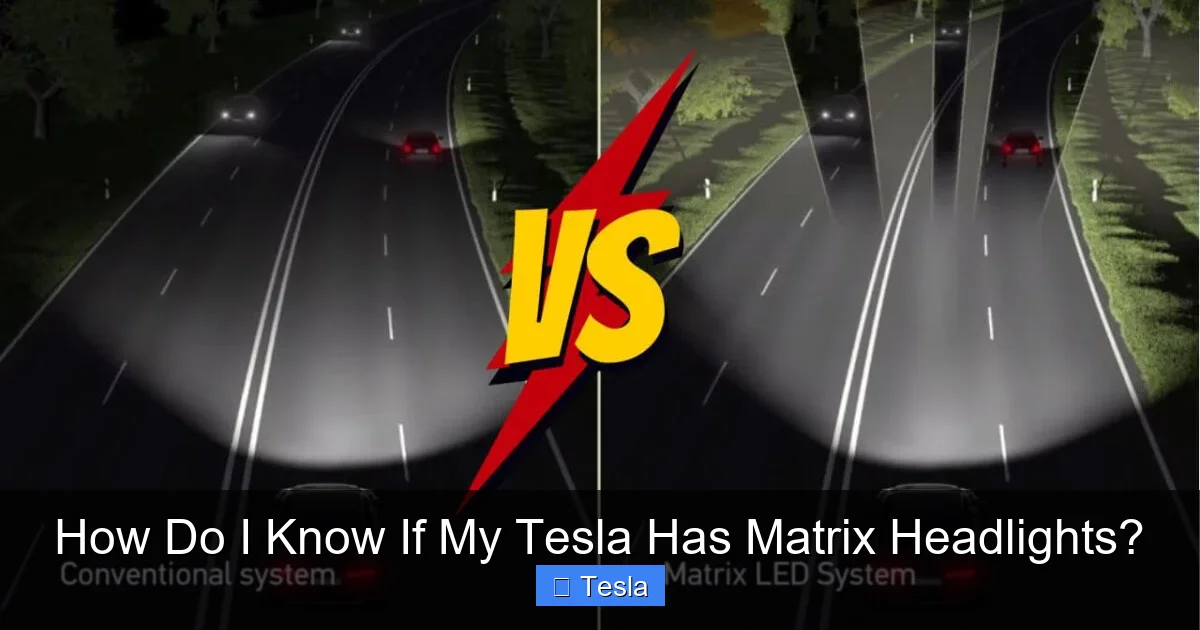
Matrix headlights, or adaptive driving beams (ADB), are a smart system. Here’s how they work:
- The Eyes: A forward-facing camera, usually mounted near the rearview mirror, constantly scans the road ahead. It identifies vehicles (headlights, taillights), pedestrians, and even reflective signs.
- The Brain: A dedicated computer module processes this camera data in real-time, figuring out where other road users are and what kind of lights they have.
- The Hands: This is the star of the show: the headlight assembly itself. Instead of one or two big LED chips, a Matrix headlight contains a grid of dozens of individual, tiny LED emitters. Think of it like a low-resolution TV screen for your front bumper.
- The Magic: The brain tells each tiny LED segment what to do. For an oncoming car, it will turn OFF or drastically DIM the specific LEDs that would shine light directly into that driver’s eyes. For a car ahead of you in your lane, it might leave a dark vertical strip down the center of your beam so you can see past it on the right shoulder, but won’t blind the driver in front. All other LEDs stay full blast, illuminating everything else—the shoulders, the curves, the signs.
The benefit is huge. Studies show adaptive high beams can improve your own visibility by up to 50% compared to manually switching between low and high beams, because you spend almost all your time with the high beams on, just intelligently masked. It’s safer for you and more courteous for everyone else. No more “flash-and-pass” or accidentally leaving high beams on. It’s a silent, seamless co-pilot for your night vision.
The Evolutionary Timeline: When Did Tesla Get Them?
This is the most critical piece of the puzzle. Tesla didn’t just flip a switch one day and give every car Matrix headlights. They rolled them out gradually as part of hardware refresh cycles. Knowing your model year and trim is your first major clue.
- Model S & Model X: The pioneers. The updated “Palladium” Model S and Model X, which debuted in June 2021, came standard with the new Matrix headlight design. If you have a 2021+ Model S or X (post-June 2021 production), you almost certainly have them. The older, pre-2021 “Raven” and earlier models use a different, non-Matrix LED headlight design.
- Model 3 & Model Y: This is where it gets interesting. For the world’s best-selling EVs, Matrix headlights were introduced as part of the 2022 model year refresh, but it wasn’t universal.
- Standard Range (SR) / Rear-Wheel Drive (RWD): These base trims did not receive the Matrix headlight hardware initially. They came with a simpler, single-bar LED headlight (which is still very good, but not adaptive).
- Long Range & Performance: These trims did receive the new Matrix headlight hardware as standard or available equipment starting with late 2021/early 2022 production vehicles. So a 2022 Long Range Model Y likely has them; a 2022 Standard Range Model 3 likely does not.
- “Adaptive Highbeam” – This is the most common current naming.
- “Automatic High Beam” – This can be ambiguous. On some cars, this just means the car switches high beams on/off automatically (a more basic feature). But on cars with Matrix hardware, this setting usually controls the adaptive beam functionality. Try turning it on and driving at night to see the effect.
- “High Beam Assist” – Similar to above.
- “Matrix Beam” – Less common now, but was used in earlier software versions.
- Software Version: Tesla continuously updates the UI. An older software version might not expose the setting clearly, even if the hardware is present. Make sure your car is updated to the latest stable release via Controls > Software.
- Regional Regulations: In some countries or jurisdictions, adaptive high beam systems are not yet homologated (approved for use). Tesla may disable the feature via software in those markets, even on hardware-equipped cars. The setting might be missing entirely.
- Hardware Absence: Simply put, if the physical Matrix headlight assembly isn’t installed, the software option won’t be there. This is the most likely reason for a missing toggle on a US/Canada-spec vehicle.
- For Matrix: You might see codes like “LHD” (for certain markets), “LED MATRIX,” or a specific option package name that includes adaptive beams.
- For Standard LED: Codes like “LED” or “STANDARD LED” without “MATRIX” or “ADAPTIVE.”
- When you drive at night, your headlights will automatically switch to high beam mode whenever the system determines the road is dark enough and there are no oncoming or preceding vehicles within a certain range.
- As an oncoming car appears, you’ll see your high beams stay on, but a dark, precise shadow will appear over that car’s position in your light pattern. The car ahead of you will not be blinded.
- Once the oncoming car passes, the shadow disappears and your full high beam returns instantly.
- When following another car, the system will create a “gap” in the lower part of your beam so your light doesn’t reflect off their mirrors and taillights into their eyes.
- Maximized Visibility: You drive with high beams on 80-90% of the time on dark roads, seeing signs, animals, and curves much earlier.
- No More Manual Toggling: You stop worrying about when to flash your lights or when to dip them. The car handles it politely and perfectly.
- Politeness Factor: You become the driver who never blinds anyone. It’s a silent courtesy that improves safety for everyone.
- Future-Proofing: As regulations evolve, this type of adaptive lighting is becoming the global standard. You already have it.
- Clean the windshield and front camera. The camera is usually behind the rearview mirror, in that black plastic housing. If it’s dirty, covered in bugs, or iced over, the system will disable itself. Clean it gently with a microfiber cloth.
- Check for obstructions. Make sure nothing (a dashcam, a large parking permit) is blocking the camera’s view.
- Update software. Ensure you’re on the latest version. Tesla occasionally tweaks the adaptive beam algorithms.
- Consider geography. If you’re in a country where the feature is disabled by software, it simply won’t work, regardless of settings.
Important Caveat: There were some mid-year changes. For a brief period in 2022, some Long Range/Performance Model 3s and Ys were built with the old headlights due to supply chain issues. Your specific VIN is the only true decider. But as a general rule: 2021+ Model S/X = Yes; 2022+ Model 3/Y Long Range/Performance = Probably Yes; 2022+ Model 3/Y Standard Range = No.
Method 1: The Touchscreen Check (Your First Stop)
This is the easiest, fastest, and most reliable method for the vast majority of owners. Your Tesla’s software knows exactly what hardware it’s talking to. If the Matrix system is present and enabled, the option will be right there in the menus.
Visual guide about How Do I Know If My Tesla Has Matrix Headlights?
Image source: tesladept.com
Step-by-Step Navigation
1. Sit in the driver’s seat with the car powered on (you don’t need to be driving, just “on”).
2. Tap the Controls icon (the car symbol) on the bottom toolbar.
3. Scroll down and select Lights.
4. You’ll see the Headlight settings section.
What you’re looking for is a toggle or setting related to the high beams. Here are the specific names it might have, depending on your software version and region:
What you should see: If your car has Matrix headlights, you will see a dedicated toggle for this adaptive function. It’s not just a simple “On/Off” for high beams; it’s a specific mode that uses the adaptive technology. If you only see a basic “Headlights: On/Off/Auto” and no separate adaptive toggle, it’s a strong indicator you have the standard LED headlights.
What If The Setting Is Greyed Out Or Missing?
This can happen for a few reasons:
Method 2: The Physical Spot-Check (Look at the Headlights)
If you’re a hands-on person, or if the software check is inconclusive, you can do a visual inspection. You’ll need a flashlight and maybe a step ladder for the front of the car. Do this during the day with the car off.
Visual guide about How Do I Know If My Tesla Has Matrix Headlights?
Image source: carstale.com
What to Look For: The LED Array Pattern
Pop the hood or simply look at the headlight assembly from the front of the car. Focus on the part that actually emits light—the clear lens.
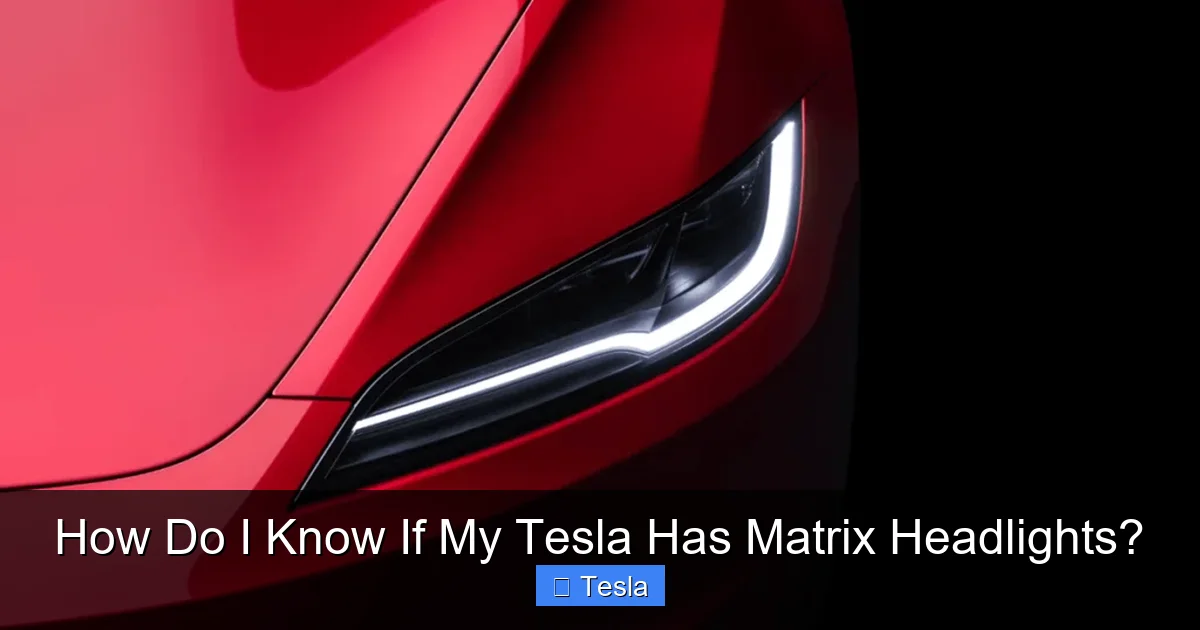
Matrix Headlight Signature: You will see a complex, almost pixelated pattern. Inside the headlight housing, there is a large, rectangular (or slightly curved) reflector/emitter area that is packed with many small, individual square or rectangular LED chips. They are usually arranged in neat rows and columns. It looks intricate, technical, and expensive. When you look closely, you can often make out the distinct segments. This is the “matrix” grid.
Standard LED Headlight Signature: This is much simpler. You will typically see one of two designs:
1. A single, long, continuous horizontal light bar (on many Model 3/Y base trims). This is one long strip of LEDs.
2. Or, a few larger, individual LED modules (like 2-3 big circular or rectangular pods per headlight). These are not a dense grid.
Pro Tip: Search online for “[Your Year] [Your Model] headlight daytime running light signature.” Enthusiast forums and image searches are invaluable. Compare photos of your car’s headlights to confirmed Matrix and non-Matrix examples. The difference is usually very obvious once you know what to look for.
A Word of Caution
Don’t confuse the daytime running light (DRL) signature with the main high/low beam projector. On many Teslas, the distinctive “T” or horizontal line you see during the day is the DRL, which is separate from the main headlight projector behind it. The Matrix technology is in the main projector unit, which is deeper inside the headlight assembly. You may need to peer into the headlight, past the DRL chamber, to see the main LED array. Sometimes it’s easier to look at the headlight from the side of the car to see the reflector bowl.
Method 3: The VIN Decoder & Paper Trail
When in doubt, go to the source: your car’s factory build sheet. Your Vehicle Identification Number (VIN) contains codes that specify the exact headlight type installed.
Visual guide about How Do I Know If My Tesla Has Matrix Headlights?
Image source: carstale.com
How to Decode Your VIN
1. Find your VIN. It’s on the driver’s side dashboard (visible through the windshield), on the door jamb sticker, and in your Tesla app under your car’s details.
2. Use a specialized decoder. Generic VIN decoders won’t cut it. You need one that understands Tesla’s specific option codes. The best free resource is the community-maintained TeslaFi VIN Decoder or Dr. Tesla’s VIN Decoder. Simply enter your 17-digit VIN, and it will generate a detailed build report.
3. Look for the headlight code. In the decoded output, search for terms like “HEADLAMP,” “LIGHT,” or “MATRIX.” You’re looking for a specific option code. Common codes might include:
Why this works: Tesla’s factory build sheet is the ultimate authority. If the Matrix headlight assembly (a specific part number) was installed on the production line, it will be listed here. This method removes all guesswork about model year vs. actual hardware.
The Service Center Confirmation
If you’re still unsure after the VIN check, a call or visit to a Tesla Service Center is the final word. Give them your VIN, and a service advisor can look up the exact specifications. They can confirm if your specific vehicle was built with the Matrix headlight hardware. This is the most authoritative answer you can get.
The Benefits of Having Matrix Headlights (It’s Not Just a Gimmick)
So you’ve confirmed you have them. Now what? Understanding how to let them work their best enhances the experience. The system is largely “set it and forget it,” but there are a few things to know.
How to Use Them
Once the “Adaptive Highbeam” (or equivalent) setting is turned ON in your menus, the system is automatic. There is no separate switch. Here’s the typical behavior:
You might notice a very subtle, almost imperceptible flickering in the light pattern on very bumpy roads or when the camera view is obstructed. This is the system rapidly recalculating. It’s normal.
Safety and Convenience Wins
The advantages are tangible:
It’s worth noting that while the system is exceptionally good, it’s not infallible. Very sharp curves, heavy rain/snow obscuring the camera, or unusual vehicle light setups (like some modified trucks with extremely high-mounted lights) can occasionally confuse it. But in 99% of scenarios, it works flawlessly.
Common Myths and Troubleshooting
With any tech, misinformation and quirks abound. Let’s clear some up.
“Can I Retrofit Matrix Headlights onto My Older Tesla?”
The short, hard answer is: practically no, and definitely not as an official upgrade. The Matrix system requires two things: 1) The specific Matrix-capable headlight assembly (which has a different part number and internal LED layout), and 2) The vehicle’s computer must be programmed to control that specific hardware. Swapping just the headlight assembly is a complex, expensive body shop job (~$3,000+ per side) and would still require a firmware/hardware update from Tesla to function, which they do not provide for retrofit. It’s not a simple bulb swap. If you don’t have it from the factory, you’re not getting it.
“My ‘Adaptive Highbeam’ setting is on, but it doesn’t seem to be working.”
First, confirm you actually have the hardware using the methods above. If you do have the hardware, try these steps:
“Is it legal?”
Yes, in North America and most of the world. Adaptive driving beam systems are fully legal and, in fact, encouraged by safety agencies like the Insurance Institute for Highway Safety (IIHS). Some very specific regions in Europe have historically had stricter rules, but the technology is now widely accepted. You do not need to turn it off for police or inspections in the US/Canada.
Conclusion: Light Up Your Path Correctly
Figuring out if your Tesla has Matrix headlights is a mix of simple software checking, a bit of visual detective work, and understanding the model’s history. For most owners, the journey starts and ends at the touchscreen: Controls > Lights > Headlight Settings. If you see that magical “Adaptive Highbeam” toggle, you’ve got the good stuff. Flip it on, take a night drive on a dark road, and prepare to be impressed by how seamlessly your car manages its own high beams.
If the toggle is missing, take a peek at your headlights. That single, long light bar is a telltale sign of the older design. And when in absolute doubt, your VIN is the final arbiter. Knowing you have Matrix headlights isn’t just about bragging rights; it’s about understanding a key safety feature of your vehicle and using it to its full potential. It represents Tesla’s philosophy: using software and smart hardware to solve old, annoying problems (like manually dipping your beams) in a way that feels like magic. So go check your car, enable the feature if you have it, and enjoy the safest, brightest night drives of your life. Your eyes—and the eyes of every driver you meet—will thank you.
Frequently Asked Questions
Can I manually control the Matrix headlight segments?
No. The Matrix system is entirely automatic and managed by the car’s computer and camera. There is no driver interface to select which LEDs are on or off. The system works in the background to optimize the beam pattern without any input.
Do Matrix headlights use more battery power than standard LED headlights?
Negligibly. While they have more individual LEDs, the system only uses the total power needed to illuminate the road. It might actually be more efficient in some scenarios because it’s not wasting light by shining it into the eyes of other drivers, where that light provides zero benefit to you.
Will Matrix headlights work with a trailer hitch installed?
The system is designed to account for a trailer if your Tesla is programmed to know one is attached. When you connect a trailer via the electrical harness, the car’s systems should recognize it and adjust the headlight aim and adaptive beam pattern accordingly to avoid dazzling drivers through the trailer’s side mirrors.
Why would my Matrix headlights suddenly stop working?
The most common cause is a dirty or obscured front-facing camera. Clean the area behind the windshield wipers where the camera is located. Other causes can be a software glitch (try a soft reboot: hold both scroll wheels on the steering wheel until the screen restarts) or, rarely, a hardware fault requiring service.
Do Matrix headlights make my Tesla more visible to pedestrians?
Not directly. Their primary function is to manage light for oncoming and preceding drivers. However, by keeping your high beams on more often, they can make your car more visible from the side in dark conditions, as more light spills onto the road and surroundings. They do not alter the DRL (daytime running light) pattern.
Is there any maintenance required for Matrix headlights?
No different from any other LED headlight. They are solid-state and should last the life of the vehicle. The only “maintenance” is ensuring the front camera lens is clean. Do not attempt to disassemble or adjust the headlight assemblies yourself; they are precisely calibrated at the factory.







