
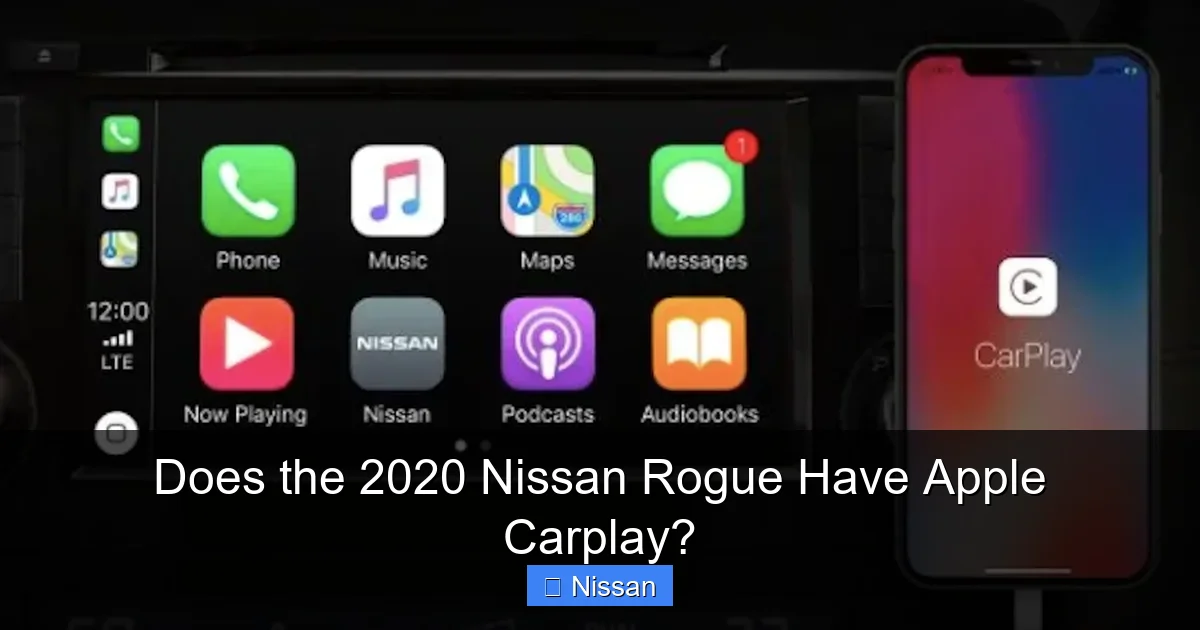
Does the 2020 Nissan Rogue Have Apple Carplay?

Contents
- 1 Key Takeaways
- 2 📑 Table of Contents
- 3 Apple CarPlay in the 2020 Nissan Rogue: An Overview
- 4 How to Set Up Apple CarPlay in Your 2020 Nissan Rogue
- 5 Features and Functionality of Apple CarPlay in the 2020 Rogue
- 6 Compatibility and Limitations
- 7 Troubleshooting Common Apple CarPlay Issues
- 8 Apple CarPlay vs. Android Auto: What’s the Difference?
- 9 Final Thoughts: Is Apple CarPlay Worth It in the 2020 Rogue?
- 10 Frequently Asked Questions

Car LED Headlight Bulb

Pressure Washer for Car

Car Wax Polish

Car Tissue Holder
The 2020 Nissan Rogue includes Apple CarPlay as a standard feature on all trim levels, making it easy to integrate your iPhone for navigation, music, and hands-free communication. This seamless connectivity enhances your driving experience with intuitive controls and voice commands through Siri.
If you’re considering the 2020 Nissan Rogue—or already own one—you’ve probably wondered: *Does the 2020 Nissan Rogue have Apple CarPlay?* The short answer is a resounding yes. In fact, Apple CarPlay isn’t just available—it’s standard across every trim level of this popular compact SUV. That means whether you’re driving the entry-level Rogue S or splurging on the fully loaded SL, you’ll enjoy seamless integration with your iPhone right out of the box.
But beyond the simple “yes,” there’s a lot more to know about how Apple CarPlay works in the 2020 Rogue, how to set it up, what features you can expect, and why this feature matters for everyday driving. In this guide, we’ll walk you through everything you need to know—from initial setup to troubleshooting common issues—so you can get the most out of your vehicle’s smart connectivity.
Whether you’re a tech enthusiast looking to maximize your infotainment experience or just someone who wants to safely listen to podcasts while commuting, understanding Apple CarPlay in your 2020 Nissan Rogue will make your time behind the wheel more enjoyable, efficient, and safe.
Key Takeaways
- Apple CarPlay is standard on all 2020 Nissan Rogue trims: Whether you choose the base S, mid-level SV, or top-tier SL, Apple CarPlay comes included at no extra cost.
- Easy iPhone integration via USB: Simply plug in your compatible iPhone using a Lightning cable to access apps like Maps, Messages, and Spotify directly on the infotainment screen.
- Siri voice control for safer driving: Use voice commands to send texts, make calls, or get directions without taking your hands off the wheel.
- Compatible with most recent iPhone models: Works with iPhone 5 and newer running iOS 7.1 or later, though newer models offer the best performance.
- No subscription required: Unlike some connected services, Apple CarPlay doesn’t require a paid plan—just your iPhone and a USB connection.
- Works alongside Android Auto: The 2020 Rogue also supports Android Auto, giving drivers flexibility regardless of their smartphone platform.
- Regular software updates improve functionality: Keep your vehicle’s infotainment system updated through Nissan’s portal to ensure optimal CarPlay performance.
📑 Table of Contents
- Apple CarPlay in the 2020 Nissan Rogue: An Overview
- How to Set Up Apple CarPlay in Your 2020 Nissan Rogue
- Features and Functionality of Apple CarPlay in the 2020 Rogue
- Compatibility and Limitations
- Troubleshooting Common Apple CarPlay Issues
- Apple CarPlay vs. Android Auto: What’s the Difference?
- Final Thoughts: Is Apple CarPlay Worth It in the 2020 Rogue?
Apple CarPlay in the 2020 Nissan Rogue: An Overview
The 2020 Nissan Rogue was designed with modern drivers in mind—people who rely heavily on their smartphones for navigation, entertainment, and communication. To meet that demand, Nissan made Apple CarPlay a standard feature across its entire lineup. This wasn’t always the case; earlier model years required higher trims or optional packages to access CarPlay. But by 2020, Nissan recognized the importance of smartphone integration and included it universally.
So what exactly is Apple CarPlay? Think of it as a simplified, driver-friendly version of your iPhone’s interface, mirrored onto your car’s touchscreen. It gives you access to key apps like Apple Maps, Messages, Phone, Music, Podcasts, and third-party apps such as Spotify, Waze, and Audible—all optimized for use while driving. The goal is to reduce distractions by letting you interact with your phone using large icons, voice commands, and minimal screen tapping.
In the 2020 Rogue, Apple CarPlay appears as a dedicated icon on the main infotainment menu. Once activated (usually by plugging in your iPhone), the system takes over the central display, presenting a clean, grid-based layout similar to your iPhone’s home screen—but simplified for safety. You can swipe between pages, tap apps, or use Siri to control everything hands-free.
One of the standout aspects of CarPlay in the Rogue is its responsiveness. The 2020 model uses a 7-inch or 8-inch touchscreen (depending on trim), and both handle CarPlay smoothly with minimal lag. Navigation via Apple Maps is particularly well-integrated, offering real-time traffic updates, turn-by-turn directions, and even estimated arrival times that sync with your calendar.
Why Apple CarPlay Matters in a Family SUV
The Nissan Rogue has long been marketed as a family-friendly vehicle—spacious, reliable, and packed with safety features. Adding Apple CarPlay reinforces that identity. Parents can use it to manage kids’ audiobooks during long road trips, while teens can safely stream music without fiddling with their phones. Even grandparents benefit from simplified navigation when visiting unfamiliar areas.
Moreover, Apple CarPlay supports “Do Not Disturb While Driving” mode, which automatically silences notifications and sends auto-replies to incoming messages—helping keep everyone focused on the road. This aligns perfectly with Nissan’s emphasis on safety, including features like Automatic Emergency Braking and Blind Spot Warning.
How to Set Up Apple CarPlay in Your 2020 Nissan Rogue

Visual guide about Does the 2020 Nissan Rogue Have Apple Carplay?
Image source: gunnnissan.com
Setting up Apple CarPlay in your 2020 Rogue is straightforward—but there are a few steps to ensure it works flawlessly. Here’s a step-by-step guide to get you connected quickly.
Step 1: Check Your iPhone Compatibility
Before anything else, confirm your iPhone is compatible. Apple CarPlay requires an iPhone 5 or newer running iOS 7.1 or later. However, for the best experience—especially with newer features like dashboard view or enhanced Siri functionality—we recommend using an iPhone 8 or later with iOS 13 or higher.
To check your iOS version:
– Go to **Settings > General > About**
– Look for “Software Version”
If you’re due for an update, connect to Wi-Fi and go to **Settings > General > Software Update**.
Step 2: Use a High-Quality Lightning Cable
Apple CarPlay in the 2020 Rogue connects via USB—not wirelessly (that feature didn’t arrive until later models). That means you’ll need a Lightning-to-USB cable. While the car may come with a basic cable, we strongly recommend using an Apple-certified or MFi (Made for iPhone) cable. Cheap third-party cables often cause connection drops, slow charging, or fail to trigger CarPlay altogether.
Pro tip: Keep a spare cable in your glove compartment. Cables wear out, and having a backup ensures you’re never stuck without CarPlay on a long drive.
Step 3: Plug In and Enable CarPlay
1. Start your 2020 Nissan Rogue.
2. Plug your iPhone into one of the USB ports located in the center console (usually near the gear shifter).
3. Wait a few seconds—the infotainment screen should display a prompt asking if you want to enable CarPlay.
4. Tap “Allow” on your iPhone when the notification appears.
5. The CarPlay interface should now load on your dashboard screen.
If CarPlay doesn’t appear automatically, go to the main menu on your Rogue’s touchscreen and look for the “Apple CarPlay” icon—it often resembles a phone with a car outline.
Step 4: Customize Your CarPlay Experience
Once connected, you can personalize CarPlay to suit your preferences:
– Rearrange app icons by holding and dragging them (just like on your iPhone).
– Add frequently used apps to the first page for quick access.
– Enable “Siri Suggestions” so predictive apps (like Maps if you’re near home) appear automatically.
You can also control CarPlay using the Rogue’s physical buttons or voice commands. Press and hold the voice command button on your steering wheel to activate Siri—no need to say “Hey Siri” unless your iPhone is set up for it.
Features and Functionality of Apple CarPlay in the 2020 Rogue

Visual guide about Does the 2020 Nissan Rogue Have Apple Carplay?
Image source: vehiclefreak.com
Now that you’re set up, let’s explore what you can actually *do* with Apple CarPlay in your 2020 Nissan Rogue. The experience is rich, intuitive, and designed to minimize distractions.
Navigation with Apple Maps
Apple Maps is one of the most-used features in CarPlay—and for good reason. In the 2020 Rogue, it provides crisp visuals, real-time traffic data, and smooth turn-by-turn directions. You can search for destinations by typing (using the on-screen keyboard), selecting from recent locations, or simply asking Siri: “Take me to the nearest gas station.”
One handy feature is integration with your iPhone’s calendar. If you have a meeting scheduled, CarPlay can suggest leaving early based on current traffic conditions. It also supports sharing your ETA with contacts directly from the navigation screen.
For those who prefer alternatives, third-party apps like Waze are also supported—just download them from the App Store and they’ll appear in CarPlay automatically.
Music, Podcasts, and Audiobooks
Whether you’re into Spotify, Apple Music, Pandora, or Audible, CarPlay lets you control your audio library with ease. Browse playlists, search for artists, or ask Siri to “Play my workout mix.” The audio plays through the Rogue’s speakers, and playback controls appear on both the CarPlay screen and the vehicle’s physical media buttons.
Podcast lovers will appreciate the ability to resume episodes where they left off—even if you switched to radio during your last drive. CarPlay remembers your last-used audio app and resumes playback seamlessly.
Hands-Free Communication
Making calls and sending messages is safer and simpler with CarPlay. When a call comes in, it appears as a pop-up on the screen—you can answer or decline with a tap. To make an outgoing call, press the voice button and say, “Call Mom on mobile.”
For texting, CarPlay reads incoming messages aloud and lets you reply using voice dictation. Just say, “Reply: I’m running 10 minutes late,” and Siri sends it for you. This keeps your eyes on the road and complies with hands-free laws in most states.
Note: Group messaging and certain emoji reactions may not be fully supported—stick to simple text for reliability.
Third-Party App Support
Beyond Apple’s native apps, the 2020 Rogue supports a growing list of third-party apps optimized for CarPlay. Popular options include:
– **Spotify**: Full music streaming with offline playlists.
– **Waze**: Community-driven navigation with police alerts and road hazards.
– **Audible**: Listen to audiobooks with chapter navigation.
– **WhatsApp**: Send and receive messages (where legally permitted).
To see which apps are available, open CarPlay and swipe to the second page of icons. Newly installed compatible apps appear here automatically.
Compatibility and Limitations

Visual guide about Does the 2020 Nissan Rogue Have Apple Carplay?
Image source: vehiclefreak.com
While Apple CarPlay in the 2020 Nissan Rogue is robust, it’s not without limitations. Understanding these will help you avoid frustration and get the most out of the system.
iPhone Model Requirements
As mentioned, CarPlay requires an iPhone 5 or newer. However, older models (like the iPhone 5 or 6) may experience slower performance or lack support for newer CarPlay features. For example, the dashboard view (which shows maps, music, and phone info side-by-side) requires iOS 13+ and a compatible iPhone.
If you’re using an iPhone SE (1st gen) or older, consider upgrading for a smoother experience—especially if you rely heavily on navigation or streaming.
No Wireless CarPlay
Unlike some 2021+ vehicles, the 2020 Rogue does **not** support wireless Apple CarPlay. You must use a wired connection via USB. While this might seem like a drawback, wired connections are generally more stable and charge your phone simultaneously—something wireless systems often struggle with.
That said, if wireless CarPlay is a must-have, you can explore aftermarket adapters (like the CarlinKit or Ottocast), though these may void warranties or cause compatibility issues.
Software Updates Matter
Nissan periodically releases infotainment system updates that improve CarPlay performance, fix bugs, and add features. To check for updates:
– Visit the [Nissan Owner Portal](https://www.nissanusa.com/owners.html)
– Enter your VIN
– Look for “Software Updates” under your vehicle details
Some owners report that updating their system resolved issues like CarPlay disconnecting randomly or Siri not responding. Always ensure your iPhone is also updated to the latest iOS version.
Bluetooth vs. CarPlay
It’s important to note that Bluetooth and CarPlay serve different purposes. Bluetooth handles phone calls and basic audio streaming, but it doesn’t support navigation, messaging, or app interfaces. For full functionality, always use the USB connection for CarPlay.
Troubleshooting Common Apple CarPlay Issues
Even with proper setup, you might encounter occasional hiccups. Here are solutions to the most common problems reported by 2020 Rogue owners.
CarPlay Not Appearing After Plugging In
If your iPhone charges but CarPlay doesn’t launch:
– Restart both your iPhone and the vehicle.
– Try a different USB port (some ports are power-only).
– Reset the infotainment system by holding the power button for 10+ seconds.
– Ensure “CarPlay” is enabled in your iPhone’s settings: **Settings > General > CarPlay > [Your Vehicle]**
Siri Not Responding
If Siri doesn’t activate when you press the voice button:
– Check that Siri is enabled on your iPhone: **Settings > Siri & Search**
– Make sure the microphone isn’t blocked (dirt or covers can interfere).
– Test Siri outside the car to rule out iPhone issues.
Audio Cutting Out or Delayed
This is often caused by a faulty cable or low iPhone battery. Try:
– Using a different Lightning cable
– Closing background apps on your iPhone
– Turning off “Low Power Mode”
Apps Not Showing Up
If a newly installed app (like Spotify) doesn’t appear in CarPlay:
– Open the app on your iPhone at least once.
– Ensure it’s CarPlay-compatible (check the App Store description).
– Restart your iPhone and reconnect.
Apple CarPlay vs. Android Auto: What’s the Difference?
The 2020 Nissan Rogue supports both Apple CarPlay and Android Auto—a rare and appreciated feature that gives drivers flexibility. But how do they compare?
Apple CarPlay offers a cleaner, more consistent interface with deep integration into iOS. It excels in voice recognition (thanks to Siri) and seamless syncing with iCloud services like Calendar and Reminders. The design is minimalist and easy to navigate, even for less tech-savvy users.
Android Auto, on the other hand, mirrors Google’s ecosystem. It integrates tightly with Google Maps, Gmail, and Google Assistant. Some users prefer its customization options and broader third-party app support.
In practice, both systems work well in the Rogue. The choice comes down to your smartphone preference. If you’re deep in the Apple ecosystem (iPhone, iPad, Mac, Apple Watch), CarPlay will feel more natural. If you use Google services extensively, Android Auto might be the better fit.
Final Thoughts: Is Apple CarPlay Worth It in the 2020 Rogue?
Absolutely. For anyone who relies on their iPhone for daily tasks, Apple CarPlay in the 2020 Nissan Rogue is a game-changer. It transforms your vehicle into a smart, connected space where navigation, communication, and entertainment are all within easy reach—without compromising safety.
The fact that it’s standard on all trims makes the Rogue an even more compelling choice in the competitive compact SUV market. You’re not paying extra for connectivity; it’s built-in, reliable, and user-friendly.
While the lack of wireless CarPlay might disappoint some, the wired connection ensures stability and keeps your phone charged. And with regular software updates from Nissan, the system continues to improve over time.
Whether you’re commuting to work, road-tripping with family, or running weekend errands, Apple CarPlay adds real value to your driving experience. So if you’re shopping for a used 2020 Rogue—or already own one—rest assured: yes, it has Apple CarPlay, and it works great.
Frequently Asked Questions
Does every 2020 Nissan Rogue trim have Apple CarPlay?
Yes, Apple CarPlay is standard on all 2020 Nissan Rogue trims, including the S, SV, and SL. There are no optional packages or upgrades required.
Can I use Apple CarPlay wirelessly in the 2020 Rogue?
No, the 2020 Nissan Rogue only supports wired Apple CarPlay via a USB connection. Wireless CarPlay was not available on this model year.
What iPhone models work with Apple CarPlay in the 2020 Rogue?
Apple CarPlay works with iPhone 5 and newer running iOS 7.1 or later. For the best experience, use an iPhone 8 or later with iOS 13 or higher.
Do I need a subscription to use Apple CarPlay?
No, Apple CarPlay does not require a subscription. It’s free to use as long as you have a compatible iPhone and a USB cable.
Why won’t Apple CarPlay connect in my 2020 Rogue?
Common causes include a faulty USB cable, outdated iOS, or disabled CarPlay settings. Try restarting your phone and vehicle, or check Settings > General > CarPlay on your iPhone.
Can I use both Apple CarPlay and Android Auto in the 2020 Rogue?
Yes, the 2020 Rogue supports both systems, but only one can be active at a time. Simply plug in your iPhone for CarPlay or your Android device for Android Auto.



