
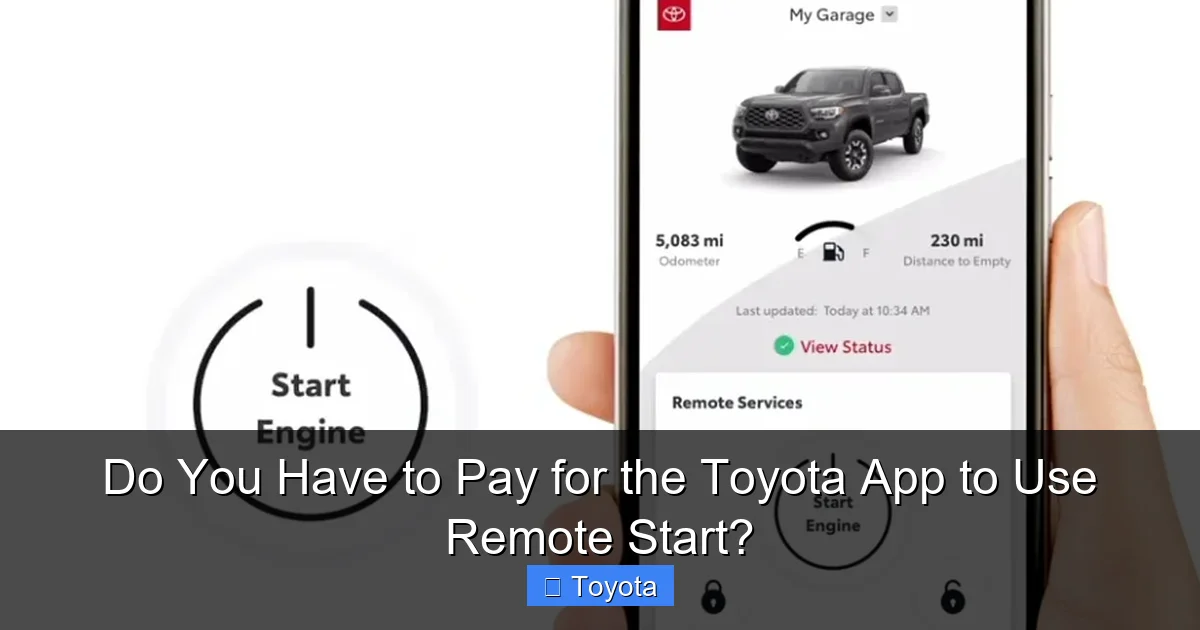
Do You Have to Pay for the Toyota App to Use Remote Start?

Contents
- 1 Key Takeaways
- 2 📑 Table of Contents
- 3 Understanding Toyota’s Remote Start Landscape
- 4 Which Toyota Models Get Free App Remote Start (The Trial)
- 5 The Subscription Cost: What You Pay After the Trial
- 6 The Eternal Alternative: Your Key Fob’s Remote Start Button
- 7 Step-by-Step: How to Use and Set Up Each Method
- 8 Pros, Cons, and Final Recommendations
- 9 Frequently Asked Questions

Car Sunshade for Windshield
Foam Cannon

Diesel Fuel Additive

Car LED Headlight Bulb
The short answer is: it depends entirely on your specific Toyota model and model year. Many newer Toyotas come with a limited-time trial of the connected services that include app-based remote start. After the trial expires, a paid subscription is typically required to use the feature through the Toyota app. However, some models are equipped with a standard key fob that offers remote start at no extra cost, completely independent of any app or subscription. Always check your owner’s manual or vehicle’s specifications to know which system you have.
Key Takeaways
- Understanding Do You Have to Pay for the Toyota App to Use Remote Start?: Provides essential knowledge
📑 Table of Contents
- Understanding Toyota’s Remote Start Landscape
- Which Toyota Models Get Free App Remote Start (The Trial)
- The Subscription Cost: What You Pay After the Trial
- The Eternal Alternative: Your Key Fob’s Remote Start Button
- Step-by-Step: How to Use and Set Up Each Method
- Pros, Cons, and Final Recommendations
Understanding Toyota’s Remote Start Landscape
So, you’re standing in your office, watching the snow fall, and you think, “I wish my car was warm and toasty right now.” You reach for your phone, open the Toyota app, and… you get a message that you need to subscribe. Sound familiar? This moment of confusion is incredibly common. The question “Do you have to pay for the Toyota app to use remote start?” doesn’t have a one-size-fits-all answer, and Toyota’s marketing doesn’t always make it crystal clear. Let’s break down the entire system, from the free button on your key fob to the subscription prompts on your screen, so you know exactly what you’re paying for (or not).
First, we need to separate two distinct technologies that both get you the same result: a running engine. There’s the traditional key fob remote start, which has existed for over a decade. That’s the physical button on your key that you press once, twice, or hold down. Then there’s the smartphone app remote start, part of Toyota’s connected services ecosystem. These are two different pathways to the same destination, and they have completely different cost structures. Your confusion likely stems from not knowing which pathway your specific vehicle is equipped with.
The Two-Tier System: Key Fob vs. Connected Services
Think of it like home security. Some homes come with a basic lock and key (the key fob). Others come with a smart system that lets you lock doors from your phone, but that system usually has a monthly fee (the connected services). Your Toyota is the same. The key fob system is a one-time cost baked into the car’s price when you bought it. The app system is a service.
The key fob remote start works via a dedicated radio frequency channel directly between your fob and your car. It’s instantaneous, requires no cellular signal, and costs nothing beyond the initial purchase of the vehicle. The app remote start works over the cellular network. Your phone sends a command to Toyota’s cloud servers, which then relay it to your car’s embedded telematics module (like a built-in cell phone for the car). This “middle man” is what allows for all the other cool features—lock/unlock, vehicle status, maintenance alerts—but it also means Toyota incurs a cost for every message sent, hence the subscription.
Which Toyota Models Get Free App Remote Start (The Trial)
Here’s the most important section for new car shoppers or recent buyers. If your Toyota is from the 2018 model year or newer and has the “Toyota Remote Connect” or “Safety Connect” feature, it almost certainly came with a complimentary trial period. This trial is your free pass to use the app for remote start, along with other connected features like stolen vehicle locator, emergency assistance, and maintenance alerts.
Visual guide about Do You Have to Pay for the Toyota App to Use Remote Start?
Image source: blog.toyotaofmorristown.com
The standard trial length for most recent models is three years from the vehicle’s original in-service date. For some older models (like certain 2018-2020 vehicles), it was a one-year trial. This trial is not tied to your ownership; it’s tied to the car’s VIN and starts when the car is first sold. If you buy a used 2021 Toyota with 20,000 miles, you may have only a year or two of trial left, or it may have already expired. The trial is a major selling point for new cars, but it’s a temporary benefit.
To check your trial status, the best method is to download the Toyota app, log in or create an account, and add your vehicle. The app will clearly state your subscription status and expiration date. You can also call Toyota Customer Experience with your VIN handy.
Examples of Trial Eligibility by Model
While rules can vary slightly, here is a general guide for popular models:
- Toyota Camry (2018+): Most trims come with a trial. For a deep dive into Camry-specific capabilities, including which trims have it standard, see our detailed guide on does the Toyota Camry have remote start.
- Toyota RAV4 (2019+): All models with the multi-information display typically include the trial for Remote Connect.
- Toyota Corolla (2019+): Standard on most trims with trial. The 2022 Corolla Cross also includes it; learn more about its specific setup in our article on how to remote start a 2022 Toyota Corolla Cross.
- Toyota Highlander (2020+): Included on most models with the trial.
- Toyota Tacoma (2020+): Available, often with trial, on higher trims.
Critical Note: Base models or fleet vehicles may sometimes be ordered without the telematics module, meaning they have no app capability at all, even with a trial. Always verify.
The Subscription Cost: What You Pay After the Trial
So, the trial ends. Now what? You’ll see prompts in the Toyota app and emails from Toyota offering a subscription. As of early 2024, the pricing structure for “Toyota Remote Connect” is generally:

Visual guide about Do You Have to Pay for the Toyota App to Use Remote Start?
Image source: rav4resource.com
- Monthly Plan: Approximately $15 – $20 per month.
- Annual Plan: Approximately $150 – $200 per year (a small discount over monthly).
These plans often bundle remote start with other connected services like vehicle health reports, maintenance alerts, and the ability to lock/unlock doors from your phone. There is typically no “remote start only” plan; it’s part of the connected services suite. You subscribe through the Toyota app or on the Toyota website, and the payment is linked to your Toyota account. The subscription auto-renews, so you’ll need to cancel it manually if you decide you no longer want the service.
For context, this is a common industry model. Competitors like GM (OnStar), Hyundai (Blue Link), and Kia (Connect) all use similar subscription-based models for their app-based remote functions after an initial trial period.
Is It Worth the Price? A Personal Cost-Benefit Analysis
Whether $15-$20 a month is worth it is a deeply personal calculation. Ask yourself: How often do you actually use remote start? If you live in a mild climate and only use it a few times a winter, the math probably doesn’t work. If you live in Minnesota or Canada and use it daily for 5 months of the year, that convenience might be priceless. Factor in the other app features—do you like checking fuel level from your couch? Receiving maintenance alerts? If you use multiple features, the subscription feels more valuable.
Also, consider your alternatives. If your key fob has a remote start button, you already have a perfectly functional, zero-cost system. The app’s main advantage is convenience (phone is always with you) and range (cellular vs. RF). The key fob’s range is typically 300-500 feet. The app’s range is anywhere you have a cell signal. That’s a huge benefit if you’re trying to start your car from inside a building far from the parking lot.
The Eternal Alternative: Your Key Fob’s Remote Start Button
This is the section that solves the problem for most people. Look at your key fob right now. Does it have a button with a symbol that looks like a circle with an arrow, or says “Start” or “Engine”? If yes, congratulations! You have physical remote start. This feature works completely independently of the Toyota app, your phone, or any subscription. It was a one-time feature included with your car’s purchase price.

Visual guide about Do You Have to Pay for the Toyota App to Use Remote Start?
Image source: rav4hub.com
The operation is simple and universal across almost all Toyota models with this feature:
- Press the lock button on your fob to ensure the car is locked.
- Press the remote start button twice in rapid succession.
- The hazard lights will flash once, and the engine will start.
- To turn it off, press the remote start button once, or press any other button on the fob, or unlock and open a door.
This method is instant, reliable, and has no recurring fees. The only “cost” is that you need the key fob on your person, and you must be within its limited radio range. For many, this is a perfectly acceptable trade-off. Before you even consider paying for an app subscription, confirm if your key fob already has this capability. It’s the simplest, most cost-effective solution.
Why Does the Key Fob Feature Exist Alongside the App?
You might wonder why Toyota offers two ways to do the same thing. The reason is market segmentation and feature creep. The key fob remote start has been a standard “premium” feature for years, often only on higher trims. The connected services app was a new technology introduced later that allowed Toyota to offer the feature (and more) to lower trims that didn’t previously get a fancy key fob. It also opened up a new recurring revenue stream. So, a 2023 LE-trim Camry might not have the “nice” key fob with remote start, but it almost certainly has the telematics module and a trial for the app-based start. The reverse is also true: a well-equipped 2016 Camry might have a great key fob but zero app capability.
Step-by-Step: How to Use and Set Up Each Method
Let’s make this practical. Here’s exactly how to use both systems.
Using the Key Fob Method (No App, No Cost)
1. Ensure your key fob battery is good (if range seems short, replace the coin cell battery).
2. Make sure all doors and the hood are closed.
3. Press the lock button on your fob.
4. Immediately press and release the remote start button twice. You should see the headlights flash and hear the engine crank.
5. The car will run for 10-15 minutes (varies by model/year) before shutting off automatically, or until you drive it.
6. To cancel, press the remote start button once, or unlock the car.
Using the Toyota App Method (Requires Trial/Subscription)
1. Ensure your vehicle’s ignition is OFF and all doors are closed.
2. Open the Toyota app on your smartphone. You must be logged into your Toyota account.
3. On the main screen, select your vehicle (if you have multiple).
4. Look for the “Start” or “Remote Start” button/icon. It may be under a “Controls” or “Climate” menu.
5. Tap “Start.” The app will show a “Starting…” message, then confirm the engine is running.
6. You can set climate control settings (temperature, fan) before starting on some models.
7. To stop the engine, tap “Stop” in the app.
Prerequisites: Your car must have an active cellular connection (check for a “SOS” or “Connected” symbol on your rearview mirror or instrument cluster). Your phone must have an internet connection (cellular data or Wi-Fi). You must have an active Remote Connect subscription or be within your trial period.
Pros, Cons, and Final Recommendations
Let’s summarize the battlefield between the two systems.
Key Fob Remote Start:
Pros: Free forever after car purchase, instant response, no dependency on networks or servers, works anywhere (no cell signal needed), no monthly bill.
Cons: Limited range (you must be within a few hundred feet), requires carrying the fob, no additional features (like status checks).
Best for: Anyone who just wants to warm up or cool down their car from their front door or balcony. The most cost-effective choice.
App Remote Start (via Subscription):
Pros: Massive range (anywhere with cell service), convenience of using your phone (always on you), integrates with other connected features (lock/unlock, find my car, maintenance alerts).
Cons: Recurring cost ($15-$20/month), can be delayed by a few seconds due to cloud communication, completely fails if cellular network is down or your car’s telematics module has no signal.
Best for: Those who value the long-range convenience highly, want the bundled connected features, or have a vehicle without a key fob remote start button but with the telematics module.
Our Verdict: How to Decide
For the vast majority of people, the answer is simple: use your key fob if it has the button. It’s a free, reliable, and instant feature you already own. Paying a recurring fee for the same basic function via an app is hard to justify unless you have a specific need for the extended range (e.g., starting your car from your office building 1,000 feet away).
However, if your car does not have a key fob with remote start but does have the trial for the app, then by all means use the trial! Enjoy it for as long as it lasts. When the trial ends, do a sober assessment: how many times a week did you actually use it? If the answer is “more than twice,” the subscription might be worth it to you. If not, you can simply let it expire and continue using your key fob for lock/unlock (which is almost always free) and accept that the remote start feature is now gone from your phone.
For new car buyers, always ask the dealer: “Does this vehicle have a key fob with a remote start button?” and “What is the included trial period for connected services?” Get the answers in writing on the buyer’s order. This knowledge is power and saves you from surprise subscription bills down the road.
Frequently Asked Questions
How long is the free trial for Toyota Remote Connect?
Most new Toyotas from the 2018 model year onward include a complimentary trial of Toyota Remote Connect, which typically lasts for three years from the vehicle’s original in-service date. Some earlier models may have had a one-year trial. You can check your exact trial expiration date within the Toyota app.
Can I use remote start on the Toyota app without a subscription?
You can only use the app-based remote start feature if your vehicle is within its initial complimentary trial period for Toyota Remote Connect, or if you have an active paid subscription. Once the trial expires, the remote start function in the app will be disabled until you subscribe.
My 2020 Toyota RAV4 has a key fob remote start button. Do I need the app subscription too?
No, you do not. If your physical key fob has a dedicated remote start button, you can use that feature forever at no extra cost. The app subscription is a separate service for smartphone-based remote start. You can choose to use the key fob only, or pay for the app if you want the added range and other connected features.
How much does the Toyota Remote Connect subscription cost per month?
The standard subscription for Toyota Remote Connect, which includes remote engine start via app, is typically priced around $15 to $20 per month or approximately $150 to $200 per year. Pricing can vary slightly by region and model year. It’s always best to check the current offers in the Toyota app or on the official Toyota website.
Will my 2017 Toyota Camry work with the Toyota app for remote start?
Most likely, no. The 2017 model year generally predates the widespread inclusion of the embedded telematics module required for the Toyota Remote Connect app services. Your 2017 Camry, if equipped with remote start, almost certainly uses the key fob method only. You can confirm by checking if your key fob has a remote start button or by consulting your owner’s manual.
If I sell my car, does the new owner get my remaining trial period?
Yes, the complimentary trial for connected services is tied to the vehicle’s VIN, not the owner’s account. When you sell your car, the new owner can register the vehicle with their own Toyota account and will have access to whatever trial period remains on that specific vehicle. Your personal subscription, if you had one, does not transfer and should be canceled.







