
How to Enable Horn When Locking a Hyundai

Enabling the horn when locking your Hyundai provides audible confirmation that your vehicle is secure. This feature, often called “horn confirmation” or “audible lock feedback,” can typically be activated through your key fob, the vehicle’s infotainment system menu, or the Hyundai Digital Key app. The exact steps vary slightly by model and year, but the process is straightforward and enhances your everyday convenience and peace of mind.
Have you ever walked away from your Hyundai, pressed the lock button on your key fob, and felt a moment of doubt? “Did it actually lock?” You’re not alone. That tiny flash of the lights is easy to miss in bright sunlight or from a distance. This is where one of the simplest yet most useful convenience features comes into play: the audible horn confirmation. That short, satisfying beep or honk when you lock your car isn’t just a polite acknowledgment—it’s a clear, audible signal that your vehicle is secure. If your Hyundai isn’t doing this, don’t worry. Enabling the horn when locking is a quick settings change you can often do yourself. This guide will walk you through every method, for nearly every Hyundai model, so you can lock your car with absolute confidence.
We’ll break it down simply. First, we’ll explore what this feature is and why Hyundai includes it. Then, we’ll dive into the three primary ways to turn it on: using your key fob buttons, navigating the infotainment screen, and using the Hyundai app. Because Hyundai’s lineup is vast—from the compact Accent to the electric Ioniq 5—we’ll highlight the specific steps for popular models like the Elantra, Sonata, Tucson, Santa Fe, and Kona. If you run into trouble, our troubleshooting section will help you solve common problems. By the end, you’ll know exactly how to customize your Hyundai’s lock response to fit your preferences.
Key Takeaways
- Feature Availability: Most Hyundai models from the early 2010s onward support horn confirmation, but it may be disabled from the factory or require specific trim levels.
- Multiple Activation Methods: You can usually enable the feature via a key fob button sequence, the infotainment system’s vehicle settings menu, or the Hyundai Digital Key smartphone app.
- Model Variations: The menu path and fob button combination differ between models (e.g., Sonata vs. Tucson) and model years, so consult your owner’s manual for precise instructions.
- Troubleshooting is Key: If the horn doesn’t sound, check the key fob battery, ensure the vehicle’s “Horn Confirmation” setting is ON, and verify no aftermarket alarms are interfering.
- Battery Impact is Minimal: The brief horn blast uses negligible power; it will not drain a healthy car battery, but a weak key fob battery can prevent the signal from sending.
- Security vs. Noise: While it confirms lock status, be mindful of local noise ordinances and residential areas when using this feature late at night.
- Software Updates May Help: If your model supports it, a dealer-performed software update can sometimes add or fix horn confirmation functionality.
📑 Table of Contents
- What is Horn Confirmation and Why Use It?
- Method 1: Enabling via the Key Fob (Button Sequence)
- Method 2: Enabling Through the Infotainment System Menu
- Method 3: Using the Hyundai Digital Key (Mobile App)
- Model-by-Model Quick Reference Guide
- Troubleshooting: Why Isn’t My Horn Honking?
- Benefits, Considerations, and Best Practices
- Conclusion: Lock with Confidence
What is Horn Confirmation and Why Use It?
Horn confirmation, sometimes labeled as “Audible Lock Feedback” or “Lock Sound” in your vehicle’s menu, is a programmed function that causes the horn to emit a short chirp or a full horn honk when you lock the doors using the key fob or the exterior door handle button (if equipped). It’s a direct auditory response that says, “Command received and executed.”
The Core Benefits: More Than Just a Beep
The primary benefit is unequivocal confirmation. In a crowded parking lot, a quick honk helps you identify which car is yours. At night, a visible light flash might be subtle, but a horn is unmistakable. It also serves as a basic security deterrent; a potential thief hearing the lock engage might think twice. For drivers with visual impairments or in situations where you can’t see the lights (like when your arms are full of groceries), the audible cue is invaluable. It transforms a silent, uncertain action into a definitive one.
A Note on Hyundai’s Implementation
Hyundai has implemented this feature consistently across its lineup for over a decade, but the default setting varies. Some models, particularly older ones or certain base trims, may have it disabled from the factory to comply with local noise regulations. Others might have it set to a single chirp, while some allow you to choose between a chirp and a full honk or even disable it entirely. The good news is that for the vast majority of Hyundai vehicles on the road today, the setting is user-configurable.
Method 1: Enabling via the Key Fob (Button Sequence)
This is often the fastest method and works on many Hyundai models from approximately 2011 onward. It involves a specific button-press sequence directly on your key fob. The logic is that you press the lock and unlock buttons in a particular order to access a hidden settings menu on the fob itself, which then transmits a new configuration to the car.

Visual guide about How to Enable Horn When Locking a Hyundai
Image source: shareyourrepair.com
The Classic “Lock + Unlock” Sequence
For a huge number of Hyundais, including many Elantra, Sonata, and Tucson models from the 2010s, here is the standard procedure:
- Ensure you are within range of your vehicle (typically 20-50 feet).
- Press and hold the LOCK button on your key fob.
- While holding LOCK, press the UNLOCK button once.
- Release both buttons. You should hear the horn give a confirmation chirp (if the feature was already on) or a different tone indicating the setting changed. In many cases, this single sequence toggles the horn confirmation ON or OFF. You may need to repeat it to achieve the desired state.
Pro Tip: After performing the sequence, test it by pressing just the LOCK button. You should hear the horn. If not, repeat the sequence. Some models require you to be inside the car with doors closed for the initial programming, so consult your manual if the external sequence fails.
Model-Specific Fob Sequences
While the lock/unlock combo is standard, variations exist:
- Newer Models (2020+) with Smart Key: On models with a keyless entry fob that has a hidden physical key inside, the sequence might be different. Often, you must insert the physical key into the driver’s door lock, turn it to the “lock” position, then press a fob button. The owner’s manual is essential here.
- Santa Fe and Palisade: Some recent Santa Fe and Palisade models use a sequence involving the TRUNK button. Try: Press LOCK, then UNLOCK, then TRUNK, then release all. Listen for a horn chirp.
- Kona and Venue: These subcompact SUVs often follow the classic lock/unlock method, but always verify in your manual.
Important: If your key fob has a PANIC button, be careful not to press it accidentally during this sequence, as it will set off the car alarm.
Method 2: Enabling Through the Infotainment System Menu
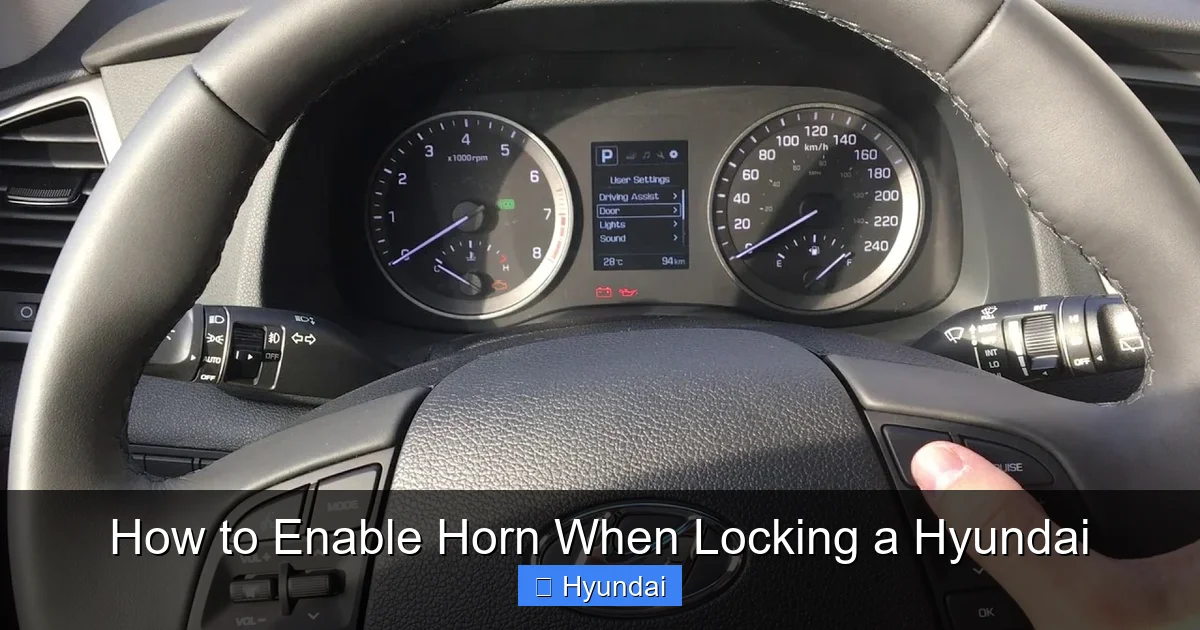
This is the most universal and user-friendly method, as it provides a clear visual interface. The setting is buried within the “Vehicle” or “Door” settings of your infotainment screen. The exact menu path varies by model year and infotainment generation (e.g., standard vs. premium audio).

Visual guide about How to Enable Horn When Locking a Hyundai
Image source: i.ytimg.com
General Navigation Steps
For most Hyundai models equipped with a color touchscreen (often called “Audio Video Navigation” or “AVN” systems):
- Start your vehicle or turn the ignition to the “ON” position (do not start the engine).
- Press the SETUP or VEHICLE button on the infotainment screen or center console.
- Navigate to a menu called “Vehicle Settings,” “Convenience,” “Door,” or “Lock.”
- Look for an option named “Horn Confirmation,” “Audible Lock Feedback,” “Lock Sound,” or “Horn on Lock.”
- Select it and change the setting to ON, Enabled, or choose your preferred sound (Chirp/Honk).
- Exit the menu. The change is typically saved automatically.
Model-Specific Menu Paths
Let’s get specific for popular models. Always refer to your owner’s manual for the definitive path, as software updates can change menu structures.
- Hyundai Sonata (2015-2023): Settings > Vehicle > Door > Horn Confirmation (ON/OFF).
- Hyundai Elantra (2017-2023): Settings > Vehicle > Door > Horn Confirmation.
- Hyundai Tucson (2022-2023): Settings > Vehicle > Door > Audible Lock Feedback.
- Hyundai Santa Fe (2021-2023): Settings > Vehicle > Door > Horn Confirmation.
- Hyundai Kona (2023): Settings > Vehicle > Door > Horn Confirmation.
- Older Models (pre-2015) with Basic Screens: The setting may be under “Setup” > “Door” or even accessed through the instrument cluster menu using steering wheel controls. Check your manual.
Practical Example: Imagine you have a 2020 Hyundai Sonata. You get in, press the START button (without pressing the brake), wait for the screen to boot. Tap the “Menu” button, select “Settings,” then “Vehicle.” Scroll down to “Door” and tap it. You’ll see “Horn Confirmation” with a toggle switch. Tap it to ON. Now, when you exit the car and press the fob lock button, you’ll hear a clear chirp. It’s that simple.
Internal Link Context: Navigating these infotainment menus can feel daunting if you’re new to your Hyundai. If you’re struggling to find the right settings screen, a great way to get familiar with the interface is by first practicing with a simpler setting, like changing the climate control display from Celsius to Fahrenheit. This builds confidence in using the touchscreen and menu structure.
Method 3: Using the Hyundai Digital Key (Mobile App)
For newer Hyundai models (typically 2020 and later) that support the Hyundai Digital Key or Blue Link® connected car services, you can control lock settings from your smartphone. This is especially useful if you’ve misplaced your key fob or simply prefer using your phone.
Visual guide about How to Enable Horn When Locking a Hyundai
Image source: i.ytimg.com
Steps via Hyundai App
- Download and install the official Hyundai Digital Key app (or MyHyundai with Bluelink for connected services) on your compatible smartphone.
- Log in and ensure your vehicle is paired and connected.
- Navigate to the “Vehicle Settings” or “Convenience” section within the app.
- Look for a toggle for “Horn Confirmation” or “Audible Lock Feedback.”
- Switch it to ON.
- The change should sync to your vehicle within a few moments. Test with the app’s lock button; the horn should sound.
Important Considerations for App Control
Using the app requires an active cellular connection for both your phone and the vehicle (via its embedded modem). There may be a slight delay between toggling the setting in the app and it taking effect in the car. Also, note that some basic Hyundai models without a connected services subscription will not have this option. The physical key fob and infotainment menu methods are more universally available.
EV Specific Note: Hyundai’s electric vehicles like the Ioniq 5 and Kona Electric heavily integrate the Digital Key. When using the app to lock your EV, you might also want to ensure your charging setup is correct. If you’re using a portable charger at home, always follow the proper procedure to unplug an electric car charger before driving away to avoid damage.
Model-by-Model Quick Reference Guide
While the methods above cover most cases, here’s a quick cheat sheet for specific Hyundai models. Remember, model year is critical—a 2018 Elantra differs from a 2023.
Hyundai Sonata
A staple of the Hyundai sedan lineup. For 2011-2014 models, the key fob sequence (LOCK+UNLOCK) is primary. For 2015-2023 models with touchscreens, the infotainment path (Settings > Vehicle > Door > Horn Confirmation) is the most reliable. All recent Sonatas support it.
Hyundai Elantra
Similar to the Sonata. The 2017-2023 sixth-generation and 2024 seventh-generation Elantra use the infotainment menu. The popular 2011-2016 fifth-generation Elantra relies on the fob sequence. If your Elantra has a standard audio system without a large screen, the fob method is your only bet.
Hyundai Tucson
The compact SUV. 2015-2021 models (third and fourth gen) typically use the fob sequence or a menu under “Vehicle Settings.” The all-new 2022+ Tucson makes it easy via the large standard touchscreen: Settings > Vehicle > Door > Audible Lock Feedback.
Hyundai Santa Fe
The midsize SUV. 2013-2020 models often require the fob sequence. The 2021+ redesigned Santa Fe places the setting clearly in the infotainment menu (Settings > Vehicle > Door). Some higher trims with the 10.25″ screen may have it under a “Convenience” sub-menu.
Hyundai Kona
The quirky subcompact SUV. 2018-2022 models generally use the key fob sequence. The 2023 refresh with the new infotainment system uses the standard menu path. The electric Kona follows the same rules as the gas version.
Hyundai Ioniq & Ioniq 5
For the hybrid/EV Ioniq (2017-2022), use the infotainment menu. For the revolutionary Ioniq 5 (2022+), the setting is in the touchscreen under Vehicle Settings. The Digital Key app is a primary feature on the Ioniq 5, so app control is seamless.
Hyundai Palisade
The flagship SUV. Due to its premium features, the setting is almost certainly in the large infotainment screen: Settings > Vehicle > Door > Horn Confirmation. The key fob sequence may also work as a backup.
Older Models (2010 and Earlier)
Vehicles like the 2010 Hyundai Genesis or 2009 Azera may not have a programmable horn confirmation at all, or it may be fixed ON/OFF at the factory. Your only recourse is to consult a Hyundai dealer to see if a software update is possible, which is unlikely for these older platforms.
Troubleshooting: Why Isn’t My Horn Honking?
You followed the steps, but nothing happens when you lock the car. Don’t panic. Here’s a systematic checklist to diagnose the issue.
Step 1: Confirm the Setting is Actually ON
This seems obvious, but it’s the first step. Re-check the setting in the infotainment menu or re-perform the fob sequence. On some models, the sequence toggles it OFF if it was already ON. Listen carefully for a different horn tone after the sequence—it might be a double chirp indicating success.
Step 2: Check the Key Fob Battery
A weak key fob battery is the most common culprit. The signal strength is insufficient to trigger both the lock and the horn command. Replace the key fob battery (usually a CR2032) with a fresh one. This is a cheap and easy fix. If you’re unsure how, your owner’s manual has instructions. Maintaining your key fob is part of overall vehicle care; a dead fob battery can strand you just like a dead car battery. Speaking of which, if your car battery is weak or failing, it can sometimes cause odd electrical behavior, though it rarely prevents horn confirmation specifically. To be safe, learn how to know when you need a new car battery so your entire electrical system performs reliably.
Step 3: Rule Out Aftermarket Interference
Did you install an aftermarket alarm system or remote starter? These systems often override or disable the factory horn confirmation to avoid conflict. Consult the aftermarket system’s manual to see if it has its own “honk on lock” setting that needs to be enabled, or if it has disabled the factory feature entirely.
Step 4: Test in Different Scenarios
Test the lock function from various distances and angles. Are you too far away? Is there heavy interference from other electronics or large metal objects between you and the car? Try locking from right next to the vehicle. Also, try locking from the driver’s door handle button (if your car has one)—does the horn sound then? This isolates whether the issue is with the key fob signal or the car’s receipt of the command.
Step 5: Software and Dealer Assistance
If none of the above works, your vehicle’s software might have a glitch. A simple battery disconnect (negative terminal for 10 minutes) can sometimes reset the Body Control Module (BCM). Warning: Disconnecting the battery may reset other settings (radio presets, seat memory). If that fails, a visit to the Hyundai dealer is the final step. They can run a diagnostic on the BCM and apply any available software updates that might restore the feature. Some early model-year vehicles of a new generation shipped with the feature disabled due to regulatory issues and required a dealer update to enable it.
Benefits, Considerations, and Best Practices
Now that you have the horn working, let’s talk about how to use it wisely and maintain it.
Security and Peace of Mind
The audible confirmation is a powerful psychological tool. It gives you that final, undeniable “click” (or “honk”) that your car is locked and the alarm is armed. In an era of silent key fobs, this audible feedback is a tangible connection to your vehicle’s security status. It’s especially useful in parking garages where sound echoes, helping you confirm you locked the correct vehicle.
Noise Etiquette and Battery Health
Be a good neighbor. Using the full horn honk at 2 AM in a quiet residential street is inconsiderate. Most systems allow you to choose a gentle chirp instead of a full honk—opt for the chirp in noise-sensitive areas. Also, remember that while the horn’s power draw is tiny, a chronically weak car battery will eventually cause all electrical systems to fail. Regular maintenance is key. Following a consistent oil change schedule is crucial for overall engine health, which in turn supports the alternator that keeps your battery charged. A well-maintained engine and charging system means your battery stays healthy, powering everything from the starter to the horn chirp.
Customizing Your Lock Experience
Once you have horn confirmation on, explore other related lock settings in your menu. You might find options for:
- Auto Lock: Locks the doors automatically when you put the car in drive or reach a certain speed.
- Horn on Trunk Release: Some models can be set to honk when you open the trunk via the fob.
- Light Flash Only: You might prefer silent locking with just lights, which you can disable the horn for.
Tailor these to your lifestyle. Parents might use the horn to signal teens the car is locked. Fleet users might prefer silent mode.
Conclusion: Lock with Confidence
Enabling the horn when locking your Hyundai is a small change that yields a big return in daily convenience and security. Whether you prefer the direct approach of a key fob button sequence, the clarity of the infotainment menu, or the modern touch of a smartphone app, the power is in your hands. Start with your owner’s manual—it’s the ultimate guide for your specific model and year. If the manual is lost, the model-specific paths we provided for the Sonata, Elantra, Tucson, and others are an excellent starting point. Remember to check your key fob battery first if things don’t work. By taking a few minutes to configure this setting, you transform every exit from your vehicle into a moment of assured security. You’ll never have to wonder “did it lock?” again. Now, go ahead, enable that horn, and walk away with confidence.
Frequently Asked Questions
Is the horn confirmation feature available on all Hyundai models?
Most Hyundai models from the early 2010s to the present have this feature, but availability can depend on the trim level and model year. Some very base models or vehicles from before 2010 may not have a programmable setting. The best way to know is to check your owner’s manual or look for the “Horn Confirmation” option in your infotainment menu.
Will enabling the horn when locking drain my car’s battery?
No, the horn uses a minimal amount of power for a very short duration (about 0.5 seconds). It has no measurable impact on your car’s battery life. However, a weak or failing car battery can sometimes cause the horn not to sound, so maintaining a healthy battery is important for all electrical functions.
My key fob sequence isn’t working. What should I try next?
First, replace the key fob battery with a fresh CR2032. Then, consult your owner’s manual for the exact sequence for your model year, as it can vary. If that fails, try the infotainment menu method, which is often more reliable. Ensure you are within close range of the vehicle when programming the fob sequence.
Can I make the horn sound a longer honk instead of a chirp?
It depends on your model. Some Hyundai models allow you to choose between a single chirp and a longer honk in the infotainment settings menu (often under “Horn Confirmation”). Others are fixed to a chirp. The setting is usually binary (ON/OFF) rather than offering multiple sound lengths. Check your vehicle’s menu for any “Sound Type” option.
Does this feature work when I lock the car with the physical key?
No, horn confirmation is typically only triggered when using the remote key fob, the exterior door handle button (on keyless entry models), or the smartphone app. Locking the car manually with the key in the door cylinder will not activate the horn.
Why would Hyundai disable this feature from the factory?
Primarily due to local noise ordinances and regulations in certain markets or apartment complexes where constant audible feedback from many cars could be considered a noise nuisance. Disabling it from the factory gives the owner the choice to enable it based on their personal preference and local rules.
