
How to Reset Jeep Wrangler Oil Life

Resetting your Jeep Wrangler’s oil life monitor is a simple but crucial step after every oil change. This process tells your vehicle’s computer that fresh oil and a new filter are installed, allowing the accurate tracking of your next service interval. The procedure varies slightly depending on your Wrangler’s model year and trim, but it’s always a manual, no-tool-required process done through the vehicle’s instrument cluster. Failing to reset this light can lead to confusion and potentially missed maintenance, so mastering this task is essential for every Wrangler owner.
Key Takeaways
- Reset After Every Oil Change: The oil life monitor must be manually reset to 100% following every oil and filter change, regardless of the oil type used.
- Model-Specific Procedures: The exact button combinations differ between the newer JL (2018+) models with the Uconnect touchscreen and older JK (2007-2018) or TJ (1997-2006) models with gauge clusters.
- No Scan Tool Required: This is a simple driver-activated procedure through the steering wheel controls or instrument panel; you do not need a professional OBD-II scanner for a standard reset.
- Verification is Key: After completing the reset sequence, always confirm the display reads “100%” or “Oil Life 100%” and the service light is extinguished.
- Understanding the System: The oil life monitor is an algorithm based on engine revolutions, temperature, and time—not just mileage—making the manual reset the only way to reinitialize it.
- Safety First: Ensure the vehicle is parked in “Park” (automatic) or neutral (manual) with the parking brake set before attempting the reset procedure.
- Don’t Reset Early: Only perform the reset immediately after the physical oil change is complete. Resetting too early will render the monitoring system inaccurate.
📑 Table of Contents
- Why Resetting Your Jeep Wrangler’s Oil Life is Non-Negotiable
- Demystifying the Jeep Wrangler Oil Life Monitoring System
- Essential Preparation Before You Begin
- Step-by-Step Reset Procedures by Wrangler Generation
- Verifying Success and What to Expect After Reset
- Troubleshooting Common Issues and Expert Tips
- The Bigger Picture: Oil Changes and Your Wrangler’s Longevity
Why Resetting Your Jeep Wrangler’s Oil Life is Non-Negotiable
You just finished the ritual: the new oil is poured, the filter is tightened, the drain plug is torqued, and the old oil is responsibly recycled. The job feels complete. But if you drive away and that little oil can icon or “Oil Life” percentage on your dashboard remains illuminated, your work isn’t truly done. Resetting the oil life monitor is the final, critical step that closes the maintenance loop. It’s your Jeep’s way of saying, “I know you took care of me. Now I’ll keep track of when you need to do it again.”
Think of the oil life monitor as a smart, algorithm-driven assistant. It doesn’t just count miles; it considers engine runtime, operating temperature, and driving conditions to calculate oil degradation. When you change the oil, you’re providing fresh resources, but the computer’s internal clock is still running from the last reset. If you don’t manually tell it, “Hey, we’re starting fresh!” it will continue counting down from its previous point, eventually telling you to change oil that’s already been replaced. This leads to confusion, ignored warnings, or worse—forgetting a future change because you assumed the system was already reset. Making this a habit ensures your Wrangler’s maintenance schedule remains accurate and reliable.
Demystifying the Jeep Wrangler Oil Life Monitoring System
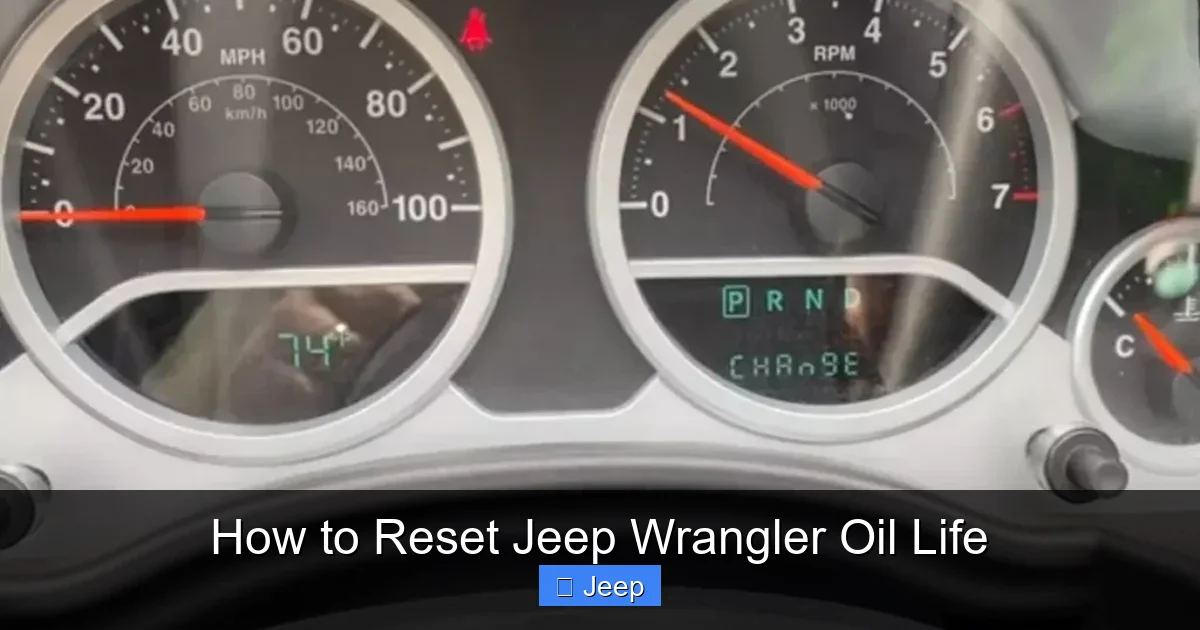
Before we dive into button presses, it helps to understand what you’re communicating with. The system, often called the “Oil Life Monitor” or “Maintenance Schedule,” is part of your Wrangler’s onboard computer network. It uses a complex algorithm that factors in:
Visual guide about How to Reset Jeep Wrangler Oil Life
Image source: jeeprunner.com
- Engine Revolutions: High-RPM driving wears oil faster than gentle cruising.
- Engine Temperature: Cold starts and short trips don’t allow oil to reach optimal temperature, causing fuel dilution and sludge.
- Time: Even if you don’t drive much, oil degrades over time from moisture and contaminants.
Based on this data, it calculates a percentage from 100% (fresh oil) down to 0% (oil change overdue). Typically, the “Change Oil” message will illuminate when it reaches 15% or 0%, but you can check the precise percentage at any time through the vehicle’s menu. The reset procedure essentially tells this algorithm, “Set the counter back to 100% for a new cycle.” It is a purely electronic process with no physical connection to the oil itself.
The Important Distinction: Oil Life vs. Oil Pressure
A critical point of confusion for many owners is the difference between the oil life monitor and the oil pressure warning light. The oil life monitor is your scheduled maintenance reminder—a yellow or orange light/icon that says “Change Oil” or shows a percentage. The oil pressure warning is a RED, serious light (often an oil can icon) that indicates a dangerous lack of oil pressure, which can cause catastrophic engine failure. You never “reset” an oil pressure warning; you must stop the vehicle immediately and diagnose the cause. The procedures outlined here are solely for the maintenance reminder light. If your oil pressure light is on, do not proceed with a reset—address the emergency first.
Essential Preparation Before You Begin
While the reset itself takes seconds, proper preparation ensures success and avoids frustration. Rushing into the process can lead to failed attempts or accidentally changing other settings. Here’s your pre-reset checklist:
Visual guide about How to Reset Jeep Wrangler Oil Life
Image source: oilreset.com
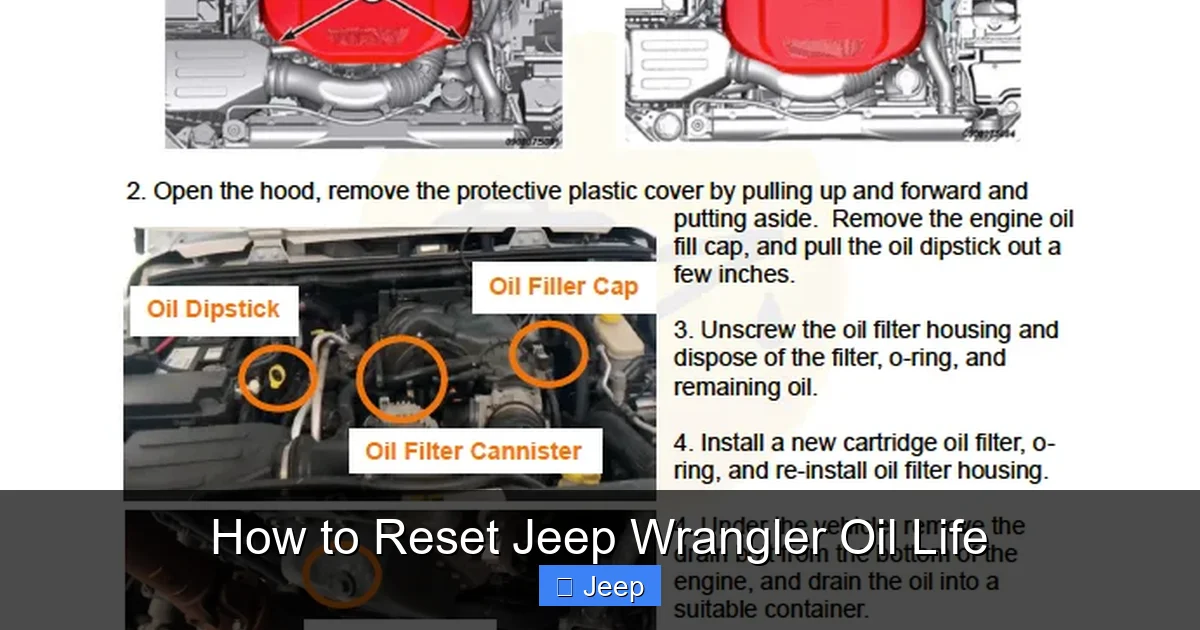
- Complete the Oil Change: This seems obvious, but it’s the most important step. The reset should only be done after the new oil and filter are installed and the dipstick confirms proper level. Never reset before the work is done.
- Park Safely & Set the Parking Brake: Your Wrangler must be in “Park” (for automatics) or neutral (for manuals) with the parking brake firmly engaged. The vehicle should be on level ground.
- Turn Ignition to “ON” (Run Mode): Do not start the engine. Insert the key and turn it to the first click, or if you have a keyless fob, press the “Start/Stop” button twice without touching the brake pedal. All dashboard lights should illuminate, but the engine remains off.
- Locate Your Controls: The buttons you’ll use depend entirely on your Wrangler’s generation. For JL models (2018+), you’ll use the steering wheel-mounted controls and the Uconnect touchscreen. For JK/TJ models, you’ll use the “Up/Down” arrow buttons on the steering wheel or the instrument cluster stalk. Have your owner’s manual handy for your specific year and trim if you’re unsure.
- A Calm Environment: Perform this in a quiet setting where you can focus on the sequence. It’s easy to miss a step or press the wrong button if you’re distracted.
Taking two minutes for these steps prevents a ten-minute session of frustration. Remember, the system is designed to be user-friendly, but it expects you to follow the sequence precisely.
Step-by-Step Reset Procedures by Wrangler Generation
This is the core of the guide. Jeep changed the interface significantly with the introduction of the JL Wrangler in 2018. We’ll break it down by the three main generations you’ll encounter on the road today.
Visual guide about How to Reset Jeep Wrangler Oil Life
Image source: jeeprunner.com
For Jeep Wrangler JL Models (2018-Present)
The JL Wrangler, with its modern Uconnect 4 or 5 system, uses a combination of steering wheel buttons and the touchscreen. The process is logical but involves navigating digital menus.
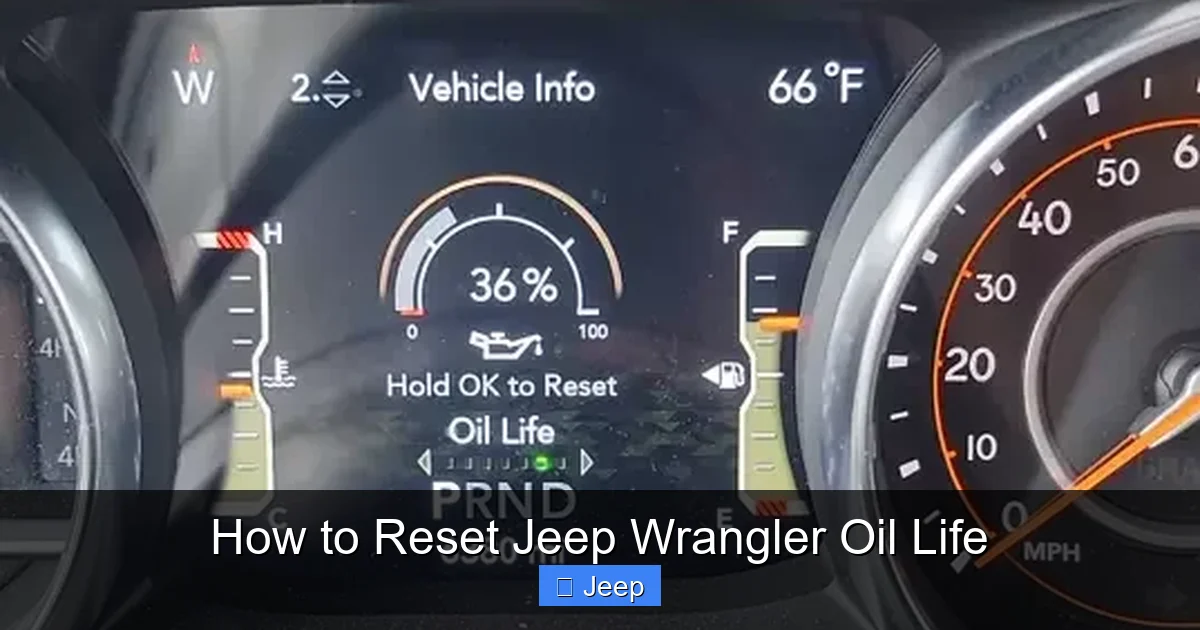
- Enter Menu Mode: With the ignition in “ON” (engine off), press the “OK” button (the central scroll/enter button) on the left side of the steering wheel. You should see the menu appear on the driver information display (the small screen in the gauge cluster) or the main Uconnect screen.
- Navigate to “Vehicle Info”: Use the “Up/Down” arrow buttons on the steering wheel to scroll through the menu options. Look for “Vehicle Info” or “Vehicle Information” and press “OK” to select it.
- Select “Oil Life”: Inside the Vehicle Info menu, scroll to find “Oil Life” or “Oil Life Remaining” and press “OK”. The current percentage will be displayed.
- Initiate Reset: With the oil life percentage shown on the screen, press and hold the “OK” button for approximately 3-5 seconds. You should see a message like “Are you sure you want to reset?” or the percentage start to blink.
- Confirm Reset: While the message is blinking or after holding, press the “OK” button one more time to confirm. The display should change to read “100%” or “Oil Life 100%”.
- Exit and Verify: The system will typically return to the previous menu or exit automatically. Turn the ignition off and then back on to ensure the “Change Oil” message is gone and the oil life reads 100%.
Pro Tip for JL Owners: If the sequence doesn’t work, ensure you are in the correct sub-menu. Some JL models require you to be in the “Oil Life” screen specifically before holding “OK.” If you have the larger Uconnect touchscreen, the reset might also be available under Settings > Vehicle > Oil Life.
For Jeep Wrangler JK & TJ Models (2007-2018 & 1997-2006)
These older models use a simpler system controlled by the “Up/Down” arrow buttons on the steering wheel (or sometimes a stalk on the column). There is no touchscreen menu.
- Turn Ignition to “ON”: As always, key turned to run position or two presses of the start button without brake.
- Access the Menu: Quickly press the “Down” arrow button on the steering wheel three times in rapid succession. You should see “Menu” appear on the odometer display in the gauge cluster.
- Navigate to Oil Life: Press the “Down” arrow button repeatedly to scroll through the menu items. You’re looking for “Oil Life” or “Oil Life %”. Once highlighted, press the “OK” (or sometimes “Set”) button to select it.
- Initiate Reset: The current oil life percentage will be displayed. Now, press and hold the “OK” button. After a few seconds, the percentage will begin to blink or you’ll see a reset prompt.
- Confirm: While it’s blinking, release the button and immediately press it again (or continue holding until it resets, depending on model year). The display should now read “100%”.
- Exit: The system may exit automatically. Turn the ignition off and back on to verify the warning light is off and the gauge shows 100%.
Important Note for JK/TJ: On some earlier TJ and JK models, the sequence is: ON > Press Down Arrow 3x > Scroll to “Oil Life” > Press OK > Hold OK until it resets to 100%. If you have a 2012-2018 JK with the optional 7-inch touchscreen, your procedure may blend the JL and JK methods—consult your manual. If you find yourself struggling, referencing a specific guide for your exact year, like the procedure for a similar Chrysler-based system can sometimes offer a parallel insight, though Jeep’s interface is unique.
Verifying Success and What to Expect After Reset
You followed the steps, saw the 100%, and felt a sense of accomplishment. But don’t drive off just yet—verification is key. First, ensure the “Change Oil” message or amber oil can icon is completely extinguished from your dashboard. If it’s still there, the reset failed; start the process over, being extra careful with the timing of button presses.
Next, cycle the ignition: turn the car completely OFF, wait 5 seconds, and turn it back to “ON” (without starting). Re-check the oil life display through the menu. It should steadfastly show 100%. Now, start the engine. The oil life monitor should remain at 100% and no warning lights should appear. If a check engine light comes on after a reset, it is likely coincidental and unrelated to the oil life procedure. However, if the oil life light itself comes back on immediately or within a very short drive cycle (50 miles), the reset may not have been accepted, or there could be an underlying sensor issue with the oil quality sensor (if equipped).
Going forward, you can check your oil life percentage at any time by repeating the menu navigation steps (without holding OK). You’ll watch it gradually descend from 100% over thousands of miles and driving conditions. This gives you a fantastic, real-time estimate of your oil’s health.
Troubleshooting Common Issues and Expert Tips
Even with clear instructions, a few hiccups can occur. Here’s how to handle them.
- “The Menu Won’t Appear” (JK/TJ): The “three quick presses of the down arrow” must be done in rapid succession, almost like a triple-click. Practice it with the car off to get the rhythm. Also, ensure you’re not in a deep sub-menu from a previous session; sometimes turning the car off and on clears the memory.
- “The Percentage Won’t Blink/Reset” (JL): Double-check that you are highlighting the “Oil Life” option itself before holding “OK.” Holding “OK” on a different menu item will do nothing or change that setting. Also, ensure you hold it long enough—3-5 seconds is typical.
- “The Light Came Back On After 100 Miles”: This is a strong indicator the reset sequence was not completed correctly. The system did not accept the command. Go through the steps again, meticulously. If it persists, there may be a fault in the instrument cluster or the Powertrain Control Module (PCM). A professional scan tool may be needed to force a reset.
- “I Disconnected the Battery During the Oil Change. Now the Light is On.” Disconnecting the battery can sometimes cause the PCM to lose all learned data, including the oil life status. It may default to “0%” or trigger a service reminder. You must perform the reset procedure as outlined above. For deeper system resets after a battery disconnect, you might also need to reset other systems like the radio presets and steering angle sensor.
- “Can I Reset It Without Changing the Oil?” Technically, yes, the procedure is just a button press. But you should never do this. Resetting the monitor without fresh oil means your engine is running on degraded oil while the computer thinks it’s new. This defeats the entire purpose of the monitoring system and risks engine damage.
Expert Tip: Consider keeping a small maintenance log in your glovebox. Jot down the date, mileage, and oil type/viscosity used after each change. This complements the electronic monitor and provides a hard copy record. It’s also useful if you ever sell the vehicle.
The Bigger Picture: Oil Changes and Your Wrangler’s Longevity
Resetting the light is the final step in a critical maintenance process. But the choice of oil and the quality of the service are what truly protect your Jeep’s heart—its engine. Using the correct oil viscosity (typically 0W-20 for newer Pentastar V6 and 2.0T engines, 5W-20 or 5W-30 for older models) and a high-quality filter is paramount. The oil life monitor’s algorithm is calibrated for specific oil standards. Using subpar oil can cause the monitor to degrade the oil life percentage faster, which is actually a good thing—it’s trying to protect your engine by asking for changes sooner.
For specific recommendations on the best oils for your particular Wrangler model and engine, resources like our guide on the best oil for a 2014 Jeep Wrangler can provide detailed analysis of conventional vs. synthetic options. Remember, severe driving conditions—frequent short trips, off-roading in dusty conditions, towing, or extreme temperatures—can accelerate oil breakdown. In these cases, even if your oil life percentage is relatively high (say, 40%), it might be wise to change the oil early and then reset the monitor. You are the ultimate judge of your driving conditions; the monitor is a helpful guide, not an absolute law.
Frequently Asked Questions
What does 5% oil life mean on my Jeep Wrangler?
It means your oil has degraded to 5% of its useful life and is nearing the end of its service interval. You should plan an oil change very soon, ideally within the next 100-300 miles. The “Change Oil” message will typically appear at 0%.
How often should I reset my Jeep Wrangler’s oil life?
You should reset the oil life monitor once and only once, immediately after completing a full oil and filter change. Never reset it before the change or more than once per service interval.
Can I reset the oil light without a scan tool?
Yes, absolutely. The reset procedure is designed to be performed by the driver using only the steering wheel controls and instrument cluster. You do not need any special scan tools or software for a standard oil life reset on any Jeep Wrangler model.
Why does my check engine light come on after resetting the oil life?
The oil life reset procedure should not trigger a check engine light. If it illuminates immediately after, it is likely a pre-existing, unrelated issue that coincidentally appeared, or a loose gas cap. If the light is for oil pressure (a red oil can icon), stop driving immediately as this is an emergency.
What happens if I accidentally reset the oil life too early?
Resetting too early means the monitor will start counting down from 100% while your oil is already partially used. This will cause the “Change Oil” warning to come on later than it should, potentially leading you to exceed the safe service interval. If this happens, it’s best to note the mileage and change the oil at the originally scheduled time, then reset properly.
Do I need to reset the oil life after a battery disconnect or change?
Yes, often. Disconnecting or replacing the battery can cause the vehicle’s computer modules to lose memory, including the oil life status. After a battery service, check your oil life display. If it shows “—” or a low percentage, perform the standard reset procedure to restore it to 100%.
