
Why Does My Toyota Corolla Say Maintenance Required?

Seeing “Maintenance Required” on your Toyota Corolla’s dashboard is a normal, scheduled reminder from your car’s computer. It typically signals that a routine service—like an oil change, tire rotation, or inspection—is due based on mileage or time. It is NOT a warning of immediate danger like a check engine light. You should plan to have the recommended service performed soon and then reset the light. Ignoring it long-term can lead to premature wear and more costly repairs down the road.
Key Takeaways
- It’s a Mileage/Time-Based Reminder: The light is triggered by your Corolla’s computer tracking miles driven and/or time since the last specific maintenance item was completed.
- Common Triggers Include Oil Changes & Tire Service: The most frequent cause is an overdue oil and filter change, but it can also indicate needed tire rotations, air filter replacements, or other scheduled services.
- It Is NOT an Emergency Warning: Unlike a check engine light or oil pressure warning, this light does not mean your car is in immediate danger. You have time to schedule service.
- You Must Reset It Manually After Service: A technician or you must perform a specific reset procedure after the maintenance is done to turn the light off and start the next countdown cycle.
- Consult Your Owner’s Manual for the Exact Schedule: Your manual provides the precise maintenance intervals (e.g., every 5,000 miles or 6 months) for your specific model year and driving conditions.
- Ignoring It Can Lead to Costly Problems: Skipping scheduled maintenance, especially oil changes, can cause engine sludge, wear, and failure of other components, leading to expensive repairs.
- You Can Often Check What’s Due Yourself: Many Corollas allow you to view the specific maintenance item (e.g., “OIL”) by using the odometer/trip meter button when the light is on.
📑 Table of Contents
- Understanding Your Toyota Corolla’s “Maintenance Required” Message
- How the “Maintenance Required” System Actually Works
- Common Triggers for the “Maintenance Required” Message
- What to Do When the Light Comes On: A Step-by-Step Guide
- How to Reset the “Maintenance Required” Light Yourself
- Misconceptions and Critical Warnings
- Proactive Maintenance: The Best Way to “Avoid” the Light
- Conclusion: Your Trusty Reminder, Not a Threat
Understanding Your Toyota Corolla’s “Maintenance Required” Message
You’re driving along, everything feels normal, and then you glance at the dashboard. There it is: the words “MAINTENANCE REQUIRED” glowing steadily on your instrument panel. For a moment, your heart might skip a beat. Is something seriously wrong? Should you pull over immediately?
Take a deep breath. If you own a Toyota Corolla, this message is one of the most common and predictable notifications you’ll receive. It is not a panic alarm. Instead, think of it as your car’s polite, automated way of saying, “Hey, remember that appointment you’re supposed to schedule for me?” It’s a built-in service reminder system, a hallmark of Toyota’s commitment to reliability and owner convenience. This comprehensive guide will demystify everything about that message—from exactly why it appears to what you should do about it, how to reset it, and how to avoid it becoming a more serious issue.
How the “Maintenance Required” System Actually Works
Your Toyota Corolla isn’t haunted; it’s just very good at math. Underneath that simple message is a sophisticated but straightforward computer algorithm. The system doesn’t use sensors to detect wear on your oil or tires. Instead, it’s a predictive counter based on two primary inputs: the number of miles you’ve driven and, in many models, the amount of time that has passed since the last reset.
Visual guide about Why Does My Toyota Corolla Say Maintenance Required?
Image source: carpursuits.com
The Role of the Maintenance Indicator Light (MIL)
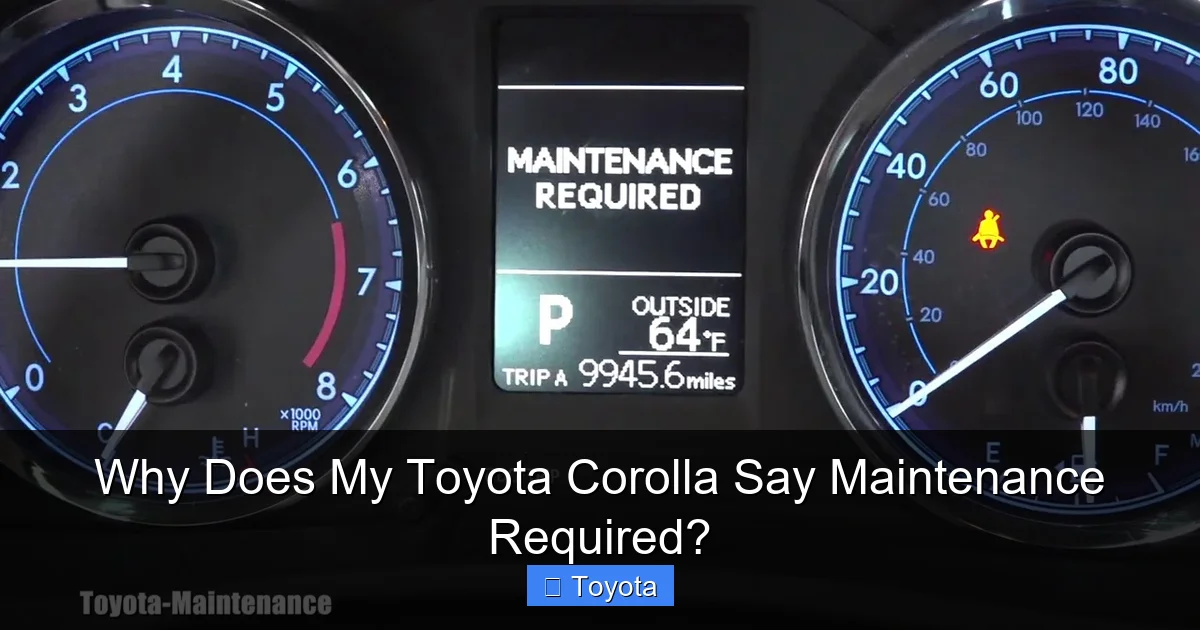
The physical light on your dash is part of the Maintenance Indicator Light (MIL) system. When you start your car, all dashboard lights, including this one, will illuminate briefly as a self-check. If the system has determined a service interval has been reached, the “MAINTENANCE REQUIRED” text will remain lit (or start blinking, then stay on) after the startup sequence. The system is pre-programmed with factory-set intervals for different maintenance tasks. For example, it might be set to remind you every 5,000 miles for an oil change and every 15,000 miles for a cabin air filter.
How the Computer Tracks Your Service Intervals
Here’s the core of it: when you or your technician performs a scheduled service and then manually resets the maintenance light, you are essentially telling the car’s computer, “Start counting from zero again for this specific item.” The computer then begins tallying your mileage (and sometimes time) from that reset point. Once you accumulate the pre-determined number of miles (e.g., another 5,000), the system calculates that the next oil change is due and illuminates the message. It’s a closed-loop system that relies entirely on that reset being done correctly after each service.
Practical Example: Your 2020 Corolla’s manual calls for an oil change every 5,000 miles. You get your oil changed at 30,000 miles, and the shop resets the light. The computer now starts counting from 30,000. When your odometer reads 35,000 miles, the system triggers the “MAINTENANCE REQUIRED” message. If you change the oil at 35,500 miles but forget to reset the light, it will continue to stay on, even though the service is done. This is a common cause of confusion, which we’ll address later.
Common Triggers for the “Maintenance Required” Message
While an oil change is the most famous culprit, the “MAINTENANCE REQUIRED” alert can be tied to several different service items. The specific trigger often depends on your Corolla’s model year and the maintenance schedule programmed for it. Here are the most frequent reasons:
Visual guide about Why Does My Toyota Corolla Say Maintenance Required?
Image source: carpursuits.com
1. Oil and Filter Change (The #1 Cause)
This is the big one. Engine oil degrades over time and with use. Regular changes are critical to lubricate the engine, reduce friction, and prevent sludge buildup. For most modern Corollas using synthetic oil, the interval is typically between 5,000 and 10,000 miles, but always verify in your owner’s manual. The system is counting down from your last reset, and when it hits the programmed mileage threshold, the light comes on.
2. Tire Rotation
To ensure even tire wear and prolong tire life, regular rotations are essential (usually every 5,000 to 7,500 miles). Many Toyota maintenance schedules pair the tire rotation with the oil change. If your car is programmed for this combined service, the “MAINTENANCE REQUIRED” light may be signaling that both are due simultaneously.
3. Cabin Air Filter Replacement
This filter cleans the air entering your car’s HVAC system from pollen, dust, and pollutants. It’s a routine item that gets clogged over time, reducing airflow and air quality. Replacement intervals are often around 15,000 to 30,000 miles. The maintenance system may have a separate counter for this or include it in a broader “multi-point inspection” reminder.
4. Engine Air Filter Inspection/Replacement
Your engine needs clean air to run efficiently. A dirty engine air filter hurts fuel economy and performance. Like the cabin filter, its replacement is a scheduled item that can trigger the maintenance light.
5. Other Scheduled Inspections & Services
The reminder can also encompass a full multi-point inspection. This is a comprehensive check-up where a technician examines belts, hoses, brakes, fluid levels, battery, and more. The light might simply mean “it’s time for your 30,000-mile service,” which includes all the above plus other manufacturer-specified checks. In some older models, the system might even track brake pad wear or battery health, though this is less common.
How to Identify the Specific Trigger
Many Toyota models have a handy feature: when the “MAINTENANCE REQUIRED” light is on, you can often see what specific item is due. Turn the ignition to “ON” (do not start the engine). Then, press and release the odometer/trip meter reset button on your dashboard repeatedly. The display should cycle through different maintenance items and their remaining mileage (e.g., “OIL 0000” or “TIRE 1500”). This tells you exactly what the computer is asking for. If your model doesn’t show this, your owner’s manual will have the definitive maintenance schedule table.
What to Do When the Light Comes On: A Step-by-Step Guide
So, the message is glowing. Don’t panic, but don’t ignore it either. Here is your action plan:
Visual guide about Why Does My Toyota Corolla Say Maintenance Required?
Image source: i.ytimg.com
Step 1: Perform a Quick Visual & Fluid Check
Before you even call the shop, take five minutes to look under the hood and around the car. Check your engine oil level with the dipstick. Is it low? Dark and gritty? Check your coolant and windshield washer fluid levels. Look for any obvious leaks. Inspect your tires for proper inflation (use a gauge, don’t just eyeball it) and significant wear. This quick check gives you valuable information and shows your technician you’re on top of things. If your oil is extremely low or dark, mention this immediately when you book your appointment.
Step 2: Consult Your Owner’s Manual
This is your single most important resource. Find the “Scheduled Maintenance” section. It will have a detailed chart broken down by mileage intervals (5k, 10k, 15k, etc.) and list every service item required at each point for your specific model year and engine. Cross-reference this with what you found in your step 1 check. This empowers you to have an informed conversation with your mechanic and avoid unnecessary upsells.
Step 3: Schedule Your Service
Based on the manual and your checks, call your trusted mechanic or Toyota dealer’s service department. Tell them, “My 2018 Corolla’s maintenance required light is on. According to my manual, I’m due for the 30,000-mile service, which includes an oil change, tire rotation, and cabin air filter.” Giving them this specifics helps them prepare and gives you a more accurate quote. If you’re unsure what’s due, just say the light is on and they will look up the schedule based on your VIN and current mileage.
Step 4: Professional Inspection vs. DIY
For an oil change and tire rotation, a competent DIYer can handle the job. However, the “maintenance required” light often signifies a need for a full multi-point inspection. This is where a professional’s trained eye is invaluable. They will check brake pad thickness, suspension components, fluid conditions (transmission, brake, power steering), belts, and more. These are critical safety and longevity checks that are hard to do thoroughly at home. It’s generally recommended to have the full inspection done professionally when this light appears, even if you perform some items yourself.
Internal Link Integration: While scheduling your Corolla’s service, it’s a good time to address any other odd behaviors. For instance, if you’ve also noticed intermittent cranking but not starting issues, mention this to your mechanic as it could be related to a neglected maintenance item like a dirty fuel filter or weak battery, both of which can be part of a comprehensive inspection.
How to Reset the “Maintenance Required” Light Yourself
Once the required service is completed, the light must be manually reset. This is a simple process you can often do at home in under 30 seconds. Important: Only reset the light AFTER the maintenance is actually performed. Resetting it without doing the work defeats the entire purpose of the system and will lead to engine damage or other problems.
The Standard Reset Procedure (For Most 2008-Present Corollas)
- Turn the ignition to the “ON” position (where the dashboard lights come on, but do not start the engine).
- Ensure the odometer is displayed (not the trip meter). If your car has a button to toggle between odometer/trip, press it until you see the total mileage.
- Turn the ignition “OFF.”
- Press and hold the odometer/trip meter reset button (usually the same button used to toggle the display).
- While still holding the button, turn the ignition back to the “ON” position. Continue holding the button.
- The odometer display will show a series of dashes or a countdown. After a few seconds, it should change to read “000000” or display “DONE.”
- Release the button. The “MAINTENANCE REQUIRED” light should be off.
When NOT to Reset the Light
Never reset the light if:
- You have not yet performed the overdue service (oil change, etc.).
- You are trying to “trick” the system to pass an emissions test or inspection (this is illegal and unsafe).
- The light is flashing or behaves erratically (this could indicate a different system fault).
- You are unsure of the procedure for your specific model year. (When in doubt, check the manual or ask your technician to show you).
Note: Procedures can vary slightly. For some older models (early 2000s), you may need to use the trip meter button while the key is in the “ON” position. Always refer to your owner’s manual for the exact steps for your vehicle. If the reset procedure doesn’t work, it’s possible the system has a stored code that needs a professional scan tool, though this is rare for the maintenance reminder.
Misconceptions and Critical Warnings
Let’s clear up some confusion and highlight what you absolutely should not do.
Misconception 1: “It’s Just a Reminder, So I Can Ignore It for a While.”
This is the most dangerous mindset. While it’s not an immediate “stop driving” warning, it is a time-sensitive service alert. The mileage programmed into the system is the manufacturer’s maximum recommended interval. For engine oil, this is the absolute limit before significant wear accelerates. Driving 1,000 miles past your oil change interval is far less risky than driving 5,000 miles past it. Treat the light as a “soft deadline” and schedule service within one to two weeks of it coming on, or within 500-1,000 miles, whichever comes first.
Misconception 2: “My Car Just Had an Oil Change, Why is it Still On?”
This is the #1 reason people search for this topic. The answer is almost always: The light was not reset after the last service. The system doesn’t know you changed the oil; it only knows it has counted the programmed number of miles since the last reset. When you get an oil change, you or your technician must perform the reset procedure. Politely ask them, “Did you reset the maintenance required light?” before you leave the shop. It’s a simple step that is sometimes overlooked, especially at quick-lube shops. If they forgot, they should do it for free, or you can follow the steps in the previous section.
Internal Link Integration: This exact scenario—the light staying on after service—is so common we have a dedicated article on it. For a deeper dive into the reasons why your car might still say oil change required after an oil change, including reset oversights and sensor issues, be sure to read that guide.
Misconception 3: “It’s the Same as a Check Engine Light.”
They are completely different systems. The “MAINTENANCE REQUIRED” light is a preventive, planned maintenance reminder. The “Check Engine Light” (MIL – Malfunction Indicator Light) is a reactive warning that illuminates when the car’s emissions or engine management system detects a fault, often related to sensors, emissions components, or ignition issues. One is about scheduled care; the other is about an active problem. Do not confuse them.
The Danger of Total Neglect
What happens if you just… never reset it? Eventually, the light will just stay on forever. But the bigger issue is that you’ve lost your car’s built-in maintenance tracker. You’ll no longer get timely reminders for oil changes, tire rotations, or other critical services. This leads directly to the “nuclear option” of car ownership: catastrophic engine failure. Running an engine with old, sludgy oil is the fastest way to turn a $50 oil change into a $5,000+ engine rebuild. The light is your free, factory-installed safeguard against this.
Proactive Maintenance: The Best Way to “Avoid” the Light
You can’t stop the light from eventually coming on—that’s its job! But you can control when and under what conditions it appears, which is key to your Corolla’s longevity and your peace of mind.
Follow the Schedule, Not Just the Light
Don’t wait for the light to be your only cue. Your owner’s manual’s maintenance schedule is your bible. Mark your calendar or set phone reminders for major interval milestones (e.g., 30k, 60k, 90k miles). Some services, like coolant flushes or transmission fluid changes, may not trigger the “MAINTENANCE REQUIRED” light but are still vital. Being proactive means servicing the car according to the manual’s severe driving conditions schedule if you do a lot of short trips, extreme temperatures, or dusty environments—this shortens many intervals.
Keep Meticulous Service Records
Whether you use a physical booklet, a spreadsheet, or an app, keep a record of every service: date, mileage, what was done, and where. This has two huge benefits: 1) It helps you track upcoming needs between “light” intervals, and 2) It provides undeniable proof of proper maintenance when you sell the car, significantly boosting resale value.
Use Quality Parts and Fluids
When you do have service performed, insist on the correct specification fluids and parts. For a Corolla, this means using Toyota-approved oil (often 0W-16 for newer models—learn why Toyota specifies such thin oil here), genuine or high-quality replacement filters, and tires rated for your vehicle. Cutting corners here can negate the benefits of the service and potentially cause new problems.
The Ultimate Pro-Tip: Reset the Light Yourself
Even if you have a shop do the work, learn the reset procedure. When you pick up your car, before you even drive off, turn the ignition on and verify the light is off. If it’s still on, ask them to reset it right then. This simple habit ensures your system is always accurately tracking your next service interval, so you never miss a beat.
Conclusion: Your Trusty Reminder, Not a Threat
That “MAINTENANCE REQUIRED” message on your Toyota Corolla is one of the most user-friendly features of the car. It’s a direct line of communication from your vehicle’s computer, designed to take the guesswork out of ownership and help you protect your investment. It is not an omen of doom; it is a nudge toward responsible care.
Understanding that it’s a simple mileage/time counter, knowing the common triggers (primarily oil changes), and remembering the critical step of resetting it after service transforms this dashboard message from a source of anxiety into a powerful tool. By responding promptly—consulting your manual, scheduling the recommended service, and verifying the reset—you are actively extending the life of your Corolla’s engine, transmission, and tires. You’re saving money by preventing major failures and maintaining your car’s value. So, the next time those words appear, smile, check your odometer, make that phone call, and get your trusted Corolla the care it’s asking for. It’s the easiest way to ensure your reliable companion stays reliable for hundreds of thousands of miles.
Frequently Asked Questions
Is it safe to drive my Corolla with the “Maintenance Required” light on?
Yes, it is generally safe to drive for a short period (a few hundred miles) to schedule service. However, you should not delay for weeks or thousands of miles, especially if the reminder is for an oil change, as severe engine damage can occur.
What is the most common reason for this light to come on?
The overwhelming most common reason is that your engine oil and filter change is due. This is typically set by the manufacturer to illuminate every 5,000 to 10,000 miles, depending on your model and oil type.
I just had my oil changed. Why is the light still on?
The light was almost certainly not reset after the service. The system only tracks miles since the last manual reset, not the actual oil condition. You or your technician must perform the reset procedure (found in your owner’s manual) to turn it off and restart the countdown cycle.
Can I reset the light without doing the maintenance?
Technically yes, but you should never do this. Resetting the light without performing the overdue service means you’ve disabled your car’s maintenance reminder system. You will forget to change your oil, leading to accelerated engine wear and potential catastrophic failure. It is a very costly and dangerous shortcut.
How much does it typically cost to have the maintenance done and the light reset?
Cost varies widely by location, shop, and specific service. A basic oil change and tire rotation might cost $50-$100. A major 30,000-mile service with multiple items and a full inspection could range from $300-$600+. The reset itself is usually free and takes 10 seconds if you’re at a reputable shop.
Will the light eventually turn off on its own if I keep driving?
No. The system is designed to stay on until it is manually reset. It will not turn off after you drive another 500 miles on its own. The only way to extinguish it is to complete the due service and then perform the reset procedure.
