
Where Is the Tpms Reset Button on a Toyota Camry?

Knowing where the TPMS reset button on a Toyota Camry is can save you time and stress when your tire pressure warning light comes on. This guide walks you through the exact location, step-by-step reset process, and troubleshooting tips for various model years.
If you’ve ever been driving your Toyota Camry and suddenly seen that little yellow tire icon flash on your dashboard, you know how unsettling it can be. That’s your Tire Pressure Monitoring System (TPMS) letting you know something might be off with your tire pressure. It could be a slow leak, a change in temperature, or just a sensor glitch. Whatever the cause, the first thing most drivers want to know is: “Where is the TPMS reset button on a Toyota Camry?”
The good news? Resetting the TPMS on a Camry is usually straightforward—once you know where to look. The bad news? The location and method can vary depending on your model year. Some older Camrys have a physical reset button tucked away under the dashboard, while newer models rely entirely on the vehicle’s infotainment or instrument cluster system. This guide will walk you through everything you need to know—from finding the button to completing the reset and understanding why the light came on in the first place.
Whether you’re a long-time Camry owner or just picked up a used one, this article will help you handle TPMS issues like a pro. We’ll cover the exact locations for different model years, step-by-step reset procedures, common mistakes to avoid, and tips for maintaining proper tire pressure. By the end, you’ll be confident in resetting your TPMS and keeping your Camry running safely and efficiently.
Key Takeaways
- TPMS reset button location varies by model year: On most Toyota Camry models from 2007–2017, the button is under the dashboard near the steering column or near the fuse box.
- Newer models (2018+) may not have a physical reset button: Instead, use the multi-information display (MID) or touchscreen to reset the system.
- Always check tire pressure before resetting: Ensure all tires are inflated to the recommended PSI listed on the driver’s door jamb sticker.
- Drive the car after resetting: Most systems require driving at speeds above 20–25 mph for several minutes to complete the reset.
- Battery or sensor issues can trigger false warnings: If the light keeps coming back, inspect sensors or consult a technician.
- Use the correct procedure for your model: Follow year-specific steps to avoid confusion or incomplete resets.
- Keep a tire pressure gauge handy: Regular checks prevent unnecessary TPMS alerts and improve fuel efficiency.
📑 Table of Contents
- Understanding TPMS in the Toyota Camry
- Where Is the TPMS Reset Button on a Toyota Camry? (By Model Year)
- Step-by-Step Guide to Resetting the TPMS on a Toyota Camry
- Common Reasons the TPMS Light Comes On
- Troubleshooting TPMS Issues on the Toyota Camry
- Maintaining Your TPMS and Tire Health
- When to Visit a Toyota Service Center
- Conclusion
Understanding TPMS in the Toyota Camry
Before diving into where the reset button is, it’s helpful to understand what TPMS actually does. The Tire Pressure Monitoring System is a safety feature designed to alert you when one or more of your tires are significantly underinflated. Underinflated tires can lead to poor handling, reduced fuel economy, increased tire wear, and even blowouts—especially at high speeds.
In the Toyota Camry, the TPMS uses sensors mounted inside each wheel (usually attached to the valve stem) to monitor air pressure. These sensors transmit data wirelessly to the vehicle’s computer. If the pressure in any tire drops below a certain threshold—typically around 25% below the recommended level—the dashboard warning light will illuminate.
There are two main types of TPMS: direct and indirect. The Camry uses a direct TPMS, which means each tire has its own sensor that measures actual pressure. This is more accurate than indirect systems, which estimate pressure based on wheel speed differences.
The TPMS warning light usually looks like a horseshoe-shaped icon with an exclamation point in the middle. It may flash briefly when you start the car and then stay on if there’s an issue. Sometimes, the light comes on temporarily due to cold weather—tires lose pressure as temperatures drop. In these cases, inflating the tires to the correct PSI and driving for a few minutes often resolves the issue without needing a reset.
However, if the light remains on after checking and adjusting tire pressure, a reset is likely needed. This is where knowing where the TPMS reset button on a Toyota Camry comes in handy.
Where Is the TPMS Reset Button on a Toyota Camry? (By Model Year)

Visual guide about Where Is the Tpms Reset Button on a Toyota Camry?
Image source: truckguider.com
The location of the TPMS reset button on a Toyota Camry depends heavily on the model year. Toyota has updated its dashboard and electronics over the years, so the method for resetting the system has evolved. Below is a breakdown by generation to help you find the right solution for your vehicle.
2007–2011 Toyota Camry
For Camry models from 2007 to 2011, the TPMS reset button is typically located under the dashboard on the driver’s side, near the steering column. It’s a small, black or gray button, often labeled “SET” or “TPMS.” You may need to crouch down and look up from beneath the dashboard to spot it.
Some drivers describe it as being near the fuse box or close to the hood release lever. It’s usually recessed and may require a bit of searching. If you’re having trouble finding it, try using a flashlight and gently feeling around the area with your hand.
2012–2017 Toyota Camry
From 2012 to 2017, Toyota kept the physical reset button in a similar location—under the dashboard near the steering column. However, the exact placement can vary slightly depending on trim level and options. On some models, it’s mounted on a small panel that can be removed for easier access.
In these years, the button is often unmarked but can be identified by its size and shape. It’s about the size of a pencil eraser and may require a small tool (like a paperclip or pen) to press it. Always ensure the ignition is on (but the engine doesn’t need to be running) when attempting the reset.
2018–2023 Toyota Camry
Starting with the 2018 model year, Toyota redesigned the Camry and eliminated the physical TPMS reset button on most trims. Instead, the system is reset through the multi-information display (MID) on the instrument cluster or via the touchscreen infotainment system.
For example, on the 2018–2023 Camry, you’ll typically:
– Turn the ignition to “ON” (without starting the engine).
– Use the steering wheel controls to navigate to the “Settings” menu.
– Select “Vehicle Settings” > “TPMS” > “Reset.”
– Confirm the reset and then drive the vehicle.
This method is more modern and user-friendly, but it requires familiarity with the car’s menu system. If you’re not comfortable navigating the menus, consult your owner’s manual or visit a Toyota service center.
2024 Toyota Camry and Beyond
The 2024 Toyota Camry continues the trend of digital TPMS management. There is no physical reset button. Instead, the system is fully integrated into the vehicle’s digital dashboard and touchscreen interface. The reset process is similar to the 2018–2023 models, using the MID or infotainment system.
Toyota has also improved sensor communication in newer models, allowing for faster detection and more accurate alerts. Some trims even offer real-time tire pressure readings for each wheel, displayed directly on the screen.
Step-by-Step Guide to Resetting the TPMS on a Toyota Camry

Visual guide about Where Is the Tpms Reset Button on a Toyota Camry?
Image source: thecarhow.com
Now that you know where the TPMS reset button on a Toyota Camry is (or isn’t), let’s walk through the actual reset process. The steps vary slightly depending on your model year, so we’ll cover both the physical button method and the digital menu method.
Resetting with a Physical Button (2007–2017 Models)
If your Camry has a physical reset button, follow these steps:
1. **Park the vehicle on a flat surface** and turn off the engine.
2. **Check and adjust tire pressure** using a reliable tire gauge. Inflate all tires to the recommended PSI (found on the driver’s door jamb sticker).
3. **Turn the ignition to the “ON” position** (do not start the engine). This powers up the electrical system.
4. **Locate the TPMS reset button** under the dashboard near the steering column. It may be labeled “SET” or unmarked.
5. **Press and hold the reset button** for about 3–5 seconds. You may hear a beep or see the TPMS light flash.
6. **Release the button** and wait for the light to turn off or stop flashing.
7. **Start the engine** and drive the vehicle at speeds above 20–25 mph for at least 10 minutes. This allows the system to recalibrate and confirm proper pressure.
If the light remains on after driving, repeat the process or check for sensor issues.
Resetting via the Multi-Information Display (2018+ Models)
For newer Camrys without a physical button, use the digital menu:
1. **Ensure all tires are properly inflated** to the recommended PSI.
2. **Turn the ignition to “ON”** (engine off).
3. **Use the steering wheel controls** to access the “Settings” menu on the instrument cluster.
4. **Navigate to “Vehicle Settings” > “TPMS” > “Reset.”**
5. **Confirm the reset** when prompted.
6. **Start the engine** and drive at speeds above 20 mph for 10–15 minutes.
Some models may require you to press and hold the “OK” button on the steering wheel to initiate the reset. Always refer to your owner’s manual for model-specific instructions.
Tips for a Successful Reset
– Always reset the TPMS with the ignition on but the engine off unless otherwise specified.
– Drive the car after resetting—this is crucial for the system to recognize the new pressure readings.
– If the light comes back on immediately, double-check tire pressure and look for leaks.
– Avoid resetting the system in extreme cold or heat, as temperature fluctuations can affect readings.
Common Reasons the TPMS Light Comes On
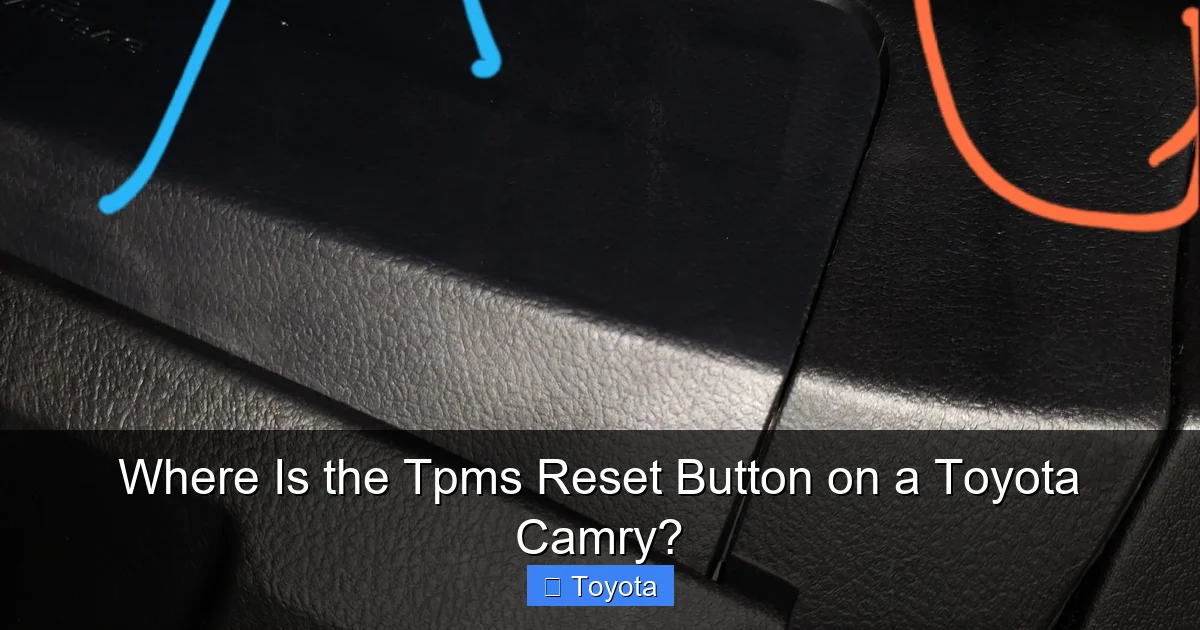
Visual guide about Where Is the Tpms Reset Button on a Toyota Camry?
Image source: i.imgur.com
Understanding why the TPMS light activates can help you prevent future issues and respond appropriately. Here are the most common causes:
Low Tire Pressure
The most frequent cause is simply low air pressure in one or more tires. This can happen gradually over time due to natural air loss (all tires lose about 1–2 PSI per month) or sudden changes in temperature. Cold weather causes air to contract, leading to lower pressure readings.
Always check your tire pressure monthly and before long trips. Use the PSI rating listed on the driver’s door jamb—not the maximum pressure printed on the tire sidewall.
Tire Leaks or Damage
Slow leaks from punctures, damaged valve stems, or worn wheel seals can trigger the TPMS light. If you notice the light comes on repeatedly, inspect your tires for nails, cracks, or bulges. A professional inspection may be needed to locate hidden leaks.
Faulty TPMS Sensors
Each TPMS sensor has a battery that lasts about 5–10 years. When the battery dies, the sensor stops transmitting data, and the system may trigger a warning. Replacing sensors can be costly ($50–$150 per sensor), but it’s necessary for proper function.
Sensors can also fail due to corrosion, impact damage, or manufacturing defects.
Recent Tire Rotation or Replacement
After rotating tires or replacing a tire, the TPMS system may need to be reset. The sensors are tied to specific wheel positions, so moving them confuses the system. Always reset the TPMS after any tire service.
System Glitches or Software Updates
Occasionally, the TPMS light may come on due to a software glitch or incomplete reset. In rare cases, a vehicle software update from Toyota may be needed to fix communication issues between sensors and the control module.
Troubleshooting TPMS Issues on the Toyota Camry
Even with the correct reset procedure, you might encounter problems. Here’s how to troubleshoot common TPMS issues:
TPMS Light Won’t Turn Off After Reset
If the light remains on after following the reset steps:
– Double-check tire pressure with a calibrated gauge.
– Ensure the reset was completed correctly (e.g., held the button long enough or navigated the menu properly).
– Drive the car for at least 15 minutes at highway speeds to allow the system to recalibrate.
– If the issue persists, one or more sensors may be faulty or have a dead battery.
TPMS Light Flashes Then Stays On
A flashing TPMS light usually indicates a system malfunction, such as a failed sensor or communication error. This requires diagnostic scanning with a TPMS tool or visit to a dealership.
Only One Tire Shows Low Pressure
If only one tire is affected, inspect that tire for leaks, damage, or a faulty valve stem. Sometimes, the sensor itself is the issue. A tire shop can test individual sensors.
No Physical Reset Button Found
If you can’t locate the reset button on a 2007–2017 model, consult your owner’s manual or search online forums for your specific trim. Some base models may not have a button and instead use a key fob sequence (e.g., pressing the lock and unlock buttons in a specific pattern).
Aftermarket Wheels or Tires
Installing aftermarket wheels without TPMS sensors will trigger the warning light. You’ll need to install compatible sensors or use a TPMS bypass module (not recommended for safety reasons).
Maintaining Your TPMS and Tire Health
Preventing TPMS issues starts with regular maintenance. Here are some best practices:
– **Check tire pressure monthly** using a quality gauge. Do this when tires are cold (not driven for at least 3 hours).
– **Rotate tires every 5,000–7,500 miles** to ensure even wear and consistent pressure.
– **Inspect tires for damage** during oil changes or tire rotations.
– **Replace TPMS sensors** when replacing tires, especially if they’re over 7 years old.
– **Keep the owner’s manual handy** for model-specific TPMS instructions.
– **Use a TPMS diagnostic tool** if you frequently work on your own vehicle.
Proper tire maintenance not only keeps the TPMS light off but also improves safety, fuel efficiency, and tire lifespan.
When to Visit a Toyota Service Center
While many TPMS issues can be resolved at home, some situations require professional help:
– The TPMS light won’t turn off after multiple resets.
– You suspect a faulty sensor or dead battery.
– The system shows inconsistent or erratic readings.
– You’ve recently had tires replaced or rotated and the light won’t reset.
– Your Camry is under warranty and you want to avoid voiding it with DIY repairs.
Toyota service centers have specialized tools to diagnose and reset TPMS systems accurately. They can also replace sensors and update vehicle software if needed.
Conclusion
Knowing where the TPMS reset button on a Toyota Camry is—and how to use it—can save you time, money, and stress. Whether your Camry has a physical button under the dashboard or a digital reset through the instrument cluster, the process is manageable with the right guidance.
Always start by checking tire pressure and ensuring all tires are properly inflated. Then, follow the correct reset procedure for your model year. Remember to drive the vehicle after resetting to allow the system to recalibrate.
Regular maintenance and awareness of TPMS function will keep your Camry safe and efficient. And if you ever run into persistent issues, don’t hesitate to consult a professional. With this knowledge, you’re ready to handle any TPMS warning that comes your way.
Frequently Asked Questions
Where is the TPMS reset button on a 2015 Toyota Camry?
The TPMS reset button on a 2015 Toyota Camry is located under the dashboard on the driver’s side, near the steering column. It’s a small, unmarked button that may require a flashlight to locate.
Do all Toyota Camrys have a TPMS reset button?
No. Models from 2007–2017 typically have a physical reset button, while 2018 and newer models use the multi-information display or touchscreen to reset the system.
Can I reset the TPMS without driving the car?
No. After resetting, you must drive the vehicle at speeds above 20–25 mph for at least 10 minutes so the system can confirm proper tire pressure.
Why does my TPMS light keep coming back on?
This could indicate a slow leak, faulty sensor, or low tire pressure. Check all tires for damage and ensure they’re inflated to the correct PSI.
How often should I check my tire pressure?
Check tire pressure at least once a month and before long trips. Use a reliable gauge and measure when tires are cold.
Can I drive with the TPMS light on?
You can drive short distances, but it’s unsafe to ignore the warning. Underinflated tires can overheat, wear unevenly, and increase the risk of a blowout.
