
What Battery Goes in a Ford F150 Key Fob

Finding the right battery for your Ford F150 key fob is usually straightforward—most use a common CR2032 3V lithium coin cell. However, the exact type can vary slightly by model year and key fob style (standard vs. intelligent access). Always confirm by checking your old battery or owner’s manual before purchasing. Replacing it is a simple DIY task that takes under 5 minutes and saves a costly dealership visit.
There you are, standing in the parking lot, pressing the unlock button on your Ford F150 key fob for the third time. Nothing. The truck sits there, stubborn and silent. Your first thought might be a dead truck battery or a faulty starter, but hold on. Nine times out of ten, the culprit is the tiny, inexpensive battery hiding inside that plastic remote. Knowing exactly what battery goes in a Ford F150 key fob is the first, most crucial step to getting you back on the road in minutes, not hours, and saving you a hefty trip to the dealer.
This isn’t complicated rocket science. It’s a small, standardized power cell. But getting it wrong—using the wrong size or type—can mean a fob that doesn’t fit, doesn’t work, or even gets damaged. Whether you drive a 2013 model with the basic remote or a 2022 with the intelligent access key, this guide will walk you through everything you need to know. We’ll identify the correct battery, show you how to open your specific fob safely, and give you the confidence to do it yourself. Let’s dive in and solve this little annoyance once and for all.
Key Takeaways
- Most F150 key fobs use a CR2032 battery: This is the standard 3V lithium coin cell for model years from the mid-2000s to present, but always verify your specific fob.
- Older models (pre-2004) may use a CR2025: This is a slightly thinner battery. The difference matters—using the wrong thickness can damage the fob’s internal contacts.
- Check your old battery first: The fastest, most accurate method is to simply remove the dead battery and read the printing on it.
- Replacement is a simple DIY job: No special tools or programming are typically needed; it’s a direct swap that takes seconds with a small flathead screwdriver or plastic pry tool.
- Buy quality batteries from reputable brands: Stick with names like Duracell, Energizer, or Panasonic for reliable performance and longevity in your key fob.
- A weak battery causes specific symptoms: Reduced range, intermittent locking, and a “key battery low” warning on your dash are classic signs it’s time for a change.
- Proper disposal is important: Lithium coin cells are hazardous waste. Take them to a retailer with a battery recycling program or a designated collection site.
📑 Table of Contents
Understanding Your Ford F150 Key Fob
Before we talk batteries, let’s quickly understand what we’re working with. “Key fob” is the common term for the electronic remote that locks, unlocks, and may start your F150. Over the years, Ford has used a few different styles for the F150. The two main categories you’ll encounter are the standard remote key fob and the Intelligent Access (IA) key with a push-button start. The battery type is largely the same between them, but the process to open the fob differs slightly.
The Standard Remote Fob
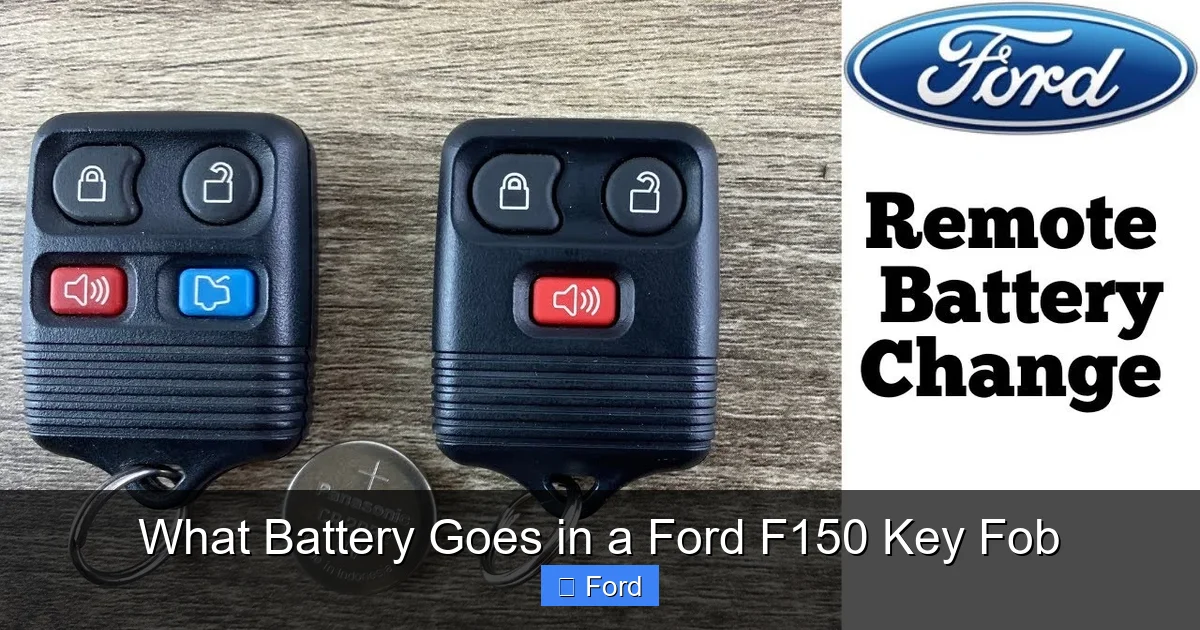
This is the traditional, separate key-shaped remote you’ve likely seen for years. It has physical buttons for lock, unlock, panic, and trunk release. The battery compartment is typically accessed by prying open a small seam along the side or back. This style has been prevalent from the early 2000s through many model years.
The Intelligent Access (IA) Key
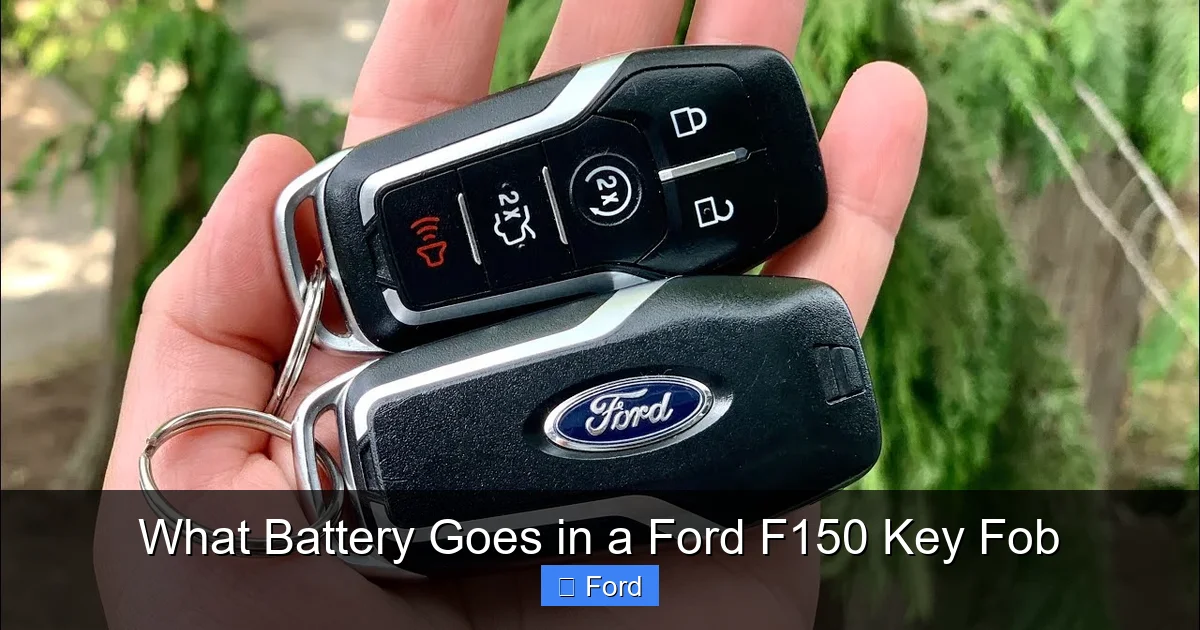
This is the more modern, “partially hidden” key that slides out of a plastic casing. It’s used with the push-button start system. Inside the plastic casing, there’s a small, separate battery compartment, often accessed by removing a tiny plastic cover or prying the two-piece shell apart. The battery itself is usually the same CR2032.
Why does this matter? Knowing your fob type tells you how to open it, which is the first physical step in the battery replacement process. Don’t worry; we’ll cover the specific steps for each later. For now, just identify which one you have.
Identifying the Correct Battery: CR2032 vs. CR2025
Here is the absolute core of your question. The vast majority of Ford F150 key fobs from approximately 2004 to the present day use the CR2032 battery. This is a 20mm diameter, 3.2mm thick, 3-volt lithium coin cell. It’s one of the most common small electronics batteries in the world.
Visual guide about What Battery Goes in a Ford F150 Key Fob
Image source: bankrate.com
However, there is a close sibling: the CR2025. It has the same 20mm diameter and 3V output, but it is only 2.5mm thick. This 0.7mm difference might seem tiny, but in the tight confines of a key fob, it can mean the difference between a secure fit and a loose connection that fails. Some older Ford fobs, particularly from the late 1990s to early 2000s, used the thinner CR2025.
How to Be 100% Sure: The “Look at the Old One” Method
The only foolproof way to know is to open the fob and look at the battery that’s already in there. The battery type is printed in tiny letters on the top face. It will clearly say “CR2032” or “CR2025”. If the printing is worn off, you can compare the physical thickness to a known new battery. This is why we always recommend having a new battery on hand before you start, so you can do a direct comparison.
If you cannot open the fob (perhaps it’s broken), your next best resource is the owner’s manual for your specific truck. In the “Key” or “Remote” section, it will list the replacement battery part number. You can also use reputable online parts lookup tools on Ford’s website or major auto parts retailers, entering your F150’s exact year, make, and model.
A critical note on quality: Do not be tempted by generic, no-name batteries at the dollar store. For a key fob, you want a battery with a long shelf life and stable voltage output. Stick with major brands like Duracell, Energizer, Panasonic, or Sony. The price difference is negligible, but the reliability is huge. A cheap battery might die in six months, leaving you stranded again.
Step-by-Step: How to Replace the Battery in Your F150 Key Fob
Now for the hands-on part. The process is simple, but it requires a gentle touch and the right tool. You’ll need: your new CR2032 (or CR2025) battery, and a small, flat tool. A plastic pry tool (like a guitar pick or old gift card) is ideal as it won’t scratch the fob. A small flathead screwdriver works in a pinch, but be extra careful. Never use excessive force or metal tools near the seam if you can avoid it, as you can crack the plastic.
Visual guide about What Battery Goes in a Ford F150 Key Fob
Image source: i.ytimg.com
Let’s break it down by fob style.
Replacing the Battery in a Standard Remote Fob
This is the most common procedure. Look at your fob. You’ll see a seam running around the edge, usually on the side or back. There is often a tiny notch or groove to insert your pry tool.
- Insert the Tool: Gently work your plastic pry tool into the seam at the notch. You may need to twist it slightly.
- Pry Open: Apply steady, gentle pressure. The two halves of the fob are held together by plastic clips. They should pop apart with a soft click. Work your way around the seam if needed. If it’s stuck, check for a hidden screw (some have one under a sticker or rubber button).
- Locate the Battery: Once open, the small circular battery will be sitting in a plastic holder. Note its orientation—which side is facing up (usually the positive “+” side is facing up).
- Remove the Old Battery: Gently pry it out with your tool or a fingernail. Avoid stabbing at the battery.
- Insert the New Battery: Place the new battery in the exact same orientation. Press it down gently until it sits flush in the holder.
- Reassemble: Align the two halves of the fob and press them together firmly until all the plastic clips snap back into place. You should hear/feel several clicks.
- Test: Press all the buttons to ensure they work and the fob reassembled correctly.
Replacing the Battery in an Intelligent Access (IA) Key
This fob is a bit different. The key blade slides out. The battery is in the plastic head.
- Remove the Key Blade: Press the release button and slide the metal key blade out completely.
- Find the Battery Cover: On the side opposite the key blade, you’ll see a small, rectangular or square plastic cover. It may have a tiny notch.
- Pry Off the Cover: Use your plastic pry tool in the notch to gently pop this small cover off. It’s usually held by clips or a tiny screw (check carefully).
- Replace the Battery: Under the cover, you’ll see the coin cell. Note its orientation, remove the old one, and insert the new CR2032 the same way.
- Reattach the Cover: Snap the small plastic cover back into place until it’s secure.
- Reinsert the Key Blade: Slide the key blade back into its slot until it clicks.
- Test Functions: Test the lock, unlock, and panic buttons. If your F150 has push-button start, you may need to have the key inside the vehicle to test the start function, but the remote functions should work immediately.
Pro Tip: If your fob has a visible seam but no obvious notch, sometimes gently twisting the two halves can help separate them. If you’re really stuck, search online for “Ford F150 key fob battery replacement [Your Exact Year]”. A quick video on YouTube will show you the exact method for your specific fob design. It’s worth the 30-second search to avoid frustration.
Troubleshooting: What If a New Battery Doesn’t Fix It?
So you’ve carefully opened the fob, replaced the old CR2032 with a fresh, name-brand one, snapped it back together, and… it still doesn’t work. Don’t panic. The battery was the most common culprit, but other issues can arise.
Visual guide about What Battery Goes in a Ford F150 Key Fob
Image source: i.ytimg.com
Check the Battery Orientation
This is the #1 mistake. The positive (+) side of the battery almost always faces up towards the rubber buttons or the fob’s internal circuit board. If you installed it backwards, it won’t make contact. Open it up and double-check. The “+” symbol on the battery should be visible when you look at it from the top.
Inspect for Corrosion or Damage
Look at the battery contacts (the small metal springs or plates) inside the fob. If you see white, crusty corrosion, clean it gently with a cotton swab dipped in a tiny amount of isopropyl alcohol. Let it dry completely. Also, inspect the plastic clips on the fob housing. A broken clip means the two halves aren’t pressing together firmly, which can interrupt the connection.
Is the Fob Physically Damaged?
Has it been dropped in water or stepped on? Internal circuit damage is possible. If the fob is physically compromised, a new battery won’t help. You may need a replacement fob, which requires programming by a dealer or locksmith.
Could It Be the Car’s Receiver?
Rarely, the problem is with the vehicle’s keyless entry module. But before you go down that expensive road, consider this: if your physical key blade still unlocks the door, the problem is almost certainly with the fob itself (battery, orientation, or fob failure). If the physical key doesn’t work either, you have a different, more serious issue with the door lock or ignition.
If you’ve tried everything and the fob is dead, your next step is to consult a professional. But in the vast majority of cases, a correctly installed, fresh CR2032 is the magical fix.
Beyond the Fob: Related Key and Battery Questions
Your key fob battery is just one part of your F150’s starting and security system. It’s natural to have related questions. For instance, you might wonder if a dying fob battery can actually prevent your truck from starting. The answer is nuanced. In a traditional key-and-ignition truck, a dead fob battery won’t stop you from starting with the physical key. However, in a push-button start F150, the system constantly “listens” for the fob’s signal. A completely dead battery means the fob can’t communicate, and the truck’s computer won’t allow the engine to start, even if the fob is physically inside the cab. You’ll see a message like “Key Not Detected.” This is why it’s important not to ignore warning signs. For a deeper dive into this specific issue, you can read our article on whether a dead key fob battery can cause a car not to start.
Furthermore, while you’re focusing on the F150, it’s helpful to know that the process for changing a key fob battery is remarkably similar across many modern vehicles. The basic principles—locating the seam, prying carefully, and replacing a CR2032—apply to countless makes and models. If you ever need to do this for a different vehicle in your household, the skill transfers directly. Guides for specific models, like a Honda Civic or a Nissan Sentra, follow nearly identical steps. Understanding the universal nature of this task can save you time and money across all your vehicles.
Conclusion: Empowerment Through a Simple Fix
Let’s bring it home. The answer to “What battery goes in a Ford F150 key fob?” is overwhelmingly the CR2032 3V lithium coin cell. For a select few older models, it may be the thinner CR2025. The definitive answer is always on the battery you’re replacing. This small, $5 part is the power source for your convenience and security. Replacing it is a perfect DIY project: it requires no mechanical skill, takes less time than a coffee break, and costs a fraction of a dealership service call.
Don’t wait until you’re locked out or stranded. When you first notice the range decreasing or the dashboard warning light appearing, head to the store, get a quality battery, and perform the swap. Keep this guide bookmarked or print it out. You’ve now got the knowledge to handle this common maintenance task with confidence. You’re not just replacing a battery; you’re taking control of your vehicle’s access system and ensuring your F150 is ready when you need it. Now, go ahead and get that new battery. Your future self, standing in a dry parking lot with a working key fob, will thank you.
Frequently Asked Questions
What is the most common battery for a Ford F150 key fob?
The vast majority of Ford F150 key fobs, from the mid-2000s to current models, use a standard CR2032 3V lithium coin cell battery. This is a 20mm diameter by 3.2mm thick battery.
How do I know if my F150 key fob uses a CR2032 or CR2025?
The only surefire way is to open the fob and read the printing on the old battery. If it’s worn off, compare its thickness to a new CR2032. Older F150 models (pre-2004) are more likely to use the thinner CR2025 (2.5mm thick).
Can I replace the Ford F150 key fob battery myself?
Yes, absolutely. It’s a simple, no-tools-or-minimal-tools DIY job that takes less than 5 minutes. You only need a small flathead screwdriver or plastic pry tool and the correct replacement battery. No programming is required for the battery swap itself.
Why does my F150 key fob still not work after changing the battery?
First, double-check that the new battery is inserted with the correct orientation (+ side up). Second, ensure the fob’s two halves are snapped together securely. If it still fails, the fob may have internal damage, or the battery contacts could be corroded and need cleaning.
How long should a key fob battery last in an F150?
A quality lithium coin cell like a CR2032 typically lasts 2-3 years with normal use. Factors like extreme temperatures, frequent remote use, and a weak original battery can shorten its lifespan.
What happens if I use the wrong thickness battery (CR2025 instead of CR2032)?
Using a thinner CR2025 in a fob designed for a CR2032 can cause a loose fit. The battery may not make proper contact with the internal terminals, leading to intermittent or complete failure. It’s best to use the exact size specified for your fob.