
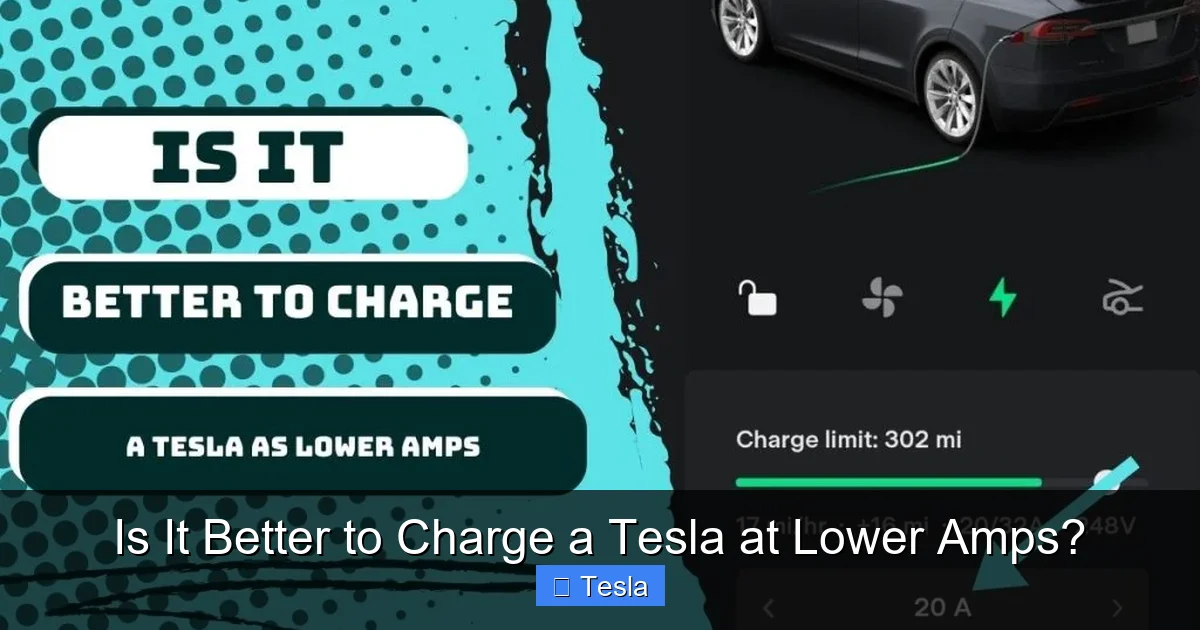
Is It Better to Charge a Tesla at Lower Amps?

Contents
- 1 Key Takeaways
- 2 📑 Table of Contents
- 3 The Heart of the Matter: Your Tesla’s Lithium-Ion Battery
- 4 Heat: The Silent Battery Killer (And How Charging Speed Fuels It)
- 5 The Great Trade-Off: Pros and Cons of Lower Amps
- 6 When to Choose Lower Amps vs. Higher Amps: A Practical Guide
- 7 Tesla’s Built-in Intelligence: You’re Not in Full Control
- 8 Practical Scenarios and Bottom-Line Recommendations
- 9 Conclusion: Find Your Balance
- 10 Frequently Asked Questions


Charging your Tesla at lower amps typically reduces heat generation, which can be gentler on the battery’s long-term health. However, it significantly increases charging time. The “better” approach depends entirely on your situation: for daily overnight charging, lower amps are often ideal; for quick top-ups on road trips, higher amps (or Supercharging) are necessary despite a minor theoretical impact on longevity.
So, you’ve got your shiny new Tesla in the garage, and you’re staring at the charging settings on your phone app or the car’s screen. You see you can set the charging amperage. Maybe you’ve heard whispers that slower is better for the battery. But is it actually better to charge a Tesla at lower amps? It’s a fantastic question that gets to the heart of electric vehicle ownership. The answer isn’t a simple yes or no—it’s a nuanced balance of battery science, daily life logistics, and understanding what your car is really doing. Let’s break it all down, friend to friend.
First, let’s clarify what we’re talking about. When we say “charge at lower amps,” we’re referring to the alternating current (AC) charging you do at home with your Wall Connector or a mobile connector, or at public Level 2 stations. This is the charging that uses your Tesla’s onboard charger to convert AC power from your wall into direct current (DC) that the battery can store. The amperage (amps) setting tells your onboard charger how much current it’s allowed to draw from the source. A lower number means it draws less current per hour, which directly translates to a slower charging speed. We are NOT talking about Tesla’s Supercharger network here, which provides high-power DC directly to the battery, bypassing your car’s onboard charger entirely. That’s a separate, though related, topic.
Key Takeaways
- Heat is the primary enemy: Slower charging at lower amperages produces less heat, reducing long-term stress on battery cells.
- Time vs. longevity trade-off: Lower amps mean much longer charging sessions, which is impractical for urgent needs but perfect for overnight charging.
- Daily use favors slower charging: For routine charging where you have 8+ hours, using a lower amp setting (e.g., 32A or 40A on a 60A circuit) is optimal for battery health.
- Supercharging is different: Tesla’s DC Superchargers bypass your car’s onboard charger, so the “amps” discussion applies mainly to AC charging (Level 1/2) at home or public stations.
- Your Tesla is smart: The vehicle’s software actively manages the charging curve, tapering current as the battery fills to protect itself, regardless of your max amp setting.
- Battery chemistry matters: Lithium-ion batteries degrade fastest from high constant stress (high heat + high state of charge). Lower amps help mitigate the heat factor.
- Convenience is key: Don’t sacrifice your schedule excessively. A healthy battery pack will easily outlast the car’s mechanical components with reasonable charging habits.
📑 Table of Contents
- The Heart of the Matter: Your Tesla’s Lithium-Ion Battery
- Heat: The Silent Battery Killer (And How Charging Speed Fuels It)
- The Great Trade-Off: Pros and Cons of Lower Amps
- When to Choose Lower Amps vs. Higher Amps: A Practical Guide
- Tesla’s Built-in Intelligence: You’re Not in Full Control
- Practical Scenarios and Bottom-Line Recommendations
- Conclusion: Find Your Balance
The Heart of the Matter: Your Tesla’s Lithium-Ion Battery
To understand charging, you must understand what you’re charging. Your Tesla’s battery pack is a sophisticated collection of thousands of lithium-ion cells. These cells love to be charged and discharged, but they have specific stressors that accelerate their inevitable, very gradual degradation. The two biggest culprits are heat and time spent at a very high state of charge (SoC).
Lithium-Ion Basics: It’s All About Ion Movement
Think of a lithium-ion cell like a hotel. The negative electrode (anode) is a full parking lot of lithium ions. The positive electrode (cathode) is an empty, waiting parking lot. When you charge, you force those lithium ions to move from the anode, through an electrolyte solution, to park in the cathode. When you drive, they happily move back to the anode, releasing energy. Charging is like directing a huge crowd of ions (electrons) across a busy highway (the electrolyte). A bigger, faster highway (higher current/amps) moves more ions per hour, but it creates more friction and heat in the process.
The Role of Current (Amps) in This Process
The amount of current (measured in amps) you push into the battery directly influences the speed of that ion movement. Double the amps, roughly double the speed (up to the battery’s and charger’s limits). But physics is unforgiving: higher current means more internal resistance within the cells, which generates more heat. Heat is the silent killer. It can accelerate unwanted chemical reactions, degrade the electrolyte, and cause the anode to develop a thicker, more resistive solid electrolyte interface (SEI) layer. All of this means a slight, permanent loss of capacity over years. So, the theory is sound: lower amps = less heat = potentially less long-term stress.
Heat: The Silent Battery Killer (And How Charging Speed Fuels It)
This is the most critical concept. Your Tesla has a brilliant, complex thermal management system—a liquid coolant loop that snakes through the battery pack, the motor(s), and the charger. Its job is to keep everything in the optimal temperature window, usually around 20-40°C (68-104°F). When you charge, especially at high power, two things generate heat: the chemical reaction inside the cells (as described above) and the onboard charger itself.
Visual guide about Is It Better to Charge a Tesla at Lower Amps?
Image source: lh5.googleusercontent.com
How Charging Speed Generates Heat
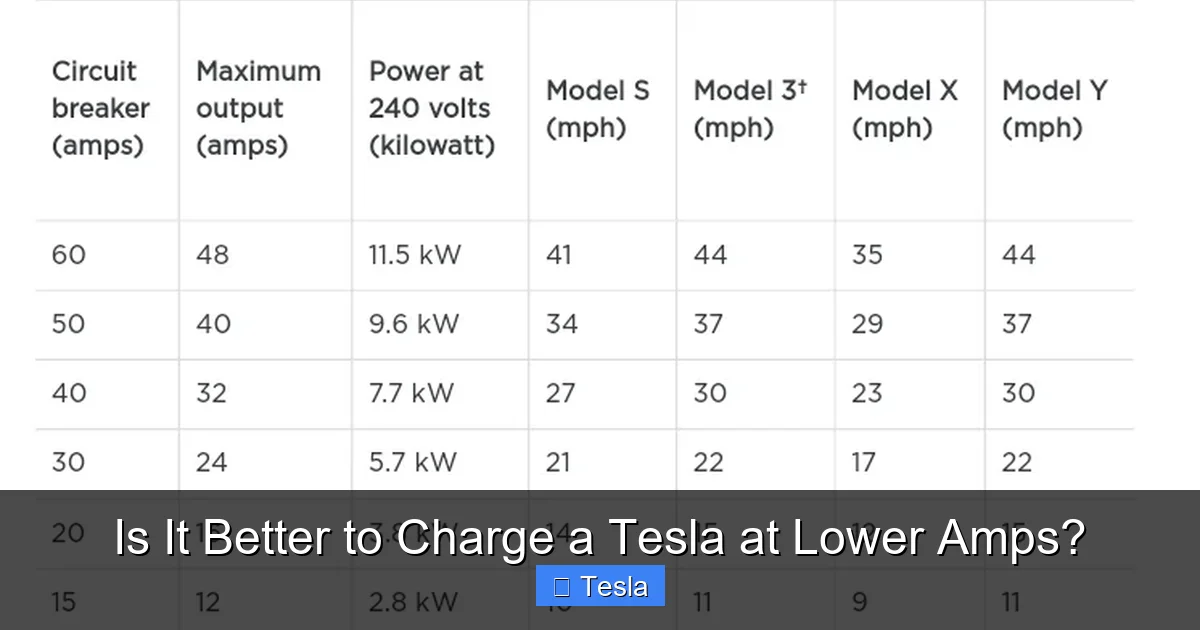
Your onboard charger is a powerful piece of electronics converting AC to DC. It’s not 100% efficient; some energy becomes waste heat. The higher the amperage you request, the harder this charger works and the more heat it produces. That heat is dumped into the coolant loop. Simultaneously, the high current into the cells generates internal heat. The thermal management system has to work overtime to pull this dual-source heat away. If the system gets overwhelmed, battery temperature rises. While your car will actively limit charging power if things get too hot, it’s better to avoid that scenario altogether. Charging at 48A on a 60A circuit creates more heat than charging at 32A on the same circuit, all else being equal.
Thermal Management System Limits and Real-World Impact
Here’s the good news: Tesla’s systems are robust. For typical AC charging (Level 2), even at the maximum your home setup allows (often 48A or 80A depending on hardware and circuit), the thermal system can usually manage the heat without issue, especially in temperate climates. The degradation impact from a few hours of higher-amp AC charging once or twice a week is, according to most real-world data from Tesla owners, negligible compared to other factors like extreme ambient temperatures or frequent charging to 100%. The bigger heat threat comes from repeated, sustained Supercharging sessions on hot days, where DC power is pushed directly into the pack at a much higher rate. So, while lower AC charging amps reduce heat, the margin of benefit for daily use might be smaller than many fear.
The Great Trade-Off: Pros and Cons of Lower Amps
Let’s lay it on the line. Here’s what you gain and what you lose by manually capping your charging amperage to a lower number.
Visual guide about Is It Better to Charge a Tesla at Lower Amps?
Image source: evmotorr.com
Advantages of Charging at Lower Amps
- Minimized Heat Generation: As established, this is the primary benefit. Less stress on the thermal system and potentially less cumulative chemical stress on the cells.
- Reduced Strain on Home Electrical System: A lower amp draw is gentler on your home wiring, circuit breaker, and electrical panel. This is particularly relevant if you have an older panel or a long cable run from the panel to the charger. It can also reduce the audible hum from the Wall Connector.
- Potential for Off-Peak Charging Savings: If you have a time-of-use electricity plan, setting a lower amp limit might allow you to charge entirely within cheaper off-peak hours without worrying about overlapping with other high-draw appliances. You’re trading speed for guaranteed low cost.
- Peace of Mind: For the ultra-cautious owner who wants to do everything by the book to preserve their $15,000+ battery pack, running at 32A instead of 48A provides a psychological benefit, even if the tangible benefit is small.
Disadvantages of Charging at Lower Amps
- Painfully Slow Charging Speeds: This is the biggest drawback. The difference between 48A and 32A on a Long Range Model 3 (75 kWh pack) is about 8-10 miles of range per hour. If you need 200 miles of range, at 48A that might take ~6 hours. At 32A, you’re looking at ~9 hours. For overnight charging, this often doesn’t matter. But if you get home late and need to leave early, it can be a real problem.
- Inflexibility: You’re manually capping your speed. If you have a 60A circuit but set it to 32A, you’re leaving 50% of your potential capacity unused every time you charge, even when you might desperately need the speed.
- May Not Address the Real Issue: If your primary concern is battery longevity, consistently charging to 100% and then leaving the car sitting at that high SoC is far more damaging than the difference between 32A and 48A for a few hours. Focus on the bigger levers first (SoC, temperature).
- Wasted Infrastructure Investment: You paid for a 60A circuit and a Wall Connector that can handle it. By consistently using a lower setting, you’re not utilizing the investment you made for faster charging when you need it.
When to Choose Lower Amps vs. Higher Amps: A Practical Guide
Okay, so it’s a trade-off. How do you decide? It all comes down to your specific routine and needs. Let’s map it out.
Visual guide about Is It Better to Charge a Tesla at Lower Amps?
Image source: evseekers.com
The Golden Rule: Overnight Charging is Your Friend
If you plug in every night and have 8, 10, or 12 hours to charge, you are in the optimal scenario for slower charging. Your car’s charging speed naturally slows down as it approaches your set limit (e.g., 80% or 90%). The last 20% from 80% to 100% is very slow anyway, regardless of amp setting. So, if you set your car to charge to 80% and you have all night, you could literally set your amperage to the minimum your car allows (often 5A or 8A) and it would fully charge by morning. For daily commuting with overnight charging, feel free to use a lower amp setting (like 32A or even 40A). You’ll save a tiny bit on heat, have zero stress about the car being ready, and your battery will be perfectly happy. This is the single best practice for long-term health.
When You Need the Speed: High Amps are Just Fine
There are absolutely times when you need more range, faster. Maybe you got home at midnight after a long trip and need to drive 150 miles at 6 AM. Maybe you have a spontaneous day trip. In these cases, crank that amp setting up to your circuit’s maximum. The temporary increase in heat from a few hours of faster charging is not going to meaningfully degrade your battery. The car’s software is designed to handle this. The principle of “everything in moderation” applies. It’s the consistent, daily use of the absolute maximum amp setting on a hot day, combined with charging to 100%, that you might want to think about. But for occasional use? No harm, no foul. If you frequently need faster charging at home, it might be a sign your 220V outlet or circuit capacity is undersized for your needs, and a upgrade would be a better solution than permanently limiting your speed.
Tesla’s Built-in Intelligence: You’re Not in Full Control
Here’s a fascinating nuance: even if you set your max amperage to 48A, your Tesla is almost never actually drawing 48A for the entire session. The charging process is a dynamic, software-controlled curve.
The Magic of the Charging Curve
When you plug in, your car “handshakes” with the charger to see what power is available. It then starts drawing current, but not at the maximum. It ramps up gradually. As the battery state of charge (SoC) increases, the car’s software automatically begins to taper the current, even if you’ve set a high max amp. This is because pushing high current into a nearly full battery is even more stressful and inefficient. By the time you hit 50% SoC, you might already be drawing less than your max setting. By 80%, you’re likely at a fraction of it. So, the difference between setting 48A and 32A is most pronounced in the first 1-2 hours of a charge from a low SoC. After that, the car self-regulates. This built-in intelligence is your best friend for battery health.
Use the “Scheduled Charging” Feature!
This is the most powerful tool you have. In your Tesla app or car menu, set a “Departure Time” for your typical weekday morning. The car will then intelligently calculate when to start charging to meet your target SoC by that time. It will often choose to charge at a slower, more efficient rate over a longer period rather than blasting at full speed for a short time. This feature, combined with a lower max amp setting for overnight, is the ultimate “set it and forget it” recipe for optimal battery care and low electricity costs (if you have time-of-use rates).
Practical Scenarios and Bottom-Line Recommendations
Let’s bring this home with real-world situations.
Scenario 1: The Daily Commuter (Overnight, 8+ hours)
Recommendation: Set your charging limit to 80-90% SoC. Set your max amperage to a moderate level (32A or 40A is plenty). Use Scheduled Departure. This is the gold standard. You’ll wake up to a ready car, with minimal heat stress on the pack.
Scenario 2: The High-Mileage Driver (Home for <6 hours)
Recommendation: You need more speed. Set your max amperage to your circuit’s maximum (e.g., 48A). Accept the small, likely negligible trade-off in heat for the practicality of getting enough miles. Ensure you’re not consistently charging to 100% daily; aim for 80-90% for daily driving and only charge to 100% when you know you’ll be driving soon after.
Scenario 3: Road Trips and Use of Superchargers
Recommendation: Don’t overthink AC charging amps for road trips. Use Superchargers for speed. The DC fast charging generates more heat than any AC Level 2 session ever will. The best practice here is to precondition the battery (the car does this automatically when navigating to a Supercharger) and to not stress about the 10-15 minute charge from 20% to 80%. The system is designed for this. For the rare AC charging on a trip (at a hotel, for example), use whatever speed is available. It’s a drop in the bucket compared to the Supercharging.
Scenario 4: You’re Charging a Rental or Borrowed Tesla
Recommendation: Follow the same principles. Use the lowest practical amp setting if you have time, but prioritize getting the needed range. The battery’s long-term health is the rental company’s concern, but being a considerate renter means not unnecessarily straining the equipment. A moderate setting is a good middle ground.
Ultimately, your Tesla’s battery is one of the most robust, well-cooled, and managed packs in the automotive world. The engineers at Tesla have designed it to handle a wide variety of charging scenarios. Obsessing over the exact amp number for your daily AC charge is probably less critical than you think. Focus on the bigger picture: avoid extreme temperatures when possible, don’t consistently charge to 100% and then let it sit, and use the scheduled charging feature. Within that framework, if you have the time, charging at a lower amp is a gentle, harmless practice. If you need the speed, use the higher amps. Your battery will be just fine either way.
Conclusion: Find Your Balance
So, is it better to charge a Tesla at lower amps? Scientifically, yes, because less heat is better for lithium-ion chemistry. Practically, the benefit for typical AC charging is small and often outweighed by the convenience of faster charging. The “better” method is the one that fits your life while respecting the two main degradation factors: heat and high state of charge. For the vast majority of owners who charge overnight, using a moderate amp setting (not necessarily the lowest, but not always the highest) combined with a departure time schedule and an 80-90% daily charge limit is the sweet spot. This gives you a full “tank” every morning, minimizes heat, and works with your electricity plan. Stop worrying about the amp number on a daily basis. Set it once based on your typical schedule, use the smart scheduling features, and enjoy your Tesla. The car is smarter about its battery than we are.
Frequently Asked Questions
Does charging at lower amps actually extend Tesla battery life?
Yes, but the effect is likely very small for typical AC charging. Lower amps reduce heat, and heat degrades batteries. However, the difference between, say, 32A and 48A for overnight charging is minimal compared to the impact of extreme ambient heat or consistently charging to 100%. It’s a good practice but not a magic bullet.
What amperage should I use for daily home charging?
For most people with overnight charging, a setting between 32A and 40A is more than sufficient and gentle. Use your car’s “Scheduled Departure” feature so it can optimize the charge timing. Only use the maximum your circuit allows (e.g., 48A or 80A) if you have a short charging window and need the extra miles quickly.
Will charging at lower amps save me money on electricity?
No. Electricity is billed by kilowatt-hours (kWh), not by amps or time. A full charge from 0% to 100% uses the same amount of energy (kWh) regardless of whether it takes 10 hours at 16A or 4 hours at 40A. The only potential saving is if a lower amp setting allows you to fully charge within cheaper off-peak hours, but that’s about timing, not the amp rate itself.
Does using lower amps affect my Tesla’s battery warranty?
No. Tesla’s battery warranty (typically 8 years/100,000+ miles) covers excessive capacity loss (e.g., below 70% original capacity). Normal charging habits, whether using higher or lower amps within the car’s designed specifications, will not void this warranty. The warranty is against defects, not normal wear from typical use.
What’s the lowest amp I should ever use?
Your Tesla’s mobile connector can go as low as 5A or 8A (depending on region). This is perfectly safe and fine for trickle charging over a weekend if you’re away. For daily use, there’s no “too low” if you have the time. However, charging at extremely low amps (like 5A) for a daily commute might not give you enough range in a reasonable time, so balance practicality with gentleness.
Is there a difference between charging amps at home vs. at a public Level 2 station?
No. The principle is identical. The public station provides AC power, and your Tesla’s onboard charger converts it, just like at home. The same heat vs. time trade-off applies. If you’re using a public station for a few hours, feel free to use its maximum output. The wear and tear on your battery is the same as if you were drawing that many amps from your home outlet.







