How to Use Trailer Backup Assist on a Ford F-150

Contents
- 1 Key Takeaways
- 2 📑 Table of Contents
- 3 What is Trailer Backup Assist?
- 4 How Trailer Backup Assist Works: The Technology Behind It
- 5 Preparing Your Ford F-150 and Trailer for TBA
- 6 Step-by-Step: Using Trailer Backup Assist
- 7 Pro Tips for Mastering Trailer Backup Assist
- 8 Troubleshooting Common TBA Issues
- 9 Conclusion: The Confidence to Towing
- 10 Frequently Asked Questions



Trailer Backup Assist (TBA) in the Ford F-150 revolutionizes trailer reversing by letting you control the trailer’s direction with a simple knob. This system uses the truck’s cameras and sensors to guide you, making even tight spots manageable. With practice, you’ll back up trailers with confidence and precision, eliminating the guesswork and stress traditionally associated with towing.
Backing up a trailer has long been one of the most daunting tasks for any driver. That white-knuckle moment when you’re trying to reverse a boat, camper, or utility trailer into a tight space? It’s enough to make anyone sweat. But what if your Ford F-150 could practically do it for you? Enter Trailer Backup Assist (TBA), a brilliant piece of technology designed to take the guesswork and stress out of trailer reversing. This system transforms a notoriously tricky maneuver into a simple, controlled process. Whether you’re a seasoned tower or just starting out, understanding how to use Trailer Backup Assist on your Ford F-150 will make every backup smoother, safer, and far less frustrating. Let’s dive in and demystify this incredible feature.
Key Takeaways
- TBA uses a control knob: Turn the knob left to back the trailer left, right to go right—the truck steers itself.
- Setup is crucial: Properly connect the trailer and calibrate the system before each use.
- Go slow and steady: Keep speeds under 3 mph for maximum control and system accuracy.
- Practice in open areas: Start in empty lots to get a feel for the system’s response before tackling tight spots.
- System has limits: TBA won’t correct extreme angles or replace the need for spotters in complex situations.
- Use visual cues: Watch the camera display and mirrors to complement the knob control.
- Stay alert: Always be ready to take manual control if needed, and check surroundings constantly.
📑 Table of Contents
What is Trailer Backup Assist?
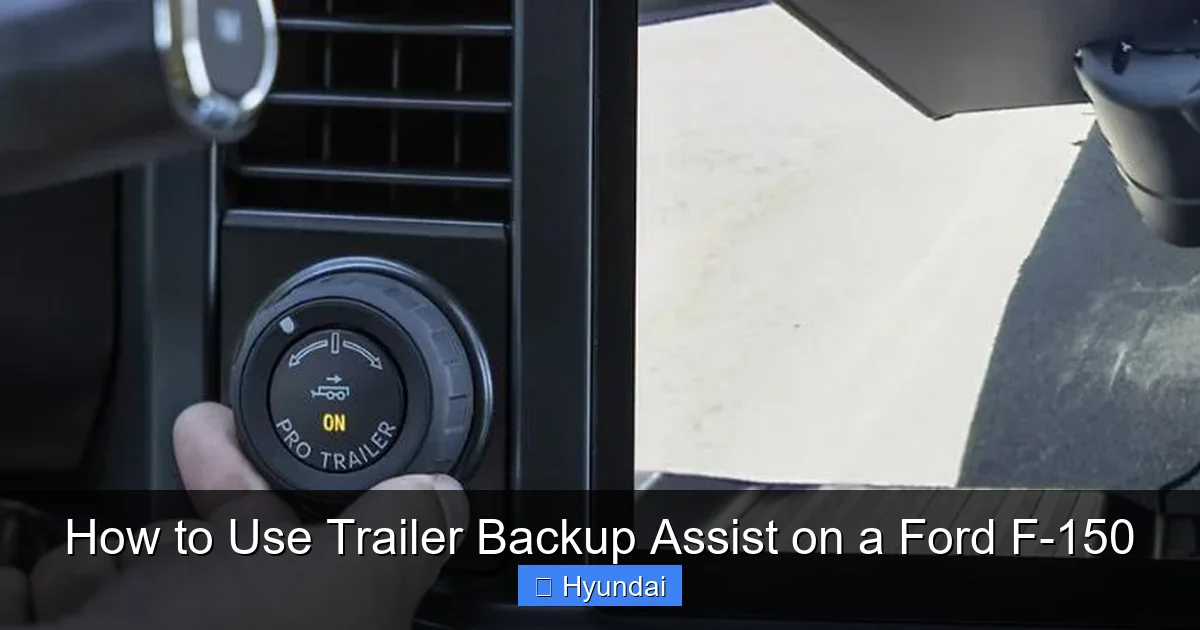
Trailer Backup Assist is an advanced driver-assistance system exclusive to Ford trucks, including the F-150. At its core, TBA is a guided backup system that automates the steering of your truck while you control the speed and direction of the trailer. Instead of you having to turn the steering wheel opposite to the trailer’s movement, you simply use a small rotary knob on the dashboard. This knob sends commands to the truck’s computer, which then calculates the necessary steering input to make the trailer go exactly where you want it.
Think of it as having an expert co-pilot whose only job is to handle the wheel while you focus on looking over your shoulder, watching the camera, and modulating the gas pedal. The system uses a combination of the trailer angle sensor (installed on the hitch) and the truck’s rearview camera to create a real-time visual and computational map of the trailer’s position relative to the truck. This allows for incredibly precise control, even with long or wide trailers.
For Ford F-150 owners, TBA isn’t just a party trick; it’s a serious safety and convenience tool. It reduces the risk of jackknifing, minimizes trailer sway during backups, and helps prevent costly collisions with obstacles, campsite amenities, or other vehicles. It’s part of Ford’s broader Co-Pilot360 suite of safety tech, which includes features like blind-spot monitoring and pre-collision assist. While other brands offer similar systems, Ford’s implementation with the dedicated control knob is widely praised for its intuitive nature.
The Evolution of Trailer Assist Technology
Trailer backup systems have evolved from complex aftermarket setups to integrated factory features. Early versions required drivers to manually input trailer dimensions and often felt robotic. Modern systems like Ford’s TBA are seamless, activating with the press of a button and offering smooth, predictable response. This technology represents a shift toward making heavy-duty truck capabilities accessible to everyday drivers, not just professional haulers.
How Trailer Backup Assist Works: The Technology Behind It
To truly master Trailer Backup Assist, it helps to understand what’s happening under the hood—or rather, in the computer. The system is a beautiful orchestration of hardware and software working in real-time.
Visual guide about How to Use Trailer Backup Assist on a Ford F-150
Image source: rogersford.com
The key components are:
- The Trailer Angle Sensor: This is a small electronic device mounted on the trailer hitch. It communicates the angle between the truck and trailer to the F-150’s computer hundreds of times per second.
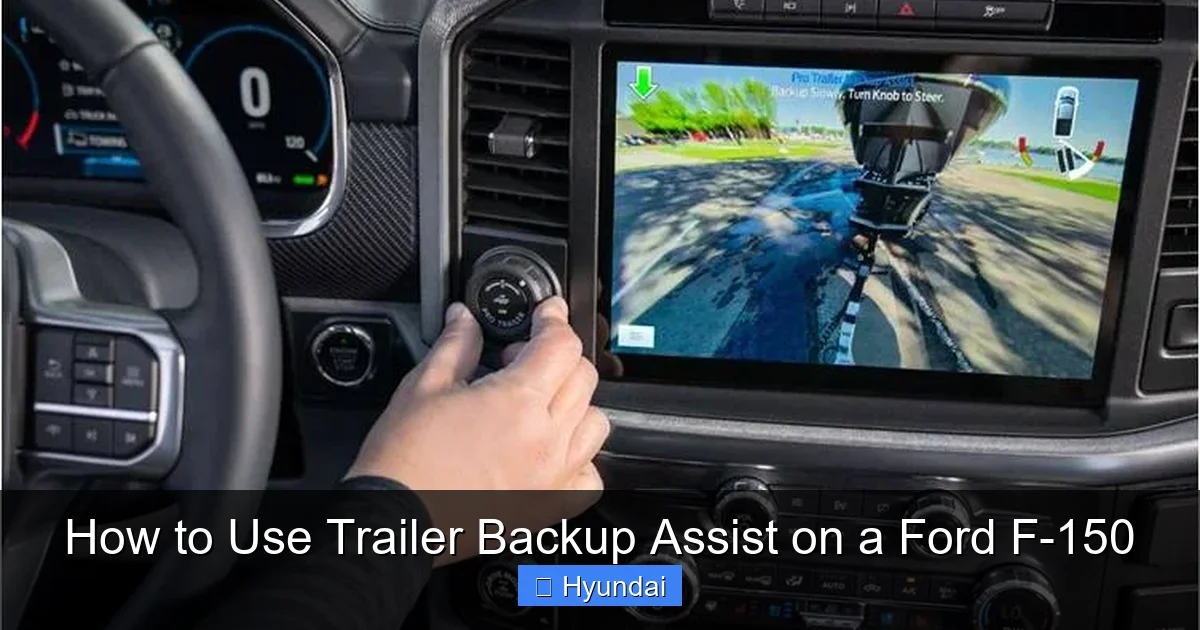
- The Rear Camera System: The standard rearview camera (and often the 360-degree camera on higher trims) provides the visual reference on your infotainment screen. The system overlays guidelines that help you judge distance and angle.
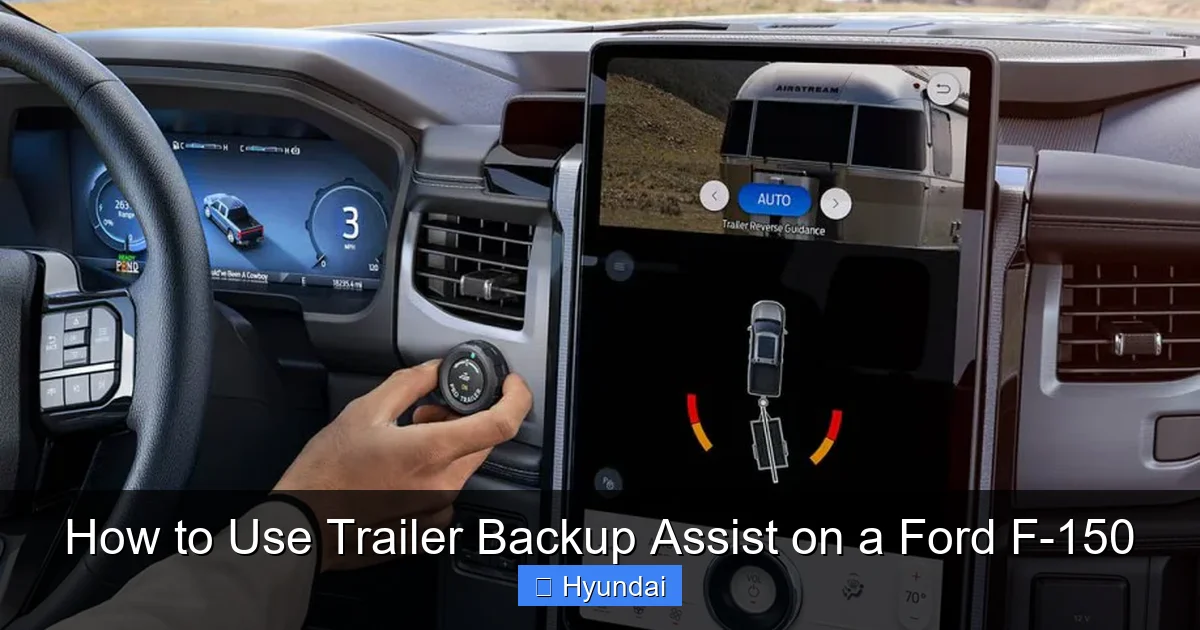
- The Control Knob: Located on the center console, this is your primary interface. It’s a rotary dial that you turn in the direction you want the trailer to go. A larger turn equals a sharper initial angle.
- The Power Steering and Computer Modules: The truck’s computer takes the knob input and trailer angle data, then calculates the exact steering wheel movement needed. It commands the electric power steering system to turn the wheels accordingly, all while you control forward/reverse motion with the accelerator.
The Role of the Trailer Angle Sensor
This sensor is the unsung hero of TBA. Without it, the system would have no way of knowing the trailer’s position relative to the truck. When you connect your trailer, you must ensure this sensor is properly mounted and aligned. Most aftermarket hitches come with a mounting plate for it, and Ford often includes it with the factory tow package. The sensor must be installed at the pivot point—the center of the hitch ball—for accurate readings.
How the Camera System Guides You
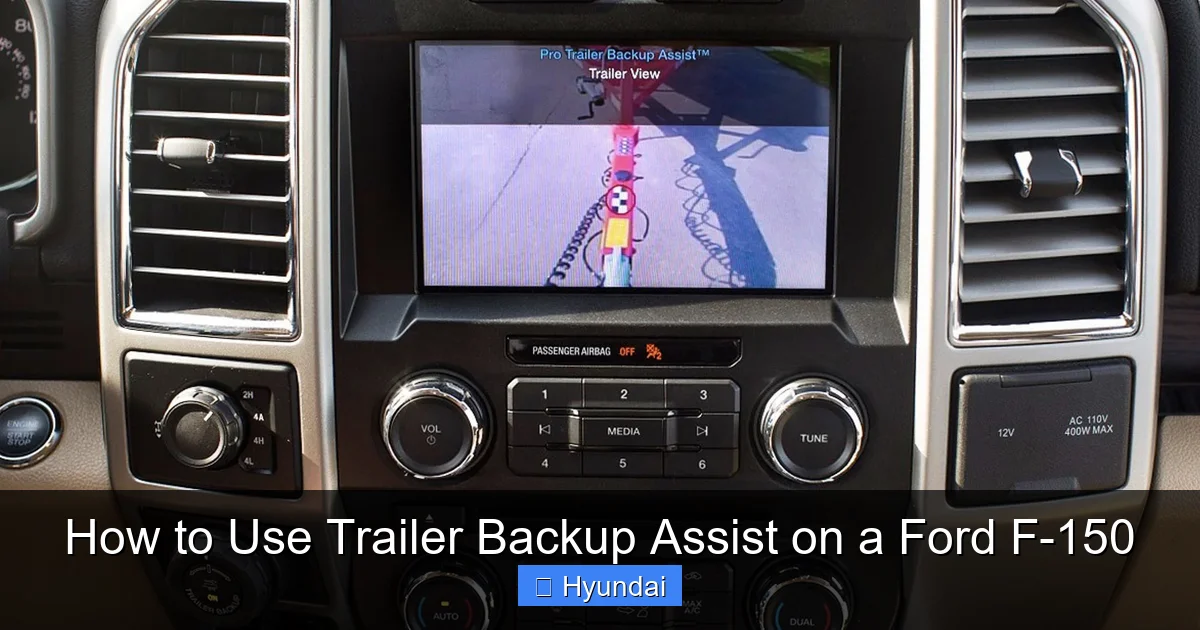
On your F-150’s display, you’ll see the trailer’s path overlaid with colored lines. Typically, a green line shows the projected path if you continue straight, while yellow or red lines indicate potential collision zones. This visual aid is crucial for judging how much space you have. The camera doesn’t just show what’s behind you; it dynamically adjusts the guidelines based on the trailer angle and your knob inputs, giving you a “future view” of the trailer’s arc.
Preparing Your Ford F-150 and Trailer for TBA
Successful use of Trailer Backup Assist starts long before you put the truck in reverse. Proper preparation ensures the system works accurately and safely. Rushing this step is a common mistake that leads to frustration.
Visual guide about How to Use Trailer Backup Assist on a Ford F-150
Image source: rogersford.com
First, ensure your F-150 is properly equipped. TBA is typically part of the Max Trailer Tow Package or available as a standalone option on many trims. Check your owner’s manual or window sticker to confirm. You’ll also need the compatible trailer wiring harness that includes the connection for the angle sensor.
Next, physically connect your trailer:
- Secure the trailer to the hitch ball with the coupler lock and safety chains.
- Plug in the trailer’s electrical connector. This powers the angle sensor and lights.
- Verify the trailer brakes and lights are functioning. A quick light check is non-negotiable for safety.
Calibrating the System
Once connected, you must tell your F-150 about the trailer. Here’s the process:
- Start the truck and ensure it’s in Park with the parking brake set.
- On the infotainment screen, go to Settings > Vehicle > Trailer Backup Assist (path may vary slightly by model year).
- Select “Add Trailer” or “Calibrate.” The system will prompt you to confirm the trailer is connected and parked on level ground.
- Follow the on-screen instructions, which usually involve turning the steering wheel fully left and right to let the system learn the steering ratio. The truck may move slightly.
- Once calibration is complete, the system is ready. It will remember trailer profiles for future use, which is handy if you tow multiple trailers.
If you change trailers or disconnect and reconnect, you may need to recalibrate, especially if the trailer’s length or hitch point differs significantly.
Pre-Backup Checklist
Before engaging TBA, run through this mental checklist:
- Area is clear: Walk behind the trailer to check for obstacles, people, or pets.
- Trailer is straight: Start with the trailer as straight as possible relative to the truck for the easiest initial control.
- Mirrors are adjusted: While you’ll use the camera, side mirrors provide valuable peripheral vision.
- Speed control ready: Your right foot will be on the brake initially; plan to use very gentle accelerator pressure.
- Spotter available (if needed): For complex situations, a spotter can be a lifesaver. Establish hand signals beforehand.
Remember, a well-prepared setup is half the battle. Taking five minutes to calibrate and check can save you from an hour of frustration or a costly repair.
Step-by-Step: Using Trailer Backup Assist
Now for the main event. Here is a detailed, step-by-step guide to using Trailer Backup Assist on your Ford F-150. We’ll break it down into phases for clarity.
Visual guide about How to Use Trailer Backup Assist on a Ford F-150
Image source: ascencione.com
Activating the System
With your trailer connected and calibrated:
- Put the truck in Reverse.
- Press the Trailer Backup Assist button on the dashboard or console. This is usually a dedicated button with a trailer icon. The infotainment screen will switch to the trailer camera view with the guidance graphics.
- The system is now active. You’ll see a prompt like “Use knob to steer trailer.”
If the system doesn’t activate, double-check your trailer connection and calibration status. Sometimes a loose sensor connection can prevent engagement.
The Knob Control Technique
This is the heart of TBA. Here’s how to use the knob effectively:
- To back the trailer to the LEFT: Turn the knob counterclockwise (left).
- To back the trailer to the RIGHT: Turn the knob clockwise (right).
The key is to turn the knob in the direction you want the trailer to go. This is opposite of traditional backing, where you turn the wheel toward the trailer’s direction. With TBA, you think about the trailer’s path, not the truck’s. For example, if you want the trailer’s front to swing left, you turn the knob left. The truck’s front will swing right, but you don’t worry about that—the system handles it.
How much to turn? Small adjustments make small changes. A gentle 1/4 turn of the knob initiates a gradual arc. A full 90-degree turn will make the trailer pivot sharply. Start small. You can always add more knob input as needed. The system is designed to be progressive and forgiving.
Speed and Steering Management
Your left foot controls the brake. Your right foot controls the gas. Your left hand (or right, depending on comfort) controls the knob.
- Start in brake: With the truck in reverse, hold the brake pedal firmly. This gives you complete control to start and stop instantly.
- Apply very gentle gas: Once you begin turning the knob, feather the accelerator to move at a crawl—ideally under 3 mph. This slow speed gives you maximum time to react and the system to make precise corrections.
- Watch the screen and mirrors: Your primary focus should be the camera display, which shows the trailer’s path. Glance at the side mirrors for blind spots. The camera guidelines are your best friend for judging distance.
- Make incremental corrections: If the trailer is drifting too far one way, ease off the knob slightly or counter-steer a bit. Avoid jerky movements.
Completing the Backup
As the trailer approaches its final position:
- Begin straightening the trailer by returning the knob to the neutral (center) position. The system will stop steering input, and the truck will straighten the wheels.
- Use the brake to come to a complete stop.
- Shift to Park, set the parking brake, and disengage TBA by pressing the button again or turning off the truck.
- Unhook as usual.
Practice this sequence repeatedly in an empty parking lot with a trailer (or even a shopping cart for absolute beginners) to build muscle memory. The motion of using the knob while modulating the brake will become second nature.
Pro Tips for Mastering Trailer Backup Assist
Even with a perfect guide, mastering TBA takes practice. These advanced tips will help you become proficient faster and handle more challenging scenarios.
Practice Drills in Safe Environments
Before you need it at a crowded campground or boat ramp, spend time in a large, empty parking lot. Set up cones or cardboard boxes as targets. Try backing into a “slot” between two cones. Practice S-turns around obstacles. The goal is to learn how the trailer responds to different knob inputs at various angles. You’ll discover that longer trailers have a wider turning radius and require earlier, smoother knob inputs.
Working with Spotters Effectively
TBA doesn’t eliminate the need for a spotter in tight or complex situations; it just changes the dynamic. When using a spotter:
- Establish clear, simple hand signals before you start (e.g., “stop,” “left,” “right,” “straighten”).
- The spotter should position themselves where they have a clear view of the trailer’s path, not just the back of the trailer.
- Remember: you’re controlling the trailer’s *direction* with the knob. The spotter’s “left” and “right” commands should refer to the direction the *trailer* needs to go, which matches your knob input.
- Keep your windows down so you can hear the spotter clearly.
A good spotter plus TBA is an unbeatable combination for navigating tight campsites or narrow boat launches.
Handling Different Trailer Types
Not all trailers are created equal. Here’s how TBA behaves with different setups:
- Travel Trailers & Fifth-Wheels: These have a fixed pivot point, so response is predictable. Fifth-wheels, with their higher hitch point, may have a slightly different turning characteristic—practice to get the feel.
- Boat Trailers: The pivot is at the winch stand. The trailer’s long, narrow shape can be easier to control, but the keel can be fragile. Use extra caution near docks.
- Utility Trailers: These are often shorter and may have a higher tongue weight. They can respond more quickly to knob inputs, so use smaller, smoother turns.
- Multiple Axle Trailers: Longer trailers with two or three axles have a larger turning radius. Start your knob turns earlier and be patient.
Always do a short practice run with a new or unfamiliar trailer to gauge its behavior.
Using TBA on Slopes and Uneven Ground
Backing uphill or downhill adds complexity. Gravity can cause the trailer to push or pull the truck. With TBA:
- Uphill: The trailer may want to push the truck backward faster. Use the brake more firmly and expect to make slightly larger knob inputs.
- Downhill: The trailer’s weight can increase sway. Maintain extremely slow speed and be ready to correct. If the trailer starts to sway, stop, straighten, and try again with smaller inputs.
- Avoid using TBA on very steep slopes (>10%) if possible. It’s safer to have a spotter guide you manually in such conditions.
The system is designed for level ground primarily. On inclines, the trailer angle sensor data might be slightly less accurate, so rely more on visual cues.
Troubleshooting Common TBA Issues
Even the best tech can hiccup. Here are common issues and how to solve them.
System Won’t Engage
If pressing the TBA button does nothing:
- Check trailer connection: Is the electrical plug fully inserted? Is the sensor harness connected? A loose connection is the #1 cause.
- Verify calibration: Go into the menu and see if a trailer profile is active and calibrated. You may need to recalibrate after a battery disconnect or if you changed trailers.
- Look for warning lights: A trailer disconnect or brake warning light on the dash can disable TBA. Address the underlying issue first.
- Consult manual: Some F-150 models require the truck to be in “Neutral” before engaging reverse for TBA to work (a quirk of certain transmissions).
Trailer Doesn’t Respond to Knob
If the knob turns but the trailer goes straight:
- The system may not have a good “lock” on the trailer angle. Try starting with the trailer perfectly straight.
- The angle sensor might be misaligned or faulty. Check its mounting—it must be at the exact center of the hitch ball and level.
- Extreme cold or moisture can interfere. Clean the sensor connections and try again.
Erratic Steering or Over-Correction
If the truck steers too sharply or seems to oscillate:
- You’re likely turning the knob too aggressively. Use smaller, smoother inputs. The system is sensitive.
- Check your speed. Going faster than 3-4 mph reduces control. Always crawl.
- The system may need recalibration if it’s consistently overreacting.
Camera Display Issues
A fuzzy or non-functional camera screen:
- Clean the rear camera lens—it’s easily dirtied by road grime.
- Check for software updates at your dealer. Infotainment glitches can sometimes be resolved with a reboot (hold power button for 10 seconds).
- If the problem persists, it could be a wiring issue, especially in the trailer harness.
When in doubt, consult your Ford F-150 owner’s manual. It has model-specific troubleshooting steps. If problems continue, a dealership can run diagnostics on the TBA module.
Conclusion: The Confidence to Towing
Trailer Backup Assist in the Ford F-150 is more than just a feature—it’s a game-changer for anyone who tows. It turns a high-stress, skill-based maneuver into a learnable, repeatable process. By understanding how the system works, preparing your truck and trailer correctly, and practicing the knob technique, you’ll gain a level of confidence that makes towing enjoyable rather than anxiety-inducing.
Remember, technology is an aid, not a replacement for awareness. Always look over your shoulder, use your mirrors, and be ready to take the wheel if needed. Start in empty spaces, build your skills gradually, and soon you’ll be backing into the tightest campsite or dock with the ease of a pro. Your Ford F-150’s Trailer Backup Assist is there to make your adventures smoother and safer—embrace it, practice it, and let it take the wheel (literally) when you need it most.
And while you’re mastering your F-150’s towing tech, don’t forget to explore other helpful guides on our site, like how to check tire pressure on a Honda Civic for general maintenance tips, or understanding driver-assist systems such as lane assist on a Subaru. Even if you drive a Ford, these principles of vehicle care and technology apply across the board. Happy towing!
Frequently Asked Questions
How do I activate Trailer Backup Assist on my Ford F-150?
First, ensure your trailer is properly connected and the system is calibrated via the infotainment menu. Then, shift into Reverse, press the dedicated TBA button on the dash, and follow the on-screen prompts. The camera view will activate, and you can begin using the control knob.
Can I use Trailer Backup Assist with any trailer?
TBA works with most conventional trailers, including travel trailers, boat trailers, and utility trailers, as long as they are properly hitched and the angle sensor is installed correctly. However, extremely long or wide trailers may require more practice, and some specialty trailers (like those with multiple pivot points) might not be compatible. Check your owner’s manual for specific weight and length limits.
What speed should I back up at when using TBA?
Always keep your speed under 3 mph (about 5 km/h). A slow, controlled crawl gives the system time to make precise steering corrections and gives you ample time to react. Use only gentle pressure on the accelerator; your left foot should be ready to brake at any moment.
Can I steer manually while using Trailer Backup Assist?
No, when TBA is active, the system controls the steering wheel automatically based on your knob inputs. You should not touch the steering wheel during operation, as it could fight the system and cause erratic movement. If you need to take over, simply press the TBA button to disengage and then steer manually.
What should I do if Trailer Backup Assist isn’t working?
First, check that the trailer is securely connected and the electrical harness is plugged in. Ensure the angle sensor is mounted correctly at the hitch. Try recalibrating the system in the vehicle settings menu. If problems persist, inspect for any dashboard warning lights (like trailer disconnect or brake warnings) that may disable the system. Consult your owner’s manual or a dealer for further diagnosis.
How much practice is needed to become proficient with TBA?
Basic proficiency can be achieved after 30-60 minutes of deliberate practice in an empty parking lot. To master tight maneuvers and handle different trailer types, plan for several practice sessions. Start with straight-back drills, then progress to backing into simulated “slots.” Muscle memory for the knob control develops quickly with consistent repetition.