
How to Reset Maintenance Light on 2010 Toyota Highlander

Your 2010 Toyota Highlander’s maintenance light is a helpful reminder for scheduled service. Resetting it is simple once you know the steps, but only do so after completing the required maintenance. Follow our easy guide to clear that light and keep your Highlander running smoothly.
Key Takeaways
- The maintenance light is a reminder, not a diagnosis: It illuminates based on mileage and time intervals for routine service like oil changes, tire rotations, and inspections.
- Always perform the required maintenance first: Reset the light only after you’ve completed the specific service it’s reminding you of, typically an oil change or multi-point inspection.
- The reset uses your odometer/trip meter buttons: No special tools are needed; you’ll use the “ODO/TRIP” button and the ignition switch in a specific sequence.
- Your odometer must display total mileage: The reset procedure only works when the instrument cluster shows the vehicle’s total odometer reading, not a trip meter.
- The light indicates a “maintenance required” system: It is separate from the “check engine” light, which signals an emissions or engine problem.
- If the light returns quickly, investigate: A rapidly returning light may indicate the maintenance wasn’t completed properly or there’s an underlying issue with the sensor or system.
- Consult your owner’s manual: It provides the exact maintenance schedule and reset procedure specific to your vehicle’s configuration.
📑 Table of Contents
- Understanding Your 2010 Toyota Highlander’s Maintenance Light
- Essential Preparation Before You Begin
- Method 1: The Standard Button Reset Procedure
- Method 2: Alternative Approach and Common Variations
- Troubleshooting: What to Do If the Light Won’t Reset
- The Bigger Picture: Why Your Maintenance Schedule Matters
- Conclusion: Keeping Your Highlander’s Light Off for the Right Reasons
Understanding Your 2010 Toyota Highlander’s Maintenance Light
Hey there, Toyota Highlander owner! That little wrench icon glowing on your dashboard isn’t trying to annoy you—it’s your vehicle’s way of saying, “Hey, it’s time for some TLC!” In your 2010 Highlander, this maintenance required light is part of Toyota’s sophisticated onboard system that tracks service intervals. Unlike the ominous check engine light, which points to a specific fault, this light is purely a mileage and time-based reminder. It’s programmed to illuminate after you’ve driven a certain number of miles or after a specific period has passed since your last service, whichever comes first.
Think of it as your car’s personal assistant, keeping track of routine but critical maintenance tasks. For the 2010 model year, the most common trigger is an oil change reminder, but it also encompasses other scheduled services from your owner’s manual, like tire rotations, air filter replacements, and brake inspections. The system is designed to help you stay on top of preventive maintenance, which is absolutely key to ensuring your Highlander’s longevity, reliability, and safety. Ignoring it can lead to premature wear, poor fuel economy, and even costly repairs down the road. So, seeing that light is a good thing—it means your car is smart and you’re about to be proactive!
What Exactly Triggers the Light?
The maintenance required system in your 2010 Highlander is typically set at the factory to activate after 5,000 miles or 6 months from the last reset. This aligns with traditional oil change intervals. However, your specific interval might vary if a previous owner or technician adjusted it. The system doesn’t “know” if you changed your oil; it simply counts miles and days. This is why it’s crucial to complete the actual maintenance work first. Resetting the light without changing the oil or performing the service is like erasing a to-do list without doing the tasks—it defeats the purpose and can harm your engine.
The light will usually illuminate steadily once the preset interval is reached. After you start the vehicle, it will stay on for a few seconds and then turn off until the next service interval. If you’ve just had service done and the light is still on, that’s your cue to reset it. The process is straightforward but must be done correctly.
Essential Preparation Before You Begin
Before you start pressing buttons, let’s get organized. A smooth reset process starts with a little prep work. First and foremost, confirm that the required maintenance has been completed. Did you just change the oil and filter? Did you rotate the tires? If you took it to a shop, they should have reset it for you, but sometimes they forget or it doesn’t take. If you did the work yourself, you’re responsible for the reset.
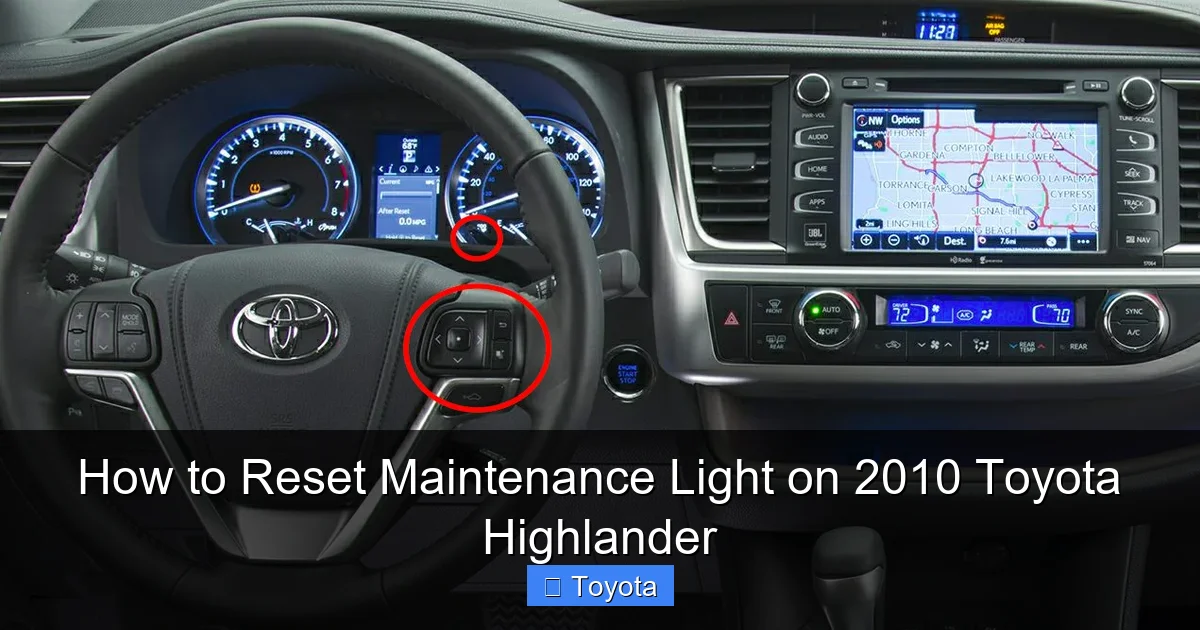
Visual guide about How to Reset Maintenance Light on 2010 Toyota Highlander
Image source: oilreset.com
Next, you need to be familiar with your instrument cluster. You’ll be using the “ODO/TRIP” button, usually located on the dashboard near the speedometer or on the steering column stalk. Its primary function is to toggle between the total odometer reading and the trip meter readings (Trip A and Trip B). For the reset to work, your display must show the total vehicle mileage (the odometer), not a trip meter. If it’s on Trip A or B, the sequence won’t initiate.
Grab your owner’s manual if you have it. While the process is standard for this generation, it’s your ultimate reference. Also, ensure your battery is in good shape. A weak battery can sometimes cause electrical glitches during the reset. Finally, park your Highlander safely, set the parking brake, and turn off all accessories like the radio and AC to minimize electrical drain during the procedure.
Why Doing the Maintenance First is Non-Negotiable
Let’s be crystal clear: resetting the light without doing the work is a false economy. The maintenance required system is there to protect your engine and other components. Oil, for example, breaks down over time and with heat cycles. Even if you haven’t hit the mileage mark, the oil’s chemical properties degrade. The 5,000-mile/6-month interval is a safe average for conventional oil. If you use synthetic, you might extend it, but you must then adjust the maintenance reminder interval accordingly—a process that often requires a professional scan tool. By resetting only after you’ve completed the service, you create an accurate record in your car’s “brain” and ensure you get the full protection interval from fresh fluids and filters. It’s about respecting the engineering and investing in your vehicle’s health.
Method 1: The Standard Button Reset Procedure
This is the classic, factory-prescribed method for your 2010 Highlander. It’s a manual sequence that tricks the maintenance computer into registering a new service interval. Don’t worry; it’s not tricky at all. Just follow these steps precisely. The entire process should take less than 30 seconds.
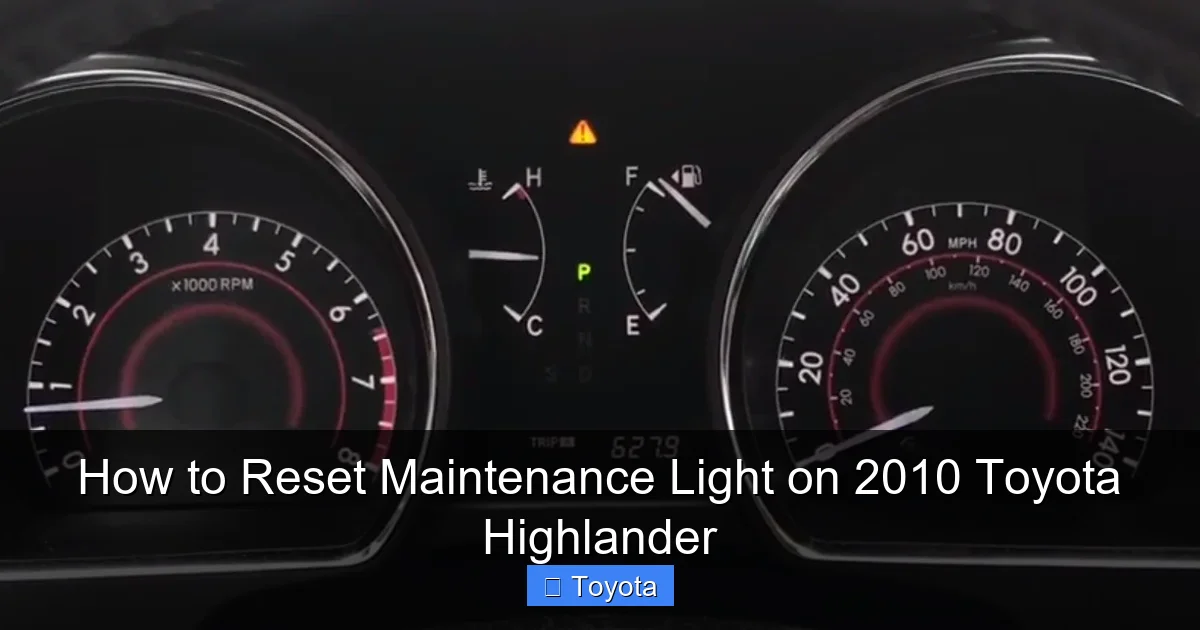
Visual guide about How to Reset Maintenance Light on 2010 Toyota Highlander
Image source: images.squarespace-cdn.com
Step-by-Step Guide to the Traditional Reset
Step 1: Start by ensuring your ignition is OFF. Your vehicle should be parked and in “Park” (P) with the parking brake set.
Step 2: Press and hold down the “ODO/TRIP” button. While continuing to hold it, turn the ignition key to the “ON” position (the position right before “START,” where all your dashboard lights come on). Do NOT start the engine. You’ll see the odometer display begin to cycle or a series of dashes appear.
Step 3: Keep holding the “ODO/TRIP” button for approximately 5-10 seconds. You should see the maintenance required light (the wrench icon) begin to blink, then go out completely. On some models, the odometer display may show “000000” or “—–” for a moment.
Step 4: Release the button. Turn the ignition OFF, wait about 5 seconds, and then turn it back to the “ON” position (again, without starting the engine). Check your dashboard. The maintenance required light should be off. To be absolutely sure, you can now start the engine. The light should illuminate for a few seconds during the bulb check and then turn off, confirming the reset was successful.
Pro Tip: If the light doesn’t go out, repeat the process. Ensure you’re starting from a complete “OFF” ignition state each time. Also, double-check that your odometer is displaying the total miles, not a trip meter, before you begin Step 2. If your trip meter is on, press the “ODO/TRIP” button once to cycle back to the main odometer reading.
Method 2: Alternative Approach and Common Variations
While the button-hold method is standard for the 2010 Highlander, a few owners have reported slight variations. Sometimes, the “ODO/TRIP” button might be labeled differently, or the sequence might involve the “Trip Reset” button on the stalk. If the primary method fails after a few attempts, try this alternative sequence, which is common in many Toyota models of this era.
Visual guide about How to Reset Maintenance Light on 2010 Toyota Highlander
Image source: oilreset.com
The “Trip Meter A” Reset Sequence
Step 1: Turn the ignition to the “ON” position (do not start).
Step 2: Use the “ODO/TRIP” button to switch your display until you see “Trip A” (it will usually say “TRIP A” or show a small “A” icon).
Step 3: Now, turn the ignition OFF.
Step 4: Press and hold the “ODO/TRIP” button down.
Step 5: While still holding the button, turn the ignition back to the “ON” position. Continue holding for about 5 seconds until the maintenance light blinks and goes out, or until the trip meter resets to “0.0.”
Step 6: Release the button, turn ignition OFF, and restart to verify.
This method leverages the trip meter reset function to communicate with the maintenance module. It’s worth a try if the first method feels unresponsive. Remember, the key is the combination of button state (pressed/released) and ignition state (ON/OFF).
Troubleshooting: What to Do If the Light Won’t Reset
So you followed the steps perfectly, but that stubborn wrench icon is still glaring at you. Don’t panic. This usually points to one of a few common issues. First, re-verify that the maintenance was actually performed. Did the oil change include a new filter? Was the correct oil used? Sometimes, a loose sensor or an incomplete reset at a quick-lube shop is the culprit.
Second, your Highlander’s system might have a “latched” maintenance reminder. This means the light will not reset until the ignition has been cycled (turned off and on) a few times after the procedure. Try starting and stopping the engine 2-3 times. Third, a weak battery can cause a communication error with the Body Control Module (BCM), which manages the light. If your battery is old or the connections are corroded, clean the terminals and ensure a solid connection, then try again.
Fourth, there’s a small chance the system has detected a fault. For example, if your oil life monitoring sensor (if equipped) or another component is failing, it might keep the light on as a secondary warning. Finally, and most importantly, consult your owner’s manual. It has the definitive procedure and troubleshooting steps for your specific trim (Base, Limited, Sport, etc.). If all else fails, a visit to a trusted mechanic or Toyota dealer is in order. They can use a professional scan tool to both diagnose any underlying issues and force a reset if necessary. You can also find model-specific guidance by looking at resources for similar years, like our guide on how to reset the maintenance light on a 2017 Toyota Highlander, which often shares the same fundamental process.
When to Seek Professional Help
While resetting the light is a DIY task, know your limits. If you’ve confirmed the service is done, the battery is healthy, and the manual’s procedure fails, it’s time to call a pro. Also, if the maintenance light is accompanied by other warnings—like low oil pressure, check engine light, or unusual noises—do not reset anything. Drive (or tow) your Highlander to a mechanic immediately. These could indicate a serious problem that a simple reset would only mask, potentially leading to engine damage. A professional can read any stored trouble codes from the car’s computer to see if there’s an underlying issue preventing the reset.
The Bigger Picture: Why Your Maintenance Schedule Matters
Resetting the light is just the final step in a cycle of care. The real value lies in the maintenance itself. Your 2010 Highlander is a robust SUV, but it has thousands of moving parts that need attention. The factory maintenance schedule is a science-backed timeline for replacing fluids, filters, and wearing components before they fail. Adhering to it preserves your engine’s health, ensures optimal fuel efficiency, maintains safe braking and handling, and protects your investment.
For the 2010 Highlander, typical services at the 5,000-mile interval include an oil and filter change, tire rotation, and a multi-point inspection. At 30,000 miles, you might add cabin air filter replacement, fuel system cleaning, and more detailed inspections. At 60,000 miles, major services like spark plug replacement, transmission fluid change (if automatic), and coolant system flush come into play. Following this schedule prevents small issues from becoming big, expensive ones. It also keeps your car’s resale value higher, as a complete service history is a huge plus for future buyers. Remember, a well-maintained Highlander can easily surpass 200,000 miles.
What’s Typically Included in a “Maintenance Required” Service?
When that wrench light comes on, it’s generally calling for the service associated with the current interval. Here’s a typical breakdown for a 2010 Highlander at the common 5,000-mile mark:
- Oil and Filter Change: The most critical item. Fresh oil lubricates the engine, reduces friction, and helps cool components.
- Tire Rotation: Promotes even tire wear, extending tire life and ensuring safe handling.
- Multi-Point Inspection: A technician checks fluid levels (coolant, brake, power steering, windshield washer), belts, hoses, battery, lights, wipers, and brakes.
- Brake Inspection: Pads, rotors, and calipers are checked for wear.
- Air Filter Check: The engine air filter is inspected and replaced if dirty.
- Reset Maintenance Light: The final step, clearing the reminder for the next interval.
If you’re doing your own maintenance, be meticulous. Use the correct oil viscosity (likely 5W-20 for most 2010 engines), a quality filter, and follow torque specifications. For anything beyond basic fluid and filter changes, like brake work or timing belt service (if applicable to your engine), professional expertise is strongly recommended.
Conclusion: Keeping Your Highlander’s Light Off for the Right Reasons
There you have it! You now know exactly how to tackle that maintenance required light on your 2010 Toyota Highlander. The process is a simple manual sequence using your odometer button and ignition key. But remember, the reset is merely the ceremonial “checkmark” after you’ve done the real work—the maintenance itself. Your Highlander is a dependable workhorse, and treating it with regular, scheduled care is the secret to its long life and your peace of mind.
Don’t view the light as a nuisance. See it as a helpful nudge from your intelligent vehicle, designed to save you money and prevent breakdowns. By understanding the system, performing the necessary services, and executing the reset correctly, you’re taking full control of your car’s health. You’ve got this! Now, go ahead, get that service done, and follow the steps to enjoy a clear dashboard and a smoothly running Highlander for many more miles to come. For more specific maintenance guides, such as resetting the oil maintenance light on your 2010 Highlander, our site has you covered. Safe travels!
Frequently Asked Questions
Why does my maintenance light come on immediately after I reset it?
This usually means the underlying maintenance task, like an oil change, was not actually completed or was done incorrectly. It can also indicate a faulty sensor or a problem with the vehicle’s maintenance reminder computer. Double-check that the specific service (oil, filter, etc.) was performed properly.
What’s the difference between the maintenance required light and the check engine light?
The maintenance required light (wrench icon) is a simple mileage/time counter reminding you of scheduled service. The check engine light (engine-shaped icon) indicates a detected problem with the engine or emissions system that needs diagnosis. One is preventive, the other is reactive.
Can I reset the maintenance light without changing the oil?
Technically yes, using the button sequence. However, you should never do this. The light is a reminder that your oil is due for replacement. Resetting it without changing the oil means you’ll be running old, degraded oil, which can cause engine wear and damage.
Do I need any special tools or a scan tool to reset the light?
No. For the 2010 Highlander, the reset is done manually using only the vehicle’s “ODO/TRIP” button and the ignition key. No scan tools, computers, or special equipment are required for this procedure.
How do I know what maintenance the light is reminding me of?
The light itself is a general “maintenance required” reminder. To know the specific service, check your owner’s manual maintenance schedule based on your current mileage. You can also refer to any service stickers left by your mechanic in the driver’s door jamb or windshield.
My 2010 Highlander has a multi-information display. Does the reset process change?
No, the fundamental process remains the same. You still use the “ODO/TRIP” button with the ignition. The display might show additional text like “MAINTENANCE REQUIRED” or have a menu option, but the core button-hold sequence while the ignition is cycled is standard for this model year.
