
How to Change a Nissan Key Fob Battery

Changing a Nissan key fob battery is a simple DIY task that takes just minutes and saves you a trip to the dealership. With the right tools and a few easy steps, you can restore full functionality to your key fob and avoid common pitfalls.
Key Takeaways
- Most Nissan key fobs use a CR2032 battery: This common 3-volt coin cell battery is widely available and inexpensive, making replacements easy and affordable.
- No special tools are required: A small flathead screwdriver or a coin is usually enough to open the key fob casing without damaging it.
- Always handle the battery with clean, dry hands: Oils and moisture can reduce battery life and affect performance.
- Reassemble carefully to avoid damage: Misaligned parts or over-tightening can crack the plastic or misalign internal components.
- Test all functions after replacement: Ensure lock, unlock, trunk, and panic buttons work properly before relying on the fob.
- Keep your old battery for recycling: Dispose of used batteries responsibly at designated recycling centers or auto parts stores.
- Programming is rarely needed: Most Nissan key fobs do not require reprogramming after a battery change, but some newer models may need a quick reset.
📑 Table of Contents
Why Your Nissan Key Fob Battery Needs Replacing
Your Nissan key fob is one of those small devices you probably don’t think about—until it stops working. Whether you’re standing in the rain trying to get into your car or realizing the trunk won’t pop open remotely, a dead key fob battery can be a major inconvenience. The good news? Replacing it is one of the easiest and most cost-effective DIY fixes you can do at home.
Most Nissan key fobs are powered by a small, round lithium battery—typically a CR2032. Over time, this battery loses its charge, especially if the fob is used frequently or left near electronic devices that cause interference. Symptoms of a dying battery include reduced range (you have to be right next to the car for it to work), intermittent button responses, or the fob not working at all. If your key fob is acting up, it’s likely time for a battery swap.
Unlike some car repairs that require specialized tools or a trip to the mechanic, changing a Nissan key fob battery is something almost anyone can handle. With just a few minutes and a couple of household items, you can restore full functionality to your key fob and avoid the hassle and cost of visiting a dealership. Plus, doing it yourself gives you the satisfaction of solving the problem on your own—and saves you around $20–$50 in labor fees.
Tools and Materials You’ll Need
Before you start, it’s important to gather the right tools and materials. The good news is that you probably already have most of what you need at home. Here’s a simple checklist to make sure you’re prepared:
Visual guide about How to Change a Nissan Key Fob Battery
Image source: wikihow.com
Battery Type: CR2032
The vast majority of Nissan key fobs—including models like the Altima, Sentra, Rogue, Maxima, and Pathfinder—use a CR2032 3-volt lithium coin cell battery. This battery is widely available at drugstores, supermarkets, electronics stores, and online retailers. It’s inexpensive, usually costing between $2 and $5 for a single battery, or less when bought in multipacks.
While CR2032 is the standard, it’s always a good idea to double-check your owner’s manual or look at the old battery once you open the fob to confirm the exact type. Some older or less common Nissan models might use a different battery, such as a CR2025 or CR2016, though this is rare. Using the wrong battery can lead to poor performance or damage to the fob.
Opening Tool: Flathead Screwdriver or Coin
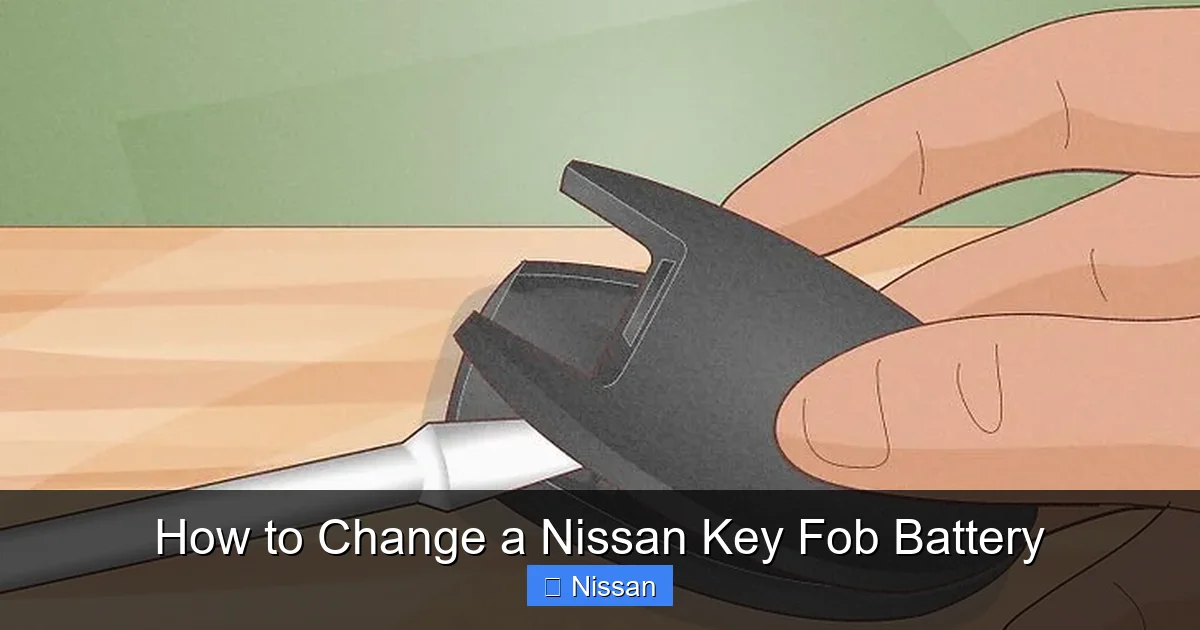
To open the key fob, you’ll need a tool to gently pry apart the two halves of the casing. A small flathead screwdriver (about 3–4 mm wide) works best, but if you don’t have one handy, a coin—like a quarter or a nickel—can do the job in a pinch. Avoid using anything too sharp or metal-heavy, as it could scratch or crack the plastic.
Some newer Nissan key fobs have a small release button or a sliding mechanism, but most still rely on a simple snap-fit design. The seam where the two halves meet is usually visible around the edge of the fob. Look for a small indentation or notch—this is where you’ll insert your tool to begin opening it.
Clean Workspace and Good Lighting
Find a clean, well-lit area to work. A clutter-free surface helps prevent losing small parts, and good lighting ensures you can see the tiny components inside the fob. Natural light or a bright lamp is ideal. If you’re working near a carpet, consider placing a towel or piece of paper underneath to catch any parts that might fall.
Optional: Tweezers and Magnifying Glass
While not essential, tweezers can be helpful for handling the small battery, especially if your fingers are large or if the battery is stuck. A magnifying glass or reading glasses can also make it easier to see the battery orientation and internal contacts. If you have them, keep them nearby just in case.
Step-by-Step Guide to Changing the Battery
Now that you’ve gathered your tools and materials, it’s time to get started. Follow these step-by-step instructions to safely and effectively replace your Nissan key fob battery. The process is straightforward and should take less than 10 minutes from start to finish.
Visual guide about How to Change a Nissan Key Fob Battery
Image source: wikihow.com
Step 1: Locate the Seam and Release Mechanism
Hold your key fob with the buttons facing up. Look around the edges for a thin seam separating the front and back halves. On most Nissan fobs, this seam runs along the side or bottom. Some models, like the newer Rogue or Altima, have a small button or slider near the key ring loop that must be pressed or moved to release the cover.
If your fob has a physical key inside (common in models like the Maxima or Frontier), you may need to remove it first. Look for a small release button near the key ring—press it and pull the key out gently. This often gives you better access to the seam and makes opening the fob easier.
Step 2: Open the Key Fob Casing
Insert your flathead screwdriver or coin into the seam at the designated notch. Apply gentle, steady pressure to pry the two halves apart. Start at one end and work your way around the edge. Avoid using excessive force—Nissan key fobs are made of durable plastic, but they can crack if pried too aggressively.
As you lift the top half, you’ll hear a soft “click” or feel the pieces separate. Once open, set the top half aside carefully. You should now see the internal circuit board and the battery compartment. Take a moment to observe how everything is arranged—this will help you reassemble it correctly later.
Step 3: Remove the Old Battery
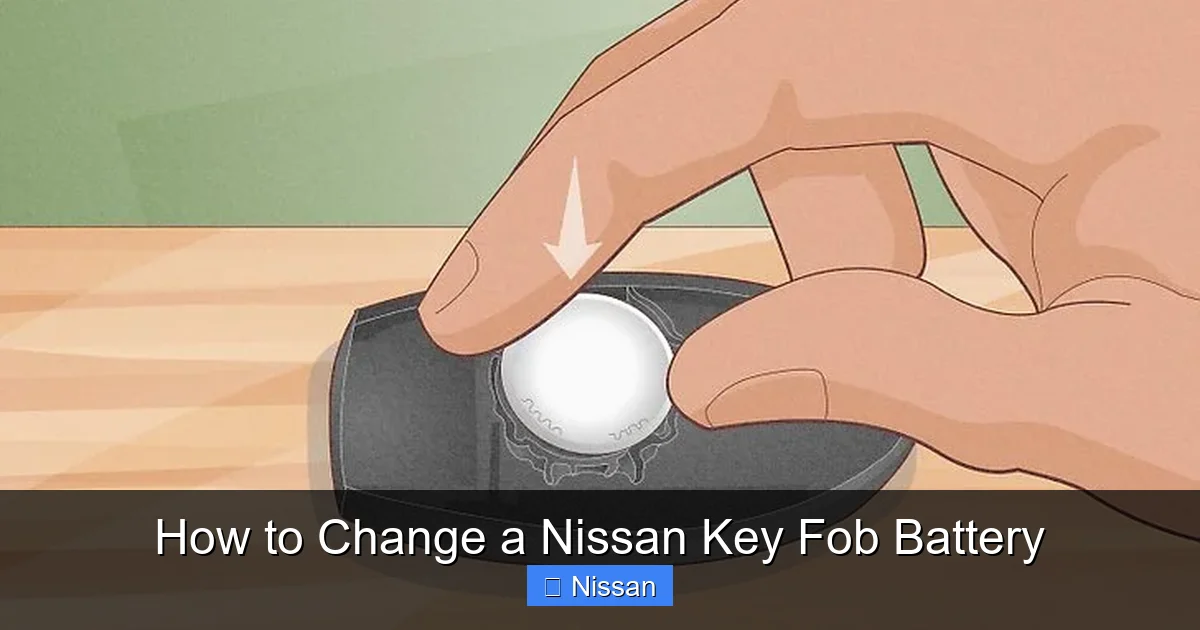
The battery is usually held in place by a small metal clip or a plastic bracket. It sits in a circular recess with the positive (+) side facing up. Use your fingernail, tweezers, or the edge of your screwdriver to gently lift the battery out. Be careful not to touch the circuit board or other components with metal tools, as this could cause a short.
Once the battery is out, take note of its orientation. The positive side (marked with a “+”) should be facing upward. This is crucial when inserting the new battery. If you’re unsure, compare it to the diagram on the new battery packaging or take a quick photo with your phone for reference.
Step 4: Insert the New Battery
Take your new CR2032 battery and place it into the compartment with the positive side up. Make sure it sits flat and secure in the recess. If the battery doesn’t fit snugly, double-check the orientation—it should drop in easily without forcing.
Some fobs have a small retaining clip that snaps over the battery. If yours does, gently press it down to secure the battery in place. Don’t worry if it doesn’t click loudly—just ensure the battery is stable and won’t move around when the fob is closed.
Step 5: Reassemble the Key Fob
Carefully align the two halves of the fob, making sure the buttons and circuit board are properly seated. Press the halves together firmly but gently until you hear a series of clicks indicating they’ve snapped back into place. Avoid twisting or bending the casing, as this can misalign internal components.
If your fob has a physical key, reinsert it by sliding it back into the slot until it clicks. Test the key to make sure it turns smoothly in the ignition or door lock.
Step 6: Test All Functions
Before you call the job done, test every button on the key fob. Stand a few feet away from your Nissan and press the lock, unlock, trunk, and panic buttons. Make sure each one responds promptly and consistently. If a button doesn’t work, open the fob again and check that the battery is properly seated and the contacts are clean.
If the fob still doesn’t work, try replacing the battery again—sometimes a brand-new battery can be defective. If multiple batteries fail, there may be an issue with the fob itself, such as corroded contacts or a damaged circuit board.
Tips to Avoid Common Mistakes
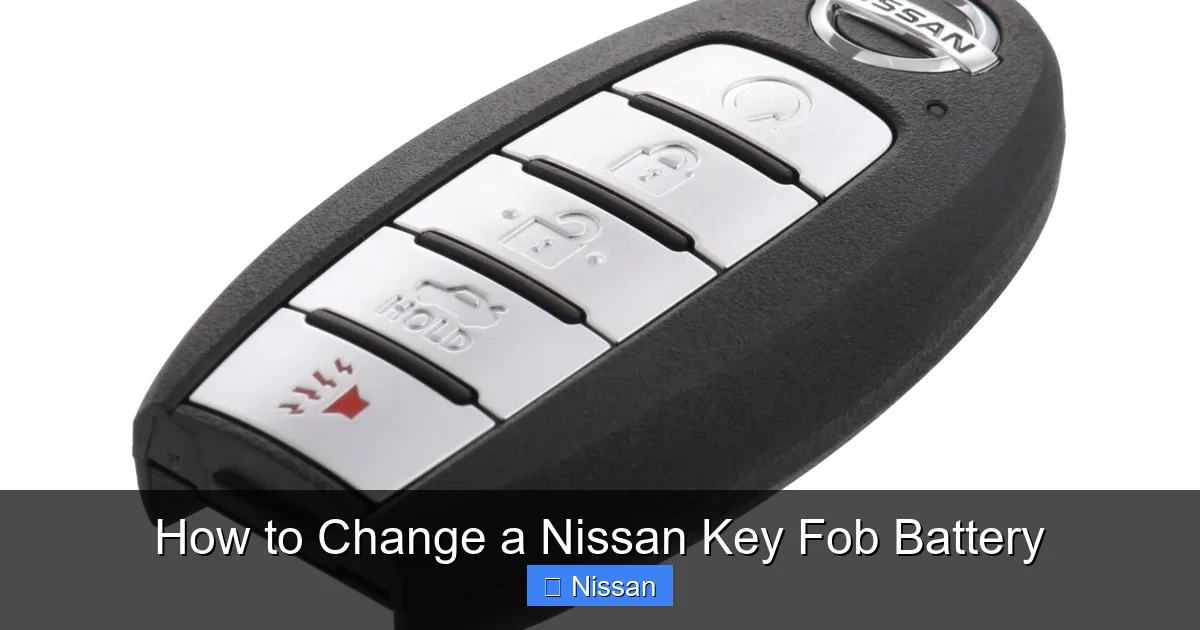
Even though changing a Nissan key fob battery is simple, a few common mistakes can lead to frustration or damage. Here are some practical tips to help you avoid them and ensure a smooth, successful replacement.
Visual guide about How to Change a Nissan Key Fob Battery
Image source: pictures.dealer.com
Don’t Force the Casing Open
One of the most frequent errors is using too much force when prying open the fob. Nissan key fobs are designed to snap together, but the plastic can crack if you use a screwdriver like a crowbar. Always start at the designated seam and apply even, gentle pressure. If it’s not opening easily, double-check that you’re at the right spot—some fobs have hidden release mechanisms.
Keep Track of Small Parts
It’s easy to lose the tiny battery or a small screw if your fob has one. Work over a tray or piece of paper to catch anything that might fall. If you drop the battery, don’t panic—just pick it up carefully and wipe it clean with a dry cloth before reinserting.
Avoid Touching the Circuit Board
The internal components of your key fob are sensitive to static electricity and oils from your skin. Try to handle only the edges of the fob and the battery itself. If you accidentally touch the circuit board, it’s usually not a problem, but it’s best to minimize contact to prevent long-term damage.
Use the Correct Battery Orientation
Inserting the battery upside down is a common mistake that can prevent the fob from working. Always double-check that the positive (+) side is facing up. If the fob doesn’t work after replacement, this is the first thing to verify.
Don’t Skip the Test
It’s tempting to close the fob and walk away once the battery is in, but always test all functions. A quick test ensures everything is working and saves you from discovering a problem later when you’re in a hurry.
When to Seek Professional Help
While most Nissan key fob battery replacements are straightforward, there are situations where it’s better to consult a professional. Knowing when to DIY and when to call in help can save you time, money, and frustration.
Fob Still Doesn’t Work After Replacement
If you’ve replaced the battery correctly and the fob still doesn’t function, there may be a deeper issue. Corroded battery contacts, a damaged circuit board, or water damage could be to blame. In these cases, a locksmith or Nissan dealership can diagnose and repair the fob—or provide a replacement if necessary.
Water Damage or Physical Damage
If your key fob has been dropped, exposed to moisture, or shows signs of cracking or warping, internal components may be compromised. Attempting to repair it yourself could make the problem worse. A professional can assess the damage and recommend the best course of action.
Newer Models with Advanced Features
Some newer Nissan vehicles, especially those with proximity sensors or push-button start, may require reprogramming after a battery change. While this is rare, it’s worth checking your owner’s manual or contacting a Nissan service center if your fob doesn’t respond after replacement.
Warranty Concerns
If your vehicle is still under warranty, tampering with the key fob could potentially void certain coverage. In such cases, it’s safer to have the battery replaced by an authorized Nissan technician to avoid any complications.
How to Extend the Life of Your Key Fob Battery
Once you’ve successfully replaced your Nissan key fob battery, you’ll want it to last as long as possible. With a few simple habits, you can extend the life of your battery and reduce the frequency of replacements.
Avoid Extreme Temperatures
Heat and cold can degrade battery performance. Don’t leave your key fob in direct sunlight, on a car dashboard, or in a freezing glove compartment for long periods. Extreme temperatures can cause the battery to drain faster or even leak.
Keep It Clean and Dry
Dirt, dust, and moisture can interfere with the fob’s electrical contacts. Wipe the exterior with a dry cloth regularly, and avoid exposing it to water. If your fob gets wet, dry it thoroughly before use.
Minimize Unnecessary Use
Pressing the buttons when not needed—like repeatedly testing the lock function—can drain the battery faster. Use the fob only when necessary, and consider using the physical key for quick entries when the battery is low.
Store Properly When Not in Use
If you’re not using your car for an extended period, consider removing the battery from the fob to prevent slow drainage. Store the fob in a cool, dry place away from electronic devices that could cause interference.
Replace Before It Dies Completely
Pay attention to early warning signs like reduced range or slow response. Replacing the battery at the first sign of weakness can prevent being locked out unexpectedly.
Conclusion
Changing a Nissan key fob battery is a quick, easy, and rewarding DIY task that anyone can master. With just a CR2032 battery, a flathead screwdriver, and a few minutes of your time, you can restore full functionality to your key fob and avoid the cost and hassle of a dealership visit. Whether you drive an Altima, Rogue, Sentra, or any other Nissan model, the process is nearly identical—simple, safe, and effective.
By following the steps outlined in this guide, you’ll not only solve a common automotive annoyance but also gain confidence in handling small repairs yourself. Remember to test all functions after replacement, handle the battery with care, and recycle the old one responsibly. With proper maintenance and a few smart habits, your new battery can last up to three years or more, keeping your key fob reliable and ready whenever you need it.
Frequently Asked Questions
What type of battery does a Nissan key fob use?
Most Nissan key fobs use a CR2032 3-volt lithium coin cell battery. This is the standard for models like the Altima, Rogue, Sentra, and Maxima. Always check your owner’s manual or the old battery to confirm.
Do I need to reprogram my Nissan key fob after changing the battery?
In most cases, no. The majority of Nissan key fobs do not require reprogramming after a battery change. However, some newer models with advanced features may need a quick reset—consult your manual or a Nissan dealer if issues persist.
Can I use a different battery if I don’t have a CR2032?
No. Using a different battery type, such as a CR2025 or CR2016, can cause poor performance or damage the fob. Always use the exact battery specified for your model.
Why won’t my key fob work after replacing the battery?
Common causes include incorrect battery orientation, a defective new battery, or dirty contacts. Double-check that the positive side is up, clean the contacts with a dry cloth, and try a different battery if needed.
How often should I replace my Nissan key fob battery?
Most key fob batteries last 2–3 years, depending on usage. Replace it at the first sign of weak signal, slow response, or reduced range to avoid being locked out.
Where can I recycle my old key fob battery?
Used batteries should be recycled at designated locations such as auto parts stores (like AutoZone or O’Reilly), electronics retailers, or local hazardous waste facilities. Never throw them in the regular trash.
