
How Do You Turn Off the Brake Hold on a Toyota Corolla

Contents
- 1 Key Takeaways
- 2 📑 Table of Contents
- 3 Understanding Your Corolla’s Brake Hold System
- 4 Step-by-Step: How to Turn Off Brake Hold on Your Toyota Corolla
- 5 When and Why You Might Want to Disable Brake Hold
- 6 Troubleshooting: What If Brake Hold Won’t Turn Off?
- 7 Brake Hold vs. Auto Hold vs. Parking Brake: Clearing the Confusion
- 8 Safety First: Best Practices When Using or Disabling Brake Hold
- 9 Conclusion: Your Car, Your Control
- 10 Frequently Asked Questions

Car Glass Cleaner

LED Emergency Road Flares

Anti-Slip Dashboard Mat

Car Vacuum Cleaner (Portable)
The brake hold feature in your Toyota Corolla automatically keeps the brakes applied when you come to a complete stop, which is handy in traffic. Turning it off is simple: just press the dedicated “Brake Hold” button on your center console or dashboard, typically located near the gear shifter. The system will deactivate, and the indicator light on your instrument cluster will turn off. Remember, disabling it means you’ll need to manually keep your foot on the brake at long stops.
Key Takeaways
- Brake Hold is a convenience feature: It holds your Corolla stationary at a stop without you needing to keep your foot on the brake pedal, reducing fatigue in heavy traffic.
- Turning it off is immediate: You can disable Brake Hold at any time by pressing the physical “Brake Hold” button; the change takes effect instantly.
- The system has prerequisites: For Brake Hold to activate or stay on, your seatbelt must be fastened, the driver’s door must be closed, and the engine must be running.
- It is not a parking brake: Brake Hold only works when the vehicle is moving and comes to a stop. It will not hold the car on a hill indefinitely and is not a substitute for the parking brake.
- Disabling is driver preference: Some drivers prefer to turn it off when towing, driving on very steep hills, or in situations where they want full manual control without any system intervention.
- A warning light indicates status: A “Brake Hold” indicator (usually a green “HOLD” or similar symbol) on your dashboard glows when the system is active and ready to hold the vehicle.
📑 Table of Contents
- Understanding Your Corolla’s Brake Hold System
- Step-by-Step: How to Turn Off Brake Hold on Your Toyota Corolla
- When and Why You Might Want to Disable Brake Hold
- Troubleshooting: What If Brake Hold Won’t Turn Off?
- Brake Hold vs. Auto Hold vs. Parking Brake: Clearing the Confusion
- Safety First: Best Practices When Using or Disabling Brake Hold
- Conclusion: Your Car, Your Control
Understanding Your Corolla’s Brake Hold System
So, you’re sitting at a long red light in your trusty Toyota Corolla, your foot is getting tired, and you notice a little “HOLD” symbol glowing on your dash. That’s the Brake Hold system working its magic. It’s a fantastic piece of technology designed to take the strain off your leg during those annoying stop-and-go commutes. But what happens when you want to be in full, manual control? Maybe you’re about to tow a trailer, you’re navigating a tricky hill, or you just prefer the old-school feel of keeping your foot on the pedal. Knowing how to turn off the brake hold on a Toyota Corolla is a simple yet important skill for every driver.
This system is part of Toyota’s broader suite of driver-assist technologies. It works in conjunction with your vehicle’s electronic brakeforce distribution and anti-lock braking systems. When you come to a complete stop, it automatically maintains hydraulic pressure in the brake lines, holding the car in place. As soon as you touch the accelerator, it releases seamlessly. It’s wonderfully intuitive… until you need it not to be. Let’s break down exactly what this feature is, how it works, and most importantly, the clear, simple steps to disable it.
How Brake Hold Actually Works
Think of Brake Hold as an extra pair of robotic feet on your brake pedal. When you press the brake pedal firmly to stop, the system activates. Once you come to a full stop, it takes over, keeping the brake calipers applied. You can then take your foot off the pedal. The system will keep the car stationary on level ground and on mild grades. It’s crucial to understand that it is not a parking brake. If you shift into Park (P) or turn off the engine, the Brake Hold disengages automatically, and the parking brake (if you have an electronic parking brake) may engage, or you must use the traditional parking brake lever/button.
For the system to function, several conditions must be met: your seatbelt must be fastened, the driver’s door must be closed, and the engine must be running. If any of these are not true, the system will not activate, and you’ll see a warning message on your multi-information display. This is a key safety feature to prevent the system from holding the car if the driver is not properly situated or the car is not running.
Step-by-Step: How to Turn Off Brake Hold on Your Toyota Corolla
Disabling the Brake Hold feature is refreshingly straightforward. There is no deep dive into complicated vehicle settings menus for the basic on/off function. Toyota provides a dedicated, easy-to-reach physical button for this exact purpose. The process is identical across most recent Corolla model years, from the 2014 redesign through the current generation.
Visual guide about How Do You Turn Off the Brake Hold on a Toyota Corolla
Image source: i.pinimg.com
Method 1: The Quick Button Press
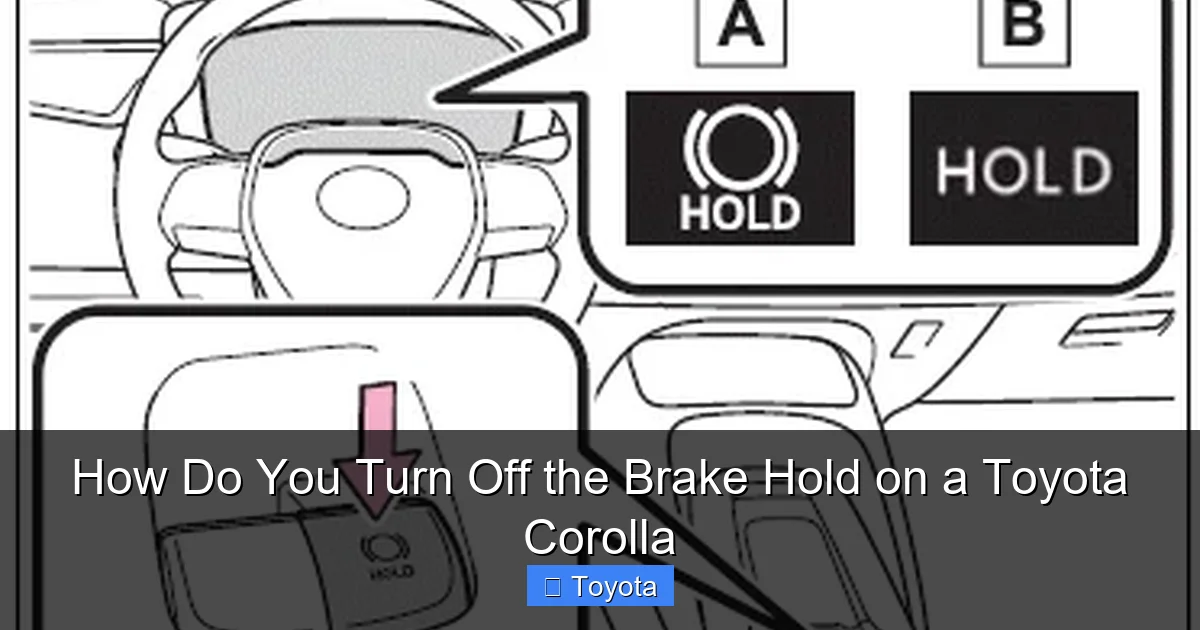
This is the primary and fastest method. Locate the Brake Hold button. It’s almost always on the center console, within easy reach of the driver’s right hand. It’s typically to the left of the gear shifter, near the electronic parking brake switch (if equipped) or the drive mode select button. The button itself usually has a clear icon—a circle with “HOLD” inside or a stylized brake disc with the word “HOLD.”
- Step 1: Start your Corolla. Ensure the engine is running.
- Step 2: Press the Brake Hold button firmly. You will often feel a tactile click.
- Step 3: Look at your instrument cluster. The green “HOLD” indicator light should turn off. If it was previously on, it will extinguish immediately. If it was off, it will remain off. The system is now disabled.
That’s it! From this point forward, until you press the button again, your Corolla will not engage Brake Hold when you stop. You will be responsible for holding the car with the brake pedal at all stops. The system will also not be “armed” and ready to activate automatically on your next stop.
Method 2: Turning It Off Permanently via Vehicle Settings (If Available)
On some newer Toyota models with more advanced multi-information displays, there might be an option to change the default behavior of Brake Hold. However, for the vast majority of Corollas, the physical button is the only direct control. The button acts as a toggle—press it to turn it on, press it again to turn it off. There is no “permanent off” setting in the standard menu system that overrides the button’s last state. The car simply remembers the last state of the button (on or off) from your last drive. So, if you turn it off using the button before you turn off the car, it will be off when you start it next time. If you want it off consistently, get in the habit of pressing the button after you start driving. For those interested in customizing other dashboard displays or vehicle settings, you might explore the “Vehicle Settings” menu on your touchscreen or odometer display, but you will not find a master switch for Brake Hold there. For more on navigating your Corolla’s various settings and displays, you might find our guide on how to change the time on a 2022 Toyota Corolla helpful, as it walks through the display menu system.
When and Why You Might Want to Disable Brake Hold
While Brake Hold is a fantastic convenience feature for daily commuting, there are several legitimate scenarios where turning it off is the smarter, safer choice. It’s not about the feature being “bad”—it’s about using the right tool for the job.

Visual guide about How Do You Turn Off the Brake Hold on a Toyota Corolla
Image source: i.ytimg.com
Towing a Trailer or a Heavy Load
This is the most critical reason to disable Brake Hold. When you’re towing, the extra mass of a trailer changes the dynamics of your vehicle completely. The Brake Hold system is calibrated for the weight of the unloaded Corolla. With a trailer, the system may not be able to hold the combined weight securely on an incline, leading to a potentially dangerous rollback. The manual control and heightened awareness required when towing mean you should always have both feet ready—one on the brake, one ready on the accelerator. Disable Brake Hold before you even connect the trailer and begin your trip.
Driving in Hilly or Mountainous Terrain
On steep hills, especially when stopped on an incline, the Brake Hold system’s holding power might be insufficient. You might feel the car creep backward slightly before the system catches itself. This can be unnerving and may not provide the secure hold you need. In these situations, it’s safer and more controlled to use the traditional foot brake and be prepared to transition smoothly to the accelerator. For drivers who frequently encounter steep grades, turning off Brake Hold becomes a habitual part of the pre-drive routine.
Frequent Stop-and-Go Traffic with Quick Starts
Paradoxically, in very dense, moving traffic where stops are extremely brief and you’re constantly moving just a few feet, some drivers find the automatic engagement and release of Brake Hold to be slightly laggy or hesitant. They prefer the immediate, direct response of manually pressing and releasing the brake pedal. It’s a matter of personal feel and the specific traffic pattern. If you feel the system is causing you to hesitate or react differently, try turning it off for a day and see if your driving flow improves.
Winter Driving and Slippery Conditions
On ice or snow, the last thing you want is any unexpected system intervention. While Brake Hold is designed to be smooth, its automatic release when you touch the gas could potentially cause a wheel spin if you apply too much throttle too quickly on a slippery surface. By turning it off, you have absolute, granular control over the brake release and throttle application, allowing for the gentlest possible starts to avoid wheel spin. This falls under the general principle of minimizing automatic systems when driving in low-traction conditions.
Troubleshooting: What If Brake Hold Won’t Turn Off?
What happens if you press the button, but the little “HOLD” light on your dash stays stubbornly illuminated? Or, conversely, what if the light is on and you can’t seem to make it activate when you stop? These issues usually point to one of a few common problems.

Visual guide about How Do You Turn Off the Brake Hold on a Toyota Corolla
Image source: tochr.net
System Prerequisites Not Met
The most common reason Brake Hold won’t activate or will deactivate itself is because one of its safety conditions is not met. Check these first:
- Is your seatbelt fastened? An unbuckled driver or passenger (in some models) will disable the system.
- Is the driver’s door fully closed? Ajar doors will trigger a warning.
- Is the engine running? The system requires the ignition to be in the “ON” or “RUN” position, not just “ACC.”
- Is the parking brake engaged? If the electronic parking brake is active, Brake Hold will not work.
- Is there a system fault? If the Brake Hold indicator is blinking or a warning message appears on your screen (like “Brake Hold System Unavailable”), there may be an issue with the brake switch, wheel speed sensors, or other components. In this case, a diagnostic scan at a dealership or trusted mechanic is needed.
The Button Itself Might Be Faulty
Like any physical switch, the Brake Hold button can wear out or become sticky. If pressing it doesn’t produce a click or the light state never changes, the button may need to be replaced. This is a relatively simple and inexpensive fix for a technician. Before assuming the worst, try pressing it a few times firmly but gently to see if it’s just stuck.
Recent Battery Disconnect or Software Glitch
Sometimes, after a battery drain or a jump-start, the car’s various electronic modules can get into a confused state. A Brake Hold system that was working fine before might act up. The first step is often a full system reset. Turn the car completely off, remove the key (or press the start/stop button to the “OFF” position without the brake), open and close the driver’s door, and wait about 5 minutes. This allows all control modules to fully power down. Then restart the car and try the Brake Hold button again. If problems persist, it’s time for a professional look. For other common Toyota dashboard warnings, our article on how to reset the check engine light on a Toyota Corolla covers similar reset procedures for different systems.
Brake Hold vs. Auto Hold vs. Parking Brake: Clearing the Confusion
This is a frequent point of bewilderment for many drivers. Your Corolla’s dashboard and manual might use different terms, and it’s easy to mix them up. Understanding the distinct purposes of each is key to using your car safely and correctly.
Brake Hold (What We’ve Been Discussing)
As described, this is a convenience feature for temporary stops. It holds the car at a stoplight or in traffic. It disengages automatically when you press the accelerator or when you shift to Park/Neutral or turn off the car. It uses the main braking system.
Auto Hold (Often Confused with Brake Hold)
Some Toyota models (and many European brands) have a feature called “Auto Hold.” The function is very similar—it holds the car at a stop. The main difference is often in the activation. Auto Hold might activate automatically once you come to a stop after driving at a certain speed, whereas Brake Hold typically requires you to press the button to “arm” it before your stop. The Toyota Corolla in most markets uses the term “Brake Hold” and the button-activated method. If your car has a separate “Auto Hold” indicator, consult your owner’s manual, but the control method is likely the same button. To learn about another common Toyota hold/assist feature, check out our explanation of what the hold button on a Toyota Corolla is, which clarifies this exact terminology.
Electronic Parking Brake (EPB) / Parking Brake
This is a safety and security system, not a convenience feature for traffic. The parking brake is designed to hold the vehicle securely when parked, on any grade, for an indefinite period. It is mechanically engaged (even if electronically controlled) and should be used every time you park, especially on hills. It is activated by a separate button (often with a “P” icon) or by pulling a lever. You should never use Brake Hold as a parking brake. Always engage the proper parking brake when parked.
Safety First: Best Practices When Using or Disabling Brake Hold
Treat Brake Hold as a helpful assistant, not a replacement for attentive driving.
- Always be ready: Even with Brake Hold active, keep your foot poised over the brake pedal. Be prepared to brake immediately if the system fails or if a vehicle behind you is approaching too quickly.
- Know your surroundings: On a steep hill, even with Brake Hold on, be prepared to add a little more brake pressure manually if you feel the car rolling back before you press the gas.
- Disable for specific scenarios: Remember the key reasons to turn it off: towing, steep hills, slippery conditions, or if it simply doesn’t match your driving style.
- Don’t rely on it for parking: Make it a habit to always use the dedicated parking brake (button or lever) when you park, regardless of whether Brake Hold was just used.
- Check your mirrors: When Brake Hold is active and you’re stopped, be extra aware of traffic behind you. The system holding the car steady might give drivers behind you a false sense that you’re about to move, so use your turn signals early when you do decide to go.
By understanding these systems, you become a more confident and capable driver. If you’re interested in mastering other Toyota Corolla features, from activating Sport Mode to managing automatic headlights, we have detailed guides to help you get the most out of your vehicle.
Conclusion: Your Car, Your Control
The brake hold feature on your Toyota Corolla is a brilliant example of modern engineering designed to make daily driving a little less tedious. It works seamlessly for thousands of miles of commute. But true mastery of your vehicle comes from knowing how to use its tools—and when to put them away. Turning off the brake hold is not a rejection of technology; it’s an exercise in appropriate application. Whether you’re hooking up a camper for a weekend trip, tackling a mountain pass, or simply prefer the direct connection of foot-to-pedal, the process is a simple, one-button operation. Remember the location of that “HOLD” button on your console. Make it part of your pre-drive ritual when the situation calls for it. By doing so, you maintain complete control, ensure safety for yourself and others, and get exactly the driving experience you want from your reliable Corolla. Now, go ahead and try it—press that button, see the light go out, and enjoy the feeling of pure, unassisted braking control.
Frequently Asked Questions
Will turning off Brake Hold affect my regular braking or my parking brake?
No. Disabling Brake Hold only stops the automatic holding function at traffic stops. Your main brake pedal and parking brake operate completely independently and will work exactly as normal. You must always use the parking brake when parked.
My Brake Hold light stays on even after I press the button to turn it off. Is this normal?
No, that indicates a problem. The light should extinguish immediately when you press the button to disable the system. If it stays on, check that all prerequisites are met (seatbelt, door, engine running) and try a full system reset by turning the car off and waiting a few minutes. If it persists, have the system scanned for faults.
Is it safe to drive with Brake Hold permanently turned off?
Absolutely. It is a convenience feature, not a safety requirement. Many drivers choose to never use it. Driving with it off simply means you are responsible for holding the brake pedal at every stop, which is how all cars worked before this technology existed.
Does Brake Hold use extra fuel or wear out my brakes faster?
Negligibly. The system uses existing brake hydraulic pressure maintained by the ABS pump. It does not significantly increase brake wear compared to a human holding the pedal, and it has no direct impact on fuel economy. Any potential wear differences are minimal.
Why does my Brake Hold sometimes disengage by itself even when I’m still stopped?
The system may disengage if it detects a fault, if the driver’s door is opened, if the seatbelt is unbuckled, if the engine is turned off, or if you shift out of Drive (into Neutral or Park). It also may disengage if it senses the vehicle is on a steep grade beyond its holding capability.
Can I reset or recalibrate the Brake Hold system myself?
There is no user-activatable “reset” button. A simple system reset (turning the car off for several minutes) can clear temporary glitches. For persistent issues or after certain repairs (like brake work), a professional scan tool is required to recalibrate the system’s sensors and actuators at a dealership or qualified shop.







