
How to Program a Kia Key Fob

Programming your Kia key fob at home is often possible and can save you significant money. The process varies by model year and key type, requiring specific steps and sometimes a working original key. While many 2026 Kia models allow owner programming, some advanced smart keys require professional equipment. Always consult your owner’s manual first and be prepared with a fresh battery for best results.
There’s nothing quite like the frustration of a dead or lost Kia key fob. That little piece of plastic and metal is your ticket to freedom, and when it fails, your day can come to a screeching halt. The good news? For many Kia owners in 2026, programming a replacement or spare key fob is a skill you can learn, saving you a hefty trip to the dealership. But it’s not as simple as pressing a few buttons. The process is a dance between your key fob’s internal chip and your car’s computer, and every Kia model has its own unique steps. This guide will walk you through everything you need to know, from understanding your key type to executing the perfect programming sequence, and knowing exactly when it’s time to wave the white flag and call a professional.
We’ll break it down in plain language. No confusing jargon, just clear instructions. Whether you drive a compact Kia Rio, a family-friendly Sorento, or the rugged new 2026 Kia Sportage, we’ve got you covered. First things first: let’s identify what kind of key you’re dealing with, because that determines your entire path forward.
Key Takeaways
- Compatibility is key: Your ability to program a Kia key fob depends heavily on your specific model year and whether it uses a standard remote, a push-start smart key, or a proximity key. 2026 models increasingly use encrypted systems that may limit DIY programming.
- You often need one working key: Most self-programming sequences for Kia vehicles require at least one already-programmed, functioning key fob to initiate the “learning” mode for a new fob.
- The right tools matter: At minimum, you’ll need a fresh CR2032 (or correct) battery for the new fob and your vehicle’s owner’s manual. Some models may require an OBD2 port programmer for full functionality.
- Processes differ by model: A 2026 Kia Telluride’s procedure will differ from a 2020 Kia Forte’s. Always verify the exact steps for your vehicle using the manual or a reliable source.
- Know when to call a pro: If your key is a ” dealer-proximity” key or your vehicle won’t enter programming mode with the standard sequence, a locksmith or dealership with the correct scan tool is necessary.
- Security features are a barrier: Kia’s immobilizer system uses a unique chip code. Programming simply copies the signal; it cannot bypass a lost, all-original-key situation without professional cryptographic programming.
- Testing is crucial: After programming, test all functions—lock, unlock, trunk, panic—from various distances before considering the job complete.
📑 Table of Contents
- Understanding Your Kia Key Fob: It’s More Than Just Buttons
- Preparation: The “Measure Twice, Cut Once” Phase
- Step-by-Step Programming Procedures for Common Kia Scenarios
- Troubleshooting: Why Your Programming Attempt Failed
- Advanced Features: Programming More Than Just Locks
- When to Seek Professional Help: The Smart Move
- Conclusion: Empowerment Through Knowledge
Understanding Your Kia Key Fob: It’s More Than Just Buttons
Before you buy a new fob or start pressing buttons, you need to know what you have. Kia uses several different key technologies, and the programming method is tied directly to the key’s design. Using the wrong method for your key type is the most common reason for failure.
The Three Main Types of Kia Keys (2026 Focus)
Standard Remote Key Fob: This is the classic, separate key head with buttons for lock, unlock, trunk, and panic. It has a physical metal key blade that inserts into the door. Programming this type is often the simplest and most commonly done by owners. It relies on a sequence of button presses and ignition cycles.
Push-Button Start Smart Key (Proximity Key): This key is usually a fob you keep in your pocket or purse. There’s no physical key blade to insert. The car detects its presence via radio frequency. Pressing the brake and the push-button starts the engine. Programming these is more complex. Some models allow a sequence using the ignition and buttons, but many 2026 models require a professional scan tool to write the key’s code to the car’s immobilizer module.
Key Card / Switchblade Key: Less common but found on some Kias, this is a credit-card-sized key that flips out a blade. Programming is similar to the standard remote fob but often has a specific sequence involving the key blade in the door lock.
Pro Tip: Your owner’s manual is your best friend. The “Keys” or “Remote Keyless Entry” section will explicitly state if owner programming is possible and list the exact steps. If you don’t have a manual, Kia’s official website often has digital copies for your specific model year and trim.
Why Your Model Year is Critical
Kia, like all automakers, has been steadily increasing the security and complexity of its key systems. A 2015 Kia Optima’s standard fob can likely be programmed with a simple 10-second sequence. A 2026 Kia EV9’s smart key almost certainly cannot be programmed without a dealership-level diagnostic computer due to advanced encryption and rolling code technology. As a general rule, if your vehicle has a push-button start and no physical key backup, assume you’ll need professional help unless your manual explicitly states otherwise. For those with a physical key blade, your odds of DIY success are much higher.
Preparation: The “Measure Twice, Cut Once” Phase
You wouldn’t start a road trip without checking your tires and fuel. Don’t start programming without this prep work. Skipping these steps leads to the most common failures.
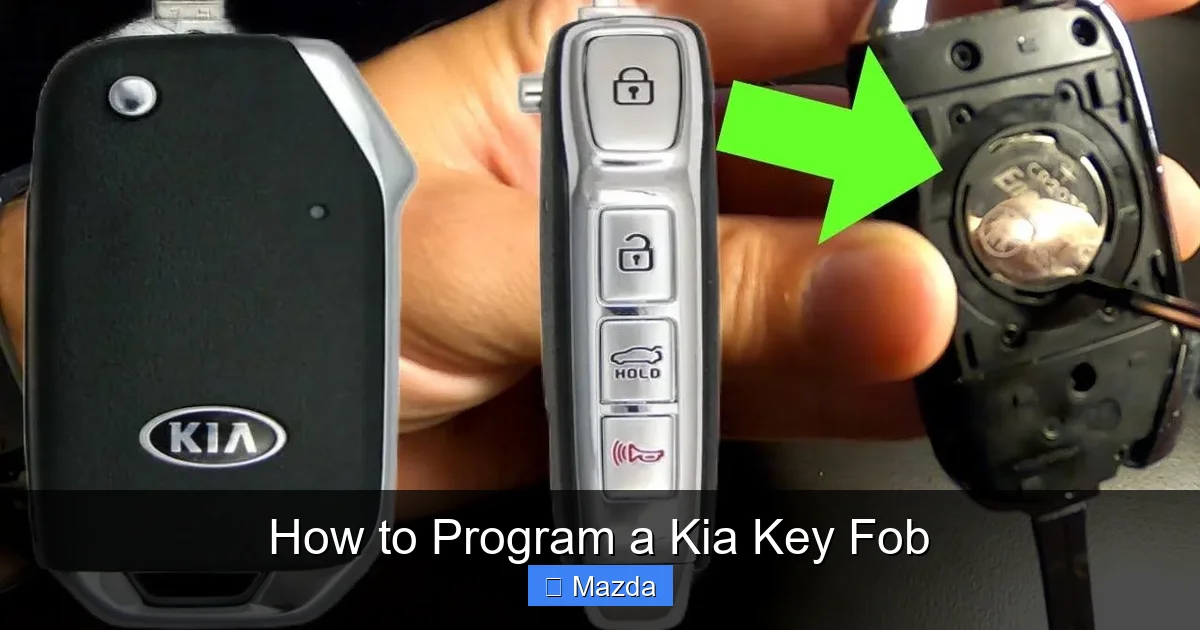
Visual guide about How to Program a Kia Key Fob
Image source: i.pinimg.com
Gather Your Tools and Materials
This is a simple list, but each item is non-negotiable:
- The New, Unprogrammed Key Fob: Ensure it’s the correct part number for your exact Kia model, year, and trim. A fob for a 2022 Sportage won’t work on a 2026 Seltos. When in doubt, provide your VIN to the parts supplier.
- A Fresh Battery: Always install a new, high-quality CR2032 (or specified) battery in the new fob before you start. A weak battery is a silent killer of programming sequences. Keep the old battery out until the moment you begin.
- Your Working (Original) Key Fob: For most owner-programmable Kias, you need at least one already-programmed key to be present and working in the car. This key is your “master” for the sequence.
- Your Vehicle’s Owner’s Manual: Have the exact page for key programming open and ready. Follow it precisely.
- A Quiet, Interference-Free Zone: Do this away from other vehicles, large metal objects, or strong radio sources. You want a clear, clean signal between your fob and the car’s receiver, usually located near the steering column.
Vehicle Readiness Checklist
Your Kia must be in a specific state to accept a new key. This is universal:
- All doors must be closed and unlocked. This is critical. An open or locked door will abort the sequence.
- The ignition must be in the “ON” position (but engine off). Turn the key (or press the start button without the brake) to the “RUN” or “ACC” position where the dashboard lights come on.
- No other key fobs should be inside the vehicle. Remove all keys, fobs, and key cards from the interior. The car’s system can get confused by multiple signals.
- Your phone’s Bluetooth and other wireless devices should be off or away. While not always necessary, it eliminates potential signal interference.
Understanding the “Learn Mode” Concept
When you initiate the programming sequence, your Kia’s Body Control Module (BCM) enters a temporary “learn mode.” In this mode, it’s actively listening for a signal from a compatible, unprogrammed key fob. Your job is to get the car into this mode and then press the buttons on the new fob in the correct timing so the car “hears” and stores its unique code. The entire window for this is often very short—sometimes just 10-30 seconds. That’s why reading the manual and acting quickly is so important. If you miss the window, you usually have to restart the entire sequence from the beginning.
Step-by-Step Programming Procedures for Common Kia Scenarios
This is the heart of the matter. We’ll cover the most common, owner-programmable sequences. Remember: Your owner’s manual is the final authority. These are general templates.

Visual guide about How to Program a Kia Key Fob
Image source: surelockkey.com
Scenario 1: Programming a Standard Remote for a Kia with a Physical Key (e.g., older Forte, Rio, Sedona)
This is the most straightforward DIY process. Here is a very common sequence, but verify yours:
- Enter Learn Mode: Sit in the driver’s seat with all doors closed and unlocked. Insert your original, working key into the ignition. Turn it to the “ON” position (dashboard lights on, engine off). Wait 1-2 seconds.
- Cycle the Ignition: Turn the key back to “OFF” and remove it. Immediately, within 5 seconds, re-insert it and turn it back to “ON.” Do this ON-OFF-ON-ON cycle quickly (total of three “ON” positions, with the last one held). The parking lights should flash once, or you may hear a chime, indicating learn mode is active. If you don’t see or hear a confirmation, consult your manual—the timing is precise.
- Program the New Fob: Once in learn mode (you have about 10-30 seconds), press and release the LOCK button on your new, unprogrammed fob. The parking lights should flash again to confirm acceptance.
- Test and Exit: Turn the ignition “OFF.” Remove the original key. Test the new fob: lock and unlock the doors. If it works, you’re done. If not, restart the entire sequence from step 1. Some systems require you to press the button on the new fob while the ignition is in the “ON” position from step 2—the manual will specify.
Practical Tip: If you have multiple new fobs, you can often program them all at once once in learn mode by pressing the lock button on each fob within the time window. The system will store each code sequentially.
Scenario 2: Programming a Push-Button Start Smart Key (Limited DIY Possibility)
This is where things get tricky for 2026 models. A sequence that might work on a 2018 Optima will fail on a 2024+ Carnival. The most common owner method is:
- Enter the vehicle with all doors closed. Place the original, working smart key in the cup holder or on the center console (some models require it to be in a specific “key pocket”).
- Press the brake pedal, then press the ENGINE START/STOP button once. The car should enter “ACC” mode (accessory mode, lights on, engine off). Do not start the engine.
- Within 30 seconds, place the new, unprogrammed smart key in the same designated spot (consult manual).
- Press the brake pedal and then the ENGINE START/STOP button again. The system should recognize the new key. You may see a message on the instrument cluster like “Key Learned” or hear a series of beeps.
- Test the new key by pressing the start button with the brake (engine should start) and using the lock buttons on the fob.
Critical Warning: If this sequence fails, or if your manual states “Programming requires a dealer,” stop. Forcing the issue can sometimes lock the system, requiring a full reset by a professional. For advanced smart keys, a tool like the general car key fob programmer we discuss in our broader guide is often necessary, which is why many owners opt for professional help for this key type.
Scenario 3: Adding a Spare Key Using the “Two-Key Method”
Some Kias use a method where you use two already-programmed keys to add a third. This is less common now but exists on certain models.
- Ensure you have two working, programmed keys.
- Follow a specific sequence: Insert Key 1, turn ON, then OFF. Remove Key 1. Immediately insert Key 2, turn ON, then OFF. Remove Key 2. Immediately insert the new key, turn ON, and wait 5 seconds, then turn OFF.
- The new key should now be programmed. This method is finicky and requires perfect timing between key removals and insertions.
Troubleshooting: Why Your Programming Attempt Failed
Don’t panic if it doesn’t work on the first try. Here’s a diagnostic checklist:

Visual guide about How to Program a Kia Key Fob
Image source: i.ytimg.com
The Usual Suspects: Battery, Timing, and Sequence
- Dead/Weak Battery in New Fob: This is the #1 cause. Replace the battery with a fresh, name-brand one.
- Incorrect Sequence or Timing: Did you move too fast or too slow? The ON-OFF-ON cycle must be within a 5-second window. Practice without the new fob first.
- Doors Not Fully Unlocked: Even a slightly ajar door or a door that is locked will prevent learn mode. Physically check each door handle.
- Interference: Move away from other cars, garages, or large metal structures. Try programming inside the vehicle with the windows up.
- Wrong Key Fob: Double-check the part number. A fob for a Hyundai might look identical but will not program to a Kia. The internal transponder chip is different.
Signs You’ve Hit a System Limitation
If you’ve triple-checked everything and it still fails, you’ve likely encountered one of these:
- “Maximum Number of Keys Learned” Message: Your car’s memory is full. It can only store a set number of keys (usually 3-4). You must use a professional scan tool to erase old keys before adding a new one.
- No Response at All: No lights, no chimes. The car never entered learn mode. This often means your model does not support owner programming for that key type.
- Engine Starts but Fob Buttons Don’t Work: This means the immobilizer chip was programmed (the car starts) but the remote functions (lock/unlock) were not. This requires a separate, often professional, procedure for the remote control frequency.
- Your 2026 Model Uses Encrypted Proximity Keys: As of the 2024-2026 model years, most Kia SUVs and sedans with push-button start use encrypted keys that require a proprietary dealer scan tool (like the Kia GDS) to program. No aftermarket tool can replicate this security yet.
Advanced Features: Programming More Than Just Locks
Your Kia key fob likely does more than lock the doors. Programming these additional features can sometimes be done separately.
Programming the Trunk Release
Many Kia fobs have a dedicated trunk button. This is often programmed automatically when you program the lock/unlock functions. If it doesn’t work after a successful programming, it may need a separate, quick sequence. Often, it involves pressing and holding the trunk button for 3-5 seconds while the car is in learn mode. Check your manual for “Trunk/Glass Hatch Release” programming.
Integrating Homelink and Garage Door Openers
This is a separate system from your car’s key programming. The Homelink buttons in your rearview mirror or overhead console are programmed to learn the signal from your garage door remote, not from your Kia’s computer. The process involves putting your garage door opener’s remote into “learn mode” and then pressing the Homelink button in your car. It’s a direct pairing between the two devices. For detailed steps, see our specific guide on how to program a Kia garage door opener.
Remote Start Features (If Equipped)
If your Kia has a factory remote start, the fob button for it (often a separate circular button) is typically programmed alongside the other functions during the main key programming sequence. There is rarely a separate process. However, if your vehicle has an aftermarket remote start system, its programming is entirely separate and follows the instructions from that system’s manufacturer.
When to Seek Professional Help: The Smart Move
Knowing your limits is a sign of a smart DIYer. Here’s when to call in the cavalry:
The Dealership vs. Automotive Locksmith Debate
If you need professional programming, you have two main options.
- Kia Dealership: They have the official Kia Global Diagnostic System (GDS) and the latest software updates. They are guaranteed to have the right equipment and can program any key, including the most advanced 2026 encrypted smart keys. However, they are almost always the most expensive option. You’ll pay for the key itself, the programming fee (often $80-$150+), and possibly a “key code” fee. For a Kia key replacement at a dealer, expect a total bill of $250-$500+ depending on the key type.
- Certified Automotive Locksmith: A reputable, mobile locksmith who specializes in automotive keys is often 30-50% cheaper than a dealer. They invest in high-end, multi-brand diagnostic tools (like the Autel, Launch, or Snap-on equivalents) that can program many Kia keys. Crucially, you must call and ask: “Do you have the capability to program a 2026 Kia [Your Model] smart key/proximity key?” If they say yes, they are your best bet for cost savings and convenience (they come to you).
Scenarios That Absolutely Require a Pro
- You have lost all original keys. The car has no programmed key to initiate the owner sequence. This requires “on-board programming” with a scan tool to write the first key to the immobilizer.
- Your vehicle is a 2024 or newer model with push-button start and no physical key slot. Assume it needs a dealer/locksmith.
- You’ve tried the owner sequence multiple times and it fails. Further attempts may lock the system.
- The key fob you purchased is a “blank” with no pre-cut blade. You will need a locksmith or dealer to cut the physical key to match your ignition/door, then program the chip.
Conclusion: Empowerment Through Knowledge
Programming a Kia key fob is a perfect example of a task that sits on the border of DIY and professional service. For owners of older Kias with standard remotes and a physical key, it’s a fantastic, money-saving skill to master. The process is logical, repeatable, and deeply satisfying when you hear that final *click* and see the doors lock. For the vast majority of 2026 Kia owners with advanced smart keys, the landscape has shifted. The high-security encryption that keeps your car safe from theft is the same technology that puts the programming firmly in the hands of equipped professionals.
Your takeaway should be this: Open your owner’s manual first. It will tell you definitively if you can do it yourself. If it says you can, follow the steps meticulously—prepare, time your actions, and eliminate interference. If it says you can’t, or if your attempts fail, don’t waste hours in frustration. Call a reputable automotive locksmith. The cost of a professional service is the price of expertise, and for a job that secures your $30,000+ investment, it’s often money very well spent. Whether you DIY or call for help, you’re now equipped with the knowledge to navigate the situation confidently and get back on the road.
Frequently Asked Questions
Can I program a Kia key fob myself?
Yes, but only for certain key types and model years. Kias with a standard remote and a physical key blade (typically pre-2020 models) often allow owner programming through an ignition sequence. However, most 2024-2026 models with push-button start and proximity keys require a professional scan tool.
What tools do I need to program my Kia key fob?
At a minimum, you need the new, unprogrammed key fob with a fresh battery, your vehicle’s owner’s manual, and one already-programmed working key. For some models, you may also need an OBD2 port programmer tool, which is typically used by professionals.
How long does it take to program a Kia key fob?
If your model supports owner programming and you have all materials ready, the actual sequence takes less than 30 seconds. However, factoring in preparation, troubleshooting if it fails, and multiple attempts, you should set aside 15-20 minutes. Professional programming at a locksmith or dealer usually takes 20-45 minutes.
What if my Kia won’t enter programming mode?
First, double-check that all doors are closed and unlocked, the ignition is in the correct position, and no other fobs are inside. Ensure you are using the correct sequence with precise timing. If it still fails, your model may not support owner programming for that key type, or your system may be at maximum key capacity, requiring a professional reset.
Is there a difference between programming a smart key and a standard key fob?
Yes, a significant one. A standard remote key fob programs the remote control functions (lock/unlock) and often the immobilizer chip through a simple button/ignition sequence. A smart key (push-button start) involves programming the proximity and encryption to the vehicle’s security system. This almost always requires specialized, dealer-level software for modern models.
Can I reuse an old Kia key fob if I get a new car?
No. The key fob’s internal transponder chip is permanently coded to your specific Kia’s vehicle identification number (VIN) and immobilizer system. You cannot take a programmed fob from one Kia and use it on another, even if they are the same model and year. Each vehicle must learn its own keys individually.
