
How Do I Renew My Toyota Remote Connect Subscription?

Renewing your Toyota Remote Connect subscription is a straightforward process you can complete in minutes through the Toyota app, your owner portal, or with help from your dealer. Your subscription powers essential connected services like remote engine start, vehicle health alerts, and emergency assistance. Keep your Toyota connected and secure by ensuring your subscription is active before its expiration date.
So, you’re getting a notification that your Toyota Remote Connect subscription is about to expire. Maybe you’ve seen the little “subscription required” message pop up on your dashboard screen when you try to use the remote start feature from your phone. Don’t worry—this is a common experience for Toyota owners, and renewing is usually a smooth, digital process. This guide will walk you through everything you need to know, step by simple step. We’ll cover what the subscription actually does, the different ways you can renew it, how to troubleshoot common problems, and why keeping it active is a smart move for your vehicle’s security and convenience.
Think of your Toyota Remote Connect subscription as the digital lifeline for your car’s connectivity features. It’s the service that lets your vehicle talk to the internet and, by extension, to your smartphone. Without an active subscription, those handy remote functions—like locking the doors from the grocery store parking lot, checking fuel levels from your couch, or getting automatic maintenance alerts—simply won’t work. The good news is that Toyota has made the renewal process user-friendly, with options that fit your lifestyle. Whether you’re a tech-savvy app user or prefer talking to a person, you have a path forward. Let’s dive in and get your Toyota re-connected.
Key Takeaways
- Multiple Renewal Avenues: You can renew your Toyota Remote Connect subscription directly through the Toyota app, your MyT Toyota owner portal online, or by visiting your dealership.
- Check Your Status First: Always verify your current subscription status and expiration date in the Toyota app or owner portal before attempting to renew.
- Subscription Tiers Matter: Understand which Remote Connect services you have (e.g., Safety Connect, Service Connect, Remote Connect) as renewal options and costs can differ.
- Payment and Account Info: Ensure your payment method on file is valid and your Toyota account login credentials are correct to avoid renewal hiccups.
- Grace Periods Are Limited: Most subscriptions do not have a long grace period after expiration; services will disconnect, so renew promptly.
- Dealer Assistance is Available: Your Toyota dealer’s service department can help with renewal, account setup, and answering questions about your connected services.
📑 Table of Contents
- What Exactly is Toyota Remote Connect?
- Understanding Your Subscription and Expiration
- Method 1: Renewing Through the Toyota App (The Easiest Way)
- Method 2: Renewing via the MyT Toyota Owner Portal
- Method 3: Renewing Through Your Toyota Dealer
- Method 4: Renewing Over the Phone with Toyota Customer Service
- Troubleshooting: What If Renewal Doesn’t Work?
- The Cost: What to Expect When You Renew
- Why Bother Renewing? The Real Value of Staying Connected
- Conclusion: Keep Your Toyota in the Loop
What Exactly is Toyota Remote Connect?
Before we tackle the “how,” it’s crucial to understand the “what.” Toyota Remote Connect is an umbrella term for a suite of connected services delivered through your vehicle’s embedded telematics system (often called a “TCU” or telematics control unit). It’s not a single feature but a bundle of capabilities that require an active paid subscription to function beyond the initial trial period that comes with most new Toyotas.
The Core Services Within the Bundle
Your specific Remote Connect package might include some or all of the following services, which are often tiered:
- Remote Connect: This is the heart of it. It enables the Toyota app on your smartphone to communicate with your vehicle. Features include remote engine start/stop (for climate control), lock/unlock doors, locate your vehicle on a map, honk the horn and flash lights, and check vehicle status (fuel level, odometer, tire pressure).
- Safety Connect: This is the emergency and safety layer. It includes automatic collision notification (which can alert emergency services if your airbags deploy), an SOS button for manual emergency calls, and roadside assistance.
- Service Connect: This provides proactive maintenance alerts, diagnostic trouble code notifications, and the ability to schedule service appointments directly through the app.
- Driver Connect: A newer feature that can offer personalized in-vehicle experiences based on recognized drivers, though availability varies by model and region.
When you first set up your Toyota, you likely enjoyed a trial period—often 1 to 3 years—of these services for free. The renewal prompt means that trial is ending. The exact services you retain depend on the subscription plan you choose to renew. You can often renew just the base Remote Connect features or opt for a bundle that includes Safety Connect.
Understanding Your Subscription and Expiration
You can’t renew what you don’t understand. The first practical step is to confirm exactly what you have and when it ends. This information is readily available but buried in a few digital places.
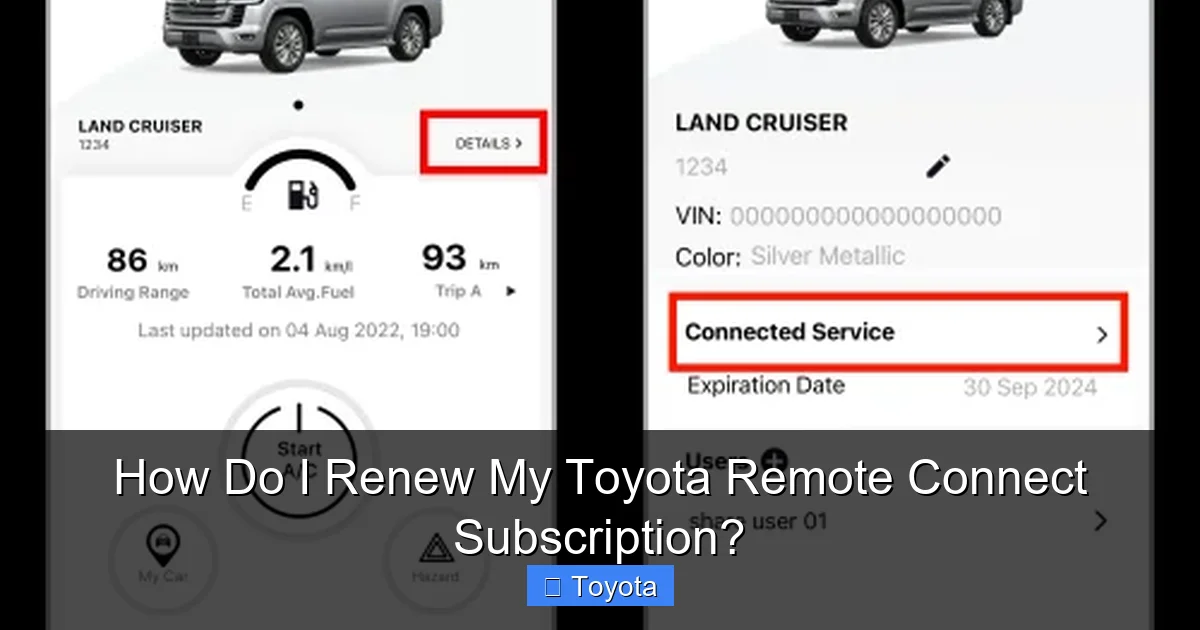
Visual guide about How Do I Renew My Toyota Remote Connect Subscription?
Image source: faq.toyota-connect.com
How to Check Your Current Subscription Status
There are three primary ways to check:
- The Toyota App: This is the easiest method. Open the app on your phone. Log in (ensure you’re using the same account linked to your vehicle). On the main screen or in a menu (often under “Vehicle” or “Settings”), you should see a section for “Connected Services” or “Subscription.” It will list your active services and their expiration dates. Look for a banner or notification about renewal.
- MyT Toyota Owner Portal: Go to the official Toyota owner website (mytoyota.toyota.com or your regional equivalent) and log into your account. Navigate to your vehicle’s profile page. There is typically a “Connected Services” or “Subscription” tab that displays the same information as the app.
- In-Vehicle Display: Sometimes, your car’s infotainment screen will display a message when you start the car, or you can find the status by going into the “SETTINGS” menu, then “Connected Services” or “Toyota Connected Services.”
Take note of the exact expiration date. Services usually cut off at 12:01 AM on the expiration date in your time zone. It’s best to renew a few days before to avoid any lapse in service.
Why Does My Subscription Have an Expiration?
Toyota, like most automakers, offers these connected services on a subscription basis after the complimentary trial. The revenue from subscriptions helps fund the ongoing costs of maintaining the telematics hardware in your car, the cellular data plans that keep it connected, and the development of the cloud-based servers and app infrastructure that make remote control possible. It’s a shift from a one-time hardware sale to an ongoing service relationship.
Method 1: Renewing Through the Toyota App (The Easiest Way)
For most people, renewing directly in the Toyota app is the fastest and most convenient method. It takes just a few taps, and you can do it from anywhere. Here’s a detailed walkthrough.
Visual guide about How Do I Renew My Toyota Remote Connect Subscription?
Image source: toyota-connect.com
Step-by-Step: Renewing in the App
- Open the Toyota App: Make sure you have the latest version installed from your device’s app store (Apple App Store or Google Play Store).
- Log In: Use the same username and password you set up when you first connected your car. If you’ve forgotten your password, use the “Forgot Password” link.
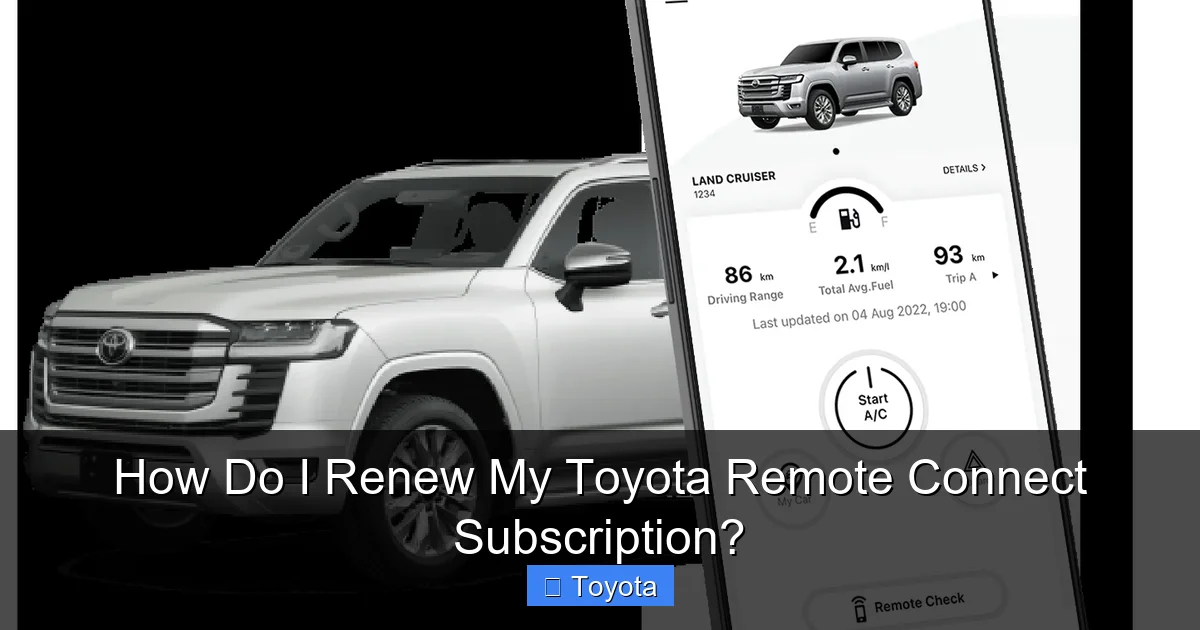
- Navigate to Subscriptions: On the home screen, look for your vehicle’s name or image. Tap on it to进入 your vehicle’s dashboard. Find a menu item labeled “Connected Services,” “Subscription,” “Manage Services,” or a gear/settings icon.
- View Your Plan: You’ll see your current plan (e.g., “Remote Connect & Safety Connect”) with its expiration date. There should be a prominent button that says “Renew Now,” “Subscribe,” or “View Plans.”
- Select Your Plan: Tap to see the available renewal options. You might have choices like:
- Monthly: Pay a smaller amount each month (e.g., $14.99/month).
- Annual: Pay a lump sum for a full year, which is usually cheaper per month (e.g., $149/year).
- Multi-Year: Sometimes 2 or 3-year plans are offered at a further discount.
- Choose Your Services: You may be able to customize your bundle. For example, you could renew just Remote Connect features or add Safety Connect for an additional fee.
- Enter Payment Information: If your payment method is already saved (like a credit card or PayPal), you can select it. If not, you’ll need to enter new, valid payment details. Double-check the card number, expiration date, and billing address.
- Review and Confirm: Carefully review the plan details, price, and billing cycle. Look for any auto-renewal clauses. Once you’re sure, tap “Confirm,” “Subscribe,” or “Complete Purchase.”
- Confirmation: You should receive an immediate on-screen confirmation and a receipt via email. The subscription status in the app should update to “Active” within a few minutes, though sometimes it can take up to 24 hours to fully propagate across Toyota’s systems.
Pro Tip: Ensure your smartphone has a stable internet connection (Wi-Fi or cellular data) during this process. A dropped connection could interrupt the payment.
Method 2: Renewing via the MyT Toyota Owner Portal
If you prefer using a computer or are having trouble with the mobile app, the web-based owner portal is a great alternative. The steps are very similar to the app but on a larger screen.
Visual guide about How Do I Renew My Toyota Remote Connect Subscription?
Image source: evto.ca
Step-by-Step: Renewing on the Website
- Go to the Website: Navigate to the official Toyota owner portal for your region (e.g., mytoyota.toyota.com for the US).
- Log In: Enter your account credentials. If you don’t have an account, you’ll need to create one. You’ll typically need your Vehicle Identification Number (VIN), which is on your registration or driver’s side dashboard, and proof of ownership.
- Select Your Vehicle: Once logged in, your linked vehicles will be displayed. Click on the one you need to renew services for.
- Find the Subscription Section: Look for tabs or links like “Connected Services,” “My Subscriptions,” “Manage Services,” or “Vehicle Services.”
- Review and Select: Your current plan and expiration will be shown. Click the button to “Renew,” “Subscribe,” or “Add Services.”
- Choose Plan & Payment: Select your desired plan term (monthly/annual) and any service tiers. Enter or select your payment method. The website will use a secure payment gateway.
- Complete the Transaction: Agree to the terms and complete the purchase. You should see a confirmation page and receive an email receipt.
- Activation: As with the app, activation is usually quick but can take up to 24 hours. You can check the status later in the portal or app.
Note: The owner portal is also an excellent place to manage your account details, update your address, add or remove payment methods, and view your entire billing history for connected services.
Method 3: Renewing Through Your Toyota Dealer
Not everyone is comfortable with online transactions, or perhaps your subscription renewal is bundled with a service visit. Your Toyota dealership’s service department is fully equipped to help you with subscription renewals.
What to Expect at the Dealer
You can call the service department, schedule an appointment, or even handle it while your car is in for an oil change or other maintenance. Here’s how it works:
- Call or Visit: Contact your preferred Toyota dealer’s service advisors. Tell them you need to renew your Remote Connect subscription. They can look up your account using your VIN or license plate.
- Discussion of Options: The advisor can explain the available plans, any current promotions (dealers sometimes have bundled offers), and answer questions about which services are best for your driving habits.
- Payment: You can pay over the phone with a credit card, in person at the service desk, or sometimes the charge can be added to your existing service invoice.
- Activation Assistance: The dealer can often verify that the subscription has been activated on their system immediately. In some cases, they may need to perform a brief software reset or re-provision the telematics module in your vehicle, which they can do quickly in the service bay. This is particularly helpful if you’re experiencing technical glitches.
- Hands-On Help: If you’re not tech-comfortable, the dealer can also help you download and log into the Toyota app for the first time, ensuring everything is linked correctly.
When to Use the Dealer Method: This is ideal if you have complex questions, want to bundle the subscription with a maintenance package, have had persistent activation issues, or simply prefer face-to-face interaction. There is typically no extra fee for the dealer to process the renewal; you only pay the subscription cost.
Method 4: Renewing Over the Phone with Toyota Customer Service
For those who prefer a phone call, Toyota’s customer care centers can process subscriptions. This method is less common now with the prevalence of the app and portal, but it remains an option.
- Find the Number: The phone number for Toyota Customer Experience (in the US, it’s often 1-800-331-4331) is on your owner’s manual, your window sticker, or the official Toyota website.
- Have Your Info Ready: Be prepared to provide your VIN, license plate, and current account information. They will verify your identity and vehicle ownership.
- Process the Payment: The representative will walk you through plan options and take your payment information over a secure line.
- Confirmation: You will receive a verbal confirmation and an email or mailed receipt. Activation timelines are the same as online methods.
Caution: Be wary of third-party websites or sellers on auction sites offering “cheap” Remote Connect renewals. Always go through official Toyota channels (the app, official website, or an authorized dealer) to avoid scams and ensure your subscription is legitimate and properly activated.
Troubleshooting: What If Renewal Doesn’t Work?
Sometimes, the process hits a snag. Here are the most common issues and how to solve them.
“Payment Failed” or “Card Declined”
This is the most frequent hurdle. First, double-check your card number, expiration date, CVV, and billing address. Ensure your bank has not flagged the charge as fraudulent (a call to your bank can resolve this). Make sure your card has sufficient funds or credit limit. If using a debit card, ensure it’s enabled for online/international transactions. Try a different payment method (another card or PayPal if offered).
Can’t Log Into My Account
Use the “Forgot Password” or “Reset Password” link on the login page. Check your email (and spam folder) for the reset instructions. If you never set up an account, you’ll need to create one, which requires your VIN and proof of ownership (like a registration document). If your email has changed, you may need to call customer service to update it on your Toyota account.
Vehicle Not Showing in My Account/App
First, ensure you’re logged into the correct account. The vehicle is linked to the account that was used to initially activate the trial. If you are the new owner, you may need to have the previous owner release the vehicle from their account, or you may need to visit a dealer to have the telematics module re-provisioned to your account. You will need your ownership documents for this process.
Subscription Shows Active, But Features Don’t Work
This can be a synchronization delay. Wait 24-48 hours after renewal. If it persists, try these steps:
- Restart Your Vehicle: Turn the car completely off, remove the key (or press the start/stop button until the dash goes dark), wait 2 minutes, and restart.
- Restart Your Phone: Power off your smartphone completely and turn it back on. Re-open the Toyota app.
- Check Cellular Signal: Your car needs a cellular signal to communicate. If you’re in a remote area or a parking garage, move to a location with better signal. The “no signal” icon may appear on your dash.
- Re-Login to the App: Log out of the Toyota app and log back in.
- Consult Your Dealer: If none of the above works, there may be a hardware or module issue. A dealer can run diagnostics on the telematics unit.
The Cost: What to Expect When You Renew
Pricing for Toyota Remote Connect subscriptions varies by model year, region, and the specific bundle you choose. Toyota frequently runs promotions, especially for first-time renewals.
Typical Pricing Structures (US Market Example)
- Remote Connect Only: Often around $14.99/month or $149/year.
- Remote Connect + Safety Connect: This is the most common bundle, typically priced around $19.99/month or $199/year.
- All-Inclusive Bundles: Some newer models may offer a bundle that includes Driver Connect, Service Connect, and more, potentially priced higher.
These prices are subject to change. Always check the exact price in your app or portal, as it will be tailored to your vehicle and location. Annual commitments are almost always more cost-effective than monthly. Keep an eye out for “lock-in” rates where you pay for a year or two at a guaranteed price to avoid future increases.
What’s Included in the Price?
The subscription fee covers the ongoing cellular data service for your vehicle, access to the Toyota cloud servers, and the continuous development and maintenance of the Toyota app. There are no hidden data usage fees for you—the car uses a dedicated, built-in SIM card with its own data plan covered by your subscription.
Why Bother Renewing? The Real Value of Staying Connected
It’s easy to see the subscription as just another bill. But for many Toyota owners, the value far outweighs the cost. Here’s what you keep by renewing:
Unmatched Convenience and Peace of Mind
- Climate Control: The #1 used feature is remote engine start. Warm up your car in winter or cool it down in summer before you even step outside. This is huge for comfort and can even help defrost windows faster.
- Security: Forget if you locked the door? Check and lock it instantly from your phone. Honk the horn and flash lights to locate your car in a crowded lot. This is a powerful anti-theft and convenience tool.
- Vehicle Health: Service Connect alerts you to potential issues (like a failing battery or low oil pressure) before they become major, costly problems. You can also get maintenance reminders based on actual driving conditions, not just a generic mileage interval.
- Safety Net: Safety Connect’s automatic collision notification is a literal life-saver. If you’re in a serious accident and are incapacitated, help is dispatched automatically to your vehicle’s location. The SOS button is there for any other emergency.
- Roadside Assistance: Locked your keys in? Got a flat? A simple tap in the app can connect you to roadside assistance, often with better response times than a traditional membership because your exact location is transmitted.
- Resale Value: A vehicle with an active, transferable connected services subscription can be a selling point. A buyer may value the remaining subscription period, effectively giving you a return on your investment.
If you rely on these features daily, the subscription isn’t a luxury—it’s a utility. For others, the safety components alone make it worthwhile. Consider your personal needs: Do you frequently forget if your car is locked? Do you live in an extreme climate? Do you want the latest maintenance alerts? Your answers will guide your decision.
Conclusion: Keep Your Toyota in the Loop
Renewing your Toyota Remote Connect subscription is a simple but important task to maintain the smart, connected capabilities of your vehicle. By now, you should know exactly where to check your status, the three main renewal methods (app, web portal, dealer), how to troubleshoot common problems, and the tangible benefits you’re keeping. The process is designed to be user-friendly, taking less than five minutes if you have your payment info ready.
Don’t wait until the last day. Mark your calendar for a week before your expiration date. Log into the Toyota app, verify your subscription end date, and choose your renewal plan. Think of it as a small, regular investment in your car’s longevity, your personal safety, and your daily convenience. Your Toyota is more than just a machine; with an active Remote Connect subscription, it becomes a connected partner that looks out for you and makes your life a little easier. Take a few minutes now, and enjoy the seamless connectivity for another year or more.
Frequently Asked Questions
How will I know when my Toyota Remote Connect subscription is about to expire?
You will receive multiple notifications. Toyota typically sends an email to the address on your account 30-60 days before expiration. Your Toyota app will also display prominent banners and notifications on the vehicle dashboard screen. You can always check the exact expiration date manually in the app under Connected Services.
Is there a grace period after my subscription expires?
There is no guaranteed grace period. Services are designed to terminate at 12:01 AM on the expiration date. In rare cases, you might have a few hours where some functions sporadically work, but you should not rely on this. To avoid any lapse in safety or convenience features, renew a few days early.
Can I renew my subscription for more than one year at a time?
Yes, often you can. The Toyota app and owner portal frequently offer 1-year, 2-year, and sometimes 3-year renewal plans. Multi-year plans usually provide a discount compared to paying month-to-month and protect you from potential annual price increases.
If I sell my car, can I get a refund for my unused subscription?
Generally, no. Subscriptions are tied to the vehicle’s VIN and are non-refundable. However, you can often transfer the remaining subscription period to the new owner, which can be a selling point. The new owner will need to call Toyota customer service with the bill of sale to have the subscription re-linked to their account.
Do I need to renew my subscription if I rarely use the connected features?
Technically, no. If you never use remote start, vehicle tracking, or the safety services, you can let it expire and your car will still operate normally. However, consider that Safety Connect’s automatic collision notification is a passive safety feature that works even if you never actively use the app. It’s a valuable “just in case” feature.
Can I use my Toyota Remote Connect subscription while traveling internationally?
This depends on your vehicle’s telematics module and the regions covered by Toyota’s global connected services partnerships. In North America, services work in the US, Canada, and Puerto Rico. For travel to Europe or Asia, coverage is limited or non-existent. Check Toyota’s official website for the specific coverage map for your vehicle model and year before relying on it abroad.
