
How to Clear the Maintenance Light on a Toyota Camry

The maintenance light on your Toyota Camry is a helpful reminder, not an emergency. You can reset it yourself in under 30 seconds using the odometer button or trip meter reset. However, you should only clear it after performing the required oil change or service. This guide provides detailed, model-specific instructions for every Camry generation.
Key Takeaways
- The light is a reminder, not a malfunction: The “MAINTENANCE REQUIRED” or wrench icon light illuminates based on a mileage or time interval set by Toyota. It does not indicate a problem with your car’s computer.
- Always service first, reset second: You must complete the necessary maintenance—typically an oil and filter change—before resetting the light. Resetting it without servicing defeats its purpose and can lead to engine damage.
- The process is simple and tool-free: For most Camry models (1997-2024), you only need the ignition key and the odometer/trip meter reset button on the dashboard. No special tools or a mechanic are required for the reset itself.
- Method varies slightly by model year: The exact button sequence differs between pre-2012 models (using the odometer) and 2012+ models (using the trip meter). Identifying your Camry’s generation is the first step.
- If the light returns quickly, investigate: A properly reset light should stay off for thousands of miles. If it reappears soon after, the system may not have been reset correctly, or there could be an underlying electrical issue.
- Consult your owner’s manual: Your manual has the definitive procedure for your specific vehicle. It’s the best resource if our guide doesn’t match your exact trim or year.
- Resetting is safe and won’t cause damage: Performing the reset procedure is a standard, manufacturer-approved action. It simply tells the car’s computer that the service interval has been addressed.
[FEATURED_IMAGE_PLACEHOLDER]
📑 Table of Contents
- Introduction: That Little Wrench on Your Dashboard
- Understanding Your Camry’s Maintenance Reminder System
- Method 1: The Classic Reset (Pre-2012 Models)
- Method 2: The Trip Meter Reset (2012-Present Models)
- What If the Light Won’t Reset or Comes Back Immediately?
- The Bigger Picture: Why Following the Maintenance Schedule Matters
- Advanced Scenarios and Model-Specific Notes
- Conclusion: A Simple Task with a Big Impact
Introduction: That Little Wrench on Your Dashboard
You’re driving your reliable Toyota Camry, and everything feels perfect. Then, you glance at the instrument cluster and see it: a small, persistent wrench icon or the words “MAINTENANCE REQUIRED.” It’s not the check engine light, which usually signals a problem. This is your car’s friendly, electronic nudge. It’s saying, “Hey, it’s been 5,000 miles or 6 months since my last oil change. Time for some love!”
For many Camry owners, this light triggers a minor sigh. The service itself is a necessary, routine expense. But the good news is that clearing the maintenance light on a Toyota Camry is one of the simplest DIY tasks you can do. It takes less than a minute, requires no tools, and costs nothing. This comprehensive guide will walk you through exactly how to do it for every generation of Camry, from the late 1990s to the current 2024 model. We’ll explain why the light comes on, why you must service first, and what to do if the light is stubborn. Let’s get that wrench off your dash and back to worry-free driving.
Understanding Your Camry’s Maintenance Reminder System
Before we dive into button-pushing, it’s crucial to understand what you’re dealing with. The maintenance required system in your Toyota Camry is not a magic predictive computer. It’s a relatively simple timer and mileage counter built into the instrument cluster or body control module.
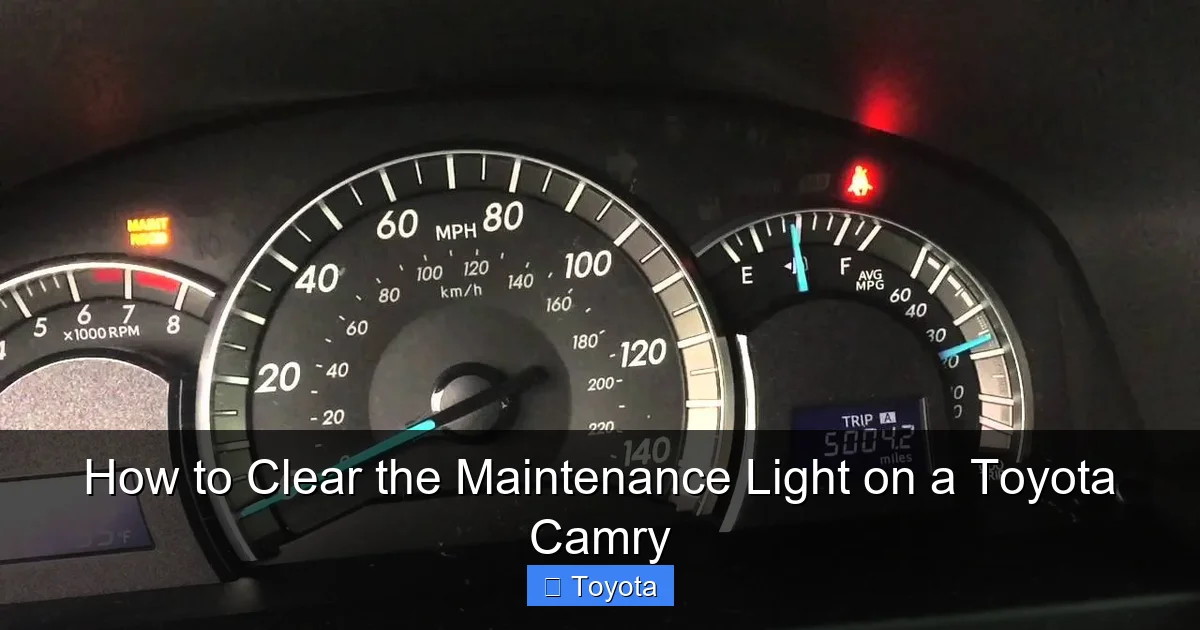
Visual guide about How to Clear the Maintenance Light on a Toyota Camry
Image source: i.ytimg.com
How Does It Know When to Light Up?
The system is pre-programmed by Toyota with a service interval. For decades, this has typically been set to illuminate every 5,000 miles (or 8,000 kilometers) or every 6 months, whichever comes first. This interval aligns with the traditional recommendation for oil changes in normal driving conditions. When your Camry’s odometer reaches the programmed mileage threshold or the internal timer reaches the time threshold, the light turns on. It will stay on continuously until you manually reset it. It does not monitor oil life, engine health, or tire pressure—it’s purely a mileage/time counter.
Why You Must Never Skip the Actual Service
The golden rule: Always perform the required maintenance before you reset the light. This is non-negotiable. The light is a safety and reliability feature designed to protect your engine. Resetting it without changing the oil and filter means your engine will continue running on degraded oil, which loses its lubricating and cleaning properties. This can lead to increased wear, sludge buildup, and eventually, catastrophic engine failure. The cost of an engine rebuild or replacement is thousands of dollars—a far cry from the $50-$100 for a standard oil change. Think of the light as a trusted advisor; you wouldn’t fire an advisor who reminds you to pay your bills, would you? You’d pay the bills and then thank them. Do the same for your Camry.
Method 1: The Classic Reset (Pre-2012 Models)
If you own a Toyota Camry from model years 1997 through 2011 (including the popular 2007-2011 sixth generation), your reset procedure uses the traditional odometer display. This method is famously simple and is the one most people remember.

Visual guide about How to Clear the Maintenance Light on a Toyota Camry
Image source: oilreset.com
Step-by-Step for 1997-2011 Camry Models
Ensure your car is parked safely with the parking brake set. The engine should be off. You do not need to turn the ignition to “ON” for the first step.
- Turn the ignition key to the “ACC” (Accessory) position. This is the position right after “OFF” where the radio and dash lights come on, but the engine is not running. If your car has a push-button start, press the “START/STOP” button once without touching the brake pedal to enter accessory mode.
- Locate the “ODO/TRIP” button. This is the small button on the dashboard, usually near the speedometer or on the instrument cluster itself. It’s used to toggle between the odometer and trip meter A/B displays.
- Turn the key to the “ON” position (or press the start button twice without braking). All dash lights will illuminate, and you’ll see the odometer reading. Do not start the engine.
- Press and hold the “ODO/TRIP” button. While holding it down, you should see the odometer display begin to cycle or flash. Keep holding it.
- After about 5-10 seconds of holding, the display will change. It will often show a series of dashes “—–” or a counter resetting to zero. This indicates the maintenance reminder has been cleared.
- Release the button and turn the ignition off. Wait a second, then start the engine. The maintenance required light should be gone.
Pro Tip: If the light doesn’t go out, make sure you are holding the button long enough. The display change is your confirmation. Also, ensure your car is in “Park” (or “Neutral” for manuals), as some models require this for the reset to engage. If you’re still having trouble, a quick search for “how to reset maintenance light on a 2010 Toyota Camry” will yield video tutorials specific to that exact year, showing the exact display behavior.
Method 2: The Trip Meter Reset (2012-Present Models)
Starting with the 2012 model year (the seventh generation), Toyota changed the procedure for most Camry models. They moved away from the odometer display and now use the trip meter reset function. It’s equally simple but a different sequence.

Visual guide about How to Clear the Maintenance Light on a Toyota Camry
Image source: oilreset.com
Step-by-Step for 2012-2024 Camry Models
Again, ensure the car is parked and the engine is off. No need to start it.
- Turn the ignition to the “ON” position. Press the start button twice without your foot on the brake, or turn the key to “ON.” All dash lights will come on.
- Using the “ODO/TRIP” button, display “TRIP A” or “TRIP B.” Press the button until the trip meter (not the main odometer) is showing on the screen. You’ll see “TRIP A” or “TRIP B” in the display.
- Turn the ignition “OFF.” Press the start button again or turn the key to “OFF.” The dash lights will go out.
- Now, press and hold the “ODO/TRIP” button. While holding it down, turn the ignition back to the “ON” position (step 2). Keep holding the button.
- Watch the trip meter display. After a few seconds (5-10), the trip meter will start to count up rapidly or display a series of zeros/dashes. This is the reset confirmation.
- Continue holding until it stops counting and displays “000000” or shows zero. Then, release the button.
- Turn the ignition off and restart the engine. The maintenance required light should be extinguished.
Important Note for Hybrid Owners: The procedure for the Toyota Camry Hybrid is identical to the gas models from the same year. The system is the same. There is no separate “hybrid maintenance” light reset; it uses the same wrench icon. For any specific quirks, your owner’s manual is the final authority. The consistency across Toyota’s lineup is actually helpful; you’ll find a similar process for other models like the Highlander or RAV4.
What If the Light Won’t Reset or Comes Back Immediately?
So you followed the steps perfectly, but that wrench is still glaring at you. Or worse, it went away for a day and then came right back. Don’t panic. This is uncommon but has a few logical explanations.
Common Reasons for a Stubborn Maintenance Light
- Incorrect Procedure: Double-check your model year. Are you using the odometer method on a 2015 Camry? That won’t work. You must use the trip meter method for 2012+. The timing of when you turn the key “OFF” and “ON” while holding the button is critical. Watch a video for your exact year to see the sequence.
- The System Wasn’t Actually Ready: Some systems require that the odometer reading is displaying (not the trip meter) when you first turn the key to “ON” in the pre-2012 method. For the post-2012 method, the trip meter must be displayed before you turn the key off.
- Low Battery Voltage: A severely weak car battery can sometimes interfere with the instrument cluster’s ability to complete the reset sequence. If your battery is old or the car has been sitting, try jump-starting it or charging the battery first, then repeat the reset.
- Faulty Instrument Cluster or Control Module: This is rare. If you’ve tried the correct procedure 5-6 times and the light persists, there could be a fault in the body control module (BCM) or the instrument cluster itself. This requires professional diagnosis with a scan tool.
- You Have a Different Light: Are you sure it’s the “MAINTENANCE REQUIRED” light? Camrys also have a “CHECK ENGINE” light (usually yellow/amber, an engine icon) and sometimes a separate “SERVICE ENGINE SOON” message. The process above is only for the maintenance reminder wrench or text. If you have a different light illuminated, you’ll need a different diagnostic approach. For example, resetting the airbag light is a completely different, often more complex, procedure.
Troubleshooting Checklist
If your reset fails, run through this list:
- Verify the exact model year and trim of your Camry.
- Review the owner’s manual procedure for that specific year.
- Ensure the car is in “Park” and all doors are closed (some systems are picky).
- Perform the procedure with a fully charged battery.
- Try the sequence 3-4 times in a row, being precise with the timing.
- Search online for “[Your Year] Toyota Camry maintenance light reset video.” Visual guidance is invaluable.
The Bigger Picture: Why Following the Maintenance Schedule Matters
It’s tempting to just clear the light and forget about it. After all, the car seems to run fine. But this is a short-sighted view that risks your Camry’s longevity and your wallet. Let’s connect the light to the real-world service it represents.
What Does “Maintenance Required” Typically Mean?
For the vast majority of Camrys on the road, this light means it’s time for an oil and filter change. That’s the primary service tied to the 5,000-mile interval. However, depending on the specific service schedule programmed for your model year and engine type (e.g., 2.5L 4-cylinder vs. 3.5L V6), the reminder might also be synced with other periodic services, such as:
- Tire rotation (often recommended at the same 5,000-mile interval)
- Cabin air filter replacement
- Engine air filter inspection/replacement
- Brake inspection
- Fluid level checks (coolant, brake, transmission)
Your owner’s manual will have a detailed maintenance schedule chart. The light is a generalized reminder for the “A” service (oil change) on that chart. More comprehensive “B” services (often at 30,000 miles) may require more work and reset the timer for a longer interval.
The Cost of Ignorance: Engine Damage from Old Oil
Modern engines are finely tuned machines with tight tolerances. They rely on clean, properly viscous oil to form a protective film between metal components. Over time and mileage, oil breaks down. It becomes contaminated with fuel, water, and metal particles. It loses its ability to lubricate, cool, and clean. Running an engine on oil past its service life causes:
- Increased Wear: Metal-on-metal contact grinds down bearings, piston rings, and camshafts.
- Sludge Formation: Therfore oil breakdown creates thick, abrasive sludge that can clog oil passages, starving the engine of lubrication.
- Overheating: Oil carries heat away. Degraded oil is less effective at cooling the engine’s internal parts.
The repair bill for a sludged or worn-out engine can easily exceed $5,000. A $75 oil change is the cheapest insurance policy you can buy for your engine. The maintenance light is your policy reminder. Resetting it without changing the oil is like turning off your smoke alarm instead of putting out the fire. For broader Toyota knowledge, understanding how to turn off the maintenance light on a Toyota in general is useful, but the principle always remains: service first, reset second.
Advanced Scenarios and Model-Specific Notes
While the procedures above cover 95% of Camrys, a few specific scenarios deserve mention.
The 2020+ Camry and Digital Gauge Clusters
Camrys from the 2020 model year onward, especially in higher trims, feature a full digital LCD instrument cluster. The process remains the same (trip meter method for 2012+), but the menu navigation might look slightly different. You might need to use the steering wheel-mounted arrow buttons to select the trip meter display on the screen before initiating the reset sequence. The core concept—turn on, display trip A, turn off while holding button, turn on while holding—remains unchanged. If your digital cluster has a “Settings” or “Vehicle” menu accessible via steering wheel controls, consult the manual, as some newer models might allow a menu-based reset.
After a Battery Disconnect
If you ever had to disconnect the battery (for a dead battery, starter replacement, etc.), the maintenance light will almost certainly come back on. This is because the clock and mileage counter in the body control module lose power and revert to default, forgetting the last reset mileage. You will need to perform the reset procedure again after your next scheduled oil change. The light coming on after a battery disconnect is normal and does not mean your car needs service immediately if you recently had an oil change.
The Wrench Icon vs. Text Display
Older Camrys (pre-2007ish) might show a small wrench icon. Newer ones often display the text “MAINTENANCE REQUIRED.” Some very new models may show a wrench icon in the digital display alongside a message. The reset procedure is identical regardless of whether you see an icon or text. It’s the same system.
Conclusion: A Simple Task with a Big Impact
Clearing the maintenance required light on your Toyota Camry is a quintessential piece of automotive self-sufficiency. It’s a 30-second task that puts you in control of your vehicle’s service schedule. By following the correct procedure for your model year—using the odometer for 1997-2011 models and the trip meter for 2012+ models—you can easily silence that dashboard wrench after you’ve completed the essential oil change.
Remember the critical caveat: never reset the light without performing the service it calls for. Doing so is a false economy that risks your engine’s health. View the light not as an annoyance, but as a helpful reminder from your car to take care of it. In return, your Camry will continue to provide the legendary reliability, comfort, and fuel efficiency it’s known for. Now that you know how, you can handle this small but important part of Camry ownership with confidence. For other common Toyota light resets, our library has guides on everything from tire pressure to more complex systems, but the maintenance light is always the first and most frequent one you’ll encounter.
Frequently Asked Questions
Can I reset the maintenance light without changing the oil?
Yes, you can physically perform the reset procedure without changing the oil, but you absolutely should not. The light is a critical reminder that your engine needs fresh oil. Resetting it without servicing defeats the safety system and can cause severe engine damage from running on degraded oil.
Why does my maintenance light come on after I just changed the oil?
This happens because the mechanic or you did not reset the maintenance reminder timer after the oil change. The system has no way of knowing you performed the service unless you manually reset it using the procedure in this guide. Always ask the shop to reset it, or do it yourself immediately after an oil change.
What’s the difference between the maintenance required light and the check engine light?
The maintenance required light (wrench icon or text) is a simple mileage/time counter for routine service like oil changes. The check engine light (engine icon) indicates a problem with the emissions, engine, or transmission system detected by the car’s computer and requires a diagnostic scan to identify the fault.
My 2015 Camry’s light won’t reset using the trip meter method. What now?
Double-check you are using the correct sequence: 1) Key ON, display TRIP A, 2) Key OFF, 3) Hold ODO/TRIP button while turning key back ON, 4) Hold until display resets. Ensure the car is in Park. Try a fully charged battery. If it still fails, consult your owner’s manual or a professional, as a rare module fault is possible.
Is the maintenance interval always 5,000 miles?
For most Camry models and normal driving conditions, Toyota’s default factory setting is 5,000 miles or 6 months. However, the interval can be adjusted by a dealer using specialized software, and some model years/engines may have different default intervals. Your owner’s manual specifies the exact interval for your vehicle.
Will disconnecting the battery clear the maintenance light?
No. Disconnecting the battery will not reset the maintenance required light. In fact, it may cause the light to come on if the system loses its stored mileage data. The light is reset through a specific electronic sequence using the dash button, not by clearing the car’s memory via battery disconnect.
