
How Many Battery Bars in Nissan Leaf?

The Nissan Leaf uses a visual battery bar display to show remaining charge, typically showing 12 bars when fully charged. Understanding these bars helps drivers estimate range and monitor battery health over time. This guide explains how the system works, what affects bar accuracy, and how to maintain optimal performance.
Key Takeaways
- Battery bars represent state of charge: The Nissan Leaf uses up to 12 bars to display how much energy is left in the battery, with each bar roughly equating to 8–10% of total capacity.
- Bars don’t equal miles directly: While bars give a quick visual cue, actual driving range depends on speed, weather, terrain, and driving habits.
- Battery degradation affects bar accuracy: Over time, as the battery ages, the number of usable bars may decrease, even if the display still shows 12 bars when “full.”
- Leaf models vary in battery size: Older models (like the 2011–2017 Leaf) have smaller 24–30 kWh batteries, while newer versions (2018+) offer 40–62 kWh packs, affecting how bars translate to range.
- Eco mode and climate control impact bars: Using heater or AC heavily can drain bars faster, especially in extreme temperatures.
- Regular charging habits matter: Avoiding deep discharges and frequent fast charging can help preserve battery health and bar consistency.
- Use the Leaf Spy app for deeper insights: Third-party tools like Leaf Spy provide more detailed battery data beyond what the dashboard shows.
📑 Table of Contents
- How Many Battery Bars in Nissan Leaf? A Complete Guide
- Understanding the Nissan Leaf Battery Bar System
- Battery Bars vs. Real-World Range
- Battery Degradation and Bar Accuracy
- Different Nissan Leaf Models and Battery Sizes
- Tips for Maintaining Battery Health and Bar Consistency
- Conclusion: Making the Most of Your Nissan Leaf Battery Bars
How Many Battery Bars in Nissan Leaf? A Complete Guide
If you’re driving a Nissan Leaf—or thinking about buying one—you’ve probably noticed the row of glowing bars on your dashboard. These aren’t just for show. They’re your car’s way of telling you how much juice is left in the battery. But how many battery bars are in a Nissan Leaf? And what do they really mean?
The short answer: Most Nissan Leaf models display up to 12 battery bars when the car is fully charged. Each bar represents roughly 8–10% of the total battery capacity. So, 12 bars = 100%, 6 bars = about 50%, and so on. But it’s not quite that simple. The real story involves battery aging, temperature, driving style, and even the model year of your Leaf.
In this guide, we’ll break down everything you need to know about Nissan Leaf battery bars—what they mean, how they work, and how to keep them working for you. Whether you’re a new Leaf owner or a seasoned EV driver, understanding your battery bars can help you get the most out of your electric car.
Understanding the Nissan Leaf Battery Bar System
Visual guide about How Many Battery Bars in Nissan Leaf?
Image source: cdn.prod.website-files.com
The Nissan Leaf uses a visual battery state-of-charge (SoC) indicator made up of 12 horizontal bars. When the car is fully charged, all 12 bars light up. As you drive and use energy, the bars disappear one by one. This system is designed to be simple and intuitive—no need for complex calculations or range estimates.
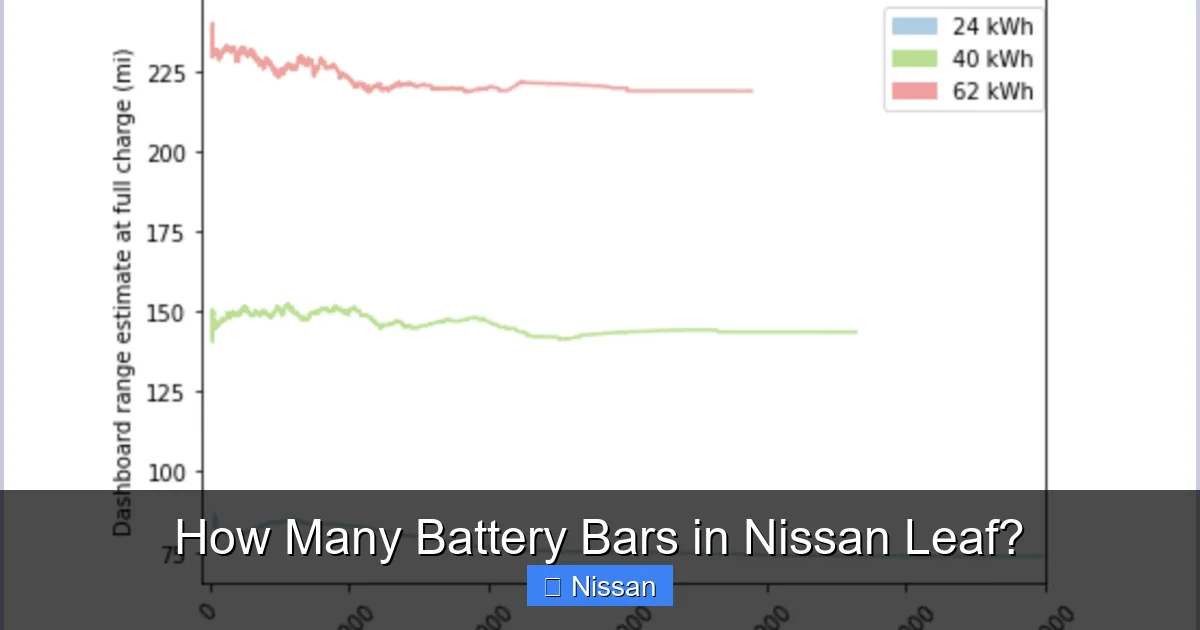
But here’s the catch: These bars are a rough approximation, not a precise measurement. They don’t directly translate to miles or kilometers. Instead, they reflect the percentage of charge remaining in the battery pack. For example, if your Leaf has a 40 kWh battery, each bar represents about 3.3 kWh of energy. On a 62 kWh model, each bar is closer to 5 kWh.
Why does this matter? Because two Leafs with the same number of bars might have very different actual ranges. A 2013 Leaf with a 24 kWh battery and 12 bars might only go 75 miles, while a 2023 Leaf with a 62 kWh battery and 12 bars could travel over 200 miles. The bars are consistent, but the real-world range isn’t.
How the Bars Are Calculated
The Leaf’s battery management system (BMS) constantly monitors voltage, current, and temperature to estimate how much energy is left. It then converts that data into the 12-bar display. This process isn’t perfect—especially as the battery ages.
Over time, lithium-ion batteries lose capacity. A brand-new Leaf might show 12 bars at 100%, but after several years, those same 12 bars might only represent 85–90% of the original capacity. This is called battery degradation. The bars still light up the same way, but they’re not telling the whole story.
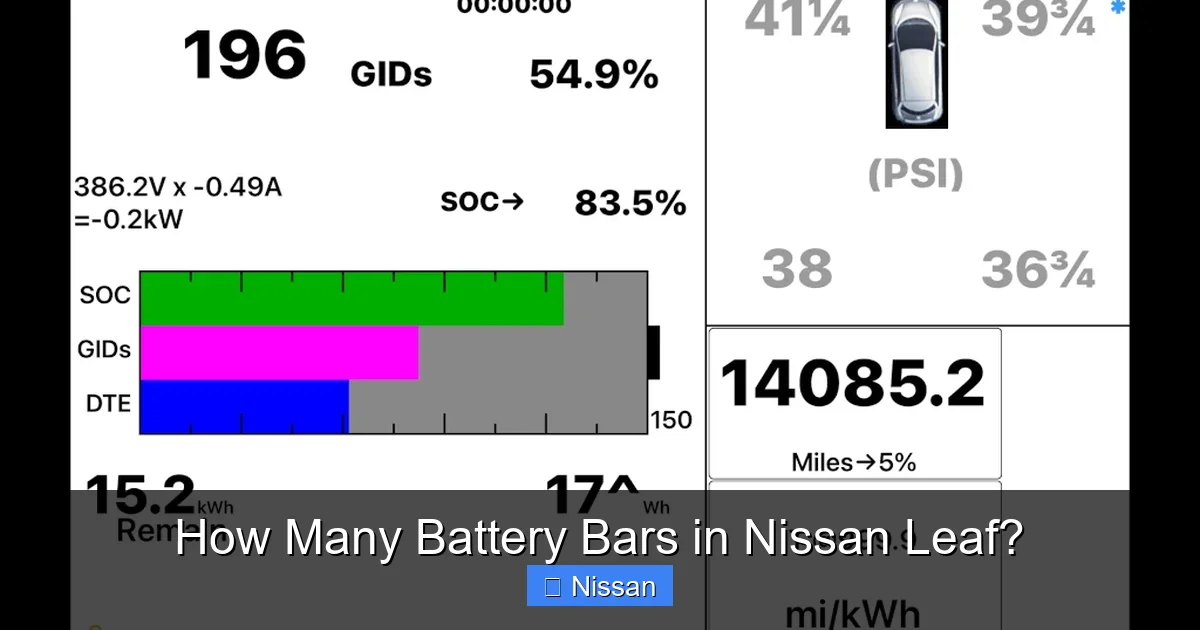
That’s why many Leaf owners use apps like Leaf Spy to get more accurate data. These tools connect to the car’s OBD-II port and show real battery capacity, state of health (SoH), and even individual cell voltages. But for everyday driving, the 12-bar system is usually good enough.
What Happens When Bars Drop?
As you drive, the bars will gradually disappear. Here’s what to expect:
– 12 bars: Fully charged. Ready for maximum range.
– 8–10 bars: Still plenty of juice. Ideal for daily commuting.
– 4–6 bars: Time to think about charging soon. Range is getting limited.
– 1–3 bars: Low battery warning. The car may reduce power or activate “turtle mode” to conserve energy.
– 0 bars: The car will shut down. You’ll need a tow or a charge.
When you hit 3 bars or fewer, the Leaf may display a warning message like “Low Battery” or “Charge Soon.” At 1 bar, the car might limit acceleration and turn off non-essential systems to preserve energy.
Battery Bars vs. Real-World Range
Visual guide about How Many Battery Bars in Nissan Leaf?
Image source: cdni.autocarindia.com
One of the biggest misconceptions about the Nissan Leaf is that battery bars directly equal miles. They don’t. The number of bars tells you how much charge is left, but not how far you can go.
Range depends on many factors:
– Driving speed: Highway driving uses more energy than city driving.
– Weather: Cold weather reduces battery efficiency. In freezing temps, range can drop by 30–50%.
– Climate control: Using the heater or AC drains the battery quickly.
– Terrain: Hills and mountains require more power.
– Tire pressure and weight: Underinflated tires or heavy loads reduce efficiency.
For example, a 2018 Leaf with a 40 kWh battery might show 8 bars and estimate 100 miles of range on a warm day. But if you’re driving in -10°C (14°F) weather with the heater on full blast, that same 8 bars might only get you 60 miles.
That’s why Nissan includes a separate range estimate on the dashboard. This number is calculated based on recent driving habits and current conditions. It’s more accurate than the bars alone.
Example: Bars in Different Conditions
Let’s say you have a 2020 Nissan Leaf SV with a 40 kWh battery. On a mild spring day, 12 bars might give you about 150 miles of range. But in winter, with the heater running, that same 12 bars could drop to 100 miles or less.
Similarly, if you drive aggressively—frequent acceleration and high speeds—you’ll burn through bars faster than someone who drives smoothly and uses regenerative braking.
How to Maximize Range per Bar
Want to get the most out of each battery bar? Try these tips:
– Use Eco mode: This limits acceleration and reduces energy use.
– Precondition the cabin: While plugged in, use the Leaf’s climate control to heat or cool the car. This uses grid power, not battery power.
– Drive smoothly: Avoid rapid acceleration and hard braking. Use regenerative braking to recapture energy.
– Check tire pressure: Keep tires inflated to the recommended level.
– Reduce weight: Remove unnecessary items from the car.
By driving efficiently, you can stretch each bar further and reduce the need for frequent charging.
Battery Degradation and Bar Accuracy
Visual guide about How Many Battery Bars in Nissan Leaf?
Image source: i.imgur.com
One of the biggest concerns for Nissan Leaf owners is battery degradation. Over time, all lithium-ion batteries lose capacity. For the Leaf, this means that the 12 bars you see today might not represent the same amount of energy as they did when the car was new.
What Is Battery Degradation?
Battery degradation is the gradual loss of a battery’s ability to hold a charge. It’s measured as a percentage of the original capacity. For example, if your Leaf’s battery was originally 40 kWh and now holds 36 kWh, it has degraded by 10%.
Degradation is normal, but it can be accelerated by:
– Frequent fast charging: Using DC fast chargers too often can stress the battery.
– High temperatures: Parking in hot climates (like Arizona or Texas) speeds up degradation.
– Deep discharges: Letting the battery drop to 0% regularly can harm longevity.
– Leaving the car unplugged for long periods: Storing a Leaf with a low charge can damage the battery.
How Degradation Affects Battery Bars
Here’s the tricky part: The Leaf’s 12-bar display doesn’t automatically adjust for degradation. If your battery has lost 15% of its capacity, the car will still show 12 bars when “full”—but that “full” is now only 85% of the original capacity.
This can be misleading. You might think you have 100% charge, but in reality, you’re starting with less energy than before. Over time, you may notice that your range per bar decreases, even if the display looks the same.
Signs of Battery Degradation
How can you tell if your Leaf’s battery is degrading? Look for these signs:
– Reduced range: You’re getting fewer miles per charge than when the car was new.
– Bars disappearing faster: You notice the bars dropping more quickly during normal driving.
– Longer charging times: It takes longer to reach 100%, especially on Level 2 chargers.
– “Check EV System” warning: This could indicate a battery or charging issue.
If you suspect degradation, consider getting a battery health check. Some Nissan dealers offer diagnostic tests, or you can use third-party tools like Leaf Spy.
Can You Fix Battery Degradation?
Unfortunately, you can’t reverse battery degradation. But you can slow it down:
– Avoid extreme temperatures: Park in the shade or a garage when possible.
– Limit fast charging: Use it only when necessary.
– Keep the battery between 20% and 80%: This reduces stress on the cells.
– Use the “Charge Limit” feature: Many Leafs let you set a maximum charge level (e.g., 80%) to preserve battery life.
While you can’t stop degradation entirely, good habits can help your Leaf last longer.
Different Nissan Leaf Models and Battery Sizes
Not all Nissan Leafs are the same. Over the years, Nissan has released several versions with different battery capacities. This affects how the battery bars translate to real-world performance.
Early Models (2011–2017)
The first-generation Leaf (2011–2017) came with a 24 kWh or 30 kWh battery, depending on the year and trim. These models typically show 12 bars when fully charged.
– 24 kWh model: Each bar ≈ 2 kWh. Full range: 75–85 miles (EPA).
– 30 kWh model: Each bar ≈ 2.5 kWh. Full range: 107 miles (EPA).
These older Leafs are more prone to degradation, especially in hot climates. Many owners report losing 1–2 bars of usable capacity over 5–7 years.
Second Generation (2018–2023)
The redesigned Leaf (2018 and later) introduced larger batteries:
– 40 kWh model: Each bar ≈ 3.3 kWh. Full range: 150 miles (EPA).
– 62 kWh model (Leaf Plus): Each bar ≈ 5.2 kWh. Full range: 226 miles (EPA).
These newer models have better thermal management and improved battery chemistry, which helps reduce degradation. They also support faster charging and offer more features.
2024 and Beyond
Nissan continues to update the Leaf, with rumors of even larger batteries and longer ranges. The 2024 model retains the 40 kWh and 62 kWh options, with improved efficiency and software.
Choosing the Right Model for You
If you’re buying a used Leaf, battery size matters. A 2015 Leaf with 24 kWh might be cheaper, but it won’t go as far as a 2020 Leaf Plus with 62 kWh. Consider your daily driving needs and climate when choosing.
Tips for Maintaining Battery Health and Bar Consistency
Keeping your Nissan Leaf’s battery healthy is key to maintaining accurate and reliable battery bars. Here are some practical tips:
Charge Smart
– Use Level 2 charging at home: It’s gentler on the battery than frequent fast charging.
– Avoid charging to 100% daily: Unless you need the full range, stop at 80–90%.
– Don’t let the battery sit at 0%: Charge when you hit 20–30% to avoid deep discharges.
Monitor Battery Health
– Use Leaf Spy or similar apps: These tools give you detailed battery data, including state of health (SoH).
– Check for software updates: Nissan occasionally releases updates that improve battery management.
Drive Efficiently
– Use B mode for extra regen: This increases regenerative braking, helping you recapture energy.
– Plan your routes: Avoid heavy traffic and steep hills when possible.
– Precondition while plugged in: Heat or cool the cabin before driving to save battery.
Store Properly
– If storing long-term, keep charge at 50%: This reduces stress on the battery.
– Use a battery maintainer if needed: Some owners use trickle chargers to keep the 12V battery healthy.
Get Regular Maintenance
– Have the battery inspected: Especially if you notice reduced range or performance.
– Check coolant levels: The Leaf’s battery is liquid-cooled, and low coolant can cause overheating.
Conclusion: Making the Most of Your Nissan Leaf Battery Bars
So, how many battery bars are in a Nissan Leaf? The answer is 12—but what those bars mean depends on your model, driving habits, and battery health. While the 12-bar system is simple and easy to understand, it’s not the whole story.
To get the most out of your Leaf, pay attention to real-world range, monitor battery degradation, and adopt smart charging and driving habits. Use tools like Leaf Spy for deeper insights, and don’t rely solely on the bars to judge your remaining range.
The Nissan Leaf is a reliable, efficient electric car—and with proper care, its battery can last for many years. By understanding your battery bars and what affects them, you’ll enjoy a smoother, more confident EV experience.
Frequently Asked Questions
How many battery bars does a fully charged Nissan Leaf have?
A fully charged Nissan Leaf typically displays 12 battery bars. Each bar represents roughly 8–10% of the total battery capacity, depending on the model.
Do battery bars equal miles in a Nissan Leaf?
No, battery bars don’t directly equal miles. They show the percentage of charge left, but actual range depends on driving conditions, weather, and battery health.
Why are my Nissan Leaf battery bars disappearing faster?
This could be due to battery degradation, cold weather, aggressive driving, or frequent use of climate control. Check your battery health and driving habits.
Can I increase the number of battery bars on my Leaf?
No, the number of bars is fixed at 12. However, you can improve battery health to ensure those bars represent as much energy as possible.
What does it mean when my Leaf shows 0 battery bars?
Zero bars means the battery is critically low. The car will likely shut down and require a charge or tow. Avoid letting the battery reach this point.
How accurate are Nissan Leaf battery bars?
The bars are a general estimate and can become less accurate as the battery ages. For precise data, use apps like Leaf Spy to monitor battery health and capacity.
