
How to Change Clock on Subaru

Changing the clock on your Subaru is simpler than you think—whether you drive a Legacy, Outback, Forester, or Crosstrek. This guide walks you through every method, from basic manual adjustments to using steering wheel controls and infotainment systems, so you’ll never be late again.
Key Takeaways
- Most Subaru models allow clock adjustment via the steering wheel controls or center display menu. This is the fastest and most user-friendly method for newer vehicles.
- Older Subaru models may require using physical buttons on the radio or climate control panel. These often involve holding down specific buttons to enter time-setting mode.
- Always ensure your vehicle is parked and in accessory mode (or running) when adjusting the clock. This prevents accidental changes and ensures power to the display.
- Some Subarus sync the clock with GPS time automatically. If enabled, this feature keeps your clock accurate without manual input—great for road trips.
- If your clock resets after turning off the car, check the 12V battery or fuse. A weak battery can cause electrical glitches that affect dashboard functions.
- Consult your owner’s manual for model-specific instructions. Subaru designs vary slightly between years and trims, so your manual is your best reference.
- Resetting the clock regularly improves timekeeping accuracy. Even GPS-synced clocks can drift slightly over time, so a quick check every few months helps.
📑 Table of Contents
- Why Keeping Your Subaru Clock Accurate Matters
- Understanding Your Subaru’s Clock System
- How to Change the Clock on Newer Subaru Models (2015–Present)
- How to Change the Clock on Older Subaru Models (2000–2014)
- Troubleshooting Common Clock Issues
- Tips for Maintaining Accurate Time in Your Subaru
- Conclusion
Why Keeping Your Subaru Clock Accurate Matters
We’ve all been there—running late, glancing at the dashboard, only to realize your car’s clock is 10 minutes behind. It’s a small thing, but an inaccurate clock can throw off your entire day. Whether you’re catching a flight, picking up your kids, or just trying to stay on schedule, having the correct time in your Subaru is more than a convenience—it’s a safety and reliability feature.
Modern Subarus are packed with advanced technology, from adaptive cruise control to lane-keeping assist, but even these smart systems rely on accurate timekeeping. For example, some models use time data for maintenance reminders, trip logging, and even syncing with your smartphone calendar. If your clock is off, these features might not work as intended. Plus, let’s be honest—there’s something satisfying about a perfectly synchronized dashboard. It just feels right.
The good news? Changing the clock on a Subaru is usually a quick, straightforward process. Unlike some older cars that require cryptic button combinations or even removing panels, most Subarus made in the last 15 years offer intuitive menus and controls. Whether you drive a rugged Outback, a sporty WRX, or a family-friendly Ascent, the steps are similar. In this guide, we’ll walk you through every method, so no matter what year or model you own, you’ll be able to set the time like a pro.
Understanding Your Subaru’s Clock System

Visual guide about How to Change Clock on Subaru
Image source: i.ytimg.com
Before diving into the steps, it helps to understand how Subaru designs its clock systems. Over the years, Subaru has evolved from simple analog displays to full-color touchscreens with GPS integration. Knowing which type your vehicle uses will help you choose the right method.
Types of Clock Displays in Subaru Vehicles
Subaru clocks fall into three main categories: basic digital, multi-function display (MFD), and infotainment-integrated. Basic digital clocks are found in older models like the early 2000s Impreza or Forester. These usually show just the time and maybe the date, and they’re adjusted using physical buttons near the radio.
Multi-function displays (MFD) are more common in mid-2000s to early 2010s models. These screens show the time, outside temperature, fuel economy, and trip data. They’re often controlled via buttons on the steering wheel or center console. The clock setting is usually buried in a submenu, but it’s still accessible with a few taps.
The latest Subarus—like the 2020+ Outback, Forester, and Crosstrek—use large touchscreen infotainment systems (Starlink). These integrate the clock into the main display, often in the top corner. Time can be set manually or synced automatically via GPS. Some even pull time from your connected smartphone using Apple CarPlay or Android Auto.
Manual vs. Automatic Time Setting
Subaru offers both manual and automatic clock adjustment. Manual setting means you input the time yourself using buttons or a touchscreen. This is reliable but requires you to remember to update it for daylight saving time or after a battery disconnect.
Automatic time setting uses GPS signals to keep the clock accurate. When enabled, your Subaru constantly checks satellite data and adjusts the time as needed. This is especially helpful for long drives across time zones. However, if you’re in an area with poor GPS reception—like a tunnel or dense forest—the clock might not update immediately.
Most drivers prefer a hybrid approach: enable GPS sync but check the time manually every few months. This gives you the best of both worlds—convenience and accuracy.
How to Change the Clock on Newer Subaru Models (2015–Present)
Visual guide about How to Change Clock on Subaru
Image source: i.ytimg.com
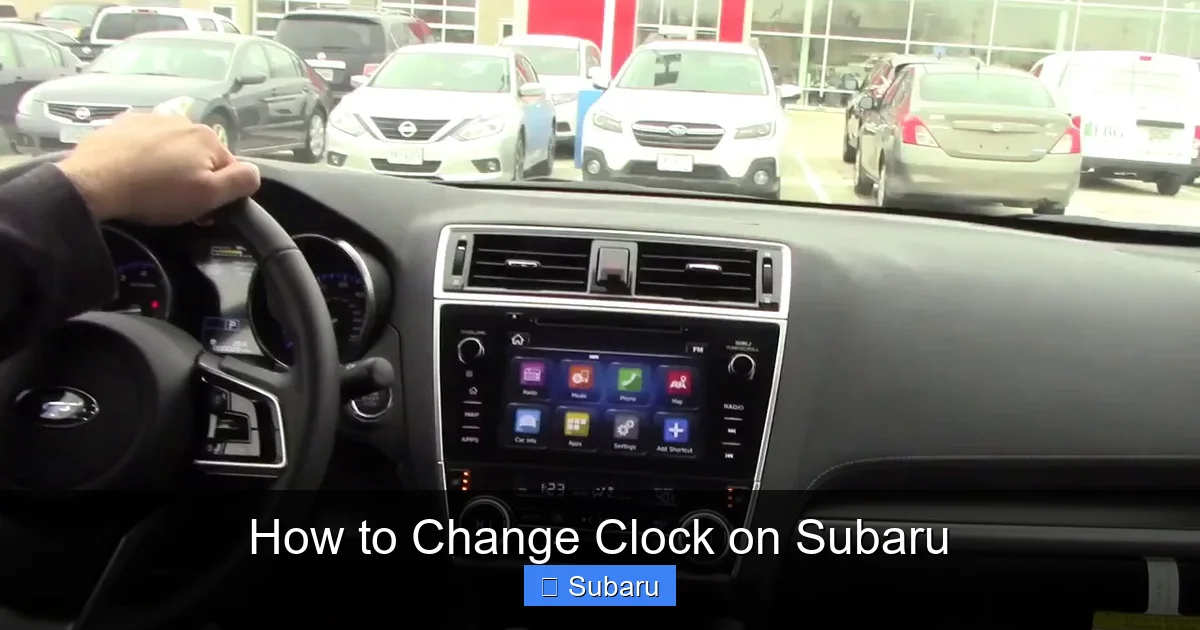
If you drive a Subaru from 2015 onward, chances are your clock is controlled through the infotainment system or steering wheel. These models prioritize user-friendly design, so changing the time usually takes less than a minute.
Using the Touchscreen Infotainment System
Start by turning on your vehicle or putting it in accessory mode (press the start button without pressing the brake). This powers up the display without starting the engine—perfect for quick adjustments.
On the home screen of your Starlink system, look for a gear icon or “Settings” menu. Tap it, then navigate to “Clock” or “Time & Date.” You’ll see options to set the time manually or enable GPS sync.
To set manually, tap “Manual” and use the on-screen keypad to enter the current hour and minute. Don’t forget to select AM or PM if your system uses a 12-hour format. Some models let you toggle between 12-hour and 24-hour time—choose whichever you prefer.
After entering the time, tap “Save” or “OK.” The clock should update instantly. If it doesn’t, try restarting the system by turning the car off and on again.
Using Steering Wheel Controls
Many newer Subarus let you adjust the clock without touching the screen. This is great for minimizing distractions while driving—though we recommend doing this when parked.
Press the “Menu” or “Info” button on your steering wheel. Use the arrow keys to scroll through the options until you see “Clock” or “Time.” Press “Enter” or “OK” to select it.
You’ll now see the current time with the hour highlighted. Use the up/down arrows to adjust the hour, then press “Right” to move to the minutes. Adjust the minutes, then press “Enter” to confirm. Some models require you to press and hold “Enter” for a few seconds to save.
If your steering wheel doesn’t have these controls, check your owner’s manual—some trims limit functionality to higher-end models.
Enabling GPS Time Sync
To enable automatic time updates, go back to the “Clock” or “Time & Date” menu in your infotainment system. Look for an option like “Sync with GPS” or “Automatic Time.” Toggle it on.
Once enabled, your Subaru will use its built-in GPS antenna to pull the correct time from satellites. This usually happens within a few minutes of driving in an open area. You’ll notice the clock adjusts automatically when you cross into a new time zone.
Keep in mind that GPS sync won’t work if your antenna is blocked—like when parked in a garage or underground lot. Also, if your car’s battery was recently disconnected, it may take a short drive to re-establish the GPS connection.
How to Change the Clock on Older Subaru Models (2000–2014)

Visual guide about How to Change Clock on Subaru
Image source: tadvantagebetaprod-com.cdn-convertus.com
Older Subarus don’t have touchscreens or GPS sync, but that doesn’t mean setting the clock is difficult. These models rely on physical buttons and simple menus, often located on the radio or climate control panel.
Using Radio or Climate Control Buttons
In many 2000s-era Subarus—like the Legacy, Outback, or Baja—the clock is part of the radio display. To adjust it, turn on the ignition (or accessory mode).
Look for a “Clock” or “Time” button on the radio face. Press and hold it for 3–5 seconds until the time starts blinking. This puts the system into edit mode.
Use the “Tune” or “Seek” buttons (usually labeled with arrows) to adjust the hour. Press the “Clock” button again to move to the minutes, then use the same arrows to set them. Once done, press “Clock” one more time to save.
Some models use the “H” and “M” buttons (Hour and Minute) instead. Press and hold “H” to adjust the hour, then “M” for minutes. Release when the correct time is shown.
Using the Multi-Function Display (MFD)
If your Subaru has a small LCD screen between the gauges (common in 2008–2014 Imprezas and Foresters), the clock may be controlled through the MFD.
Press the “DISP” or “INFO” button on the steering wheel or dashboard until you see the time display. Then, press and hold the “SET” or “MODE” button for a few seconds.
The hour should start blinking. Use the “+” and “–” buttons (often on the steering wheel) to adjust it. Press “SET” again to move to minutes, adjust, then press “SET” to confirm.
If your MFD doesn’t respond, try cycling through all display modes first. Sometimes the clock setting is hidden behind trip data or fuel economy screens.
Dealing with Reset Clocks After Battery Disconnect
If your clock resets every time you turn off the car, it could be a sign of a weak 12V battery or a blown fuse. Subaru clocks are powered by the auxiliary system, which relies on a stable electrical supply.
Check your battery voltage with a multimeter—it should read around 12.6 volts when the car is off. If it’s below 12.2, consider replacing the battery. Also, inspect the fuse box (usually under the dashboard or hood) for any blown fuses related to the radio or instrument cluster.
Replacing a fuse is cheap and easy, but if the problem persists, it might be a wiring issue. In that case, consult a Subaru technician.
Troubleshooting Common Clock Issues
Even with the right steps, you might run into problems. Here are some common issues and how to fix them.
Clock Won’t Change or Save
If the time won’t update or reverts after you save it, the system might not be recognizing your input. Try this: turn the car off, wait 30 seconds, then restart it. This resets the electronics and often fixes glitches.
Also, make sure you’re in the correct mode. Some Subarus won’t let you change the clock while the car is in reverse or if the parking brake isn’t engaged. Always adjust the time while parked and in park (or neutral with the brake on).
Clock Drifts Over Time
If your clock slowly gains or loses time, it could be a sign of a failing internal clock chip. This is rare but possible in older models. The fix usually involves replacing the instrument cluster or radio—something best left to a professional.
Alternatively, enable GPS sync if available. This keeps the clock accurate without manual intervention.
Display Is Blank or Flickering
A blank or flickering clock could indicate a loose connection or failing display. Check the wiring behind the radio or instrument cluster. If you’re not comfortable doing this yourself, visit a Subaru service center.
In some cases, a software update from Subaru can fix display issues. Check with your local dealer to see if your model has any pending updates.
Tips for Maintaining Accurate Time in Your Subaru
Keeping your clock accurate isn’t just about setting it once—it’s about ongoing care. Here are some pro tips to ensure your Subaru’s time stays spot-on.
Check the Time Monthly
Even with GPS sync, it’s a good idea to verify the time once a month. Compare it to your phone or a reliable wall clock. If it’s off by more than a minute, adjust it manually.
Update for Daylight Saving Time
Don’t forget to spring forward and fall back! While some Subarus auto-adjust, many still require a manual change. Mark your calendar for the first Sunday in November and the second Sunday in March.
Use Your Phone as a Backup
If you’re unsure about your car’s time, glance at your phone. Most smartphones sync with network time, so they’re almost always accurate. You can also use voice assistants like Siri or Google to ask, “What time is it?”
Keep Your Software Updated
Subaru occasionally releases software updates that improve system performance, including clock accuracy. Visit your dealer or check the Subaru website for updates specific to your model.
Conclusion
Changing the clock on your Subaru doesn’t have to be a headache. Whether you’re driving a brand-new Crosstrek with GPS sync or a trusty 2005 Outback with manual buttons, the process is designed to be simple and intuitive. By understanding your vehicle’s system and following the right steps, you can keep your dashboard accurate and reliable.
Remember, a correct clock isn’t just about convenience—it’s part of your car’s overall functionality. It helps with navigation, maintenance reminders, and even safety features. So take a few minutes to set it right, and enjoy the peace of mind that comes with being on time, every time.
If you ever get stuck, don’t hesitate to consult your owner’s manual or reach out to a Subaru service center. They’re there to help. And now that you know how to change the clock on your Subaru, you’re one step closer to mastering your vehicle’s many features.
Frequently Asked Questions
How do I change the clock on a 2022 Subaru Outback?
To change the clock on a 2022 Subaru Outback, go to the home screen of the Starlink infotainment system, tap “Settings,” then “Clock” or “Time & Date.” Choose “Manual” and enter the correct time using the on-screen keypad. You can also enable “Sync with GPS” for automatic updates.
Why does my Subaru clock keep resetting?
If your Subaru clock resets after turning off the car, it’s likely due to a weak 12V battery or a blown fuse. Check the battery voltage and inspect the fuse box. A failing battery can’t maintain power to the clock memory, causing it to reset.
Can I change the clock while driving?
While you can technically adjust the clock while driving using steering wheel controls, it’s safer to do so when parked. Distracted driving increases accident risk, so always prioritize safety over convenience.
Does my Subaru automatically adjust for daylight saving time?
Some newer Subaru models with GPS sync will automatically adjust for daylight saving time. However, many still require a manual change. Check your owner’s manual or test it by observing the clock after the time change.
How do I change the clock on a 2008 Subaru Forester?
On a 2008 Subaru Forester, press and hold the “Clock” button on the radio until the time blinks. Use the “Tune” arrows to adjust the hour, press “Clock” again to move to minutes, adjust, then press “Clock” to save.
What if my Subaru’s clock display is broken?
If the clock display is blank, flickering, or unresponsive, it could be a hardware issue like a failing screen or loose wiring. Visit a Subaru service center for diagnosis and repair. In some cases, a software update may resolve the problem.
