
How to Change the Battery in a Car Key

Changing the battery in your car key is simpler than you think—and it can save you a trip to the dealership. With just a few tools and a little patience, most drivers can replace a dead key fob battery in under 10 minutes. This guide walks you through every step, from identifying your key type to testing the new battery, so you’re back on the road fast.
Key Takeaways
- Most car key fobs use CR2032 batteries: These small, round lithium batteries are common and affordable, available at most drugstores, electronics shops, or online.
- You don’t need special tools: A flathead screwdriver, butter knife, or even a coin is often enough to pry open most key fobs.
- Check your owner’s manual first: It may include specific instructions or warnings for your vehicle’s key fob model.
- Handle the circuit board gently: Avoid touching the tiny components inside to prevent static damage or misalignment.
- Test the key after replacement: Make sure all buttons (lock, unlock, trunk, panic) work before reassembling fully.
- Keep the old battery for reference: It helps confirm the correct replacement type and polarity orientation.
- Replace batteries proactively: If your key range weakens or buttons respond slowly, it’s likely time for a new battery.
📑 Table of Contents
- Why Your Car Key Battery Dies—And Why You Should Replace It Yourself
- What You’ll Need to Change a Car Key Battery
- Step-by-Step Guide to Changing Your Car Key Battery
- Tips and Common Mistakes to Avoid
- When to Call a Professional
- How Often Should You Replace Your Car Key Battery?
- Environmental and Safety Considerations
- Conclusion
Why Your Car Key Battery Dies—And Why You Should Replace It Yourself
We’ve all been there: you’re rushing to get to work, late for a meeting, or just trying to load groceries into the car—and your key fob won’t respond. You press the lock button again and again, but nothing happens. The dashboard doesn’t light up. The doors stay stubbornly shut. Your first thought might be, “Is my car broken?” But more often than not, the culprit is something much simpler: a dead battery in your car key.
Modern car keys—especially key fobs with remote functions—are powered by small lithium coin-cell batteries. These batteries typically last between 2 to 4 years, depending on usage. Every time you press a button to lock, unlock, or start your car remotely, you’re drawing a tiny bit of power. Over time, that power depletes. And when it’s gone, your key becomes little more than a fancy piece of plastic—unless you know how to replace the battery yourself.
The good news? You don’t need to visit a dealership or pay $50–$100 for a simple battery swap. In most cases, you can do it at home with tools you already have. Not only does this save money, but it also saves time. No waiting for an appointment, no explaining the issue to a service advisor—just a quick fix that gets you back in control of your car.
Signs Your Car Key Battery Is Dying
Before you start disassembling your key fob, it’s helpful to confirm that a dead battery is actually the problem. Here are the most common signs:
– **Reduced range:** You used to be able to unlock your car from 50 feet away, but now you have to stand right next to the door.
– **Delayed response:** You press the button and nothing happens for a few seconds—or it only works after multiple attempts.
– **Intermittent function:** The key works sometimes but not others, especially in cold weather.
– **Dashboard warning light:** Some cars display a “key not detected” or “replace key battery” message on the instrument cluster.
– **Physical key still works:** If you can manually unlock the door with the physical key blade inside the fob, but the remote buttons don’t work, it’s almost certainly a battery issue.
If you’re experiencing one or more of these symptoms, it’s time to check the battery. And don’t worry—this isn’t a sign of a bigger problem. It’s just normal wear and tear.
What You’ll Need to Change a Car Key Battery
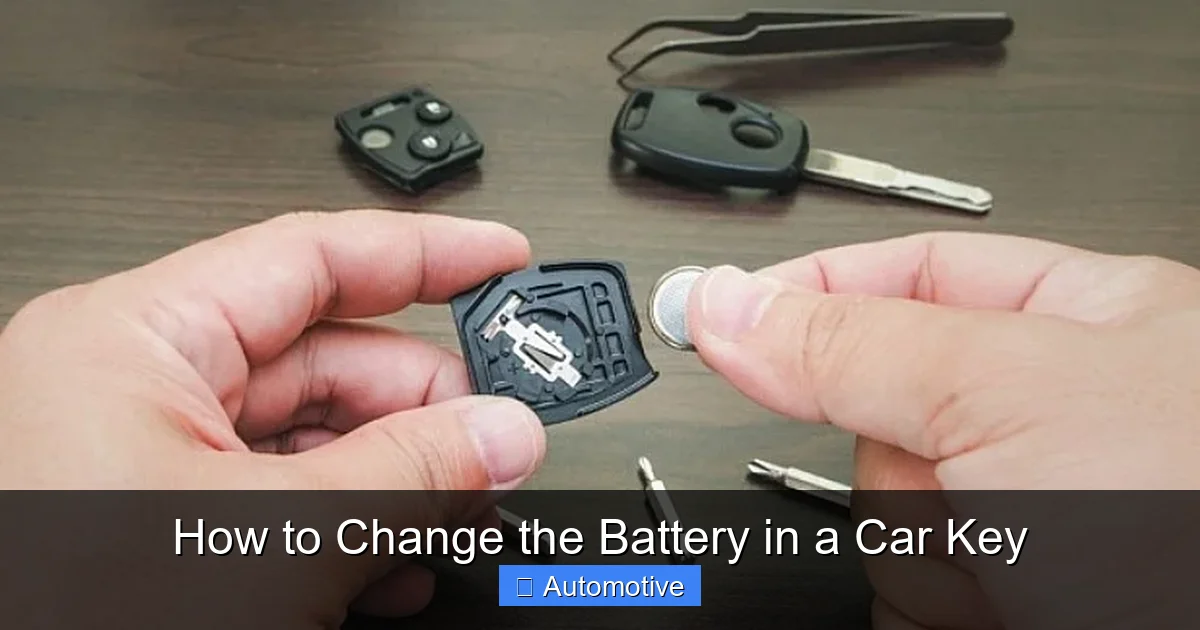
Visual guide about How to Change the Battery in a Car Key
Image source: ebaymotorsblog.com
One of the best things about replacing a car key battery is how little you need to get started. You probably already have most of these items lying around the house.
Essential Tools and Supplies
– **Replacement battery:** Most key fobs use a CR2032 3-volt lithium battery, but some models may use CR2025, CR2016, or others. Check your owner’s manual or the old battery for the correct type.
– **Small flathead screwdriver:** A standard-sized one works, but a precision screwdriver set is ideal.
– **Butter knife or plastic prying tool:** If you don’t have a screwdriver, a dull kitchen knife or a plastic spudger (used for phone repairs) can gently separate the fob halves.
– **Coin (optional):** Some key fobs have a small slot where you can insert a coin to twist and open the case.
– **Clean cloth or paper towel:** To wipe away dust or fingerprints from the interior.
– **Tweezers (optional):** Helpful for handling small components or removing the old battery.
Where to Buy a Replacement Battery
You don’t need to go to a car dealership to buy a key fob battery. In fact, you can find them almost anywhere:
– **Pharmacies and drugstores:** CVS, Walgreens, and Rite Aid often carry CR2032 batteries in the electronics or hearing aid section.
– **Big-box retailers:** Walmart, Target, and Costco sell multipacks of lithium batteries at a discount.
– **Electronics stores:** Best Buy, Micro Center, or even vape shops (yes, really!) often stock them.
– **Online retailers:** Amazon, eBay, and Battery Junction offer bulk packs for as little as $0.50 per battery.
A single CR2032 battery typically costs between $1 and $3. Buying a pack of 4 or 5 is a smart move—you’ll have spares for future replacements or other devices like garage door openers or digital calipers.
Step-by-Step Guide to Changing Your Car Key Battery

Visual guide about How to Change the Battery in a Car Key
Image source: bradscartunes.com
Now that you’ve gathered your tools and confirmed the battery type, it’s time to get to work. The process varies slightly depending on your key fob design, but the basic steps are the same for most models.
Step 1: Identify Your Key Fob Type
Car key fobs come in several designs, and knowing yours will help you open it correctly:
– **Snap-together fobs:** The most common type. Two plastic halves snap together and can be pried apart with a tool.
– **Screw-secured fobs:** Less common, but some luxury or older models use small screws to hold the case together.
– **Slide-out or flip-key fobs:** These have a physical key blade that slides or flips out. The battery compartment is usually accessed after removing the blade.
– **Integrated smart keys:** Found in high-end vehicles (e.g., BMW, Mercedes, Tesla). These may require special tools or dealership assistance, though many can still be opened manually.
Check your owner’s manual or look up your car’s make, model, and year online to find specific instructions. YouTube is also a great resource—search for “[Your Car Model] key fob battery replacement” to see a video demo.
Step 2: Open the Key Fob
This is the trickiest part for beginners, but with a gentle touch, it’s totally doable.
For **snap-together fobs**, look for a small seam running around the edge of the fob. Insert your flathead screwdriver, butter knife, or plastic pry tool into the seam near the keyring hole. Gently twist the tool to create a small gap, then work your way around the fob, applying light pressure. Don’t force it—plastic clips can break if you’re too aggressive.
For **flip-key or slide-out fobs**, first remove the physical key blade. There’s usually a small release button or latch near the base. Once the blade is out, you’ll see a small compartment or a seam where the battery sits. Use your tool to carefully pry open that section.
For **screw-secured fobs**, use a small Phillips or flathead screwdriver to remove the screws. Keep them in a safe place—they’re easy to lose!
Step 3: Remove the Old Battery
Once the fob is open, you’ll see the battery seated in a small circular holder. It’s usually held in place by a metal clip or just snug fit.
Use your fingernail, tweezers, or the tip of your screwdriver to gently lift the battery out. Be careful not to scratch or damage the surrounding circuit board. Note the orientation of the battery—most have the positive (+) side facing up, but some may be reversed. Take a quick photo with your phone if you’re unsure.
Step 4: Insert the New Battery
Take your new battery and place it into the compartment in the same orientation as the old one. The positive (+) side usually faces up, but double-check the markings inside the fob or on the old battery.
Press it down gently until it sits flat. You shouldn’t need to force it—if it doesn’t fit easily, you may have the wrong battery type or the wrong orientation.
Step 5: Reassemble the Key Fob
Carefully align the two halves of the fob and press them together until you hear a series of clicks. Make sure all edges are flush and no gaps remain. If your fob uses screws, reinsert and tighten them—don’t overtighten, as this can crack the plastic.
If your key has a physical blade, slide or flip it back into place.
Step 6: Test the Key
Before you celebrate, test all the buttons:
– Press the lock and unlock buttons.
– Try the trunk release or panic button (if applicable).
– Stand a few feet away to check the range.
If everything works, you’re done! If not, double-check that the battery is properly seated and oriented. Sometimes a loose connection or dirty contact points can cause issues.
Tips and Common Mistakes to Avoid
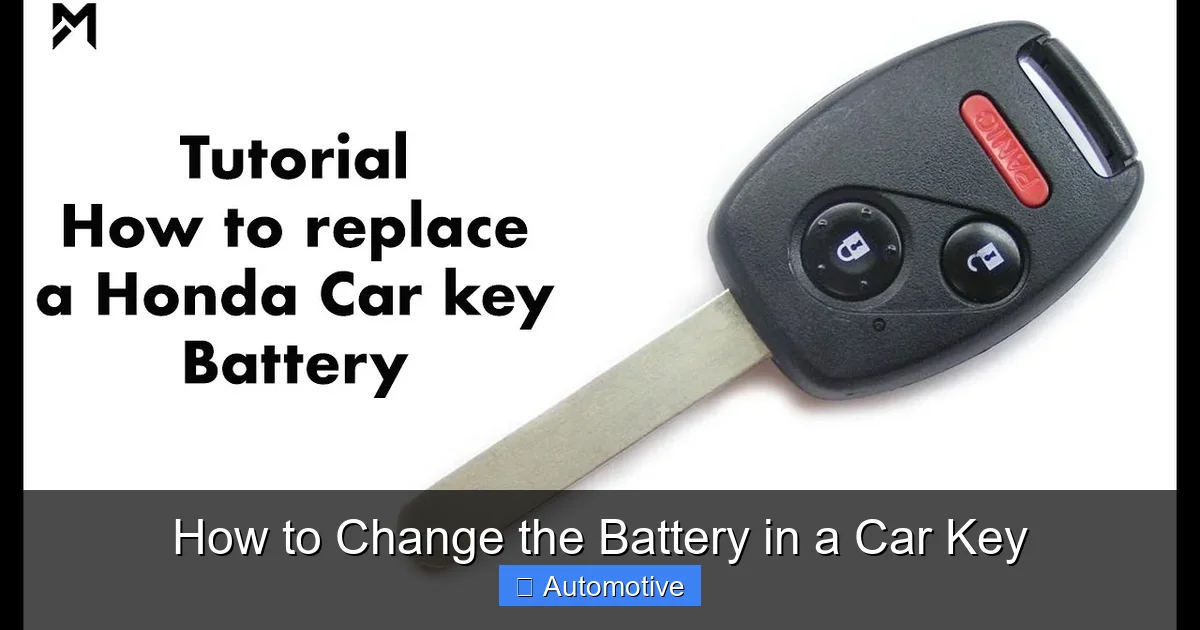
Visual guide about How to Change the Battery in a Car Key
Image source: i.ytimg.com
Even though changing a car key battery is straightforward, a few common mistakes can trip up even experienced DIYers.
Don’t Force the Fob Open
Plastic clips are fragile. If you’re struggling to open the fob, stop and reassess. Look for hidden screws, release latches, or a different seam. Forcing it can crack the casing, making the fob unusable.
Avoid Touching the Circuit Board
The tiny components inside your key fob are sensitive to static electricity and oils from your skin. Handle the interior as little as possible, and avoid touching the metal contacts or chips. If you must, use clean tweezers or wear an anti-static wrist strap.
Don’t Mix Up Battery Types
CR2032, CR2025, and CR2016 may look similar, but they have different thicknesses. Using the wrong one can damage the fob or cause poor contact. Always match the exact model number.
Keep the Old Battery for Reference
Before tossing the old battery, hold onto it for a few minutes. It confirms the correct replacement type and shows you the proper orientation. Once you’re sure the new one works, you can safely dispose of the old battery at a recycling center.
Store Spare Batteries Properly
Lithium batteries can discharge if stored in hot or humid environments. Keep spares in a cool, dry place—like a drawer or toolbox—and avoid leaving them in your car, where temperatures can soar.
When to Call a Professional
While most key fobs are user-serviceable, there are times when it’s best to seek help.
Smart Keys and Proximity Fobs
High-end vehicles like BMW, Mercedes-Benz, Audi, and Tesla often use advanced smart keys that communicate with the car via radio frequency and proximity sensors. These fobs may have sealed compartments or require programming after a battery change. If your key has a “start” button on the fob itself or allows keyless entry without pressing any buttons, it’s likely a smart key.
In these cases, even if you can open the fob, replacing the battery might reset the fob’s programming. Some models require a diagnostic tool or dealership visit to re-sync the key with the car. Check your owner’s manual or contact your dealer before attempting a DIY replacement.
Water Damage or Physical Damage
If your key fob has been dropped, submerged in water, or shows signs of corrosion, the battery may not be the only issue. Water damage can ruin the internal circuitry, and simply replacing the battery won’t fix it. In these cases, you may need a replacement fob—or professional repair.
No Response After Battery Replacement
If your key still doesn’t work after a fresh battery, the problem could be:
– A faulty battery (even new ones can be defective)
– Dirty or corroded contact points
– A damaged circuit board
– A programming issue
Try cleaning the battery contacts with a cotton swab and rubbing alcohol. If that doesn’t work, consult your dealership or a locksmith who specializes in automotive keys.
How Often Should You Replace Your Car Key Battery?
There’s no universal rule, but most manufacturers recommend replacing the battery every 2 to 4 years. However, usage patterns matter.
If you use your key fob frequently—locking and unlocking multiple times a day, using remote start in extreme weather, or carrying it in a pocket with other keys that cause accidental button presses—the battery may drain faster.
Conversely, if you rarely use the remote functions and mostly rely on keyless entry or push-button start, the battery could last closer to 5 years.
A good rule of thumb: if you notice any of the warning signs mentioned earlier—reduced range, delayed response, or intermittent function—it’s time to check the battery. Don’t wait until it completely dies and leaves you stranded.
Some drivers make it a habit to replace the battery during routine maintenance, like oil changes or tire rotations. Others keep a spare battery in their glove compartment just in case.
Environmental and Safety Considerations
Lithium batteries contain small amounts of toxic materials and should never be thrown in the regular trash. Most communities have battery recycling programs—check with your local waste management agency or visit Call2Recycle.org to find a drop-off location near you.
When handling the battery, avoid puncturing or crushing it. Lithium batteries can leak or catch fire if damaged. If a battery leaks, wear gloves and clean the area with a damp cloth. Dispose of the battery immediately.
Also, keep spare batteries away from children and pets. If swallowed, lithium batteries can cause serious internal injuries. Store them in their original packaging or a secure container.
Conclusion
Changing the battery in your car key is one of the simplest—and most rewarding—DIY automotive tasks you can do. It takes just a few minutes, costs less than a cup of coffee, and saves you from the hassle and expense of a dealership visit. With the right tools, a little patience, and this guide, you’ll be able to keep your key fob working like new for years to come.
Remember: most key fobs use a CR2032 battery, can be opened with a flathead screwdriver or coin, and should be tested after replacement. Handle the interior gently, avoid forcing the case, and always recycle your old battery responsibly.
So the next time your key fob starts acting up, don’t panic. Grab a new battery, follow these steps, and get back to driving with confidence. Your car—and your wallet—will thank you.
Frequently Asked Questions
What type of battery does my car key use?
Most car key fobs use a CR2032 3-volt lithium battery, but some models may require CR2025 or CR2016. Check your owner’s manual or the old battery for the correct type.
Can I use any flathead screwdriver to open my key fob?
Yes, a standard flathead screwdriver works for most snap-together fobs. For tighter spaces, a precision screwdriver or plastic prying tool is safer to avoid scratching the plastic.
Will changing the battery reset my key fob’s programming?
In most cases, no. Simple remote fobs retain their programming after a battery change. However, some smart keys may require re-syncing—check your manual or consult your dealer.
How do I know if my key fob battery is completely dead?
If the key doesn’t respond at all—even when held right next to the car—and the physical key still works, the battery is likely dead. A weak signal or delayed response also indicates low power.
Can I replace the battery in a waterproof or sealed key fob?
Some high-end fobs are sealed and not meant to be opened by users. Attempting to pry them open may void the warranty or damage the fob. Check your manual or contact the manufacturer first.
Where can I recycle my old car key battery?
Most pharmacies, electronics stores, and municipal waste centers accept lithium batteries for recycling. Use resources like Call2Recycle.org to find a drop-off location near you.
