
What Battery Does a Ford F-150 Key Fob Use

Your Ford F-150 key fob almost always uses a standard CR2032 3V coin battery. Replacing it is a simple DIY task that takes under 5 minutes with a small flat-head screwdriver. Knowing this saves you time and money on unnecessary dealership visits.
You’re standing by your Ford F-150, remote in hand, pressing the lock button. Nothing happens. You press it again. Still nothing. A wave of frustration hits. Is the truck broken? Did the remote die? Before you panic or head to the dealer, take a breath. The most common culprit is also the simplest fix: a dead battery in your key fob. But what battery does a Ford F-150 key fob use? The answer is almost always the same, and replacing it yourself is one of the easiest DIY tasks you can do. This guide will walk you through everything you need to know, from identifying the correct battery to performing the swap, troubleshooting, and understanding how it fits into your truck’s larger electrical system. Let’s get your remote working again.
Key Takeaways
- Battery Type: Nearly all Ford F-150 key fobs (2011-present) use a common CR2032 3-volt lithium coin cell.
- Simple Replacement: The process typically requires only a small flat-blade screwdriver and takes 2-5 minutes, with no special tools.
- Universal Compatibility: The same CR2032 battery fits virtually every F-150 key fob design from the 12th generation (2009-2014) through the current 14th generation (2021+).
- Warning Signs: Reduced remote range, intermittent locking/unlocking, or a dashboard message signal a weak key fob battery.
- Buy Quality: Always purchase name-brand CR2032 batteries (Duracell, Energizer, Panasonic) to prevent leaks that can damage the key fob’s internal circuit.
- Separate System: The key fob battery is completely independent from your truck’s main automotive battery; one does not power the other.
📑 Table of Contents
- Understanding Your Ford F-150 Key Fob Battery
- Step-by-Step: Replacing Your Key Fob Battery
- Battery Life, Maintenance, and Longevity Tips
- Troubleshooting: When a New Battery Doesn’t Fix It
- Choosing the Right Battery: Brands, Where to Buy, and What to Avoid
- The Bigger Picture: Key Fob Batteries vs. Your Truck’s Main Battery
- Conclusion: Empowerment Through Simple Knowledge
Understanding Your Ford F-150 Key Fob Battery
First, let’s clear up any confusion. The small plastic device you carry in your pocket or purse is called a key fob. It’s a sophisticated remote control that uses radio frequency signals to communicate with your truck. Inside, there’s a single, small battery that powers the radio transmitter and, in some models, the internal circuitry for passive entry. For the Ford F-150, Ford has standardized on one battery type across nearly all recent model years because it’s reliable, compact, and provides just the right amount of power for the job.
The Universal CR2032 Coin Cell
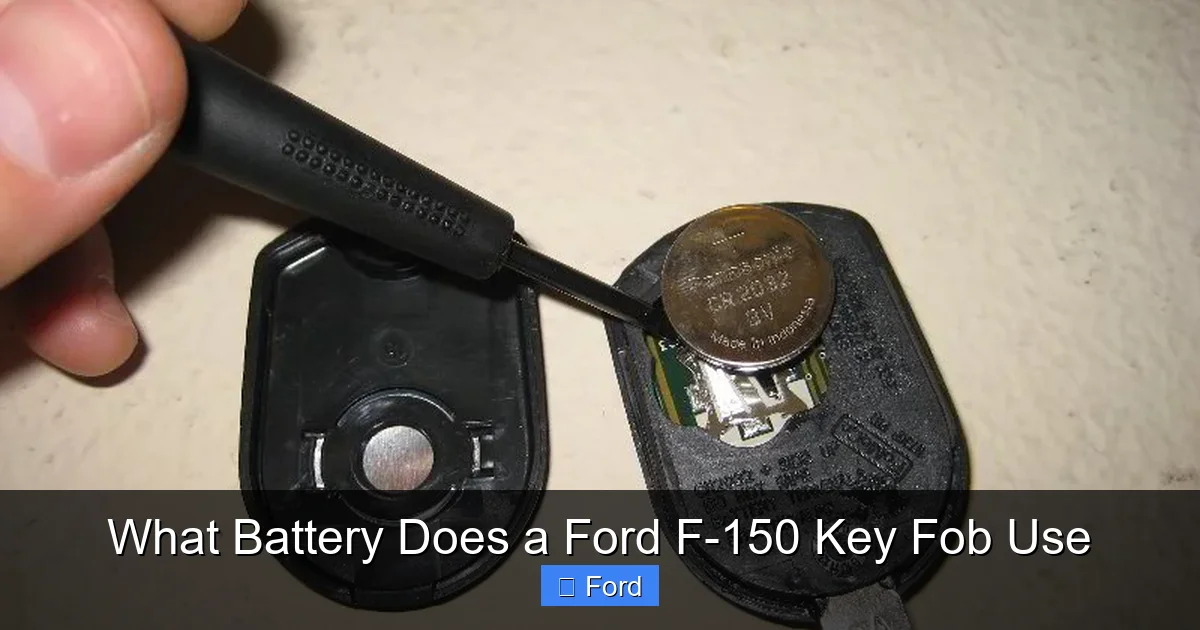
The battery your Ford F-150 key fob uses is the CR2032. This is a lithium-based, 3-volt, coin-shaped battery. The “CR” stands for “Coin Round,” the “20” indicates it’s 20mm in diameter, and the “32” means it’s 3.2mm thick. It’s the same battery found in countless other devices: watches, computer motherboards (for BIOS memory), small LED flashlights, and other car key fobs from brands like Toyota, Honda, and Chevrolet. Its popularity is due to its stable voltage output, long shelf life (often 5-10 years when stored), and ability to function in a wide temperature range.
You can buy CR2032 batteries virtually anywhere: auto parts stores, big-box retailers, electronics shops, and online. They are inexpensive, usually costing between $1 and $5 per battery for quality brands. The consistency of this standard is great news for F-150 owners—you don’t need a special, proprietary battery.
Why Ford Uses the CR2032
Ford’s engineering team selects components based on reliability, cost, and size constraints. The key fob is a tiny space, and the CR2032 offers the perfect balance. It provides enough power to send a clear signal to your truck (typically 50-100 feet in open space) for years without needing a change. Its lithium chemistry means it has a very low self-discharge rate, so it will sit on a shelf for years and still have most of its charge. For a device you might use only a few times a day, this longevity is ideal.
It’s important to note that while the Ford F-150 key fob battery type is consistent, the physical design of the key fob itself has changed over the years. The 2015-2020 models (13th generation) have a traditional two-button fob with a removable plastic back. The 2021+ models (14th generation) often feature a more integrated, sleeker “intelligent access” key with a different internal layout and a small, hidden battery compartment. Don’t worry—the battery type remains the CR2032. The replacement procedure varies slightly, but the core steps are the same. We’ll cover the specifics for each design shortly.
Step-by-Step: Replacing Your Key Fob Battery
Now for the hands-on part. Replacing the battery in your F-150 key fob is a straightforward process. The key is to be gentle. The plastic casings can be brittle with age, and the internal circuit board is sensitive to static electricity. Here’s a complete guide that covers both major F-150 key fob styles.
Visual guide about What Battery Does a Ford F-150 Key Fob Use
Image source: fobbattery.com
Tools You’ll Need
Seriously, you likely already have the primary tool. Gather these items:
- A new CR2032 battery. Stick with reputable brands like Duracell, Energizer, or Panasonic. Avoid generic, no-name batteries from questionable online sellers—they have a higher risk of leakage, which can corrode the delicate contacts inside your fob.
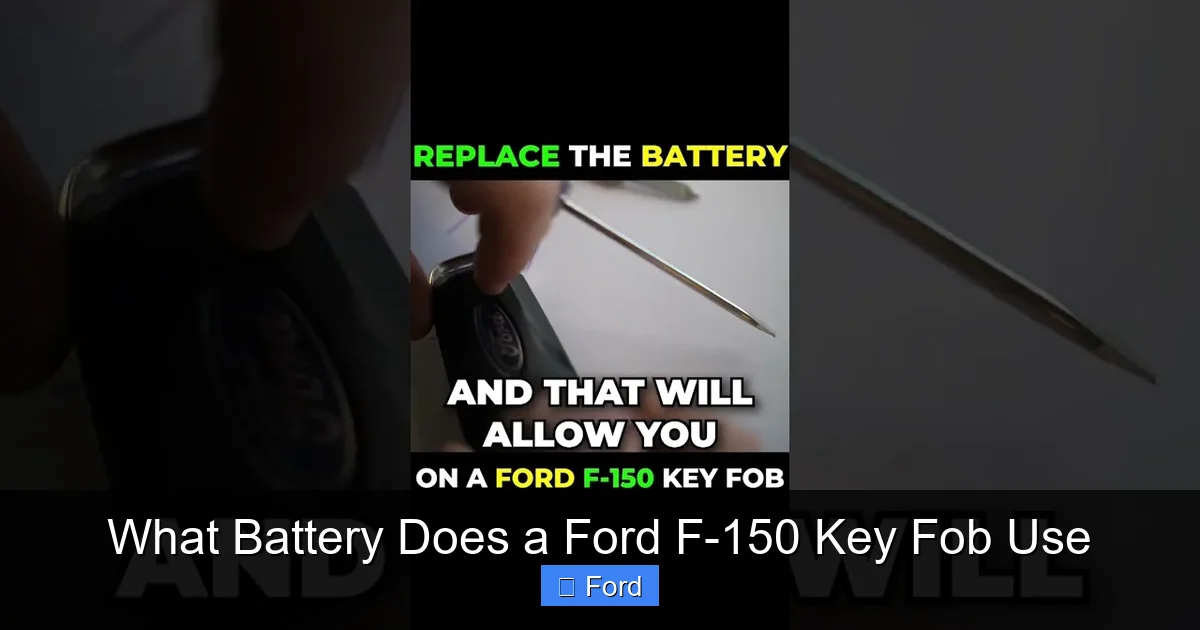
- A small flat-head screwdriver. A standard electronics screwdriver or even a sturdy plastic prying tool (like a guitar pick) works best. You need something thin enough to slip into the seam of the key fob without marring the plastic.
- Optional: A soft cloth to protect the fob’s finish and a can of compressed air to gently blow out any dust from the compartment.
Opening the Key Fob: Two Main Designs
Identify your F-150’s model year to determine which process applies.
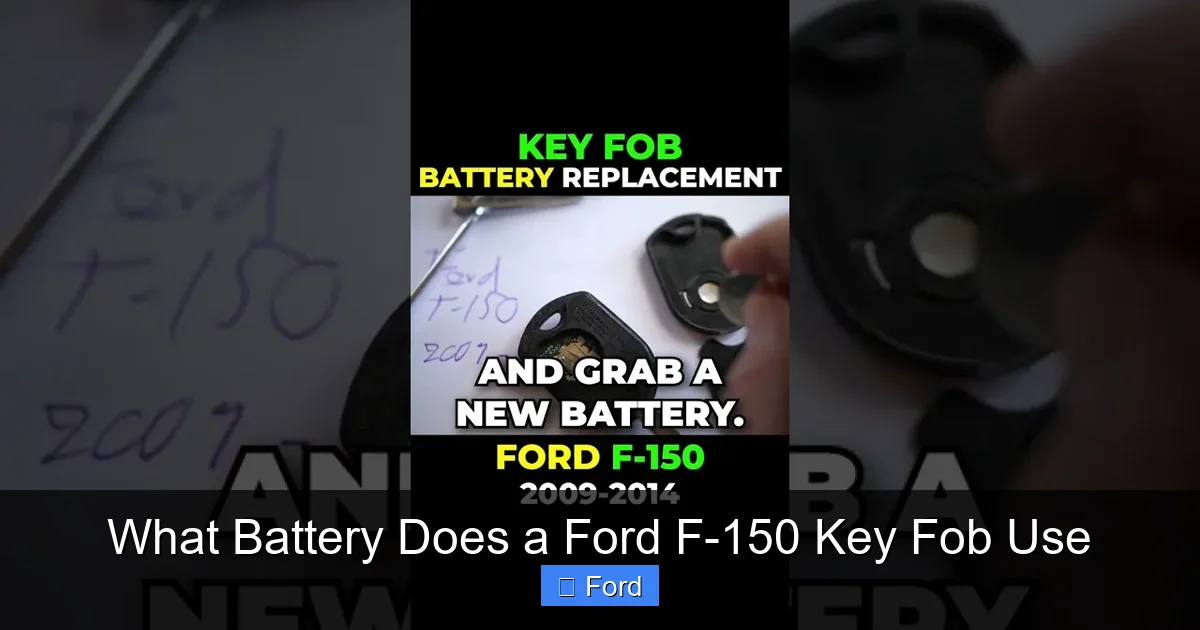
For 2015-2020 F-150s (and many 2009-2014 models): This is the classic, slightly chunkier remote with distinct buttons. The battery is accessed by removing the entire plastic back cover. Locate the small seam where the front and back halves meet. There is often a tiny screw hidden under a rubber button cover or in the key ring loop. Carefully pry up any rubber covers to check for a screw. If there’s a screw, remove it with your screwdriver. If not, it’s a snap-fit. Insert your flat-head screwdriver into the seam at the key ring end and gently twist. The back should pop off. Work your way around the seam if needed. Be patient—forcing it can crack the plastic.
For 2021+ F-150s (and some 2020+ with intelligent access): This fob is more streamlined and often has a small, circular battery cover on the back. Look for a tiny slot or opening near the key ring. Insert your screwdriver and gently pry the small circular cover off. It’s usually held by friction or a tiny clip. Underneath, you’ll see the CR2032 battery sitting in a clip. There is no need to separate the entire fob halves.
Installing the New Battery
Once the fob is open, you’ll see the old battery held in a plastic clip. Note the orientation: the battery’s positive side (+) is almost always facing up or outward (the side with the writing or the “+” symbol). This is critical. Installing it backwards will not damage the fob immediately, but it won’t work. Gently pry the old battery out from under the clip’s retaining tab. Discard it properly.
Take your new CR2032. Handle it by the edges—do not touch the flat surfaces with your bare fingers. Oils and moisture from your skin can shorten the battery’s life. Place it into the clip, ensuring the “+” symbol matches the orientation of the old one. Press it down gently until it sits flush and is secured by the clip.
Reassembly and Testing
Before snapping the fob back together, give the interior a quick look. Make sure no debris or dust is on the circuit board or button contacts. A quick blast of compressed air can help. Align the two halves of the fob (or replace the small battery cover) and press them together firmly until you hear a snap. If your fob had a screw, reinsert and tighten it—but don’t overtighten, as it can strip the plastic threads.
Now, test it immediately. Stand near your F-150 and press the lock and unlock buttons. The doors should respond with the familiar double-press chirp or silent lock. Test the range by walking away—try 30 feet, then 50 feet. If it works perfectly, you’re done! If it doesn’t, open it back up and double-check the battery orientation and that it’s seated properly. If it still fails after a correct install, the issue may lie elsewhere—see the troubleshooting section below.
Battery Life, Maintenance, and Longevity Tips
A fresh CR2032 in your F-150 key fob should last between 2 and 5 years, depending on usage and environmental factors. But you can take steps to maximize its life and avoid being stranded with a dead fob.
Visual guide about What Battery Does a Ford F-150 Key Fob Use
Image source: paulstravelpictures.com
Typical Lifespan and Factors Affecting It
The stated lifespan is based on average use. If you live in an extremely hot climate (like Arizona or Florida), the high temperatures can accelerate chemical reactions inside the lithium battery, shortening its life. Conversely, extreme cold can temporarily reduce voltage output, making the fob seem weak even with a good battery. Frequent use of the remote—locking, unlocking, opening the tailgate—will drain it faster than occasional use. Also, if your F-150 is equipped with a Passive Entry system (where you just touch the door handle to lock/unlock without pressing a button), that feature constantly uses a tiny amount of power to listen for the fob’s signal, which can reduce battery life compared to a standard remote.
Pro Tips to Extend Battery Life
- Store Your Fob in a Signal-Blocking Pouch: When not in use, especially at home or in a desk drawer, keep your key fob in a small Faraday pouch or even an old Altoids tin. This prevents it from constantly searching for and pinging your truck, which drains the battery over time. It also protects against relay theft attacks.
- Minimize Unnecessary Button Presses: Get in the habit of using the physical key (if your fob has one) to unlock the door when you’re close, rather than pressing the remote from 20 feet away. Every signal sent uses a minuscule amount of power, but it adds up.
- Avoid Extreme Temperatures: Don’t leave your key fob on the dashboard of your truck in direct summer sun or on an icy windowsill in winter. The cabin can become an oven or freezer, stressing the battery.
- Perform a DIY Test Annually: After replacing the battery, note the date on a sticker inside the fob. Once a year, do a range test. If you notice the effective range has dropped from, say, 75 feet to 30 feet, it’s a sign the battery is weakening and you should replace it proactively.
Troubleshooting: When a New Battery Doesn’t Fix It
You’ve carefully replaced the CR2032, but your key fob still doesn’t work. Don’t assume the new battery is bad (though it’s possible). Here’s a systematic approach to diagnose the issue.
Visual guide about What Battery Does a Ford F-150 Key Fob Use
Image source: fobbattery.com
Common Post-Replacement Issues
First, confirm the basics. Is the battery inserted with the correct polarity (+ up)? Is it seated firmly in the clip? Sometimes the battery isn’t fully engaged. Open it back up and press it down. Check for any debris or corrosion on the metal contacts inside the fob. If you see a white, crusty buildup, clean it gently with a pencil eraser or a cotton swab dipped in a tiny amount of isopropyl alcohol. Let it dry completely.
If the fob still doesn’t work, the new battery itself could be defective or dead on arrival. This is rare with quality brands but happens. Try the battery in another device, like a kitchen scale or a spare key fob, to test it. Alternatively, try the old battery again—if it suddenly works, you might have installed the new one incorrectly.
When to Consider Reprogramming or Replacement
If a correctly installed, known-good battery doesn’t bring the fob back to life, the problem is likely with the fob’s internal circuitry. This could be due to water damage, a failed component, or a lost pairing with your truck. For basic remotes, a simple battery replacement is almost always the fix. For intelligent access keys (the 2021+ style), they can sometimes lose their programming if the battery is completely dead for a long period. In this case, you may need to reprogram the key fob. This often requires a visit to a Ford dealer or a locksmith with the proper diagnostic tools. They can use a scan tool to re-sync the fob to your truck’s security module. If the fob is physically damaged (cracked case, broken buttons), replacement is the only option. While a dealership key fob replacement can be expensive, there are often more affordable aftermarket and refurbished options available. For more on costs, you can read about how much a new key fob costs.
Choosing the Right Battery: Brands, Where to Buy, and What to Avoid
Not all CR2032 batteries are created equal. The price difference between a $2 name-brand battery and a $0.50 generic one exists for a reason.
Trusted Brands vs. Generic
Stick with major manufacturers: Duracell, Energizer, Panasonic, Sony, or Renata. These brands have stringent quality control, consistent voltage output, and robust seals to prevent electrolyte leakage. A leaking battery is the #1 cause of key fob destruction. The corrosive lithium electrolyte can eat through the circuit board, rendering the fob permanently useless. Generic batteries, especially those from unknown online marketplaces, have a much higher failure and leakage rate. The few cents you save are not worth the $100-$300 cost of a replacement fob. Buy your batteries from reputable retailers—auto parts stores (AutoZone, Advance, O’Reilly), electronics stores (Best Buy), or the automotive aisle at Walmart or Target.
Where to Purchase (Avoiding Counterfeits)
Be cautious on e-commerce platforms. When buying online, check seller ratings meticulously. A pack of 10 genuine Duracell CR2032 batteries for $8 is plausible. A listing for $2 is almost certainly counterfeit. Counterfeit batteries often have misspelled brand names, poor print quality on the label, and feel lighter than genuine ones. For a single battery, your local auto parts store is the safest bet. They often have them behind the counter, so just ask for a “CR2032 for a Ford key fob.”
Special Considerations for Smart Key Systems
For F-150s with the “Intelligent Access” key (push-button start with passive entry), the key fob contains a more complex circuit and a secondary low-power receiver. While it still uses a CR2032, the battery may seem to drain faster if the fob is constantly near the vehicle (e.g., left on a console). The same quality advice applies. Some owners of these systems report a dashboard message like “Key Fob Battery Low” which is a clear, direct warning from the truck’s computer. Heed this warning and replace the battery promptly to avoid being locked out of a vehicle that won’t detect its key.
The Bigger Picture: Key Fob Batteries vs. Your Truck’s Main Battery
It’s easy to conflate all “car batteries” into one concept, but your F-150 has two distinct electrical power sources: the giant lead-acid starting battery under the hood, and the tiny lithium key fob battery. Understanding the difference is key to proper maintenance and troubleshooting.
Why They’re Different and Why It Matters
The main battery (often a Group 48, 65, or 78, depending on engine and year) provides the massive burst of cranking amps needed to start your V6 or V8 engine. It also powers all the truck’s lights, infotainment, and computers when the engine is off. The key fob battery is a low-power source solely for the remote’s radio transmitter. They are not connected in series or parallel. A dead main battery will not affect your key fob’s ability to lock/unlock the doors (the fob broadcasts its own signal). However, a dead main battery will prevent the truck from starting, even if the key fob is perfect and the push-button start illuminates. This is a common point of confusion. If your F-150 won’t start but the key fob works, the issue is almost certainly the main battery or starter. You can learn about what percent a car battery needs to start to better diagnose this.
Connecting to Main Battery Health
While independent, there is one indirect link. If your truck’s main battery is severely weak or failing, the vehicle’s electrical system voltage can drop. This low voltage can sometimes cause the key fob’s internal circuitry to behave erratically or fail to communicate properly, even with a fresh CR2032. So, if you’ve replaced the key fob battery and it still works intermittently, it’s worth checking the health of your main truck battery. A weak main battery can also cause a multitude of other electrical gremlins. For specific F-150 battery recommendations, you can explore guides for your model year, like the best battery for a 2018 Ford F-150 or your specific year.
Conclusion: Empowerment Through Simple Knowledge
Your Ford F-150 is a powerful, capable machine, but its simplicity is often found in the small things. Knowing that your key fob uses a standard, inexpensive CR2032 battery—and that you can replace it yourself in minutes—is a small victory that saves you time, money, and the hassle of a dealership appointment. It transforms a moment of frustration into a quick, satisfying DIY win. Remember the steps: identify your fob style, open it gently, note the battery orientation, install a quality CR2032, and test. Keep a spare battery in your glove box. If you follow the maintenance tips to extend its life, you’ll likely go years between replacements. Should a new battery not solve the problem, you now have a framework for troubleshooting—checking orientation, cleaning contacts, and understanding when the issue might be deeper. You’re not just a driver; you’re a informed owner who understands one more piece of your truck’s puzzle. Now, go ahead and give that fob a new lease on life.
Frequently Asked Questions
What type of battery does a Ford F-150 key fob use?
Almost all Ford F-150 key fobs from the 2011 model year onward use a standard CR2032 3-volt lithium coin cell battery. This is a universal size, making replacements easy to find.
How often should I replace the key fob battery in my F-150?
Under normal conditions, a CR2032 battery lasts 2-5 years. You should replace it preemptively when you notice reduced range or intermittent function, or if you get a “Key Fob Battery Low” warning on your dashboard in newer models.
What are the signs of a low key fob battery in a Ford F-150?
The primary signs are having to stand much closer to the truck for the remote to work, needing to press buttons multiple times, or the doors/tailgate not responding reliably. In 2021+ models, a specific low battery warning message will appear on the instrument cluster.
Can I use a different battery if I don’t have a CR2032?
No. You must use a CR2032. Other coin cells like CR2025 or CR2016 are the wrong thickness and will not make proper contact, causing the fob to fail. Using an incorrect battery can also damage the internal clip.
What if my key fob gets wet after I replace the battery?
If the fob is submerged, open it immediately, remove the battery, and dry all internal components thoroughly with a soft cloth and compressed air. Let it air dry completely for 24-48 hours before reinstalling a new battery. Water can short-circuit the board.
How much does it cost to replace a key fob battery at a dealership?
While the battery itself costs $1-$5, a dealership will typically charge a labor fee of $30-$60 for the replacement, as they may also need to reprogram or resync the fob. Doing it yourself takes 5 minutes and only the cost of the battery.
