Replace Remote Car Key Battery
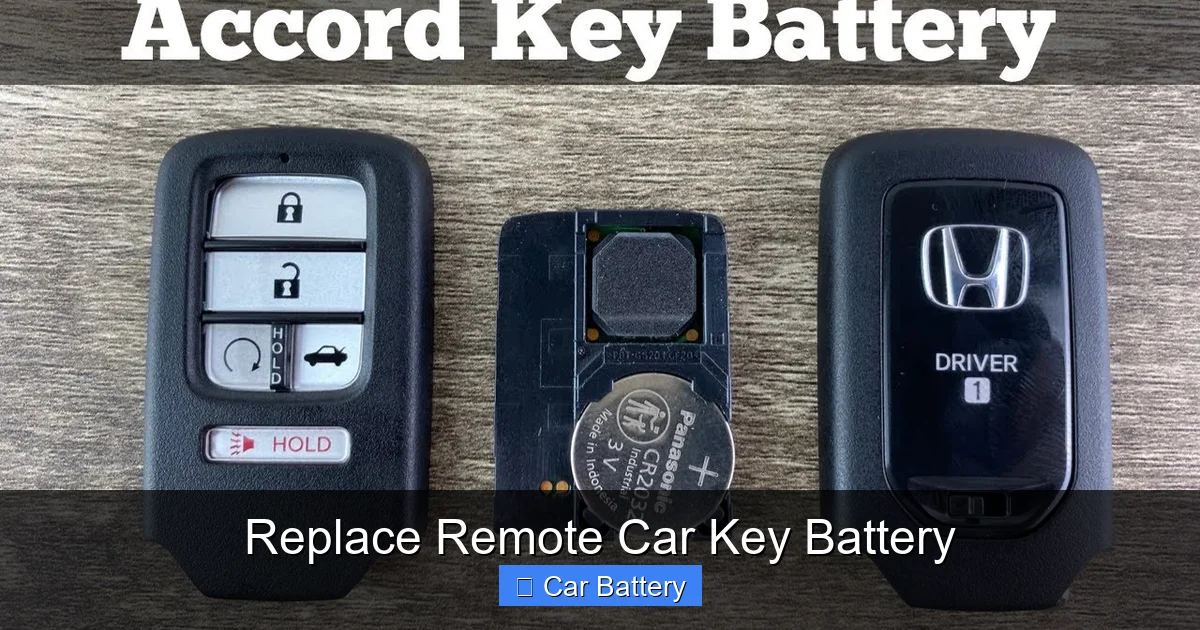
Replacing a remote car key battery is easier than you think—and saves time and money. With the right tools and a few simple steps, you can restore your key fob’s function in under 10 minutes. No dealership visit needed—just follow our expert guide.
This is a comprehensive guide about replace remote car key battery.
In This Article
- 1 Key Takeaways
- 2 Why Your Remote Car Key Battery Dies—And Why You Should Replace It Yourself
- 3 Signs It’s Time to Replace Your Remote Car Key Battery
- 4 What Type of Battery Does Your Remote Car Key Use?
- 5 Step-by-Step Guide to Replacing Your Remote Car Key Battery
- 6 Troubleshooting Common Issues After Battery Replacement
- 7 When to Reprogram Your Key Fob
- 8 Tips to Extend Your Key Fob Battery Life
- 9 Conclusion
- 10 Frequently Asked Questions
- 10.1 How often should I replace my remote car key battery?
- 10.2 Can I use a different battery if I can’t find the exact type?
- 10.3 Will replacing the battery reset my key fob’s programming?
- 10.4 What if my key fob has no visible seam or opening?
- 10.5 Can I replace the battery while the car is running?
- 10.6 Is it safe to open my key fob myself?
Key Takeaways
- Most key fobs use CR2032 batteries: This common coin cell battery powers the majority of remote car keys and is widely available at drugstores, supermarkets, and online.
- Replacement takes less than 10 minutes: With basic tools like a flathead screwdriver or a plastic pry tool, you can open the key fob and swap the battery quickly.
- Always check the battery orientation: Installing the battery upside down is a common mistake—make sure the positive (+) side faces up as indicated inside the fob.
- Keep the fob clean and dry: Dirt, moisture, or debris can interfere with the battery contacts and reduce performance—wipe the interior gently during replacement.
- Test the remote after replacement: Press all buttons to ensure the signal is strong and the car responds—if not, recheck the battery or consider reprogramming.
- Some fobs require reprogramming: A few high-end or newer models may need a quick reset after battery replacement—check your owner’s manual or manufacturer’s website.
- Avoid using metal tools aggressively: Prying too hard with a screwdriver can crack the plastic casing—use a plastic spudger or credit card for safer opening.
[FEATURED_IMAGE_PLACEHOLDER]
Why Your Remote Car Key Battery Dies—And Why You Should Replace It Yourself
We’ve all been there: you’re walking to your car, keys in hand, ready to hop in and go—only to press the unlock button and get… nothing. The remote car key battery has died. It’s frustrating, especially when you’re in a hurry or parked in a dimly lit lot. But here’s the good news: replacing a remote car key battery is one of the easiest DIY fixes you can do, and it doesn’t require a trip to the dealership or a mechanic.
Modern key fobs are packed with electronics that allow you to lock, unlock, start, and even open the trunk from a distance. All that convenience runs on a small, coin-shaped battery—usually a CR2032. Over time, that battery loses its charge, and the signal weakens. You might notice the range shrinking, buttons becoming unresponsive, or the car not reacting unless you’re right next to it. These are all signs it’s time for a battery swap. The good news? It’s cheap, fast, and totally doable at home with minimal tools.
In this guide, we’ll walk you through everything you need to know about replacing your remote car key battery—from identifying the right battery type to safely opening your key fob, installing the new battery, and testing it out. Whether you drive a Honda, Toyota, Ford, BMW, or any other make, the process is similar across most models. By the end, you’ll feel confident handling this common maintenance task yourself—and save both time and money.
Signs It’s Time to Replace Your Remote Car Key Battery
Before you start prying open your key fob, it’s important to confirm that a dead battery is actually the issue. Sometimes, the problem isn’t the battery at all—it could be a faulty button, damaged circuitry, or even interference from other electronics. But in most cases, a weak or dead battery is the culprit. Here are the most common signs that it’s time to replace your remote car key battery.
Reduced Range or Weak Signal
One of the earliest signs of a dying battery is a noticeable drop in range. If you used to be able to unlock your car from 50 feet away but now have to be right next to the door, the battery is likely running low. The remote still works, but the signal is too weak to reach the car’s receiver from a distance. This happens gradually, so you might not notice it at first—until one day, you’re standing in the rain, pressing the button over and over.
Buttons Feel Stiff or Unresponsive
A healthy key fob should respond instantly when you press a button. If the buttons feel sticky, require extra pressure, or don’t “click” properly, it could be due to low power. The internal circuitry isn’t getting enough juice to send a strong signal, so the buttons seem sluggish. In some cases, pressing multiple times finally triggers a response—another red flag.
Car Doesn’t Respond Unless Key Is Close
When the battery is nearly dead, the fob might only work when it’s within a few inches of the car. This is especially common with push-to-start vehicles that use proximity sensors. If you have to hold the key near the door handle or dashboard to start the car, the battery is likely on its last legs.
Interior Light Doesn’t Flash or Beep
Many key fobs have a small LED light that flashes when you press a button. If the light is dim, flickering, or completely off, it’s a strong indicator that the battery is low. Some models also emit a beep or chirp when a button is pressed—if that sound is gone, the battery may be the issue.
Dashboard Warning Light or Key Fob Alert
Some newer vehicles have a dashboard warning that appears when the key fob battery is low. It might say “Key Fob Battery Low” or show a key icon with a battery symbol. If you see this message, it’s time to replace the battery—don’t ignore it, or you could get locked out.
Physical Damage or Corrosion
Sometimes, the problem isn’t just the battery—it’s the condition of the key fob itself. If you drop your keys or expose them to moisture, the battery compartment can get corroded or the contacts can become dirty. This prevents proper connection, even with a fresh battery. Inspect the inside of the fob for white powder, rust, or grime—clean it gently with a cotton swab and rubbing alcohol if needed.
Once you’ve confirmed that the battery is the issue, it’s time to gather your tools and get to work. But first, let’s talk about what kind of battery you’ll need.
What Type of Battery Does Your Remote Car Key Use?
Not all key fobs use the same battery, but the vast majority rely on a few common types. The most popular by far is the CR2032—a small, round, lithium coin cell battery about the size of a nickel. It’s used in everything from car remotes to garage door openers, computer motherboards, and medical devices. But depending on your vehicle’s make and model, you might need a CR2025, CR2016, or even a smaller battery like a CR1632.
How to Identify Your Key Fob Battery
The easiest way to find out which battery your key fob uses is to check the old one. When you open the fob (we’ll cover how to do that next), the battery will usually have the type printed right on it—like “CR2032” or “DL2032.” If you can’t open it yet, check your owner’s manual. Most manufacturers list the battery type in the “Key Fob” or “Remote Control” section. You can also search online using your car’s year, make, and model—just type “[Your Car] key fob battery type” into Google.
Common Key Fob Battery Types
- CR2032: The most common type, used in Honda, Toyota, Ford, Chevrolet, Nissan, and many others. It’s 20mm in diameter and 3.2mm thick, with a 3-volt output.
- CR2025: Slightly thinner than the CR2032 (2.5mm), but the same diameter. Used in some BMW, Mercedes, and Audi models.
- CR2016: Thinner still (1.6mm), found in certain Hyundai, Kia, and older GM vehicles.
- CR1632: Smaller in diameter (16mm), used in compact key fobs or smart keys with fewer functions.
Always match the exact battery type. Don’t substitute a CR2025 for a CR2032 just because it fits—using the wrong thickness can damage the contacts or cause poor connection. And never use alkaline or rechargeable batteries unless specified—most key fobs require non-rechargeable lithium cells.
Where to Buy a Replacement Battery
You don’t need to go to a dealership or auto parts store. CR2032 batteries are sold almost everywhere:
- Drugstores like CVS, Walgreens, and Rite Aid
- Supermarkets like Walmart, Target, and Kroger
- Electronics stores like Best Buy or Micro Center
- Online retailers like Amazon, eBay, or Battery Junction
A single CR2032 costs around $1–$3, but you can often get a pack of 4 or 5 for under $10—great for keeping spares on hand.
When buying, look for reputable brands like Energizer, Duracell, Panasonic, or Sony. Avoid ultra-cheap no-name batteries—they may leak or fail prematurely. And always check the expiration date—lithium batteries have a shelf life of 5–10 years.
Step-by-Step Guide to Replacing Your Remote Car Key Battery
Now that you know what battery you need, it’s time to replace it. The process is straightforward, but it helps to go slow and be careful—especially when opening the fob. Most key fobs snap together with plastic clips, and forcing them can crack the casing. Here’s a step-by-step guide to help you do it right.
Step 1: Gather Your Tools
You don’t need much:
- A small flathead screwdriver (preferably plastic or nylon)
- A plastic pry tool or old credit card (optional, but helpful)
- The correct replacement battery (e.g., CR2032)
- A clean, well-lit workspace
Avoid using metal screwdrivers if possible—they can scratch or damage the fob. If you must use one, wrap the tip in tape to reduce the risk.
Step 2: Locate the Seam and Opening Mechanism
Most key fobs have a seam running around the edge where the two halves meet. Look for a small notch, groove, or indentation—this is where you’ll insert your tool to pry it open. Some fobs have a release button or a sliding cover for the physical key. If yours has a metal key inside, pull it out first—it often reveals the seam or makes it easier to open.
Step 3: Gently Pry Open the Fob
Insert your flathead screwdriver or plastic tool into the seam at the weakest point—usually near the key ring or where the buttons are. Apply gentle, even pressure and slowly work your way around the edge. Don’t force it. The halves should pop apart with a soft click. If it’s stuck, try warming the fob slightly with a hair dryer (low heat) to soften the plastic—but don’t overheat it.
Step 4: Remove the Old Battery
Once the fob is open, you’ll see the battery seated in a small compartment. It’s usually held in place by a metal clip or a plastic bracket. Note the orientation—most batteries have a “+” (positive) side that faces up. Use your fingernail or a non-metal tool to gently lift the battery out. Avoid touching the contacts with your fingers—oils from your skin can reduce conductivity.
Step 5: Insert the New Battery
Place the new battery into the compartment with the positive (+) side facing up—unless your fob is labeled otherwise. Make sure it sits flat and secure. If there’s a clip, press it down gently to hold the battery in place. Double-check the orientation—this is the #1 mistake people make.
Step 6: Reassemble the Fob
Line up the two halves of the fob and press them together firmly. You should hear a series of clicks as the clips snap back into place. Don’t hammer it—just apply even pressure around the edges. Once closed, test the buttons to make sure they move freely.
Step 7: Test the Remote
Stand a few feet from your car and press the lock, unlock, and trunk buttons. The car should respond immediately. If it doesn’t, try standing closer or recheck the battery orientation. Some fobs may need a few seconds to “wake up” after replacement.
Step 8: Reinsert the Physical Key (If Applicable)
If you removed a metal key earlier, slide it back into the fob. Make sure it’s fully seated and secure.
And that’s it! You’ve successfully replaced your remote car key battery. Total time: under 10 minutes.
Troubleshooting Common Issues After Battery Replacement
Even with careful installation, sometimes things don’t go perfectly. Here are a few common problems and how to fix them.
The Remote Still Doesn’t Work
If your key fob still doesn’t respond after a fresh battery, don’t panic. First, double-check the battery orientation. It’s easy to install it upside down. Next, inspect the battery contacts—are they clean and making solid contact? Use a cotton swab and a drop of rubbing alcohol to clean any dirt or corrosion. Let it dry completely before reassembling.
If that doesn’t work, the issue might be deeper. The fob’s internal circuit board could be damaged, or the buttons may be worn out. In rare cases, the car’s receiver might need a reset. Try reprogramming the fob (see next section).
The Buttons Feel Stiff or Don’t Click
This usually means the fob wasn’t reassembled properly. Open it again and check that the rubber button pad is aligned correctly with the circuit board. If it’s shifted, the buttons won’t make contact. Also, ensure no debris is stuck underneath.
The Fob Won’t Stay Closed
If the halves won’t snap together, one of the plastic clips may be broken. This can happen if you pried too hard. Unfortunately, there’s no easy fix—you may need to replace the entire fob or use a small piece of tape to hold it shut (not ideal, but functional).
The Car Doesn’t Recognize the Fob
Some vehicles require a brief reprogramming sequence after a battery change. This is more common with push-to-start or smart key systems. Check your owner’s manual for instructions—often, it involves turning the ignition on and off in a specific pattern or pressing certain buttons in sequence.
When to Reprogram Your Key Fob
Most key fobs work immediately after a battery replacement. But some—especially newer models with advanced features like remote start, proximity sensing, or encrypted signals—may need to be reprogrammed. This ensures the car’s security system recognizes the fob again.
Signs You Need to Reprogram
- The car starts but the remote buttons don’t work
- The key fob works only when held near the dashboard
- The car shows a “Key Not Detected” message
- You’ve replaced the battery and waited 5–10 minutes with no improvement
How to Reprogram (General Steps)
Reprogramming methods vary by manufacturer, but here’s a common sequence for many vehicles:
- Sit in the driver’s seat with all doors closed.
- Insert the key into the ignition (or press the start button with the fob nearby).
- Turn the ignition to “On” (but don’t start the engine).
- Press and hold the “Lock” button on the fob for 5–10 seconds.
- Turn the ignition off and remove the key.
- Test the remote.
Some cars require multiple cycles or specific button combinations. Always refer to your owner’s manual or search for “[Your Car] key fob reprogramming” online.
If reprogramming doesn’t work, the fob may be damaged or the car’s receiver may need service. In that case, a visit to the dealership or a locksmith may be necessary.
Tips to Extend Your Key Fob Battery Life
A little care goes a long way. Here are some tips to help your next battery last as long as possible—typically 3 to 5 years.
Avoid Extreme Temperatures
Heat and cold can degrade battery performance. Don’t leave your keys in a hot car or outside in freezing weather. Extreme temps can cause the battery to drain faster or even leak.
Keep It Clean and Dry
Moisture is the enemy of electronics. If your fob gets wet, dry it immediately with a soft cloth and let it air dry completely before using. Avoid exposing it to rain, snow, or humid environments.
Don’t Press Buttons Unnecessarily
Every press drains a tiny bit of power. Avoid “testing” the remote repeatedly or holding buttons down longer than needed. Also, don’t store the fob near other electronics that might interfere with the signal.
Store Spare Batteries Properly
If you buy a multi-pack, store extras in a cool, dry place—not in your car or garage. Keep them in their original packaging to prevent contact with metal objects, which can cause short-circuiting.
Replace Before It Dies Completely
Once the battery is very low, the fob may start malfunctioning or lose programming. Replace it at the first sign of weakness to avoid getting locked out.
Conclusion
Replacing a remote car key battery is a simple, cost-effective way to keep your vehicle accessible and secure. With just a few dollars and a few minutes of your time, you can restore full functionality to your key fob—no dealership visit required. By learning to identify the signs of a dying battery, choosing the right replacement, and following safe installation steps, you’ll save money and gain confidence in handling basic car maintenance.
Remember: most key fobs use a CR2032 battery, which is easy to find and install. Always check the orientation, keep the fob clean, and test it thoroughly after replacement. And if your fob still doesn’t work, don’t assume it’s broken—try reprogramming or inspect for damage.
With this guide, you’re equipped to handle battery replacements like a pro. So the next time your remote starts acting up, don’t panic—just grab a new battery and get back on the road.
Frequently Asked Questions
How often should I replace my remote car key battery?
Most key fob batteries last 3 to 5 years, depending on usage. Replace it at the first sign of weak signal or unresponsive buttons to avoid getting locked out.
Can I use a different battery if I can’t find the exact type?
No—always use the exact battery type specified for your fob. Using a different size or voltage can damage the contacts or cause poor performance.
Will replacing the battery reset my key fob’s programming?
Usually not, but some advanced fobs may need a quick reprogramming sequence after battery replacement. Check your owner’s manual for details.
What if my key fob has no visible seam or opening?
Some smart keys or flip-key designs require a hidden release button or a special tool. Consult your manual or search online for model-specific instructions.
Can I replace the battery while the car is running?
Yes, but it’s not necessary. The car doesn’t need to be on or off—just make sure the fob is away from strong electronic interference during replacement.
Is it safe to open my key fob myself?
Yes, as long as you’re gentle and use the right tools. Avoid forcing it open, and keep the interior clean to prevent damage to the circuit board.