
How to Turn on Srh in a Subaru

Contents


Turning on SRH (Steering Responsive Headlights) in your Subaru enhances nighttime visibility by adjusting headlight direction based on steering input. This guide walks you through the simple steps to activate SRH, explains how it works, and offers tips to ensure optimal performance.
Key Takeaways
- SRH stands for Steering Responsive Headlights: This feature automatically adjusts your headlights left or right as you turn the steering wheel, improving visibility on curves and corners.
- SRH is available on select Subaru models: It’s commonly found in Outback, Forester, Ascent, and Legacy trims with LED or HID headlights.
- Activation is simple and driver-controlled: You can turn SRH on or off using the vehicle’s menu system or physical buttons, depending on your model year.
- SRH only works under certain conditions: It activates at low to moderate speeds (usually under 25 mph) and when the headlights are on.
- Regular maintenance ensures SRH performance: Keep sensors clean and check for software updates to avoid malfunctions.
- SRH improves safety, not just convenience: By illuminating the road ahead more effectively, it reduces blind spots and helps prevent accidents.
- Not all Subarus have SRH: Check your owner’s manual or vehicle specs to confirm if your model includes this feature.
📑 Table of Contents
What Is SRH in a Subaru?
SRH stands for Steering Responsive Headlights, a smart lighting technology designed to improve nighttime driving safety. Unlike traditional headlights that shine straight ahead regardless of your direction, SRH systems pivot the headlights left or right in sync with your steering wheel movements. This means when you’re navigating a curve, corner, or winding road, your headlights follow your path, lighting up the road ahead more effectively.
This feature is especially helpful on rural roads, mountain passes, or poorly lit suburban streets where sharp turns can create dangerous blind spots. Instead of driving into darkness, SRH gives you a clearer view of what’s ahead, helping you spot pedestrians, animals, or road hazards sooner. Subaru has integrated SRH into many of its newer models as part of its commitment to safety and driver assistance technology.
How SRH Works
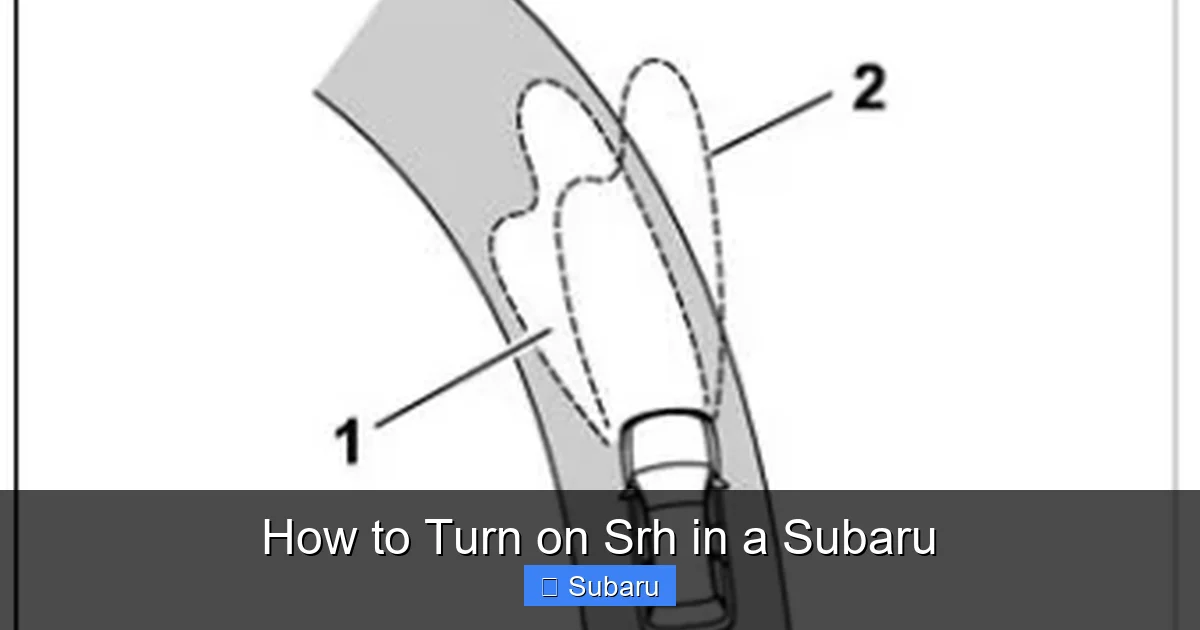
The SRH system uses a combination of sensors, steering input data, and motorized headlight assemblies to function. When you turn the steering wheel, the vehicle’s onboard computer detects the angle and speed of the turn. Based on this information, it sends a signal to small electric motors inside the headlight housing, which then pivot the beams in the direction you’re heading.
For example, if you’re making a left turn at an intersection, the left headlight will swivel slightly to the left, illuminating the side of the road and the path you’re about to take. This happens seamlessly and almost instantly, giving you better visibility without any effort on your part. The system is designed to work at lower speeds—typically under 25 mph—because that’s when most turning maneuvers occur in urban and suburban environments.
Benefits of Using SRH
The primary benefit of SRH is improved safety. By lighting up the road where you’re actually going, it reduces the risk of missing critical details in your peripheral vision. This is especially useful when driving at night, in fog, or during heavy rain when visibility is already compromised.
Another advantage is increased driver confidence. Knowing that your headlights are actively helping you see better can make nighttime driving less stressful, particularly on unfamiliar roads. Additionally, SRH can help reduce eye strain by providing consistent, well-directed illumination, which is easier on the eyes than constantly adjusting to dark patches.
Which Subaru Models Have SRH?
Not every Subaru comes equipped with Steering Responsive Headlights, so it’s important to know whether your vehicle has this feature. SRH is typically available on higher trims and newer models, especially those with advanced safety packages like Subaru’s EyeSight system.

Visual guide about How to Turn on Srh in a Subaru
Image source: images.simplepart.com
Common models that include SRH are the Subaru Outback, Forester, Ascent, and Legacy, particularly in Limited, Touring, or Premier trim levels. These models often come with LED or HID headlights, which are required for the SRH system to function properly. Older models or base trims with halogen headlights usually do not support SRH.
How to Confirm If Your Subaru Has SRH
The easiest way to check is by consulting your owner’s manual. Look for sections on “Lighting,” “Headlight Systems,” or “Driver Assistance Features.” If SRH is included, it will be clearly listed with instructions on how to use it.
You can also look for physical indicators. Vehicles with SRH often have a small icon on the dashboard or instrument cluster—usually a headlight with an arrow curving to the side—that lights up when the system is active. Additionally, if your Subaru has adaptive headlights or dynamic bending lights, there’s a good chance SRH is part of the package.
Model Year Considerations
SRH became more widely available in Subaru vehicles starting around 2015. If you own a model from 2015 or later, especially one with LED headlights, there’s a strong possibility it includes SRH. However, even among newer models, availability can vary by region and trim level. For example, a 2020 Outback Premium might not have SRH, while the 2020 Outback Touring does.
If you’re unsure, you can also visit a Subaru dealership or use the VIN (Vehicle Identification Number) lookup tool on Subaru’s official website to check your vehicle’s original equipment.
How to Turn On SRH in a Subaru
Activating SRH in your Subaru is a straightforward process, but the exact steps can vary slightly depending on your model year and infotainment system. In most cases, you’ll use either the steering wheel controls, the central display menu, or a combination of both.
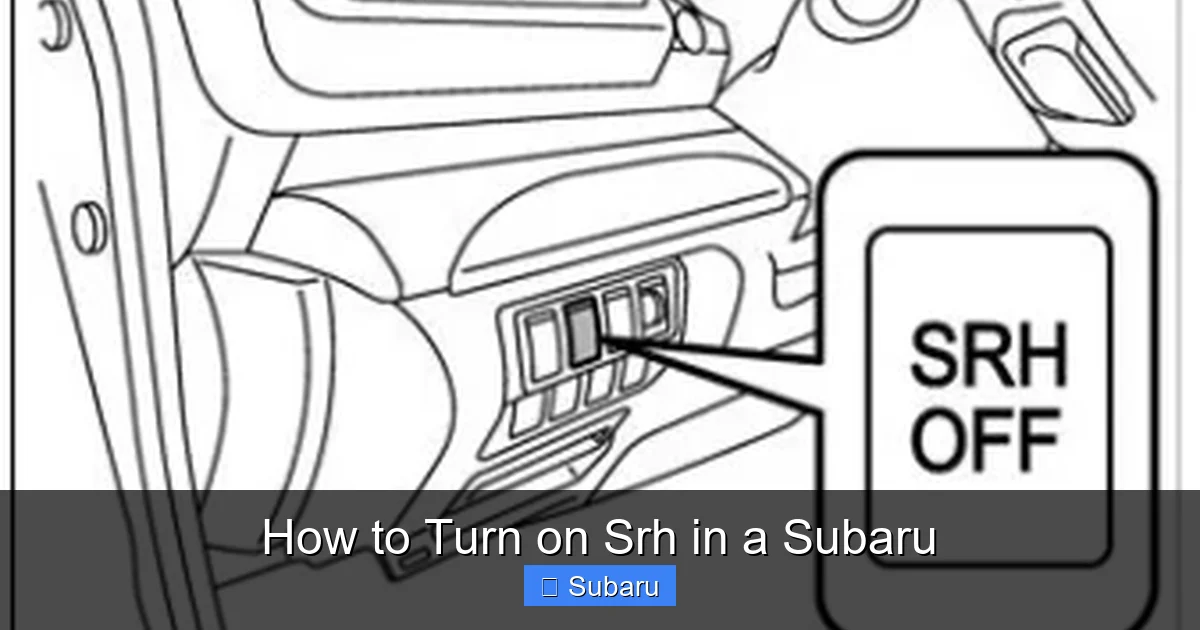
Visual guide about How to Turn on Srh in a Subaru
Image source: suforester5.com
Step-by-Step Guide for Most Models (2015–2024)
Here’s a general method that works for many Subaru vehicles with SRH:
- Turn on your headlights. SRH only functions when the headlights are on. Make sure they’re set to “Auto” or “On” using the headlight switch on the left side of the steering column.
- Access the vehicle settings menu. Press the “Menu” or “Settings” button on your steering wheel or center console. This will open the main menu on your infotainment screen.
- Navigate to “Vehicle Settings.” Use the arrow keys or touchscreen to find the “Vehicle” or “Car Settings” option.
- Select “Lighting” or “Headlight Settings.” Look for a submenu related to lighting, headlights, or driver assistance features.
- Find “Steering Responsive Headlights” or “SRH.” Toggle the switch to “On.” Some models may label it as “Adaptive Headlights” or “Bending Lights.”
- Exit the menu. The system will save your settings automatically. You should now see the SRH icon illuminate on your dashboard when you turn the steering wheel.
Alternative Methods for Older or Simpler Models
Some older Subaru models or base trims may not have a digital menu system. In these cases, SRH might be controlled via a physical button or automatically enabled when certain conditions are met.
For example, in some Forester or Outback models from the early 2010s, SRH turns on automatically when the headlights are on and the vehicle is moving below 25 mph. There may not be a manual on/off switch—just ensure your headlights are active and the system will engage as needed.
If your vehicle has a “Lighting” button on the dashboard or center console, pressing it might cycle through different lighting modes, including SRH. Check your owner’s manual for specific instructions.
Using the EyeSight Menu (For Models with EyeSight)
If your Subaru is equipped with the EyeSight driver assistance system, you may be able to control SRH through the EyeSight settings menu. Here’s how:
- Press the “Menu” button on the steering wheel.
- Navigate to “EyeSight Settings” or “Driver Assist.”
- Look for “Headlight Settings” or “Adaptive Lighting.”
- Toggle “Steering Responsive Headlights” to “On.”
This method is common in models like the 2021+ Ascent and 2022+ Outback. The integration with EyeSight allows for smoother coordination between lighting and other safety features like lane departure warning and adaptive cruise control.
When Does SRH Activate?
Understanding when SRH turns on—and when it doesn’t—is key to using it effectively. The system is designed to enhance visibility during low-speed maneuvers, so it has specific activation parameters.
Visual guide about How to Turn on Srh in a Subaru
Image source: suforester5.com
Speed Requirements
SRH typically activates only when the vehicle is moving at speeds below 25 mph (40 km/h). This is because most turning, cornering, and lane changes happen at lower speeds in urban and residential areas. Once you exceed this threshold—such as on highways or freeways—the system disengages, as the headlights are already pointed in the direction of travel.
For example, if you’re driving through a roundabout or making a U-turn in a parking lot, SRH will engage and pivot the headlights accordingly. But once you merge onto a highway and accelerate past 30 mph, the system will stop adjusting the beams.
Headlight Status
SRH only works when the headlights are on. If your lights are off or in “Parking Light” mode, the system won’t activate. This means you need to ensure your headlights are set to “Auto” or “On” during nighttime driving, fog, or low-visibility conditions.
Some drivers forget to turn on their headlights during dusk or overcast days, which can disable SRH even if it’s enabled in the settings. Make it a habit to check your headlight status, especially during seasonal changes when daylight hours shift.
Steering Input Sensitivity
The system responds to the degree and speed of steering input. Gentle turns may not trigger a significant headlight adjustment, while sharp or quick turns will cause a more pronounced pivot. This sensitivity ensures the system only activates when it’s truly needed, avoiding unnecessary movement that could distract the driver.
For instance, if you’re making a wide, gradual turn on a country road, the headlights may only swivel slightly. But if you’re navigating a tight corner or alley, the system will pivot more dramatically to illuminate the path ahead.
Troubleshooting Common SRH Issues
Even with proper setup, you might encounter issues with your Subaru’s SRH system. Most problems are minor and can be resolved with simple checks or maintenance.
SRH Not Turning On
If you’ve followed the steps to enable SRH but it’s not working, start by checking the basics:
- Are your headlights on? SRH won’t activate if the lights are off.
- Are you driving below 25 mph? The system won’t engage at higher speeds.
- Is the feature enabled in the menu? Double-check your settings.
- Is your vehicle equipped with SRH? Confirm using the owner’s manual or VIN lookup.
If all settings are correct and the system still doesn’t respond, there may be a sensor or software issue. Dirt, snow, or ice on the front sensors can interfere with signal detection. Clean the area around the headlights and front grille gently with a soft cloth.
SRH Icon Not Displaying
The SRH icon—usually a headlight with a curved arrow—should appear on your dashboard when the system is active. If it’s missing, it could mean the system isn’t engaging or there’s a display issue.
Try restarting your vehicle to reset the system. If the icon still doesn’t appear, check for software updates at your Subaru dealership. Outdated firmware can sometimes cause display glitches.
Headlights Not Pivoting
If the headlights don’t move when you turn the steering wheel, the motorized assemblies may be stuck or malfunctioning. This is rare but can happen due to wear, moisture, or electrical issues.
In such cases, it’s best to visit a certified Subaru service center. They can run diagnostics and replace any faulty components under warranty if applicable.
False Activation or Erratic Movement
Occasionally, SRH might activate unexpectedly or move erratically. This can be caused by interference from aftermarket accessories, damaged sensors, or software bugs.
Avoid installing non-OEM lighting or electronics near the headlights, as they can disrupt the system’s signals. If the problem persists, a dealer inspection is recommended.
Maintenance Tips for SRH
To keep your Subaru’s SRH system working smoothly, regular maintenance is essential. While the system is designed to be reliable, a few simple habits can extend its lifespan and performance.
Keep Sensors Clean
The front-facing sensors that detect steering input and vehicle speed can become dirty over time. Dirt, mud, snow, or road salt can block their view and reduce accuracy.
Wipe the sensors gently with a damp cloth during routine car washes. Avoid using high-pressure water directly on the headlight area, as it can force moisture into sensitive components.
Check for Software Updates
Subaru periodically releases software updates that improve system performance and fix bugs. These updates can enhance SRH responsiveness and compatibility with other safety features.
Visit your local Subaru dealership or check the Subaru Starlink app (if equipped) for available updates. Many updates can be installed remotely or during routine service visits.
Inspect Headlight Alignment
Misaligned headlights can reduce the effectiveness of SRH. If your beams are pointing too high, too low, or off to the side, the pivoting motion won’t illuminate the road properly.
Have your headlights checked and aligned annually, especially after hitting potholes or curbs. Proper alignment ensures maximum visibility and safety.
Avoid Aftermarket Modifications
Installing non-OEM headlights, bulbs, or wiring harnesses can interfere with SRH functionality. The system relies on precise calibration between the headlights, sensors, and control module.
Stick to Subaru-approved parts and accessories to maintain system integrity. If you’re upgrading your lighting, consult a professional to ensure compatibility.
Conclusion
Turning on SRH in your Subaru is a simple yet powerful way to enhance your nighttime driving experience. By automatically adjusting your headlights to match your steering input, this feature improves visibility, reduces blind spots, and increases overall safety—especially on winding roads and tight corners.
Whether you drive an Outback, Forester, Ascent, or Legacy, checking for SRH capability and enabling it through your vehicle’s menu can make a noticeable difference. Just remember to keep your headlights on, drive within the activation speed range, and maintain your system regularly for optimal performance.
With SRH activated, you’re not just driving smarter—you’re driving safer. So the next time you head out after dark, take a moment to ensure this helpful feature is working for you. Your future self (and your passengers) will thank you.
Frequently Asked Questions
What does SRH stand for in a Subaru?
SRH stands for Steering Responsive Headlights. It’s a feature that automatically adjusts the direction of your headlights based on steering wheel input, improving visibility on curves and turns.
Can I turn SRH off if I don’t want to use it?
Yes, you can turn SRH off at any time through your vehicle’s settings menu. Simply navigate to the lighting or headlight settings and toggle the feature off.
Does SRH work in reverse?
No, SRH typically only works when driving forward. The system is designed for forward-moving maneuvers like turning at intersections or navigating curves.
Will SRH drain my battery?
No, SRH uses minimal power and is integrated into your vehicle’s electrical system. It does not significantly impact battery life or performance.
Can I install SRH on a Subaru that doesn’t have it?
Generally, no. SRH requires specific hardware, including motorized headlight assemblies and sensors, which cannot be easily retrofitted. It’s best to check if your model supports it from the factory.
Why isn’t my SRH working even though it’s turned on?
Common reasons include driving above 25 mph, headlights being off, dirty sensors, or a software glitch. Check your settings, speed, and clean the front sensors to troubleshoot.







