
How to Turn on Sport Mode in a Dodge Charger

Sport Mode in the Dodge Charger enhances throttle response, steering feel, and transmission behavior for a sportier driving experience. This guide walks you through enabling Sport Mode across various model years, trims, and infotainment systems—ensuring you get the most out of your muscle car’s performance.
So you’ve got a Dodge Charger—maybe it’s a sleek SXT, a roaring R/T, or even a fire-breathing Hellcat. You love the growl of the engine, the aggressive stance, and the way it turns heads at every stoplight. But have you ever wondered how to unlock even more of that raw performance? That’s where Sport Mode comes in.
Sport Mode isn’t just a fancy name—it’s a real performance enhancer that transforms how your Charger behaves on the road. Whether you’re merging onto the highway, carving up a mountain pass, or just want to feel more connected to your car, turning on Sport Mode can make a noticeable difference. It’s like flipping a switch that wakes up your Charger’s inner athlete.
But here’s the thing: not all Chargers activate Sport Mode the same way. Depending on the year, trim, and technology package, the process can vary. Some models have a dedicated button right on the center console, while others bury the setting deep within the touchscreen menu. And if you’re new to the Charger family or just upgraded from an older model, figuring it out can feel a bit like solving a puzzle.
That’s why we’re here. This guide will walk you through every step of turning on Sport Mode in your Dodge Charger—no matter what year or trim you drive. We’ll cover everything from the basics of what Sport Mode actually does, to model-specific instructions, tips for maximizing performance, and even when (and when not) to use it. By the end, you’ll know exactly how to tap into your Charger’s full potential with confidence.
Key Takeaways
- Sport Mode improves performance: It sharpens throttle response, tightens steering, and adjusts shift patterns for a more engaging drive.
- Activation varies by model year: Older Chargers use a physical button, while newer models integrate Sport Mode into the Uconnect infotainment system.
- Available on most trims: From the SXT to the high-performance SRT Hellcat, Sport Mode is widely accessible across the Charger lineup.
- Works with automatic and manual transmissions: Whether you have an 8-speed automatic or a 6-speed manual, Sport Mode enhances driving dynamics.
- Can be customized in newer models: Some Chargers allow you to fine-tune Sport Mode settings like suspension and steering via the Performance Pages app.
- Use responsibly: Sport Mode increases fuel consumption and wear—best used on open roads or during spirited driving, not daily commuting.
- Check your owner’s manual: For model-specific instructions, always refer to your Charger’s official documentation.
📑 Table of Contents
- What Is Sport Mode and Why Should You Use It?
- How to Turn On Sport Mode in Older Dodge Chargers (2011–2014)
- Activating Sport Mode in Mid-Generation Chargers (2015–2019)
- Turning On Sport Mode in Newer Dodge Chargers (2020–Present)
- Tips for Getting the Most Out of Sport Mode
- Common Issues and Troubleshooting
- Conclusion
What Is Sport Mode and Why Should You Use It?
Before we dive into the “how,” let’s talk about the “why.” What exactly does Sport Mode do, and is it worth the hype?
In simple terms, Sport Mode is a driving mode that adjusts key vehicle systems to deliver a more responsive and dynamic driving experience. Think of it as your Charger’s “go-faster” setting. When activated, it changes how the engine, transmission, steering, and sometimes even the suspension behave.
For example, in normal mode, your Charger might prioritize smoothness and fuel efficiency—perfect for cruising around town or sitting in traffic. But flip on Sport Mode, and the throttle becomes more sensitive. That means even a light tap on the gas pedal sends a stronger signal to the engine, resulting in quicker acceleration. It’s like your car suddenly wakes up and says, “Let’s go!”
The transmission also gets smarter. In automatic models, Sport Mode typically holds gears longer before upshifting, keeping the engine in its power band for better performance. This is especially useful when you’re passing another vehicle or climbing a steep hill. Instead of the transmission upshifting too early and losing momentum, it waits until the RPMs are higher, giving you more power when you need it.
Steering feel is another big improvement. In many Chargers, Sport Mode tightens up the steering, reducing the amount of assist and making the car feel more connected to the road. This gives you better feedback and more precise control, especially during cornering or quick lane changes.
Some higher-end models, like the Charger R/T Scat Pack or SRT variants, even include adaptive suspension systems. In these cars, Sport Mode can firm up the shocks, reducing body roll and improving handling during aggressive driving. It’s a subtle but noticeable change that makes the car feel more planted and confident.
And let’s not forget the sound. While not all Chargers have active exhaust systems, many do—and Sport Mode often opens up the exhaust valves, letting out a deeper, more aggressive roar. It’s not just about performance; it’s about presence. When you hit Sport Mode, your Charger doesn’t just drive better—it sounds better too.
So why use it? Well, if you enjoy driving—really driving—then Sport Mode is a game-changer. It turns your daily commute into something more exciting, makes weekend drives more thrilling, and gives you the confidence to tackle winding roads with ease. It’s not just for track days or drag strips; it’s for anyone who wants to feel more engaged behind the wheel.
But here’s a word of caution: Sport Mode isn’t meant for every situation. Because it increases throttle sensitivity and holds gears longer, it can lead to higher fuel consumption. It’s also not ideal for stop-and-go traffic, where the constant revving can feel jerky and uncomfortable. Use it when you want performance, not when you’re just running errands.
How to Turn On Sport Mode in Older Dodge Chargers (2011–2014)
Visual guide about How to Turn on Sport Mode in a Dodge Charger
Image source: docharger.org
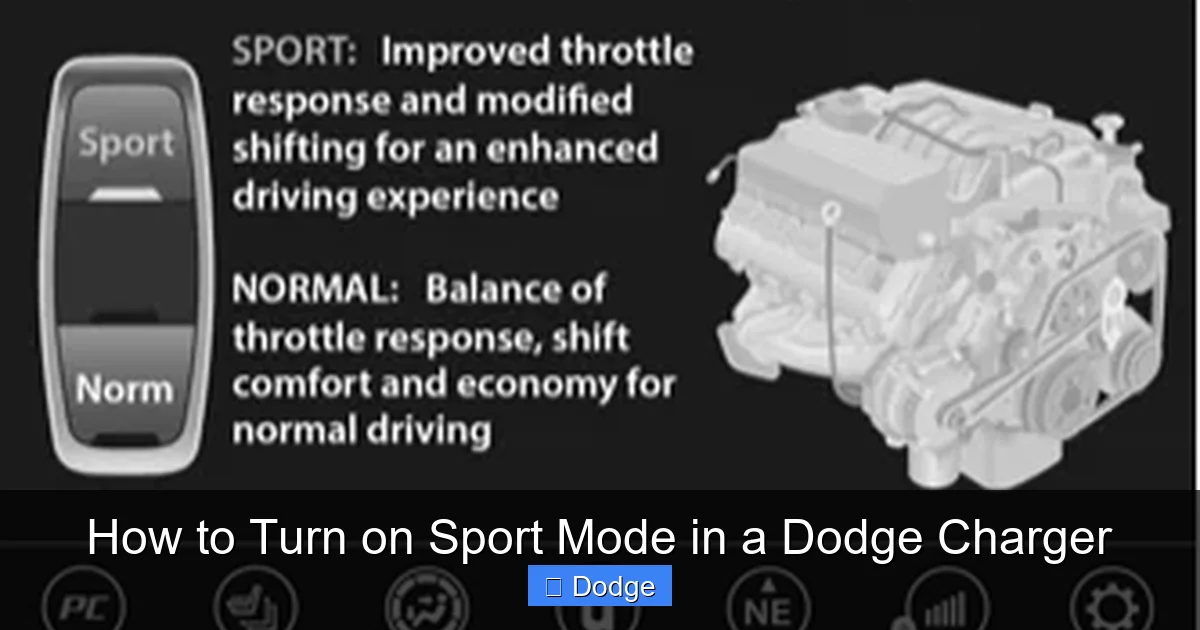
If you’re driving a Dodge Charger from the early 2010s—say, a 2011 to 2014 model—you’re in luck. These cars typically feature a straightforward, physical button to activate Sport Mode. No menus, no touchscreens, just a simple press and you’re ready to roll.
The Sport Mode button is usually located on the center console, near the gear shifter. It’s often labeled with a small icon that looks like a car with wavy lines underneath—representing speed and motion. On some models, it might simply say “SPORT” in bold letters.
To activate it, all you need to do is press the button. You’ll usually see a confirmation on the instrument cluster—either a “Sport” indicator light or a message on the digital display. Once it’s on, you’ll immediately notice the difference in how the car responds.
For example, let’s say you’re driving a 2013 Charger R/T with the 5.7L HEMI V8. In normal mode, the throttle is smooth and predictable, perfect for daily driving. But the moment you press the Sport button, the engine comes alive. The throttle becomes more responsive, the transmission shifts later, and the steering feels tighter. It’s like your Charger just got a shot of adrenaline.
One thing to note: in these older models, Sport Mode typically only affects the throttle and transmission. Steering and suspension adjustments are less common unless you have an optional performance package. But even with just those two changes, the driving experience is noticeably more engaging.
Also, keep in mind that Sport Mode in these Chargers is usually “sticky”—meaning it stays on until you turn it off or restart the car. So if you forget you had it activated, you might be surprised by the sudden surge of power the next time you hit the gas.
If you can’t find the Sport button, don’t panic. Some base models, especially the SXT trim, may not include Sport Mode at all. It was often reserved for higher trims like the R/T or SRT. Check your owner’s manual or look for the button near the shifter. If it’s not there, your model likely doesn’t have it.
Activating Sport Mode in Mid-Generation Chargers (2015–2019)
Visual guide about How to Turn on Sport Mode in a Dodge Charger
Image source: docharger.org
As Dodge updated the Charger’s design and technology in 2015, the way you activate Sport Mode evolved too. These mid-generation models introduced more advanced infotainment systems and driver customization options, which meant Sport Mode was no longer just a button—it became part of a broader performance ecosystem.
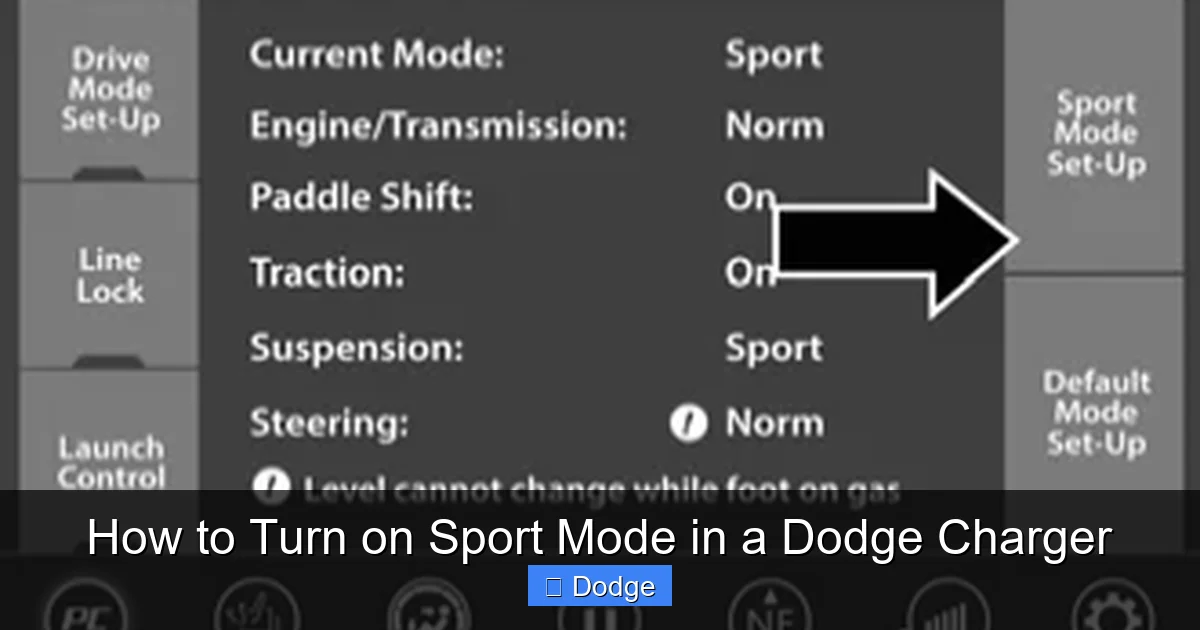
In most 2015–2019 Chargers, you’ll still find a physical Sport Mode button, but its location and functionality can vary slightly depending on the trim and options. On many models, it’s still on the center console, often near the gear shifter or climate controls. However, some higher-end trims integrate Sport Mode into the Uconnect touchscreen system.
For example, in a 2017 Charger R/T Scat Pack, you might press the physical “SPORT” button on the console. But in a 2019 Charger SRT Hellcat, you could also access Sport Mode through the Performance Pages app on the 8.4-inch Uconnect screen.
Let’s walk through both methods.
First, the physical button. Look for a button labeled “SPORT” or with a sporty icon. Press it once, and you should see a confirmation on the instrument cluster—usually a “Sport” light or message. The car will immediately respond with sharper throttle input, delayed upshifts, and tighter steering (if equipped with electronic power steering).
Now, for the touchscreen method:
1. Turn on your Charger and wait for the Uconnect system to boot up.
2. Tap the “Apps” or “Performance Pages” icon on the home screen.
3. Select “Drive Modes” or “Sport Mode.”
4. Toggle Sport Mode to “On.”
You’ll see a visual confirmation on the screen, and the car will adjust accordingly.
One cool feature in these models is that Sport Mode can sometimes be customized. For instance, in the Scat Pack and SRT trims, you might be able to choose between “Sport” and “Sport+” modes. Sport+ typically increases throttle response even further and may firm up the suspension (if you have adaptive damping).
Also, some Chargers from this era allow you to save your preferred driving mode. So if you always drive in Sport Mode, you can set it as the default—no need to reactivate it every time you start the car.
Pro tip: If you’re using the touchscreen method and can’t find the option, make sure your Uconnect system is updated. Dodge released several software updates during this period that added or improved performance features.
Turning On Sport Mode in Newer Dodge Chargers (2020–Present)
Visual guide about How to Turn on Sport Mode in a Dodge Charger
Image source: i.ytimg.com
The latest generation of Dodge Chargers—starting in 2020—brings even more sophistication to Sport Mode. With updated Uconnect 5 infotainment systems, wireless Apple CarPlay, and advanced driver aids, these cars offer a seamless and customizable way to activate performance modes.
In most 2020 and newer Chargers, Sport Mode is fully integrated into the digital experience. That means no physical button (on most trims)—everything is controlled through the touchscreen.
Here’s how to turn it on:
1. Start your Charger and let the Uconnect 5 system load.
2. From the home screen, tap the “Vehicle” or “Performance” icon.
3. Select “Drive Modes.”
4. Choose “Sport” from the available options.
You’ll see an animation on the screen, and the instrument cluster will display a “Sport” indicator. The car will immediately respond with enhanced throttle sensitivity, revised shift logic, and improved steering feedback.
But here’s where newer Chargers really shine: customization. Many models allow you to fine-tune Sport Mode using the Performance Pages app. You can adjust settings like:
– Throttle response (mild, moderate, aggressive)
– Steering feel (comfort, sport, track)
– Transmission behavior (auto, manual shift mode)
– Suspension damping (if equipped with adaptive suspension)
For example, in a 2023 Charger R/T, you might set Sport Mode to “Aggressive” throttle and “Sport” steering, but keep the suspension in “Comfort” for daily driving. It’s all about tailoring the experience to your preferences.
Another feature in newer models is the ability to save multiple drive mode profiles. So you could have one profile for spirited driving (Sport Mode with firm suspension) and another for highway cruising (Normal Mode with soft suspension). Switch between them with just a few taps.
One thing to note: on some base models like the 2022 Charger SXT, Sport Mode may not be available at all. It’s typically included on R/T, Scat Pack, and SRT trims. Always check your window sticker or owner’s manual to confirm.
Also, if you have a manual transmission Charger (yes, they still exist in some markets), Sport Mode may not be available. These systems are primarily designed for automatic transmissions, though the throttle mapping can still be adjusted manually via the drive mode settings.
Tips for Getting the Most Out of Sport Mode
Now that you know how to turn on Sport Mode, let’s talk about how to use it like a pro. Because while it’s easy to activate, using it effectively—and safely—takes a bit of know-how.
First, use Sport Mode when it makes sense. It’s perfect for open roads, highway merges, or winding backroads where you can enjoy the extra performance. But avoid using it in heavy traffic, icy conditions, or when fuel economy is a priority. The increased throttle sensitivity can make stop-and-go driving jerky, and the higher RPMs will burn more gas.
Second, pair Sport Mode with manual shift mode (if your Charger has paddle shifters). This gives you full control over gear changes, letting you hold lower gears for better acceleration or engine braking. It’s a great way to feel like you’re driving a true sports car.
Third, pay attention to your tires. Sport Mode increases stress on your tires, especially during hard cornering or rapid acceleration. Make sure your tires are properly inflated and in good condition. If you’re planning a spirited drive, consider upgrading to performance tires for better grip and handling.
Fourth, don’t forget about maintenance. Sport Mode puts extra strain on your engine, transmission, and brakes. Regular oil changes, transmission fluid checks, and brake inspections are even more important when you’re driving aggressively.
Finally, have fun—but drive responsibly. Sport Mode is designed to enhance your driving experience, not encourage reckless behavior. Always obey speed limits, stay aware of your surroundings, and respect other drivers on the road.
Common Issues and Troubleshooting
Even with all these features, sometimes Sport Mode doesn’t work as expected. Here are a few common issues and how to fix them.
Sport Mode won’t activate: If pressing the button or selecting it on the screen does nothing, check your owner’s manual to confirm your trim includes Sport Mode. Also, make sure the car is in “Drive” or “Sport” gear—some systems won’t allow activation in Park or Neutral.
No confirmation light or message: If you don’t see a “Sport” indicator, try restarting the car. Sometimes the system needs a reset. Also, check the instrument cluster settings—some models allow you to customize what’s displayed.
Sport Mode turns off automatically: This can happen if the car detects a fault or if you shift into a different drive mode. Make sure no warning lights are on, and avoid switching modes frequently.
Performance doesn’t feel different: If Sport Mode doesn’t seem to change anything, your car might not have the performance packages that enhance throttle or steering. Or, you might be driving in conditions where the differences are subtle—try it on an open road for a better feel.
When in doubt, consult your dealer or a certified Dodge technician. They can run diagnostics and ensure everything is working properly.
Conclusion
Turning on Sport Mode in your Dodge Charger is one of the easiest ways to unlock its full potential. Whether you drive a classic 2012 R/T or a brand-new 2023 Scat Pack, this feature transforms your ride from a comfortable cruiser into a thrilling performance machine.
From physical buttons to touchscreen menus, the process is simple—but the impact is huge. Sharper throttle response, smarter shifting, tighter steering, and a more aggressive exhaust note all come together to create a driving experience that’s hard to match.
Just remember: Sport Mode is a tool, not a toy. Use it wisely, maintain your Charger well, and always prioritize safety. When used correctly, it’s the perfect way to celebrate everything that makes the Dodge Charger an American icon.
So go ahead—find that button, tap that screen, and feel the difference. Your Charger is ready to play.
Frequently Asked Questions
Can I turn on Sport Mode while driving?
Yes, you can activate Sport Mode while the car is in motion. Most Chargers allow you to switch modes at any time, though it’s best to do so when the vehicle is at a safe speed and not in heavy traffic.
Does Sport Mode work on all Dodge Charger trims?
No, Sport Mode is typically available on R/T, Scat Pack, and SRT trims. Base models like the SXT may not include it, depending on the model year and options.
Will Sport Mode damage my engine or transmission?
No, Sport Mode is designed to be used regularly and won’t damage your Charger if used responsibly. However, it can increase wear over time, so regular maintenance is important.
Can I leave Sport Mode on all the time?
You can, but it’s not recommended for daily commuting. Sport Mode reduces fuel efficiency and can make driving feel harsher in traffic. Use it when you want performance, not for routine trips.
Why doesn’t my Charger have a Sport Mode button?
Some models, especially base trims or older SXT versions, don’t include Sport Mode. Check your owner’s manual or look for the feature in the Uconnect menu.
Does Sport Mode affect fuel economy?
Yes, Sport Mode typically reduces fuel economy due to increased throttle sensitivity and higher engine RPMs. Expect a noticeable drop in MPG during spirited driving.