
How to Turn Off the Maintenance Light on a 2015 Toyota Rav4

Contents
- 1 Key Takeaways
- 2 📑 Table of Contents
- 3 Understanding the Maintenance Required Light on Your 2015 Toyota RAV4
- 4 Essential Preparation Before You Begin
- 5 Method 1: The Classic Odometer/Trip Meter Reset
- 6 Method 2: Using the Multi-Information Display (MID) Menu
- 7 After the Reset: Verification and Next Steps
- 8 Common Mistakes and Troubleshooting
- 9 Frequently Asked Questions


The maintenance light on your 2015 Toyota RAV4 is not a cause for panic—it’s a friendly reminder that it’s time for routine service, like an oil change. You can reset this light yourself in under a minute using the odometer button or the vehicle’s multi-information display, but only after the required maintenance has been performed. This simple process clears the “MAINTENANCE REQUIRED” message and resets your service interval counter. Remember, resetting the light without doing the actual service is not recommended and can lead to long-term engine wear.
Key Takeaways
- The light is a service reminder, not a故障 indicator: It illuminates based on mileage/time to remind you of scheduled maintenance like oil changes, tire rotations, or inspections.
- Two primary reset methods: You can use the traditional odometer/trip meter button method or the newer multi-information display (MID) menu system, depending on your RAV4’s trim level.
- Always complete maintenance first: The reset should only be performed after a qualified technician has completed the required service tasks. Resetting without service is unsafe and dishonest.
- The process is quick and tool-free: No special tools or diagnostic computers are needed; it’s a simple sequence of button presses within the vehicle’s settings.
- It differs from the check engine light: The maintenance required light (usually a wrench icon) is separate from the check engine light (usually an engine icon), which indicates a potential problem requiring diagnosis.
- If the light returns quickly, investigate: A light that reappears soon after a reset or before the next service interval could signal an issue with the sensor or an unresolved maintenance problem.
- Consult your owner’s manual: Your specific 2015 RAV4’s manual provides the definitive procedure and service intervals for your vehicle’s configuration.
📑 Table of Contents
Understanding the Maintenance Required Light on Your 2015 Toyota RAV4
That little wrench icon glowing on your dashboard isn’t trying to ruin your day. In your trusty 2015 Toyota RAV4, it’s actually a helpful little assistant. This “MAINTENANCE REQUIRED” light is part of Toyota’s sophisticated maintenance reminder system. It’s not a warning about an immediate danger like low oil pressure; instead, it’s a pre-programmed alert based on your driving habits, mileage, and time since your last service. Think of it as your car’s way of saying, “Hey, I’ve been working hard! It’s probably time for my check-up.” The system calculates when oil changes, tire rotations, and other scheduled maintenance are due, taking into account both miles driven and the engine’s operating conditions. When the system determines the service interval has been reached, it illuminates that wrench symbol to get your attention. Ignoring it isn’t advisable, but the good news is that once the work is done by a professional, you can easily turn off the maintenance light on your 2015 Toyota RAV4 yourself, restoring that clean, clear dashboard.
What Triggers the Light?
The primary trigger for the maintenance light is the engine oil change interval. The RAV4’s onboard computer monitors engine revolutions, temperature, and driving time to estimate oil degradation. Once it calculates that the oil has likely reached the end of its effective life, the light comes on, typically every 5,000 to 7,500 miles for normal driving conditions. However, the system also tracks other maintenance items. After an oil change, the technician should reset the entire maintenance system, which clears the wrench light and starts the countdown for the next set of services, including things like tire rotation, cabin air filter replacement, and multi-point inspections. If you change your own oil, you are responsible for performing this crucial reset step.
Essential Preparation Before You Begin
Before you dive into the button-pressing sequence, there’s one non-negotiable rule: only reset the maintenance light after the required service has been completed. This is the most critical point. The light is a tool for responsible vehicle ownership, not an annoyance to be silenced. Resetting it without changing the oil or performing the necessary inspections means your car’s computer will stop reminding you, potentially leading to severe engine damage from neglected oil changes or missed safety checks. If you’re a DIY enthusiast who changes your own oil and filter, ensure you’ve used the correct oil grade (typically 0W-20 for the 2015 RAV4) and filter, and that you’ve checked other fluid levels and tire pressures. If you take your RAV4 to a shop, verify on the repair order that they performed the service and reset the light. A reputable shop will always do this, but it’s good to confirm.
Visual guide about How to Turn Off the Maintenance Light on a 2015 Toyota Rav4
Image source: i.ytimg.com
Gather Your Thoughts, Not Tools
The beauty of this process is that you need absolutely no tools—not even a socket wrench. All you need is your key fob and a clear understanding of your vehicle’s instrument cluster. The entire procedure happens using the buttons on your steering column or dashboard. It’s a good idea to do this with the car parked safely, engine off, and parking brake set. Have your owner’s manual handy for reference, as the exact button labels might vary slightly between the base model and the Limited trim. For the 2015 RAV4, you will primarily be interacting with the “ODO/TRIP” button and the “MENU” or “SETTING” button on the steering wheel stalk or the dashboard near the speedometer. Familiarize yourself with these controls before you start the sequence.
Method 1: The Classic Odometer/Trip Meter Reset
This is the tried-and-true method that works on almost every Toyota vehicle, including your 2015 RAV4. It’s a bit of a “secret handshake” with your car’s computer. This method uses the odometer display to access a hidden service menu. It’s reliable and doesn’t require navigating through digital menus. Here is the precise, step-by-step sequence to turn off the maintenance light on a 2015 Toyota RAV4 using the odometer button.
Step-by-Step Odometer Button Procedure
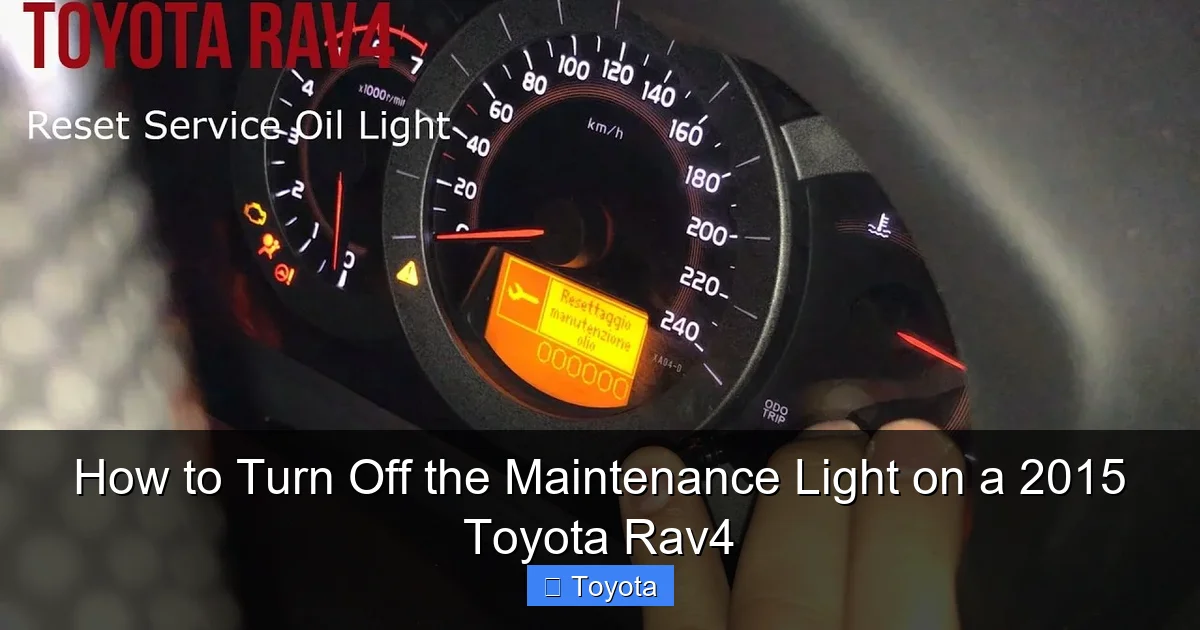
First, ensure your RAV4 is turned off. Insert the key and turn it to the “ON” position (the position right before starting the engine, where all dashboard lights illuminate). Do not start the engine. Now, locate the small button, often labeled “ODO/TRIP” or just a single reset button, on your instrument cluster. It’s typically on the dashboard near the speedometer or on the steering wheel stalk. Press and release this button to cycle the odometer display between “ODO” (total mileage) and “TRIP A” or “TRIP B” (trip meters). You want the display to show the total odometer reading (the large number). If it’s on a trip meter, press the button once to get to the main odometer.
Now, the critical part: turn the ignition key to the “OFF” position. Wait about one second. Then, turn the key back to the “ON” position (again, do not start). Immediately after turning the key on, press and hold the “ODO/TRIP” button. Hold it down for about 5-10 seconds. You should see the odometer display change. It might show a series of dashes “—–” or a message like “MAINT RE” or “SERVICE.” Keep holding the button. After a few more seconds, the wrench icon on your dashboard should start blinking, and the display may show “DONE” or simply revert to your normal odometer reading. When you see “DONE” or the light goes out, release the button. Turn the ignition off and then back on to verify that the maintenance required light is no longer illuminated. If it is still on, repeat the process, ensuring you hold the button long enough to see the confirmation.
Method 2: Using the Multi-Information Display (MID) Menu
If your 2015 RAV4 is equipped with a more advanced multi-information display (the small screen between the speedometer and tachometer that shows trip data, fuel economy, etc.), you can reset the light through its menu system. This method is often more intuitive once you know the path through the menus. It’s particularly common on higher trims like the XLE or Limited. The process involves navigating a digital menu to find the maintenance reset option. This is the method you’d find in guides for newer models, such as the 2021 Toyota RAV4, though the 2015’s menu structure is slightly simpler.
Navigating the Digital Menu
Start with the ignition in the “ON” position, engine off. Use the buttons on your steering wheel to control the MID. You’re looking for a button with a “MENU” or “SETTING” label, often a square or gear icon. Press this button to enter the menu system. Use the arrow buttons (usually the same buttons you use to scroll through trip meters) to navigate. The goal is to find a section labeled “SETTINGS,” “VEHICLE SETTINGS,” or “MAINTENANCE.” Within that submenu, you should find an option like “MAINTENANCE RESET” or “SERVICE RESET.” Select that option. The system will then ask you to confirm. It might display “RESET?” or “YES/NO.” Use the arrow buttons to select “YES” or “RESET” and press the “ENTER” or “SET” button. The display should then show a confirmation message like “MAINTENANCE RESET COMPLETE” or “DONE.” The wrench light on your dash should extinguish immediately. Exit the menu by pressing the “MENU” button again or waiting for the display to time out. This method is often preferred as it’s more deliberate and less prone to accidental resets than the odometer trick.
After the Reset: Verification and Next Steps
Once you’ve completed either reset procedure, don’t just walk away. Verification is key. Turn the ignition fully off. Wait about 10 seconds. Then, turn the key back to the “ON” position. The dashboard should perform its startup bulb check, where all lights briefly illuminate, and then go out. The maintenance required wrench icon should not remain lit after the startup sequence. If it does, the reset was not successful. Re-attempt the procedure carefully, paying close attention to the timing of the button presses. A successful reset means your car’s internal service counter has been zeroed out, and it will begin counting down from your next scheduled service interval (e.g., 5,000 miles). Make a mental note or mark your calendar with your new service mileage target. If you had the service done at a shop, a quick call to confirm they performed the reset can save you a trip back.
Recording Your New Service Interval
It’s a smart habit to record your new service mileage in your owner’s manual, a maintenance logbook, or a notes app on your phone. This creates a personal record that complements the car’s computer. Note the date, current odometer reading, and what service was performed (e.g., “Oil & filter change, tire rotation”). This log is invaluable for long-term maintenance planning and can be a selling point if you ever decide to part with your RAV4, as it demonstrates meticulous care. The car’s computer will now track your driving and alert you again when the next service is due, but having your own log ensures you have a permanent history independent of the vehicle’s memory.
Common Mistakes and Troubleshooting
Even with clear instructions, things can go wrong. The most common issue is an incorrect button sequence or not holding the button long enough. The odometer method requires precise timing: you must turn the key off and back on before pressing and holding the button. If you press the button too early or too late, the computer won’t enter reset mode. For the MID method, users sometimes get lost in the menu layers. Take your time navigating. If you can’t find “MAINTENANCE RESET,” explore other submenus like “INFO” or “CUSTOMIZE.” Another frequent mistake is confusing the maintenance light with the check engine light. The check engine light (a silhouette of an engine) requires a different diagnostic process and cannot be reset by this procedure—it will only go off when the underlying problem is fixed. If your check engine light is on, you need an OBD-II scanner or a mechanic’s diagnosis.
When the Light Won’t Stay Off
If you successfully reset the light but it comes back on within a few hundred miles or even days, this is a red flag. First, double-check that the actual service was performed correctly. Was the right oil used? Was the oil filter changed? Was the oil level filled properly? An improperly done oil change can trigger the sensor prematurely. Second, there could be a fault in the maintenance reminder system itself, such as a problem with the instrument cluster or the body control module. In this case, a visit to a Toyota dealer or a trusted independent mechanic with proper diagnostic tools is necessary. They can check for any stored fault codes related to the maintenance system. For specific issues with other Toyota models, resources like the guide for the Toyota Highlander might discuss similar system behaviors, as the underlying technology is often shared across the lineup.
Frequently Asked Questions
Is the maintenance light on my 2015 Toyota RAV4 the same as the check engine light?
No, they are completely different. The maintenance required light is a wrench icon and signals scheduled service is due. The check engine light is an engine-shaped icon and indicates a potential problem with the engine or emissions system that needs diagnosis.
Can I just ignore the maintenance light if my car seems to be running fine?
You should never ignore it. While your RAV4 may seem fine, the light is based on oil degradation calculations. Driving past the recommended oil change interval can cause excessive engine wear, sludge buildup, and eventually lead to costly engine failure.
How many miles can I drive after the maintenance light comes on before it’s critical?
The system provides a buffer. Typically, the light will illuminate about 1,000 miles before your oil change is critically overdue, but this varies based on your driving conditions (severe vs. normal). It’s best to schedule service within the next week or two.
What happens if I reset the light without getting an oil change?
Resetting without service defeats the purpose of the system. Your car will stop reminding you, and you’ll lose track of when your oil was last changed, increasing the risk of running old, degraded oil that can damage your engine.
My 2015 RAV4 has a different button layout. Where can I find the exact instructions?
Your owner’s manual is the ultimate authority. It has the exact procedure and diagrams for your specific trim level. You can also find model-specific guides online, such as the one for the 2020 Toyota RAV4, which may have a similar process.
Will disconnecting the battery turn off the maintenance light?
No, disconnecting the battery will not reset the maintenance required light. This light is stored in a non-volatile memory that retains its data even when power is lost. You must follow the specific reset procedure outlined in this guide.







